Black Friday 2026
Synthesia has not announced a 2026 Black Friday offer yet. We list it as soon as we can confirm it on Synthesia's own site.
The short answer
| Plan | Price | List price | Video minutes | Credits | Seats |
|---|---|---|---|---|---|
| Basic | Free | Free | 10 minutes a month | 1,200 a month | 1 editor |
| Starter | $14/mo billed yearly | $19/mo | 120 minutes a year | 14,500 a year | 1 editor, 3 guests |
| Creator | $59/mo billed yearly | $89/mo | 360 minutes a year | 44,000 a year | 1 editor, 5 guests |
| Enterprise | Custom | Custom | Unlimited | Custom | Custom |
The $14 and $59 figures are promotional, and they are less stable than a promotion normally is. Synthesia’s page carried a banner reading “NEW LOWER PRICES, plans now starting from $14/month, save 34%”, against list prices of $19 and $89.
Synthesia A/B tests its prices, so there is no single number
We loaded the pricing page four times from the same connection within a few minutes on 1 September 2026 and were served two different rate cards. One load advertised “Save 25%” with a Starter figure, the other three advertised “Save 35%” with a Starter figure a third lower, and the Creator tier moved with it. Same address, same browser, same language header.
That matters more than it sounds. It means any single Synthesia price you read anywhere, including on this page, is one variant observed at one moment, not a rate card you can hold the company to. Take a screenshot of the price you were shown before you buy, because the next person to load that page may not see it and neither may you.
The page also disagrees with itself
Synthesia’s own FAQ, further down the same pricing page and written in dollars regardless of which currency the cards are showing, states: “For Starter plan users, Synthesia costs $29 per month or $264 if you go with an annual plan” and “For Creator plan users, Synthesia costs $89/month or $804/year if you pay annually.”
Those are not the card figures. $264 a year works out at $22 a month, not the $14 the promotional card advertises, and $804 works out at $67 rather than $59. The most likely explanation is that the FAQ carries the undiscounted annual pricing and is not updated when a promotion runs, but we cannot verify that and Synthesia does not say so. Ask which of the two numbers your quote is based on before you commit to an annual plan.
The number that should change your decision
Basic gives you 10 minutes of video a month. Starter gives you 120 minutes a year.
Those are the same thing. Ten a month is a hundred and twenty a year. Synthesia presents one as a monthly allowance and the other as an annual one, which makes the comparison harder to do in your head at exactly the moment you are being asked to upgrade.
So Starter does not buy you more video. It buys you the ability to do things with the video you were already allowed to make. Specifically:
- Downloading your videos. The free plan does not let you.
- Removing the Synthesia logo.
- AI Dubbing and the AI Video Assistant.
- 125+ stock avatars and custom on-brand avatars.
- 3 guest seats alongside your editor seat.
That is a reasonable set of things to charge $14 a month for. It is not what most people think they are buying, because the natural assumption when a plan costs money is that it lifts the usage cap, and this one does not.
If your constraint is minutes, Starter is not your upgrade. Creator is. Creator triples the allowance to 360 minutes a year and adds 5 personal avatars, API access, branded video pages, multiple avatars per scene and interactive video.
What the credits actually meter
Synthesia sizes plans in two units at once, minutes and credits, and they do not run out together.
| Plan | Credits | Video assets included |
|---|---|---|
| Basic | 1,200 a month | 25 AI-generated video assets |
| Starter | 14,500 a year | 300 AI-generated video assets |
| Creator | 44,000 a year | 900 AI-generated video assets |
| Enterprise | Custom | Custom |
Credits are consumed by generation, including the AI-generated assets that sit inside a video rather than the finished video itself. This is the meter most likely to catch you out, because a team iterating heavily on one three-minute video can burn through credits without ever approaching its minute ceiling. Before committing to an annual plan, work out which of the two limits you will hit first. For most training teams making a few polished videos it is credits. For teams pushing volume it is minutes.
The other thing worth noting about annual sizing: Starter and Creator meter minutes per year, not per month. You can spend the lot in January. That is genuinely more flexible than a monthly cap, and it is the right way round for the seasonal bursts most training and enablement teams actually work in.
Where Enterprise starts to matter
Our Synthesia review covers the output quality these plans buy. On price, Enterprise is the only plan with unlimited video minutes, and it adds the things a company rolling this out across departments will need: SAML and SSO, live team collaboration, Brand Kits, SCORM export, one-click translation into 80+ languages, unlimited personal avatars, a dedicated CSM and implementation services.
SCORM export is the line item to check first if you are in learning and development, because it is what lets a Synthesia video be tracked inside an LMS. Synthesia lists it on the Enterprise plan card, under the heading “what you get in Creator +”, which reads as an Enterprise addition rather than a Creator feature. The plan comparison matrix further down the page did not render its per-plan values in a form we could read reliably, so confirm this one in writing before you buy on the strength of it. If completion tracking matters to you, the safe assumption is that it routes you to a quote.
A note on the price you will actually see
Synthesia prices in local currency, and the figures above are the US ones.
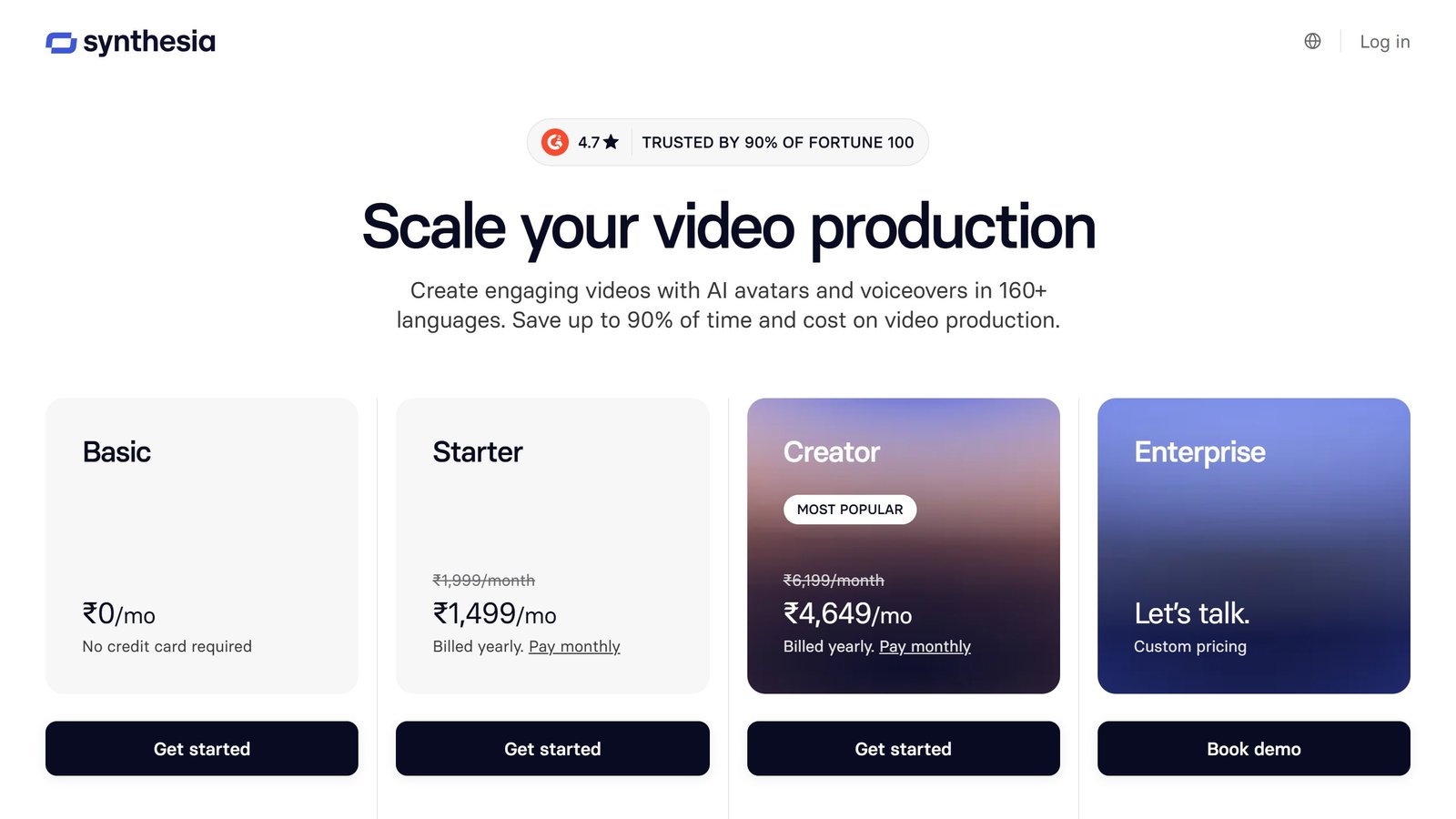
Loading the same pricing page from India on 1 September 2026 returned a completely different card: Starter at ₹1,499 a month against a ₹1,999 list, Creator at ₹4,649 against ₹6,199, and the banner reading “plans now starting from ₹1,499/month, save 25%”. Note that even the advertised discount differs, 25% there against 34% in the US.
We do not convert currencies, because a converted figure is not a price anyone is charged and the exchange rate is not ours to pick. Both sets of figures above are published exactly as Synthesia published them. What you should take from it is simpler: check the price on your own connection before you budget, because the number you were quoted in a comparison article was quoted from somebody else’s country.
AI video tools for training content, and a pricing warning
AI video generation has become the default way to produce training content at volume, and its pricing has a trap in it that almost no comparison article mentions. Here is each alternative to synthesia pricing, read 4 September 2026.
Synthesia serves different currencies to different countries
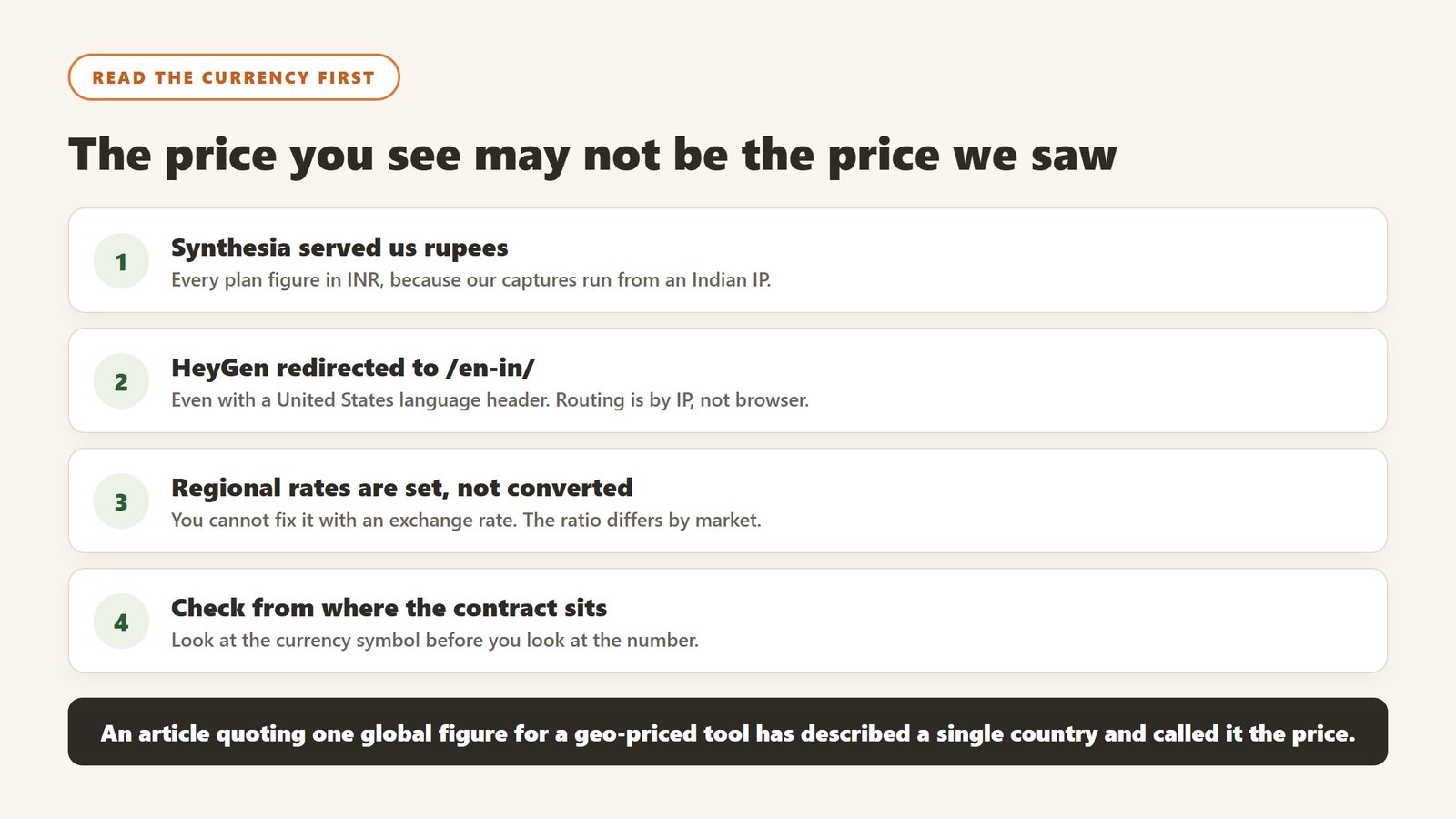
When we read Synthesia the entire rate card was in rupees: a free Basic plan at ₹0 a month, Starter at ₹1,999 a month billed monthly or ₹1,499 billed yearly, and Creator at ₹6,199 or ₹4,649 yearly, with a banner reading “Plans now starting from ₹1,499/month, Save 25%”. Our captures run from an Indian IP address, and the page served us local pricing without being asked. We do not convert currencies, so those are reported as the figures an India-served visitor sees. If you are elsewhere, your page will show different numbers, and any article quoting a single global Synthesia price has not checked this.
The one Synthesia figure that was not localised
Its Studio Express-1 custom avatar is published as a paid add-on at $1,000 a year, in dollars, available to annual plan users only, with creation taking up to ten days. That is worth knowing because custom avatars are usually the reason a training team chooses this category at all, and a four-figure annual add-on materially changes the comparison against a tool with avatars included.
Colossyan and HeyGen, both published
Colossyan publishes a free plan it describes as $27 a month worth of value, then Professional at $59 a month on annual billing with $30 a month per additional member, and includes SCORM export on the paid tier, which matters if the video has to land in an LMS. HeyGen publishes free at $0, then $29, $49 and $149 a month, with team members at $20 per seat per month. Note that heygen.com/pricing redirected us to its /en-in/ locale even with a US language header, though it displayed dollar figures.
SCORM export is the feature that decides the shortlist
If your training has to be tracked in an LMS, the video tool needs to export SCORM, and that is usually gated to a paid tier. Colossyan publishes SCORM export on Professional at $59 a month. Check this before comparing anything on price, because a cheaper tool that cannot produce a trackable package is not competing for the same job.
Avatar minutes are the real meter
Every vendor here meters on generated minutes or credits under the subscription. Work out how many finished minutes of video your training calendar actually needs in a year, then divide. A twelve module compliance refresh at eight minutes a module is roughly a hundred minutes before re-cuts, and re-cuts are where the allowance goes.
Why the price you see may not be the price we saw
This deserves its own section because it affects several tools in this category and almost no comparison article accounts for it.
What we actually observed
When we read Synthesia’s pricing page on 4 September 2026, every plan figure was in rupees, because our captures run from an Indian IP address and the site served local pricing automatically. HeyGen went further: a request to heygen.com/pricing redirected to its /en-in/ locale even when we sent a United States language header, meaning the routing is by IP rather than by browser preference.
Why this breaks most price comparisons
An article quoting a single global figure for a geo-priced tool is describing one country’s rate card and presenting it as the price. Regional pricing is not usually a straight currency conversion either; vendors set local rates deliberately, so the ratio between two markets can differ considerably from the exchange rate. That means you cannot fix the problem by converting, and we do not attempt to.
How to check your own number in thirty seconds
Open the vendor’s pricing page yourself, from the country where the contract will sit, and look at the currency symbol before you look at the number. If the URL contains a locale segment such as /en-in/ or /en-gb/, you are on a regional page. Where a vendor offers a currency selector, note that changing it sometimes changes the plan structure and not merely the symbol.
What to ask when the contract is cross-border
If your company is registered in one country and the team is in another, ask which entity is billed, in which currency, and whether the rate is fixed for the term or moves with a published exchange rate. Ask whether taxes are included, because several vendors here publish figures excluding tax. These questions are dull and they are the difference between a budget that holds and one that drifts by a fifth.
Authoring tools and the per author licence model
Course authoring is priced per author per year, not per learner, which makes it one of the easier budgets to calculate and one of the more expensive to get wrong. Here is where synthesia pricing sits, read 4 September 2026.
iSpring publishes the clearest per author rates
iSpring publishes iSpring Suite at $970 USD per author per year, iSpring Suite AI at $1,290 and iSpring Cloud AI at $720. Because the meter is authors rather than learners, the arithmetic is simple: two instructional designers on Suite AI is $2,580 a year regardless of whether you train fifty people or five thousand. That is the friendliest structure in this category for an organisation with a large workforce and a small L&D team.
Articulate is currently showing a limited-time offer, not a standard price
This one needs care. Articulate‘s canonical pricing URL redirected us to a special offer page on 4 September 2026, showing $1,198 USD per user per year against a struck-through $1,749, described as 31% off and a limited time offer, with an FAQ headed “Who is eligible for this special pricing offer?”. So the published figure is promotional. Ask what the price is outside the offer and what it renews at, because a 31% discount in year one against an undiscounted year two is a materially different deal from a $1,198 rate card.
The add-ons are priced separately and are not small
Articulate publishes Localization starting at $5,000 a year and Reach Pro starting at $3,600 for 1,200 active learners a year. Localization is the one that surprises people: if you train a multilingual workforce, translation management can cost more than the authoring seats. Price the combination you would actually deploy rather than the headline seat.
Per author is only cheap if authoring is centralised
The model rewards a small team of dedicated designers and punishes a federated approach where every department wants to build its own content. Decide which you are before buying. If fifteen people across the business each need to publish occasionally, a per author licence is the wrong shape and you should be looking at a tool priced differently, or accepting a bottleneck by design.
Measuring training, honestly
Training is the discipline most prone to measuring the wrong thing well. Four levels of rigour are available and most organisations stop at the first.
Reaction is easy and nearly worthless
Satisfaction scores at the end of a session tell you whether people enjoyed it, which correlates weakly with whether they can now do anything differently. Collect it if you like, and do not report it as evidence the training worked.
Completion is an activity metric
Completion percentage measures compliance with an instruction. It is genuinely necessary for regulated training, where the record is the point, and it is not evidence of capability anywhere else. Report it as what it is.
Behaviour change is where the real evidence starts
Pick one observable behaviour and measure it before and after: the proportion of discovery calls that reach a defined qualification step, the share of tickets resolved without escalation, the number of safety observations logged. It needs a baseline from before the training, which is why this gets skipped, and it is the first level that would survive a hostile question.
Business outcome, with the caveat stated out loud
Attributing revenue or incident rates to a training programme inside one year is genuinely hard, because everything else moved too. If you report an outcome, report what else changed in the same period. The most credible thing a training team can do is claim the behaviour change it can evidence and be openly cautious about the outcome it cannot.
Take the baseline in the week before launch
Whatever you choose, capture it before anything is switched on, from a source the project did not touch. It takes an hour and it is unrecoverable afterwards, which is the single reason most training investments can never be evaluated.
How we checked this
We did not run a hands-on trial of Synthesia for this page. This is desk research and here is what it consisted of.
We loaded synthesia.io, followed the Pricing link in Synthesia’s own navigation, and found the page served in rupees because this connection exits in India. Because a rupee figure cannot honestly be published as a dollar one, the US figures come from an archived copy of the same URL, crawled from the United States and dated 31 August 2026. The Indian figures were read live on 1 September 2026, four times, which is how the A/B testing came to light: two of the four loads returned a different rate card and a different advertised discount. The contradicting figures come from the FAQ text on that same page, read the same day. Feature and allowance detail comes from the plan comparison table on that same page. Nothing here has been converted between currencies.

Written by
FazFaz is the founder of AIToolsBakery. Some tools here are tested hands on. Others are assessed from vendor documentation and pricing verified on the live page, and every review says which one it is. Sponsors can buy a position in a guide. They cannot buy the score, the criticism, or silence about a better option.
How we test and how we make money →