AI clipping tools take a long video, a podcast, a webinar or a stream, and cut it into short vertical clips with captions, ready for TikTok, Reels and Shorts. Every tool claims to find your best moments. The ranking pages for this search are almost all written by the tools themselves, and the top result we read was a clipping vendor ranking itself first.
What none of them shows is the number that decides your bill: how much each tool costs per hour of video you upload. Plans are priced in credits, minutes, clips or videos, so they look similar until you do the arithmetic. This guide does it, from each vendor’s own pricing page, and adds the rules on credit expiry, watermarks and lifetime deals that catch people out.
How we put this together. We have not used these tools ourselves; this is a research-based comparison. Every price, allowance and rule below comes from the vendor’s own pricing page or help centre, read on 13 October 2026. The cost per hour figures are our own arithmetic on those published allowances. Prices are as displayed, in dollars unless noted. Nothing here is a test result.
What you pay per hour of video
We divided each plan’s monthly price by the hours of source video it allows each month. OpusClip, Vizard and Reap all define one credit or minute as one minute of the video you upload, so this compares like with like.
| Tool and plan | Price per month | Source video per month | Cost per hour (our arithmetic) |
|---|---|---|---|
| Reap Creator, annual | $9.99 | 10 hours | $1.00 |
| Vizard Creator, annual | $14.50 | 600 minutes | $1.45 |
| Descript Hobbyist, annual | $16 | 600 media minutes | $1.60, plus AI credits |
| Reap Creator, monthly | $16.99 | 10 hours | $1.70 |
| Kapwing Pro, annual | $16 | 1,000 credits at 2 per minute | $1.92 |
| Spikes Studio PRO+, annual | $14.09 | 300 minutes | $2.82 |
| Spikes Studio PRO+, monthly | $32.99 | 300 minutes | $6.60 |
| OpusClip Pro, annual | $14.50 | 300 credits | $2.90 |
| Vizard Creator, monthly (struck price on its yearly view) | $29 | 600 minutes | $2.90 |
| OpusClip Pro, monthly | $29 | 300 credits | $5.80 |
| OpusClip Starter, monthly only | $15 | 150 credits | $6.00 |
Read on 13 October 2026. OpusClip Pro monthly assumes the same 300 credits as its yearly plan. Descript’s figure covers media minutes only; its clip feature may also spend AI credits at a rate it does not publish. Kapwing’s credits are shared with its other tools, so treat its figure as a ceiling on clipping. Klap, Submagic and Riverside cannot be priced per hour; see their sections below.
That is more than a six-fold spread for the same job, from $1.00 to $6.60. If you clip a lot of video, the cheapest plan here costs less than a sixth of the most expensive per hour.
To put it in practical terms: a weekly one-hour podcast is about four hours of source video a month. On Reap’s annual Creator plan that fits inside the 10-hour allowance for $9.99 a month. On OpusClip Starter, four hours is 240 credits, more than its 150-credit allowance, so you would need Pro instead. A daily two-hour stream is around 60 hours a month, more than any published plan here includes, so you would need extra credits or a custom plan.
Three ways clipping tools charge
By minutes of video you upload
Reap, Vizard and OpusClip meter the length of the source video, however many clips come out; Spikes Studio and Descript also count minutes, which we read as source minutes. Reap’s FAQ says hours are calculated “based on the duration of the source video you upload… regardless of how many clips are generated.” This is the easiest model to budget.
By clips you generate
Klap charges for clips produced, not minutes uploaded: “only pay for clips you generate.” That favours people who upload long videos and want a handful of clips from each.
By videos or as an add-on
Submagic counts videos, with a maximum length per plan, and sells clipping as a separate add-on. Riverside includes its clipping feature with no published allowance.
How we chose and ordered these
Every tool had to turn a long video into short clips automatically, not just add captions. We ordered them by cost per hour of source video, weighted by features that matter for posting short clips: reframing, captions, direct posting and export quality. We dropped tools that have pivoted away from clipping or publish no usable allowance. None of these vendors paid for placement on this page.
1. Reap: the lowest cost per hour
Reap‘s Creator plan is $9.99 a month billed annually, or $16.99 month to month, for 10 hours of clipping, 10 hours of captions and 2 hours of dubbing, at 1080p. It includes a virality score, prompt-based clipping on a topic you name, models tuned for talking heads, presentations and gaming, and dubbing in more than 80 languages, plus API and MCP access. Studio, at $29 a month annually, raises that to 20 hours and 4K.
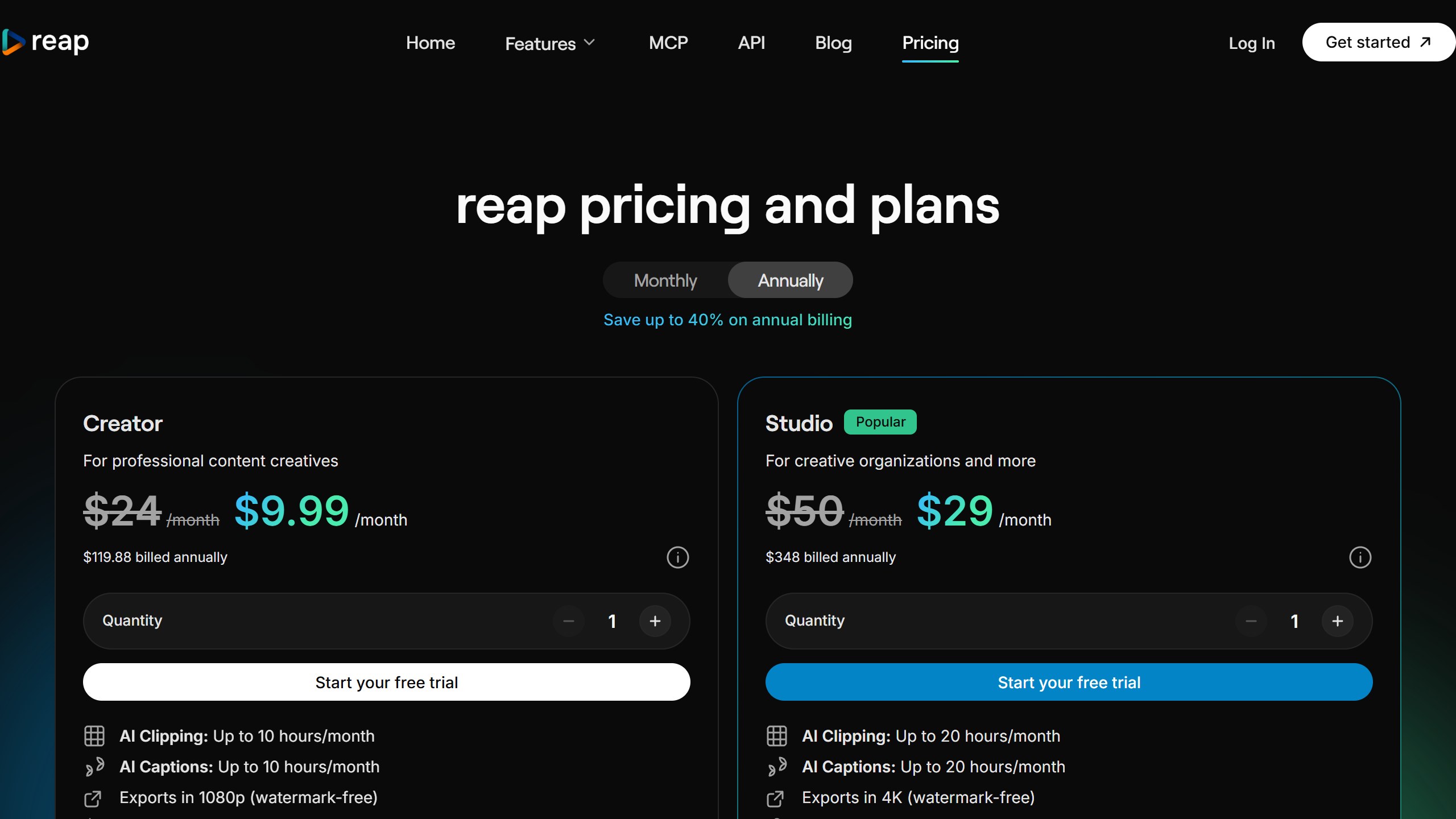
The free plan gives up to an hour a month, watermarked. Reap’s pricing page showed credits expiring in 30 days on the monthly view, so use your hours each month.
Choose it if you clip a lot and want the lowest cost per hour. Skip it if you need wide formats beyond vertical on the entry plan.
2. Vizard: 600 minutes and 4K for $14.50
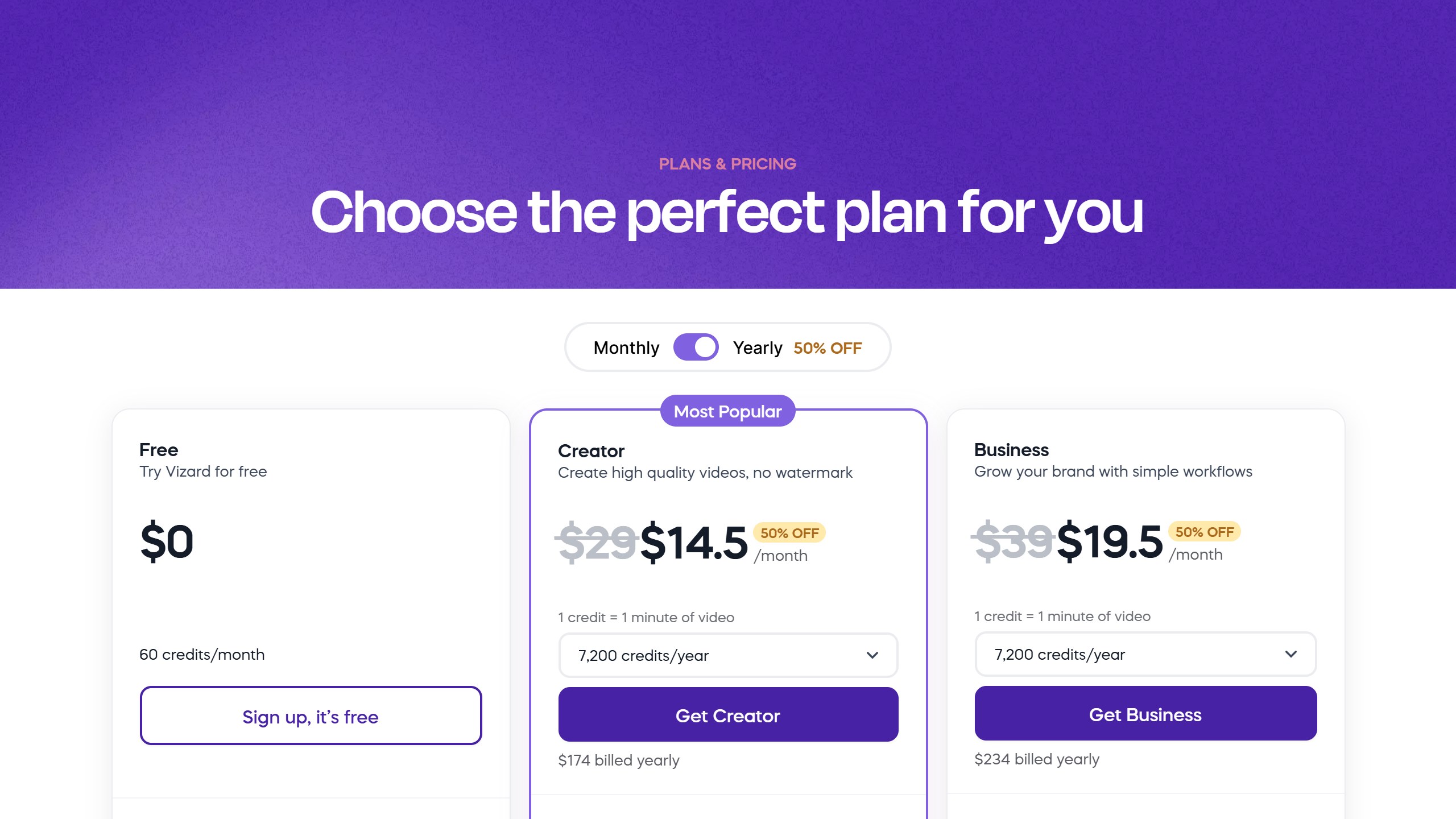
Vizard‘s Creator plan is $14.50 a month billed yearly, or $29 monthly (the struck-through figure on its yearly view; we could not confirm the monthly price), for 600 credits a month, where “1 credit = 1 minute of video”. It exports in 4K, takes uploads up to 30 GB, and schedules and publishes directly to social accounts. The free plan gives 60 credits a month at 720p, with clips kept for three days.
Choose it if you want high export quality at a low price per hour. Skip it if you want a virality score; its pricing page does not name one.
3. OpusClip: the default, at a premium
OpusClip is the best-known tool here, with a virality score, captions in more than 20 languages and direct posting to YouTube Shorts, TikTok and Reels, plus AI B-roll and posting to Facebook, LinkedIn, X, Pinterest, Threads and Bluesky on Pro. Starter is $15 a month, monthly only, for 150 credits; Pro is $29 a month or $14.50 billed yearly for 300 credits.
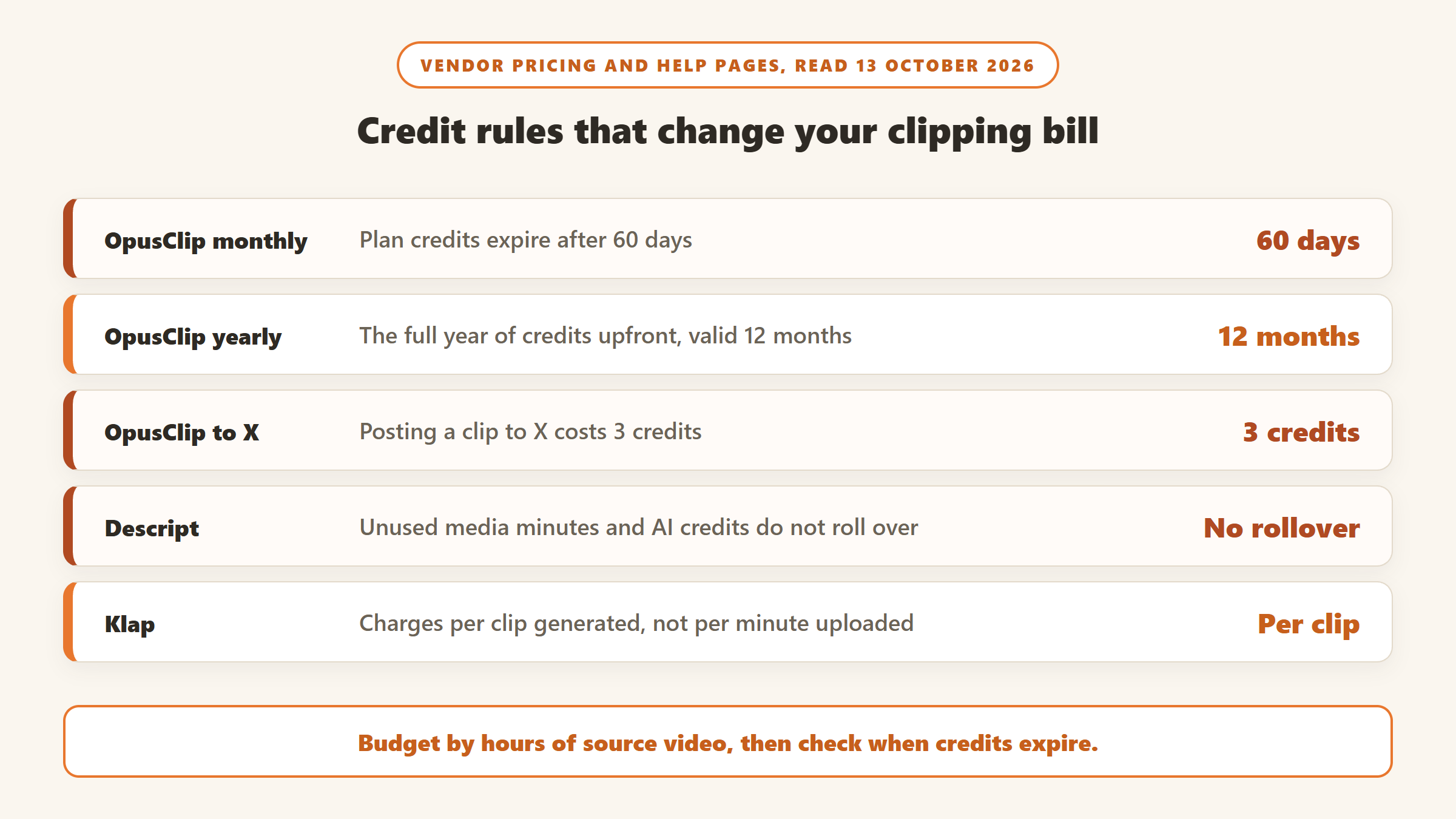
Its credits help page says one credit is one minute of imported video, monthly credits expire after 60 days, and yearly credits are given upfront and last 12 months. Free clips are watermarked and cannot be exported after three days. Posting to X costs three credits per clip per X account.
Choose it if you want the most polished posting and scoring. Skip it if cost per hour matters: its monthly plans are among the most expensive here.
4. Klap: pay per clip, not per minute
Klap charges for clips produced. Basic is $29 a month, or $14 a month yearly, for 100 clips; Pro is $79 or $39 for 300. Its clip generator page supports videos up to four hours, offers a free first video, a virality score, reframing and captions in 52 languages. It says a 20-minute video yields 8 to 15 clips and a 2-hour podcast 20 to 40, which on Basic monthly works out to roughly $2.90 to $13 per hour depending on how many clips you keep.
One conflict: its tool page says free exports have no watermark, while a Klap blog says they do. Check before relying on it.
Choose it if you upload long videos and want only a few clips from each. Skip it if you want predictable costs per hour.
5. Descript: edit the whole episode, then clip
Descript is a full editor that edits video like a document, with clip creation as one feature. Hobbyist is $16 a month billed yearly, or $24, for 600 media minutes and 400 AI credits; its help page says unused minutes and AI credits do not roll over. Its repurpose feature is marked “limited” on every plan, and its AI assistant has “no fixed price per action”, so clipping costs are less predictable than they look.
Choose it if you edit the full podcast or video and want clips from the same tool. Skip it if clipping is all you need.
6. Riverside: clips from where you record
Riverside is a recording studio first. Its pricing FAQ says core AI features, including Magic Clips, do not use credits, so clipping comes with the plan rather than metered. We are not quoting a price: the plan cards and the FAQ on the same pricing page showed different figures to us, so check it from your location. It publishes no clip allowance, so it cannot be priced per hour.
Choose it if you already record with Riverside. Skip it if you only need a clipper.
7. Kapwing: a browser editor with shared credits
Kapwing Pro is $16 a month billed yearly or $24 monthly for 1,000 credits, 4K export and videos up to 120 minutes. Its credits page prices Repurpose Studio at two credits per minute; its Clip Maker rate is not published. Credits are shared with subtitles and dubbing. There is no free trial, and the free plan is watermarked and limited to four-minute videos.
Choose it if your team already edits in Kapwing. Skip it if you want a dedicated clipper.
8. Spikes Studio: cheap annual minutes
Spikes Studio PRO+ is $14.09 a month billed annually for 3,600 minutes a year, or $32.99 monthly for 300 minutes, with no watermark, 1080p export, AI B-roll and a scheduler. The free plan gives up to 30 minutes, watermarked. Its pricing table contradicts its plan cards in places, so go by the cards.
Choose it if you want an annual plan with a low price per hour. Skip it if you need 4K.
9. Submagic: captions first, clipping as an add-on
Submagic is best known for animated captions. Starter is $12 a month billed yearly, or $19, for 15 videos up to two minutes, with no watermark on any plan. Its help centre says Magic Clips, the long-to-short feature, “is an addon subscription”, and its price was not on the vendor pages we read.
Choose it if you mostly caption clips you have already chosen. Skip it if automatic clipping is the main job.
Features that matter beyond price
| Tool | Virality score | Best export on entry paid plan | Direct posting | Free plan |
|---|---|---|---|---|
| Reap | Yes | 1080p | TikTok, Reels, Shorts, LinkedIn | 1 hour a month, watermarked |
| Vizard | Not named | 4K | Yes, 6 accounts | 60 credits, 720p |
| OpusClip | Yes | Not stated beyond free 1080p | Shorts, TikTok, Reels on Starter | 60 credits, watermarked |
| Klap | Yes | Not stated | TikTok, Instagram, YouTube | 1 video |
| Descript | Not stated | 1080p | Not stated | 60 media minutes, watermarked |
| Spikes Studio | Yes | 1080p | Scheduler | 30 minutes, watermarked |
| Submagic | Yes (add-on) | 1080p | Formats for Shorts, Reels, TikTok | Free try, no card |
Read on 13 October 2026 from each vendor’s own pages. Where a cell says not stated, the vendor’s page did not say.
How to get more from a clipping tool
The software is only part of the result. A few habits make the clips better and the plan go further.
- Feed it clean audio. Every tool here starts from a transcript. Clear audio produces accurate captions and better clip choices, so fix the sound before you upload.
- Tell it what you want. Reap’s topic prompts and similar features let you ask for clips about a subject rather than accepting the tool’s guess. That saves credits spent on clips you will throw away.
- Upload only what you will use. Because most tools meter the source length, trimming a long intro or a dead section before uploading reduces what you pay.
- Match the plan to your calendar. If you record once a month, a plan whose credits expire after 30 days works. If you record in bursts, a yearly plan with credits valid for 12 months, such as OpusClip annual, wastes less.
- Keep a human edit. Treat the AI’s picks as a first draft: tighten the opening seconds, check captions for names and jargon, and add a clear reason to keep watching.
Lifetime deals: read the fine print
Clipping tools are common on lifetime-deal marketplaces, especially around Black Friday. Reap ran on AppSumo, including a Black Friday return in November 2025 that merged clipping and captioning hours into one credit pool; its listing is now sold out, and one of its tiers labelled annual covers three years rather than a lifetime. A lifetime deal for a related tool drew a public complaint in December 2025 from a buyer who said new tiers diluted the original deal. Before you buy any lifetime plan, check exactly how many hours it includes per month, whether future features are covered, and how long you have to activate and request a refund.
What we left out, and why
Munch has pivoted: its old domain now redirects to a managed social content service. Pictory is a script-to-video generator whose minutes are not defined as upload minutes. VEED showed us prices only in Indian rupees and publishes no clip allowance. Castmagic is text-first. CapCut is a capable free editor for manual clipping, but not an automatic clipper.
What AI clipping tools cannot do yet
The tools are good at finding a clear, self-contained sentence and framing the speaker. They are weaker at humour, context that builds across several minutes, and knowing what your audience already knows. Treat their picks and virality scores as a shortlist, review every clip before posting, and expect to trim the start and end of most of them.
Which clipping tool should you pick?
If you clip a lot of video
Reap on an annual plan, or Vizard if you want 4K.
If you want the best posting and scoring
OpusClip Pro on an annual plan, which halves its cost per hour.
If you edit the whole episode
Descript, or Riverside if you already record there.
If you want a few clips from long videos
Klap, which charges per clip.
For more video tools, see our AI video generator pricing comparison and AI video tools with free tiers. We track verified offers on our AI tools Black Friday deals page.
Sources
- Reap pricing, Vizard pricing, OpusClip pricing and credits.
- Klap pricing and clip generator, Descript pricing and usage help, Riverside pricing.
- Kapwing pricing and credits, Spikes Studio pricing, Submagic pricing and Magic Clips help.
- All read 13 October 2026. Cost per hour figures are our arithmetic.

Written by
FazFaz is the founder of AIToolsBakery. Some tools here are tested hands on. Others are assessed from vendor documentation and pricing verified on the live page, and every review says which one it is. Sponsors can buy a position in a guide. They cannot buy the score, the criticism, or silence about a better option.
How we test and how we make money →