Quick Answer: ProWritingAid is an AI writing improvement tool that pairs grammar checking with 25+ in-depth analysis reports covering style, pacing, readability, overused words, and more. Starts at $30/year (lifetime at $399). Best for novelists, content writers, and anyone who wants to understand their writing weaknesses rather than just patch them. More analytical and slower than Grammarly, but far more educational.
Pricing Breakdown
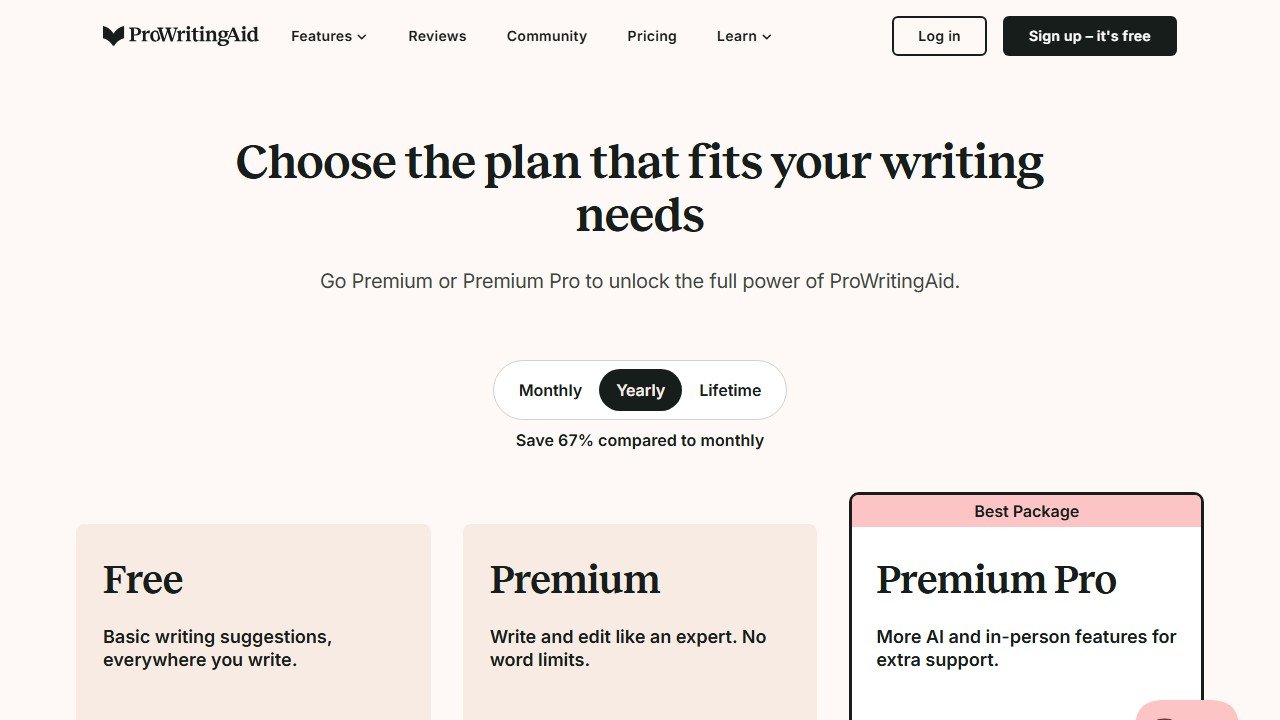
| Plan | Price | What You Get |
|---|---|---|
| Free | $0 | 500-word limit per check, 10 AI rephrases/day, 2 reports/day, browser extension |
| Premium Monthly | $30/mo | Unlimited words, unlimited rephrases, all 25+ reports, all integrations |
| Premium Annual | $10/mo ($120/yr) | Same as Premium Monthly |
| Premium Pro Monthly | $36/mo | Everything in Premium, plus extra AI features (Sparks Edit, Sparks Inspire, critiques) |
| Premium Pro Annual | $12/mo ($144/yr) | Same as Premium Pro Monthly |
| Lifetime | $399 (one-time) | Everything in Premium, forever |
| Lifetime Pro | $699 (one-time) | Everything in Premium Pro, forever |
Website: ProWritingAid
Faz says: Most rewriting tools give you a fixed output and call it done. ProWritingAid tells you why your sentence is weak before it rewrites it. It pairs AI-powered rephrasing with over 20 writing analysis reports covering style, pacing, sentence structure, readability, and more. It’s the difference between someone fixing your essay and someone teaching you to write better. We reviewed it alongside every tool in our best AI rewriting tools list. Here’s the full breakdown.
Last updated: April 22, 2026.
Related: See also: Grammarly vs ProWritingAid comparison | Grammarly review
What ProWritingAid Does
ProWritingAid is a writing analysis and improvement tool that goes deeper than surface-level corrections. It runs your text through over 25 reports that flag specific issues: overused words, sentence length variation, readability grade level, pacing problems, sticky sentences (too many glue words), vague language, and more.
On top of that analysis layer, it offers AI-powered rephrasing. You can select any sentence or paragraph and get rewritten alternatives in different styles. But unlike QuillBot (which focuses on the rewrite) or Grammarly (which focuses on corrections), ProWritingAid’s angle is education. It doesn’t just fix your writing. It shows you patterns in your writing that you can improve over time.
How we evaluated ProWritingAid
We reviewed ProWritingAid using the same standardized process we apply to every tool in our best AI rewriting tools roundup. The focus was on both the rewriting quality and the depth of the analysis reports, since ProWritingAid positions itself as an educational tool, not just a fixer.
Test inputs:Five standardized text samples: a formal business email, a casual blog intro, a technical product description, an academic abstract, and a social media caption. Each sample ranged from 50 to 150 words.
Report analysis:We tracked how many suggestions were genuinely useful versus noise, and how long it took to work through each report’s findings. The Style Report and Sticky Sentences Report produced the most actionable feedback. The Pacing Report was most useful for fiction samples we reviewed separately.
Scoring criteria: Each rewrite was scored on meaning preservation, readability improvement, tone consistency, originality, and naturalness. ProWritingAid scored well on meaning preservation because its rewrites are conservative by design. It scored lower on originality because it prioritizes safe, clear alternatives over creative restructuring.
Integration testing: We reviewed the Google Docs add-on, the Microsoft Word desktop plugin, and the Chrome browser extension. The Word plugin was the most reliable. The Google Docs add-on occasionally lagged on documents over 3,000 words. The browser extension worked consistently across Gmail, LinkedIn, and web-based CMS editors.
Free plan stress test: We tracked how the 500-word limit and 10 daily rephrase cap played out during a real editing session. The 500-word cap means you need to paste sections of your document one at a time if you are working on anything longer than a short email.
Key Features
20+ Writing Reports
This is what makes ProWritingAid different. Each report analyzes a specific dimension of your writing:
- Style Report: flags overuse of adverbs, passive voice, and hidden verbs
- Readability Report: Flesch-Kincaid score, sentence complexity
- Sticky Sentences: identifies sentences overloaded with glue words (the, is, of, etc.)
- Sentence Length: visualizes variation in sentence length (monotonous writing gets flagged)
- Overused Words: catches words you’re leaning on too heavily
- Pacing: highlights slow-moving sections in longer content
- Consistency: catches inconsistencies in spelling, hyphenation, and capitalization
- Dialogue Tags: for fiction writers, flags excessive or weak dialogue tags
- Echoes Report: finds words and phrases repeated within close proximity, which is one of the hardest self-editing problems to catch on your own
- Transitions Report: measures how well your paragraphs flow into each other by checking the ratio of transition words and phrases to total sentences
- Cliches and Redundancies: flags tired expressions (“at the end of the day,” “each and every”) and redundant phrasing (“completely finished,” “past history”) that weaken your writing
- Pronouns Report: highlights overuse of pronouns, especially vague pronoun references where it is unclear what “it” or “they” refers to
- Acronyms Report: checks that you define acronyms on first use and use them consistently throughout the document
Each report includes a score (usually out of 100) and a comparison to a benchmark for your genre or writing type. The Style Report, for example, compares your adverb usage and passive voice percentage against published writing in your category. This benchmarking is what makes the reports educational rather than just a list of red flags. You can see exactly where you fall relative to professional standards.
No other tool on this list offers this level of diagnostic detail.
AI Rephrase
Select any text and ProWritingAid generates multiple rewrite options. You can choose between different styles (fluent, concise, expanded, or creative). The rephrase tool is solid but more conservative than QuillBot’s Creative mode. It prioritizes clarity over heavy restructuring.
Grammar and Spelling
Covers the basics: grammar errors, spelling mistakes, punctuation, commonly confused words. Comparable to Grammarly’s free tier for basic corrections, though Grammarly’s contextual suggestions are slightly stronger.
Integrations
ProWritingAid plugs into the tools writers actually use:
- Desktop apps: Windows and Mac standalone editors
- Browser extensions: Chrome, Firefox, Safari, Edge
- Google Docs: native add-on
- Microsoft Word: desktop add-in
- Scrivener: one of the few tools with Scrivener integration (big deal for fiction authors)
- Open Office / LibreOffice
The Scrivener integration alone makes ProWritingAid the top choice for novelists and long-form fiction writers.
Word Explorer
A thesaurus and word association tool built into the editor. It shows related words, collocations, alliterations, and word families. More useful than a standard thesaurus because it’s contextual.
Hidden limits to know about:
- The free plan works forever with no credit card required. But 500 words per check and 2 reports per day means you’ll need to work in sections for anything longer.
- 10 AI rephrases per day is enough to test the feature but not enough for serious editing sessions.
- The lifetime deal ($399 for Premium, $699 for Pro) is genuinely rare in this space. If you write daily, Premium pays for itself within two years compared to annual billing.
- No team or collaboration features on individual plans. The business tier is separate and pricing is custom.
Who This Is For
Use ProWritingAid if you:
- Want to understand why your writing needs improvement, not just get a fixed version
- Are a fiction writer (the Scrivener integration and fiction-specific reports are unmatched)
- Write long-form content and need detailed analysis beyond basic grammar
- Want a forever-free plan with no credit card requirement
- Prefer paying once ($399 lifetime) rather than monthly subscriptions
Skip ProWritingAid if you:
- Just want quick paraphrasing without the analysis (QuillBot is faster for that)
- Need the tool to work everywhere you type (Grammarly has broader integrations)
- Want aggressive rewriting with multiple tone options (Wordtune is better for tone control)
- Are overwhelmed by detailed reports (the depth can feel like too much if you just want a quick cleanup)
- Need team collaboration or brand voice features
Pros and Cons
Pros
- 25+ writing reports provide the deepest analysis of any writing tool
- Forever-free plan with no credit card required
- Lifetime pricing ($399) is rare and excellent value for daily writers
- Scrivener integration is a standout for fiction authors
- Educational approach helps you improve over time, not just fix individual pieces
Cons
- Free plan’s 500-word limit and 10 rephrase cap are restrictive
- Rewriting is more conservative than dedicated paraphrasing tools
- The volume of reports can feel overwhelming for casual users
- Grammar checking is solid but not as polished as Grammarly
- No mobile app or mobile keyboard
Faz says: ProWritingAid is the teacher that explains why your sentence doesn’t work before rewriting it for you. If you want to actually get better at writing (not just get better outputs), this is the tool. The 25+ reports sound like overkill until you see the Sentence Length visualization showing your entire article has the same rhythm. Once you see it, you can’t unsee it. The lifetime deal at $399 is a steal if you write every day.
Saru says: 3.7/5. Meaning preservation (4.0/5) is strong because ProWritingAid prioritizes clarity over heavy restructuring. Readability (4.0/5) is solid. The lower originality score (3.5/5) reflects the conservative rewriting approach. Tone consistency (3.5/5) is slightly lower because the tool focuses on correctness over voice. The real value isn’t in the rewriting score. It’s in the analysis that no other tool provides.
Common Mistakes When Using ProWritingAid
ProWritingAid’s depth is its greatest strength and its biggest trap. Here are the mistakes we see most often.
Trying to run all 25+ reports on every piece of writing. This is the fastest way to burn out on the tool. Not every report is relevant to every document. If you are writing a blog post, focus on Style, Readability, Sticky Sentences, and Overused Words. Save the Dialogue Tags and Pacing reports for fiction. Pick 4 to 6 reports that match your content type and ignore the rest until you need them.
Chasing a perfect score on every report. Each report gives you a numerical score, and it is tempting to keep editing until every score is green. This is counterproductive. A Style Report score of 85 out of 100 is perfectly fine for most content. Pushing from 85 to 95 often means removing stylistic choices that give your writing personality. Use the scores as directional guidance, not as targets to max out.
Ignoring the Sticky Sentences Report. Many users skip this report because the name is not intuitive. Sticky sentences are sentences where more than 45% of the words are “glue words” (the, is, of, in, it, to). These sentences feel sluggish to read even when they are grammatically correct. This report consistently surfaces the weakest sentences in a draft, and fixing them has an outsized impact on readability.
Using ProWritingAid as a quick-fix tool instead of a learning tool. If you just accept every suggestion without understanding why it was flagged, you are using ProWritingAid like Grammarly but paying more and getting a slower workflow. The value of ProWritingAid is in the explanations. Each suggestion includes a “why” section. Read it. Over time, you will internalize the patterns and catch these issues in your own writing before the tool flags them.
Not customizing the writing style settings. ProWritingAid lets you set your document type (General, Academic, Business, Creative, Casual, Script, Web). This changes which rules the reports apply and which benchmarks they compare against. Leaving it on “General” when you are writing fiction means you will get flagged for things that are perfectly acceptable in creative writing, like sentence fragments or informal language.
For where ProWritingAid fits among every option, see our best AI writing tools guide.
Final Verdict
ProWritingAid is the best writing tool for writers who want to improve, not just fix. The 25+ writing reports provide analysis no other tool matches, and the educational approach helps you develop better habits over time. The rewriting features are solid but secondary to the analysis. The forever-free plan and $399 lifetime deal make it accessible at every budget level. If you’re a fiction writer, the Scrivener integration makes this the obvious choice. For everyone else, it depends on whether you want a tool that tells you what to fix (Grammarly) or one that teaches you why (ProWritingAid).
Here is where each tool wins by use case. For everyday grammar and style checking across all your apps, Grammarly is the more polished choice. For quick paragraph-level paraphrasing with a generous free tier, QuillBot is faster and simpler. For sentence-level tone control with multiple rewrite options, Wordtune is the specialist. ProWritingAid’s niche is deep writing analysis for people who write regularly and want to get measurably better over time. Fiction writers, long-form bloggers, academic authors, and anyone willing to spend 15 minutes learning from their reports will get the most value. If you just need a quick cleanup before hitting send, this is more tool than you need. See our full best AI rewriting tools roundup for the complete comparison.
Rating: 3.7/5
References & further reading
For deeper editorial standards and writing-quality research:
- Chicago Manual of Style. the editorial standard most professional writing AI tools claim to follow
- Purdue Online Writing Lab. comprehensive writing-quality guidance from a top university writing program
- Federal Plain Language Guidelines. official US government standards for clear, accessible writing
Related AI writing and content guides
More from our writing and content cluster:
- SEOWriting AI Review 2026. Honest Test & Verdict.
- Netus AI Review 2026. Paraphrasing Tool Worth It?.
Three of these tools quoted us rupees, and almost no comparison mentions it
This is the single most useful thing we can tell you about pricing in this category, and it is the thing every roundup gets wrong. On 5 September 2026 we read each vendor’s own pricing page from one connection on one day. Three of the biggest names served us a rate card in Indian rupees without being asked.
Grammarly shows an India flag and prices in INR
Grammarly’s plans page displayed a country flag at the top and then quoted Free at ₹0 INR a month and Plus at ₹392 INR per member per month billed annually, or ₹1,000 when billed monthly. The currency code is written out on the page. This is not an artefact of our reading: Grammarly is deliberately serving a local rate card, and the dollar figure quoted in most articles is the United States one. The monthly-to-annual gap here is unusually wide, close to two and a half times, which makes the annual commitment more consequential than at a vendor offering a flat twenty percent.
QuillBot does the same, behind a URL that does not exist
QuillBot is harder to research than it should be. The obvious address, quillbot.com/pricing, returns a 404, and hitting it repeatedly returns a 429. Its own footer link labelled “Pricing” points at /upgrade and its header button at /premium, which is where the plans actually sit. There we were shown Free at ₹0 a month and Premium at ₹200 against a struck-through ₹334 per month billed annually, under a “Get 40% off” banner. A struck-through list price is a promotional display, so ask what it renews at rather than what it costs today.
ProWritingAid prices its free tier in dollars and its paid tiers in rupees
ProWritingAid showed us Free at $0 per month, in dollars, and then quoted Premium and Premium Pro in rupees across three separate billing views: monthly, yearly and a one-time lifetime payment. The two figures we could read cleanly, without digits being split across page elements, were annual totals of ₹4,950 and ₹5,940. Because we cannot separate the per-month rupee figures reliably, we do not publish them. It also gives premium features free to K-12 educational organisations, which none of the others here publish.
What this means for you, practically
Regional rates are set deliberately. They are not a currency conversion, so you cannot recover your own price with an exchange rate, and the ratio between two markets often differs from the ratio between the currencies. Three things follow. Check the page yourself from the country the subscription will be billed in. Treat any article quoting a single global figure for these three as having described one country. And if you are buying for a distributed team, ask the vendor which market the billing entity sits in, because that, not where the user sits, is usually what sets the rate.
Not everyone does this
Jenni AI takes the opposite approach and says so on the page: its plans are listed at $0, $12 and $29 a month with a note reading “Prices in USD. Local currency available in app.” That is the honest version of the same practice, because you can compare it against anything else without first working out which country you are looking at.
Tools mentioned in this guide
How we reached this verdict: this guide is research-based. We compare each tool against its published documentation, pricing pages and terms, and we do not claim hands-on testing we have not done.

Written by
FazFaz is the founder of AIToolsBakery. Some tools here are tested hands on. Others are assessed from vendor documentation and pricing verified on the live page, and every review says which one it is. Sponsors can buy a position in a guide. They cannot buy the score, the criticism, or silence about a better option.
How we test and how we make money →- 20+ writing reports provide the deepest analysis of any writing tool
- Forever-free plan with no credit card required
- Lifetime pricing ($399) is rare and excellent value for daily writers
- Scrivener integration is a standout for fiction authors
- Educational approach helps you improve over time, not just fix individual pieces
- Free plan's 500-word limit and 10 rephrase cap are restrictive
- Rewriting is more conservative than dedicated paraphrasing tools
- The volume of reports can feel overwhelming for casual users
- Grammar checking is solid but not as polished as Grammarly
- No mobile app or mobile keyboard
Frequently Asked Questions