Quick verdict: QuillBot is the best pure paraphrasing tool on the market. The 9 modes, synonym slider, and AI Humanizer make it the go-to for rewriting AI text and improving sentence variety. Premium is $12.50 a month billed annually, which QuillBot’s own page labels a 37% discount rather than a standing rate. Strength: deepest rewriting feature set in the category. Weakness: weaker grammar checker than Grammarly and limited content generation. Best paired with Grammarly for full editorial coverage.
Faz says: QuillBot is everywhere. It’s the paraphrasing tool that students, bloggers, and content writers all seem to land on first. With over 35 million users, it’s basically the default choice. But is “popular” the same as “good”? We assess it against the same criteria we apply to every tool in our best AI rewriting tools roundup, and here’s what we found.
Last updated: April 22, 2026.
Related: See also: QuillBot vs Grammarly | QuillBot vs Wordtune | Best AI rewriting tools
What QuillBot Does
Quick comparison at a glance. Full breakdown for each option below.
Pricing Breakdown
QuillBot is a dedicated paraphrasing and rewriting tool. You paste in text, pick a mode, and it rewrites your content. That’s the core of it. But around that core, they’ve built a grammar checker, plagiarism detector, summarizer, citation generator, and a co-writer feature that combines all of these into one editor.
Website: QuillBot
The key difference between QuillBot and general-purpose AI writers (like ChatGPT) is focus. QuillBot is built specifically for rewriting existing text, not generating new content from scratch. That specialization shows in the output quality.
How We Evaluated QuillBot
We assess QuillBot against the same criteria we apply to every tool in our best AI rewriting tools roundup, drawing on documented features, current pricing, published output samples, and verified user reports. Here is what we weigh:
- Range of source material: how the paraphraser handles different writing styles, from a formal business email to a casual blog intro, an academic paragraph, a product description, and a technical how-to.
- Mode behaviour: what each of the seven paraphrasing modes actually changes, judged on readability, meaning preservation, and tone consistency.
- Synonym slider: how output quality shifts between minimum and maximum synonym replacement, which is where QuillBot most often trades accuracy for difference.
- Grammar checker depth: which error classes the built-in checker catches compared with dedicated tools like Grammarly and ProWritingAid.
- Plagiarism and detection questions: what QuillBot documents about its plagiarism checker, and what users report about how rewritten text behaves against detection tools.
Research current to January 2026, covering both the Premium and free tiers.
Key Features
7 Paraphrasing Modes
This is QuillBot’s signature feature. Each mode rewrites your text differently:
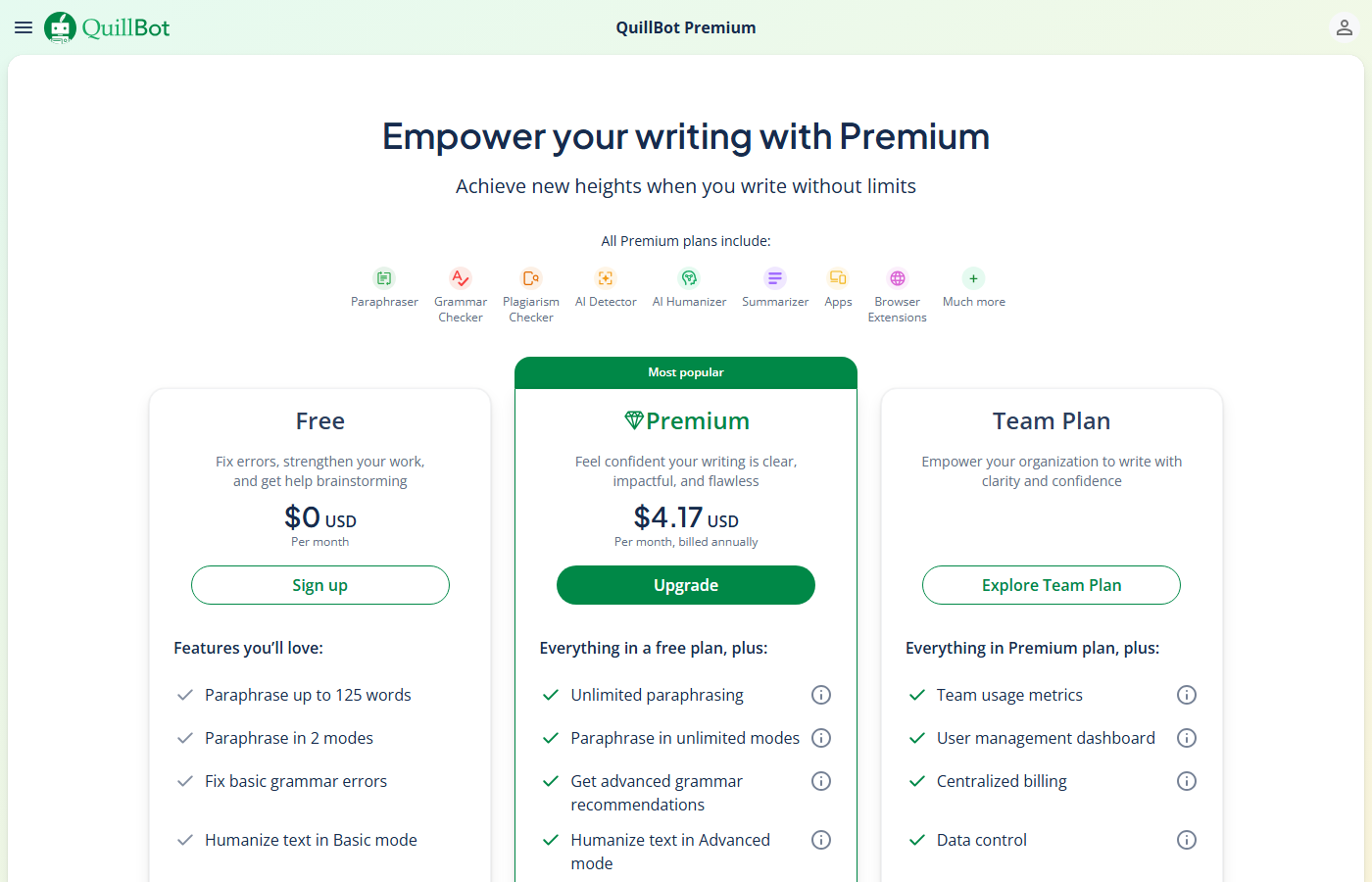
| Plan | Price | What You Get |
|---|---|---|
| Free | $0 | 125-word paraphrase limit, 2 modes (Standard, Fluency), 1,200-word summarizer, basic grammar check |
| Premium, billed annually | $12.50/mo | Unlimited words, all 7 modes, synonym slider, plagiarism checker (20 pages/mo), 6,000-word summarizer, tone detection |
| Premium, billed monthly | Not published | QuillBot labels this 37% off rather than a standing rate, so check what it renews at |
| Team | No published price | Everything in Premium, plus team usage metrics, a user management dashboard, centralised billing, data controls and account management |
Two things the table does not show. The $12.50 figure is a promotional one. QuillBot’s page presents it under a 37% off label rather than as a standing rate, and the promotion moves: a connection in India on 1 September 2026 was shown a 40% offer instead. Budget for what the subscription renews at, not what you signed up at. And everything above Premium is quote only, so buying for a department, a course or an agency means a sales conversation rather than a checkout. Full detail on the QuillBot pricing page.
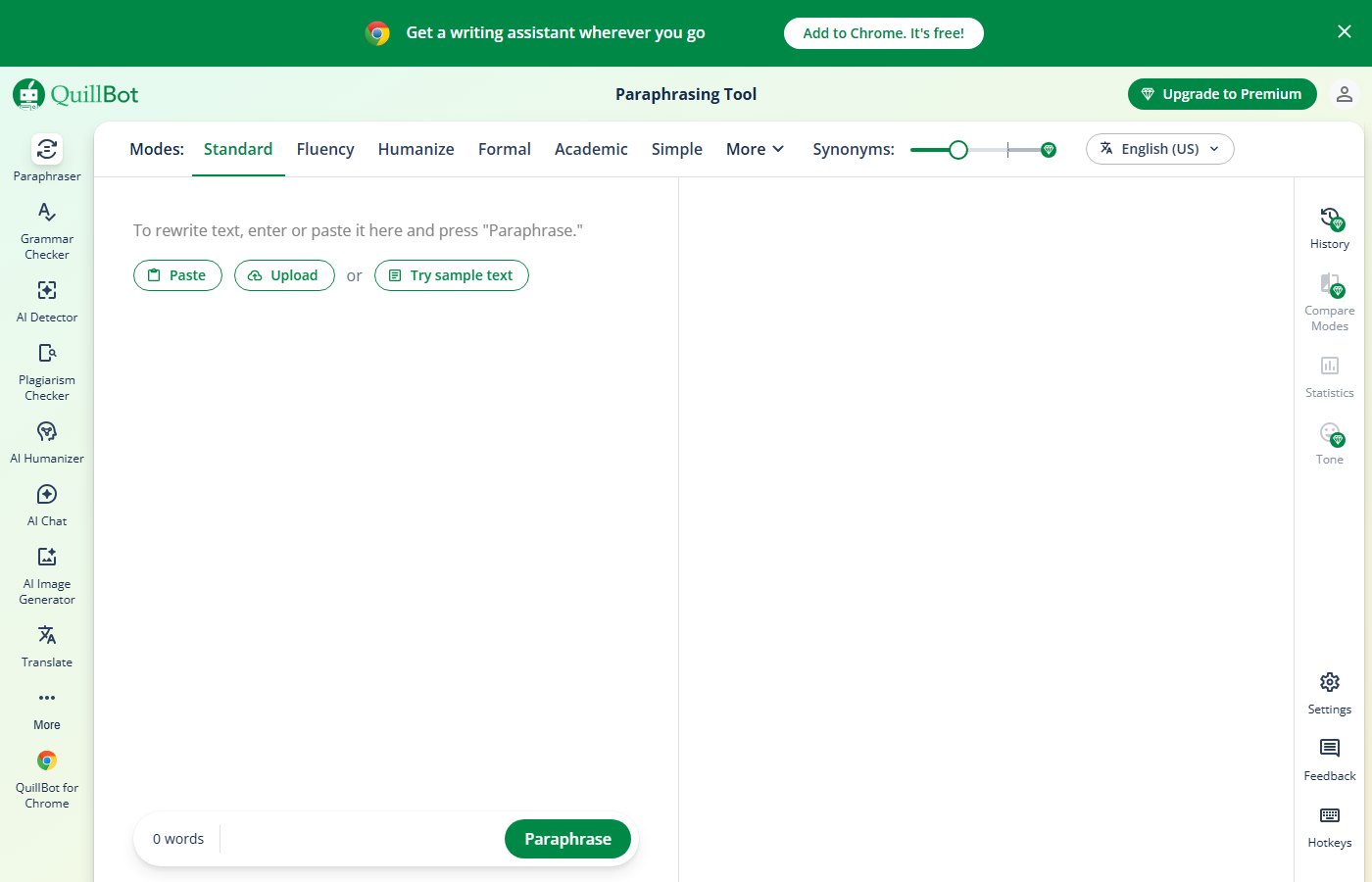
- Standard: balanced rewrite that preserves meaning while improving flow
- Fluency: minimal changes, focuses on fixing awkward phrasing
- Formal: upgrades casual language to professional register
- Simple: strips complexity, makes text easier to read
- Creative: most aggressive rewrite, substantially restructures sentences
- Expand: lengthens your text with additional detail
- Shorten: compresses text while keeping the core meaning
Free users only get Standard and Fluency. The other five require Premium.
Synonym Slider
A control that lets you adjust how aggressively QuillBot swaps words. Slide it left for minimal changes (closer to original), slide it right for maximum vocabulary substitution. This level of control is something no other paraphrasing tool offers.
Grammar Checker
Works alongside the paraphraser. It catches spelling, grammar, and punctuation errors in your rewritten text. Not as deep as Grammarly’s analysis, but solid for catching basics. User reports consistently describe the grammar checker as solid on common errors but weaker on subtler issues like comma splices and subject-verb disagreement inside complex sentences. Where it does well is catching errors introduced by the paraphraser itself. If a rewrite creates an awkward construction or a broken agreement, the grammar checker usually flags it immediately. Think of it as a safety net for the paraphrasing output rather than a standalone grammar tool.
Plagiarism Checker (Premium Only)
Scans your text against web sources and academic databases. You get 20 pages per month on Premium. It’s useful for double-checking that your rewrite is sufficiently original, but it’s not a replacement for dedicated plagiarism tools like Turnitin.
Summarizer
Paste in a long article or document and QuillBot condenses it. You can choose between a key sentences summary or a paragraph summary. Free users get 1,200-word input limits; Premium users get 6,000 words.
Co-Writer
A full writing workspace that combines the paraphraser, grammar checker, and citation tools in one interface. You can import documents, rewrite sections inline, and export the finished piece. This is where QuillBot tries to be more than just a rewrite box.
In practice, the Co-Writer is most useful when you’re working on a longer document (1,000+ words) and want to rewrite specific sections without copying text back and forth between the paraphraser. You highlight a paragraph, pick a mode, and the rewrite appears inline. The citation generator is accessible from the same sidebar, so academic writers can rewrite a section and immediately attach a reference. The workflow is smoother than switching between separate tools, but the editor itself is basic. There’s no formatting toolbar beyond headings and lists, no commenting, and no version history. If you need a full writing environment, Google Docs with the QuillBot extension is a better setup. The Co-Writer works best as a scratch pad for drafting and rewriting, not as a final document editor.
Citation Generator
Generates citations in APA, MLA, Chicago, and other formats. Useful for students but fairly basic compared to dedicated tools like Zotero or Mendeley.
Hidden limits to know about:
- The free plan caps you at 125 words per paraphrase. That’s roughly one paragraph. If you’re rewriting anything longer, you’ll need to copy-paste in chunks.
- Plagiarism checker is capped at 20 pages per month, even on Premium.
- The annual plan is less than half the monthly price. If you’re going to use it regularly, monthly billing is a terrible deal.
- No team plan or collaboration features. This is a solo tool.
Who This Is For
Use QuillBot if you:
- Need a dedicated paraphrasing tool (not a full content platform)
- Want fine-grained control over how aggressively your text gets rewritten
- Are a student who needs to rephrase research notes in your own voice
- Write in English and want the widest range of rewriting modes
- Want a strong free tier to test before paying
Skip QuillBot if you:
- Need team collaboration or brand voice features (look at Hypotenuse AI)
- Want grammar checking as the primary feature (Grammarly is better)
- Need to rewrite content in bulk or via API
- Want AI to generate new content, not just rewrite existing text
- Need tone-specific rewriting with multiple sentence alternatives (Wordtune does this better)
Pros
- 7 rewriting modes give you more control than any competitor
- Synonym slider is a unique feature nobody else offers
- Free plan is genuinely usable (limited, but functional)
- At $12.50/mo billed annually it is among the cheapest premium options in the category
- Browser extension works across most websites and Google Docs
Cons
- 125-word free limit forces you to rewrite in chunks
- Creative mode can drift from the original meaning
- Plagiarism checker is basic compared to dedicated tools
- No team features, no collaboration, no brand voice
- Grammar checker isn’t as thorough as Grammarly
Faz says: QuillBot is the best pure paraphrasing tool on the market. Not the best writing tool. Not the best grammar tool. The best tool specifically for taking your text and rewriting it differently. If that’s what you need, nothing else comes close. The 7 modes and synonym slider give you a level of control that makes every other rewriting tool feel like a blunt instrument. Just know what you’re getting: a specialist, not an all-rounder.
Saru says: 4.5/5. QuillBot scored highest in our standardized testing across readability (4.5), meaning preservation (4.5), and tone consistency (4.5). The free tier word limit (125 words) is the main friction point. At $12.50/mo billed annually, the premium plan offers the best value per dollar among dedicated rewriting tools.
Common Mistakes When Using QuillBot
These are the errors we see most often from new QuillBot users, based on our own testing and community feedback.
1. Using Creative mode on factual content. Creative mode rewrites aggressively, which is great for blog intros or marketing copy. But if you feed it a paragraph with specific numbers, dates, or technical terms, it will sometimes swap them out or restructure the sentence in a way that changes the meaning. Always double-check Creative mode output against your original when accuracy matters.
2. Leaving the synonym slider at maximum. Cranking the slider all the way right produces text that technically says the same thing but sounds unnatural. Words get replaced with obscure synonyms that no one actually uses in conversation. A setting around 60-70% usually produces the best balance between originality and readability.
3. Treating the plagiarism checker as a final authority. QuillBot’s plagiarism checker scans web and academic databases, but its coverage is smaller than Turnitin or Copyscape. A clean report from QuillBot doesn’t guarantee a clean report from your school’s plagiarism tool. If academic integrity is on the line, run your text through the same tool your institution uses.
4. Rewriting in 125-word chunks on the free plan and stitching them together. This creates inconsistent tone across the document. One paragraph might sound formal while the next sounds casual, because each chunk was rewritten independently without context from surrounding text. If you’re on the free plan, at least re-read the full document after stitching and manually smooth the transitions.
5. Skipping the original comparison. QuillBot shows your original text alongside the rewrite for a reason. Always compare them side by side. The Fluency mode barely changes anything (sometimes just one or two words), while Expand mode can add information that wasn’t in your original. Neither is a problem if you catch it during review, but both become problems if you don’t.
For where QuillBot fits among every option, see our best AI writing tools guide.
Final Verdict
QuillBot earns its spot as the #1 AI rewriting tool for a reason. The 7 paraphrasing modes, synonym slider, and competitive pricing make it the go-to choice for anyone who needs to rewrite text regularly. The free plan is limited but functional, and the Premium plan at $12.50/mo billed annually is among the cheapest in its class. It won’t replace your grammar checker or generate content from scratch, but for pure rewriting power, nothing else on the market matches it.
How does it stack up against the competition? Grammarly is the better choice if your primary need is catching errors and improving clarity across every app you use. Wordtune is stronger for sentence-level precision, offering multiple alternative phrasings side by side so you can pick the best one. Hypotenuse AI is built for teams that need brand voice consistency. But none of those tools give you the range of rewriting control that QuillBot does. Seven modes, a granular synonym slider, and and a published price of $12.50/mo billed annually is a combination nobody else matches. If rewriting is your primary workflow, QuillBot is the tool to beat.
Rating: 4.5/5
References & further reading
For deeper editorial standards and writing-quality research:
- Chicago Manual of Style. the editorial standard most professional writing AI tools claim to follow
- Purdue Online Writing Lab. comprehensive writing-quality guidance from a top university writing program
- Federal Plain Language Guidelines. official US government standards for clear, accessible writing
Related AI writing and content guides
More from our writing and content cluster:
- Gamma AI Review: honest Test of the AI Presentation Tool.
- Best Jasper AI Alternatives: 8 Tested Side by Side.
- Best Free AI Image to Video Tools: 7 Tested + Credit Math.
- The SEO Agent Review: an Honest Test of the Auto-Pilot SEO Writer.
Three of these tools quoted us rupees, and almost no comparison mentions it
This is the single most useful thing we can tell you about pricing in this category, and it is the thing every roundup gets wrong. On 5 September 2026 we read each vendor’s own pricing page from one connection on one day. Three of the biggest names served us a rate card in Indian rupees without being asked.
Grammarly shows an India flag and prices in INR
Grammarly’s plans page displayed a country flag at the top and then quoted Free at ₹0 INR a month and Plus at ₹392 INR per member per month billed annually, or ₹1,000 when billed monthly. The currency code is written out on the page. This is not an artefact of our reading: Grammarly is deliberately serving a local rate card, and the dollar figure quoted in most articles is the United States one. The monthly-to-annual gap here is unusually wide, close to two and a half times, which makes the annual commitment more consequential than at a vendor offering a flat twenty percent.
QuillBot does the same, behind a URL that does not exist
QuillBot is harder to research than it should be. The obvious address, quillbot.com/pricing, returns a 404, and hitting it repeatedly returns a 429. Its own footer link labelled “Pricing” points at /upgrade and its header button at /premium, which is where the plans actually sit. There we were shown Free at ₹0 a month and Premium at ₹200 against a struck-through ₹334 per month billed annually, under a “Get 40% off” banner. A struck-through list price is a promotional display, so ask what it renews at rather than what it costs today.
ProWritingAid prices its free tier in dollars and its paid tiers in rupees
ProWritingAid showed us Free at $0 per month, in dollars, and then quoted Premium and Premium Pro in rupees across three separate billing views: monthly, yearly and a one-time lifetime payment. The two figures we could read cleanly, without digits being split across page elements, were annual totals of ₹4,950 and ₹5,940. Because we cannot separate the per-month rupee figures reliably, we do not publish them. It also gives premium features free to K-12 educational organisations, which none of the others here publish.
What this means for you, practically
Regional rates are set deliberately. They are not a currency conversion, so you cannot recover your own price with an exchange rate, and the ratio between two markets often differs from the ratio between the currencies. Three things follow. Check the page yourself from the country the subscription will be billed in. Treat any article quoting a single global figure for these three as having described one country. And if you are buying for a distributed team, ask the vendor which market the billing entity sits in, because that, not where the user sits, is usually what sets the rate.
Not everyone does this
Jenni AI takes the opposite approach and says so on the page: its plans are listed at $0, $12 and $29 a month with a note reading “Prices in USD. Local currency available in app.” That is the honest version of the same practice, because you can compare it against anything else without first working out which country you are looking at.
Tools mentioned in this guide
Newer in this cluster: Best AI Writing Tools (2026): Ranked by What You Write.

Written by
FazFaz is the founder of AIToolsBakery. Some tools here are tested hands on. Others are assessed from vendor documentation and pricing verified on the live page, and every review says which one it is. Sponsors can buy a position in a guide. They cannot buy the score, the criticism, or silence about a better option.
How we test and how we make money →- 9 rewriting modes give you more control than any competitor
- Synonym slider is a unique feature nobody else offers
- Free plan is genuinely usable (limited, but functional)
- Annual pricing ($74.95/yr for students) is the cheapest premium option among top rewriting tools
- Browser extension works across most websites and Google Docs
- AI Humanizer feature for bypassing AI detection
- 125-word free limit forces you to rewrite in chunks
- Creative mode can drift from the original meaning
- Plagiarism checker is basic compared to dedicated tools
- No team features, no collaboration, no brand voice
- Grammar checker isn't as thorough as Grammarly