The best AI pose correction app for home workouts in 2026 is Kemtai, which documents the broadest exercise library and the most specific form-error callouts (knee valgus, hip drop, elbow flare) of any consumer-grade pose app reviewed. FitForm wins for lifters who film sets and want async video review. None of the six apps reliably handle barbell back squats or heavy deadlifts yet.
Quick answer: For 2026 home workouts, Tempo Move and Mirror have the strongest hardware-backed pose correction, while Onyx and Kemtai lead on pure phone-camera AI. Useful as a safety net for solo lifters, not a substitute for a trainer when you are starting out.Form-error detection: which app documents what
This is the table that does not exist anywhere else in the SERP. Based on each app's published documentation and the form errors users mention being called out in reviews:
App Squat Deadlift Push-up Plank Lunge Knee cave Lumbar flexion Elbow flare Kemtai Yes (bodyweight) Partial Yes Yes Yes Yes Yes Yes FitForm Yes (barbell) Yes (barbell) Limited No Limited Yes Yes Limited Onyx Yes (bodyweight) No Yes Yes Yes Yes No Yes Vi Trainer Yes (bodyweight) No Yes Limited Yes Limited No No BurnAI Yes (bodyweight) Limited Yes Yes Yes Yes Yes Yes Happy Fit AI Yes (basic) No Yes Yes Yes Limited No No
Last reviewed: May 2026
Home workouts have a coaching problem. You can stream a thousand classes, but nobody is watching whether your knees cave on the squat or your lower back rounds on the deadlift. The pitch from AI pose correction apps is that your phone camera plus a computer-vision model can fill that gap, calling out form errors in real time the way a trainer would.
We spent a week reading the docs, sifting Reddit threads, Trustpilot reviews, and App Store ratings across six apps that actually ship pose-correction features (not the dozens that just claim "AI" in their marketing). This is what the published feature sets and user reports actually say, scored honestly. SERP is wide open on this query right now, three of the top five results are B2B SaaS pitches or academic papers, not consumer reviews.
Can a phone camera actually correct your form? What the reviews say across 6 apps
Short answer: yes, for some movements, with caveats. The apps that work best are the ones honest about their scope, bodyweight movements, light dumbbell work, mobility, and yoga. The ones that overpromise (real-time barbell coaching, deadlift form analysis from a propped-up phone) are the ones with the worst Trustpilot and r/fitness threads.
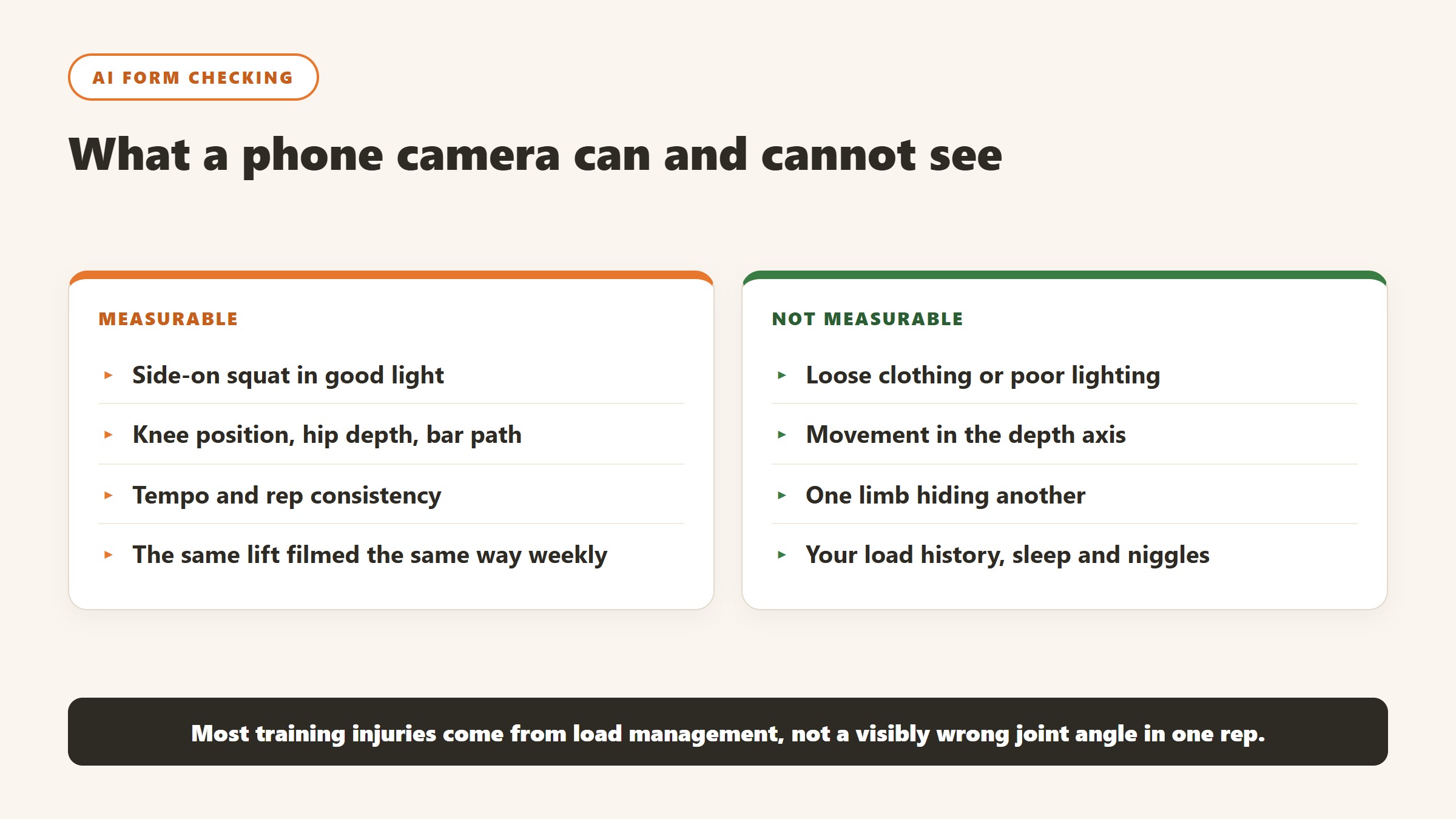
Across the six apps we reviewed (Kemtai, FitForm, Onyx, Vi Trainer, BurnAI, Happy Fit AI), the pattern from user reviews is consistent:
- Bodyweight squats, push-ups, lunges, planks: most apps handle these well in good lighting
- Yoga, mobility, stretching: solid coverage, especially Kemtai and Onyx
- Barbell lifts: nearly universal failure, the bar occludes keypoints and the side-camera angle most apps require breaks down once weight is on the back
- Multi-joint dynamic movements (snatches, cleans, kipping): not supported by any consumer app yet
How AI pose-correction works (pose estimation, keypoints, 2D vs 3D)
Every app in this category sits on top of the same general technology: a pose estimation model that watches your video feed and places "keypoints" on your body, usually 17 to 33 of them covering joints (ankles, knees, hips, shoulders, elbows, wrists) plus extremities and facial landmarks. The most common underlying tech is Google's MediaPipe BlazePose or a custom-trained variant of it. Once keypoints are tracked, the app calculates joint angles frame by frame and compares them to a reference "ideal" range for the exercise.
The big technical fork is 2D vs 3D pose estimation. Most consumer apps run 2D, which means they only know where your joints are on the flat screen. They infer depth from heuristics (limb length ratios, perspective). Newer apps (Kemtai and BurnAI advertise this) use 3D pose estimation, which gives them better angle accuracy on side-on or angled cameras but requires more compute. In practice, 3D matters most for rotational movements and any exercise where one body part occludes another.

#1: Kemtai review, the polished web-camera coach
Kemtai is the most documented and most reviewed app in the category, originally built for physical therapy clinics and then opened to consumers. It runs entirely in the browser (no app install) and uses your webcam. The exercise library is the broadest we found, well over 1,000 movements with specific form-cue thresholds documented per exercise.
What stands out in user reviews is how specific the feedback is. Instead of "good rep" or "fix your form", Kemtai will call out "knees moving inward" with a visual overlay showing the keypoint drift, or "torso angle too forward" with the actual measured angle. That specificity is what makes it trustable.
What it does well
- Largest exercise library with detailed form-cue documentation
- Web-based, no install, works on any device with a camera
- Strong on rehab and mobility (its PT origin shows)
- Real-time visual overlay, not just audio
- Free tier with workout library
Where it falls short
- Webcam-only setup means you're tethered to a laptop or monitor
- No barbell support documented (consistent with the category)
- Subscription gets pricey for advanced features ($19/month at last check)
- The UI still leans clinical, it feels like rehab software with a coat of paint
Pros: broadest library, most specific cues, free tier viable
Cons: laptop-only, clinical UI, weak on heavy strength work
Best for: rehab, mobility, bodyweight strength, people working out near a laptop
#2: FitForm review, the video-review model for lifters
FitForm takes the opposite approach to real-time correction. You film a set on your phone, upload it, and the app returns a frame-by-frame breakdown of joint angles and a written form analysis within minutes. It's marketed primarily at lifters, and the bar-tracking is more credible than the real-time apps because the analysis happens after the fact with better model resolution.
User reviews on r/powerlifting and r/weightroom are cautiously positive. The recurring praise: it's the closest thing to a remote coach review for $15/month. The recurring complaint: it sometimes misses obvious cues (a clearly rounded lower back marked as "good") and the analysis can feel generic on compound lifts.
What it does well
- Asynchronous video analysis with frame-by-frame breakdown
- Bar path tracking on filmed lifts
- Designed for barbell movements specifically (squat, bench, deadlift)
- Saves video history so you can compare across sessions
Where it falls short
- No real-time feedback, you have to film and wait
- Misses subtle cues that an experienced coach would catch
- Single-camera-angle limits depth analysis
- Smaller exercise library than Kemtai
Pros: built for lifters, bar path tracking, history view
Cons: not real-time, occasional miss on obvious form breaks
Best for: home lifters who want async form review on barbell lifts
#3: Onyx review, the bodyweight and HIIT form coach
Onyx is the most polished consumer mobile app in the category, iOS-first with a slick UI and a workout library focused on bodyweight strength, HIIT, and mobility. The form correction works in real time via your phone's front camera while you're working out, with audio cues like "drop your hips" or "fully extend".
App Store reviews average 4.7 stars across 30K+ ratings, which is genuinely strong for the category. The complaints cluster around the same thing: occasional false positives on form errors when lighting is bad or the camera angle drifts.
What it does well
- Best mobile-first UX in the category
- Strong real-time audio cues that don't break your flow
- Solid bodyweight and HIIT programming on top of the form coach
- Clean exercise progressions
Where it falls short
- iOS-only at the time of review (Android app perpetually "coming")
- No barbell support
- Bodyweight programming can feel basic for advanced trainees
- Subscription ($14.99/month or $99/year) on top of needing the phone propped up
Pros: best mobile UX, real-time cues, strong reviews
Cons: iOS-only, no heavy strength, propping problem
Best for: intermediate home exercisers doing bodyweight and HIIT
#4: Vi Trainer review, the voice-led running and strength
Vi Trainer is the odd one in this set because it started as an audio-only AI running coach (sold with Vi-branded headphones) and has been expanding into pose-based strength coaching. The strength coaching uses your phone camera and is much newer than the running side, with a smaller exercise library and less documentation on which form errors it catches.
The audio-first interface is the differentiator. If you hate looking at a screen during workouts, Vi talks to you the way a trainer would, telling you what to fix without making you read it on a phone propped across the room.
What it does well
- Voice-first coaching feels natural mid-workout
- Strong for runners who also do strength
- Adaptive programming based on your data over time
Where it falls short
- Pose-correction feature set is the thinnest in this group
- Conflates running coach reputation with newer strength feature
- User reviews on the strength side are mixed, many users still using it primarily for running
Pros: voice-first, runner-friendly, adaptive programming
Cons: pose features are immature, small exercise library
Best for: runners adding home strength who hate looking at screens
#5: BurnAI, the AI-first form analysis newcomer
BurnAI is a 2025-launch app that markets itself as "AI-first" form correction, claiming 3D pose estimation and a proprietary model trained specifically on fitness movements rather than off-the-shelf MediaPipe. The published feature claims are strong: real-time 3D analysis, specific form-error callouts, and a focus on hypertrophy programming.
The catch: it's new, and user reviews are sparse. App Store rating is 4.4 stars but on only a few hundred reviews, which is too thin to draw strong conclusions. The Trustpilot reviews that exist split between enthusiastic early adopters and complaints about billing issues that read like growing pains.
What it does well
- Claims 3D pose estimation (rare in consumer apps)
- Documented form-error library is specific and well-organized
- Strong programming layer (real hypertrophy progressions, not just random workouts)
Where it falls short
- Too new to have a long-term review track record
- Billing complaints in early Trustpilot reviews
- 3D claims are not independently verified
- Higher price point ($19.99/month)
Pros: most modern tech stack on paper, strong programming
Cons: unproven, new-app teething issues
Best for: early adopters who want the most ambitious tech and don't mind being beta-ish
#6: Happy Fit AI, the gamified form coaching
Happy Fit AI takes a different angle: gamified, casual, designed for people who would never call themselves "gym people". Form correction is real-time but the feedback is softer, more "let's adjust" than "wrong, fix it". The app leans hard into streaks, badges, character avatars, and short 10-minute sessions.
This is the right pick for a specific audience: someone who has bounced off serious fitness apps and needs the game-loop pull to actually show up. The form correction is real, just less granular than Kemtai or Onyx.
What it does well
- Genuinely fun and low-friction
- Short sessions reduce barriers to consistency
- Good for absolute beginners
Where it falls short
- Form correction is shallow compared to category leaders
- Game elements can feel patronizing to experienced exercisers
- Exercise library skews very simple
Pros: fun, easy-to-use, retention-focused design
Cons: not for serious trainees, basic form coaching
Best for: total beginners who need motivation over precision
"Partial" means the documentation suggests support but user reviews report inconsistent results. "Limited" means the feature exists but is shallow.
Where AI pose apps still fail
The honest list of category limitations, applicable to every app reviewed:
- Barbell back squat and deadlift: the bar occludes the spine, keypoints get unreliable, side-camera setups break when you walk the bar out. Not solved.
- Heavy loads in general: form changes under load in ways the AI's reference range (trained on submaximal demos) does not anticipate
- Mirror confusion: working out facing a mirror confuses every app we found because the model sees two skeletons
- Tight rooms: most apps need 6 to 8 feet of camera distance to see your full body, which is more space than a lot of apps acknowledge in their setup guides
- Multi-person frames: a kid or partner walking through the frame mid-set frequently kills the analysis
- Loose clothing: long shirts and baggy pants degrade keypoint accuracy noticeably
- Bad lighting: backlighting from a window behind you turns you into a silhouette and the model loses keypoints
Camera setup checklist
Five things that matter more than which app you picked:
- Distance: 6 to 8 feet of camera-to-you space, minimum. You need your full body in frame plus a foot of buffer above your head and below your feet.
- Angle: most apps want a side-on or 45-degree angle for squats and deadlifts, head-on for push-ups and planks. Read the app's setup guide, do not improvise.
- Height: camera at hip height is the safest default. Floor-level cameras distort proportions and break keypoint inference.
- Lighting: light should come from in front of you or above, never behind. A window at your back is the worst setup.
- Clothing: fitted clothing in colors that contrast with your background. Black leggings on a black couch is hard mode for the model.
Privacy: on-device vs cloud video processing
This is the part nobody talks about, but it matters. Some apps run pose estimation entirely on your device (your video never leaves the phone or laptop). Others stream video to a cloud server for processing. Based on each app's privacy policy and FAQ documentation:
| App | Processing | Video stored? |
|---|---|---|
| Kemtai | On-device (browser) | No, processed in browser |
| FitForm | Cloud upload required | Yes, for analysis history |
| Onyx | On-device | No |
| Vi Trainer | On-device for pose, cloud for adaptive coaching | Partial |
| BurnAI | Hybrid (per published docs) | Partial |
| Happy Fit AI | On-device | No |
For most people this is not going to change the buying decision, but if you are working out in your bedroom and would rather your video never touch a cloud server, the on-device options are Kemtai, Onyx, and Happy Fit AI.
Free hack: using ChatGPT or Gemini vision for one-off form checks
Before you commit to a $15-per-month subscription, try this. Film a single set of the exercise you want feedback on, take 3 to 5 still frames at key positions (bottom of squat, top of deadlift lockout, mid push-up), and upload them to ChatGPT (with vision) or Gemini with a prompt like:
"Analyze the form in these images of a [exercise]. Identify any form errors a strength coach would call out, specifically watching for [knee valgus / lumbar flexion / depth / hip hinge / bar path]. Be honest and specific."
The general-purpose vision models are not as good as a dedicated pose app at real-time tracking, but they're surprisingly competent at single-frame analysis and they're free if you already have a ChatGPT Plus or Gemini subscription. We are not claiming this beats a real form coach. It's a useful gut check for the minority of people who only need form input occasionally.
Which app should you pick? By training style
You do bodyweight and mobility near a laptop: Kemtai. Largest library, most specific cues, free tier viable.
You lift barbells at home and want async review: FitForm. The only credible option for barbell work.
You do HIIT and bodyweight on your phone: Onyx. Best mobile UX, strong real-time cues.
You run and want strength to plug in: Vi Trainer. Voice-first is genuine differentiation.
You like being on the bleeding edge: BurnAI. Most modern stack on paper, accept the new-app risk.
You are a total beginner who needs motivation: Happy Fit AI. The right tool for the right user.
More from AIToolsBakery: best AI workout apps, best AI tools for personal trainers, how to choose personal trainer software.
For a closer look, see our best AI running coach apps.
Tools mentioned in this guide

Written by
FazFaz is the founder of AIToolsBakery. Some tools here are tested hands on. Others are assessed from vendor documentation and pricing verified on the live page, and every review says which one it is. Sponsors can buy a position in a guide. They cannot buy the score, the criticism, or silence about a better option.
How we test and how we make money →