RestOrTrain review: an AI coach for cycling, running, swimming and triathlon that you talk to, on iPhone, iPad, Mac and Android. Free gets you a plan and a few chat messages a month. Pro costs $14.99 a month or $134.99 a year in the US. After more than a week on three accounts, I score it 4.7 out of 5.
Verdict at a glance
RestOrTrain is a coach you talk to. You tell it your goal and how many hours you’ve got, and it builds the plan, sends the workouts to your watch or bike computer, tells you how each session should feel, and reviews it when you’re done. When your week falls apart, you type one sentence and it rebuilds the week and tells you what that costs you.
I used it for more than a week on three accounts, from a complete beginner to a year-long Ironman plan on Pro. The chat is the reason to get it. My score: 4.7 out of 5.
| Best for | Cyclists, runners and triathletes who want a coach they can talk to, from a first 5K to a full Ironman |
| Platforms | iPhone (iOS 18 or later), iPad, Apple silicon Macs and Android (8.0 or later). No web app |
| Sports | Cycling, running, swimming and triathlon, plus gym sessions with exercises and sets |
| Free | A few chat messages a month (about 7 in my test), plus your plan, the calendar, workouts sent to your devices and the indoor player |
| Pro (US) | $14.99 a month or $134.99 a year. No free trial is listed; the free tier stands in for one |
| Ratings | 4.8 from 669 ratings on the US App Store, 4.8 from 1.12K reviews on Google Play (10K+ downloads) |
| What stood out | Plan changes by chat, with an Accept step for every new plan, pushback when a request is a bad idea, workout notes that explain the session, careful handling of pain, and reviews of each run and each week |
| What to know | The free allowance is small, Strava history comes in by archive upload rather than live sync, and there is no web app or workout library |
What you actually get
Forget the feature list for a second. This is what it actually did for me, on my own accounts:
- A plan built around your life. A year-long Ironman plan in five dated phases on my Pro account, and a 9-week run-walk 5K plan for the beginner that kept every weekday session to 30 minutes, as asked.
- Change anything in one sentence. Move a session, skip a day, double up, squeeze a week into three days. It explains the trade-off and makes the change. A new plan waits until you tap Accept.
- A coach that says no when it should. It wanted proof before letting me skip a foundation phase, kept six hours between a long ride and a gym session, and sent a sore knee to a physio instead of guessing.
- Every session explained. The workout notes tell you how a session should feel, and every cardio step has a zone target.
- Feedback after you train. Tap Review on a run and it tells you what the numbers mean. Ask for a week review and it tells you the one thing to fix next week.
- It comes to you. A 7:30 PM push with today’s session and the one thing to get right.
- Your devices keep working. Workouts go out to Garmin, COROS, Wahoo, Zwift, Hammerhead, Rouvy and Intervals.icu, free on every account.
On the yearly plan that’s about $2.60 a week, less than TrainerRoad or TrainingPeaks Premium charge.
How I tested it
I used RestOrTrain on Android (version 2.2.1) for more than a week in October 2026, on three accounts:
- My Pro account. RestOrTrain switched it to Pro for this review. It holds my goal of a first Ironman, with activities and daily health data coming in from Intervals.icu and a COROS watch. I followed the plan, asked for a review of a run and of a full week, and lived with the notifications every day.
- A free account set up as an advanced athlete profile: cycling and running, gym access, more than 8 hours a week. I used it to throw plan changes at the chat until the free messages ran out.
- A free account set up as a complete beginner: running only, no exercise for three years, nothing connected. I wanted to see how it treats someone who’s unsure and needs a push.
RestOrTrain is paying for this review. That doesn’t buy the verdict, and the downsides below stay in.
Setup takes about three minutes
Sign up is quick: your name, your main sports, your goal in your own words, and your gender. Max heart rate, threshold pace and FTP are optional. Each screen tells you to leave it blank if you’re not sure, and the coach can estimate them later. Then it asks about AI summaries on your Strava activities and about notifications, and you can skip both.
Take the goal box seriously. The app says athletes who describe their goal carefully get much better results, and I believe it: the more you write there, the fewer questions the chat has to ask later.
The last step is connecting your data. Garmin, Intervals.icu, Wahoo, COROS, Hammerhead, Rouvy, Zwift and WHOOP are all listed. On the advanced account I connected Intervals.icu and carried on.
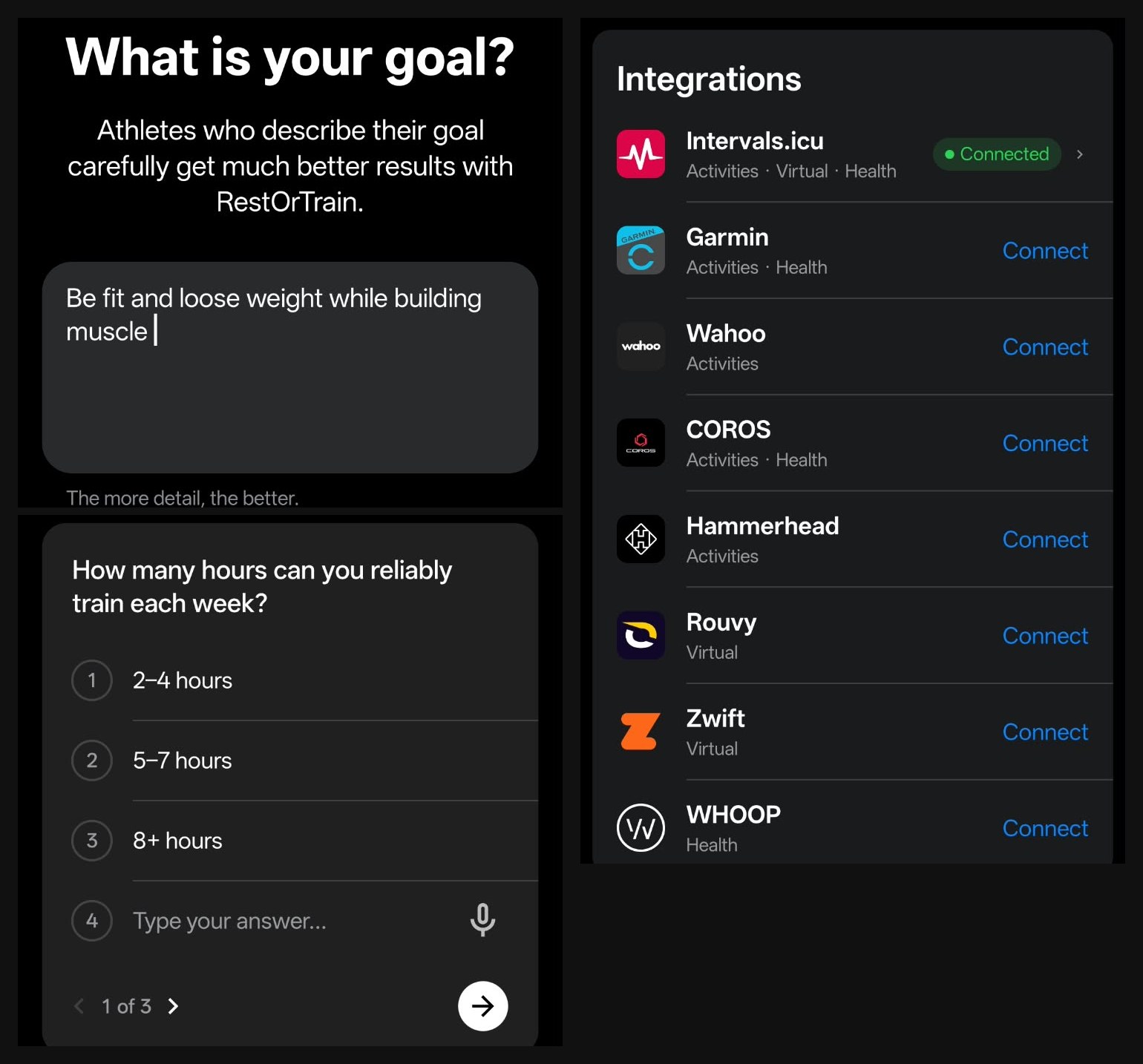
Setup on my advanced athlete account, 27 October 2026: the goal screen, the first question card in chat, and the integrations list.
The first plan: a few taps, then you approve it
The chat opens with a suggested first message. The coach answers with short question cards (hours or sessions a week, any injury, what equipment you have), and you tap an answer or type your own. Then it proposes a plan.
What I liked straight away: it won’t guess. With no training history synced, it said it wouldn’t invent a starting level, and told me how to bring my history in through Data Sync or a manual .fit upload. On the advanced account it set the endurance sessions by heart rate and effort zones instead of guessing wattages, until real data arrived.
Every plan shows up as a proposal card with dated phases, a goal for each one, and two buttons: Reject and Accept. Nothing is saved until you tap Accept. Then it offers to put the first week on your calendar with one tap on a suggested reply.
Changing the plan by chat: it adapts, and it pushes back
This is the best thing about RestOrTrain. On the advanced account I asked for one change after another in plain English, and every time it explained the trade-off before it moved anything.
Skipping the foundation phase
Its first proposal was a 12-Week Fitness and Strength plan that opened with four weeks of Foundation and Baselines. I said I had the build and the experience to skip that, and asked what the minimum requirements would be.
It didn’t just say yes. It gave me a list:
- 6 to 8 consecutive weeks of training before starting the plan
- An average of 8+ hours a week over the last month
- At least 2 strength sessions a week for six weeks, with recorded progressive loads
- At least 3 endurance sessions a week, including one of 90+ minutes
- No training missed to unusual fatigue, persistent soreness or pain in the last 3 weeks
- A recent benchmark in your main endurance sport
Then it pointed out that it couldn’t check any of this until my history synced, and suggested skipping only the testing part, not the progression. When I said I met every requirement, it took my word for it, said so plainly, and rebuilt the plan as a 12-Week Advanced Recomposition in three phases: Performance Build (28 Oct to 24 Nov), Intensification (25 Nov to 22 Dec) and Recomposition Performance (23 Dec to 19 Jan). It even named the hard part: balancing hard endurance work, heavy lifting and a calorie deficit at the same time.
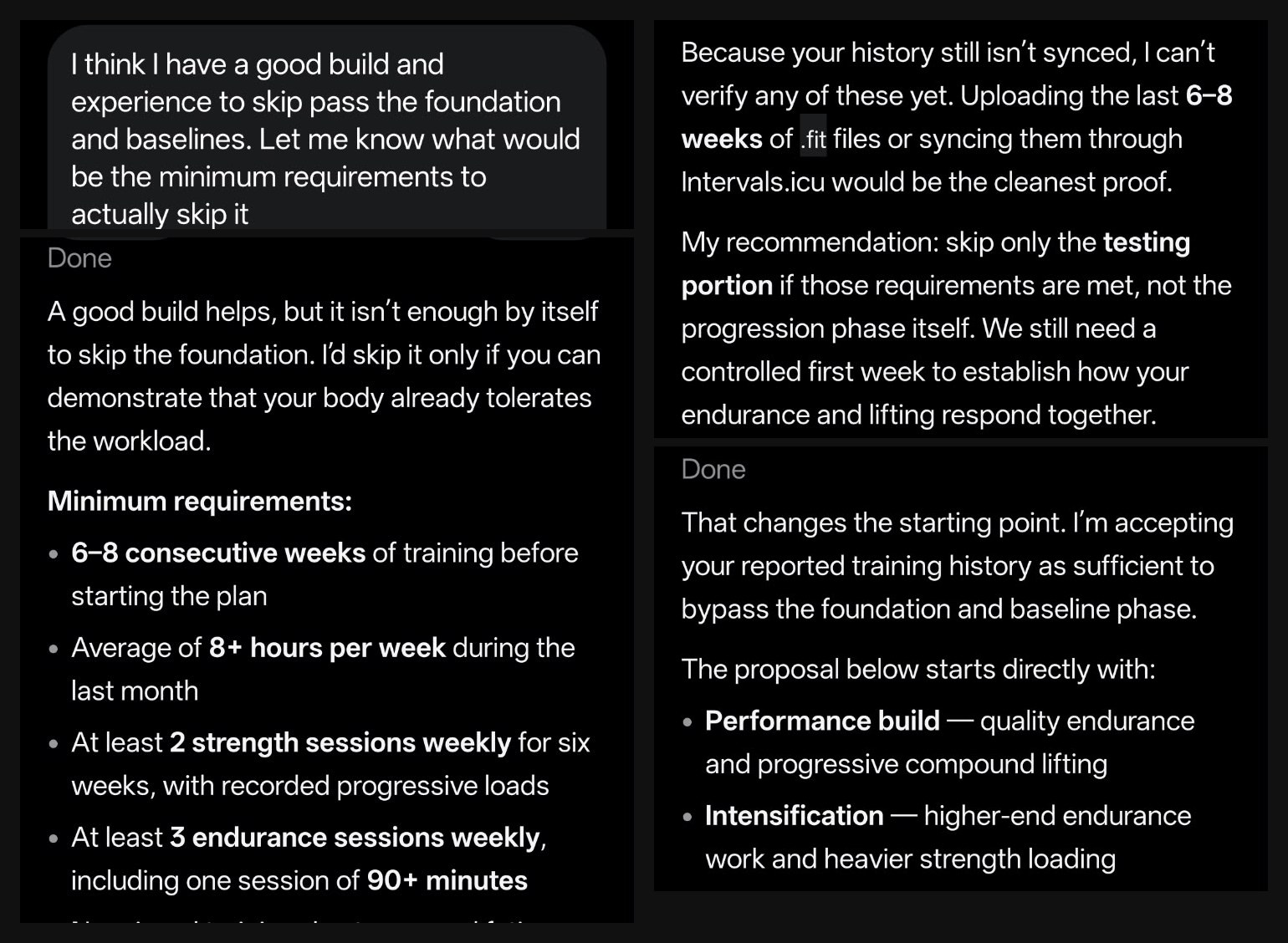
I asked to skip the foundation phase. It listed what I’d need first, said it couldn’t verify any of it yet, then accepted my answer and rebuilt the plan.
A full week, with a recovery day
One tap on Schedule my plan’s workouts and the first week was on the calendar: 9 hours 15 minutes, right in the plan’s 9 to 10 hour target. Two quality rides (3 x 12 minutes at threshold and 5 x 5 minutes of VO2), a 2 hour 30 minute long ride, three gym sessions, and Friday 30 October as a recovery day.
The gym sessions are written out properly. Strength A, lower emphasis, runs 75 minutes: a 10 minute warm-up, then back squat 4 x 5, bench press 4 x 6, Romanian deadlift 3 x 8 and chest-supported row 3 x 8, all at RPE 7, plus split squats and planks, with rest times for the big lifts and for the accessories.
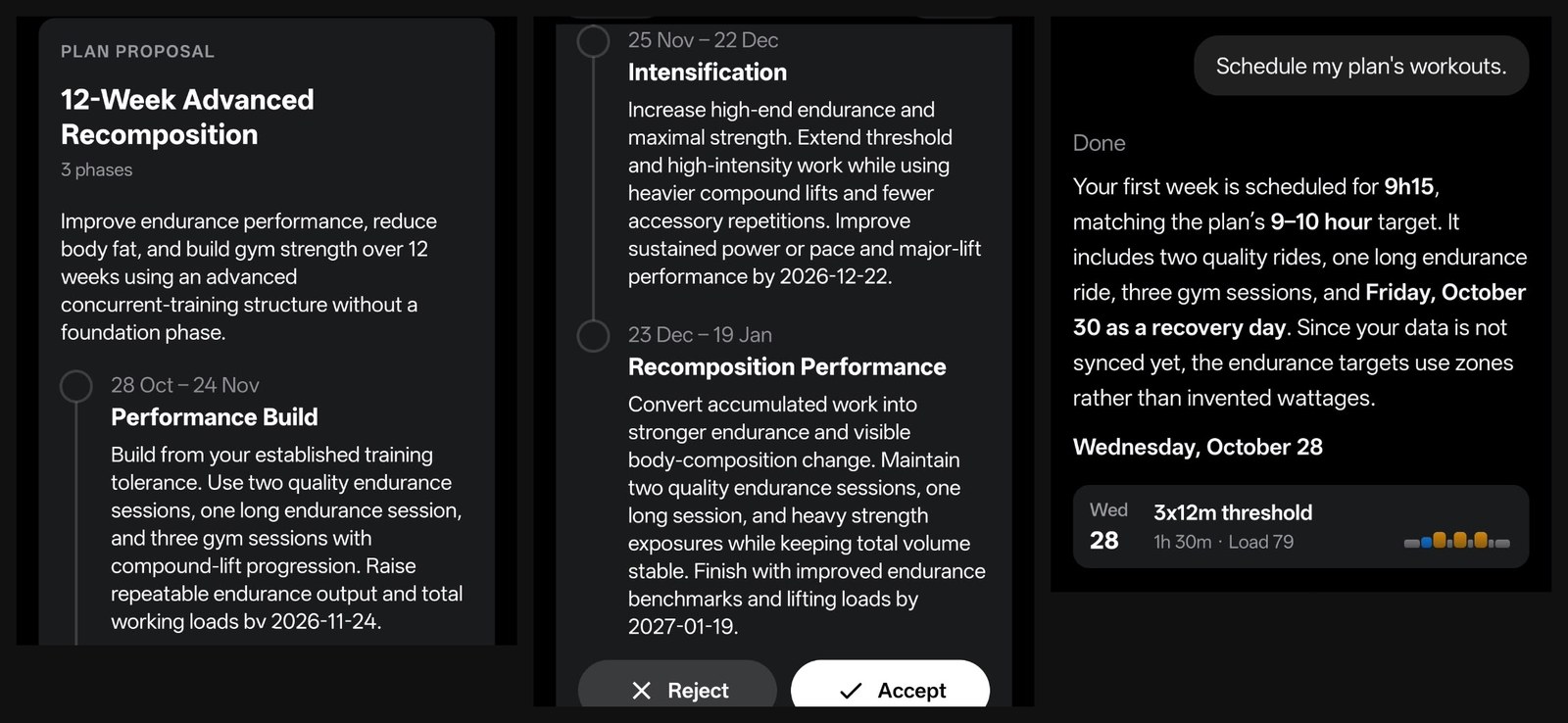
The Advanced Recomposition proposal with its Accept button, and the week it scheduled from one tap.
Moving, doubling and squeezing days
I told it I wasn’t free on Monday 2 November, where Strength C sat. It offered Wednesday 4 or Thursday 5 November, or skipping the session, and said it wouldn’t cram Strength C into the weekend or stack it on another hard session.
So I asked for two workouts on one day instead, to keep the next week as it was. It moved Strength C to Sunday 1 November after the long ride, marked Monday as unavailable, and kept the week at 9 hours 15 minutes. It also told me how to make the double day work: ride first, wait at least 6 hours, eat a full meal, then lift. And that advice went into the workout itself. Strength C’s notes say to do it at least 6 hours after the long ride, after a full meal.
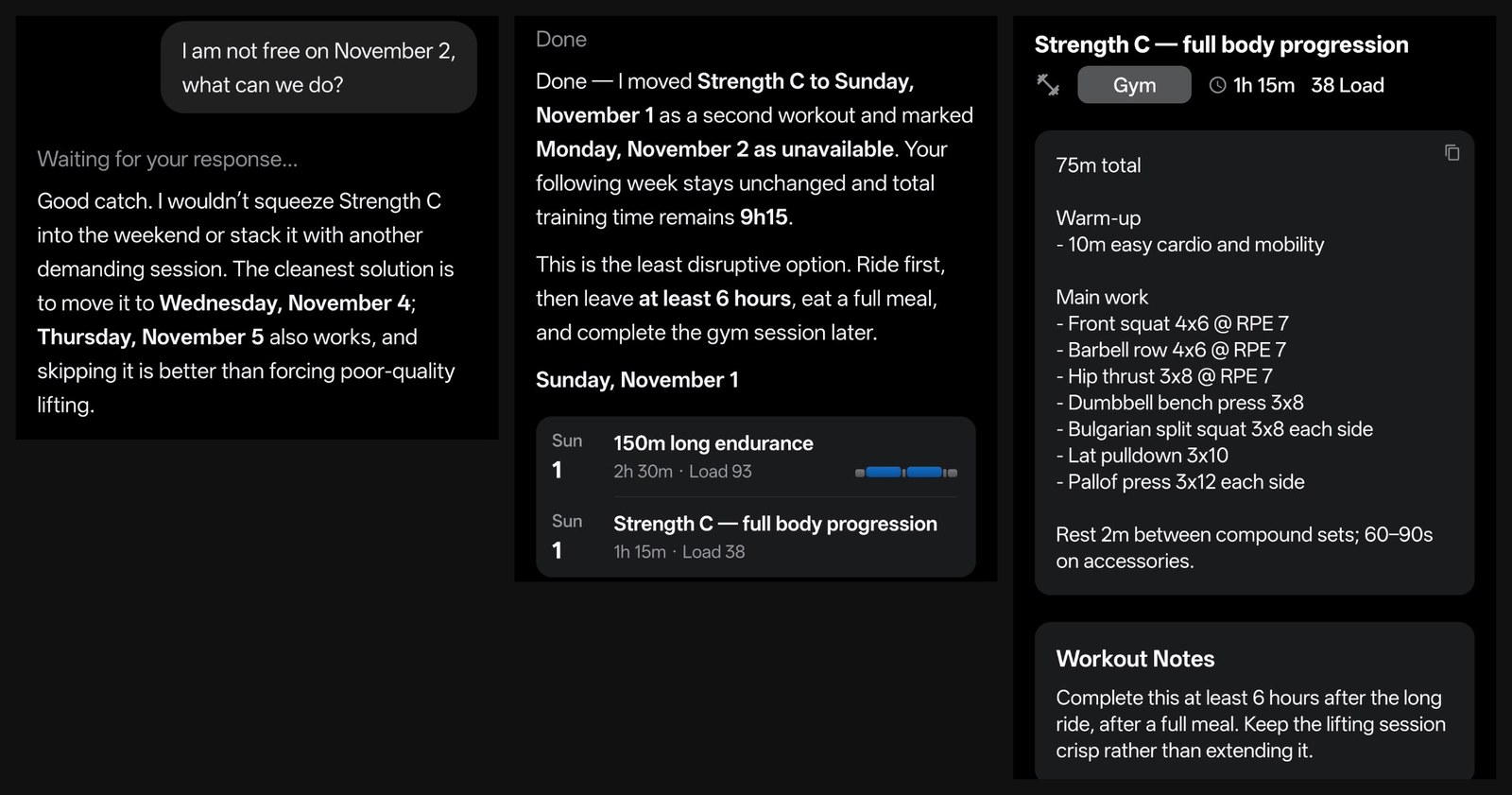
I wasn’t free on 2 November. It offered options, then moved Strength C to Sunday and wrote the 6 hour gap into the workout notes.
Then I pushed it further: fit the whole week into three days. It agreed, but called it a one-week compressed microcycle, not something to do every week, and paired the sessions up: Wednesday threshold ride plus Strength A, Saturday long ride plus Strength B, Tuesday VO2 ride plus Strength C, with 6 hours between each pair. Before changing anything, it asked which three days I wanted, because the spacing decides whether the rides keep their quality. I answered, and that’s where my free messages ran out. So the compressed week was proposed, not applied.
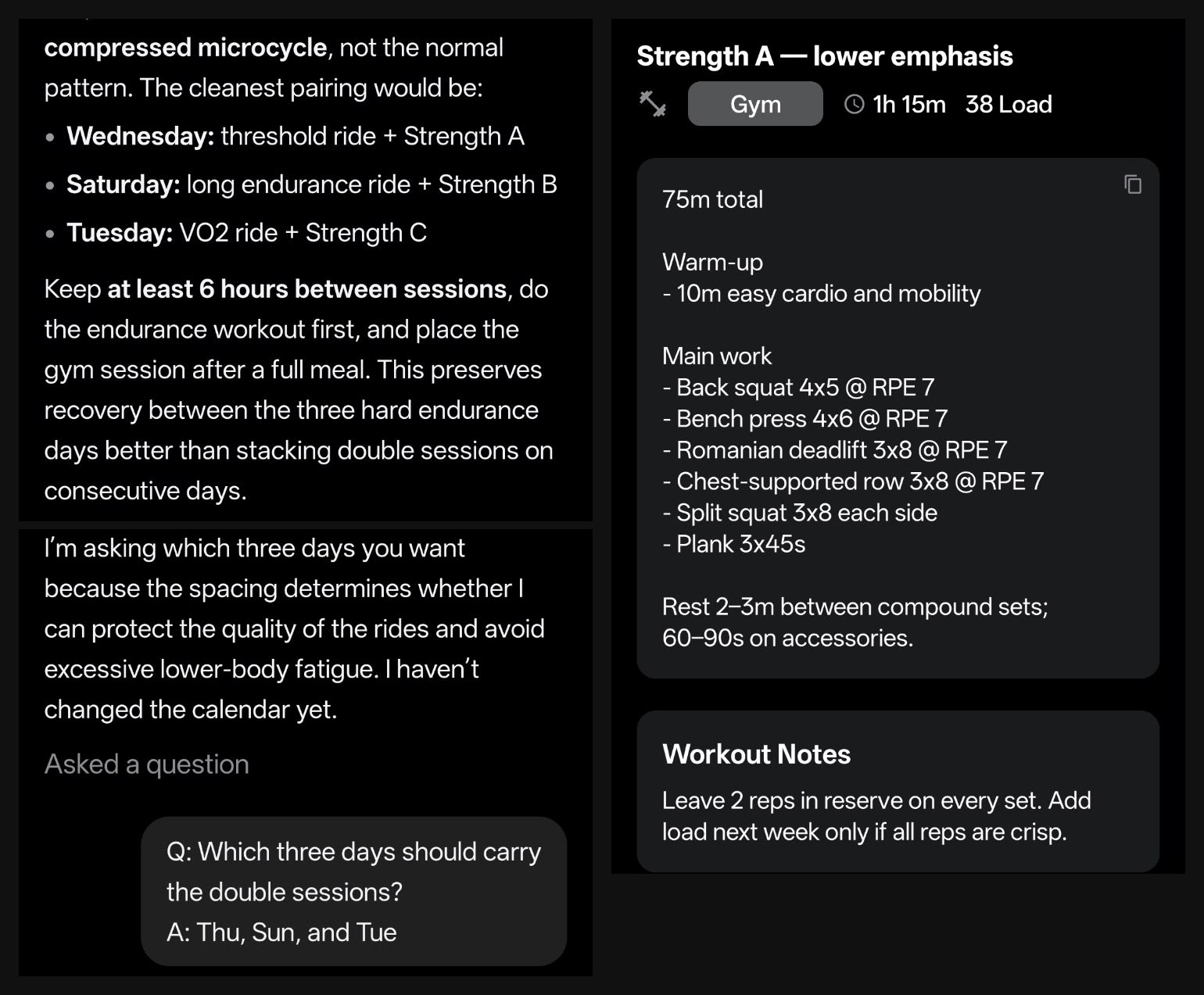
The three-day week. It asked which days to use before touching the calendar (“I haven’t changed the calendar yet”). Right: the Strength A session it had already written.
Workout notes that tell you how to do the session
Every workout has its structure and a short Workout Notes box, and that box is where the coaching shows. A few from my calendars:
- 5 x 5 minute VO2: “Hard but repeatable: every rep should look like the first. If power fades well below the range, cut the set short.”
- Recovery spin: “Flush the legs. Keep it truly easy so the next hard day counts.”
- Strength A: leave 2 reps in reserve on every set, and add load next week only if all reps are crisp.
- Easy run: conversational effort and a relaxed cadence, with Z1 and Z2 heart rate steps.
Every cardio step has a zone target, which made pacing easy. I knew how hard each part should feel without working anything out.
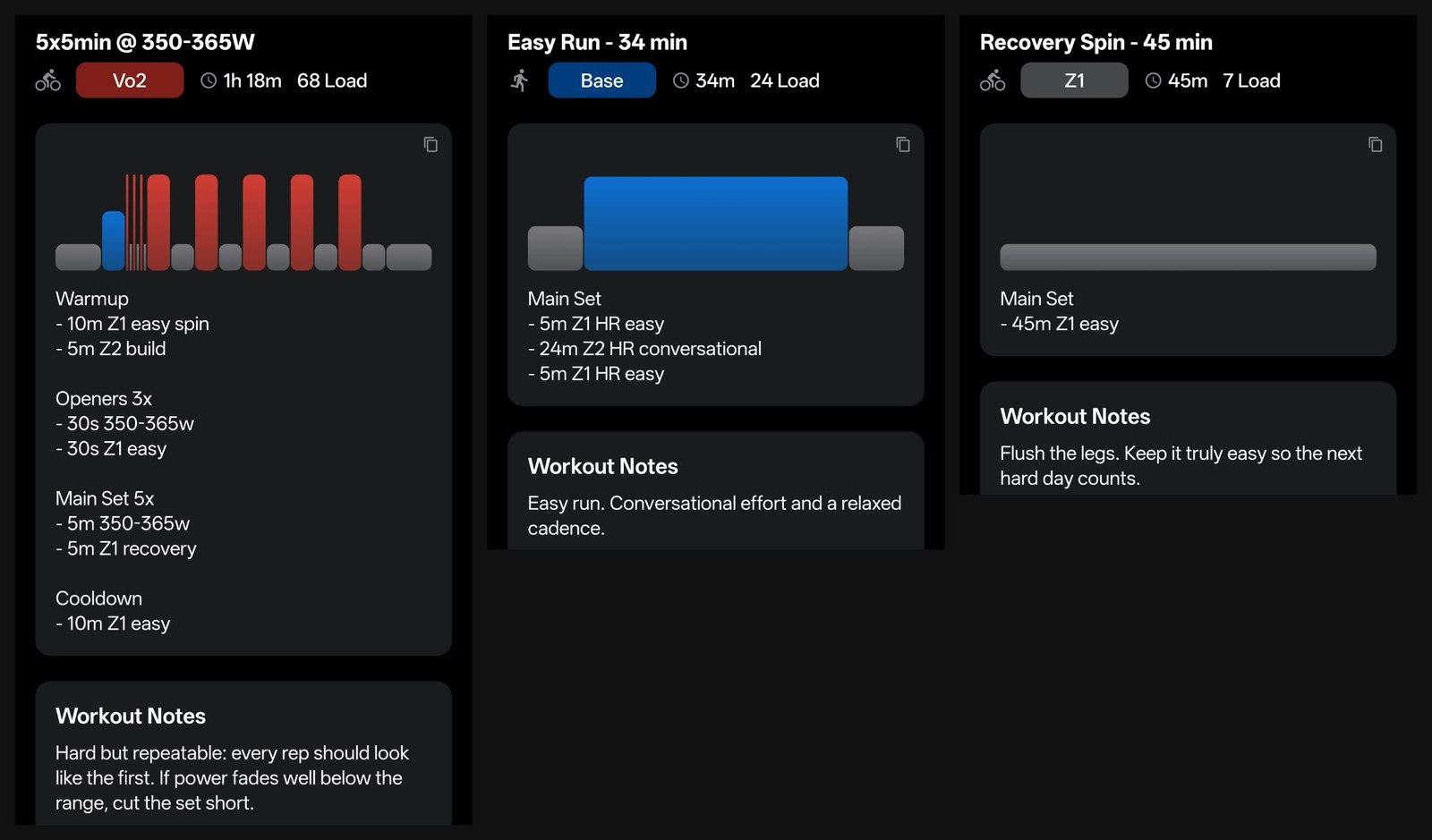
Workout notes on my Pro account: a VO2 ride, an easy run and a recovery spin.
A beginner who needs a push: honest, encouraging and careful
RestOrTrain markets itself to cyclists and triathletes, so I wanted to try the opposite: someone who hasn’t exercised in three years, sits at a desk all day, has quit before, and wants a coach to keep them going without paying for a personal trainer. I set up a fresh free account as that person, with one goal: run 5K without stopping.
Custom Instructions it actually follows
Before the first message I added Custom Instructions in Settings. The screen explains that the coach learns most things as you chat and keeps them in Memory, and that Custom Instructions are for standing rules it should always follow. I gave it these:
- I’m a complete beginner. Explain any term like zones, pace or load the first time you use it.
- I can only train after 7 PM on weekdays, and after 10 AM on weekends.
- Keep weekday sessions to 30 minutes or less.
- If I skip a session, don’t pile it onto the next day.
- Talk to me in plain, encouraging language. Be honest if I’m making excuses.
It kept every one. It explained pace (how fast you run) and training load (the overall stress your sessions create) the first time it used them, and later Z1 and Z2, with the talk test for anyone without a heart rate monitor: you should be able to speak in full sentences the whole time.
The plan: run-walk first
Three tap questions (3 sessions a week, no injuries, can’t run nonstop yet), and it came back with a 9-Week Beginner 5K plan in three phases:
| Phase | Dates | What it builds |
|---|---|---|
| Run-Walk Foundation | 28 Oct to 17 Nov | The habit and basic tolerance for impact, up to 20 minutes of steady run-walk |
| Continuous Running Build | 18 Nov to 8 Dec | Longer running blocks, fewer walking breaks, up to 30 minutes of continuous running |
| 5K Completion | 9 Dec to 29 Dec | Two short weekday runs and a longer weekend run, until 5K is done without stopping |
That’s a sensible beginner plan, and it stuck to the 30 minute weekday limit from day one.
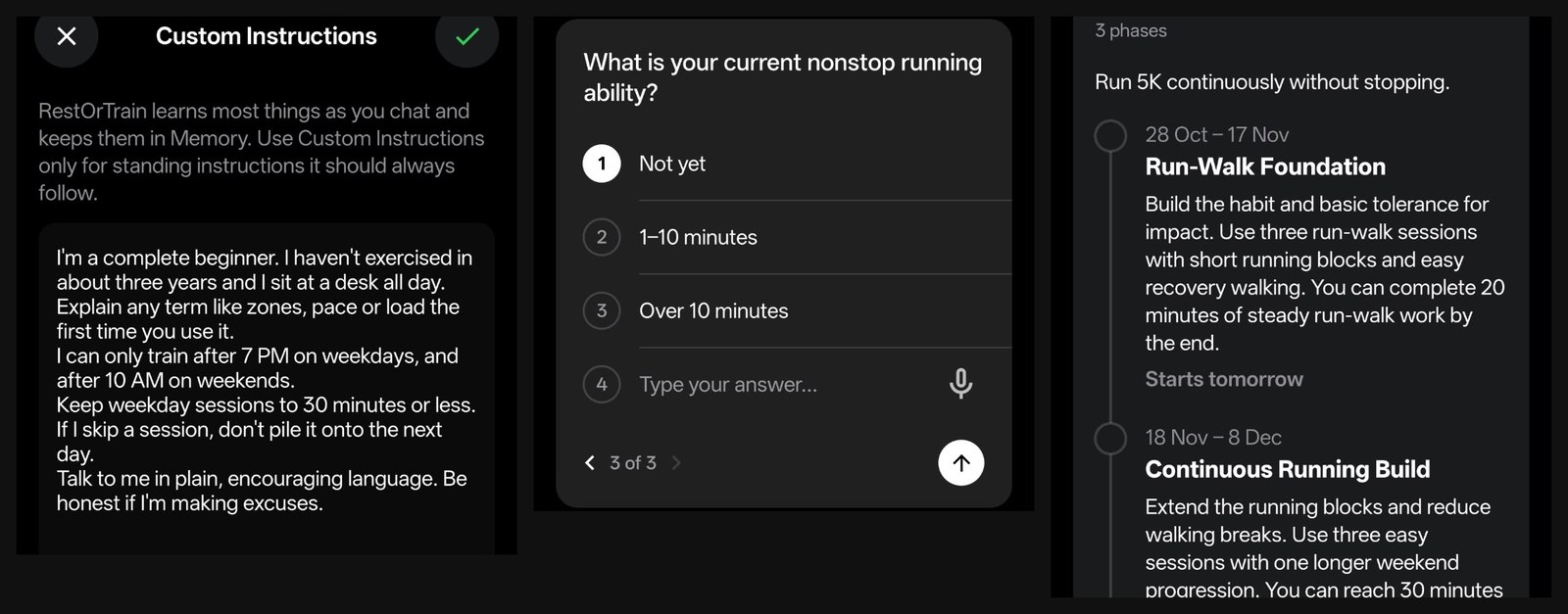
The beginner account: my Custom Instructions, one of the three tap questions, and the 9-Week Beginner 5K proposal.
Reassurance that doesn’t flatter
I told it I’d tried before and quit after a week, and asked why this time would be different. The first thing it said was the honest bit: the plan alone won’t make this time different. What can change is the setup around you. Three short run-walk sessions instead of a runner’s schedule, weekday sessions that fit the time you actually have, no punishment workout after a missed day, and week one counts as a success if you just show up. And if I kept choosing not to train, it would say so and change the routine, rather than pretend the problem was fitness. That’s my “be honest if I’m making excuses” rule at work.
It checks your rules before breaking them
Then I asked it to move tomorrow’s session to 6 AM. It spotted that 6 AM broke my weekday rule and asked first, with three options: schedule 6 AM anyway, keep it after 7 PM, or move it to the weekend. I kept the rule, and it put the first session on Wednesday 28 October after 7 PM: 6 x 1 minute jog with 2 minutes walking, 28 minutes in total.
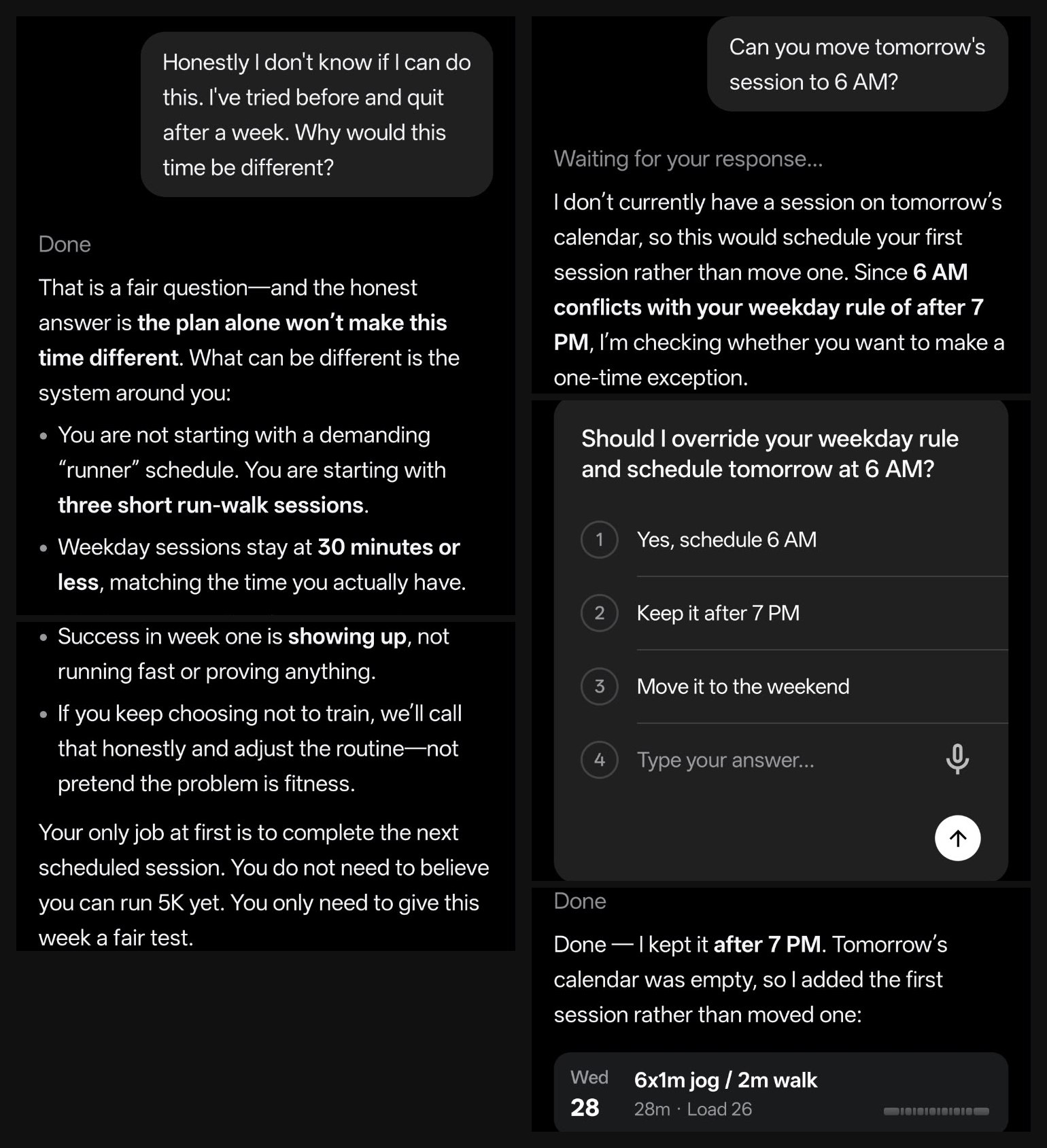
Left: the honest answer to “why would this time be different?”. Right: it caught that 6 AM broke my own rule and asked before scheduling anything.
Pain: it knows when to send you to a professional
For a beginner, this is the one that matters. I said my calves were sore two days after a session, and that I got a sharp pain on the outside of my knee about 10 minutes into running, which went away when I stopped.
It treated those two very differently:
- Calves: soreness two days after a first session can be normal after three years off. It called it delayed-onset muscle soreness, a dull, tight ache that usually peaks 24 to 72 hours after unfamiliar work.
- Knee: sharp pain that shows up at the same point every time isn’t something to run through. Don’t run today, walk only if it’s completely pain-free, and get it checked by a physiotherapist or clinician before running again.
- Warning signs: get prompt care for knee swelling, locking, giving way or pain while walking, and urgent help for one-sided calf swelling, warmth or redness, or chest pain or breathlessness.
Then it asked two quick questions to judge how urgent it was (does the knee hurt walking or on stairs; are both calves sore and dull, or is one swollen or warm), and finished with “No make-up session”, sticking to my skip rule. It never tried to diagnose the knee. That’s exactly what an AI coach should do, and it lines up with RestOrTrain’s terms, which say its advice is not a substitute for a doctor.
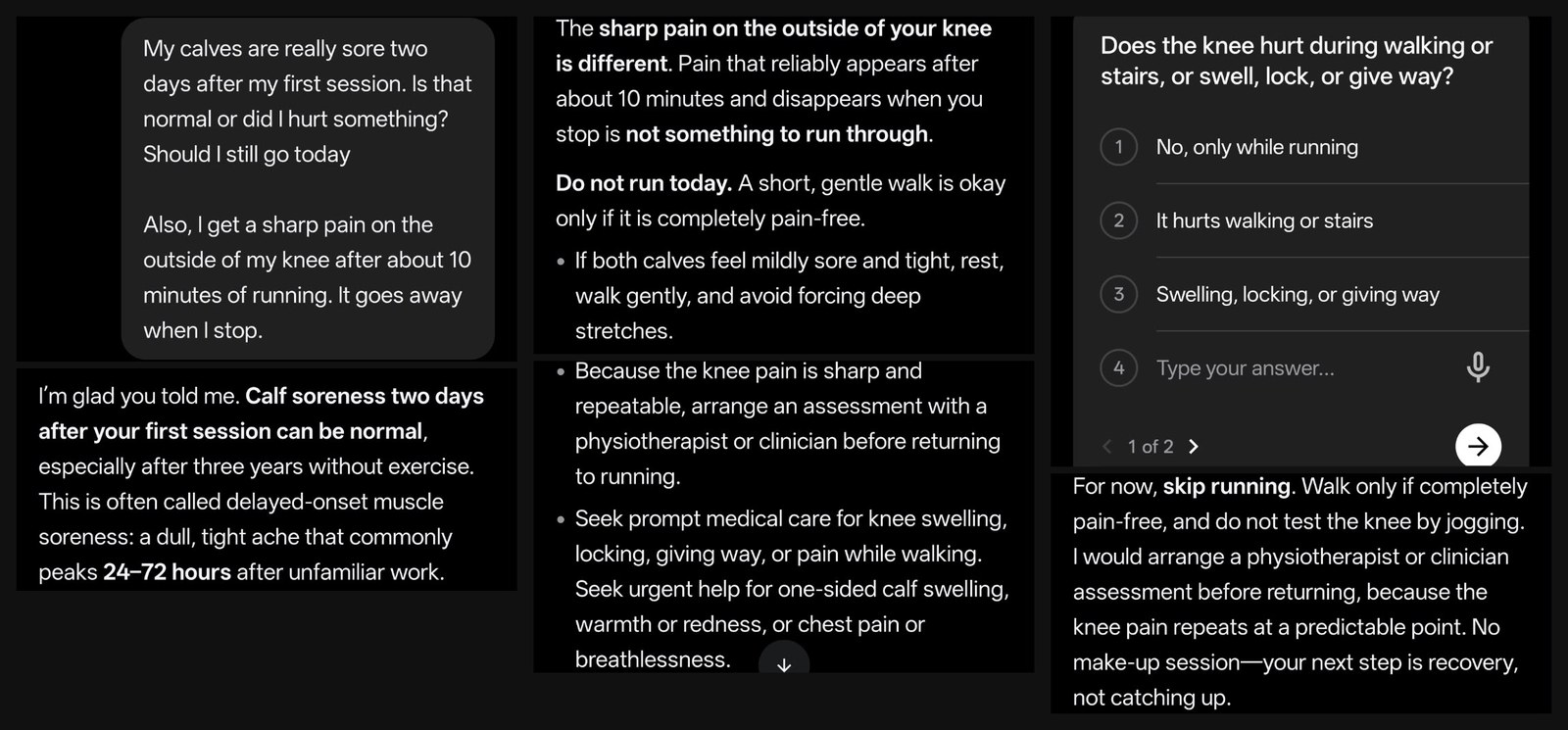
My calf and knee question, its answer, the triage question, and where it landed: skip running, see a physio, no make-up session.
The chat ran out there, at about 7 messages, so the plan summary still said no injury had been reported, and Wednesday’s run-walk was still on the calendar. With the conversation finished I’d expect it to update both. On the free tier I couldn’t get to that step.
Pro on a real goal: a year-long Ironman plan
My own account is where I used RestOrTrain day to day. The goal: a first full-distance Ironman, on 9 to 12 dependable hours a week.
A 52-week plan that admits what it doesn’t know
The plan is called First Ironman Completion, and it runs in five phases from 19 October 2026 to 17 October 2027:
| Phase | Dates | Focus |
|---|---|---|
| Foundation and race selection | 19 Oct to 15 Nov | A repeatable three-sport routine, regular swimming and easy running, and choosing a realistic race |
| Aerobic base | 16 Nov to 28 Feb | Broad endurance with most work easy, longer long rides and runs, basic strength |
| Endurance build | 1 Mar to 23 May | Longer key sessions, regular bike-to-run bricks, threshold work in small doses |
| Ironman-specific preparation | 24 May to 29 Aug | Race-day rehearsal: long steady rides, fuelling and hydration practice, open water |
| Taper and completion | 30 Aug to 17 Oct | Less fatigue, sharp race rhythm, arrive healthy |
The reasoning on the plan screen is what sold me. It said no race had been chosen and no training history was visible yet, so it was proposing a conservative 52-week arc “rather than pretending to know your current level”. The bike gets the biggest share because it’s the biggest endurance lever you can control, swimming builds frequency and skill, and running builds slowly to protect durability. Once I pick a race, the plan gets anchored to its date.
The Profile tab shows the plan, the current phase and how many days are left in it, so you always know where you are.
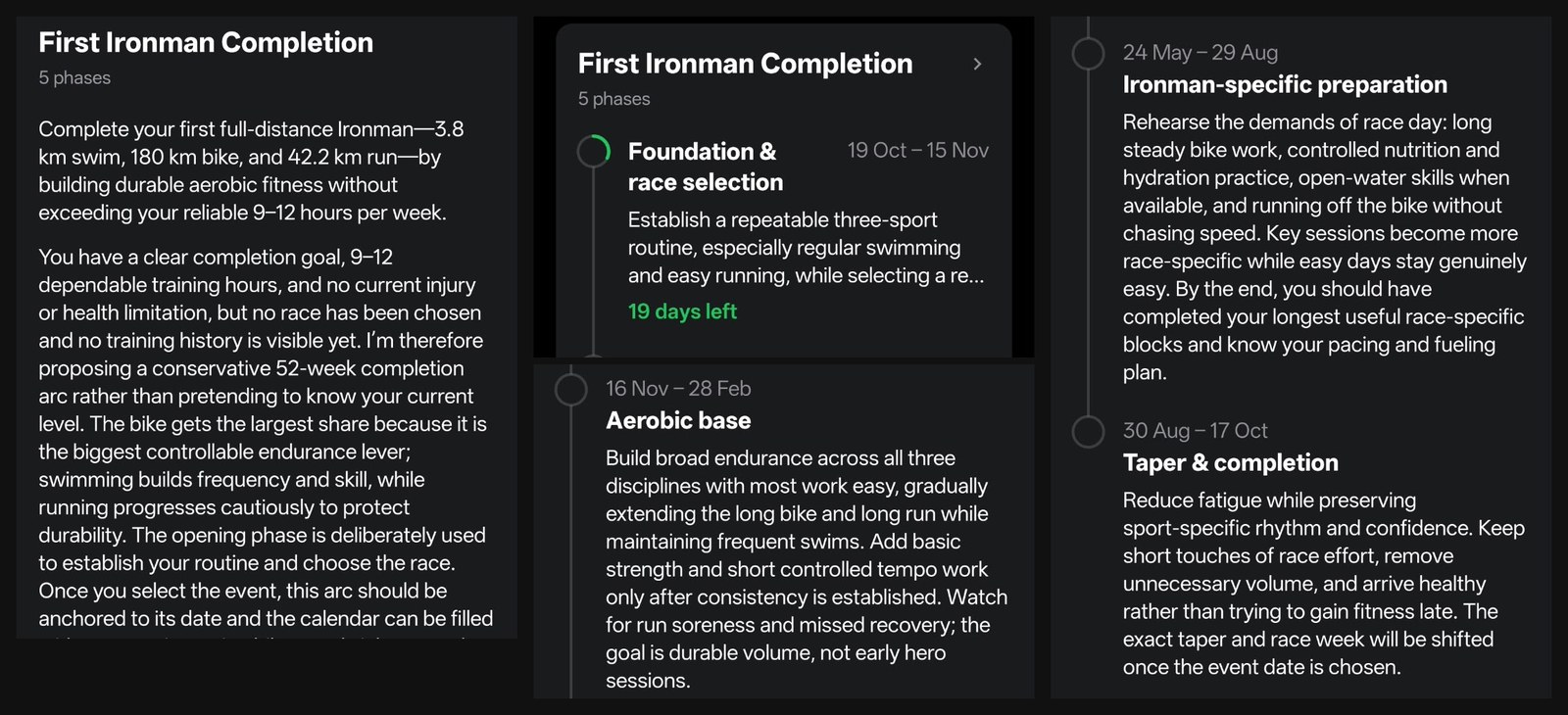
My First Ironman Completion plan on Pro, 27 October 2026: the reasoning, the Profile card with 19 days left in phase one, and the later phases.
The week on the calendar
It’s what you’d expect in a base phase: a 2 x 20 minute tempo ride, Z2 endurance rides of about an hour and one of 2 hours, 45 minute Z1 recovery spins, an easy 34 minute run, and the hard days spread out (a 5 x 5 minute VO2 ride on Tuesday, a 5 x 10 minute sweet spot ride on Thursday). Each card shows the duration and the training load, and every workout has a Guide button with its structure and notes.
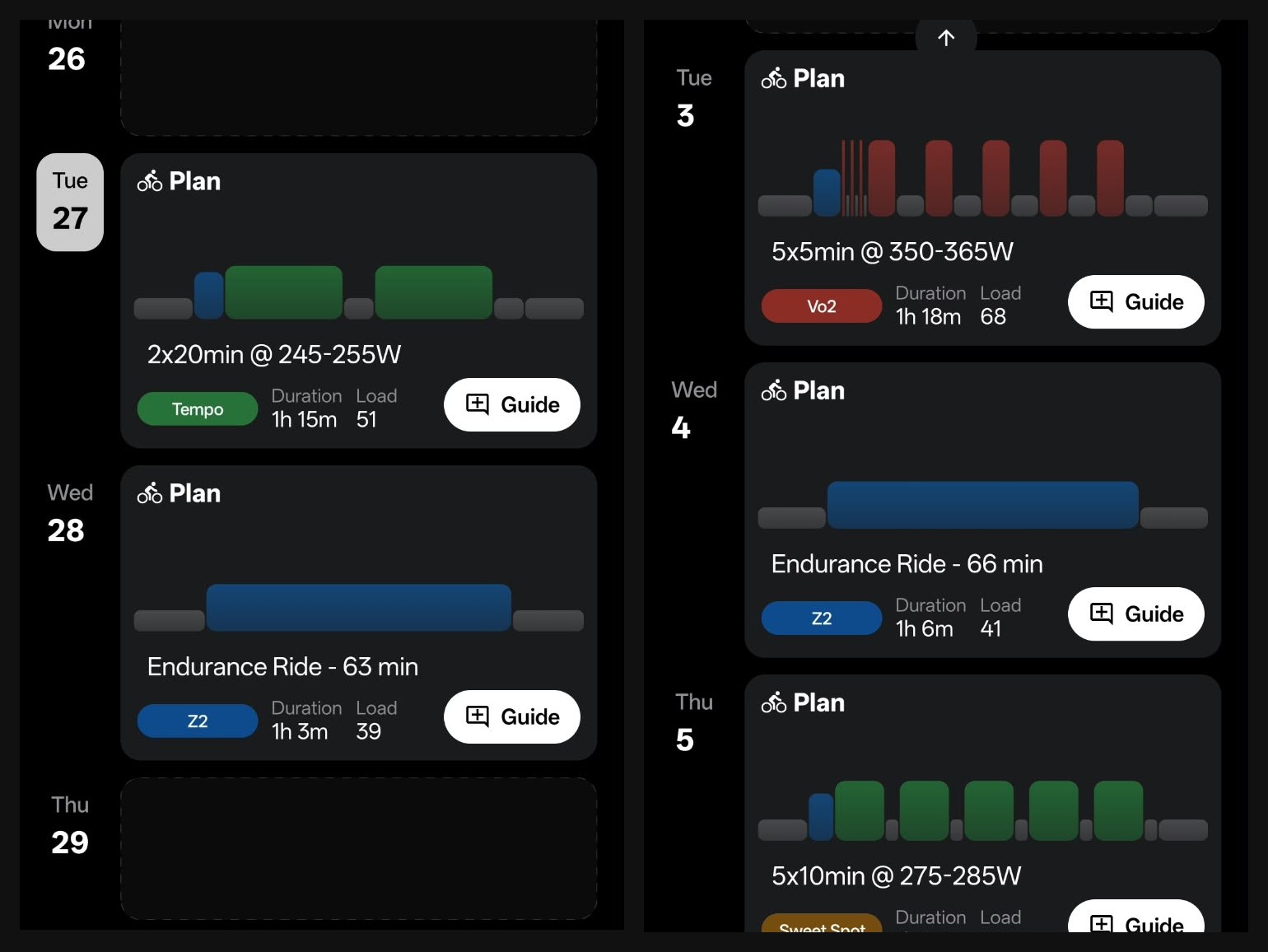
Two stretches of my Pro calendar, late October and early November.
Notifications that bring the coach to you
Under Notifications you choose what arrives by push or email:
- After Activity: a review of each ride, run or swim.
- Plan for Today: today’s planned workout, at the time you choose. Mine is 7:30 PM.
- Weekly Review: a review of your week, at 8:00 PM.
- Plan Review: a review of each plan after it ends.
- Free Questions: a note when your free questions are back.
The daily push is genuinely useful. One evening mine read: “Today: 2x20min @ 245‑255W. Aerobic strength. Keep it even and do not drift up into threshold.” You know the session, and the one thing to get right, before you even open the app.
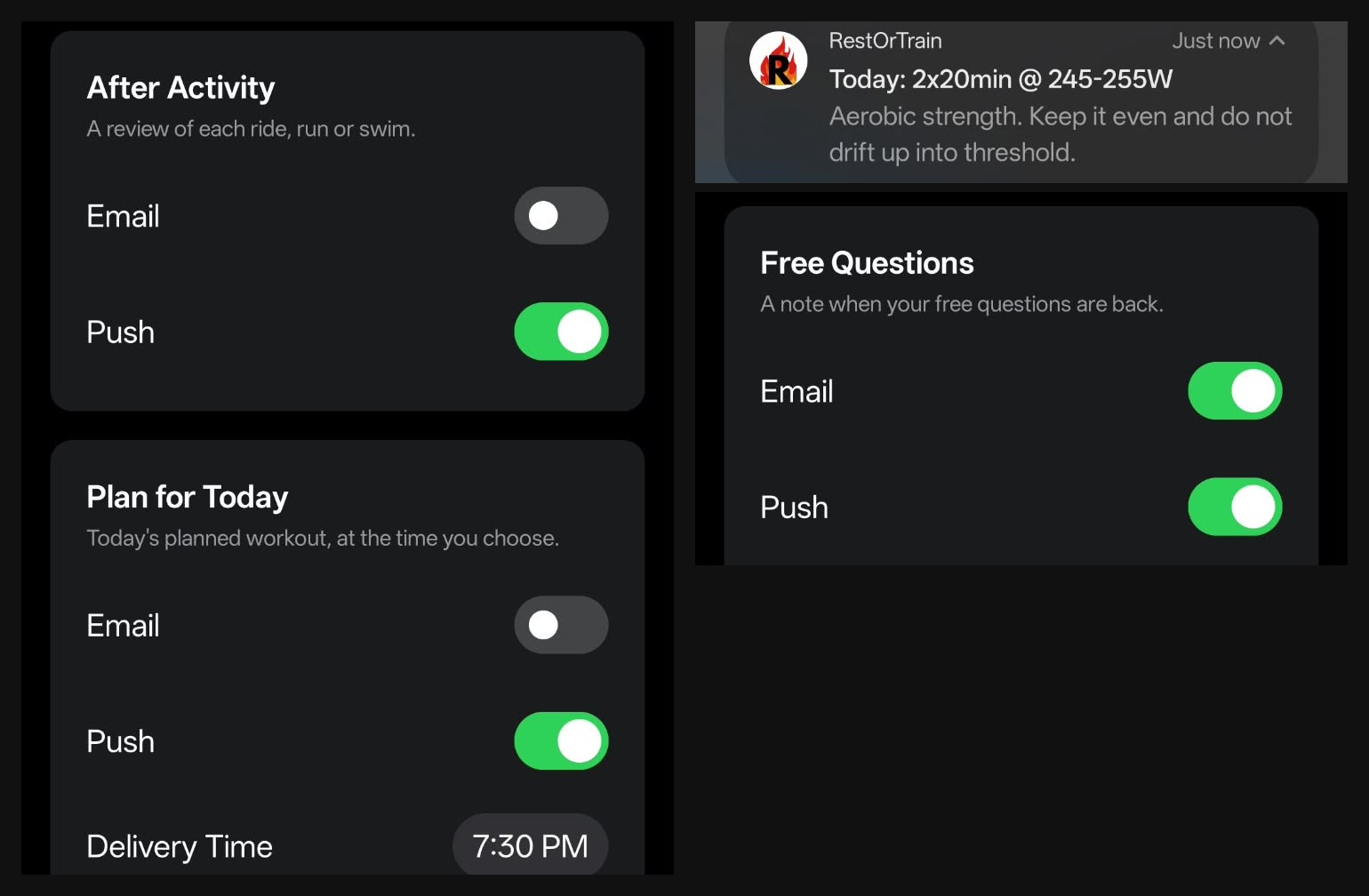
My notification settings, and the daily push with today’s session.
Your numbers, explained
The athlete card on Profile holds FTP, threshold pace, weight, HRV, resting heart rate and sleep. Each one opens a chart over 3 months, 6 months or a year, with every entry listed alongside its source: Manual Input, Chat, or a connected app such as Intervals.icu.
This is where your other apps pay off. RestOrTrain doesn’t try to replace your watch or Intervals.icu. It pulls their numbers in and puts them in one place, right next to your plan, with every entry tagged by where it came from. And the coach reads the same numbers you see. When HRV was down and resting heart rate was up, the week review said to let the warm-up decide how hard to push, instead of chasing the plan.
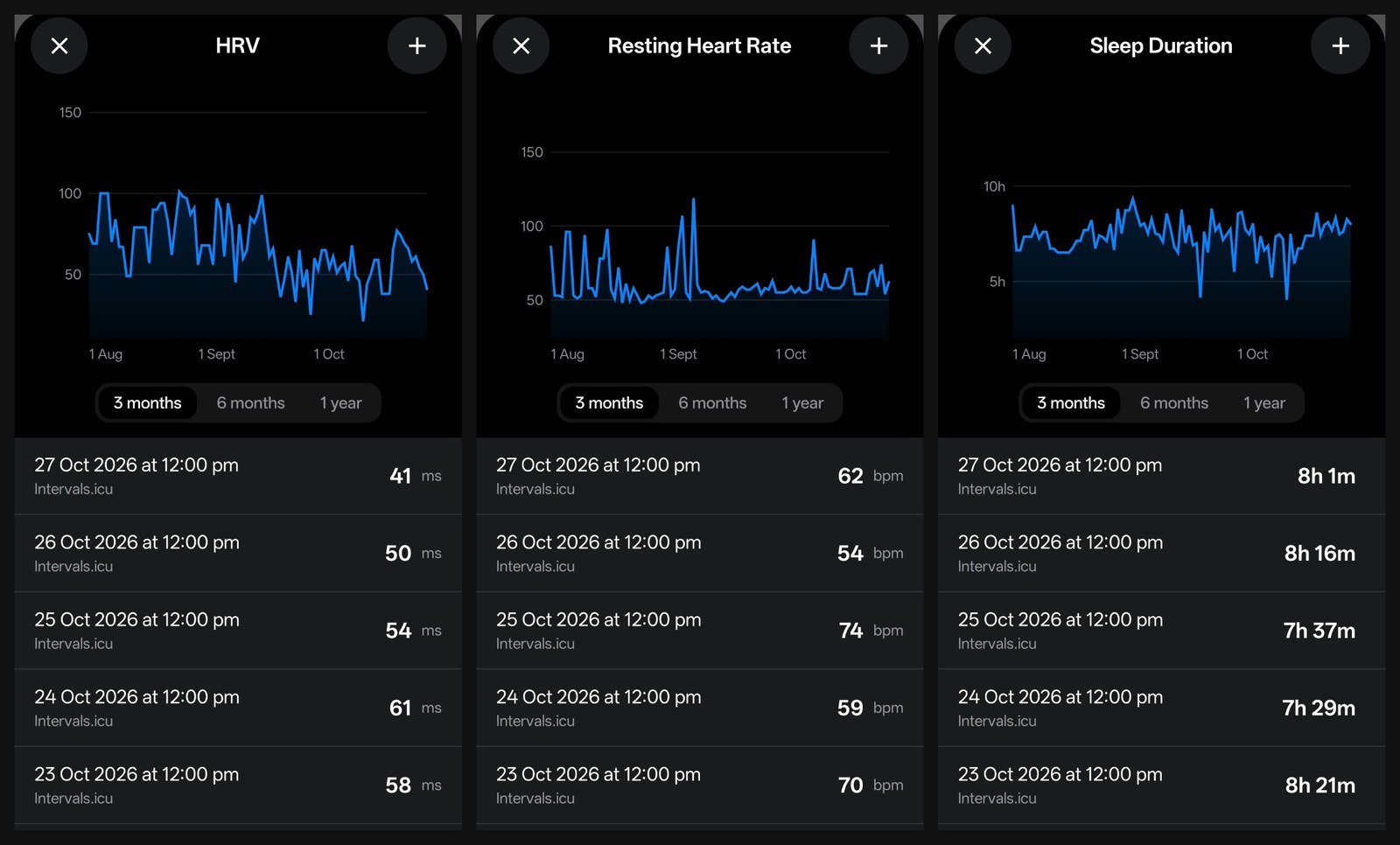
HRV, resting heart rate and sleep on the Pro account, each daily entry pulled in from Intervals.icu.
Two charts sum up your training. Training Status runs from Detraining through Fresh, Maintaining and Gaining Fitness to Overtraining Risk, with a plain explanation of each (Fresh: good for races or hard key sessions). Fitness tracks your trend from recent training load, with tips on reading it: rising means consistent training, flat means maintaining, falling usually means less load or time off. A beginner can read these without knowing what CTL or TSB stands for.
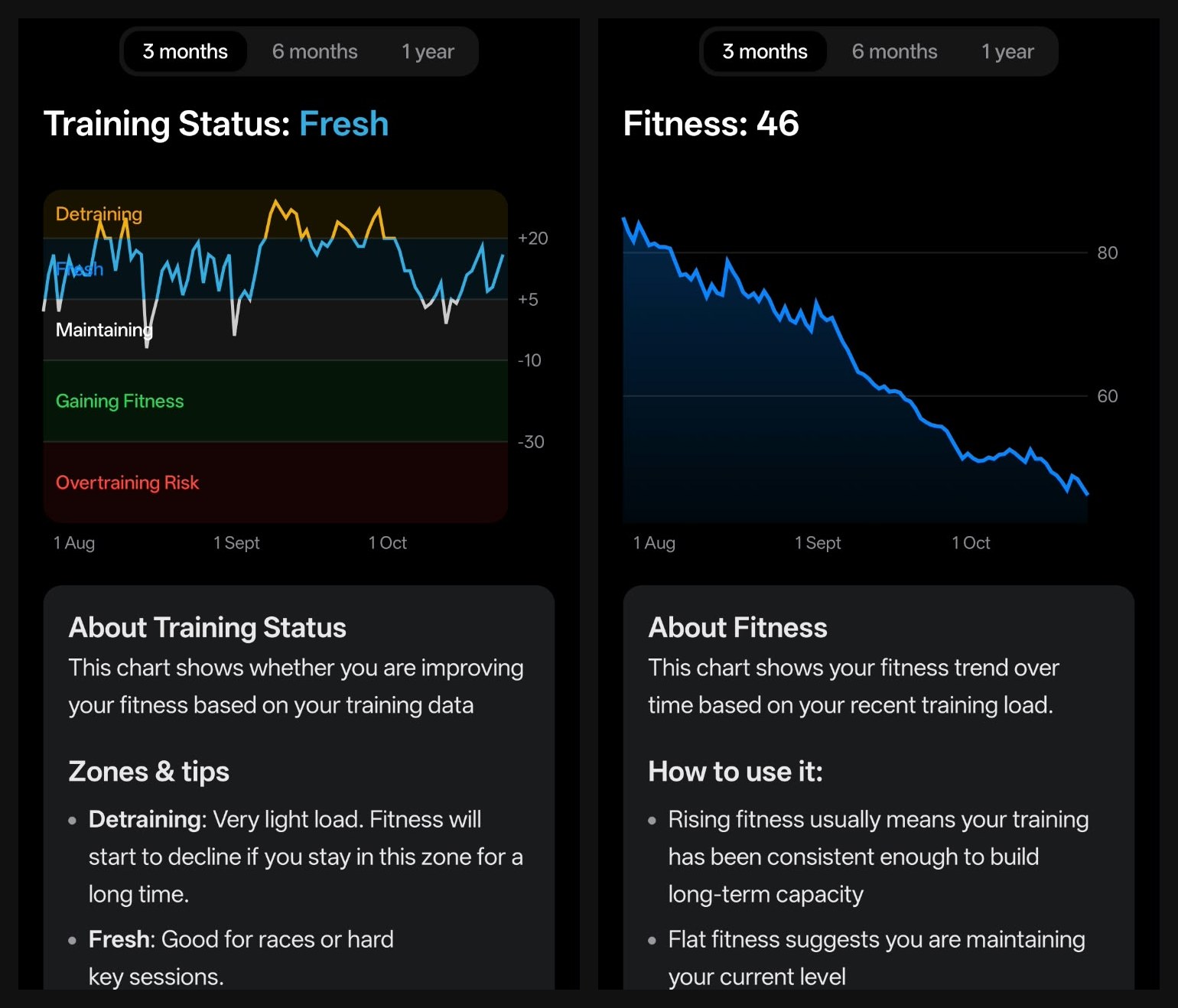
Training Status and Fitness on the Pro account, with the app’s own explanation under each chart.
This is the bit I really liked. You see the trend, not just today’s number. One look tells you whether you’re building fitness, holding it, or fresh enough for a race, and the explanation sits right under the chart.
Reviews: one run, one week
Every activity opens on a summary: a chart of the session, duration, distance, pace or power, load, a session tag such as Base, an Athlete Note box for what the data can’t show (motivation, fuelling, how hard it felt), and a full stats table. Tap Review and the full analysis lands in chat.
On a 7.1 km COROS run from 21 October, it called it a controlled aerobic run, not a hard workout. Average heart rate was 133 bpm, under my 141 bpm easy ceiling. The final climb added 62 m over about nine minutes and pushed heart rate to around 151 bpm, which explained most of the effort. Pace drifted slightly into Z3, but it said heart rate showed the run was still genuinely easy. Its verdict: exactly the low-cost running the Ironman foundation phase needs, so keep running by effort and heart rate rather than forcing pace on hilly routes.
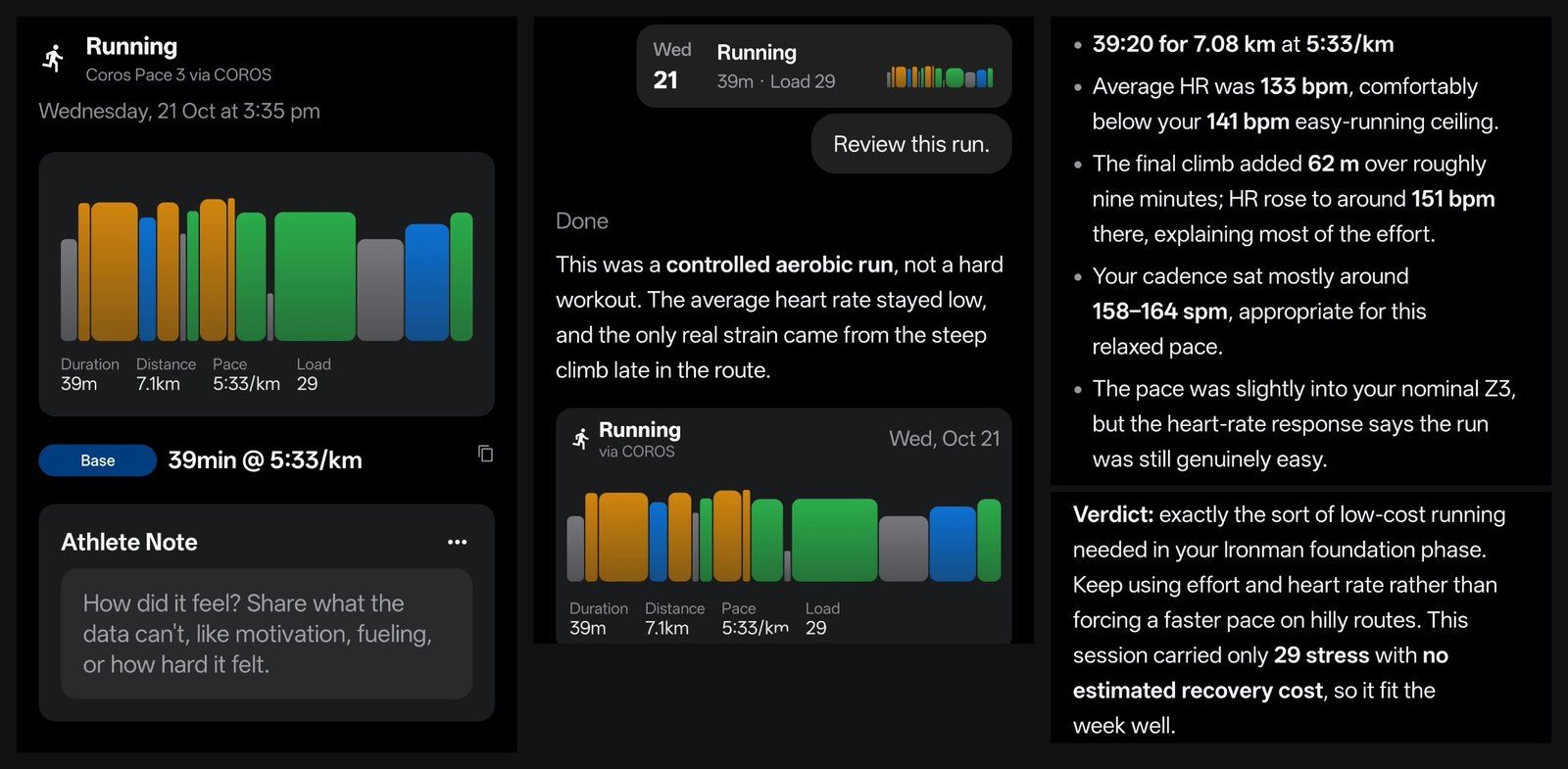
The 21 October run on Pro: the activity screen, and the review it wrote in chat.
Then I asked it to review the whole week of 19 to 25 October. It came back with:
- The totals: 6 hours 7 minutes and 223 TSS. A sensible re-entry week, but about 3 hours below my 9 to 12 hour range.
- Workout Scores: 98/100 for the long ride and 80/100 for the long run, which stopped 19 minutes short. It said that wasn’t a concern: protecting consistency matters more than forcing the final minutes.
- The weakness: frequency, not intensity. Just one swim and one ride, when an Ironman needs regular time in all three sports.
- Next week: keep one quality bike session, add a 30 to 40 minute easy swim and a second 35 to 45 minute easy run if recovery improves, keep easy rides around 190 to 220 W and easy runs below about 141 bpm, take 40 to 60 g of carbohydrate per hour on the long ride, and protect 7.5 to 8 hours of sleep.
- The caution: with HRV low and resting heart rate up that day, let the warm-up decide whether to finish both tempo intervals, and build toward 7 to 8 hours rather than jumping to 10 or 12 to make up for last week.
That’s the kind of week review a human coach would write: what went well, the one thing to fix, and how to fix it without overdoing it.
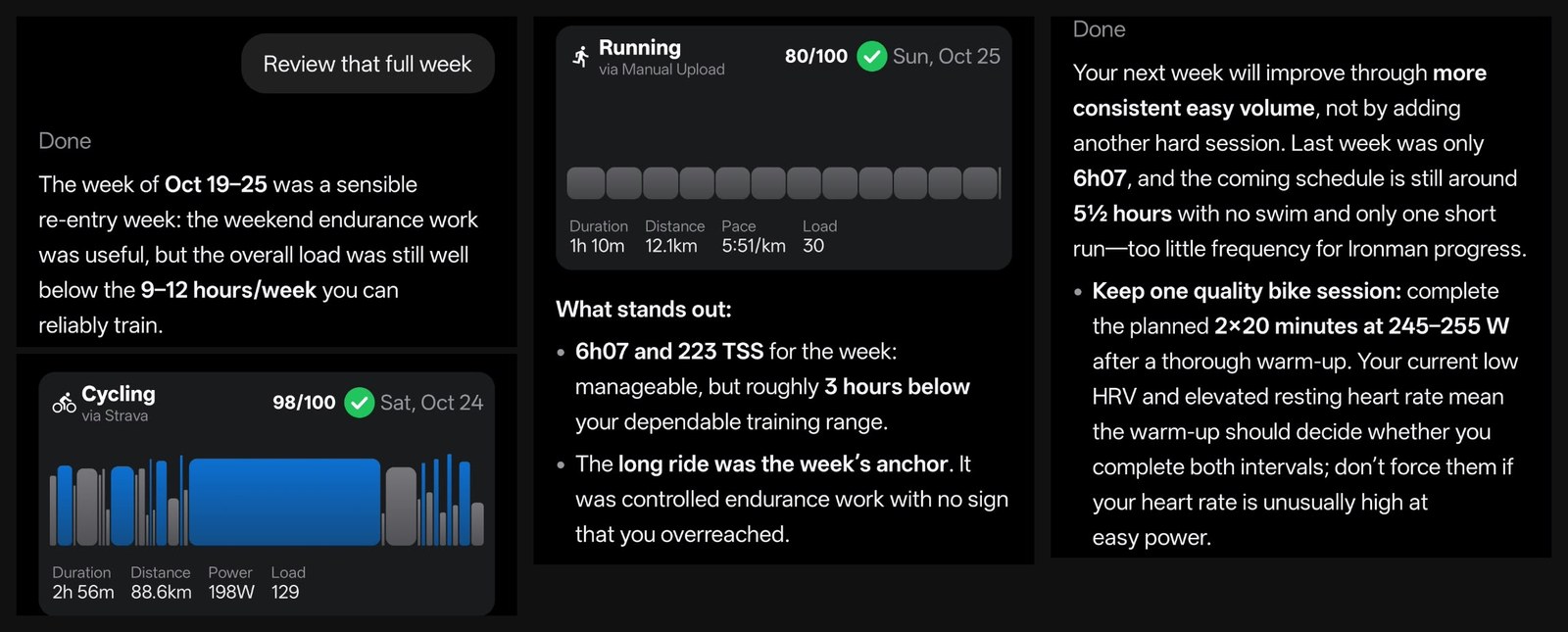
The week review on Pro: the totals, a Workout Score for each session, and what to change next week.
The indoor player
Rides with a power target on every step have a Start on indoor trainer button. The player connects to an FTMS, Tacx FE-C or Wahoo smart trainer over Bluetooth (a heart rate strap is optional) and shows power, target watts, heart rate, cadence, the time left and the workout notes, with minus and plus buttons to nudge the target. RestOrTrain says it runs in ERG mode, keeps going with the phone locked, and saves the ride to your calendar with a lap per interval, and a Workout Score when the ride matches the workout planned for that day. It’s free on every account. It’s cycling only, though: there’s no treadmill control, and gym bikes aren’t mentioned. I don’t own a smart trainer, so I opened the player but didn’t ride with it.
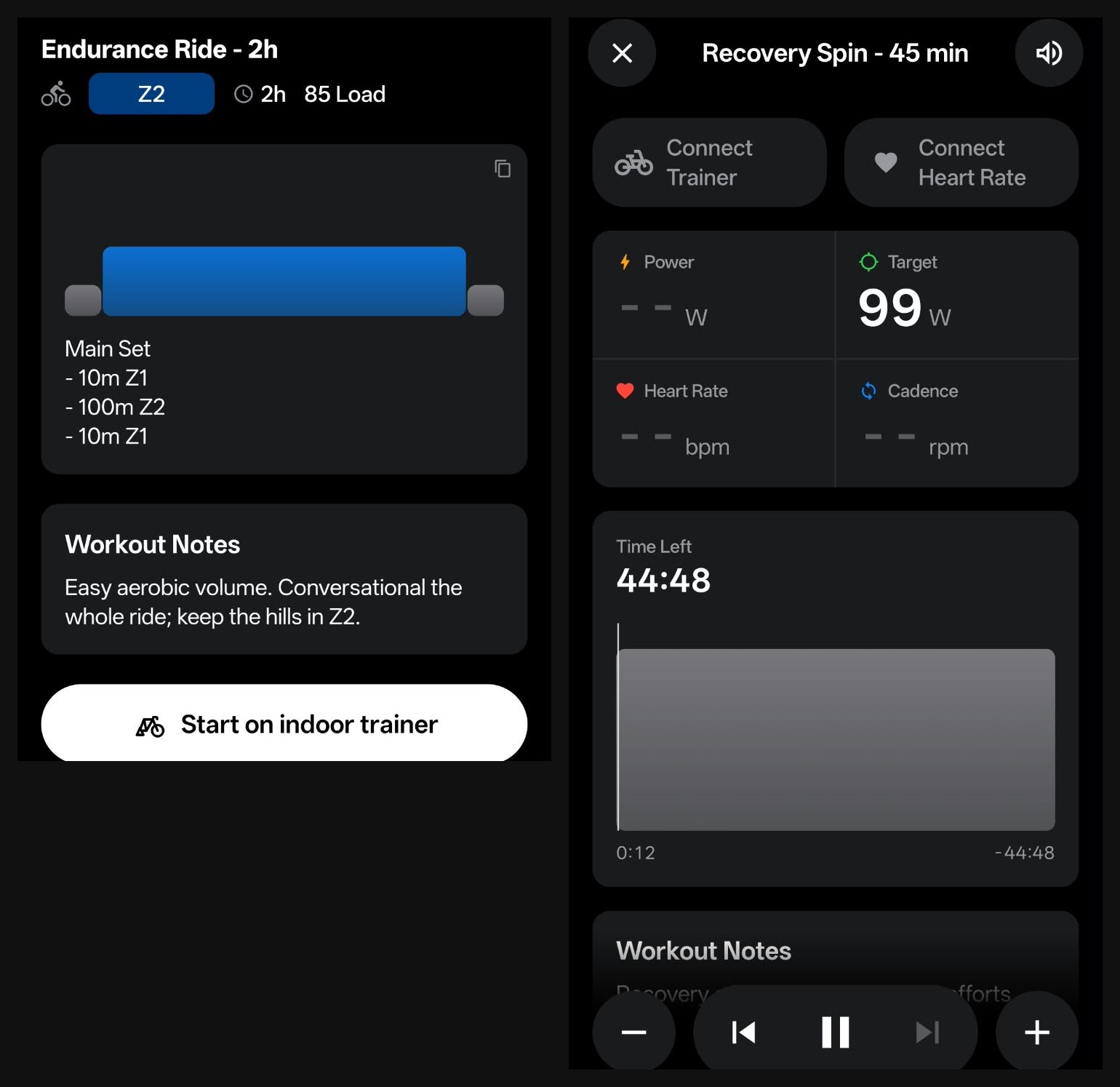
A ride’s Start on indoor trainer button, and the player itself, opened on my Pro account with no trainer connected.
Data sync: six services connected without trouble
Sync is where most of the complaints about RestOrTrain sit (more on that below), so I connected everything I could. On my Pro account, Settings, Integrations shows Garmin, Intervals.icu, Wahoo, COROS, Hammerhead and Rouvy all as Connected.
Data Sync then lets you pick where each kind of data comes from: activities, virtual activities (indoor rides), and health data such as HRV, resting heart rate, sleep and weight. On the Pro account, runs come in from COROS, and weight, HRV, resting heart rate and sleep arrive from Intervals.icu every day. It worked well the whole time.
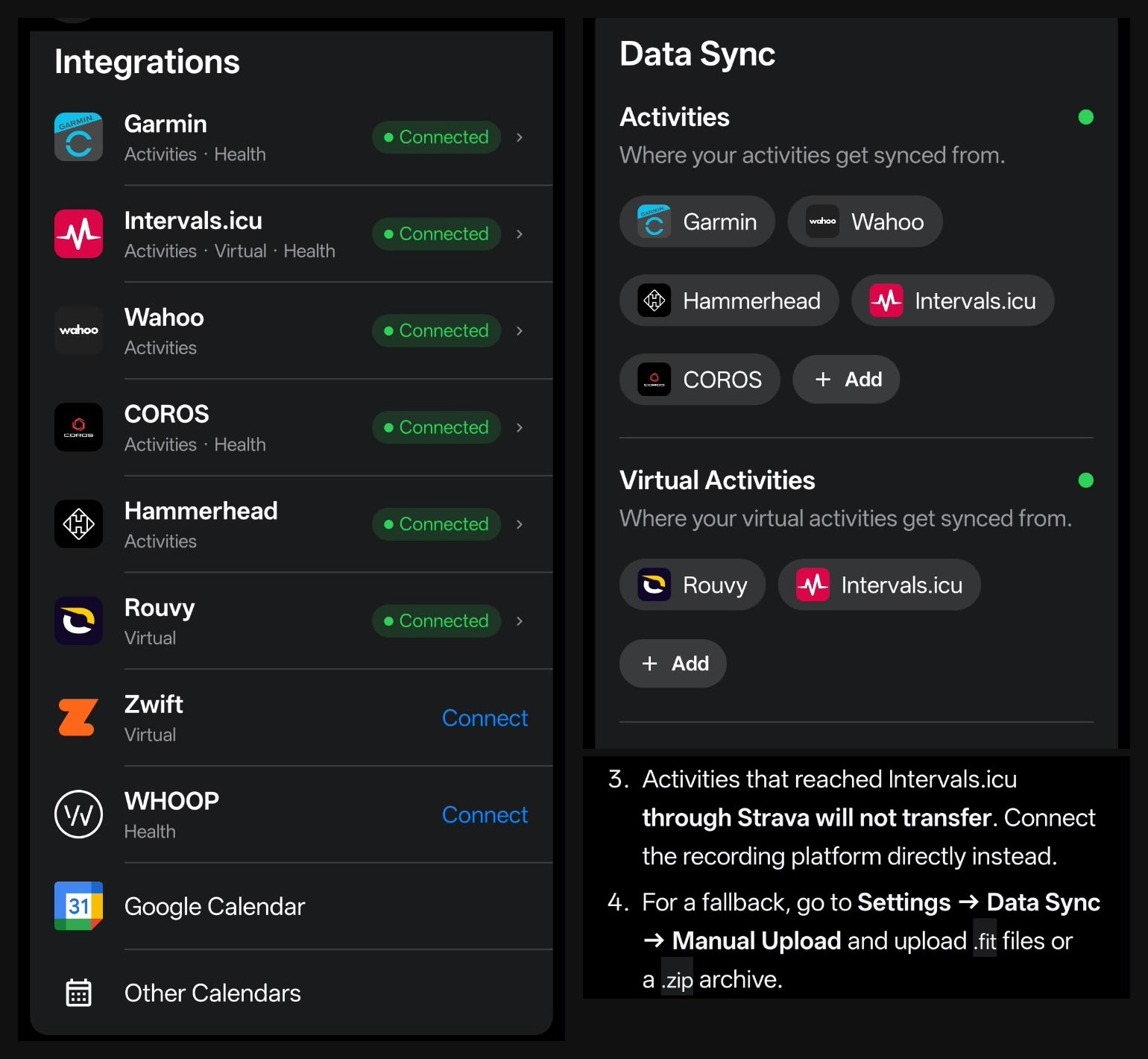
My Pro account’s Integrations and Data Sync screens, 27 October 2026, and the chat’s tip for activities that went through Strava.
Going the other way, RestOrTrain sends your planned workouts to your devices, and that’s free on every account. Its own guide lists what each one takes:
| Service | Into RestOrTrain | Workouts sent out |
|---|---|---|
| Garmin | Activities, sleep, HRV, resting heart rate, weight | Rides, runs, swims and gym sessions |
| COROS | Activities, sleep, HRV, resting heart rate | Rides, runs, swims and gym (no cadence targets) |
| Wahoo | Rides | Rides and runs |
| Hammerhead Karoo | Rides | Rides, power targets only |
| Zwift | Indoor rides and runs | Rides up to a year ahead, runs a week ahead |
| Rouvy | Indoor rides | Rides with power targets |
| Intervals.icu | Rides, sleep, HRV, resting heart rate, weight (and Polar, Suunto, MyWhoosh through it) | Rides, runs, swims and gym as text |
| WHOOP | Recovery, sleep, HRV, resting heart rate | None |
| Apple Health and Apple Watch (iPhone only) | Activities, sleep, HRV, resting heart rate, weight | Rides and runs to the watch |
You can also subscribe to your plan from Google Calendar or another calendar app, and upload .fit files or a .zip archive by hand.
Two I couldn’t test, because I don’t use Zwift or WHOOP. Store reviews mostly praise the Zwift sync, but one from 23 October says Zwift and Intervals.icu data never came through, even after reconnecting.
Strava: bring your history in, send rides out
Strava changed its API rules on 1 September 2026, and since then RestOrTrain can’t read rides from Strava directly, as it explains on its Strava page. Your Strava data still gets in, though. Export your archive from Strava, upload it under Settings, Manage Data, Manual Upload, and RestOrTrain reads the .fit files in it. For new activities, connect your watch or bike computer directly (Garmin, COROS, Wahoo and the rest) and they turn up on their own. The other direction still works too: rides from the indoor player can be posted to Strava, and RestOrTrain can add a short AI summary to your Strava activities if you switch that on.
What users say
Independent coverage of RestOrTrain is still thin: the app launched on iPhone in October 2025 and on Android at the end of September 2026. So I read what users write directly: the 107 App Store reviews Apple’s public feeds return across 21 countries, 72 written Google Play reviews, and the RestOrTrain thread on the Intervals.icu forum, from April to 23 October 2026. Reddit couldn’t be read.
What people like. It sits at 4.8 on both stores, and the same points keep coming up:
- The chat. You talk to it instead of digging through settings, and several reviewers call the replies human-like and insightful.
- A clean, focused design.
- Results. One forum user reported great results from the suggested plan, and a Google Play reviewer said it led to their best cyclocross season shape in five or six years.
- Planned workouts landing on the Garmin calendar automatically, mentioned in at least four reviews, with Garmin, COROS and Zwift sync described as flawless or a big plus.
- The newer Plan section, and the Android app.
What people criticise.
- Strava. The biggest cluster: six reviews from late August to late October say activities stopped coming in from Strava.
- Devices with no direct connection: iGPSPORT (three reviews), Magene, Fitbit and Polar.
- Sync failures on supported services: a Garmin history import in January (later reviews say Garmin history works), Zwift and Intervals.icu data not arriving (one review, 23 October), an Intervals.icu login that failed (2 October), and a setup screen that wouldn’t let one user past the connect step (16 October).
- Plan changes. One one-star review says the plan changed almost every day without being asked.
- Plan horizon. One review from September says only two weeks were planned at a time.
- The free tier and the price. Users want more free questions (one suggests watching an ad for an extra one), and a Canadian user called 22.99 CAD a month a bit steep.
- Intervals.icu details on the forum: the calendar sync is one-way, and ramp warm-ups didn’t convert cleanly to Intervals.icu (the developer said on 9 October this still needed a fix).
Do the criticisms hold up? I checked each one
Most of the sync complaints are recent, and the app updates every few days (version 2.2.1 came out on 24 October). So I checked each criticism against my three accounts and RestOrTrain’s own documentation.
| Criticism | What I found | Does it hold? |
|---|---|---|
| The plan changes without being asked | Every new plan on all three accounts came as a proposal with Reject and Accept, and nothing was saved until I accepted. Changes to the week only happened when I asked for one in chat. Even mid-conversation it said “I haven’t changed the calendar yet” while it waited for my answer | No |
| Only two weeks planned at a time | My Ironman plan runs 52 weeks in five dated phases, and the calendar shows sessions weeks ahead | No, not any more |
| Intervals.icu data never arrives, or the login fails | Intervals.icu connected on two accounts, and weight, HRV, resting heart rate and sleep arrive from it daily | Not for me |
| Stuck on the connect-accounts screen | I got past it on every account | Not for me |
| Garmin history does not import | Garmin connected on my Pro account. Later reviews say history imports fine; on the Pro account, activities came in from COROS and Intervals.icu | Not tested, likely fixed |
| Zwift data never arrives | I don’t use Zwift. Several reviews praise the Zwift sync | Could not test |
| Strava rides don’t come in | Live sync stopped because of Strava’s API rules since 1 September, not a RestOrTrain bug. Strava history still comes in by archive upload, new activities come in from a direct watch connection, and rides still go out to Strava | Partly, and it is Strava’s rule |
| No direct iGPSPORT, Magene, Fitbit or Polar | Confirmed. iGPSPORT, Magene, Polar, Suunto and MyWhoosh work through Intervals.icu | Partly |
| The Intervals.icu calendar is one-way | RestOrTrain sends workouts to Intervals.icu but doesn’t read planned workouts back; the co-founder confirmed this on the forum | Yes, by design |
| Ramp warm-ups break the Intervals.icu sync | I didn’t send a ramp workout to Intervals.icu | Could not test |
| The free tier is too small | Confirmed. I hit the limit after about 7 messages, and tapped answers count as messages | Yes |
| Too expensive | $14.99 a month or $134.99 a year in the US (about $11.25 a month), less than TrainerRoad’s $21.99 a month and TrainingPeaks Premium’s $19.95 | Depends on the user. It costs far less than a human coach |
| No web app | Confirmed. iPhone, iPad, Mac with Apple silicon and Android only | Yes |
| No workout library | Confirmed, by design: the coach writes every workout for you | Yes, by design |
| The indoor player is limited | Cycling only, and it needs a Bluetooth smart trainer | Yes |
Of the fifteen, four didn’t match what I saw: plan changes without asking, the two-week horizon, Intervals.icu failures and the stuck setup screen. One looks fixed (Garmin history). Two I couldn’t test (Zwift, ramp workouts). Price depends on what you compare it with. The rest hold: the free tier is small, Strava no longer syncs live, some devices need Intervals.icu or aren’t supported, and there’s no web app, workout library or treadmill mode. Two of those, the library and the one-way calendar, are choices rather than faults.
Price: what is free and what Pro adds
Free lets you meet the coach and get a plan on your calendar. Pro is where it becomes your coach day to day. US prices from the App Store listing, read 27 October 2026:
| Plan | US price | What you get |
|---|---|---|
| Free | $0 | A few chat messages a month (about 7 in my test, tapped answers included), plans, the calendar, sending workouts to your devices, and the indoor player |
| Pro monthly | $14.99 a month | Many more chat questions, plus photos, PDFs, GPX routes and ride weather in chat |
| Pro yearly | $134.99 a year (about $11.25 a month) | The same, for 25% less than twelve monthly payments |
Prices vary by region, and you subscribe and cancel through the App Store or Google Play. No free trial is listed. For comparison, TrainerRoad costs $21.99 a month and TrainingPeaks Premium $19.95 a month.
The free allowance is my main complaint. About 7 messages gets you a plan and a first week, but not enough to watch the chat adapt the plan, and that’s the whole reason to pay. When it runs out, you wait for the reset unless you upgrade. RestOrTrain told us free messages reset every 30 days from your first message, not from when you hit the limit, so if you use them all on day one, you wait the full 30 days. A daily or weekly allowance would show new users far more of what Pro does.
Who should get it
Beginners: take the suggested replies. Answer the tap questions, accept the plan, and let the coach put the week on your calendar. Add Custom Instructions for your hours and how you want to be spoken to, and ask it anything, including when something hurts.
Experienced athletes and triathletes: connect your devices, set a long goal, and use the chat for everything else. Ask for a week review every Sunday, and tell it when life gets in the way.
Anyone on a budget: start free, follow the suggested replies to get a week planned, and send the workouts to your watch. Upgrade when you want the chat to keep up with you.
Look elsewhere if Strava is your only data source and you don’t want to upload archives, you use Fitbit, you need a web app or dashboards on a computer, you want to pick workouts from a library, or you want the app to control a treadmill.
Verdict: 4.7 out of 5. It earns that on what matters most in an AI coach: plans built from your goal and your week, changes to your week in one sentence, honest pushback when a request is risky, workout notes that tell you how to do each session, and reviews of every run and week that explain what to fix. Users agree, with 4.8 stars on both the US App Store and Google Play. It loses points for a free allowance too small to show its value, no web app or workout library, and the Strava cut-off, which isn’t its fault but still means extra setup if Strava is all you use.
For how it compares with TrainerRoad, TrainingPeaks and the other training apps, see our guide to the best TrainerRoad alternatives.
Sources
- RestOrTrain on the US App Store: prices, 4.8 from 669 ratings, version 2.2.1 (24 October 2026), read 27 October 2026
- RestOrTrain on Google Play (US): 4.8 from 1.12K reviews, 10K+ downloads, read 27 October 2026
- App Store customer reviews: the 107 written reviews in Apple’s public review feeds across 21 countries, October 2025 to October 2026, read 27 October 2026
- Google Play written reviews: 72 reviews across 10 languages, read 27 October 2026
- RestOrTrain FAQ: sports, platforms, free and Pro, Memory and Custom Instructions
- Send workouts to Garmin, Wahoo, Zwift and Zwift integration: what each device receives
- RestOrTrain and Strava: the 1 September 2026 change and the archive upload
- Indoor workout player: trainer requirements and features
- RestOrTrain terms and privacy policy
- Intervals.icu forum thread on RestOrTrain: user feedback and developer replies, April to October 2026
- TrainerRoad pricing and TrainingPeaks pricing, read 27 October 2026
- My own use of the app on Android across three accounts, October 2026

Written by
FazFaz is the founder of AIToolsBakery. Some tools here are tested hands on. Others are assessed from vendor documentation and pricing verified on the live page, and every review says which one it is. Sponsors can buy a position in a guide. They cannot buy the score, the criticism, or silence about a better option.
How we test and how we make money →