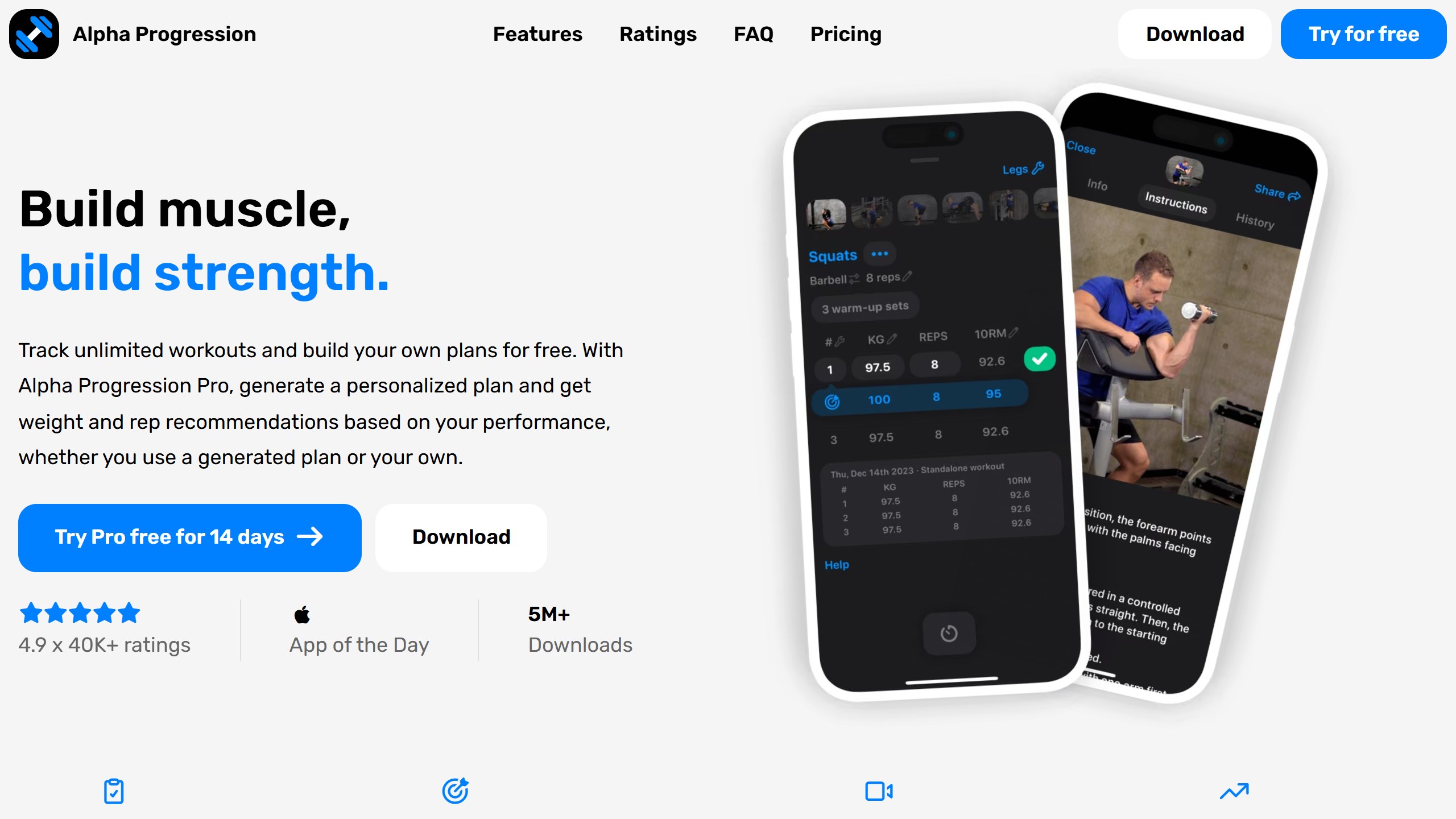
Alpha Progression review: a strength training app for iPhone and Android. The free version logs unlimited workouts with 795 exercise videos and no ads. Pro, $12.99 a month or $79.99 a year in the US, adds a plan generator and set-by-set weight and rep targets. After a week on it, I score it 4.6 out of 5.
Verdict at a glance
Alpha Progression is a strength training app that works at two levels: a new lifter can accept its presets and just train, and an experienced lifter can open the expert settings and control almost every part of the plan. After a week on its generated plan, that range is what sets it apart. Score: 4.6 out of 5.
| Best for | Gym lifters training for muscle or strength, from first plan to fully custom programming |
| Platforms | iPhone and Android, no web app |
| Free | Unlimited logging, all 795 exercise videos, your own plans, measurements, CSV export, no ads, no account |
| Pro (US) | $12.99 a month or $79.99 a year, 14-day free trial on the yearly plan |
| Ratings | 4.9 from 2,243 ratings on the US App Store, 4.8 from 21.3K reviews on Google Play (1M+ downloads) |
| What stood out | Realistic set-by-set targets, easy dropsets and supersets, sensible presets with deep customization, the 795-exercise library and separate gyms |
| What to know | No watch app yet (one is planned for the end of 2026), no web or API access to your data, and critical reviews mostly raise watch support and trial billing |
How I tested it
I tested Alpha Progression for a week, from 19 to 26 October 2026, on Android, with Pro switched on for our account by Alpha Progression for this review. I have been lifting for about two years.
- I trained six workouts from a generated five-day plan (Pull, Push, Legs, Upper, Legs) and logged them in the app.
- I set up a second gym at home and generated a Beginner plan for it.
- I tracked my bodyweight and body fat through the week, and went through the exercise library, the filters and the data export.
Alpha Progression is paying for this standalone review. It does not get to change the verdict, and the limits below stay in.
Two ways to use it: presets that think for you, or control over every detail
The same app serves two very different lifters, and it never forces the expert path on someone who just wants to train. Every screen has a recommended default, and almost every default can be changed.
The preset path: answer six questions, then just train
If you are new, or simply do not want to program your own training, the plan generator does the thinking. It asks for your experience, your goal, the muscles you care about, how often and how long you can train, and which gym you use. Then it builds the whole plan: split, exercises, sets, rep targets and effort targets.
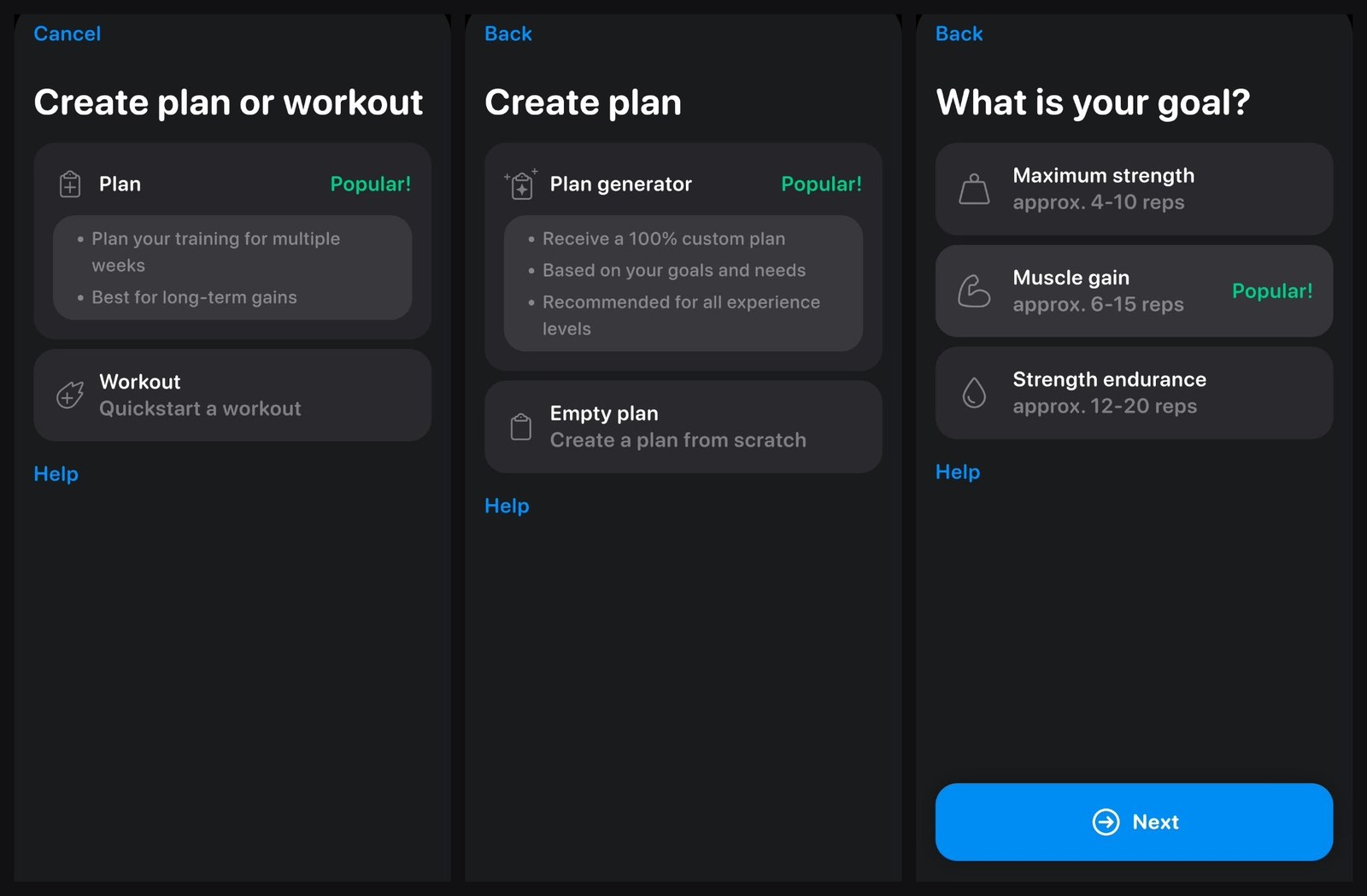
The presets are written in plain terms, so you do not need to know the jargon to choose well:
- Goals come with their rep ranges: Maximum strength (about 4 to 10 reps), Muscle gain (6 to 15, marked Popular) and Strength endurance (12 to 20).
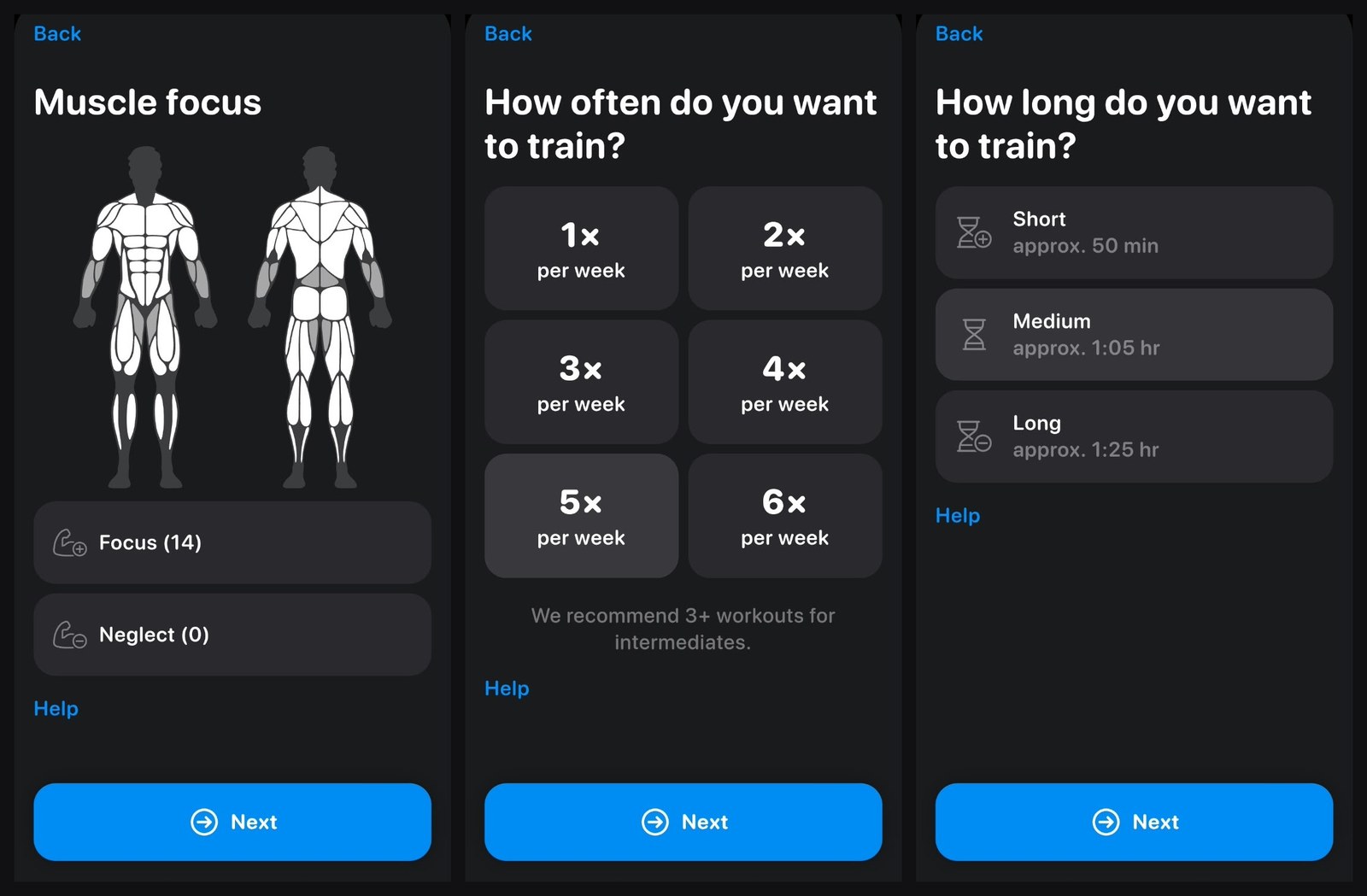
- Session length is Short (about 50 minutes), Medium (about 1:05) or Long (about 1:25), so you pick by the time you have, not by sets.
- Frequency runs from once to six times a week, with a note that intermediates should aim for three or more.
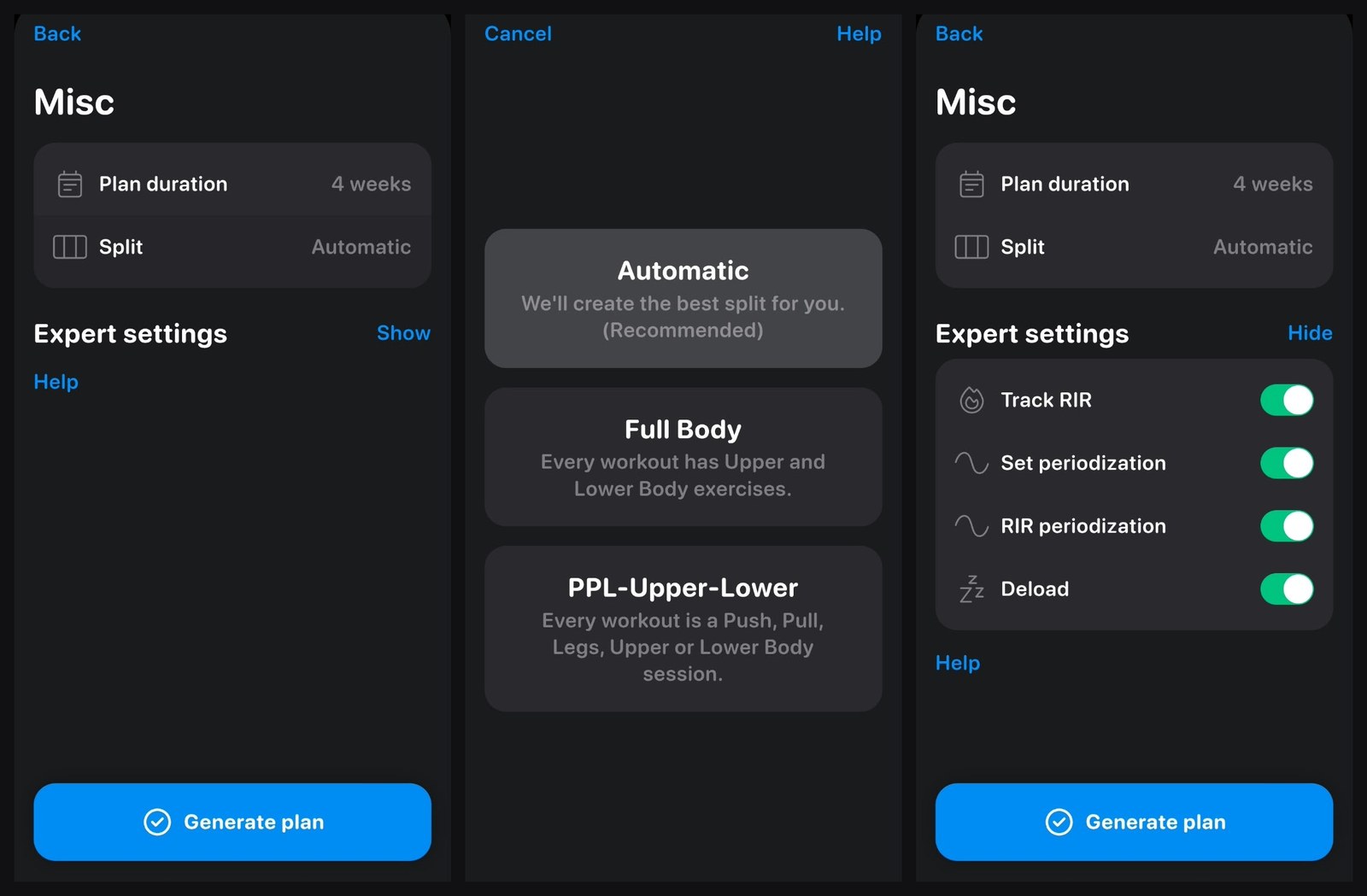
- Split defaults to Automatic, marked Recommended, so the app picks the structure for you.
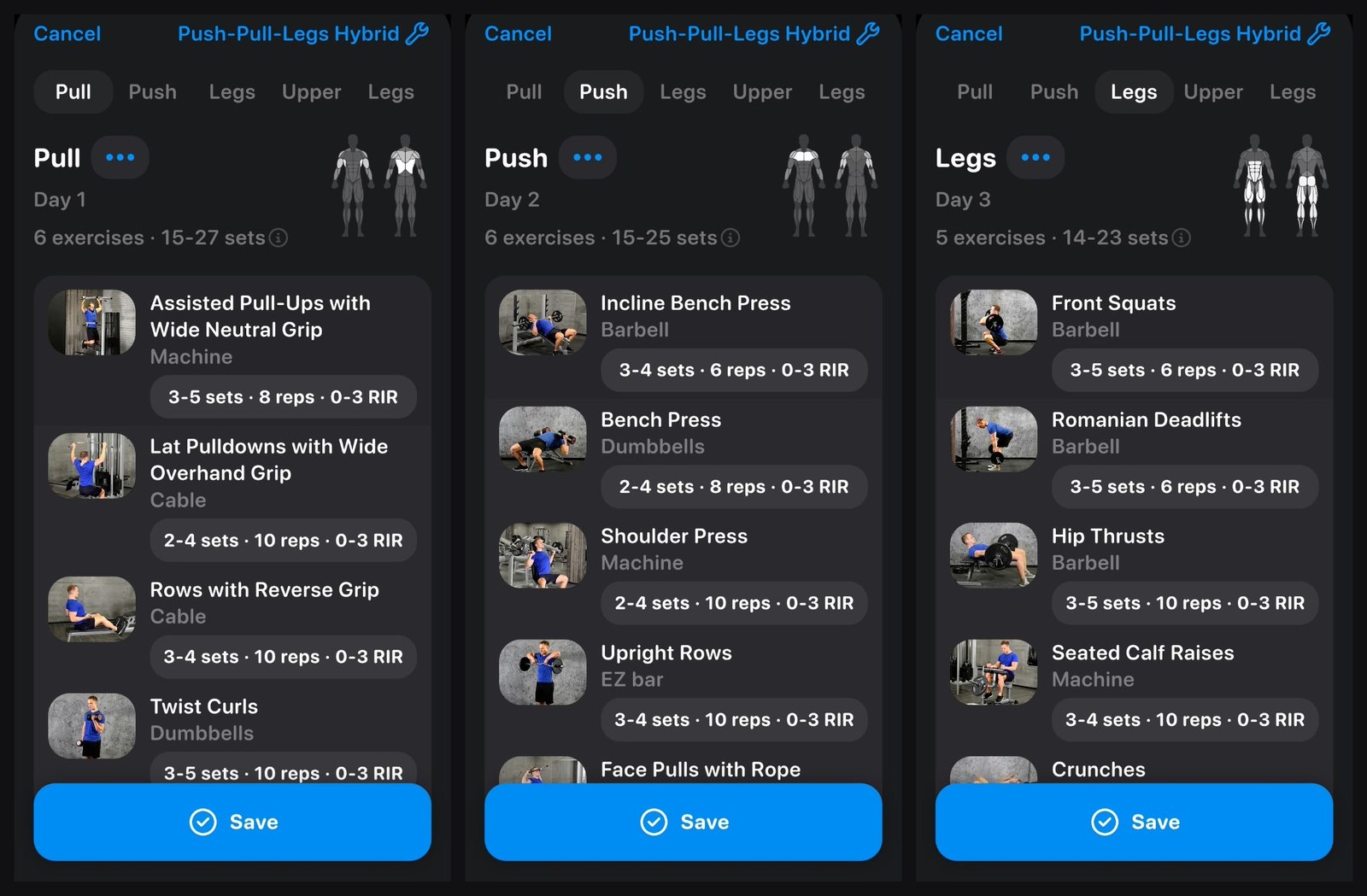
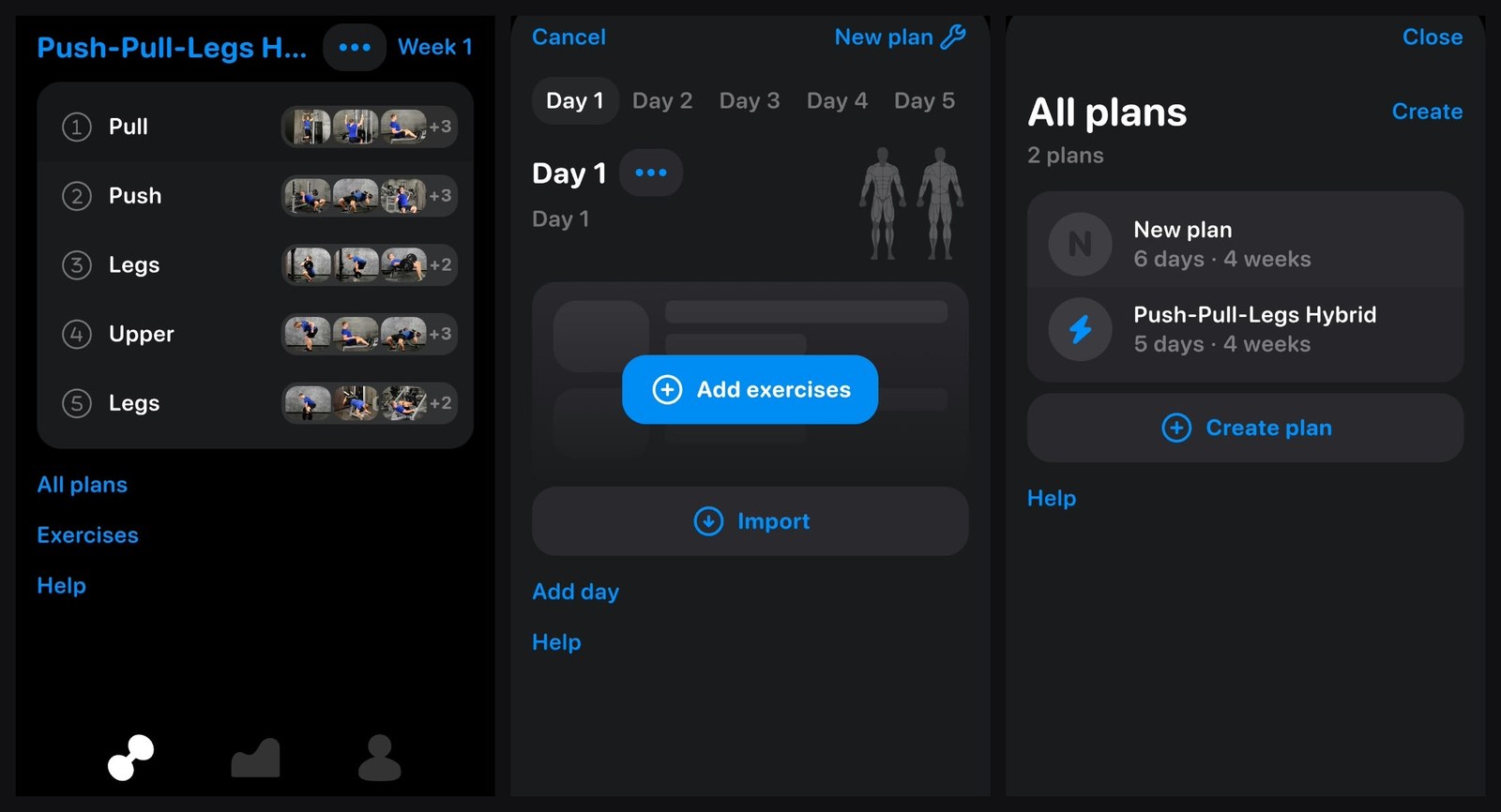
I left the split on Automatic. With five days a week it built a Push-Pull-Legs Hybrid: Pull, Push, Legs, Upper and Legs, five or six exercises a day, each with a set range, a rep target and a 0 to 3 RIR effort target. It took about four minutes from the first screen to a plan on my week view.
The presets carry on into the gym, and the first thing a beginner meets is one of the most useful screens in the app. The first time you do an exercise, it explains how to find your starting weight. This is the full guidance:
When you perform an exercise for the first time, do a test set with a weight that ensures you are able to easily reach the target of reps.
Was this test set actually easy?
No? Then, this is your starting weight and you can enter the set in the logger.
Yes? Then, increase the weight a bit.
Repeat this until you find a weight with which you can nearly reach the target reps with perfect form.
For large exercises (like Bench Press or Squats) you should aim for 3‑4 test sets. For smaller exercises (like curls), 1‑2 test sets are enough.
This matters most when you are new. Guessing a starting weight is where beginners go wrong: too heavy and form breaks down, too light and the first weeks of progression are wasted. The app gives you a simple routine to find the right weight, and from there its set-by-set targets take over. Each exercise also has setup and execution steps and a demo video.
The expert path: control the plan down to each set
If you know how you want to train, the same generator opens up. Under Expert settings you can switch each of these on or off:
- Track RIR: log reps in reserve on every set.
- Set periodization: ramp the number of sets across the weeks of the plan.
- RIR periodization: ramp effort across the weeks.
- Deload: schedule easier weeks into the plan.
You also choose the split yourself (Automatic, Full Body, or PPL-Upper-Lower), the plan length, and on the body map which muscles to focus on and which to neglect. I put 14 muscles in focus.
And you do not have to use the generator at all. This is how I prefer to train: I build my own setup rather than follow a ready-made workout. Empty plan starts you from scratch: add days, add exercises from the library, or import them. You can keep several plans side by side. I had the generated five-day plan and a six-day plan of my own. Every part of a generated plan stays editable, and you can create your own exercises if one is missing.
That is the real strength here. A beginner gets a sound plan without making a single technical decision, and an experienced lifter gets periodization, RIR, deloads, custom splits, custom exercises and separate gyms to tune. App Store reviewers say the same from both ends: one calls it great for beginners and advanced lifters alike, another, an advanced lifter, praises the full control over everything.
The exercise library: 795 exercises you can actually find
The library is the part I liked most. Because I build my own setup, I need to find the exact exercise I want, and with 795 to choose from I found every one I was looking for.
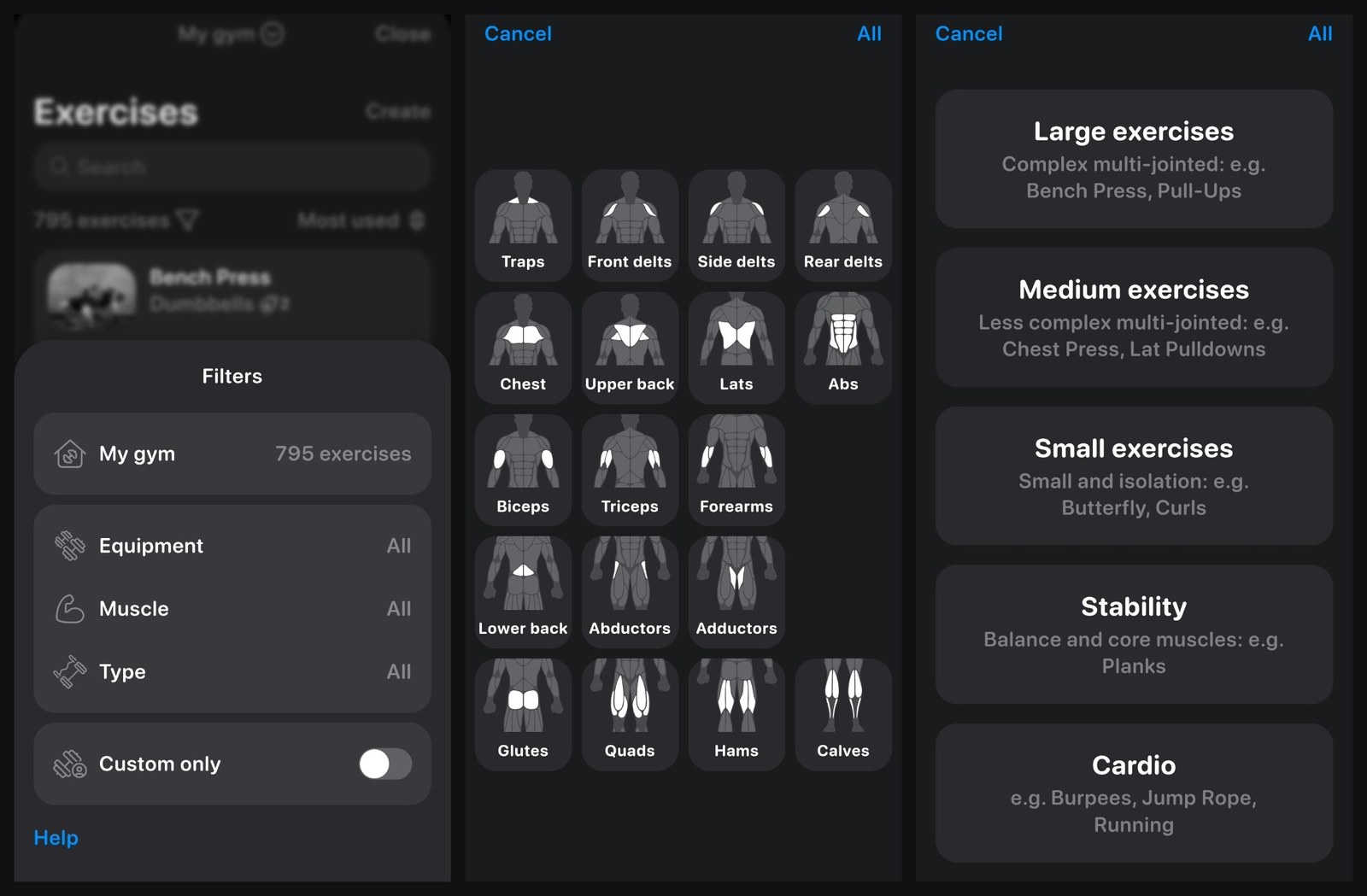
The filter is what makes that size usable. Tap the funnel next to the exercise count and you can narrow the list four ways:
- Muscle: 18 groups on a body diagram, from traps and the three delt heads down to abductors, adductors and calves.
- Type: Large, Medium and Small exercises, plus Stability (balance and core, such as planks) and Cardio (burpees, jump rope, running), so conditioning and core work can live in the same plan.
- Equipment: only what your gym has.
- Custom only: the exercises you created yourself.
The search box is quickest when you remember a name. When you do not, filtering by muscle gets you there.
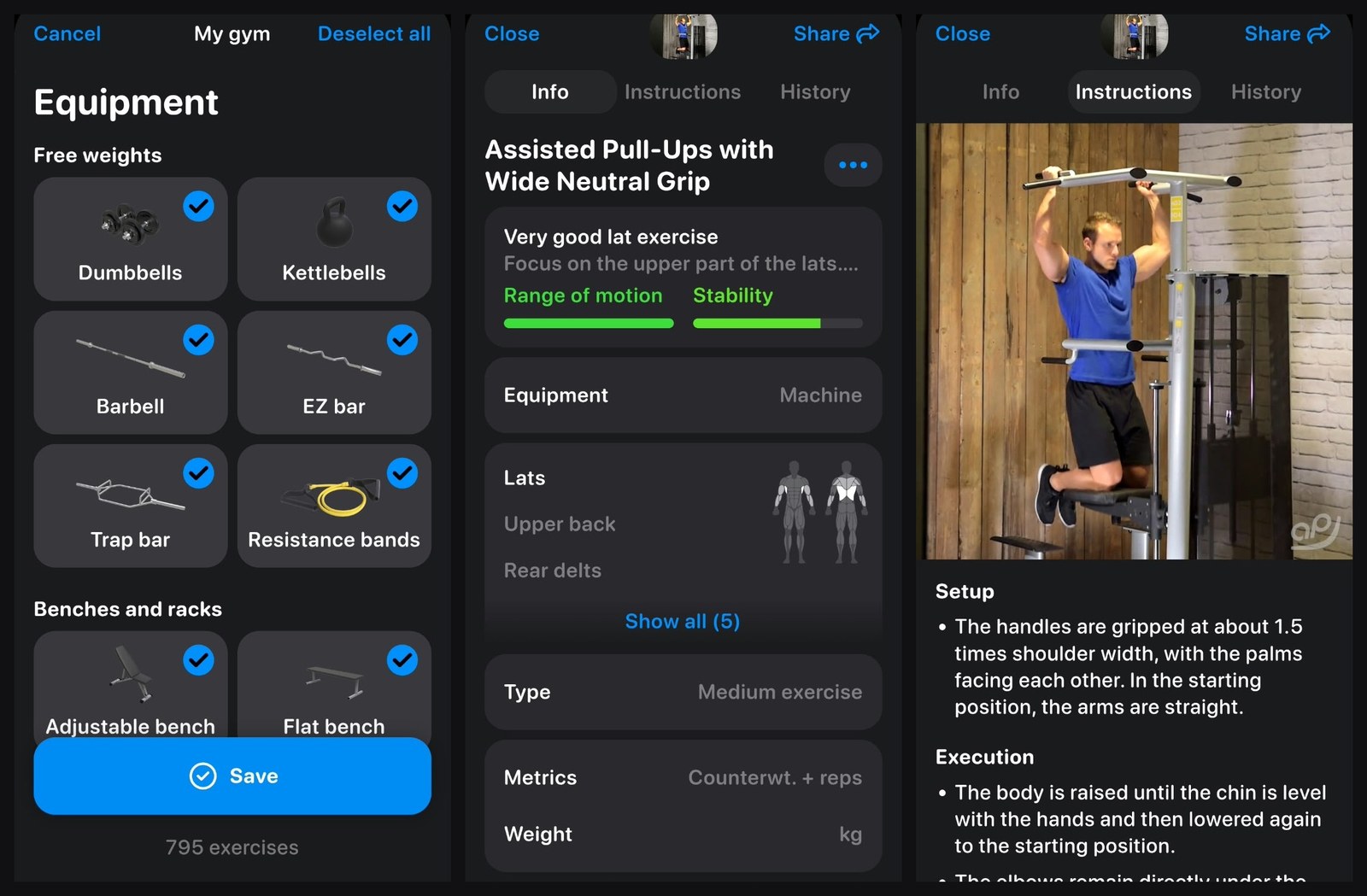
Every exercise has Info, Instructions and History tabs. Instructions split into setup, execution and extra notes, and each comes with a demo video filmed in a real gym. For me this was one of the most useful parts of the app. You can always look an exercise up on YouTube, but here the video shows the exact exercise the app has put in your plan, on the same kind of machine or with the same equipment, right where you need it. For a beginner learning form, or anyone facing a machine they have not used before, that saves guesswork. The Info tab also rates each exercise, for example range of motion and stability for assisted pull-ups, and lists the muscles it works.
Separate gyms, each with its own equipment
You can set up more than one gym and tick off what each one has: dumbbells, kettlebells, barbell, EZ bar, trap bar, resistance bands, benches and racks. If you train at home and also have a gym membership, set up both. The plan and the exercise suggestions then use only what the gym you are in actually has, which saves swapping exercises mid-session. Multiple gyms are a Pro feature.
A plan for the home gym too
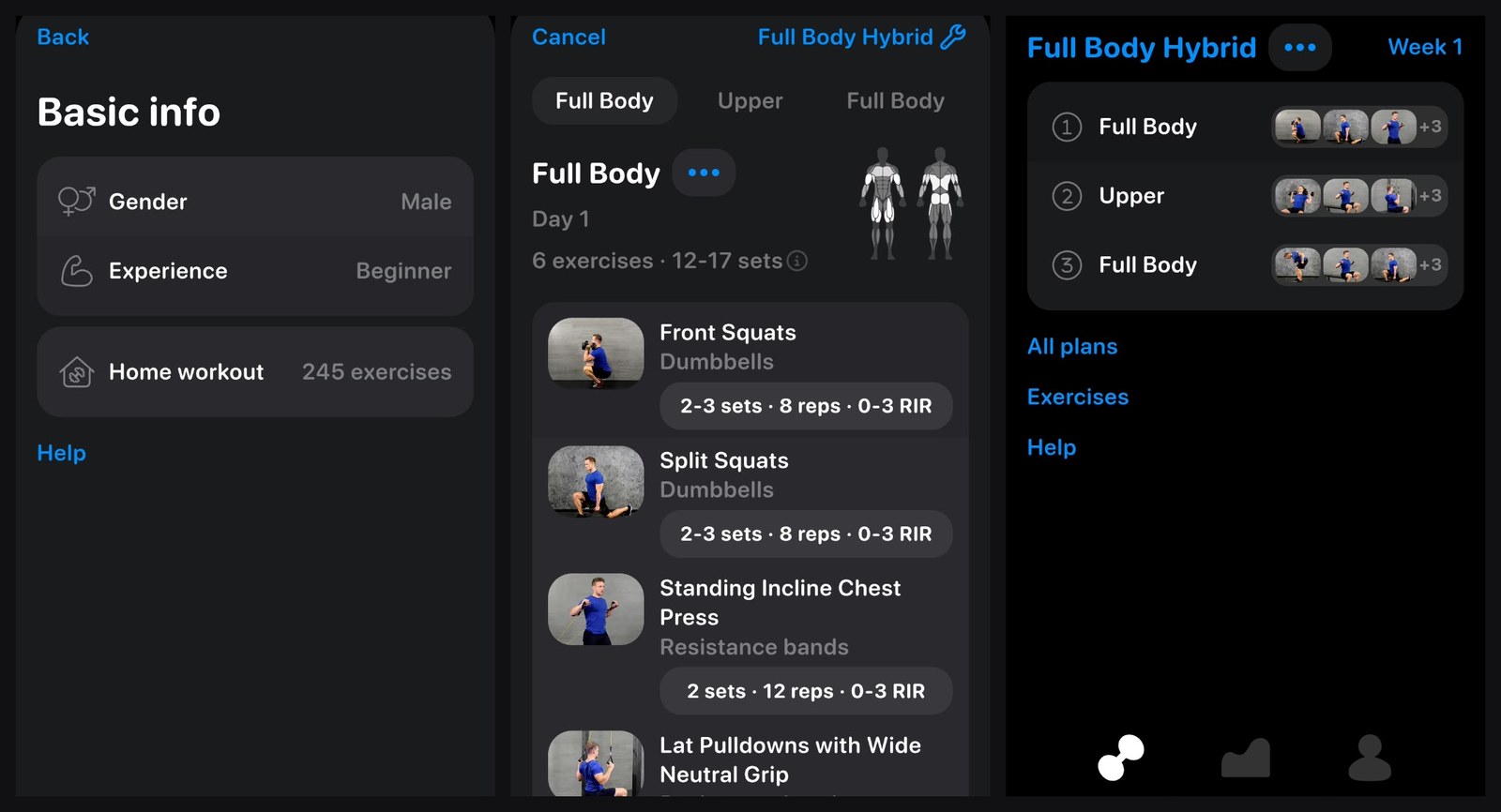
I set up my home as a second gym, with only the kit I actually have: a few dumbbells, resistance bands and bodyweight. You enter the weight of each piece of equipment too. That cut the library from 795 exercises to 245, and the generator built a plan from those alone.
For this plan I also set my experience to Beginner. It came back as a three-day Full Body Hybrid: Full Body, Upper and Full Body, each with six exercises and 2 to 3 sets per exercise (my intermediate gym plan had 3 to 5). Goblet squats and split squats with dumbbells, banded chest presses and lat pulldowns, bodyweight calf raises and side crunches: everything I could do at home, and nothing I could not.
If you train in more than one place, this is the part that removes the most friction. You switch gyms, and the plan only asks for what is in front of you.
Logging and the workout summary
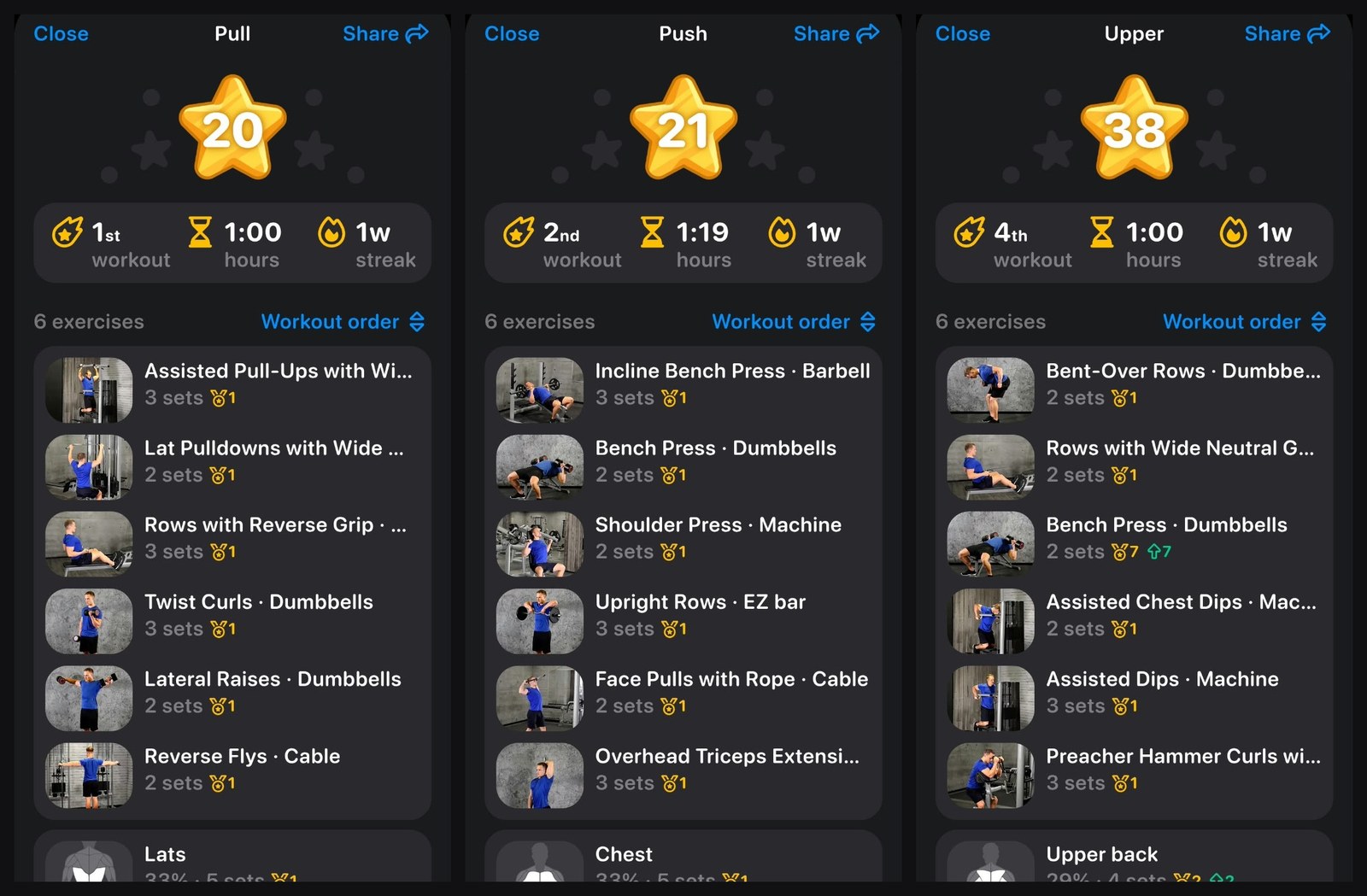
After each session the app shows a summary that explains what the workout did, not just what you lifted.
| Workout | Exercises | Length |
|---|---|---|
| Pull | 6 | 1:00 |
| Push | 6 | 1:19 |
| Legs | 5 | 0:45 |
| Upper | 6 | 1:00 |
| Legs | 5 | 1:25 |
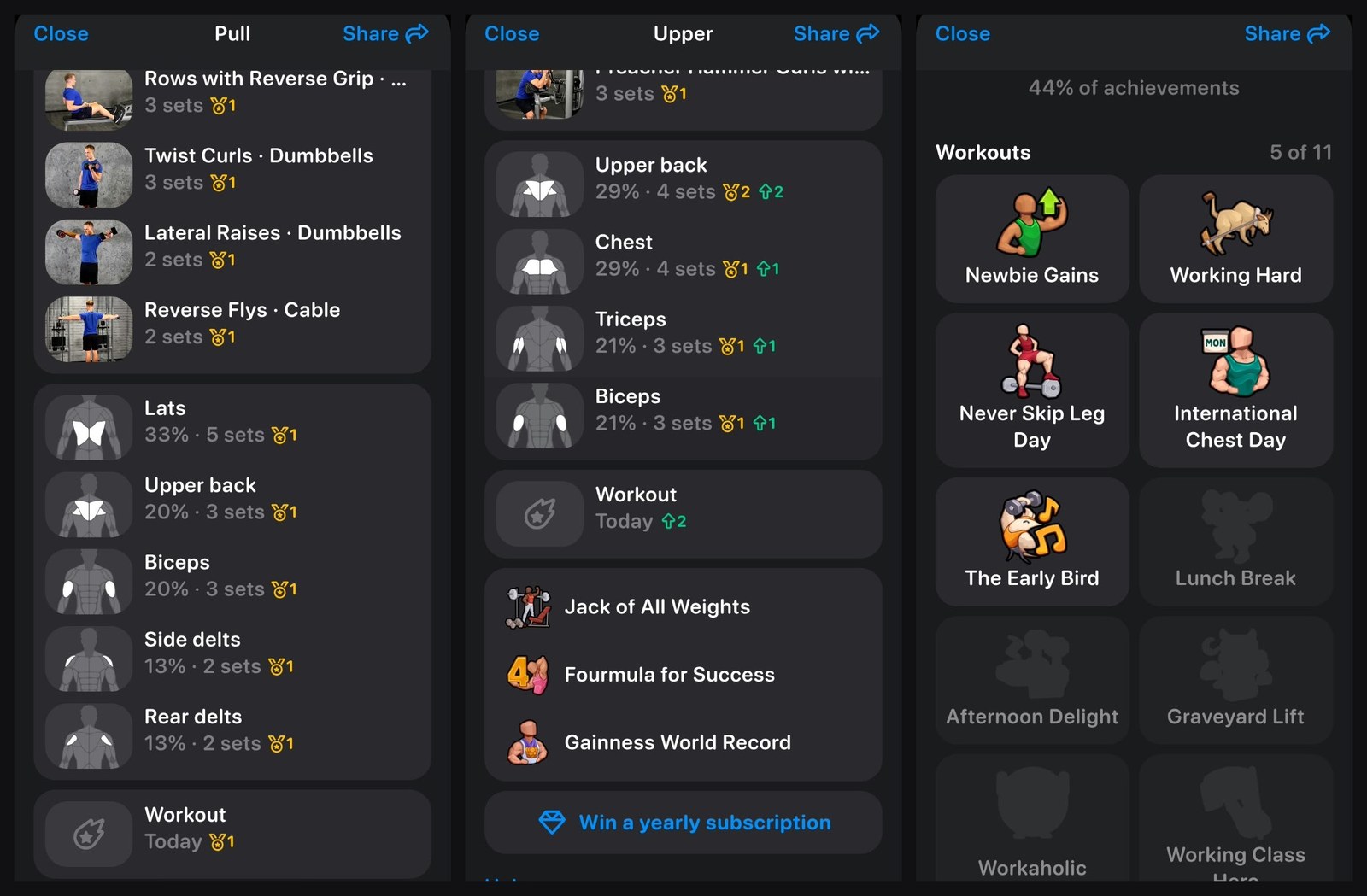
Each summary lists your exercises and sets, then breaks the work down by muscle. On Push, chest took 33% of the sets, side delts and triceps 20% each, and front and rear delts 13% each. Records are marked against exercises and muscles, and a running count tracks your workouts and weekly streak.
Achievements sit on top of that: Never Skip Leg Day, International Chest Day, Jack of All Weights and many more. After five workouts I had 44% of them. It is light-hearted, and it gives you a reason to keep the streak going.
Progression: a target to chase on every set
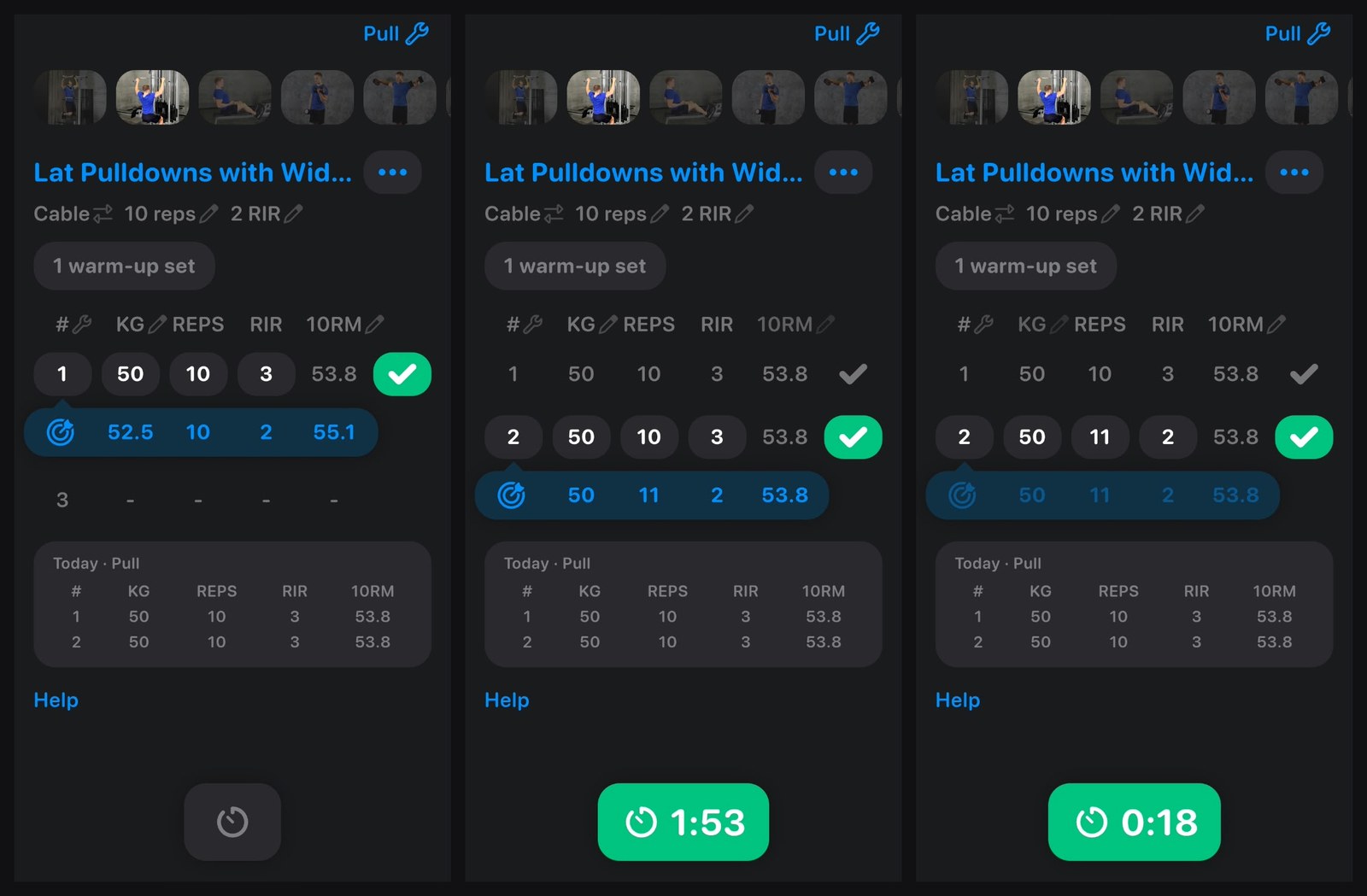
The set-by-set targets are the best reason to pay for Pro. In my live Pull session they were realistic enough to hit, and still pushed me a little further each set. If you do not want to think about the numbers, or you just want a target to chase, this is what does the work.
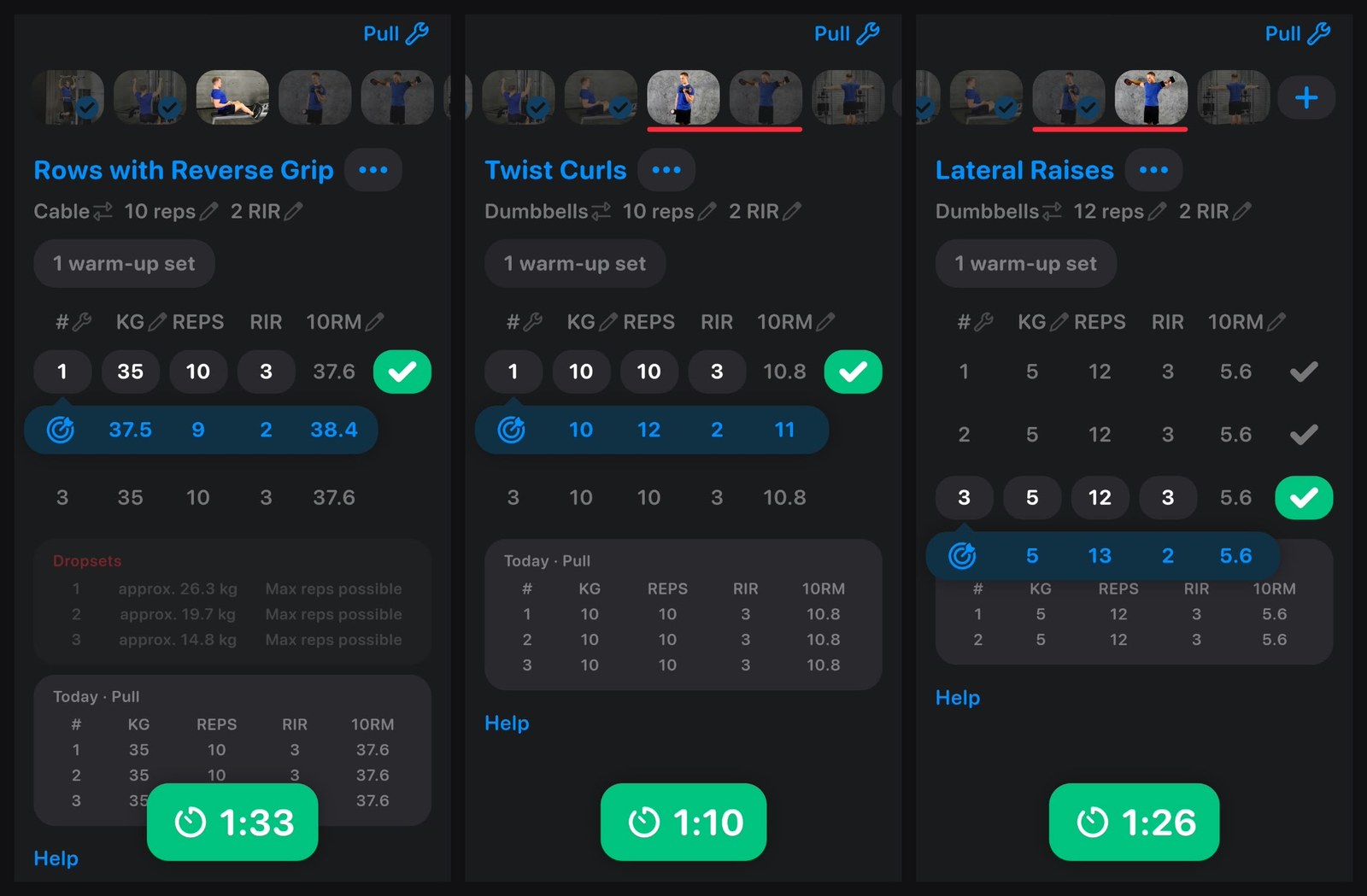
Each exercise shows a target row (weight, reps, RIR and an estimated 10-rep max) under the set you are about to do. Log the set, and the next target adjusts to what you actually did. It can push the weight or the reps, and it moves the effort target (RIR) with them.
On lat pulldowns it suggested 52.5 kg for 10 reps at 2 RIR. I did 50 kg for 10 at 3 RIR. For the next set it kept the weight at 50 kg and asked for 11 reps at 2 RIR instead: one more rep, a little closer to failure. I hit it.
The same pattern held across the session:
| Exercise | What I did | Next target |
|---|---|---|
| Lat pulldowns | 50 kg x 10 at 3 RIR | 50 kg x 11 at 2 RIR |
| Rows with reverse grip | 35 kg x 10 at 3 RIR | 37.5 kg x 9 at 2 RIR |
| Twist curls | 10 kg x 10 at 3 RIR | 10 kg x 12 at 2 RIR |
| Lateral raises | 5 kg x 12 at 3 RIR | 5 kg x 13 at 2 RIR |
When a weight jump made sense, as on rows, it raised the load and dropped a rep. On small exercises like curls and lateral raises it added reps at the same weight. Each exercise also opens with a warm-up set. The app times the workout and the rest between sets: a rest timer starts as soon as you tick a set off, counts past zero if you go over, and a notification tells you when your rest is up, so you keep to the rest the plan asks for.
Alpha Progression says the targets come from your previous workouts and the sets you have already done that day, and that they keep climbing as you hit them. It also told us that recommendations start from your second workout, and that deloads follow the plan’s schedule rather than being triggered when a lift stalls.
Dropsets and supersets without the admin
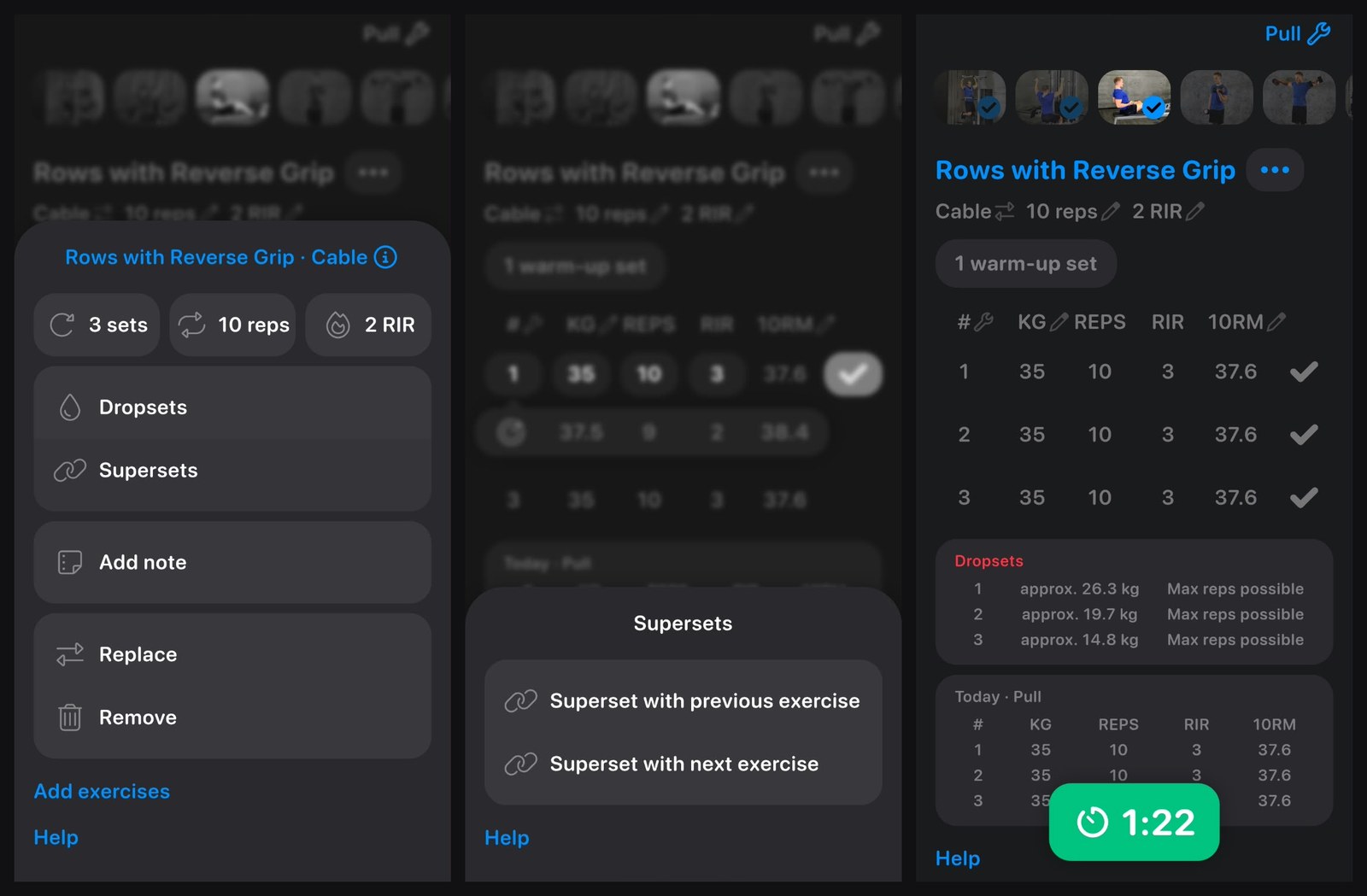
Dropsets and supersets were the most interesting part of the session. Open an exercise’s menu and you can set its sets, reps and RIR, add dropsets or supersets, add a note, or replace or remove the exercise.
- Dropsets: pick how many you want, and the app works out the drops for you as a ready preset. On rows at 35 kg it suggested about 26.3, 19.7 and 14.8 kg, each for as many reps as possible. You just do them.
- Supersets: link an exercise with the previous or the next one in the plan. During the workout the app switches between the two for you, so you are not tapping back and forth between exercises.
Deload a single day when you are sore
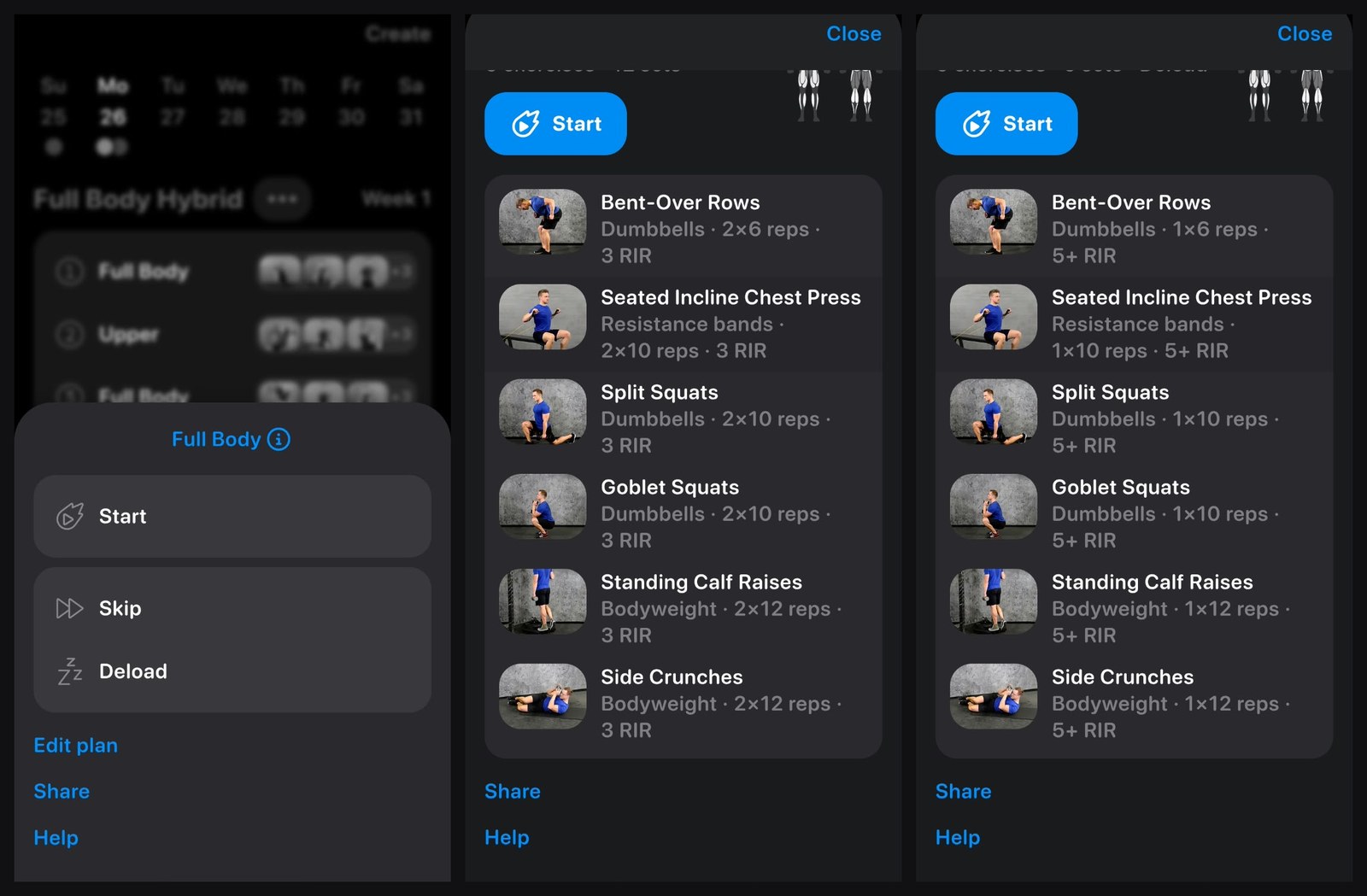
One of the most useful things I found: you can deload one day on its own. Tap a workout in the plan and you get Start, Skip or Deload. Deload keeps the same exercises but cuts the work. On my home Full Body day it went from 12 sets to 6: every exercise dropped from 2 sets to 1, and the effort target eased from 3 RIR to 5+ RIR. Reset puts the normal session back.
It is for the day you are sore but still want to train. You keep the habit and stay active without skipping the day or pushing through a full session.
Body tracking: the charts show which way you are moving
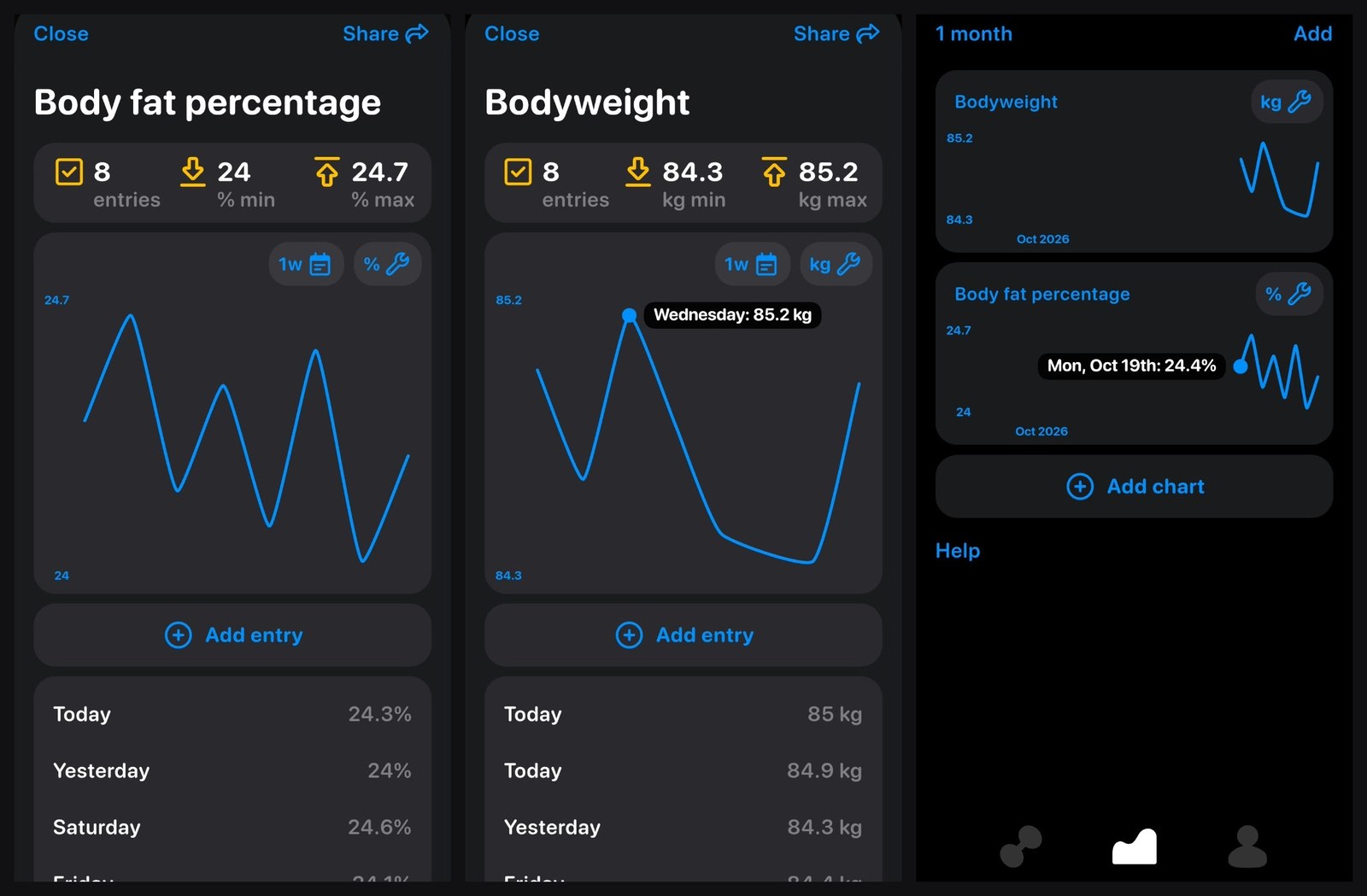
I entered my bodyweight and body fat through the week, and the charts are what make those numbers useful: they show the direction you are heading, not just today’s figure.
Over 8 entries my bodyweight ran between 84.3 and 85.2 kg and my body fat between 24.0% and 24.7%. Day to day the line jumps around, which is normal, and the chart makes the overall trend easier to read than a list. Tap any point to see its date and value. The progress tab keeps both on one screen for the month, and you can add charts of your own.
The profile also lists body measurements to track, from calves, thighs and hips to waist, chest, neck, shoulder width and upper arms, left and right. Entering measurements is free; the charts are Pro.
Strength charts, once you have a few months of data
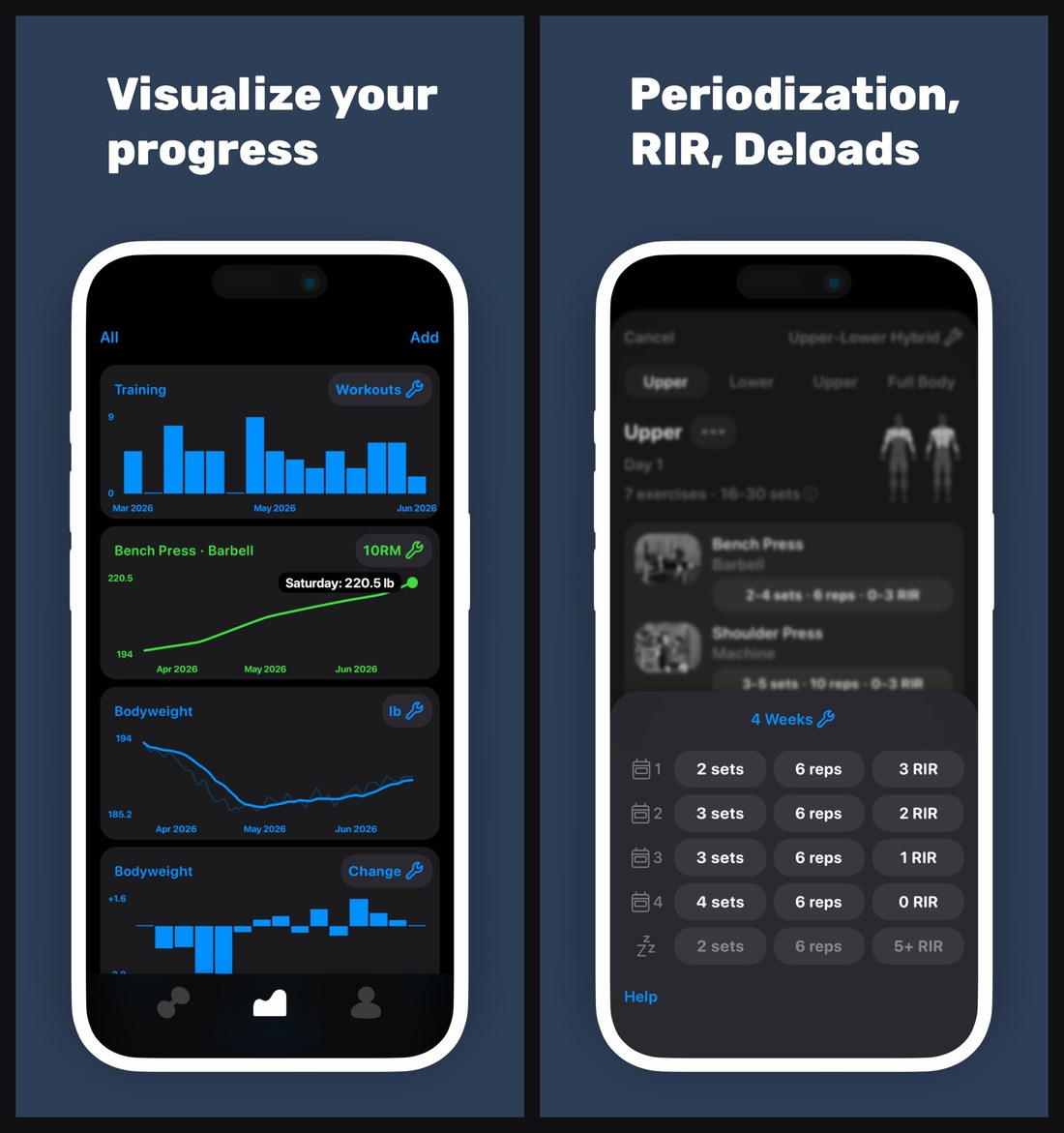
A week of training is not enough history for the strength charts to say much, so the screenshots below are Alpha Progression’s own App Store images, shown to demonstrate what the app builds over time. They are not my data. The progress tab charts workouts per week, an estimated 10-rep max for each exercise (bench press here), bodyweight and its weekly change. The second image shows what periodization does across a four-week block: sets climb from 2 to 4 while the effort target tightens from 3 RIR to 0, followed by a deload week at 2 sets and 5+ RIR.
Images: Alpha Progression’s App Store listing, October 2026.
Export: free and quick
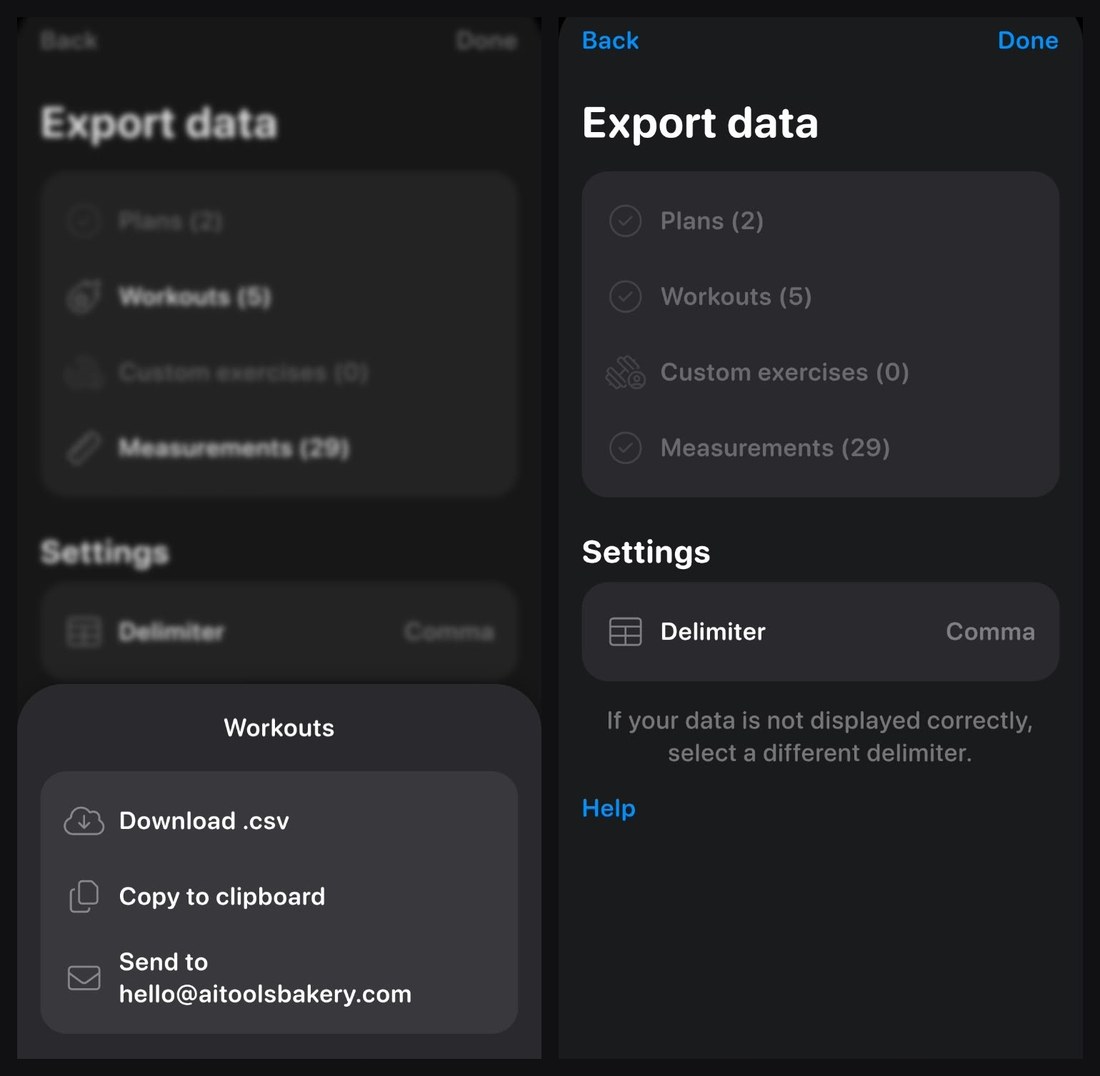
Exporting your data is free and takes a few taps. Export data lists your plans, workouts, custom exercises and measurements (for me: 2 plans, 6 workouts and 29 measurements), with a choice of delimiter for the CSV. Pick a category and you get Download .csv, Copy to clipboard, or send it to your account email.
On Android, Download .csv opens the phone’s share sheet, where you can save the file straight to your files or send it to another app. The Reddit complaint about export being a chore did not match what I found: saving the CSV took one extra tap.
A tip if you hit the same thing: after you export a category, it greys out on the export screen. There is no need to wait. Leave the Export data page, open it again, and you can export the same category straight away.
What users say
I read the 152 US App Store reviews that Apple’s public review feed returns (written between 2021 and March 2025) and the recent posts on r/alphaprogression. The picture is consistent: people like the planning and progression, and the complaints are about what sits around the training rather than the training itself.
What people like. 136 of the 152 reviews give five stars. The same points come up again and again:
- The plan generator builds a plan around their equipment and schedule. One reviewer compared its programming to plans they had paid trainers for.
- Progression recommendations take the guesswork out of adding weight.
- It suits both ends: “great guiding app for beginners and advanced lifters alike” is one review title, and an advanced lifter praised having options and control.
- The exercise instructions double as a form refresher, and the streaks and trophies keep people coming back.
- One coach uses it to build plans and share them with clients.
What people criticise.
- No watch app. Apple Watch support is the most repeated request, in at least four reviews and on Reddit. Alpha Progression says it is working on an Apple Watch app and aims to release it by the end of 2026.
- Trial billing. Three one-star reviews, from 2023 and 2024, say they were charged when a trial ended or after cancelling. Subscriptions are billed and cancelled through the App Store or Google Play, not inside the app, so cancel there before the 14-day trial on the yearly plan ends if you do not want to pay.
- Price. One reviewer called nearly $90 a year after tax too much for a workout app.
- Missing methods. Requests include rest-pause and other intensity techniques, Olympic lifts, progress photos and a proper place for stretches.
- Data access. A long-time Pro user on Reddit wants an API or web dashboard for their data. A Reddit thread also asked for feedback on whether a generated plan’s weekly volume sits in the right range for growth.
- Library size. A Reddit user pointed out that Fitbod lists over 1,600 exercises against 795. In my week the library covered everything I wanted.
Do the criticisms hold up? I checked each one
Most of these reviews were written in 2023 and 2024, and the app has changed since. So I checked each criticism against version 7.7 and my own week with it.
| Criticism | What I found | Does it hold? |
|---|---|---|
| Too few exercises (795 vs Fitbod’s 1,600+) | I build my own setup, and I found every exercise I wanted. The filters by muscle, type and equipment, and a demo video for each one, make 795 easy to use | Not for me. It may matter if you rely on unusual variations |
| Export is a chore | Download .csv opens the share sheet and saves to your files in one extra tap. Copy to clipboard and email are there too | No |
| Missing intensity techniques | Dropsets and supersets are built in, and the app works out the dropset weights for you. The exercise menu has no rest-pause or myo-rep option | Partly. Dropsets and supersets yes, rest-pause no |
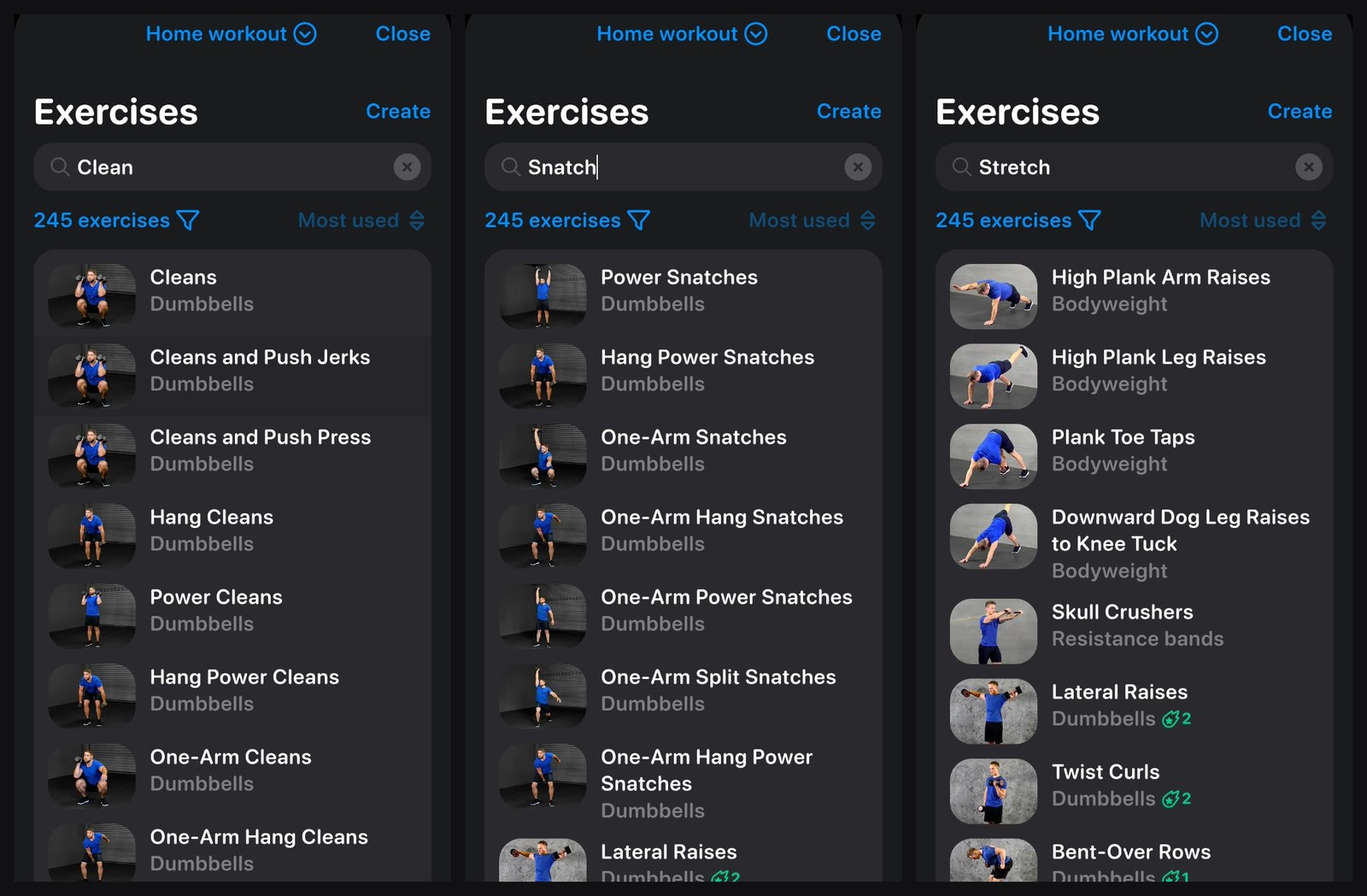
| No Olympic lifts | Searching clean, snatch and jerk, even in my dumbbell-only home gym, turned up dozens of variations: power cleans, hang cleans, power snatches, one-arm snatches, push jerks, split jerks and the combined lifts. Each has its demo video | No, they are there |
| No place for stretches | Searching stretch brings up plank and mobility moves such as downward dog leg raises, but not dedicated stretches | Yes |
| No feedback on plan volume | Every workout summary shows the sets and the share of the session each muscle got, and the listing says it charts sets per muscle. It does not tell you whether a week hits a target range | Partly |
| Supersets and a lock screen rest timer were missing | Supersets work, and the listing now shows the rest timer as a Live Activity on iPhone | No, both are there now |
| No watch app | Confirmed. The listing mentions Apple Health sync, but there is no watch app yet. Alpha Progression says one is in the works, aiming for release by the end of 2026 | Yes, for now |
| Charged after a trial | Billing runs through the app stores. I could not test this without being charged | A caution, not a fault I could confirm |
| Too expensive | Pro is $79.99 a year, about $6.67 a month, and the free version needs no payment at all | Depends on the user. It costs far less than a personal trainer |
Of the ten criticisms, four no longer match the app: library size, export, Olympic lifts, and supersets with a lock screen timer. Three are partly true: intensity techniques (no rest-pause), plan volume feedback and price. Two still stand: no watch app, though Alpha Progression is aiming to release one by the end of 2026, and no stretching routines. Trial billing is a caution about the app stores rather than a fault I could confirm.
Some older complaints look fixed. Reviews from early 2025 asked for supersets and a rest timer in the iPhone’s Dynamic Island, and both are now on Alpha Progression’s App Store listing.
Price: what is free and what Pro adds
The free version covers logging and the full library; Pro is where the planning and progression live. US prices from the App Store listing, read 26 October 2026:
| Plan | US price | What you get |
|---|---|---|
| Free | $0 | Unlimited workout logging, all 795 exercise videos, your own plans, measurements, rest timer, records, achievements, plan sharing, CSV export. No ads, no account needed |
| Pro monthly | $12.99 a month | Plan and workout generator, progression recommendations, charts, multiple gyms, periodization and deloads, plate and warm-up calculators, exercise evaluations |
| Pro yearly | $79.99 a year (about $6.67 a month) | The same, with a 14-day free trial |
The yearly plan costs about half of twelve monthly payments. The store still lists older Legacy plans at $24.99 a month and $99.99 a year, so if you subscribed a while ago, check which price you are on.
There is also a way to get Pro free. While I was testing, the app was running a monthly giveaway of a free yearly Pro subscription: share your training to your Instagram stories and tag @alphaprogression, and every story you post is another entry. Pro subscribers can enter too. The round I saw ended on 31 October, so check the app for the current one.
Who should get it
New lifters: take the presets. Pick a goal, the days and time you have and your gym, leave the split on Automatic, and follow the plan. The starting-weight guide, the exercise videos and, on Pro, the set-by-set targets cover the decisions a beginner usually gets wrong.
Experienced lifters: open Expert settings. Choose the split, ramp sets and RIR across the weeks, schedule deloads, focus or neglect specific muscles, set up each gym you train in, or skip the generator and build your own plan from 795 exercises.
Anyone on a budget: start free. Logging, the full exercise library and CSV export cost nothing and come with no ads.
Look elsewhere if you need a watch app today, an API or web dashboard for your data, built-in stretching or rest-pause sets, or an exercise library in the thousands (795 was plenty for me).
Verdict: 4.6 out of 5. It earns that on what matters most in a training app: a plan that fits your goal, schedule and equipment, set-by-set targets that are realistic but still push you, and enough control for an experienced lifter. Users agree, with 4.9 stars on the US App Store and 4.8 on Google Play. It loses points for no watch app yet (Alpha Progression is aiming to release one by the end of 2026), no web or API access to your data, and a yearly price at least one reviewer found high. Users should also cancel trials through their app store if they do not want to be charged.
For how it compares with Fitbod, Dr. Muscle, JuggernautAI and four other apps, see our guide to the best AI bodybuilding apps.
Sources
- Alpha Progression on the US App Store: features, Free vs Pro, prices, 4.9 from 2,243 ratings, version 7.7 (6 October 2026), read 26 October 2026
- US App Store customer reviews: the 152 reviews in Apple’s public review feed, 2021 to March 2025, read 26 October 2026
- Alpha Progression on Google Play (US): 4.8 from 21.3K reviews, 1M+ downloads, updated 6 October 2026, read 26 October 2026
- alphaprogression.com
- r/alphaprogression: user posts on data export, exercise count, plan volume and feature requests
- My own use of the app on Android, week of 19 October 2026

Written by
FazFaz is the founder of AIToolsBakery. Some tools here are tested hands on. Others are assessed from vendor documentation and pricing verified on the live page, and every review says which one it is. Sponsors can buy a position in a guide. They cannot buy the score, the criticism, or silence about a better option.
How we test and how we make money →