Every email marketing platform now advertises AI, and most ranking pages list the features and the “from” price side by side. The problem is that the cheapest plan often does not include the AI. Mailchimp’s Essentials plan has no generative AI. Brevo’s AI segmentation is on its top plan. ActiveCampaign’s AI is “limited” below Pro. The price you see is not the price of the AI you are reading about.
This guide fixes that. For each tool we found the cheapest plan that actually includes its AI writer, and priced it at two list sizes, 1,000 and 10,000 contacts, from the vendor’s own pricing page on the same day. We also note how AI use is metered, and which tools now let you run your account from Claude or ChatGPT, the biggest change in this category in 2026.
How we put this together. We have not used these tools ourselves; this is a research-based comparison. Every price, limit and feature below comes from the vendor’s own pricing page or feature page, read on 9 October 2026. Several vendors showed us local currency by default; the US dollar prices here come from each vendor’s own currency selector or the price data on its own page, never from our own conversion. Prices are monthly billing unless we say otherwise. Nothing here is a test result.
The “AI tax”: what the plan with AI really costs
| Tool | Cheapest plan with its AI writer | 1,000 contacts | 10,000 contacts | Free plan |
|---|---|---|---|---|
| MailerLite | Comfort | $19 | $89 | 250 subscribers, no AI writing assistant |
| Kit | Creator | $39 | $139 | Up to 10,000 subscribers |
| beehiiv | Pro (AI credits listed) | $109 | $239 | Up to 2,500 subscribers |
| Mailchimp | Standard | $29.50 | $86.24 | 250 contacts, no generative AI |
| Klaviyo | Email, plus $20 Composer agent | $30 + $20 | $150 + $20 | 250 profiles, $5 of AI a month |
| Omnisend | Standard | $20 | $132 | 250 contacts |
| GetResponse | Starter | $19 | $79 | None on its pricing page |
| ActiveCampaign | Starter, “limited” AI (billed yearly) | $15 | $149 | None, 14-day trial |
| Brevo | Starter, priced by emails sent | from $9 for 5,000 emails | see Brevo section | 300 emails a day |
Read on 9 October 2026, US dollars, monthly billing except ActiveCampaign, which shows yearly billing only. Prices exclude tax and introductory offers.
How AI works in email marketing now
Writing help
Every tool here can draft an email, suggest subject lines or rewrite in a different tone. This is the most common AI feature and the least differentiating.
Smarter sending and segments
Some tools use AI to pick the best send time for each subscriber, predict who will buy or suggest audience segments. These features usually sit on higher plans, and they matter more as your list grows.
Bring your own AI
The newer change is connectors that let Claude, ChatGPT and other assistants work inside your account, through what is called MCP. On their own pages, Mailchimp, MailerLite, Brevo, Kit, beehiiv, Omnisend and ActiveCampaign all now offer one. On MailerLite and beehiiv it starts on the free plan. If you already pay for an AI assistant, this can matter more than the vendor’s own writing tool.
How we chose and ordered these
Every tool had to send email campaigns and automations and include its own AI features. We ordered them by AI value per dollar at small list sizes for small businesses, creators and newsletter writers, then by how clearly the vendor says which plan includes the AI and how it is metered. Writing tools that do not send email were left out. None of these vendors paid for placement on this page.
1. MailerLite: the most AI per dollar for small businesses
MailerLite has renamed its plans Free, Comfort, Power and Enterprise. Its AI, which it calls HeyLite Intelligence, includes an AI writing assistant with four tones, a subject line generator, smart sending that picks send times, an AI landing page builder and an MCP connector for Claude and ChatGPT.
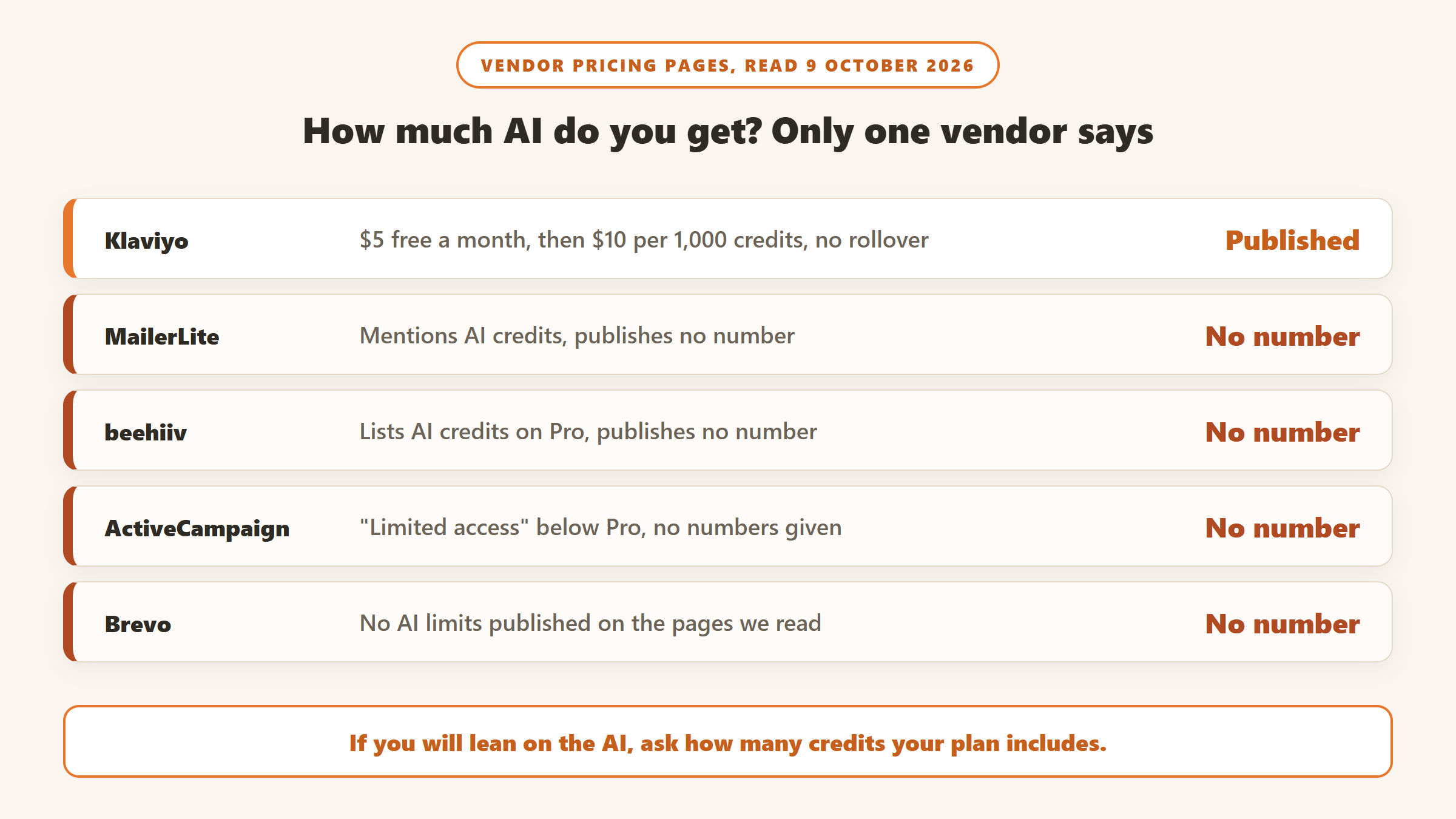
The writing assistant and smart sending start on Comfort: $19 a month at 1,000 subscribers, or $89 at 10,000, with about 10% off billed yearly. The free plan now covers 250 subscribers and 2,500 emails a month, not the 1,000 that several ranking pages still quote, and includes a limited subject line generator, one AI-built landing page and the MCP connector. MailerLite mentions AI credits but does not publish how many each paid plan includes.
Choose it if you want capable AI and automations at the lowest price. Skip it if you need a free plan for more than 250 people.
2. Kit: the biggest free list, for creators
Kit, formerly ConvertKit, now has a free plan for up to 10,000 subscribers with unlimited broadcasts, the most generous here. Its AI tools “generate and test subject lines right inside the email editor”, and the Kit MCP connector lets Claude, ChatGPT and Gemini work with your account. Its stance is plain: “You’re the talent. AI is the tool.”
Creator is $39 a month at 1,000 subscribers and $139 at 10,000, and includes the MCP connector; Pro is $79 and $189. Kit does not say which plan includes the AI subject lines. On 9 October it was offering 25% off Pro on annual billing, ending 7 November 2026. Kit says there are no sending limits on any plan.
Choose it if you are a creator building a list and want to start free. Skip it if you want deep AI writing built in.
3. beehiiv: for newsletters that make money
beehiiv is built for newsletter writers, with an ad network, paid subscriptions and a 0% cut of subscription revenue. Its AI tools include a writing assistant, tone changes, translation, image creation and an AI website builder, and its MCP connector offers read access even on the free plan.
The free plan covers 2,500 subscribers. Lite is $59 a month at 1,000 and $139 at 10,000; Pro, which lists AI credits on its plan card, is $109 and $239. beehiiv does not publish how many credits that means. It is the most expensive option here at 1,000 subscribers, and good value if you plan to earn from the newsletter.
Choose it if your newsletter is the business. Skip it if you mainly send promotions for a shop or service.
4. Mailchimp: familiar and guided, but the AI starts on Standard
Mailchimp brands its AI as Intuit Intelligence, still in beta in English for select countries. It includes generative AI for content, analytics that “explains which campaigns and automations are actually moving revenue”, and connectors to ChatGPT, Claude and Perplexity.
Its plan comparison lists generative AI as “not included” on Free and Essentials. Essentials is $17.02 a month at 1,000 contacts; Standard, where the AI starts, is $29.50, and $86.24 at 10,000. Mailchimp was offering 50% off for 12 months on 9 October. The free plan allows 250 contacts and 500 sends a month, though its main pricing page also says “fewer than 500 contacts”, so check before you rely on the higher number.
Choose it if you want a familiar tool with guided setup and will pay for Standard. Skip it if you want AI on a budget plan.
5. Klaviyo: for online stores, and the only one that prints its AI meter
Klaviyo is built around store data, and its Email plan includes “generative AI for segments, content, flows, and images” and predictive analytics. It is $30 a month at 1,000 profiles and $150 at 10,000, which makes it less of an expensive outlier than its reputation suggests.
Its Composer agent, which builds campaigns and flows and answers questions about your data, is a $20 a month add-on. Klaviyo is the only vendor here that publishes its AI metering: $5 of Composer use a month on the free plan, overage at $10 per 1,000 credits, and credits that reset monthly and “do not carry over”.
Choose it if you run a Shopify-style store and want AI built on purchase data. Skip it if you do not sell online.
6. Omnisend: the cheaper ecommerce option
Omnisend also targets online stores. Standard includes “Essential AI”, two tools for forms and reports, at $20 a month for 1,000 contacts and $132 for 10,000. Pro adds “Advanced AI”, with dynamic content, product recommendations and personalised send times, from $59. Its pricing page was offering 30% off for paying three months up front.
Choose it if you want ecommerce email for less than Klaviyo at a small list size. Skip it if you need advanced AI on the entry plan.
7. GetResponse: AI writing on the entry plan
GetResponse says its AI email generator is “available for all paid GetResponse plans”, including Starter, at $19 a month for 1,000 contacts and $79 for 10,000. Its pricing page showed us rupees with no currency selector, so these dollar figures come from the US price data on that same page; it says customers are charged in US dollars or euros. We found no free plan on its pricing page, only a 14-day trial.
Choose it if you want AI writing on the cheapest paid plan and sell courses or webinars. Skip it if you want a free plan.
8. ActiveCampaign: automation first, with AI limited below Pro
ActiveCampaign lists the longest set of AI features, which it calls Active Intelligence: an AI automation builder, campaign builder, segments, content and image generation, and predictive sending. On Starter and Plus that access is “limited”, with no numbers given; unlimited access starts on Pro.
Its pricing page shows yearly billing only: Starter at $15 a month for 1,000 contacts and $149 for 10,000, Pro at $79 and $375. There is no free plan.
Choose it if your email depends on complex automations. Skip it if you want clear AI limits on a cheap plan.
9. Brevo: pay by emails sent
Brevo charges by monthly email volume rather than list size. Starter is $9 a month for 5,000 emails and includes its Aura AI content generator and an MCP connector; Standard at $18 adds AI send time optimisation. Aura’s AI segmentation and AI data analyst are on Professional, at $499 a month on its live pricing page.
One thing to check before you buy: Brevo’s plan builder now shows an included contact allowance that changes with the email volume you choose. We could not confirm from its pages whether that is a hard cap, so check it for your list size. The free plan sends 300 emails a day.
Choose it if you have a large list you email rarely. Skip it if you want AI segmentation without paying for the top plan.
What we left out, and why
HubSpot Marketing Hub is priced per seat with marketing contacts bundled, and is best for teams already on HubSpot’s CRM. Moosend’s prices did not load for us. Sender has a generous free plan but no AI features on its pricing page, and Flodesk lists none either. Substack is a publishing platform rather than an email marketing tool. Jasper, Copy.ai and Seventh Sense help with writing or timing but do not send email.
Six things to check before you choose
- Which plan has the AI. The table above shows the cheapest plan that includes each vendor’s AI writer. On Mailchimp that is Standard, not Essentials; on ActiveCampaign full AI is Pro.
- How the price grows. Most tools charge by contacts, so a list that grows from 1,000 to 10,000 can multiply your bill four or five times. MailerLite goes from $19 to $89 a month, ActiveCampaign Starter from $15 to $149. Brevo charges by emails sent instead.
- Sending limits. Kit says it has no sending limits on any plan. Mailchimp’s free plan allows 500 sends a month and no more than 250 a day. MailerLite’s free plan allows 2,500 emails a month.
- Branding. Free and entry plans often add the vendor’s logo to your emails. On Brevo Starter, removing it showed as a $12 a month add-on.
- Yearly billing. Paying yearly saves about 10% on MailerLite and more on Kit, where Creator drops from $39 to $33 a month at 1,000 subscribers.
- Whether you need the vendor’s AI at all. If you already pay for Claude or ChatGPT and your tool offers an MCP connector, you can draft in the assistant you know and keep the cheaper plan.
Should you wait for Black Friday?
We could not confirm a Black Friday 2025 deal on any of these nine vendors’ own pages. Several were already running offers on 9 October: Mailchimp’s 50% off for 12 months, Kit’s 25% off Pro on annual billing until 7 November, Omnisend’s 30% off for paying three months up front, and Klaviyo’s $1 first month at 500 profiles. If one of those fits, there may be no reason to wait.
What AI email tools cannot do yet
AI drafts are fast, but they sound generic, and subscribers who know you will notice. The tools are best at subject line variations, rewriting for tone and turning one piece of content into several emails. They cannot tell you what your audience cares about this month; your replies and click data do that.
The other limit is list quality. No AI fixes a list of people who never asked to hear from you. Grow it with consent, keep it clean, and let the AI help with the writing.
Which AI email marketing tool should you pick?
If you are a small business on a budget
MailerLite Comfort, or GetResponse Starter if you want AI writing on the cheapest paid plan.
If you are a creator
Kit, starting on its free plan for up to 10,000 subscribers.
If your newsletter is the business
beehiiv, for monetisation tools and no cut of subscription revenue.
If you run an online store
Klaviyo for the deepest store-data AI, or Omnisend for a lower price at small list sizes.
Waiting for a sale? Our AI tools Black Friday deals page tracks Black Friday and Cyber Monday offers on email marketing and other tools, each checked on the vendor’s own site.
Sources
- MailerLite: pricing and HeyLite Intelligence. Kit: pricing and AI. beehiiv: pricing and AI features.
- Mailchimp: pricing, compare plans and AI tools. Klaviyo: pricing. Omnisend: pricing.
- GetResponse: pricing and AI email generator. ActiveCampaign: pricing. Brevo: pricing and Aura AI.
- All read 9 October 2026.

Written by
FazFaz is the founder of AIToolsBakery. Some tools here are tested hands on. Others are assessed from vendor documentation and pricing verified on the live page, and every review says which one it is. Sponsors can buy a position in a guide. They cannot buy the score, the criticism, or silence about a better option.
How we test and how we make money →