
AI narration is everywhere on YouTube now: explainers, documentaries, faceless channels and dubbed versions of existing videos. Choosing a voice tool for a channel you want to monetise comes down to three questions most comparison pages skip. Does the plan you are on give you commercial rights? What does YouTube itself allow? And what does a finished video actually cost to voice?
AI voice generators for YouTube compared
| Tool | Best for | Entry price | Commercial rights from | Cost per 10-minute script | Free option |
|---|---|---|---|---|---|
| ElevenLabs | Most channels | $6/mo | Starter, $6/mo | $1.80 | No commercial use, attribution required |
| Speechify Studio | Yearly payers | $100/yr | Studio Starter, $100/yr | $0.69 | No commercial rights, no mp3 |
| DupDub | Cloning across languages | $15/mo | Personal, $15/mo | $1.20 ($6.00 on Ultra voices) | 3-day trial, personal use only |
| Murf | Long narration | $29/mo or $19/mo yearly | Creator | $2.42 ($1.58 yearly) | No commercial rights, no downloads |
| WellSaid | Free redos, English | $19/mo | Starter, $19/mo | $9.50 ($5.00 yearly) | 3 minutes a month, no commercial rights |
| Fliki | Video included | ₹799/mo (India) | Basic, ₹799/mo (India) | About ₹139 to ₹417 on Standard (India) | 5 minutes a month |
| Descript | Fixing your own recordings | $24/mo | Not stated on the pricing page | Not published | 720p, watermarked |
| Amazon Polly | Developers | $16 per million characters | No commercial-use line; FAQ says output “belongs to you” | $0.14 | 12-month free tier |
| FineVoice | High monthly volume | $8.99/mo | Basic, $8.99/mo | $0.81 ($0.54 yearly) | Personal use only |
How we put this together. This is mainly a comparison of plans, licences and costs from each vendor’s own pages and YouTube Help, read on 4 November 2026. We ran and listened to one short FineVoice test, and we have not compared the other voices. Prices are in US dollars as displayed, except Fliki, which showed us Indian rupees; we report those as regional and do not convert them.
1. ElevenLabs: the default for monetised channels
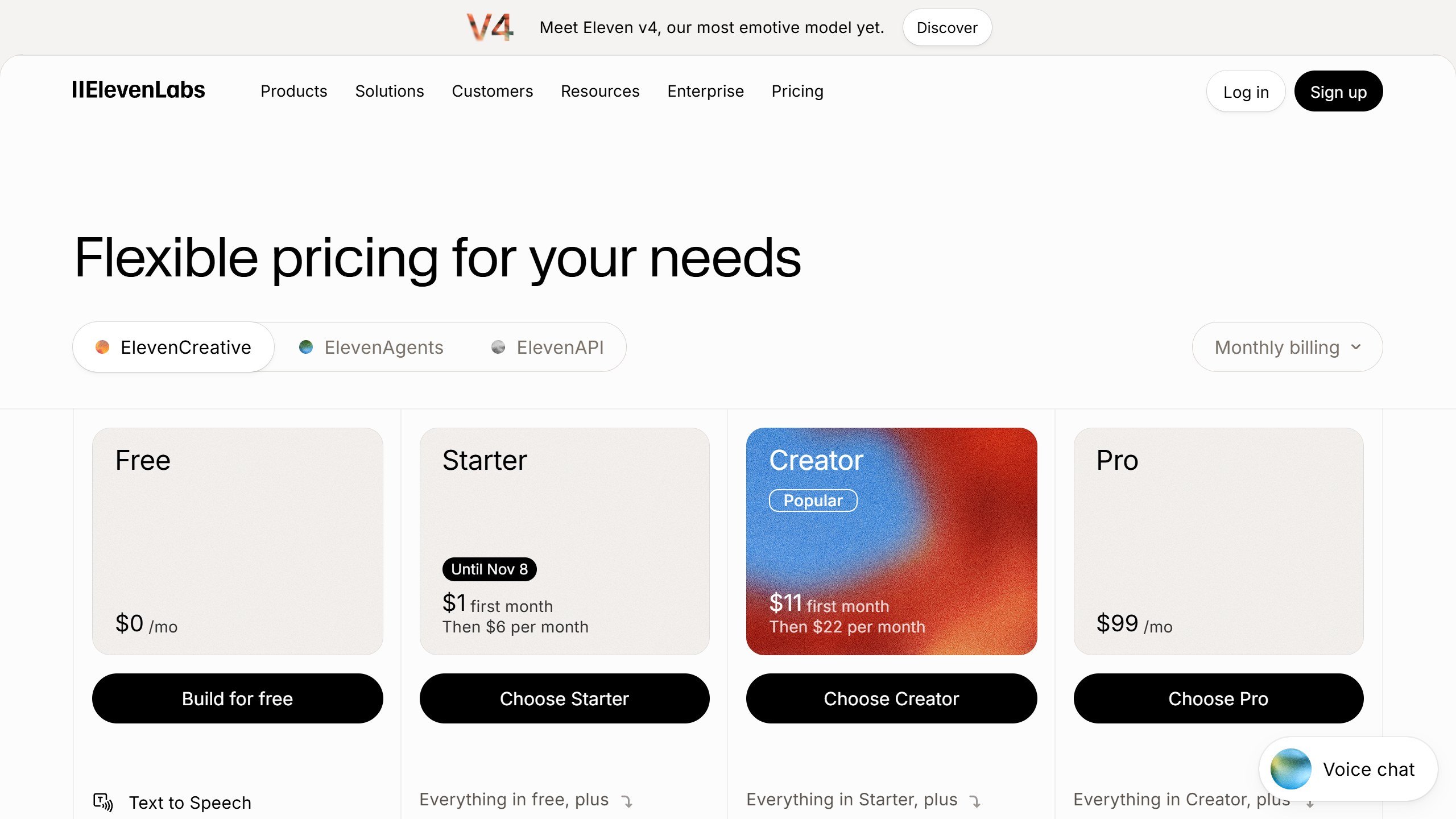
Entry price: $6 a month, with the first month at $1 until 8 November (pricing) | Free option: 10,000 credits a month, about 10 minutes, with no commercial use
Best for: most channels, especially if you want to clone your own voice.
Starter gives you about 30 minutes a month, Creator about 121 minutes at $22, and Pro about 600 minutes at $99. Paying yearly costs the price of 10 months. All paid plans carry a commercial licence, except for features in beta, and its help centre spells out that audio made outside a paid subscription stays non-commercial, even if you upgrade later.
What it does well:
- Instant voice cloning from Starter and Professional cloning from Creator
- Unused credits roll over for up to 2 months on paid plans
- The app shows when a regeneration is free before you run it
Where it falls short: Starter runs out in about a week at four videos a week, and the free plan needs attribution and can never be used commercially.
2. Speechify Studio: low cost per minute, paid yearly
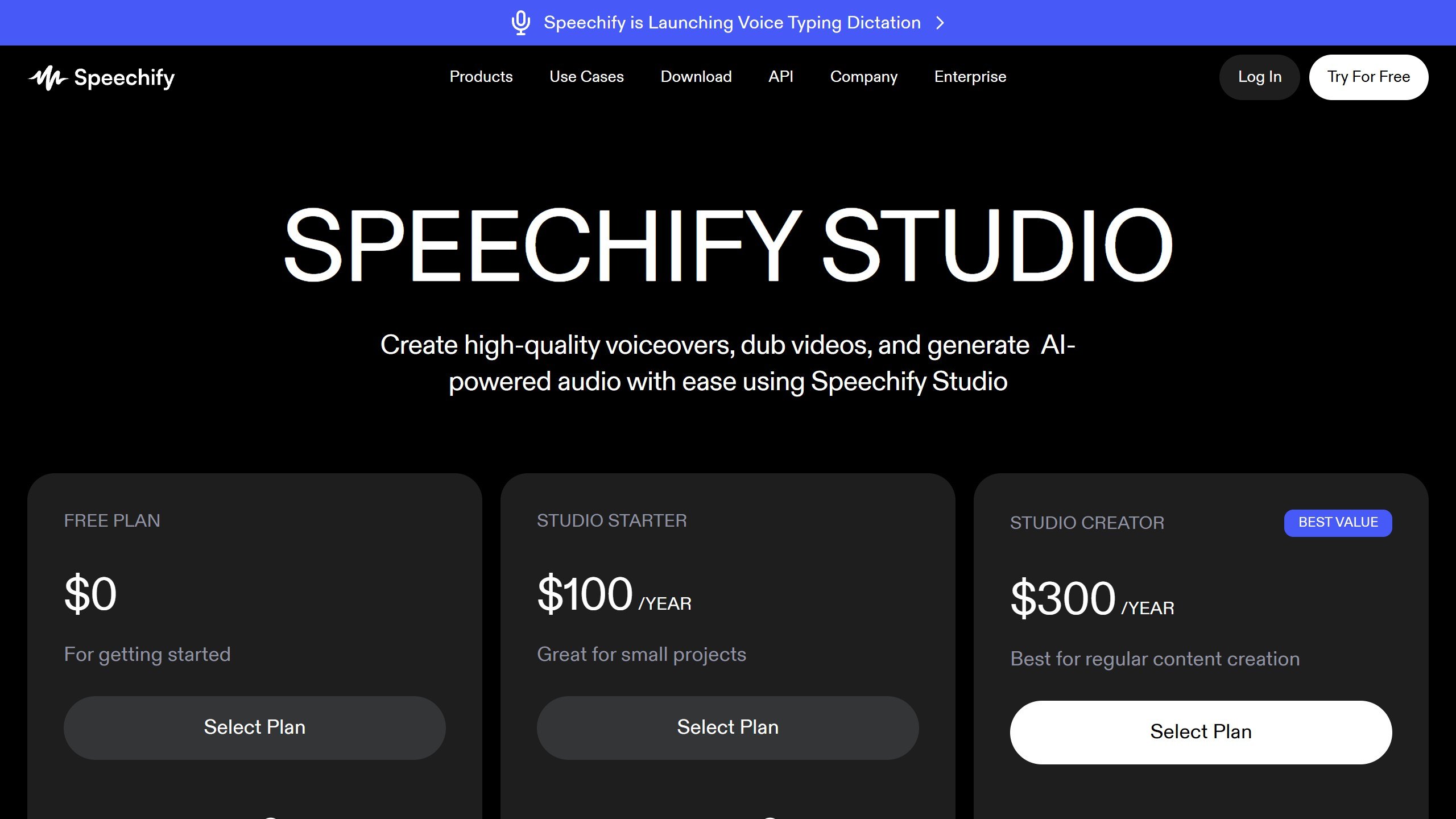
Entry price: $100 a year for 86,400 credits (pricing) | Free option: 600 Studio credits, no commercial rights and no mp3 download
Best for: channels that publish often and can pay a year upfront.
Voice-over costs one credit per second, so a 10-minute script is 600 credits. Studio Creator is $300 a year for 345,600 credits. The page says you own the audio with commercial rights in perpetuity, and its FAQ answers “Can I use Speechify Studio for Youtube?” with “Yes!”.
What it does well:
- About $0.69 per 10-minute script on Studio Starter
- Volume changes and re-exports do not use credits
- Clear YouTube wording on the pricing page
Where it falls short: it is sold yearly only on that page, and voice cloning is not listed. Changing pitch, speed or prosody uses credits again.
3. DupDub: monthly plan with cross-language cloning
Entry price: $15 a month, or $11 billed yearly (pricing) | Free option: 3-day trial with no card, for personal use only
Best for: creators who want cloning and commercial rights without paying a year upfront.
Personal includes 150 credits a month, an unlimited commercial licence and three instant cloned voices that work across languages. It lists 57 languages. Standard voices use 0.02 credits a second, and Ultra and Premium voices use 0.1, five times as much.
What it does well:
- About $1.20 per 10-minute script on standard voices
- Unused credits roll over to the next subscription month
- Each file can hold 10,000 characters, enough for a 10-minute script in one go
Where it falls short: the better voices cost five times as much, which takes a script to about $6.00, and the 150 credits cover about 125 minutes on standard voices or 25 on Ultra.
4. Murf: clear YouTube terms for long narration
Entry price: $29 a month, or $19 billed yearly (pricing, Studio tab) | Free option: 10 minutes, with no commercial rights and no downloads
Best for: long-form narration on a yearly plan.
Creator gives you 2 hours a month, or 24 hours a year as one pool on yearly billing. Business is $99 a month, or $66 billed yearly, for 8 hours a month. Its FAQ says Creator gives commercial rights for YouTube videos and that you can monetise them if your text is original. It lists 200+ voices in 30+ languages and accents.
What it does well:
- A yearly pool you can spend unevenly across the year
- Changing voice, pitch, speed or pauses on the same text does not use time
- A direct answer on YouTube monetisation in its FAQ
Where it falls short: Emphasis and some other fine controls start on Business, voice cloning is listed only on Enterprise, and the FAQ steers registered businesses to Business.
5. WellSaid: free redos, English only
Entry price: $19 a month, or $120 a year (pricing) | Free option: 3 download minutes a month, with no commercial rights
Best for: English channels that rework every line before publishing.
WellSaid charges by downloaded minutes rather than generations, so you can regenerate as often as you like. Starter is 20 minutes a month, or 240 a year. Pro is $49 a month for 180 minutes, or $396 a year for 2,160. Both include full commercial rights.
What it does well:
- Unlimited generation on paid plans
- Pro covers a busy channel at 180 minutes a month
- Simple billing that does not depend on how many drafts you make
Where it falls short: it is the most expensive per finished minute here, unused minutes do not roll over, and other languages need Enterprise.
6. Fliki: when you want the video built too
Entry price: ₹799 a month, as shown to us in India (pricing) | Free option: 5 minutes of audio and video a month
Best for: faceless channels that want script to finished video in one tool.
Fliki turns scripts into full videos with voice-over, stock footage and avatars. Basic has a 5-minute export cap, and Standard at ₹2,499 has a 15-minute cap. Its FAQ says prices are listed in US dollars, so readers elsewhere will see a different figure. It also says subscribers can publish and monetise on YouTube if the text is original.
What it does well:
- Voice, footage and avatars in one place
- Commercial rights on all three paid plans
- A yearly option at 25% off
Where it falls short: its own pages disagree on credits: the estimator suggests about ₹139 for a 10-minute video on Standard and the FAQ about ₹417. The pricing page also disagrees with itself on whether Basic includes voice cloning, so check before you buy. Basic’s export cap rules out a 10-minute video.
7. Descript: fix your own recordings with a clone
Entry price: $24 a month, or $16 billed yearly (pricing) | Free option: 720p with watermarked exports
Best for: creators who record their own voice and want to fix a word without re-recording.
Descript is an editor first. Hobbyist includes 10 media hours, 400 AI credits, AI Speech with custom voice clones, and 1080p export with no watermark. Creator is $35 a month, or $24 billed yearly, with 800 credits and 4K.
What it does well:
- Edit the video by editing the transcript
- Custom voice clones on the entry plan
- One tool for recording, editing and fixes
Where it falls short: it does not publish how many credits a minute of AI speech uses, so we could not price a script, and its pricing page has no commercial-use line for us to cite.
8. Amazon Polly: the developer baseline
Entry price: $16 per million characters on Neural voices (pricing) | Free option: 1 million Neural characters a month for the first 12 months
Best for: technical creators who generate narration at volume from code.
A 10-minute script costs about 14 cents on Neural voices, 27 cents on Generative and 4 cents on Standard. Its FAQ says your output “belongs to you” and can be replayed at no extra cost.
What it does well:
- The lowest cost per script on this page
- Usage billing with no monthly fee
- A long-running service from AWS
Where it falls short: there is no creator editor and no self-serve cloning. You work through the AWS console or API, and the pricing page has no commercial-use line.
9. FineVoice: high allowances for a busy channel
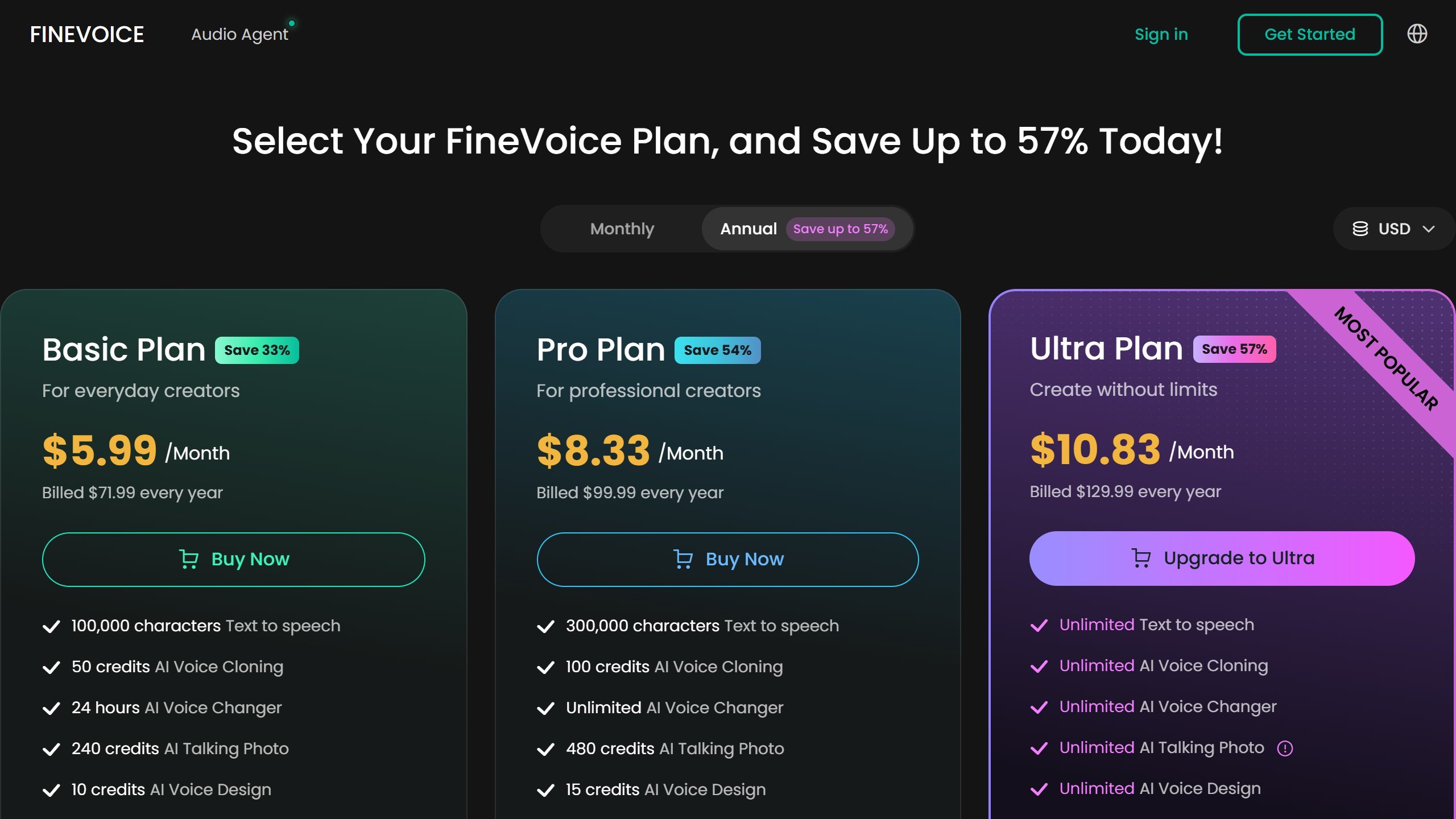
Entry price: $8.99 a month, or $71.99 a year (pricing) | Free option: 1,000 characters a day, for personal use only
Best for: channels that publish often and want a large monthly allowance.
Basic includes 100,000 characters a month, Pro is $17.99 a month or $99.99 a year for 300,000, and yearly Ultra, at $129.99, lists text to speech as unlimited. Its terms say paid users own their output and can use it commercially. We ran a short English script on an account the company set up and rated the clip highly when we listened to it. That fits its Trustpilot page, which scored 4.2 from 72 reviews on 4 November 2026, with several reviewers praising voice accuracy and cloning. One clip is a small sample, so try your own script first.
What it does well:
- About $0.81 per 10-minute script on Basic, or $0.54 on yearly billing
- Pro covers about 333 minutes a month
Where it falls short: each input is capped at 5,000 characters, so a 10-minute script takes two runs, and the terms let FineVoice use your content to improve its models. On Trustpilot, the complaints that recur are about support and plan access, and one reviewer found its Hebrew poor.
What YouTube actually allows
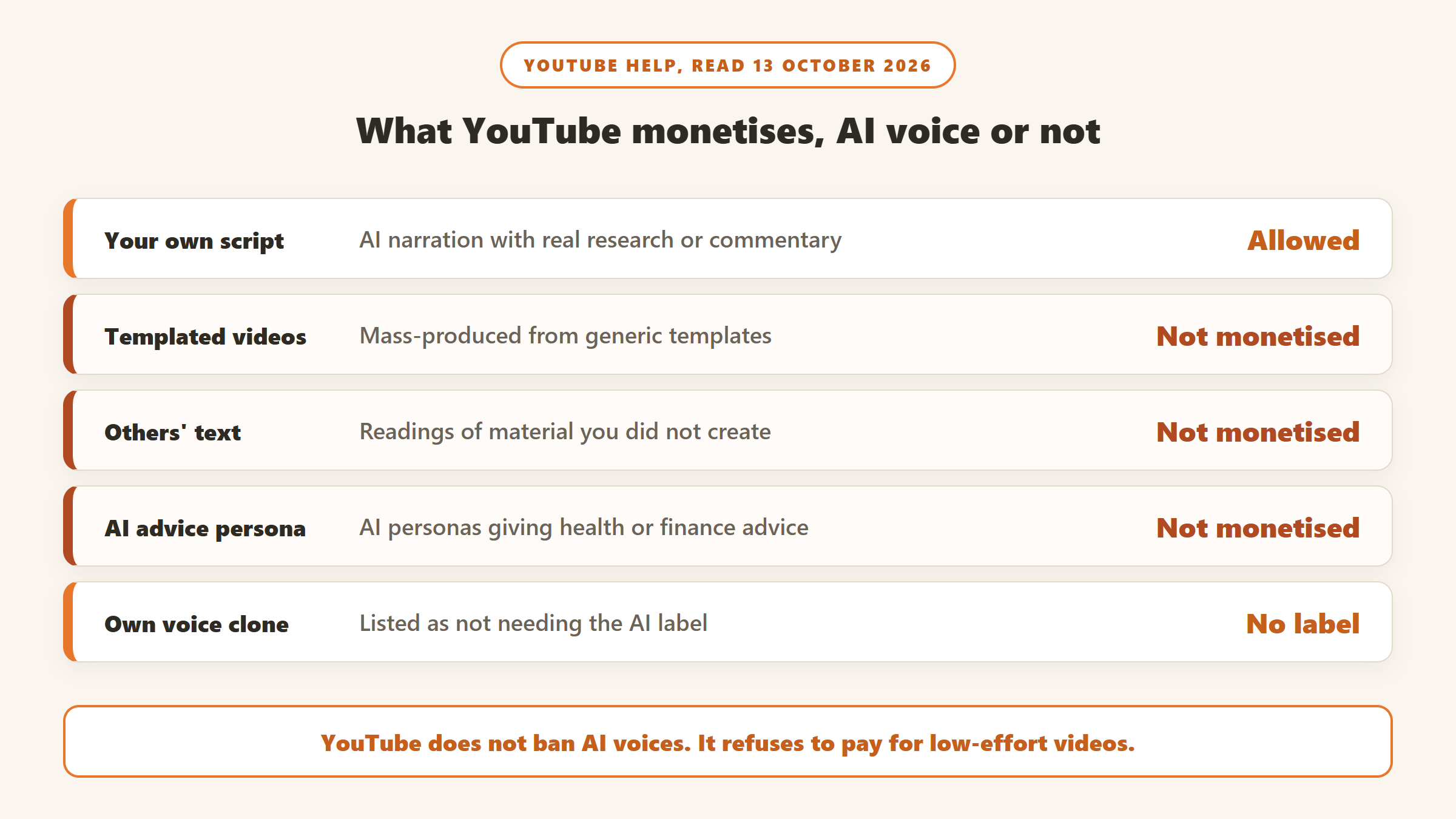
Start here, because a great voice does not help if the channel cannot earn. YouTube’s monetisation policies do not mention text-to-speech or AI voices by name. YouTube does not ban AI narration. What it does is refuse to monetise certain kinds of content, whatever voice is used.
- Inauthentic content. In July 2025 YouTube renamed its “repetitious content” policy to “inauthentic content”. It excludes content that looks mass-produced from templates, including AI-generated content made with “generic or unoriginal templates”, and slideshows or scrolling text with little narrative or commentary.
- Reused content. Videos that only feature readings of material you did not create are not monetisable. This is the rule that matters most for AI-voiced channels that narrate forum posts, encyclopaedia articles or books, and it applies to the channel as a whole.
- AI personas on sensitive topics. Channels that use AI-generated personas to deliver health, financial or similar advice will not be allowed to monetise. YouTube’s examples include an AI doctor and an AI finance podcast host.
- Your creative input. The policy says that if you use automated tools, the final product must still show your creative vision. Using AI to help edit scripts is listed as acceptable.
In practice: an AI voice reading your own original script, with real research or commentary and visuals that vary from video to video, is within the rules. An AI voice reading other people’s text over a template is not, no matter how good it sounds.
Do you need YouTube’s AI label?
YouTube’s disclosure rules require a label when content makes a real person appear to say or do something they did not. They list cloning your own voice for voice-overs or dubs as a minor use that does not need disclosure. Stock AI voices are not named either way. Our reading: a stock narrator reading your own script does not make a real person say anything, so it falls outside the listed triggers, while cloning someone else’s voice does trigger it. YouTube says disclosing AI content will not limit a video’s audience or its eligibility to earn money, but consistently failing to disclose when required can lead to penalties, including suspension from the Partner Program.
The ElevenLabs free plan trap
ElevenLabs’ help centre says the free plan cannot be used for any commercial purpose, and that content created outside a paid subscription, before or after, cannot be used commercially. Audio you make on the free plan does not become monetisable when you upgrade later. Generate the final version of anything you plan to publish while you are on a paid plan.
What it costs to voice a 10-minute video
Every tool meters differently: characters, credits, seconds, generated minutes or downloaded minutes. To compare them we priced one 10-minute narration, a script of about 1,500 words or 9,000 characters, on each tool’s entry paid plan, using each vendor’s own meter. We assume one clean render with no redos. Our FineVoice test fits that estimate, at 598 characters for 40 seconds of audio.
- Amazon Polly: 9,000 characters at $16 per million is about $0.14 on Neural voices, $0.27 on Generative and $0.04 on Standard.
- FineVoice: $8.99 for 100,000 characters makes 9,000 characters $0.81. On yearly billing, $71.99 for the same monthly allowance, it is $0.54.
- Speechify Studio: 600 seconds is 600 credits, and $100 for 86,400 credits makes it $0.69.
- DupDub: $15 for 150 credits is $0.10 a credit, and a 600-second standard voice-over uses 12 credits, so $1.20. On annual billing, $132 for 1,800 credits, it is $0.88.
- Murf: $29 for 120 minutes makes 10 minutes $2.42. On yearly billing, $228 for 1,440 minutes, it is $1.58.
- ElevenLabs: $6 for 30,000 credits, at one credit per character, makes 9,000 characters $1.80. On Creator, $22 for 121,000 credits, it is $1.64.
- WellSaid: $19 for 20 downloaded minutes makes 10 minutes $9.50. On annual billing, $120 for 240 minutes, it is $5.00.
- Fliki: Standard is ₹2,499 for 180 credits, shown to us in India. Its estimator implies about ₹139 for 10 minutes and its FAQ about ₹417.
- Descript: it does not publish credits per minute of AI speech, so we could not price it.
Redos are where the meter bites
Few scripts come out right first time. Murf uses generation time whenever you render new text or change the text in a block, though changing the voice, style, pitch or speed on the same text is free. WellSaid counts only downloaded minutes, so redos cost nothing. ElevenLabs charges per generation, and says a limited number of free regenerations may be available if the content and certain settings do not change. Speechify charges again for pitch, speed or prosody changes, and Fliki when text, voice or pauses change. If you rework scripts a lot, that can matter more than the headline price.
What a month of uploads costs
Four 10-minute videos a week is about 170 minutes of narration a month. Most entry plans fall short: ElevenLabs Starter gives about 30 minutes, FineVoice Basic about 111, Murf Creator and Speechify Studio Starter about 120, ElevenLabs Creator about 121, and DupDub Personal about 125. These plans cover it:
| Plan | Price | Minutes a month |
|---|---|---|
| FineVoice Pro | $17.99/mo, or $99.99/yr | About 333 |
| Speechify Studio Creator | $300/yr | About 480 on average |
| DupDub Professional | $40/mo | About 416 on standard voices |
| WellSaid Pro | $49/mo, or $396/yr | 180 downloaded |
| Murf Business | $99/mo | 480 |
| ElevenLabs Pro | $99/mo | About 600 |
Size the plan to your real output, including the paragraphs you will regenerate. Unused allowance carries over on ElevenLabs, for up to 2 months, and on DupDub. It does not on WellSaid or FineVoice.
A checklist before you publish an AI-voiced video
- Render the final audio on a paid plan with commercial rights.
- Write the script yourself, or add real commentary, research or analysis to any source material.
- Vary your visuals and structure between videos so the channel does not look templated.
- Do not use an AI persona to give health, financial or legal advice on a channel you want to monetise.
- Use YouTube’s AI label if you clone someone else’s voice or make a real person appear to say something.
- Keep a copy of your plan and the date you generated each file, in case a licence question comes up later.
Tools that ranking pages still recommend
- Play.ht: its domain did not resolve when we checked on 4 November 2026. Third parties report the platform was shut down at the end of 2025 after its team was acquired. If you used it, move to one of the tools above.
- LOVO (Genny): on 4 November 2026, its homepage showed a “deployment temporarily paused” notice.
- Resemble AI: it still ranks with YouTube voice pages, but its pricing page now sells deepfake detection, with no voice generation plan to compare.
One ranking page also lists Murf at $13 a month with 120 voices; Murf’s own page now says from $19 with 200+ voices.
Black Friday on AI voice tools
No voice vendor showed a Black Friday offer on its homepage or pricing page on 4 November 2026. ElevenLabs was running a first-month offer: Starter at $1 until 8 November and Creator at $11. We list offers once we can confirm them on the vendor’s site, on our AI tools Black Friday deals page.
Which AI voice tool should you pick?
If you want one tool that does it all
ElevenLabs on Starter or Creator.
If cost per minute matters most
FineVoice or Speechify Studio on a yearly plan, or Amazon Polly if you are comfortable with code.
If you publish a lot
FineVoice Pro, yearly Ultra, or WellSaid Pro if you rework every line.
If you want cloning on a monthly plan
DupDub Personal for cloned voices across languages, or FineVoice Basic for the lower price.
If you also need the video made
Fliki.
For the video side, see our AI video generator pricing comparison.
Sources
- YouTube Help: channel monetisation policies and disclosing AI content, read 13 October 2026.
- ElevenLabs pricing and publishing and licence help, Murf pricing, WellSaid pricing, Speechify Studio pricing.
- DupDub pricing, Fliki pricing, Descript pricing, Amazon Polly pricing and FAQ.
- Vendor pages read 4 November 2026, except FineVoice pricing and terms (updated 27 October 2026), read 3 November 2026. Cost per script figures are our arithmetic.

Written by
FazFaz is the founder of AIToolsBakery. Some tools here are tested hands on. Others are assessed from vendor documentation and pricing verified on the live page, and every review says which one it is. Sponsors can buy a position in a guide. They cannot buy the score, the criticism, or silence about a better option.
How we test and how we make money →