n8n is the source-available automation tool people reach for when Zapier gets expensive: drag workflows together, connect your apps, and increasingly, run AI agents. You can pay n8n to host it, or run it yourself on a server. The second option is cheaper and has no limit on how many workflows run, which is why “n8n hosting” has become its own small market.
The pages that rank for this search are mostly written by hosts, and the best independent ones skip three things: what n8n Cloud does when you hit its monthly run limit, how much memory you really need once you add AI agents, and what each host costs after the introductory price ends. This guide covers all three.
How we put this together. We have not deployed n8n on these hosts. This comparison is built from each vendor’s own pricing pages, docs and terms, read on 13 October 2026. Prices are as displayed to us from India, so they may be regional, in US dollars unless marked EUR; we have not converted any currency. Two-year totals are our arithmetic on published prices, with the working shown.
First: how much server does n8n need?
Less than most guides say, until you add AI. n8n’s hosting docs publish no general minimum. The only sizing figures are on its OEM prerequisites page, which gives memory from 320 MB to 2 GB, says “n8n isn’t CPU intensive” and that “memory requirements supersede CPU requirements”, and labels the figures “for illustrative purposes only”. Guides that quote “1 to 2 GB from the official docs” are citing something the docs do not say today.
n8n’s memory page lists what pushes usage up: large amounts of data passing through a workflow, big files, many nodes, several runs at once, and Code nodes, which “can increase memory consumption significantly”. It gives no numbers.
What changes with AI agents
n8n’s docs give no memory figure for AI Agent nodes. When an agent calls a hosted model such as OpenAI, Anthropic or Gemini, the model runs on their servers, and n8n’s own memory follows the normal rules above. The jump comes when you put a vector database or a local model on the same server. n8n’s own self-hosted AI starter kit, which bundles n8n, Ollama, Qdrant and Postgres, publishes no hardware requirements and is labelled “For testing only”.
For the vector store there is a sourced number. Qdrant’s capacity planning guide works through one million vectors at about 6.11 GB of memory, or about 7.33 GB with the 20% headroom it recommends. Local language models need their own sizing decision, and none of the vendors in this stack publishes one.
Our rule of thumb from those sources: 2 to 4 GB if your agents call hosted models, 8 GB or more if Qdrant runs on the same server, and separate planning for local models.
SQLite or Postgres, and queue mode
By default n8n uses SQLite and also supports Postgres. For scaling, queue mode splits the work between a main instance and workers, needs Redis and a database, and is not supported on SQLite. One conflict to know about: n8n’s edition comparison lists queue mode in the free Community edition, while its pricing page lists “Queue mode for scaling” as a Business feature. Running several main instances needs Enterprise.
The execution-cap trap on n8n Cloud
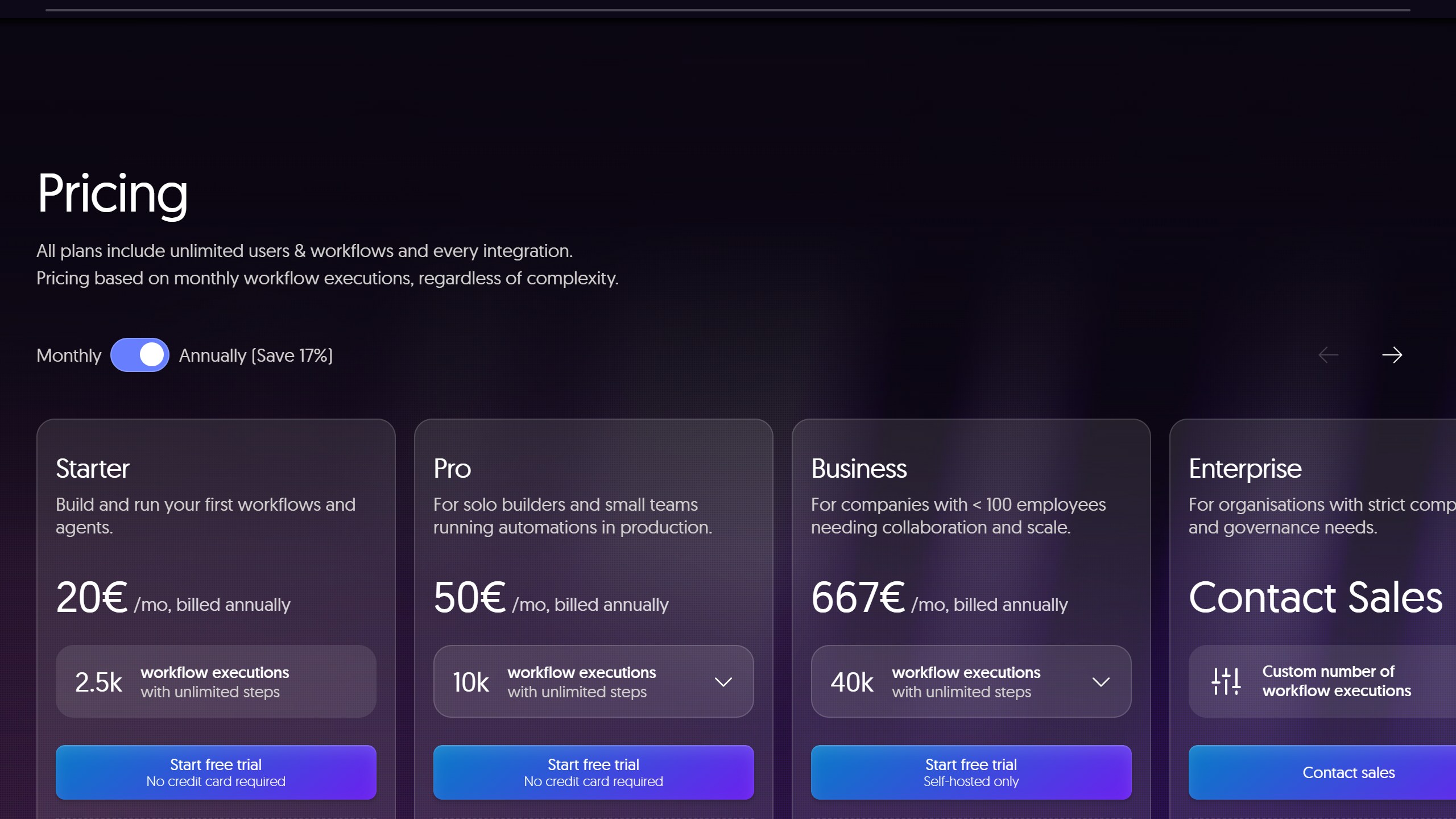
n8n Cloud is the only option here that publishes a monthly cap on executions; Hostinger’s AI automation apps plan does not state its limits. An execution is one run of a whole workflow, however many steps it has. On 13 October 2026 its pricing page listed:
| n8n Cloud plan | Billed annually | Billed monthly | Executions a month | Concurrent runs |
|---|---|---|---|---|
| Starter | EUR 20 a month | EUR 24 | 2,500 | 5 |
| Pro | EUR 50 a month | EUR 60 | 10,000 | Up to 50 |
| Business (self-hosted only) | EUR 667 a month | Not compared | 40,000 | Not stated |
| Enterprise | Contact sales | Contact sales | Custom | 200+ |
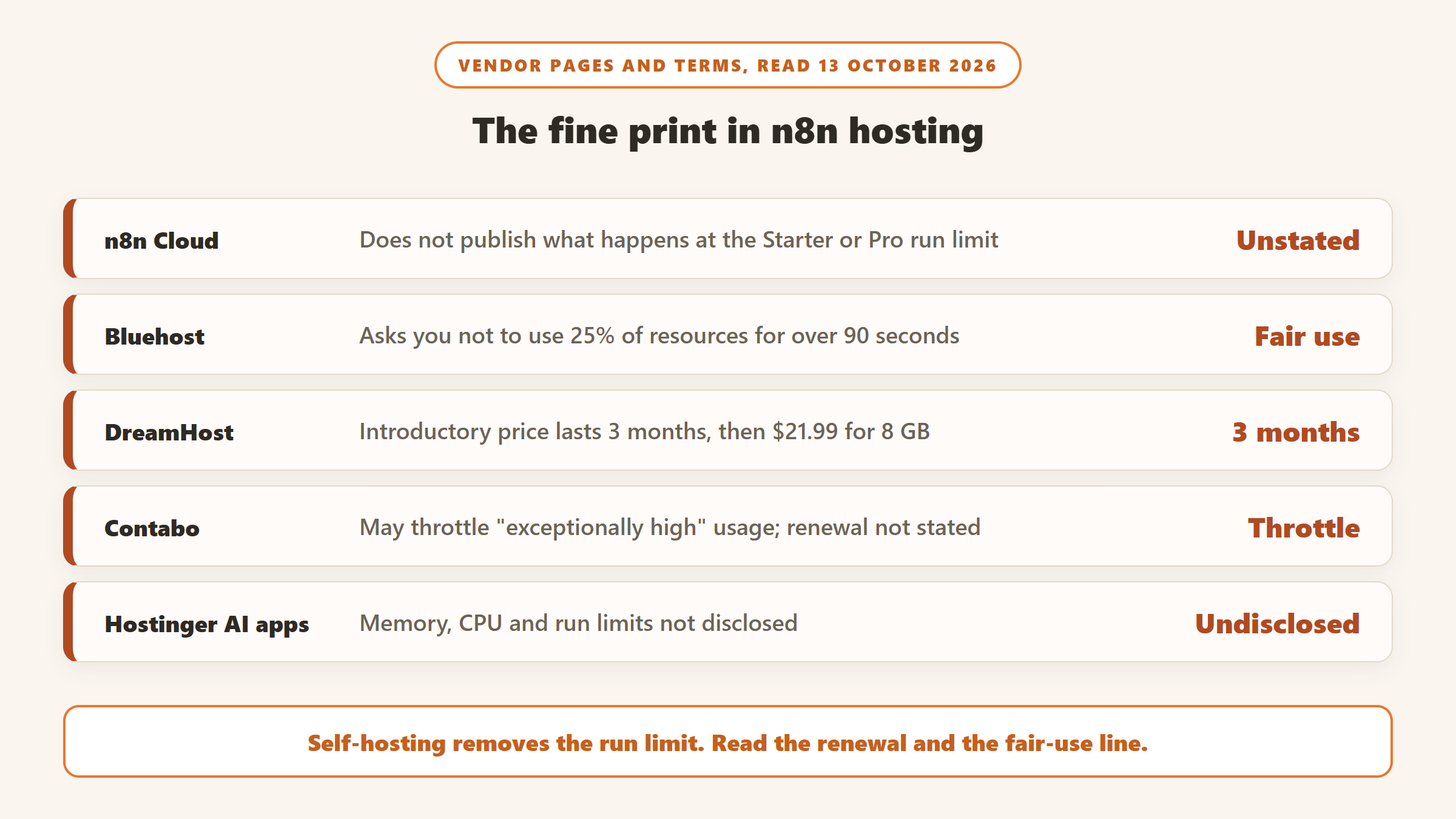
Here is the catch. n8n’s pricing FAQ promises that workflows keep running past the limit, with overage charges, only on Business and Enterprise. It says nothing about Starter or Pro. A Cloud user on n8n’s community forum reported in February 2026 that their workflows were “completely stopped” mid-cycle, and the replies, none from n8n staff, said extra executions cannot be bought on those plans. n8n does not publish what happens at the cap; users report that workflows stop until the month resets or you upgrade.
The limit is easy to hit. One workflow that checks something every five minutes runs about 8,640 times in a 30-day month (12 an hour times 24 hours times 30 days), more than three times Starter’s allowance. Every self-hosted option below has no execution cap: the only limit is the server.
The 12 options at a glance
| Host and plan | Memory | Introductory price | Renews at | n8n setup |
|---|---|---|---|---|
| n8n Cloud Starter | Managed | EUR 20 a month, annual | Same | It is n8n |
| Hostinger VPS KVM 2 | 8 GB | $8.99 a month | $14.99 | n8n template |
| Hostinger AI automation apps | Not disclosed | $5.99 a month on 24 months | $11.99 | Managed app |
| DreamHost VPS Stack 8 | 8 GB | $13.99 for 3 months | $21.99 | Pre-installed with Postgres |
| Bluehost NVMe 4 | 4 GB | $9.49 a month on 24 months | $11.99 | n8n template |
| Contabo Cloud VPS 4 | 8 GB | EUR 5.50 a month on 24 months | Not stated | Pre-installed |
| Elestio | 4 GB | About $16 a month, billed hourly | Same | Fully managed |
| DigitalOcean 4 GiB Droplet | 4 GB | $24 a month | Same | 1-Click image |
| Sliplane Base | 2 GB | EUR 17.80, excluding VAT | Same | Container platform |
| PikaPods | Not stated | From $3.70 a month | Same | Managed pod |
| Railway Hobby | Pay for use | $5 a month including $5 of usage | Same | Template |
| Kamatera Pro | 4 GB | $39 a month | Same | Configure your own |
What two years really costs
This is hosting only, before backups, extra disk, tax or any AI model spend. Dollar and euro rows are not converted, so compare them only within the same currency. Each total takes the introductory price for its introductory term, then the printed renewal price for the remaining months.
| Host and plan | Memory | How we worked it out | 24-month total |
|---|---|---|---|
| PikaPods, minimum | Not stated | $3.70 times 24 | $88.80 |
| Bluehost NVMe 2 | 2 GB | $4.69 times 24 | $112.56 |
| Contabo Cloud VPS 4 | 8 GB | EUR 5.50 times 24 | EUR 132.00 |
| Hostinger AI automation apps | Not disclosed | $5.99 times 24 | $143.76 |
| Hostinger KVM 1 | 4 GB | $6.49 times 24 | $155.76 |
| Hostinger KVM 2 | 8 GB | $8.99 times 24 | $215.76 |
| Bluehost NVMe 4 | 4 GB | $9.49 times 24 | $227.76 |
| Bluehost NVMe 8 | 8 GB | $12.99 times 24 | $311.76 |
| DreamHost Stack 4 | 4 GB | $8.99 times 3, then $15.99 times 21 | $362.76 |
| Elestio, 2 vCPU and 4 GB | 4 GB | $0.022 an hour times 730 hours times 24 | $385.44 |
| Sliplane Base | 2 GB | EUR 17.80 times 24, excluding VAT, if monthly (period unconfirmed) | EUR 427.20 |
| n8n Cloud Starter, annual | Managed | EUR 20 times 24 | EUR 480.00 |
| DreamHost Stack 8 | 8 GB | $13.99 times 3, then $21.99 times 21 | $503.76 |
| DigitalOcean 4 GiB | 4 GB | $24 times 24 | $576.00 |
| n8n Cloud Starter, monthly | Managed | EUR 24 times 24 | EUR 576.00 |
| Kamatera Pro | 4 GB | $39 times 24 | $936.00 |
What the table tells you
Bluehost holds the introductory price for its full 24-month term, and Hostinger appears to, since its page implies two years, so the jump lands in month 25: Bluehost’s 8 GB plan goes from $12.99 to $28.99 a month. DreamHost’s introductory price lasts only three months, so its two-year bill is mostly the renewal rate. And for $215.76 over two years, a Hostinger KVM 2 gives you 8 GB of memory and no execution cap, against EUR 480 for n8n Cloud Starter on annual billing, in different currencies we have not converted, if you are willing to look after a server. Railway is not in the table because its bill depends on usage; by our arithmetic on assumed usage, 1 GB of memory and a quarter of a vCPU on average, an always-on instance would cost about $15 a month in total, including the $5 fee.
The 12 options, one by one
1. Hostinger VPS: the best value for most people
Hostinger’s n8n VPS comes with an “Ubuntu 24.04 with n8n” template and promises “Unlimited workflows” and “Unlimited concurrent executions”. KVM 1 is $6.49 a month for 4 GB, renewing at $11.99; KVM 2, the one most people should pick, is $8.99 for 8 GB, renewing at $14.99; KVM 4 is $12.99 for 16 GB. Plans are paid upfront and its renewal note refers to two years, so we assume a 24-month term; check it at checkout. Support covers the server and getting n8n running, not your workflows. Its feature list mentions a queue-mode template but labels it as an add-on, and the page does not say whether that costs extra. It offers a 30-day money-back guarantee.
2. n8n Cloud: the easiest, with a cap
n8n Cloud means no server at all: n8n runs and manages it for you. Starter is EUR 20 a month billed annually or EUR 24 monthly for 2,500 executions; Pro is EUR 50 or EUR 60 for 10,000. Both include n8n’s AI nodes and a monthly allowance of Assistant credits. Choose it if your workflows run a few times a day, not every few minutes.
3. Hostinger AI automation apps: n8n without a server
Hostinger’s AI automation apps plan lets you pick one of four apps, including n8n, and switch later at no extra charge, though switching means deleting the running app, with Hostinger handling “setup, updates, backups, and security”. It is $5.99 a month on 24 months, renewing at $11.99. The catch is that the page does not disclose memory, CPU or any execution limits, so treat it as a light-use option until it does. It is the same plan we cover for OpenClaw and Hermes in our agent hosting guide.
4. DreamHost: Postgres included
DreamHost’s n8n VPS is the only option here that comes “Pre-installed with PostgreSQL”, with helper commands to back up the workflow database and update n8n when you choose. Stack 8 is $13.99 a month for the first three months for 8 GB, then $21.99. One third-party ranking page quotes a lower two-year price that does not match DreamHost’s page today. Its page states no money-back period.
5. Bluehost: a long fixed term, with fine print
Bluehost’s n8n VPS uses an n8n template at checkout. NVMe 4 is $9.49 a month for 4 GB on a 24-month term, $227.76 upfront, renewing at $11.99; NVMe 8 is $12.99 for 8 GB, renewing at $28.99. Two lines are worth reading. The page asks customers to “not exceed 25% or more of system resources for longer than 90 seconds”, printed in the context of unmetered bandwidth. And Bluehost’s refund terms exclude monthly terms and “AI Products and Services”, without saying whether an n8n server counts.
6. Contabo: 8 GB for EUR 5.50 a month
Contabo offers n8n “Free Pre-Installed” on its Cloud VPS. The Cloud VPS 4, with 4 vCPU and 8 GB, was shown at EUR 5.50 a month for a 24-month term, including tax as shown to us. It does not state a renewal price, and auto backup is available at a price the page does not state. Maintenance is yours, and Contabo reserves the right to throttle “exceptionally high or disruptive usage patterns”.
7. Elestio: fully managed, billed by the hour
Elestio runs n8n for you on a dedicated server. Its pricing page loads prices from its own size list; the cheapest 2 vCPU and 4 GB size in that list was $0.022 an hour, about $16 a month by Elestio’s own 730-hour formula. Check that it is offered for n8n at checkout. New accounts get $20 of credit for three days. If your credit runs out with auto-recharge off, the instance is stopped.
8. DigitalOcean: a 1-Click image for developers
DigitalOcean’s Marketplace n8n image runs on a Droplet; a 4 GiB Basic Droplet is $24 a month with per-second billing. SSL, backups and updates are yours to set up, and Droplet backups are a separate paid add-on whose price we did not check.
9. Sliplane: many services, one server price
Sliplane is a container platform where you pay per server and can run as many services on it as fit, so n8n, Postgres and Redis share one price. Base, with 2 vCPU and 2 GB, was EUR 17.80 excluding VAT, and daily volume backups are included. Its table has an hourly, monthly and yearly toggle that was not labelled in our read, so confirm the period.
10. PikaPods: the cheapest managed pod
PikaPods lists n8n “From $3.7/month” at minimum resources, prepaid and billed hourly, with daily backups to your own storage and weekly app updates. It suits light personal use; it does not state the resources at that price.
11. Railway: for Git and Docker users
Railway’s n8n guide offers a one-step template. Its Hobby plan is $5 a month including $5 of usage, then about $10 per GB of memory and $20 per vCPU a month. The guide warns that without basic auth “anyone with the URL can access the editor” and that without a volume your data is lost on every deploy.
12. Kamatera: try it free for 30 days
Kamatera lets you configure your own server; 2 vCPU and 4 GB is $39 a month, and a 30-day free trial covers one server up to $100. Third-party sites disagree on whether it has a ready-made n8n image, so check when you create the server.
What about Hetzner?
Hetzner is still the cheap default in many guides, and n8n’s own docs have a Hetzner install guide. But its cost-optimised cloud plans showed as unavailable on 13 October, and a 15 June 2026 price adjustment raised its CX23 plan from EUR 3.99 to EUR 5.49. Elestio still sells Hetzner capacity with n8n managed on top.
The licence, in plain words
n8n is source-available under its Sustainable Use License, and its licence FAQ is clearer than most. You can self-host n8n to run your own business’s automations, including commercially, build automations for clients as long as they cannot create or edit them, and run several instances. You cannot host n8n as a service where your clients build their own workflows, white-label it, or use enterprise features without a licence. For almost everyone reading this guide, a self-hosted n8n on any of these servers is fine.
Black Friday on n8n hosting
Hostinger’s Black Friday page says its sale runs from 19 October to 14 December 2026 and lists VPS hosting and AI automation apps, with no prices shown yet. Its Black Friday VPS page showed the same prices as its regular n8n page on 13 October, so recheck after the 19th. None of the other hosts showed a Black Friday offer on the pages we read. If you lock in a long term during a sale, compare the renewal price, not the introductory one. We track verified offers on our AI tools Black Friday deals page.
Before you pick a host
- Count your executions. If you are on n8n Cloud, multiply runs per hour by hours by days. A five-minute schedule is about 8,640 runs a month.
- Size for the AI parts, not for n8n. n8n itself is light. A vector store or local model on the same server is what needs the memory.
- Use Postgres for anything that matters. SQLite is the default, but queue mode does not support it.
- Read the renewal and the term. Several introductory prices assume you pay two years upfront.
- Set up backups on day one. On most VPS plans, backups are yours to configure or cost extra.
- Protect the editor. Railway’s own guide warns that an unprotected n8n editor is open to anyone with the address.
Which n8n host should you pick?
If you want the best value with room for AI
Hostinger KVM 2, 8 GB and no execution cap for two years.
If you never want to touch a server
n8n Cloud, as long as your workflows fit its run limit, or Elestio for a managed server with no cap.
If you want a lot of memory for little money
Contabo, with 8 GB for EUR 5.50 a month, accepting that maintenance is yours.
If you run n8n alongside other services
Sliplane, or Railway if you deploy from Git.
For the agent side of automation, see our guides to OpenClaw and Hermes agent hosting and where to host a Lovable, Bolt or v0 app.
Sources
- n8n: pricing, hosting docs, OEM prerequisites, memory issues, queue mode, editions, database, AI starter kit, licence FAQ, community forum thread. Qdrant capacity planning.
- Hostinger n8n VPS, Hostinger AI automation apps, Hostinger Black Friday, DreamHost n8n VPS, Bluehost n8n VPS, Contabo n8n hosting, Elestio n8n.
- DigitalOcean Marketplace and Droplets, Sliplane pricing, PikaPods apps, Railway n8n guide and pricing, Kamatera pricing, Hetzner price adjustment.
- All read 13 October 2026. Two-year totals are our arithmetic.

Written by
FazFaz is the founder of AIToolsBakery. Some tools here are tested hands on. Others are assessed from vendor documentation and pricing verified on the live page, and every review says which one it is. Sponsors can buy a position in a guide. They cannot buy the score, the criticism, or silence about a better option.
How we test and how we make money →