Diffit pricing at a glance
| Plan | Price | Who it is for |
|---|---|---|
| Basic | Free | Any teacher, no subscription |
| Individual, monthly | $14.99 a month | One teacher |
| Individual, annual | $149.99 a year | One teacher, works out at $12.50 a month |
| School | Quote only | A whole school |
| District | Quote only | Multiple schools |
Read from Diffit’s own pages on 30 August 2026.
Find the right page first
This trips people up, so it is worth stating plainly. Diffit has two pricing pages and the obvious one is not the one most readers want.
This page is about what Diffit costs. For the due diligence a district does after the quote, covering its privacy disclosure, the absent SOC 2 claim and what its trust badges actually certify, see our Diffit company evaluation. It carries no pricing, so the two do not overlap.
web.diffit.me/pricing is the schools and districts page. It carries no figures at all, only “See School Pricing” and “Get District Quote” buttons, plus a small line reading “Upgrading as an individual teacher? Click here for more”.
The individual teacher prices live behind that link, at web.diffit.me/individual-teacher-subscription.
So if you searched for Diffit pricing, landed on the pricing page and concluded Diffit does not publish a price, that is an understandable mistake. It does, on a different page.
Both of Diffit’s savings claims are accurate
The annual card carries two claims: “Save $29/yr” and “Save 16% vs monthly plan”. We checked both.
| Figure | |
|---|---|
| 12 months at $14.99 | $179.88 |
| Annual plan | $149.99 |
| Actual saving | $29.89 |
| Actual percentage | 16.6% |
Diffit says $29 where the true figure is $29.89, and 16% where it is 16.6%. Both claims round against themselves. That is the opposite of what we usually find, and after a run of vendors whose discount badges overstate by two or three points, it is worth saying so.
What the free tier includes
Diffit’s Basic access is a genuine free tier rather than a trial, and for some teachers it is the whole product.
On the free Basic tier:
- Ready-to-use readings with questions and vocabulary
- Download to PDF, print and share
- Adjust by reading level, length or language
What the individual subscription adds:
- Export to Google Docs, Slides, Forms and Classroom, or to Microsoft
- Align to standards, skills and DOK levels
- Turn content into graphic organisers
The export line is the one that decides it. If your workflow ends at a printed PDF, Basic covers you. If your materials need to land in Google Classroom or Microsoft, that is a paid feature and there is no way around it.
Standards alignment is the other. For anyone who has to evidence alignment to standards, skills or DOK levels, that is paid.
What the price does not tell you
What a school licence costs. Both the School and District routes are quote only, with no starting figure, no per-teacher rate and no minimum published. If you are buying for a department, that number comes from a conversation, and the individual rate gives you a rough ceiling to reason from: ten teachers at $149.99 is $1,499.90 a year, and a school licence has to beat that to make sense.
Whether individual subscriptions roll into a school licence. If teachers in your school already pay individually and you then buy a licence, nothing states what happens to those subscriptions.
What the annual term does at renewal. Standard question for any annual plan and not addressed on the page.
Who this is for
Basic, free, suits a teacher who wants levelled readings with questions and vocabulary, and is happy working in PDF.
Individual at $14.99 a month, or $149.99 a year, is for a teacher who needs materials inside Google Classroom or Microsoft, or who has to align to standards. At 16.6% off, annual is worth taking if you are staying past about ten months.
School and District are for anyone buying beyond themselves, and both start with a form.
How Diffit sits against the other AI teaching tools we have priced
Education tools split cleanly into two pricing shapes, and Diffit is in both of them at once.
| Tool | Individual teacher | School or district |
|---|---|---|
| Diffit | $14.99/mo or $149.99/yr | Quote only |
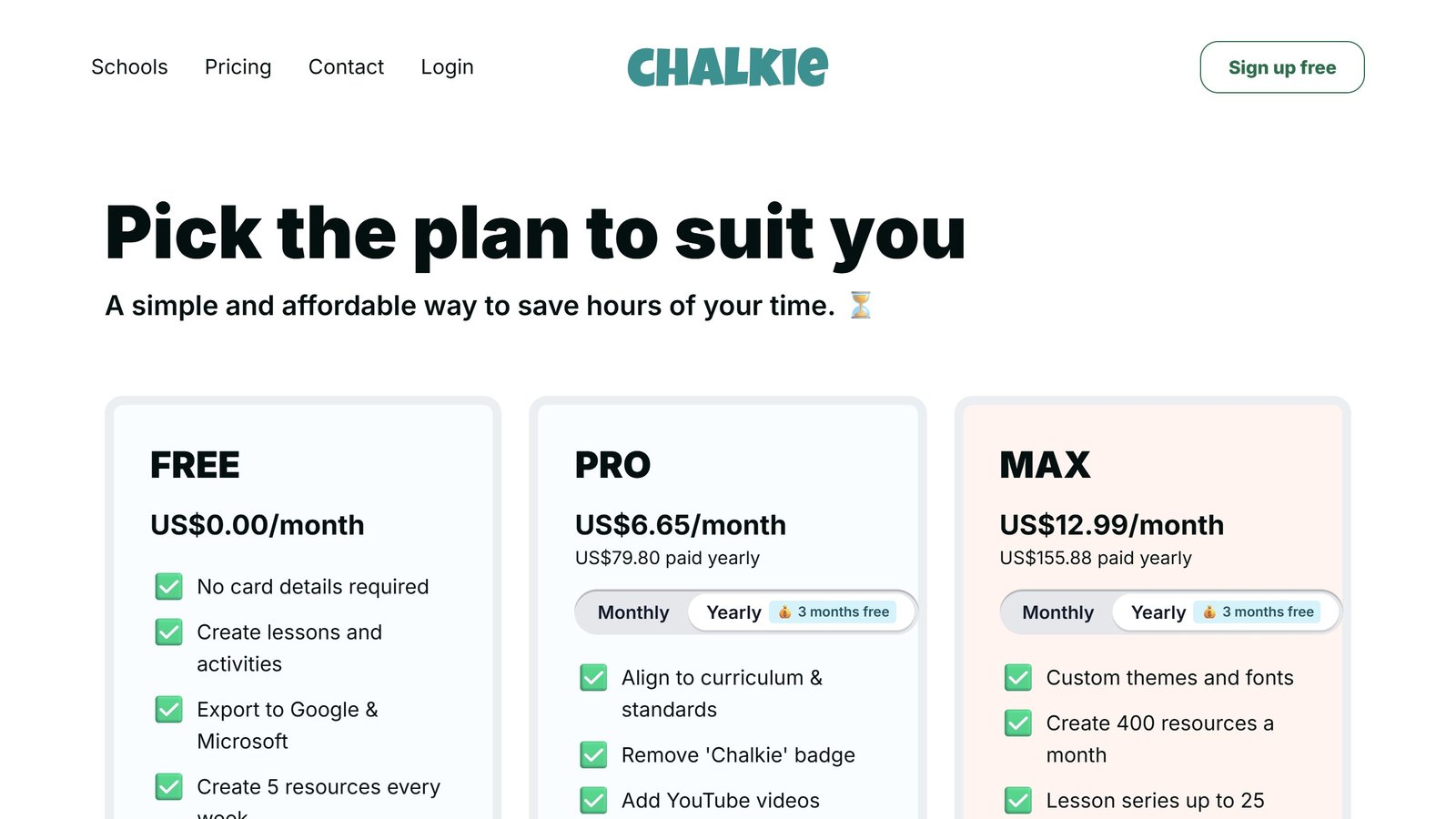
| Chalkie | $8.99/mo or $79.80/yr | Quote only |
| Curipod | Free | Quote only |
All three keep school pricing behind a form, which appears to be the norm in this category rather than anything unusual. Where they differ is what an individual teacher pays.
Curipod gives individual teachers the product free, with unlimited student writers, and charges only at school and district level. Chalkie is the cheapest paid individual plan at $8.99 a month. Diffit is the most expensive of the three for one teacher, at $14.99.
That is not a criticism on its own, because they are not the same product. Diffit generates levelled reading passages with questions and vocabulary, Chalkie builds lessons and worksheets, and Curipod runs writing practice with feedback. But if you are a teacher paying out of your own pocket, the spread between free and $14.99 a month is worth knowing before you pick.
The free tiers are the real comparison. Diffit’s free tier gives you the readings and lets you print them. Curipod’s free tier is close to the whole product. Chalkie’s allows 5 resources a week. In a category where most teachers are spending their own money, what you get for nothing may matter more than what the paid tier costs.
What these tools actually cost, vendor by vendor
Education software prices unlike anything else, because the buyer is often a teacher paying personally while the vendor is really selling to a district. That produces a free tier that is genuinely usable and an enterprise tier with no published figure. Here is each alternative to diffit pricing, read at source on 4 September 2026.
Chalkie, the most completely published rate card here
Chalkie publishes a free plan at US$0.00 a month covering five full lessons or activity sheets every seven days, then US$6.65 a month at US$79.80 paid yearly, and US$12.99 a month at US$155.88 yearly. Its annual toggle is marked as three months free and the arithmetic holds. Publishing the free tier’s exact limit, five resources per week rather than a vague “limited”, is rarer than it should be and worth rewarding.
Khanmigo, the cheapest paid option in this guide
Khanmigo publishes $44 a year, saving $4 against monthly billing, which works out around $4 a month. That is an order of magnitude below most of this category and reflects its position as a non-profit-backed product tied to an existing content library rather than a general purpose teacher toolkit. Judge it on whether that library matches your curriculum, because the price is not the deciding factor at that level.
MagicSchool and Curipod, free tiers with paid steps
MagicSchool publishes a free plan and Plus at $12.99 a month billed monthly, with a lower per user rate billed annually and volume-based discounts on district Enterprise licences that are quoted rather than published. Curipod publishes free at $0 a month and paid from $24 a month, with a yearly toggle marked as saving 21% and stated as $60 off against monthly. Both make the teacher tier genuinely usable, which is the commercial model rather than generosity.
CoGrader, where the free tier has a hard number on it
CoGrader publishes a free plan covering 100 student submissions a month with rubric building and FERPA compliance, then $15 a month billed annually. A hundred submissions is roughly three or four class sets, which makes the free tier a real trial for one teacher and clearly insufficient for a department. That is an honest place to draw the line and it lets you test properly before spending anything.
The ones that publish nothing, and what that tells you
Brisk Teaching publishes a free teacher plan at $0 but we could not read figures for its paid tiers. SchoolAI publishes tier names, Free Trial, Pro and Scale, with no figures attached, which is district-quoted pricing by design. Gradescope now sits on a Turnitin domain and its page is headed “Gradescope for Your Institution” with no rates. We also could not read pricing for Diffit, Quizlet, Photomath or Gauth. We are not claiming those publish nothing; a failed read is not evidence of absence.
What “free for teachers” actually means
Almost every tool in this category leads with a free tier, and they are not equivalent. The limit is where the product design shows.
The limits that are published, and therefore checkable
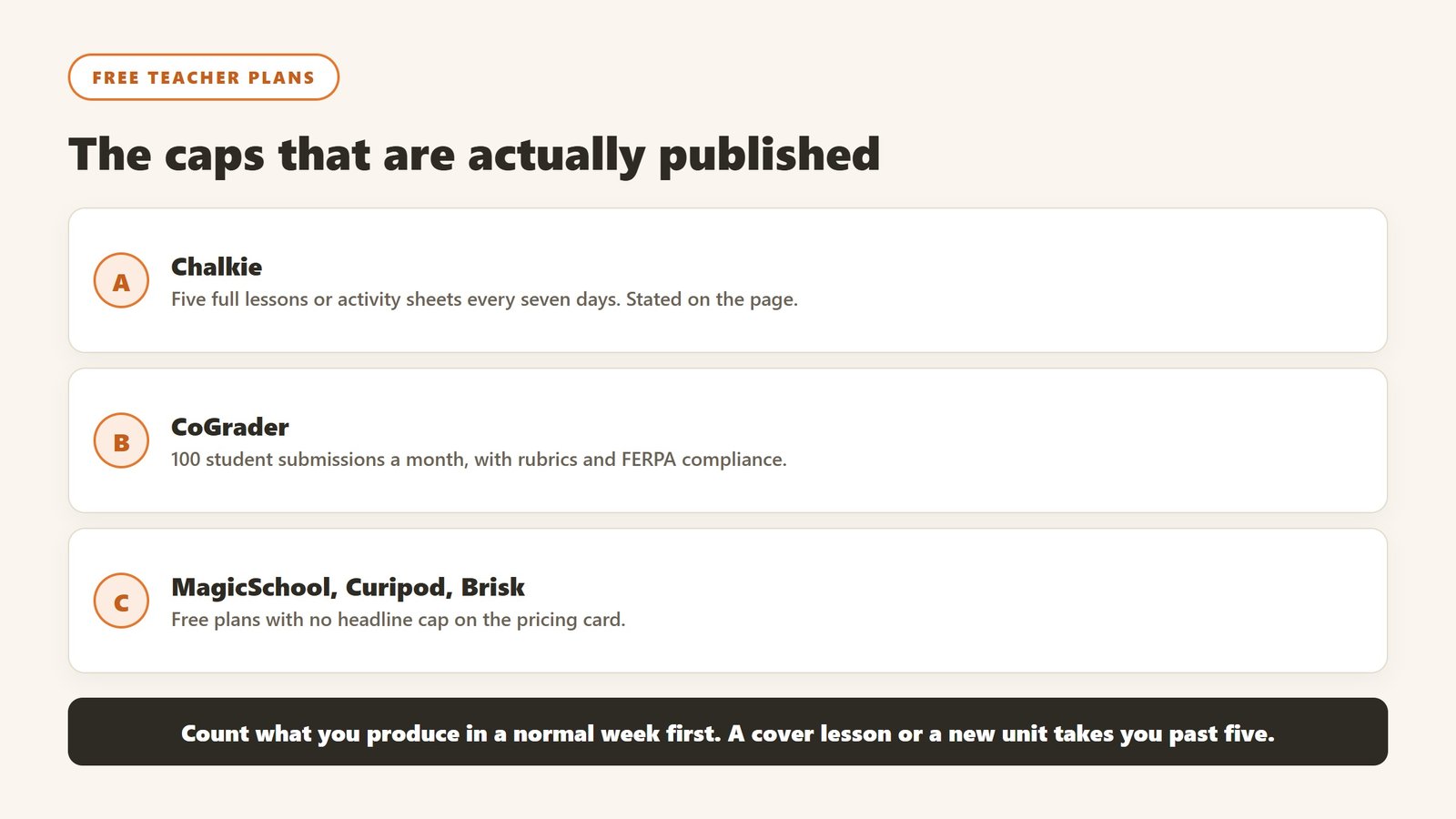
Chalkie states five full lessons or activity sheets every seven days. CoGrader states 100 student submissions a month. Curipod and MagicSchool both publish free plans without a headline cap on the pricing card. Verified 4 September 2026. A published cap is much easier to plan around than an unpublished one, because you can work out in advance whether it covers a normal week for you rather than discovering it in the middle of one.
Work out your real weekly volume before choosing
Count what you actually produce in a normal week: how many worksheets, how many class sets to grade, how many lesson plans. Teachers routinely underestimate this and then hit a cap on a Sunday evening. If your week is five lesson resources, a five-per-week free tier is exactly on the line and you will exceed it in any week with a cover lesson or a new unit.
Free for you may not be free for the school
A teacher signing up personally sits outside whatever approval process the school has for student data, which matters as soon as student work goes into the tool. That is not an argument against the tool; it is an argument for telling somebody. Most districts would far rather approve a tool a teacher is already using than discover it in an incident.
The commercial logic, stated plainly
Generous teacher tiers exist because teachers are the route to a district contract, which is where the revenue is. That is a perfectly reasonable model and it has a consequence worth knowing: the free tier is likely to stay usable, because it is the marketing. What is less predictable is whether the feature you come to depend on stays on the free side of the line. Do not build a department-wide process on a free tier of diffit pricing or anything else without a fallback.
Buying at school or district level, and why teacher pilots stall
The gap between a teacher loving a tool and a district paying for it is where most education software dies, and it is a process problem rather than a product one.
Find out who actually approves before you pilot
Curriculum, IT, data protection and procurement usually all have a say, and in most districts nobody has told teachers which of them is the blocker. Ask early. A pilot that has to be re-run after the data protection review because the first one used real student work is a term lost, and it is entirely avoidable.
Price the thing you will actually deploy
Published teacher rates and district rates are different products. MagicSchool publishes Plus at $12.99 a month and quotes Enterprise with volume discounts. SchoolAI publishes tier names only. Gradescope, now on a Turnitin domain, is institution-quoted. That means a per teacher figure multiplied by staff count is a rough upper bound rather than a quote, and it is still the number worth calculating before a call, because it anchors the conversation.
Run the pilot on the thing that fails, not the thing that demos
The demo will be a well-formed lesson plan for a well-behaved topic. Your pilot should include the awkward cases: a mixed ability class, a subject with heavy notation, a student with an access arrangement, a topic where the source material is contested. How a tool handles those decides whether teachers keep using it in November.
Name who owns it after the pilot
Every tool in this category rewards an owner and punishes shared enthusiasm. Before diffit pricing or anything else goes past a pilot, name the person whose job includes it and confirm where the hours come from. If the answer is that the keen teacher will keep doing it, the tool leaves when they do.
How to tell whether it actually helped
Education software is unusually prone to being judged on enthusiasm, because the immediate experience of a good tool is genuinely pleasant. That is not the same as it having worked.
Teacher time is the measurable win, and the honest one
Most of the real value here is hours, not outcomes. Ask two or three colleagues to record how long planning, resource creation and marking take across one normal week, before anything is introduced. It takes minutes, it is the only way the saving is ever provable, and it is unrecoverable afterwards. A tool that returns two hours a week to a teacher has earned its place without needing to claim anything about attainment.
Be sceptical of attainment claims, including your own
Attainment moves slowly, is affected by everything, and is nearly impossible to attribute to one tool inside a single year. If a vendor claims a grade improvement, ask what the comparison group was. If you are tempted to claim one internally, ask yourself the same question. Reporting a time saving you can evidence is worth more than an outcome claim you cannot.
Watch adoption in week six, not week one
Novelty carries any classroom tool through the first fortnight. The number that matters is how many teachers are still using it after half term, and whether it survived a busy assessment period. If usage collapses in the first genuinely hard week, the tool added work rather than removing it, whatever the initial reaction was.
Decide in advance what would end it
Write down before purchase what the end of the year would have to look like for you not to renew. It converts renewal from a default into a decision, which matters in a category where the per teacher cost is small enough to stop noticing.
Student data, and the questions a school has to ask before anything is switched on
This is the part of education technology where getting it wrong has consequences beyond a wasted subscription, and it is mostly answerable in writing before adoption.
Know which law you are under before you evaluate
In the United States, student education records sit under FERPA, and services aimed at under-13s bring COPPA into scope, which requires verifiable parental consent for personal information collected from children. Schools outside the US will have their own regime. The practical effect is the same: the school, not the vendor, carries the obligation, so the vendor questions exist to let you meet it.
Ask whether student work trains the model
This is the single question to get in writing. Ask whether student inputs and outputs are used to train or improve any model, including in aggregated or anonymised form, and whether that binds subprocessors too. “We do not train on your data” and “we do not train foundation models on your data” are different sentences. Get it as a contract term, because a sales assurance does not survive a change of ownership.
Ask who else touches the data
Most tools here are built on a model provider they did not write, so student work reaches a third party. Ask for the current subprocessor list, where each processes data, and how you are notified when it changes. A vendor that cannot produce that list within a day does not have one, which tells you enough about the rest of their programme.
Ask what happens at the end of a school year
Retention and deletion, stated in days rather than described as a process. What is deleted when a student leaves, when a class is archived, when the contract ends. Ask whether deletion means removed from live systems, removed from backups, or flagged. A vendor that will commit to a number in the contract is a different proposition from one that describes an approach.
The one many schools miss: inferences about a child
If a tool generates a reading level, a predicted grade, a behaviour flag or an ability estimate, that is data about a student the student never supplied. Ask whether those inferences are covered by your export, your deletion request and your access request, because a parent asking what the school holds on their child is asking about those too.
How we checked this
We read Diffit’s own pages on 30 August 2026. We started at web.diffit.me/pricing, found it covers schools and districts only, and followed Diffit’s own link to the individual teacher subscription page rather than guessing a URL. The figures above come from that page.
The saving table is our arithmetic on Diffit’s published figures. The inputs are theirs, the sums are ours, and the working is shown.
This is a pricing page, not a hands-on review. Nothing here is scored and we make no claim to have used the product.
Prices change. If a figure here no longer matches Diffit’s page, tell us and we will correct it.

Written by
FazFaz is the founder of AIToolsBakery. Some tools here are tested hands on. Others are assessed from vendor documentation and pricing verified on the live page, and every review says which one it is. Sponsors can buy a position in a guide. They cannot buy the score, the criticism, or silence about a better option.
How we test and how we make money →