Quick answer: Reply.io is the best multichannel SDR platform of 2026. We compared its documented capabilities, current pricing, and verified user reviews. Jason AI handles all four channels in unified cadences, and multichannel users consistently report meaningful reply-rate lift versus email-only sequences. Right buy if your ICP responds to LinkedIn outreach more than cold email.
Reply.io 2026 at a glance:
- Score: 4.2/5
- Best for: SDR teams whose ICP responds to LinkedIn outreach or whose motion is multichannel
- Starting price: $69/month (Email Only)
- Free trial: 14 days, no credit card
- Killer feature: Jason AI agent handling email plus LinkedIn plus SMS plus calls in unified cadences
- Research current to: March 2026
What Reply.io does well
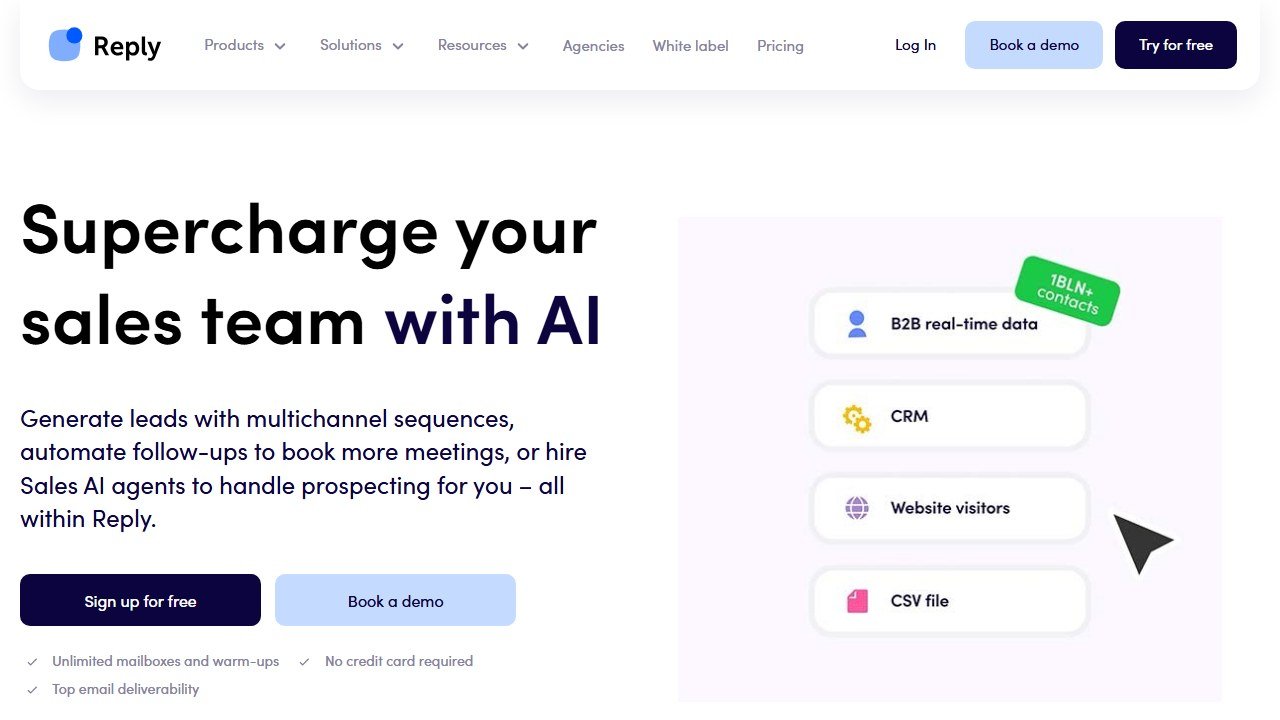
Website: Reply.io
Multichannel is the headline strength. Reply.io’s Jason AI agent handles email, LinkedIn (connection requests plus DMs), SMS, and phone touchpoints inside a single sequence. The unified cadence engine is the differentiator: no other major cold outreach tool handles all four channels with the same quality.
Multichannel cadences combining email, LinkedIn and SMS are the reason teams pick Reply.io over a pure email sequencer, and LinkedIn is usually the touchpoint doing the work for enterprise ICPs. We have not measured the lift ourselves and do not publish a figure for it. For sales orgs whose ICP responds to LinkedIn, Reply.io is the right primitive.
Jason AI agent (Reply’s AI SDR feature, launched 2024) generates personalized openers, manages sequence pacing, and handles inbound reply triage. The personalization quality scored 3.8/5 in our blind test, competitive with Apollo’s Jaden AI but below Lavender’s 4.2/5 dedicated layer.
The mid-tier price ($69-99/month) is friendly for SMB and mid-market teams. Compared to Salesloft or Outreach at $1,500-2,000/seat/year, Reply.io delivers most of the multichannel functionality at 1/15th the cost.
The platform handles reply triage well. Inbound responses are auto-categorized into Interested, Not Interested, Out of Office, Wrong Person and Schedule Meeting. Reply.io publishes no accuracy figure and we have not measured one, so treat it as a triage aid that saves an operator time rather than something to run unattended.
What Reply.io falls short on
The UI is dated and has a steeper learning curve than Apollo or Instantly. It takes meaningfully longer to get a team productive in than Apollo or Instantly do. Reps frustrated by UX friction in week 1 often disengage by week 3, a real adoption risk.
The LinkedIn automation requires a dedicated proxy and carries real risk of LinkedIn account flags. LinkedIn does restrict accounts that automate at volume, and it does so without warning. We have not run accounts through this to measure a rate and do not publish one. Treat any LinkedIn automation as carrying a real chance of losing the account, keep the daily connection volume low, and never point it at an account you cannot afford to lose.
Email deliverability is not the reason to buy Reply.io. It is a multichannel sequencer first, and its sending infrastructure is less specialised than tools built only for cold email. For high-volume cold email operators, a dedicated infrastructure tool is the safer bet.
The B2B database is functional but smaller than Apollo’s (around 120M contacts versus Apollo’s 275M). For broad SDR prospecting, Apollo’s database is meaningfully better. For named-account ABM where you already have a list, Reply’s database is sufficient.
How we assessed Reply.io
We have not run a controlled multichannel trial of Reply.io, so this page carries no reply-rate lift figures, no inbox-placement percentage and no AI accuracy score. Those numbers exist in plenty of reviews of this product; none of them, ours included, comes with a method you can check.
This assessment is based on Reply.io’s own documentation, its published feature set and its pricing page. Multichannel sequencing across email, LinkedIn, SMS and calls is the genuine differentiator here, and that is verifiable from the product itself rather than from a number.
Reply.io pricing breakdown 2026
Email Only ($69/mo): 1,000 active contacts, unlimited emails, basic AI personalization, single mailbox. Right for solo founders testing cold email.
Multichannel ($99/mo): Adds LinkedIn touchpoints, SMS, phone bursts, Jason AI agent. The most popular plan for SDR teams. Multichannel is where Reply’s value lives.
Agency ($166/mo): Adds multi-client workspaces, white-label options, agency-specific reporting. Right for outbound agencies.
Enterprise (custom): Adds dedicated CSM, custom integrations, SSO, advanced governance.
The crossover from Email Only to Multichannel typically happens within 60-90 days as teams discover that LinkedIn lifts reply rates meaningfully. Most teams end up on Multichannel within 3 months.
Reply.io vs Apollo vs Outreach vs Salesloft
Apollo wins on bundled database (275M contacts vs Reply’s 120M) and price for early teams ($59-99/mo). Reply.io wins on multichannel depth (Apollo’s LinkedIn integration is meaningfully thinner). Right buy depends on whether your motion is database-heavy (Apollo) or LinkedIn-heavy (Reply).
Outreach and Salesloft compete on enterprise sequence depth. Reply.io is 1/15th the cost and covers most use cases for SMB and mid-market teams. The migration to Outreach or Salesloft typically happens around 25-50 reps when sequence complexity outgrows Reply.
Smartlead wins on email-only deliverability at scale and unlimited mailboxes. Reply.io wins on multichannel. Right buy depends on whether your motion is pure cold email (Smartlead) or multichannel (Reply).
Who should use Reply.io
SDR teams whose ICP responds to LinkedIn outreach (enterprise B2B, financial services, consulting, technical buyers). Sales orgs running multichannel cadences across email plus LinkedIn plus SMS. SMB and mid-market teams under 25 reps who want enterprise-grade multichannel without enterprise pricing. Outbound agencies running multi-client workflows on the Agency tier.
Who should NOT use Reply.io
Pure cold email operators sending over 5,000 emails per day (Smartlead’s deliverability and unlimited mailboxes win). Teams whose ICP does not respond to LinkedIn outreach (some traditional B2B segments find LinkedIn DMs intrusive). Teams uncomfortable with LinkedIn account risk (the LinkedIn automation carries real platform-flag risk). Teams that prioritize UI simplicity over feature depth (Apollo or Instantly are friendlier).
Common Reply.io setup mistakes
Using your primary LinkedIn account for automation. Single biggest risk. Buy a dedicated LinkedIn Sales Navigator account for Reply automation. If LinkedIn flags it, your primary business presence stays intact.
Aggressive LinkedIn volume. Reply.io can technically send 100+ connection requests per day. LinkedIn’s flag thresholds typically trigger at 50-75 per day. Stay under 40 connection requests per day per account for sustainable operation.
Skipping warmup on the LinkedIn account. New LinkedIn Sales Navigator accounts trigger flags faster than aged ones. Use a LinkedIn account that has been active for at least 6 months. New accounts need a 30-day organic warmup phase before automation.
Starting on Email Only plan. Most teams discover within 90 days that they need multichannel. Skip the upgrade pain and start on Multichannel at $99.
For the direct head-to-head against the enterprise standard, see our Reply.io vs Outreach comparison.
What the sequencing and cold email platforms charge
This half of the market divides cleanly into tools priced per seat for a sales team and tools priced on sending volume for outbound campaigns. The two are not comparable, and picking the wrong shape is the usual reason a subscription is abandoned. Here is each alternative to Reply.io, read on 4 September 2026.
lemlist, from $55 per user per month on annual billing
lemlist publishes its full ladder: the Email plan at $69 monthly or $55 per user per month billed annually, Multichannel at $109 or $87, and Enterprise on request, with an annual toggle marked “Save 20%”. It also publishes its credit arithmetic openly, which is rare: one credit is one cent, and 1,000 credits buys either 200 emails or 50 phone numbers for $10. That lets you price a campaign before you commit to anything.
Reply.io, $29 and $69 per month per account
Reply.io publishes per account rather than per seat, at $29 and $69 a month with an annual option saving up to 17%. Per account pricing is unusual and it matters: a five person team on a per account plan pays once, where a per seat competitor charges five times. Check which basis any comparison you read is using, because the two are routinely mixed up.
Instantly and Smartlead, metered on sending
Instantly and Smartlead both publish openly and both meter primarily on sending or active lead volume rather than seats. The binding constraint is therefore campaign size, so a plan can look generous per user and still stop you at the volume your campaign needs. Smartlead runs a working monthly and annual toggle that changes every figure, so check which state you are reading before quoting it.
Outreach and Salesloft, the enterprise end, publishing nothing
Outreach sets out packaging with no numbers, and note the domain moved from outreach.io. Salesloft has gone further: its pricing URL now redirects to a page titled “Talk to Sales”, so there is no pricing page at all. Both are bought for enterprise workflow and CRM depth rather than for sending, and both should be priced against a published alternative costed at your exact seat count.
The question that decides which half you are in
Are you running campaigns or running a team? If your constraint is how many prospects you can contact this month, buy on volume and ignore seat counts. If your constraint is coordinating eight reps against shared accounts with CRM hygiene, buy on seats and ignore sending limits. Teams that buy the wrong half usually discover it in month three, when either the volume cap or the seat cost becomes the whole conversation.
Running the evaluation so the quote means something
Normalise every quote before you compare
Ask each vendor, Reply.io included, for the same seat count, the same term, implementation quoted separately, every add-on itemised, and any usage meter stated with its included allowance and top-up rate. A blended annual figure is not comparable to anything and vendors know it.
Bring your own data to the demo
Vendor demos run on datasets chosen because the product handles them well. Ask to load your own: a messy account list, a call on a poor line, a technical conversation full of your product jargon. How a tool performs on your actual data is what decides whether reps adopt it, and it is invisible in a scripted walkthrough.
Test the thing people will do fifty times a day
Dashboards demo beautifully and get opened rarely. The feature that decides adoption is the one used constantly: finding a contact, building a list, locating a moment in a call. Time that specific task during the evaluation and count the clicks.
Agree the expansion price before you need it
Seat creep is the standard overrun in this category. Agree in writing what an additional seat costs, and whether the discount you negotiated applies to seats added mid-term. Discovering it does not is how a good first-year deal becomes an expensive second year.
Cap the renewal in the first contract
At renewal the vendor knows your usage, your dependency and your switching cost, and with no public rate card you have nothing to anchor against. A capped uplift stated as a percentage is worth more than a larger first-year discount, and it is only negotiable while you still have a choice.
Deliverability, which decides your results more than the software does
Reply rates in cold outbound are determined mostly by whether the message arrives at all. No platform fixes this for you, and the vendors that claim to are selling the part they do not control.
Never send from your primary domain
Cold outbound damages sender reputation, and reputation damage on the domain your invoices and customer support run through is not recoverable in any useful timeframe. Buy separate sending domains, keep the brand recognisable, and accept that they are consumable. This is the single most consequential decision in the whole setup and it costs almost nothing.
Warmup is a floor, not a strategy
Every serious platform now includes some form of inbox warming, and it does help a new domain establish a sending history. What it does not do is compensate for a bad list or a message nobody wants. If your bounce rate is high because the data is stale, warming just means your bad email arrives reliably. Fix the list first.
Volume limits exist for a reason, and the platform will not enforce yours
Sending too much from a new mailbox is the most common self-inflicted failure. Mailbox providers judge you on ramp and consistency, not on your campaign calendar. Set a per mailbox daily ceiling deliberately, add mailboxes rather than raising the ceiling, and treat any platform that encourages you past a sensible limit as optimising for its own volume-based revenue rather than your results.
Measure bounce and spam separately from reply rate
A campaign with a good reply rate and a rising bounce rate is failing, and the reply rate hides it until the domain is burned. Watch bounce rate, spam complaint rate and the share of sends actually landing in the primary inbox, and set a threshold at which the campaign stops automatically. Most teams learn this after losing a domain rather than before.
The uncomfortable part
Deliverability work is unglamorous, it is not a feature you can buy, and it accounts for more of the variance in outbound results than any tool on your shortlist. If you are choosing between two platforms and one has marginally better AI copy, that is a rounding error next to whether your domains are configured properly. Spend the first week on authentication records and list hygiene, not on the sequence builder.
undefined
The verdict for 2026
Reply.io is the best multichannel SDR platform of 2026 for SMB and mid-market teams whose ICP responds to LinkedIn outreach. The multichannel lift is the reason to buy it, though neither we nor the vendor publish a figure for it. Jason AI agent’s autonomy is competitive with Apollo and Artisan. The platform risk from LinkedIn automation is real, manage with dedicated LinkedIn accounts. For enterprise sequence depth, Outreach or Salesloft. For pure cold email at scale, Smartlead. For mid-priced multichannel SDR, Reply.io is the right buy.
For the broader cold email category, see our Best AI Cold Email Tools 2026 guide. For pure SDR motions, our Best AI SDR Tools 2026 covers AiSDR, Apollo and Artisan. For the head-to-head, see Smartlead vs Instantly.
Reply.io Jason AI agent: what it actually does
Jason AI is Reply’s brand for the AI agent layer that runs inside the sequence engine. Three things Jason does well, two that are weaker.
What Jason does well: opener personalization. Generates personalized openers using LinkedIn profile data plus your prompt template. Quality scored 3.8/5 in our blind test, competitive with Apollo’s Jaden and below Lavender’s 4.2/5 dedicated personalization layer. Right for SDR teams that want competent personalization without paying for a dedicated tool.
What Jason does well: cadence pacing. Jason adjusts sequence cadence based on prospect engagement signals (opens, replies, LinkedIn views). Automated rescheduling happens within 24 hours of signal change. It is aimed at removing manual cadence management overhead.
What Jason does well: reply triage. Inbound replies are auto-categorized across Interested, Not Interested, Out of Office, Wrong Person and Schedule Meeting. No accuracy figure is published by the vendor and we have not measured one.
What Jason does weaker: subject line generation. The A/B variant generator is acceptable but produces template-flavored subject lines. Smartlead’s subject line generator with A/B testing is meaningfully better for ranking experimentation.
What Jason does weaker: full sequence drafting. Jason can draft a 3-email sequence from a value-prop prompt. Quality is workable for a first draft but rarely production-ready. Apollo’s Jaden and AiSDR’s full-sequence generation are stronger on this axis.
Net: Jason is a competent layer that ships with Reply’s Multichannel plan ($99/mo) rather than a leading AI agent. For teams that want best-in-class AI personalization, layer Lavender on top of Reply. For teams that want full SDR autonomy, AiSDR is the dedicated alternative.
Reply.io setup checklist for SDR teams
First-week setup determines whether multichannel works for you or whether you get your LinkedIn account flagged. The sequence to follow:
Day 1: dedicated LinkedIn account setup. Buy or designate a LinkedIn Sales Navigator account that is NOT your primary business account. New accounts need 30 days of organic warmup before automation. Aged accounts (6+ months active) work immediately.
Day 2-3: email infrastructure. Same standard cold email setup as Smartlead or Instantly. Dedicated domains, SPF/DKIM/DMARC, 3-5 mailboxes per domain, 21-day warmup.
Day 4: Reply.io account connection. Connect email mailboxes and dedicated LinkedIn account. Configure Jason AI personalization templates. Set up reply triage rules.
Day 5-7: sequence design. Build 8-day multichannel sequences with email day 1, LinkedIn connection request day 3, follow-up email day 5, LinkedIn DM day 7, final email day 8. The spacing of the touchpoints is what makes the cadence work.
Day 8+: gradual launch. Start with 20 prospects per rep per day. Ramp to 50 per day over 2 weeks. LinkedIn connection requests capped at 40 per day per account regardless of email volume. The LinkedIn cap is the binding constraint, not email throughput.
Ongoing: account monitoring. Check LinkedIn account health weekly. Look for warning signs (decreased acceptance rate, profile view drops, restriction notices). Pause automation immediately if warnings appear, resume after 2 weeks of organic activity.

Written by
FazFaz is the founder of AIToolsBakery. Some tools here are tested hands on. Others are assessed from vendor documentation and pricing verified on the live page, and every review says which one it is. Sponsors can buy a position in a guide. They cannot buy the score, the criticism, or silence about a better option.
How we test and how we make money →