Search for the best AI chess coach and almost every result is a list written by a company that sells one, with its own product at number one. That is not unusual in software, but in chess it hides a useful fact: the apps in this category do very different things under the same label, and the vendors’ own pages say so if you read them closely.
Some apps run a chess engine over your game and colour your moves. Some add pre-written coach comments on top of the engine. A few send the engine’s findings to a language model that explains them in plain English. And a separate group builds bots trained on human games, so you can practise against an opponent that makes human mistakes. Knowing which kind you are buying matters more than any star rating.
How we put this together. We have not used these apps ourselves; this is a research-based comparison. Every price, rating and feature below comes from the vendor’s own website, support pages or its US App Store and Google Play listing, read on 9 October 2026, and we link to each source. App Store prices are US in-app purchase prices in US dollars. Where a vendor’s website served us a regional currency, we say so rather than converting it. Nothing here is a test result, and we are not affiliated with any of these companies.
Engine, scripted coach or language model: what “AI” means here
Every app in this guide uses some form of machine intelligence, but the label covers four quite different products. The vendors’ own wording is the best guide to which one you are looking at.
Engine review
A chess engine such as Stockfish evaluates every position and finds the strongest move. Review tools built on it tell you where you lost advantage and what the engine would have played. This is precise but terse: an engine tells you that a move was a mistake, not why a human should have seen it. Lichess is the clearest example, and it is free.
Scripted coach explanations
Some apps put a friendly coach on top of the engine, with comments written in advance for common situations. Chess.com’s Coach is described on its own support pages as a virtual coach that gives move-by-move tips and flags mistakes, and neither those pages nor its announcement call it AI or a language model. Dr. Wolf, also from Chess.com, works the same way with spoken coaching.
Language-model explanations
A smaller group passes the engine’s analysis to a large language model, which writes the explanation. The risk with this design is that a language model can describe a position confidently and wrongly. The better apps limit the model to translating facts that the engine and other tools have already established. Take Take Take has published exactly how it does that, which is why it ranks high here.
Human-like opponents
The last group is about practice rather than review. Bots trained on millions of human games, such as the University of Toronto’s Maia models, play the moves a player at your rating would actually play, including the mistakes. Noctie, ChessMind AI and Chessiverse all lean on this idea, and it fixes the oldest complaint about playing computers: that they are either unbeatable or blunder in ways no human would.
AI chess coach apps compared
| App | What the AI does | Price (US) | Free option | Platforms | US App Store ratings |
|---|---|---|---|---|---|
| Chess.com | Engine review, scripted Coach | Diamond for move explanations; in-app tiers from $4.99 (Gold) to $119.99 (Diamond, yearly) | 1 full game review a day | Web, iPhone, Android | 4.8 (837,248) |
| Take Take Take | Engine plus language-model review | Free (no in-app purchases listed) | Yes | Web, iPhone, Android | 4.4 (125) |
| Noctie | Human-like bot at 25 levels, move grades | $13.90/mo or $99.99/yr | 7-day trial | Web, iPhone, Android | 4.7 (626) |
| ChessMind AI | Game review, study plan, Maia-based bots | $9.99/mo, $69.99/yr or $229.99 lifetime | Free game scan | Web, iPhone, Android | 4.7 (145) |
| Chessiverse | 1,000+ human-style bots, coach insights | $12.99/mo, $89.99/yr or $299 lifetime | Free tier | Web only | No app found |
| ChessMood | AI game scan feeding a course plan | Essential $99/mo, or $79/mo billed yearly | AI scan and study plan | Web | No app found |
| DecodeChess | Written explanations on Stockfish | $8.25/mo or $84/yr | 1 decode a day | Web | No app found |
| Chess Coach: AI Chess Tutor | Stockfish 18 plus your choice of language model | Credit packs from $2.19; Premium $4.89 one-time | 5 AI analyses | Android, iPhone | No ratings yet (new) |
| Lichess | Engine review, free Maia bots | Free | Everything | Web, iPhone, Android | 4.1 (655) |
Prices and ratings read on 9 October 2026. Apple’s in-app purchase lists often show several prices for the same plan, so check the store before you subscribe.
How we chose and ordered these
Every app had to analyse your own games or play you with a model built for training, not just host lessons or puzzles. We then ordered them by how clearly the vendor explains what its AI does, how much public evidence there is that the product works at scale (ratings volume, installs and how recently it was updated), and price. We dropped apps that have not been updated in more than a year and apps with only a handful of ratings. None of these vendors paid for placement on this page.
1. Chess.com: the review where you already play
Chess.com is where most online players already have their games, and that is its biggest advantage as a coach. Its iPhone app holds a 4.8 average from 837,248 US ratings, and its Android app has more than 100 million installs. Every game you play there can go straight into Game Review, which its membership page describes as a way to “see your best moves, game accuracy, and ways to improve.”
What you get depends on your plan. According to Chess.com’s own support article, updated in July 2026, the free Basic plan gives one full game review a day and one game against the Coach a month. Gold adds unlimited games against the Coach. Platinum adds unlimited game review. Diamond adds coach explanations on every move, plus Insights on your play over time. If the explanations are what you want, Diamond is the plan to look at.
What the Coach is, and is not
Chess.com calls its Coach a virtual chess coach. Its support pages do not describe it as AI or as a language model, so read it as engine analysis with coach commentary on top. That is not a criticism: for most club players, a clear note on why a move lost material is exactly what is needed. It does mean you should not expect a free-form conversation about your games.
The price
Chess.com’s website served us prices in Indian rupees from our location, so we use the US App Store instead. On 9 October its in-app purchases ran from $4.99 and $6.99 for Gold tiers up to $14.99, $16.99, $99.99 and $119.99 for Diamond. The store does not label which are monthly and which are yearly; the higher figures are the yearly plans. Check the store in your own country before you pay.
For beginners, Chess.com also makes Dr. Wolf, a separate app with spoken step-by-step coaching and four coach personalities, rated 4.8 from 27,003 US ratings. Its listing does not call it AI either. In-app prices were $5.99 a month or $39.99 a year.
Choose it if you already play on Chess.com and want review built into your games. Skip it if you want a coach you can question in plain language.
2. Take Take Take: the free coach that shows its working
Take Take Take, the chess company co-founded by Magnus Carlsen, describes its game review as one “that speaks like a human, not an engine.” Its iPhone listing promises a breakdown of what happened “move by move, in plain language, not engine lines.” It runs on the web, iPhone and Android, and on 9 October neither store listed any in-app purchases, so it was free.
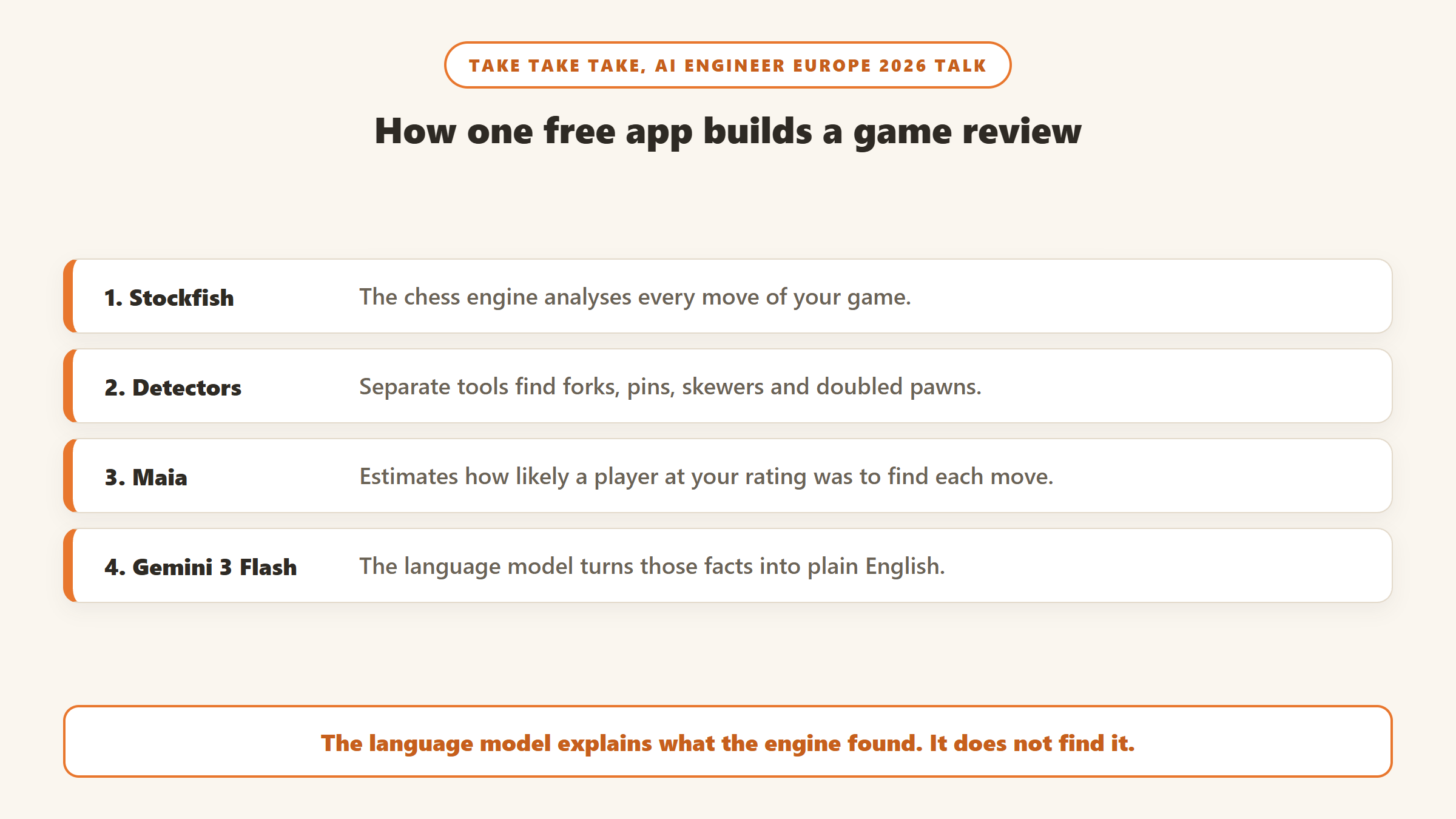
What makes it stand out is that its engineers have explained how it works. In a talk at AI Engineer Europe 2026, the team described a pipeline in which Stockfish analyses the game, separate detectors find tactical and positional patterns such as forks, pins and doubled pawns, and Maia estimates how likely a player at your rating was to find each move. Only then does a language model, Gemini 3 Flash in production, turn those established facts into English. They described the model’s role as deliberately narrow.
That design answers the main worry about language-model chess coaches, which is that they invent tactics that are not on the board. Here the model is explaining findings, not discovering them. No other app in this guide has published that level of detail about its method.
The trade-off is youth. The app was released in January 2026 and had a 4.4 average from 125 US ratings and more than 10,000 Android installs on 9 October. It is updated frequently, but it has a short public record.
Choose it if you want plain-language review of your games without paying. Skip it if you need years of track record, or a full training platform with lessons and courses.
3. Noctie: the opponent that plays like a person
Noctie is built around one idea: an opponent that “mimics human play at 25 levels”, from roughly 400 to 2800 Elo. It grades your moves from blunder to excellent, which it says are judged “like a human, not an engine”, so a move a human would reasonably play is not marked down just because the engine found something better. It imports your games from Chess.com and Lichess and turns your own mistakes into puzzles with spaced repetition.
On iPhone it holds a 4.7 average from 626 US ratings. US in-app prices were $13.90 a month or $99.99 a year. Its website, which served euros, listed EUR 14 a month or EUR 96 a year, with a 7-day free trial and no permanent free plan. The AI here is a neural network trained on human games, not a language model, so do not expect written explanations.
Choose it if you want sparring that feels like a real game at your level. Skip it if you want written analysis or a free plan.
4. ChessMind AI: a grandmaster’s plan from your games
ChessMind AI was founded in 2023 by Grandmaster Mauricio Flores Rios, and its pitch is “a plan, not just an evaluation bar.” It reviews your games, explains the plans behind the moves, and builds a study plan around what it finds. Its practice opponents are based on Maia and run from about 1100 to over 2000, and its Android listing mentions a “ChessGPT” feature where you write your thinking about a position and get feedback on it.
The iPhone app had a 4.7 average from 145 US ratings and was updated in October 2026. US in-app prices were $9.99 a month, $69.99 a year or $229.99 for lifetime access, with individual courses sold separately. A free game scan lets you see the review before paying. ChessMind does not say which engine or language model it uses.
Choose it if you want a structured improvement plan from a coach-led product, at a lower monthly price than most. Skip it if you want to know exactly what technology produces the advice.
5. Chessiverse: the biggest roster of human-style bots
Chessiverse offers more than 1,000 bots that it says “play like humans, each with a unique style and personality”, each one modelled on thousands of games. They range from 0 to 3300 in rating. Guided Play grades your moves as you go with hints and a blunder guard, and the paid Coach Insights feature reads every reviewed game together to show where you go wrong and when you play best.
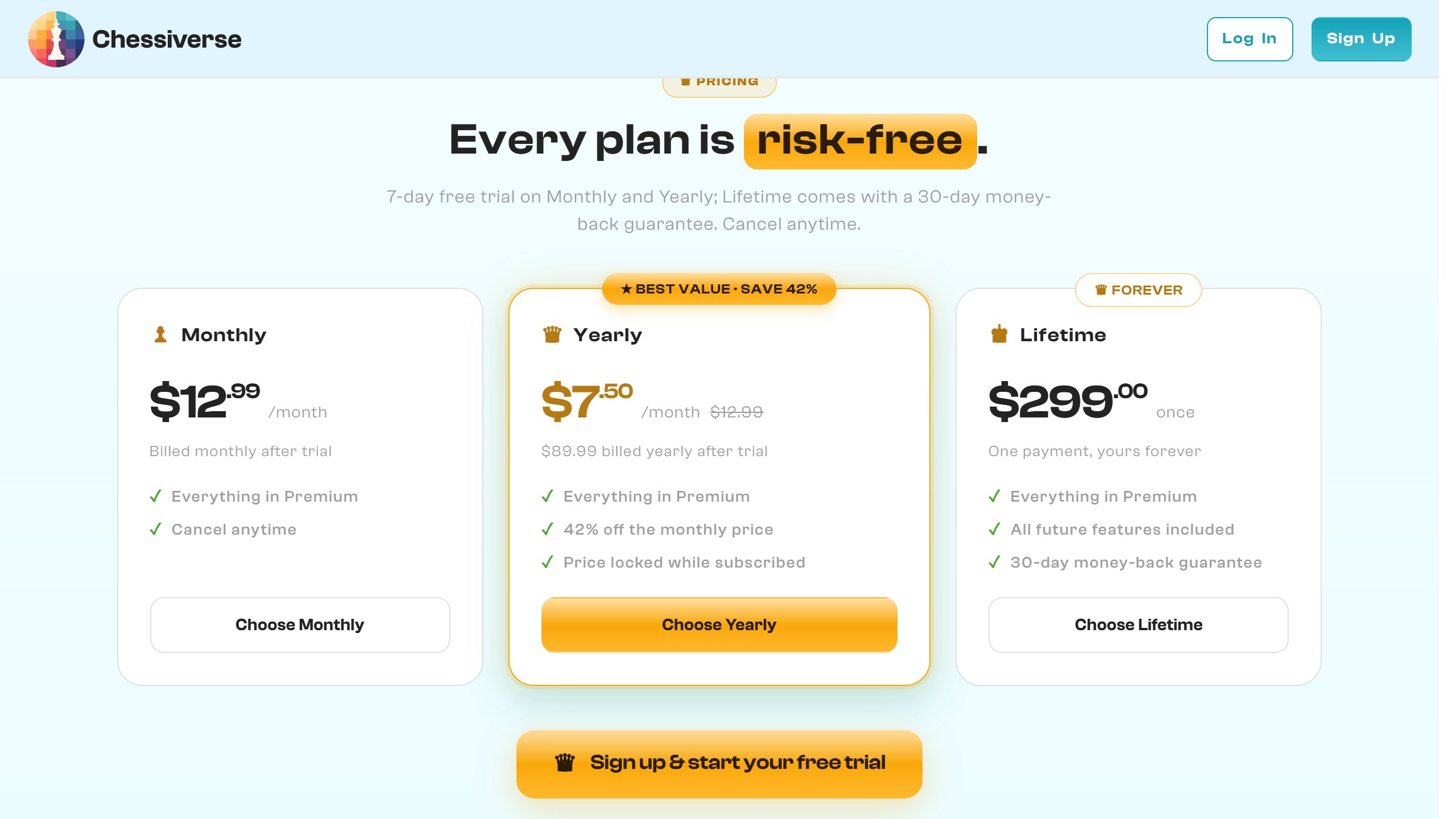
On its premium page, which served US dollars, the free tier needs no card, and Premium was $12.99 a month, $89.99 a year or $299 once for lifetime access, with a 7-day trial. Several other ranking pages still quote $9.99 a month, which is out of date. Chessiverse runs in a browser and supports smart boards from DGT, Certabo and Chessnut; we found no iPhone or Android app.
Choose it if you want variety in practice opponents, or you play on a smart board. Skip it if you want a phone app.
6. ChessMood: a free AI scan in front of an expensive course library
ChessMood is a grandmaster-led course platform, and its AI coach is the way in. On its pricing page, the free Basic plan includes AI game analysis, which it says finds your strengths and weaknesses, plus a custom study plan built from its 500 hours of courses. That free scan is the useful part for most readers.
The paid plans are a different proposition. Essential was $99 a month, or $79 a month billed $948 a year, and Pro $129 a month, or $99 a month billed yearly, with lifetime options at $3,800 and $5,800. Those prices pay for the course library, not for the AI. ChessMood does not say what engine or model its scan uses, and we found no mobile app.
Choose it if you want a free diagnosis and a course plan, and might later buy serious coaching content. Skip it if you only want game review.
7. DecodeChess: the written “why” behind engine moves
DecodeChess was one of the first products to describe itself as explainable AI for chess. It sits on top of Stockfish NNUE and explains “the why behind chess moves in rich, intuitive language”, aimed at players up to about 2000. It is a web app; we found no store app.
The free plan gives one decode a day. Unlimited was $8.25 a month or $84 a year, the cheapest paid explanation tool here, with a 7-day money-back guarantee. One flag: the footer on its site carried a 2022 copyright on 9 October. That does not prove the product has stalled, but it is worth checking that it handles your games well on the free daily decode before you pay for a year.
Choose it if you want low-cost written explanations on a computer. Skip it if you mainly study on a phone.
8. Chess Coach: AI Chess Tutor: bring your own model
Chess Coach: AI Chess Tutor is a small single-developer app that genuinely uses language models, and lets you pick which. Its Google Play listing says it is “powered by Gemini, GPT, Claude, DeepSeek and Qwen”, plays Stockfish 18 offline from 1320 to 3190 Elo, and connects to your Lichess account for online play. Explanations adapt to your rating band.
You get five free AI analyses to try it. After that you buy credit packs (125, 250 or 500 credits for $2.19, $2.29 or $3.69 in the US App Store) or a one-time Premium unlock at $4.89, and you can bring your own AI key. On Android it had a 4.5 average from 265 reviews and more than 10,000 installs. The iPhone version only launched in September 2026 and had no ratings yet.
Choose it if you are on Android, want a true language-model tutor and like paying once. Skip it if you want an app with an established company behind it.
9. Lichess and Maia: the free baseline
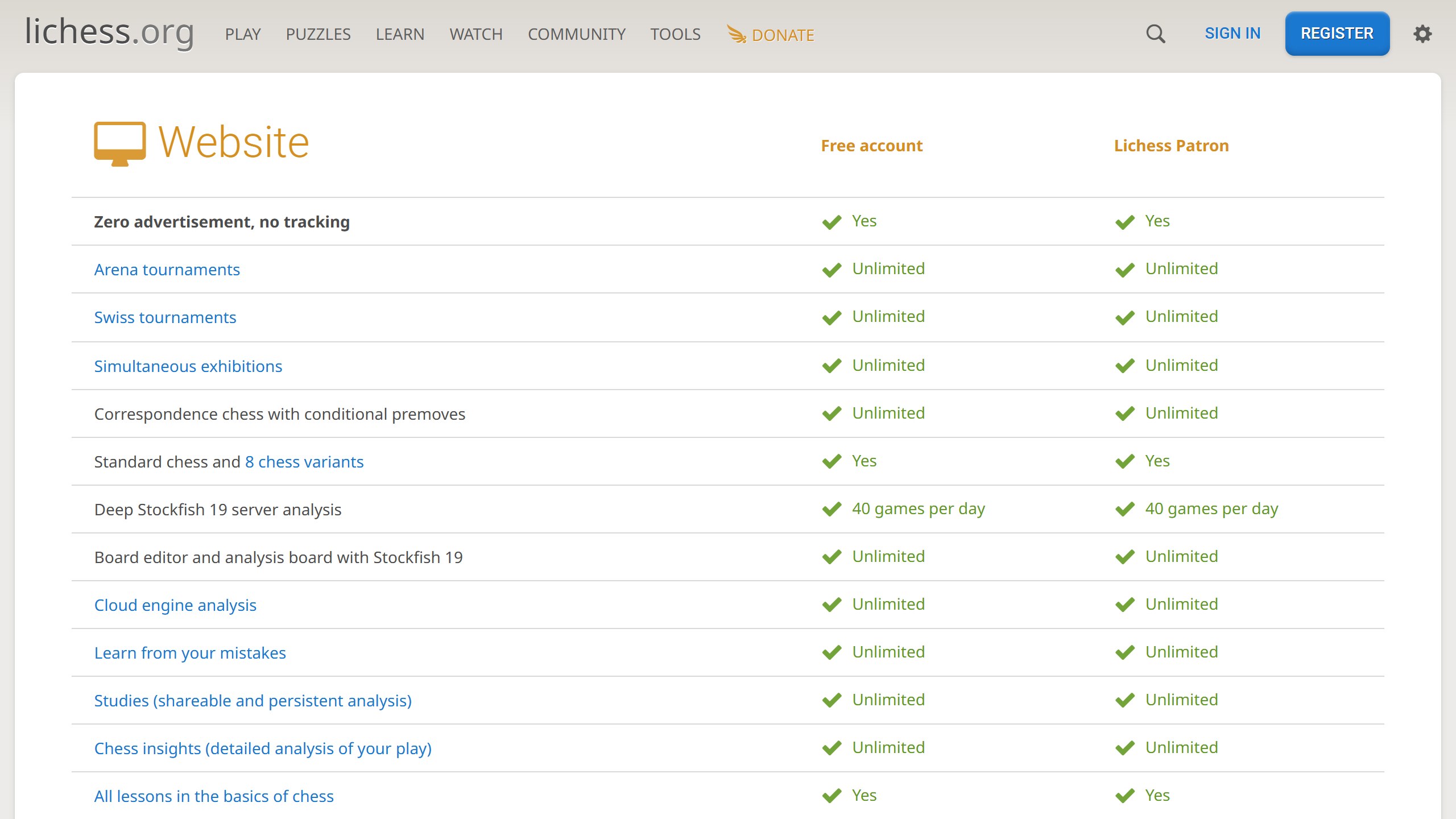
Lichess is the benchmark every paid app has to beat, because, in its own words, “all features are free for everybody, forever.” On the web you get deep Stockfish 19 server analysis, up to 40 server analyses a day, unlimited cloud analysis, a “Learn from your mistakes” mode that replays your errors as puzzles, and chess insights on your play over time. The iPhone app had a 4.1 average from 655 US ratings.
Lichess does not offer written AI coaching. What it does offer, free, is the human-like Maia bots from the University of Toronto, which are designed “to play like a human instead of playing the strongest moves.” You can play Maia at 1100, 1500 and 1900 on Lichess, the same idea several paid apps build on.
Choose it if you want serious analysis and human-like bots without paying. Skip it if you need someone, or something, to explain the engine’s verdict.
What we left out, and why
Aimchess is often listed in this category. Its website prices Premium at $7.99 a month, but its iPhone and Android apps, both listed under Chess.com, had not been updated since mid-2024 when we checked, and the iPhone app had a 3.9 average from 196 ratings. We would not commit to a year on an app that has gone quiet. Chessable, also owned by Chess.com, is an excellent course platform but we found no AI feature on the pages we read. Several smaller apps, including ChessHere and ChessGPT, had too few ratings to recommend.
What AI chess coaches cannot do yet
The honest limit is explanation. Engines know the right move but not why a human missed it. Scripted coaches cover common situations well and unusual ones poorly. Language models write fluently but can describe tactics that do not exist, which is why the more careful apps restrict them to explaining what the engine already found.
None of these apps replaces a human coach who watches how you think, notices that you rush in time trouble, or tells you to stop studying openings. What they do well is make reviewing every game cheap and fast, and that habit is where most improvement comes from. The best app is the one whose review you will actually read after each game.
Which AI chess coach should you pick?
If you play on Chess.com
Use its built-in Game Review first. Upgrade to Diamond only if you want explanations on every move.
If you want plain-language review for free
Take Take Take, with Lichess for deeper engine analysis alongside it.
If you want better practice games
Noctie on your phone, Chessiverse in a browser, or the free Maia bots on Lichess.
If you want a structured improvement plan
ChessMind AI, or ChessMood’s free AI scan if you might later buy courses.
Learning another skill with an app? Our guide to AI piano apps asks the same question: what the app actually listens to, and what it only claims.
Sources
- Chess.com: membership levels support article, membership page, US App Store listing and Google Play listing. Dr. Wolf: US App Store listing.
- Take Take Take: website, US App Store listing, Google Play listing and AI Engineer Europe 2026 talk.
- Noctie: website and US App Store listing. ChessMind AI: website and US App Store listing.
- Chessiverse: website and premium page. ChessMood: pricing page. DecodeChess: pricing page.
- Chess Coach: AI Chess Tutor: Google Play listing and US App Store listing.
- Lichess: features page and US App Store listing. Maia: maiachess.com. Aimchess: US App Store listing.
- All read 9 October 2026.

Written by
FazFaz is the founder of AIToolsBakery. Some tools here are tested hands on. Others are assessed from vendor documentation and pricing verified on the live page, and every review says which one it is. Sponsors can buy a position in a guide. They cannot buy the score, the criticism, or silence about a better option.
How we test and how we make money →