OpenClaw and Hermes are open-source AI agents that run all the time, answer you in Telegram, Slack or WhatsApp, and carry out tasks while you sleep. That last part is why hosting matters: an agent on your laptop stops when the laptop closes. So a small industry has appeared selling one-click agent hosting, and almost every page ranking for this search is written by one of those hosts, usually ranking itself first.
Those pages tend to show the introductory price and stop. This guide adds what they leave out: what the hosting costs over two and three years once the renewal price kicks in, what the refund and fair-use terms actually say, and how you pay for the AI model, which is the other half of the bill.
How we put this together. We have not deployed OpenClaw or Hermes on any of these hosts; this is a research-based comparison. Every price, limit and clause below comes from the host’s own product pages or terms, and from the official OpenClaw and Hermes documentation, read on 13 October 2026. Prices are in US dollars unless we say otherwise, and exclude tax. One host showed us euro prices including tax, and we say so rather than converting. Nothing here is a test result.
What OpenClaw and Hermes are, and what they need
OpenClaw
OpenClaw is an MIT-licensed open-source AI assistant that runs on your own machine and answers inside the messaging apps you already use, keeping its memory and credentials on your hardware. Model providers are plug-ins, and you connect it with an API key. Its install docs require Node 24.16 or later. Its control panel listens only on your own machine by default, and the docs recommend Tailscale or SSH for remote access and warn you to “treat inbound messages as untrusted input”.
Hermes Agent
Hermes Agent, from Nous Research, is also MIT-licensed and calls itself “the self-improving AI agent”: it builds and refines skills from experience, keeps long-term memory, runs scheduled jobs and talks to you through Telegram, Discord, Slack, WhatsApp, Signal or email. It works with your own keys for OpenRouter, OpenAI and others, or a Nous Portal sign-in. Its docs need Python 3.14 and install a copy of Chromium for browsing.
How much server you need
Neither project publishes a minimum amount of memory. The only figure on the ranking pages comes from a Hostinger tutorial: 4 GB, or 8 GB if the agent browses the web. That is a vendor’s guide rather than an official spec, but it matches how these agents work: the headless browser is what eats memory. Treat 4 GB as a sensible floor and 8 GB as the comfortable size for an agent that browses.
The 3-year bill
This is hosting only, before you pay anything for the AI model. Each total takes the host’s introductory price for its introductory term, then its printed renewal price for the remaining months.
| Host and plan | Memory | 24 months | 36 months |
|---|---|---|---|
| Agent37, 2 vCPU always on | 4 GB | $114.24 | $171.36 |
| Contabo Cloud VPS 4 | 8 GB | EUR 105.60 | EUR 171.60 |
| NameHero AI Agent VPS | 4 GB | about $180 | $233.77 |
| Hostinger AI automation apps | not disclosed | $143.76 | $287.64 |
| Hostinger VPS KVM 2 | 8 GB | $215.76 | $395.64 |
| Bluehost NVMe 4 | 4 GB | $227.76 | $371.64 |
| Bluehost NVMe 8 | 8 GB | $311.76 | $659.64 |
| xCloud 6 GB | 6 GB | $469.76 | $709.64 |
| Cloudways Operator | 4 GB | $479.76 | $719.64 |
| DigitalOcean 4 GiB Droplet | 4 GB | $576 | $864 |
| Kamatera, 2 vCPU | 4 GB | $936 | $1,404 |
Read on 13 October 2026. Contabo’s figures are in euros including tax as shown to us; its months 25 to 36 assume the EUR 5.50 figure on its page, which Contabo does not label as a renewal price. NameHero’s 24-month figure is our arithmetic from its 25% two-year discount; its 36-month figure is the price it prints. Hostinger VPS assumes a 24-month introductory term, and xCloud assumes its lower price applies to the first month only.
Two things stand out. Bluehost’s 8 GB plan costs $311.76 for two years and then $347.88 for the third year alone, because it renews at $28.99 a month from $12.99. And managed hosting from Cloudways or xCloud costs two to three times a one-click VPS over three years, which is the price of not looking after a server yourself.
How you pay for the AI model
The hosting bill is only half the cost. The agent also needs an AI model, and hosts handle that in three different ways.
- Bundled credits. Hostinger’s AI automation apps include pre-configured AI credits, although it does not say how many. Agent37 meters model use from the same prepaid balance as the hosting.
- Your ChatGPT subscription. Hostinger’s AI apps plan lets you use “your ChatGPT Plus or Pro subscription instead of an OpenAI API key”. It was the only host we read that offers this.
- Your own API key. Everyone else: Cloudways, xCloud, NameHero, Contabo, Bluehost, DigitalOcean and Kamatera. You pay the model provider directly, per token. Contabo was the only host that warned on its own page that these costs “can add up fast” with an agent that runs on its own.
How we chose and ordered these
Every host had to offer OpenClaw or Hermes as a managed app or a one-click install, or be a common choice for running one. We ordered them by how easily a non-specialist can get an agent running and keep it running, weighed against the three-year cost and the fine print. None of these hosts paid for placement on this page.
1. Hostinger AI automation apps: the easiest start
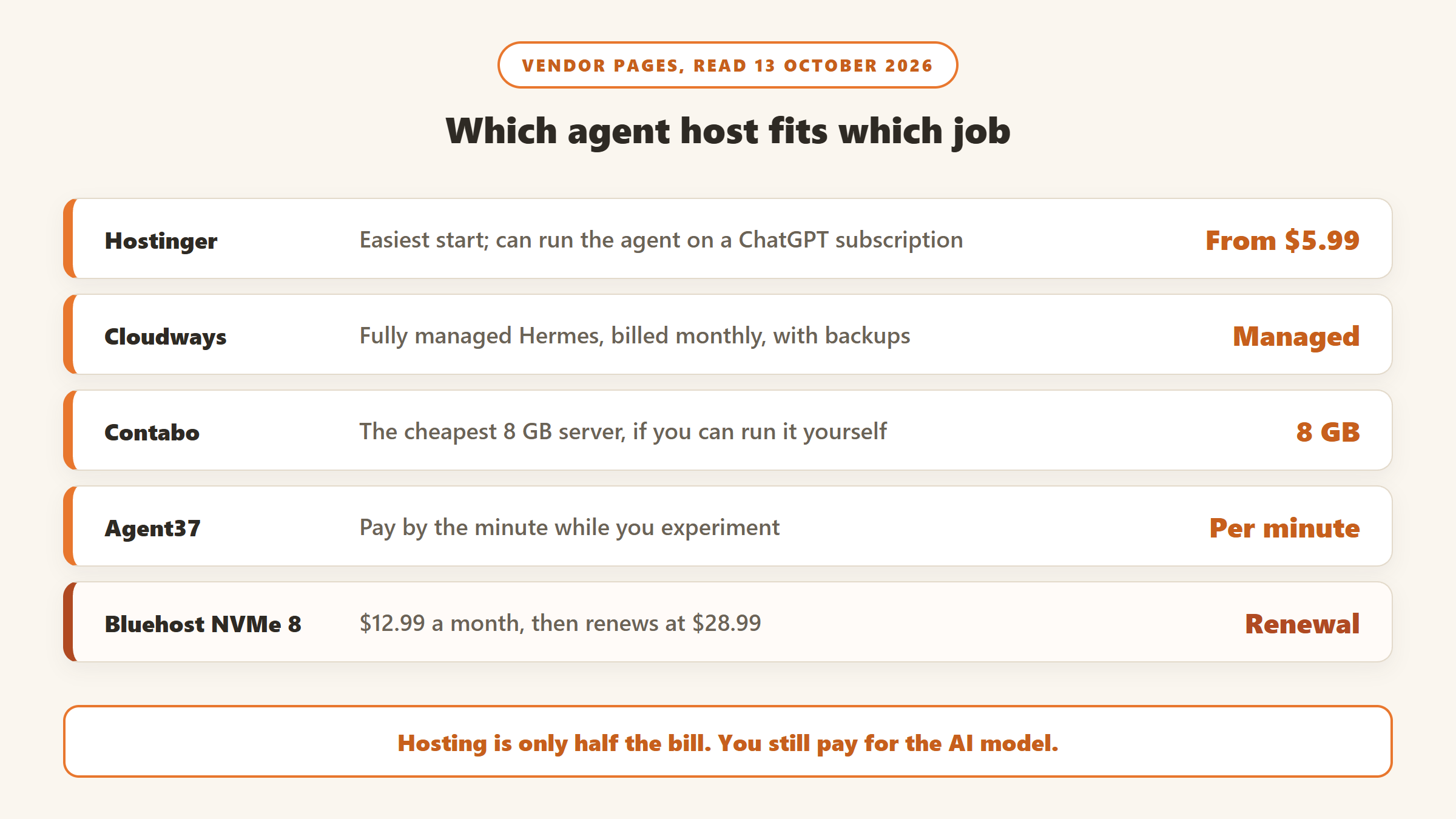
Hostinger hosts and manages OpenClaw, Hermes, n8n or Paperclip for you: “there’s no server to set up and nothing to maintain”, and it says you can be running in about 60 seconds. It is $5.99 a month on a 24-month term, $7.99 on 12 months or $10.99 month to month, renewing at $11.99, with a 30-day money-back guarantee.
Its unique feature is paying for the model with a ChatGPT Plus or Pro subscription you may already have, alongside its own credits or your own API keys. The catches: Hostinger does not publish the processor, memory or storage behind the plan, or how many AI credits are included, and switching to a different agent means deleting the running one, with its history and settings.
Hostinger’s Black Friday sale runs from 19 October to 14 December 2026, and AI automation apps is one of its featured deals. The Black Friday price applies to the first term only.
Choose it if you want an agent running today without touching a server. Skip it if you need to know exactly what hardware you are paying for.
2. Cloudways managed Hermes: managed, monthly, with backups
Cloudways says it “handles server deployment, agent installation, security, and updates”, and that automatic backups protect your Hermes memory and skills. Plans are monthly with no long term: Scout at $9.99 for 2 GB, Operator at $19.99 for 4 GB, and larger plans up to 16 GB. You bring your own model key.
Its page also advertised a limited-time 50% off without saying whether the listed prices already include it or when it ends, so check the checkout price. It offers OpenClaw as a managed app too.
Choose it if you want someone else to patch and back up the agent, and prefer monthly billing. Skip it if you want the lowest three-year cost.
3. xCloud: managed OpenClaw with the most memory to start
xCloud offers “fully managed OpenClaw hosting” with a one-click deploy. Its entry plan has 6 GB of memory and 4 vCPUs for $9.99 on the first purchase, renewing at $19.99 a month, and it says most people choose the 16 GB plan at $19.99 renewing at $39.99. You bring your own key from Anthropic, OpenAI, OpenRouter and others. On cancellation it refunds unused balance, less up to a 10% card processing fee on the amount used.
Choose it if you want a managed OpenClaw with room for browser-heavy tasks. Skip it if you are sensitive to the price doubling after the first purchase, which xCloud does not define.
4. Bluehost one-click VPS: the widest catalogue, and fine print to read
Bluehost has one-click setups for 15 AI apps, including OpenClaw, Hermes, n8n, Ollama and Claude Code. On a 24-month term, the 4 GB plan is $9.49 a month renewing at $11.99, and the 8 GB plan is $12.99 renewing at $28.99. Its Hermes page was also offering an Amazon gift card of $50 to $75 with larger plans.
Two lines worth reading
First, Bluehost’s agent pages ask customers “to not exceed 25% or more of system resources for longer than 90 seconds”. On its main VPS page that sentence sits in the explanation of unmetered bandwidth, so read it as tied to that promise, but an agent that works hard for long stretches is exactly the kind of load it describes. Second, its user agreement says the 30-day refund excludes “AI Products and Services” and monthly terms, and works only for card payments. It does not say whether a one-click agent server counts as an AI product, so ask before you buy if the refund matters to you.
Choose it if you want to try several AI apps on one server. Skip it if you need a clear refund or plan to run the agent hard all day.
5. Hostinger VPS: a DIY server with 8 GB
If you are comfortable managing a server, Hostinger’s VPS lets you deploy OpenClaw and Hermes from its app catalogue. KVM 2 has 2 vCPUs and 8 GB for $8.99 a month, renewing at $14.99, paid up front, with a 30-day money-back guarantee. That is the memory you want for an agent that browses, at a lower three-year cost than Bluehost’s 8 GB plan.
Choose it if you want 8 GB at a fair long-term price and can manage the server. Skip it if you want it managed for you.
6. NameHero AI Agent VPS: a flat three-year price
NameHero offers one-click OpenClaw, n8n, Hermes, Docker and Claude Code on a 4 GB server: $9.99 month to month or $233.77 up front for three years, with a 30-day money-back guarantee and a 99.9% uptime promise. It is unmanaged: NameHero supports the network and hardware, and you run the agent. It does not state the renewal price after three years.
Choose it if you want one payment that covers three years. Skip it if you need help running the agent.
7. Contabo: the cheapest 8 GB server
Contabo includes the first one-click installation of OpenClaw free. Its Cloud VPS 4 has 4 vCPUs and 8 GB, and its page showed us about EUR 4.40 a month for the first 24 months, including tax, which is the lowest price here for that much memory. Confirm it at checkout, as the page displays more than one figure. There is no money-back guarantee, and Contabo reserves the right to throttle servers with “exceptionally high or disruptive usage patterns”. You bring your own model key.
Choose it if price per gigabyte matters most. Skip it if you want a refund window.
8. DigitalOcean: a 1-Click image for developers
DigitalOcean’s OpenClaw 1-Click is a Marketplace “Staff Pick” on Ubuntu. A 4 GiB Droplet is $24 a month, billed by the second with a monthly cap, so you can run it for a weekend and pay only for that. It is one of the more expensive ways to keep an agent running all year, and the 1-Click page gives no hardening notes.
Choose it if you are a developer who wants hourly billing and a clean image. Skip it if you want the cheapest always-on server.
9. Agent37: pay by the minute
Agent37 runs Hermes, OpenClaw, Claude Code, Codex and other agents in isolated sandboxes, priced by usage with “no monthly plan fee or seat charge”. A 2 vCPU, 4 GB sandbox left on all month works out at $4.76. The tiered plans that other pages still quote are no longer on its site. The risk is that it runs on a prepaid balance: when the balance runs out, your sandboxes sleep until you top up.
Choose it if you want to run several different agents cheaply. Skip it if the agent must never stop.
10. Kamatera: try it free for 30 days
Kamatera lists OpenClaw in its marketplace and offers a 30-day free trial of one server worth up to $100, with a card required. After that, its 2 vCPU, 4 GB server is $39 a month, the most expensive here.
Choose it if you want to try an agent for a month before choosing a host. Skip it if you plan to keep it running long term.
What about Hetzner?
Hetzner is the usual recommendation for a cheap DIY server. On 13 October, every one of its cost-optimised cloud plans showed “currently unavailable”, and its price adjustment on 15 June 2026 raised its CX23 plan from EUR 3.99 to EUR 5.49. It also has no OpenClaw or Hermes app image. If its plans come back, it remains a strong option for people who can set up an agent themselves.
What these hosts cannot do for you
No host makes an agent safe or useful on its own. You still choose which model it uses, what accounts and files it can reach, and what it is allowed to do without asking. A cheap server with an agent that has your email and calendar is a bigger risk than an expensive one with a narrow job. Start with a small, well-defined task, watch your model spending for the first month, and widen its access only once it has earned it. If you are hosting a web app built with Lovable, Bolt or v0 rather than an agent, see where to host a Lovable, Bolt or v0 app.
Which agent host should you pick?
If you want the easiest start
Hostinger AI automation apps, especially if you already pay for ChatGPT. Its Black Friday sale starts 19 October.
If you want it fully managed and monthly
Cloudways for Hermes, or xCloud for OpenClaw.
If you can manage a server
Contabo for the lowest price on 8 GB, or Hostinger KVM 2 for 8 GB with a refund window. For workflow automation rather than a personal agent, see our guide to n8n hosting, which prices 12 options over two years.
If you want to experiment first
Kamatera’s 30-day trial, or Agent37’s pay-by-the-minute sandboxes.
Building an app rather than an agent? See our guide to AI website builders. We also track verified hosting offers on our AI tools Black Friday deals page.
Sources
- Hostinger: AI automation apps, VPS hosting and Black Friday. Cloudways: managed Hermes. xCloud: OpenClaw hosting.
- Bluehost: Hermes Agent VPS, OpenClaw VPS and user agreement. NameHero: agent hosting. Contabo: OpenClaw hosting.
- DigitalOcean: OpenClaw 1-Click and Droplets. Agent37: pricing. Kamatera: pricing and free trial. Hetzner: price adjustment.
- OpenClaw: GitHub and install docs. Hermes Agent: GitHub and docs.
- All read 13 October 2026.

Written by
FazFaz is the founder of AIToolsBakery. Some tools here are tested hands on. Others are assessed from vendor documentation and pricing verified on the live page, and every review says which one it is. Sponsors can buy a position in a guide. They cannot buy the score, the criticism, or silence about a better option.
How we test and how we make money →