If you have spent any time building online courses, you know the worst part is the blank screen. You have a slide deck, a policy PDF, or a subject expert’s brain dump, and somehow that has to become a clean, mobile-friendly lesson by Friday. Rise 360, the browser-based authoring tool from Articulate, is built to kill that blank screen fast, and in 2026 its AI Assistant is the feature everyone wants to talk about. Drop in a prompt or a source document and it drafts an outline, fills lessons with content blocks, writes knowledge-check questions, generates images, and even translates the whole course into another language.
So the obvious question for a training team or a freelance instructional designer is simple. Is the AI a genuine shortcut, or is it the kind of demo magic that falls apart the moment you ship something real? We spent real time inside Rise 360, prompting the Assistant on actual course topics, importing messy documents, and pushing the quiz and image generators to see where they break. This review leads with that AI experience because it is the deciding factor for a lot of buyers, then steps back to the tool as a whole: the block model, the responsive output, how it stacks up against its heavier sibling Storyline 360, and whether the Articulate 360 suite price is justified.
Short version: Rise 360 remains one of the fastest, most pleasant ways to build a responsive course, and the AI is a real accelerator. It is just not an autopilot, and the polish you need still comes from you.
AIToolsBakery is independent. We are not affiliated with Articulate, we do not sell Rise 360 or any authoring tool, and we earn nothing if you subscribe. When a post is sponsored we label it clearly at the top, and sponsorship never changes a score or a verdict. This review is not sponsored. Everything below is our own hands-on opinion.
What Rise 360 is
Website: Articulate Rise 360
Rise 360 is a web-based, responsive course authoring tool. You build inside a browser, there is nothing to install, and the courses you create automatically reflow to look good on a phone, a tablet, or a desktop without any extra work from you. That responsive-by-default behavior is the headline reason Rise exists, and it is still the thing it does better than almost anyone.
The building model is block-based. Instead of designing pixel-perfect slides, you stack modular blocks: text, images, video, dividers, and a strong library of interactive blocks like accordions, tabs, sorting activities, labeled graphics, timelines, process steps, and scenarios. You pick a block, drop in your content, and Rise handles the layout and the styling. For a non-developer this is the whole appeal. You can produce a professional-looking lesson in an afternoon with zero code and zero design background.
Rise 360 does not exist on its own. It ships inside the Articulate 360 suite, alongside Storyline 360 (the heavier, desktop-based tool for highly custom interactions), the AI Assistant, Review 360 for stakeholder feedback, Content Library 360 for templates and stock assets, and Localization tools for translation. That bundle matters for pricing, which we cover further down.
The AI Assistant: what it actually does
The AI Assistant is woven through the Rise authoring experience rather than bolted on as a separate app. In practice it shows up at every stage of building a course, and here is what it generated for us during testing.
| AI Assistant capability | What it does | How usable is the output |
|---|---|---|
| Course outline | Drafts a course title, description, and lesson structure from a topic prompt | Strong starting skeleton, reorder and trim |
| Block generation | Fills a lesson with text and interactive blocks on a subject | Good draft, needs fact-checking and tightening |
| Magic import | Converts an uploaded document into Rise blocks while keeping your original wording | The standout feature, big time-saver |
| Knowledge checks and quizzes | Generates multiple choice, matching, and fill-in-the-blank questions with feedback | Decent, verify answer keys and distractors |
| Lesson summaries | Condenses a lesson into a recap | Reliable for routine summarizing |
| Image generation | Creates custom images from a prompt or offers stock options | Weakest area, fine for placeholders only |
| Rewrite and tone | Adjusts tone, length, grammar, readability inline | Genuinely handy day to day |
| Translation and localization | Translates a course into other languages | Strong for first-pass localization, review needed |
The two capabilities that earn their keep are magic import and the rewrite tools. Magic import is the one that feels like a real workflow change. You hand Rise a policy document or a Word file, choose what kinds of blocks you want, and it converts the content into structured lessons while preserving your wording rather than paraphrasing it into mush. For teams that are converting existing training material into eLearning, that alone can save hours per course. The inline rewrite controls (make this more conversational, shorten this, fix the tone) are the kind of small thing you reach for constantly once it is there.
Where the AI helps and where it falls short (honest)
Here is the honest read after pushing it. The AI is excellent at beating the blank page and handling routine grunt work. Asking it for an outline, generating a first set of blocks, spinning up a quick knowledge check, rephrasing a clunky paragraph, summarizing a lesson: all of that is fast and good enough to build on. If your bottleneck is starting, the Assistant removes it.
Where it falls short is depth and polish, and this matches what hands-on reviewers at Maestro and across the eLearning community keep reporting. Generated instructional content can read flat and a little robotic, it strings facts together without the narrative flow or the deliberate learning design (think Bloom’s taxonomy, scaffolding, real scenario tension) that a skilled designer brings. It does not reliably write good alt text or navigation text, so accessibility still needs your hands on it. Quiz questions need their answer keys and distractors checked. And the image generator is the clear weak spot: AI images are inconsistent, slow to generate, and prone to the usual artifacts (the classic mangled hand with too many fingers), so treat them as placeholders rather than final assets.
The right mental model is accelerator, not autopilot. The Assistant gets you to a solid first draft dramatically faster, and then a human has to fact-check, restructure for real learning, fix accessibility, and replace weak visuals. Used that way it is a clear win. Used as a one-click course generator, it produces exactly the kind of thin, generic content that learners tune out.
Building a course: the block model and responsive output
Building in Rise is genuinely pleasant. You create lessons, stack blocks, and arrange them, and the editor stays out of your way. The interactive blocks are the secret weapon for non-designers, because a tabbed interaction, a labeled diagram, or a sorting activity that would take real effort elsewhere is a few clicks here, and it looks professional out of the box.
The responsive output is the payoff. You build once and Rise reflows the course for every screen size automatically. There is no separate mobile version to maintain and no media queries to fuss with. For organizations where a big chunk of learners are on phones, this is the feature that quietly removes an entire category of work. The tradeoff is control, which we get into next, but for the most common job (present information clearly, check understanding, look good everywhere) the block-and-responsive model is hard to beat.
Rise also benefits from a large ecosystem. Content Library 360 supplies templates, photographic and illustrated assets, characters, and icons, and there is a deep community of shared examples, downloads, and tutorials around Articulate that shortens the learning curve for newcomers.
Rise 360 vs Storyline 360: when to pick which
This is the comparison every buyer needs, because the two tools live in the same suite and solve different problems. Picking wrong wastes weeks.
| Factor | Rise 360 | Storyline 360 |
|---|---|---|
| Platform | Browser-based, nothing to install | Desktop application (Windows) |
| Build model | Block-based, stack and arrange | Slide-based, full canvas control |
| Responsive output | Automatic on every device | Fixed aspect ratio, weaker on mobile |
| Interactivity | Strong prebuilt blocks, limited custom | Triggers, variables, conditions, JavaScript |
| Learning curve | Gentle, great for non-developers | Steeper, more technical |
| Design control | Guided and consistent, limited | Fully custom, pixel-level |
| Best for | Information-heavy, mobile-first courses, fast turnaround | Scenario-based, branching, simulations, custom interactions |
The clean rule of thumb, and one that experienced designers like Devlin Peck land on: choose Rise 360 when you need to present information and quiz on it, fast, looking great on every device. Choose Storyline 360 when you need a story-driven, scenario-based, deeply interactive experience with branching logic and custom behavior that Rise simply cannot build. Many teams use both, drafting the bulk of their library in Rise and reserving Storyline for the handful of high-stakes simulations. Because they ship in the same suite, you do not have to choose one forever.
Interactivity and limits
Rise’s interactive blocks cover most everyday training needs well: tabs, accordions, sorting, labeled graphics, timelines, process steps, scenarios with simple branching, and the knowledge-check question types. For onboarding, compliance, product knowledge, and policy training, that range is usually plenty.
The ceiling is real, though. You cannot build custom interactions, you cannot wire up triggers and variables, and you cannot script behavior with JavaScript the way you can in Storyline. Fine-grained visual control is also deliberately limited. The styling guardrails that make Rise fast and consistent are the same guardrails that frustrate a designer who wants a specific, bespoke look. If your project demands a complex simulation, a heavily branched scenario, or a unique visual treatment, you will hit the wall, and that is your signal to move to Storyline or another tool with deeper interactivity. For broader context on choosing the right build tool for a project, see our guide to the best AI instructional design tools.
Pricing and who it is for
Rise 360 is not sold on its own. It is part of the Articulate 360 suite, which is an annual, per-seat subscription that bundles Rise 360, Storyline 360, the AI Assistant, Review 360, Content Library 360, and Localization tools together. There is no monthly billing, and you cannot buy a single app à la carte. Articulate offers a 30-day free trial with no credit card required, plus distinct tiers for individuals, teams (with centralized billing and collaboration), and discounted academic pricing.
We are not quoting exact dollars here because Articulate revises pricing and the suite has add-ons (for example, expanded learner distribution and localization volume) that change the total. Check the current numbers on the Articulate pricing page before you commit. What you should know going in is that this is a premium product. The per-seat annual cost is high relative to lighter authoring tools, and because the AI and the full suite are bundled, scaling across a team gets expensive quickly. That price is the most common reason teams shop alternatives, and it is a fair knock.
So who is it for? Rise 360 is an excellent fit for in-house learning and development teams, instructional designers, and freelancers who produce a steady volume of information-heavy, mobile-friendly courses and value speed and polish over deep custom interactivity. It is overkill, and overpriced, for someone who only builds a course or two a year. If you are weighing it against other suites, our Articulate vs iSpring Suite comparison breaks down that exact decision, and teams building out a full training stack should also see our roundup of the best AI corporate training tools.
Pros and cons
Pros
- Fastest path to a clean, professional course we have reviewed, especially for non-developers.
- Truly responsive output: build once, looks great on every device automatically.
- Strong library of prebuilt interactive blocks (tabs, sorting, labeled graphics, scenarios).
- AI Assistant is a real first-draft accelerator across outlines, blocks, quizzes, summaries, rewriting, and translation.
- Magic import (document to blocks, wording preserved) is a genuine workflow saver.
- Large template and community ecosystem shortens the learning curve.
- 30-day free trial, no credit card.
Cons
- AI output needs human fact-checking, restructuring, and polish. It is an accelerator, not an autopilot.
- AI image generation is inconsistent, slow, and prone to artifacts. Placeholder quality at best.
- Limited custom interactivity and fine-grained design control versus Storyline 360.
- AI does not reliably handle accessibility (alt text, navigation text) for you.
- Premium suite pricing, annual only, no à la carte apps, and the per-seat cost scales steeply.
Our verdict
Rise 360 earns a 4.4 out of 5. It is, simply, one of the best tools available for building clean, responsive courses quickly, and the things it does well it does better than almost anyone: the block model is fast and forgiving, the responsive output removes a whole class of work, and the interactive blocks make non-designers look good. The AI Assistant is a legitimate addition rather than a marketing checkbox. As a first-draft engine for outlines, blocks, quizzes, summaries, rewriting, and translation, it meaningfully speeds up the front end of course production, and magic import is the standout.
The points it loses are honest and predictable. The AI needs a human to fact-check, deepen, and polish its output, the image generator is not ready for final work, custom interactivity belongs in Storyline, and the suite is expensive enough that the price is the first thing teams push back on. None of that undermines the core product. If you build courses regularly, want them mobile-ready by default, and treat the AI as the accelerator it is rather than the autopilot the marketing implies, Rise 360 is an easy tool to recommend. Just go in clear-eyed about the editing time and the bill.
Compliance and safety training, where the record matters as much as the learning
This corner of the category has a different buyer and a different test. The question is not only whether people learned, it is whether you can prove what was delivered, to whom, and when.
The record is the product
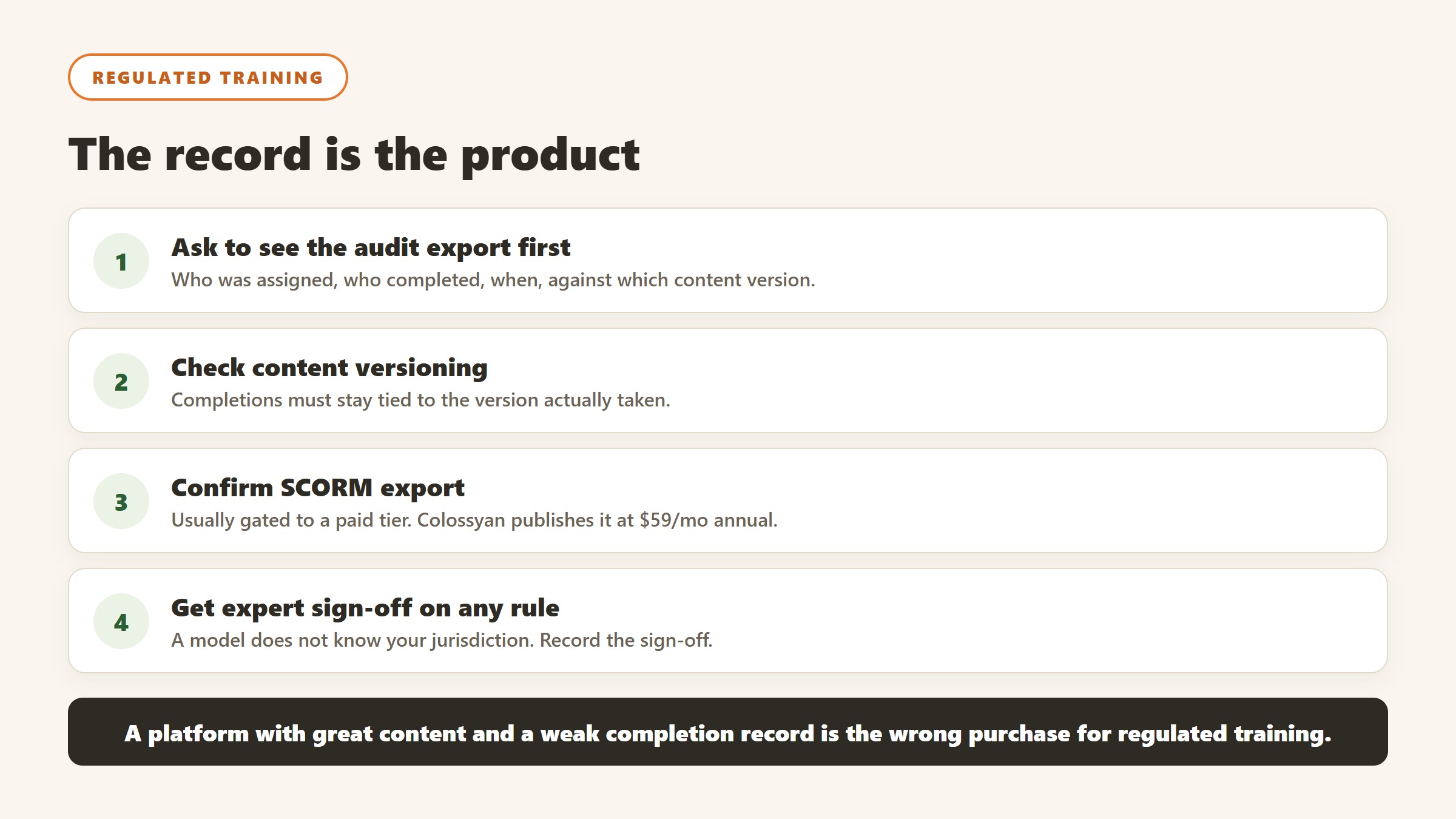
For regulated training, what you need at audit is a defensible record: who was assigned, who completed, on what date, against which version of the content. Ask any vendor to show you that export before anything else. A platform with excellent content and a weak completion record is the wrong purchase, and a plain one with an audit-ready export may be exactly right.
Content versioning is the detail people miss
Regulations change and content gets updated. When it does, you need to know which version each person completed, because “everyone completed the fire safety module” is not an answer if the module changed in March. Ask how the platform versions content and whether historical completions stay tied to the version that was actually taken.
SCORM export matters more here than anywhere
If completions have to land in a corporate LMS, the authoring or video tool must export a trackable package. Colossyan publishes SCORM export on its Professional tier at $59 a month billed annually, verified 4 September 2026. Check this before shortlisting on price, because a cheaper tool that cannot produce a trackable package is not doing the job at all.
Be careful with AI generated content in a regulated context
A model does not know your jurisdiction, your policy, or the specific standard you are being audited against, and confident wrong content in compliance training is worse than no content. Use generation for structure, scenarios and delivery, and have a named person with the relevant expertise sign off anything that states a rule. Record that sign-off alongside the content version.
Measuring training, honestly
Training is the discipline most prone to measuring the wrong thing well. Four levels of rigour are available and most organisations stop at the first.
Reaction is easy and nearly worthless
Satisfaction scores at the end of a session tell you whether people enjoyed it, which correlates weakly with whether they can now do anything differently. Collect it if you like, and do not report it as evidence the training worked.
Completion is an activity metric
Completion percentage measures compliance with an instruction. It is genuinely necessary for regulated training, where the record is the point, and it is not evidence of capability anywhere else. Report it as what it is.
Behaviour change is where the real evidence starts
Pick one observable behaviour and measure it before and after: the proportion of discovery calls that reach a defined qualification step, the share of tickets resolved without escalation, the number of safety observations logged. It needs a baseline from before the training, which is why this gets skipped, and it is the first level that would survive a hostile question.
Business outcome, with the caveat stated out loud
Attributing revenue or incident rates to a training programme inside one year is genuinely hard, because everything else moved too. If you report an outcome, report what else changed in the same period. The most credible thing a training team can do is claim the behaviour change it can evidence and be openly cautious about the outcome it cannot.
Take the baseline in the week before launch
Whatever you choose, capture it before anything is switched on, from a source the project did not touch. It takes an hour and it is unrecoverable afterwards, which is the single reason most training investments can never be evaluated.
AI video tools for training content, and a pricing warning
AI video generation has become the default way to produce training content at volume, and its pricing has a trap in it that almost no comparison article mentions. Here is each alternative to articulate rise, read 4 September 2026.
Synthesia serves different currencies to different countries
When we read Synthesia the entire rate card was in rupees: a free Basic plan at ₹0 a month, Starter at ₹1,999 a month billed monthly or ₹1,499 billed yearly, and Creator at ₹6,199 or ₹4,649 yearly, with a banner reading “Plans now starting from ₹1,499/month, Save 25%”. Our captures run from an Indian IP address, and the page served us local pricing without being asked. We do not convert currencies, so those are reported as the figures an India-served visitor sees. If you are elsewhere, your page will show different numbers, and any article quoting a single global Synthesia price has not checked this.
The one Synthesia figure that was not localised
Its Studio Express-1 custom avatar is published as a paid add-on at $1,000 a year, in dollars, available to annual plan users only, with creation taking up to ten days. That is worth knowing because custom avatars are usually the reason a training team chooses this category at all, and a four-figure annual add-on materially changes the comparison against a tool with avatars included.
Colossyan and HeyGen, both published
Colossyan publishes a free plan it describes as $27 a month worth of value, then Professional at $59 a month on annual billing with $30 a month per additional member, and includes SCORM export on the paid tier, which matters if the video has to land in an LMS. HeyGen publishes free at $0, then $29, $49 and $149 a month, with team members at $20 per seat per month. Note that heygen.com/pricing redirected us to its /en-in/ locale even with a US language header, though it displayed dollar figures.
SCORM export is the feature that decides the shortlist
If your training has to be tracked in an LMS, the video tool needs to export SCORM, and that is usually gated to a paid tier. Colossyan publishes SCORM export on Professional at $59 a month. Check this before comparing anything on price, because a cheaper tool that cannot produce a trackable package is not competing for the same job.
Avatar minutes are the real meter
Every vendor here meters on generated minutes or credits under the subscription. Work out how many finished minutes of video your training calendar actually needs in a year, then divide. A twelve module compliance refresh at eight minutes a module is roughly a hundred minutes before re-cuts, and re-cuts are where the allowance goes.

Written by
FazFaz is the founder of AIToolsBakery. Some tools here are tested hands on. Others are assessed from vendor documentation and pricing verified on the live page, and every review says which one it is. Sponsors can buy a position in a guide. They cannot buy the score, the criticism, or silence about a better option.
How we test and how we make money →Frequently Asked Questions