Quick answer: Exec is an AI roleplay platform where your team rehearses real conversations by voice and gets scored against a rubric you control. The roleplay engine is the best we have used. Plans start at $120 a month for five full seats. Two of the five pillars are still in beta.
What a day inside it taught us: Exec’s CEO frames the product with an analogy we have not been able to shake. Nobody hands a new pilot the keys to a multi-million dollar aircraft and tells them to work it out in the air. You put them in a simulator first, where the mistakes cost nothing and the lessons still stick. His argument is that a rep on a live call with a real account is in exactly that position, and we have all quietly decided that is normal. Exec is the simulator, and that framing turns out to be the most useful way to understand what the product is doing. We spent a working day testing whether it earns the comparison. It is the first sales training tool that has ever made our editor genuinely nervous before pressing the button, and that is the highest compliment we can pay it. The roleplay engine is exceptional, the feedback is specific enough to act on the next morning, and the analytics measure the one thing that actually matters, which is whether anybody got better. The supporting pillars vary. Courses surprised us. Call scoring is close to excellent with one clear gap. Knowledge Hub is early and says so. Buy this for the roleplays and you will be very happy, and treat the rest as upside that is arriving.
1. How we tested this, and what to know about the numbers
Before anything else, the thing you need to know in order to read the rest of this fairly.
Exec gave us access to a demo workspace rather than a fresh empty account. That workspace is deliberately pre-seeded to show the product at its best: it already contained hundreds of participants, thousands of completed roleplay sessions, hundreds of scored calls, a set of prepared scenarios, ready-made call categories and a populated knowledge library. None of that is ours. It is Exec’s own sample data, built to demonstrate what a mature deployment looks like.
That matters in two directions and we want to be straight about both. It means the analytics screens we show you are far richer than what you would see in your first week, so treat those figures as an illustration of the product at scale rather than as a promise about your results. It also means we could see things a trial account would never show us, like what a 45-skill proficiency table looks like once a real team has been through it, which is genuinely useful and worth having.
So here is exactly what we made rather than inherited, and everything we say about how the product behaves comes from these:
- A roleplay scenario built from scratch, from a one-paragraph brief about a real prospect situation in our own business, including the character, the backstory and the evaluation criteria.
- An edit to that scenario, asking the AI to make the character easier while preserving specific details, to see how it handled a constrained instruction.
- A live roleplay run cold, by voice, by our editor, scored and reviewed afterwards.
- A call-scoring category built end to end, with our own attributes and our own Good, Fair and Poor scorecard descriptions.
- A course generated from our own published writing, then fact-checked line by line against the source material we already knew.
- A certification issued and downloaded, to see what the artefact actually looks like.
- Seven of our own pages plus a plain-text site index loaded into the Knowledge Hub, then queried.
On sourcing, there are five kinds of statement in this review and we label all of them. Where we describe something we did, that is our own hands on the product. Where a screenshot shows demo workspace data, we say so and we do not quote the figures, because they are Exec’s sample data and not a real deployment. Where something comes from Exec’s documentation rather than from us, such as the multi-character scenarios or the coaching marketplace, we flag it. Where Exec supplied an image of something we did not run ourselves, the caption says so. And where Exec answered a question we put to them directly, mostly on pricing and roadmap, we say that too. A review that blurs those four things is not worth reading.
2. What Exec actually is
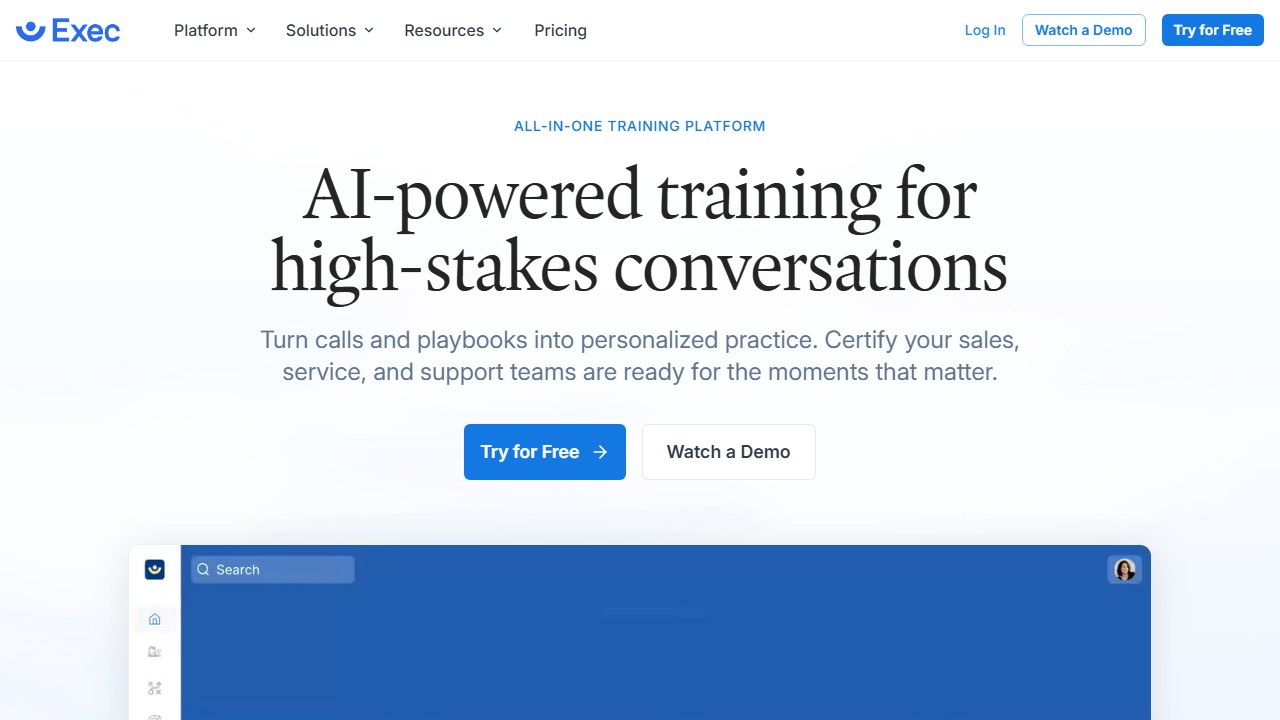
Exec is a practice platform. A rep opens a scenario, presses a button, and has a real spoken conversation with an AI character playing a prospect, a customer, or a direct report who has just been passed over for promotion. The conversation is then scored against a rubric that was published before they started, so nobody is graded on a secret standard. Those scores roll up into an organisation-wide picture of which skills are improving and which are stuck.
It is worth being precise about what it is not, because the category is crowded with things that sound similar. This is not a course library with a quiz at the end. It is not a chat window where you type at a pretend buyer. It is not a call recorder that summarises what already happened.
The simulator comparison from the top of this review is worth taking literally, because it explains the design choices rather than just selling them. Flight simulators work for three reasons: the conditions are hard enough to be uncomfortable, the debrief is specific rather than encouraging, and pilots go back in repeatedly rather than passing once and moving on. Every part of Exec that we came away impressed by maps onto one of those three, and every part that felt thinner is somewhere those three do not apply.
The product spans five pillars, and it helps to know where each one sits before you decide whether it fits the way your team works.
- Roleplays. Voice conversations with AI characters, scored against custom rubrics. This is the heart of the product and it is where the engineering has clearly gone.
- Call scoring. The same evaluation idea applied to real recorded calls, pulled in from your recorder or uploaded by hand.
- Courses. AI-generated training built from your own material, with quizzes, diagrams and roleplay briefs. Currently in beta.
- Certifications, programs and coaching. Structured learning paths, real PDF certificates with expiry dates, and a marketplace of human coaches.
- Knowledge Hub. A place to put your own documents so everything above can draw on them. Also in beta.
Those beta labels are worn openly in the left-hand navigation rather than buried in a footnote, which set the tone for the whole day. This is a product that tells you where it is confident and where it is still building.
Exec at a glance: specifications, limits and costs
Everything below is either something we saw in the product or something Exec told us directly, and the last column says which. Figures checked 12 August 2026. Confirm pricing on Exec’s own pricing page before you buy, because vendors change numbers more often than reviewers update them.
| Item | What we found | Source |
|---|---|---|
| Entry price | $120 a month for five full seats | Exec, confirmed directly |
| Extra full seat | $240 a year | Exec |
| Seat types | Full seats run roleplays and call scoring. Basic seats can book coaching, join programs, read and complete surveys, but cannot roleplay or score calls | Exec |
| Course generation | 200 platform credits, roughly 100 credits per dollar, so about $2, charged once at first outline | Exec |
| Credits included | 1,000 per full seat per month | Exec |
| Regenerating a course | Free | Exec |
| Custom scenario cap | 50 | Observed |
| Characters per scenario | Up to 4, for panel conversations | Exec documentation |
| Languages | 9, with localised character voice and coach feedback | Exec documentation |
| Call recorder integrations | Fireflies, Gong, Fathom, Clari Copilot, Sybill, Zoom, Microsoft Teams | Observed |
| Content sources | Notion, Google Drive, Guru (alpha) | Observed |
| LMS | LTI 1.3 | Observed |
| CRM integration | None today. Exec says roughly two months | Exec |
| Slack integration | None today. Exec says early 2027 | Exec |
| Call attribute field types | Single-Select, Multi-Select, Text, True or False. No Number and no Date | Observed |
| SSO and provisioning | Okta, Azure AD, Google Workspace, domain verification, optional SCIM | Observed |
| Certificates | Downloadable PDF with an expiry window. Ours ran August 2026 to August 2027 | Observed |
| Session Settings | Six switches including Video Avatar and screen share, all off by default | Observed |
3. Building a scenario from a single paragraph
We wanted to test the thing everybody claims and few deliver, which is that you can describe a situation in plain English and get a usable training exercise out of it. So we gave it a genuinely thin brief. We asked for a B2B SaaS founder who is sceptical about AI visibility, has been burned by agencies before, and needs convincing that the work is worth paying for. That was it. No name, no company, no numbers, no personality.
What came back was a character called Declan Fogarty, an operations director at a mid-sized systems integrator called Conduit Systems, who had spent roughly eight thousand pounds a month with three different AI SEO agencies and had nothing he could point at to justify the spend. It gave him a specific reason to be in the room, a specific reason to be impatient, and an opening line that landed exactly right: “Right, you have got twenty-five minutes. What is this actually about?”
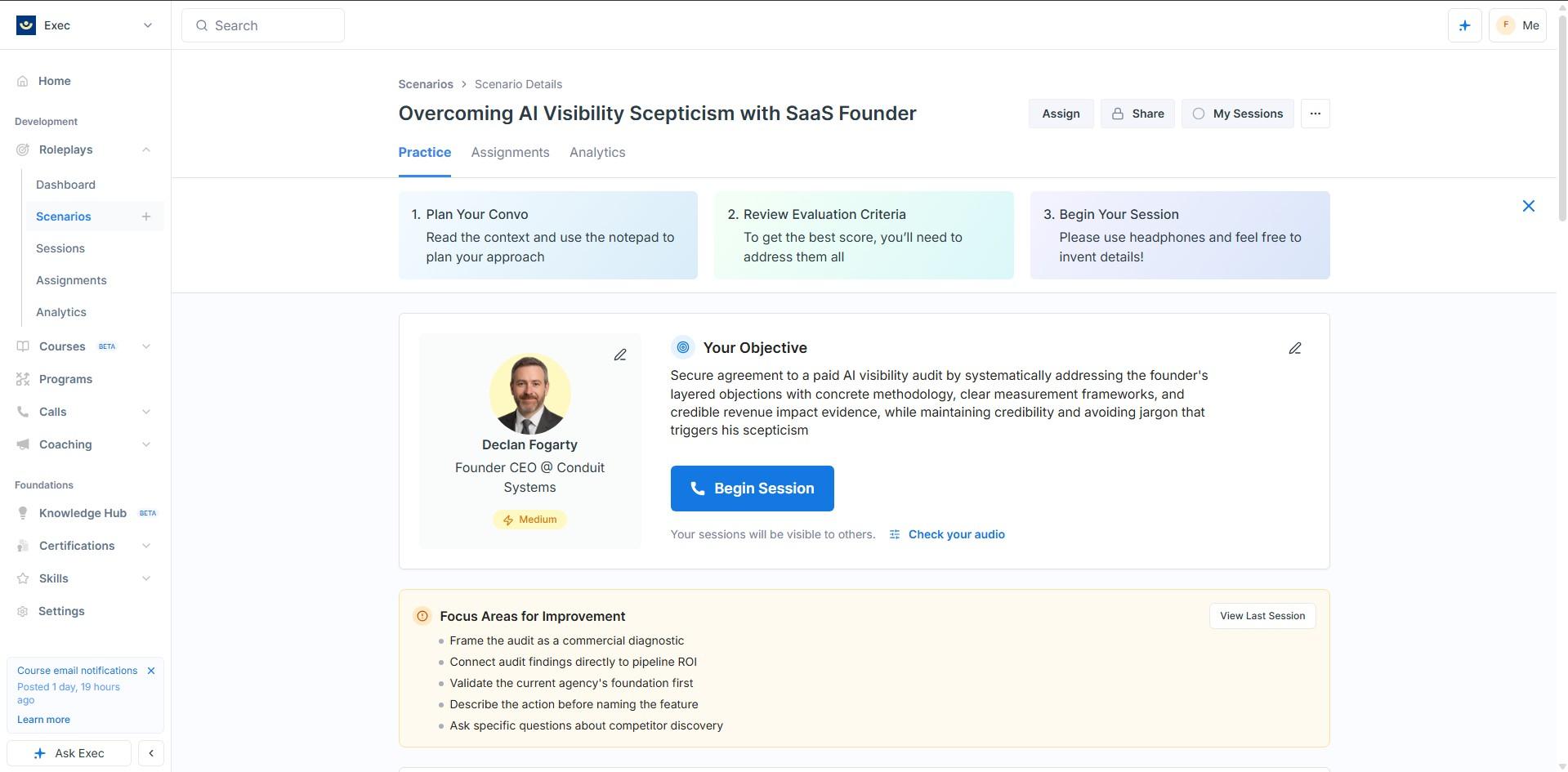
None of that detail was in our brief. It was invented, and it was invented in the right direction, which is the harder trick. Plenty of tools will produce a persona if you ask for one. Far fewer produce a persona whose scepticism is specific enough to be uncomfortable.
Alongside the character it built the evaluation criteria, and this is where we started paying proper attention. The criteria were bespoke to the scenario rather than generic sales stages. One of the Outcomes to Avoid read “relying on buzzwords like presence or visibility,” which is a very precise description of how conversations like this go wrong. It had understood not just the situation but the specific failure mode.
We then asked it to make Declan noticeably easier, while telling it explicitly to keep the name, the company, the agency spend and the backstory. It scoped the edit to the character alone, left the scenario summary untouched, and then told us exactly what it had changed: objection pacing, concession behaviour, a new warmth trigger, softer jargon policing, a new closing condition, and difficulty moved down to Medium. It finished by confirming that everything else was as we left it.
4. What is under the character, and why it matters
This is the part of the review we would most want a buyer to read, because it explains why the roleplays hold up when you push on them.
Open the Character Details tab and the machinery is right there in front of you. The character is not a hidden prompt. It is a set of fields you can read and change: basic identity, voice settings with an audio preview, the opening line, a four-paragraph backstory, a situational understanding block that is explicitly marked as not shown to the learner, seven personality traits, and then the interesting bit.
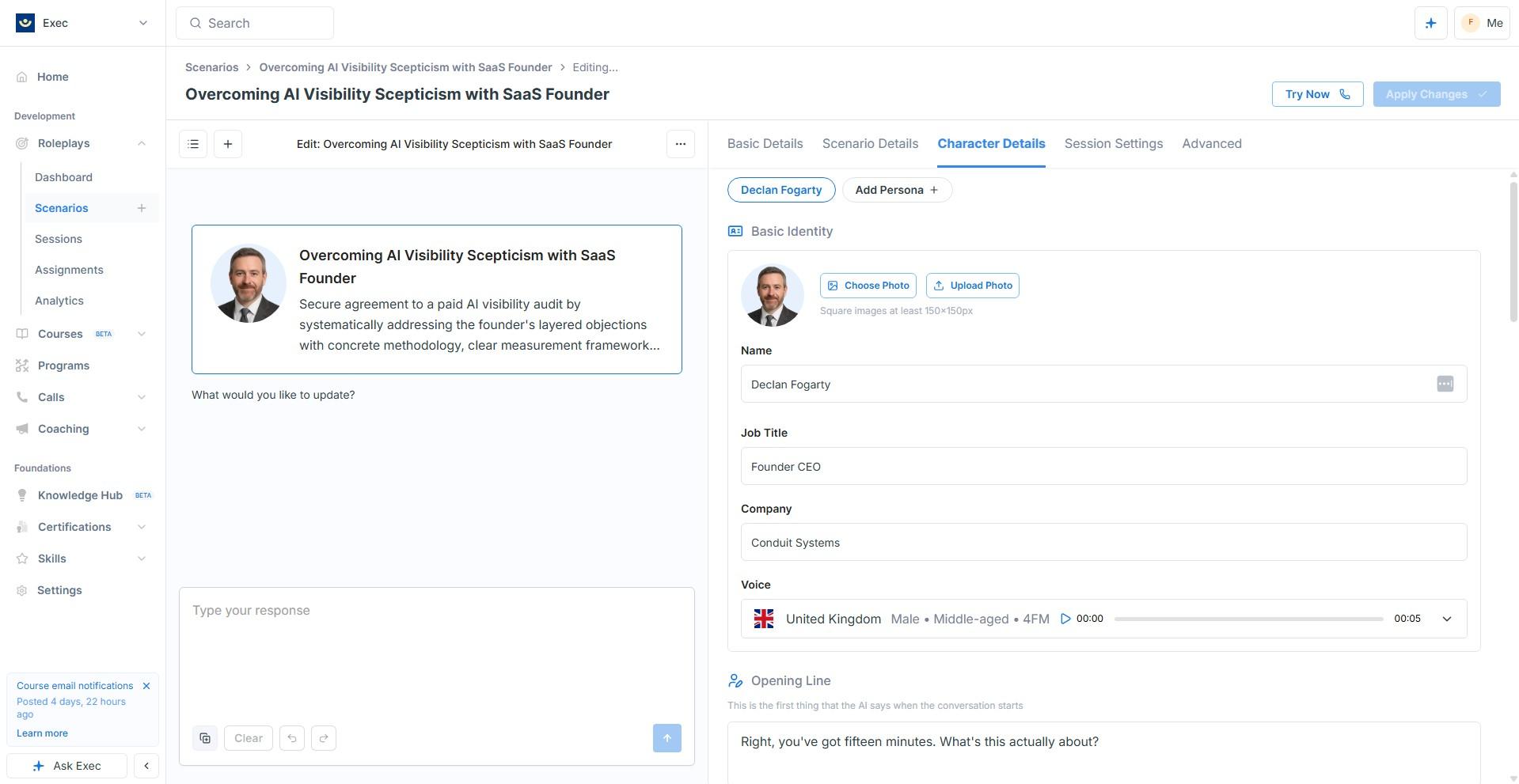
Scroll past that and you reach Conversation Guidelines, which are an explicit trigger table where each entry carries its own response budget. There are rules like “when the learner explains AI visibility services,” set to three responses. “When the learner uses terms like presence or visibility without defining them,” set to one. “When two or more objections have been addressed well and the learner has provided at least one concrete measurement example,” also set to one.
Here is what made this click for us. The two triggers about measurement did not exist before we asked for the character to be made easier. Our plain-English instruction had been compiled into new behavioural rules that we could then open up and read. The tool had not just adjusted a difficulty slider, it had written new rules and shown us its working.
The practical benefit is that you can debug a scenario. If a character is going too soft on your reps, you can see which trigger is firing, change its budget, and try again. Most competitors offer a temperature slider and a text box and wish you luck.
Two further capabilities are worth knowing if you are scoping a rollout, neither of which we ran ourselves: nine languages with localised character voice and coach feedback, and conditional context that changes what the character knows depending on who is practising.
The third deserves more than a line. Scenarios support up to four characters, which turns a one to one rehearsal into a panel. Exec sent us the screenshot below rather than us building one, and it is worth looking at properly if you are evaluating its roleplay platform.
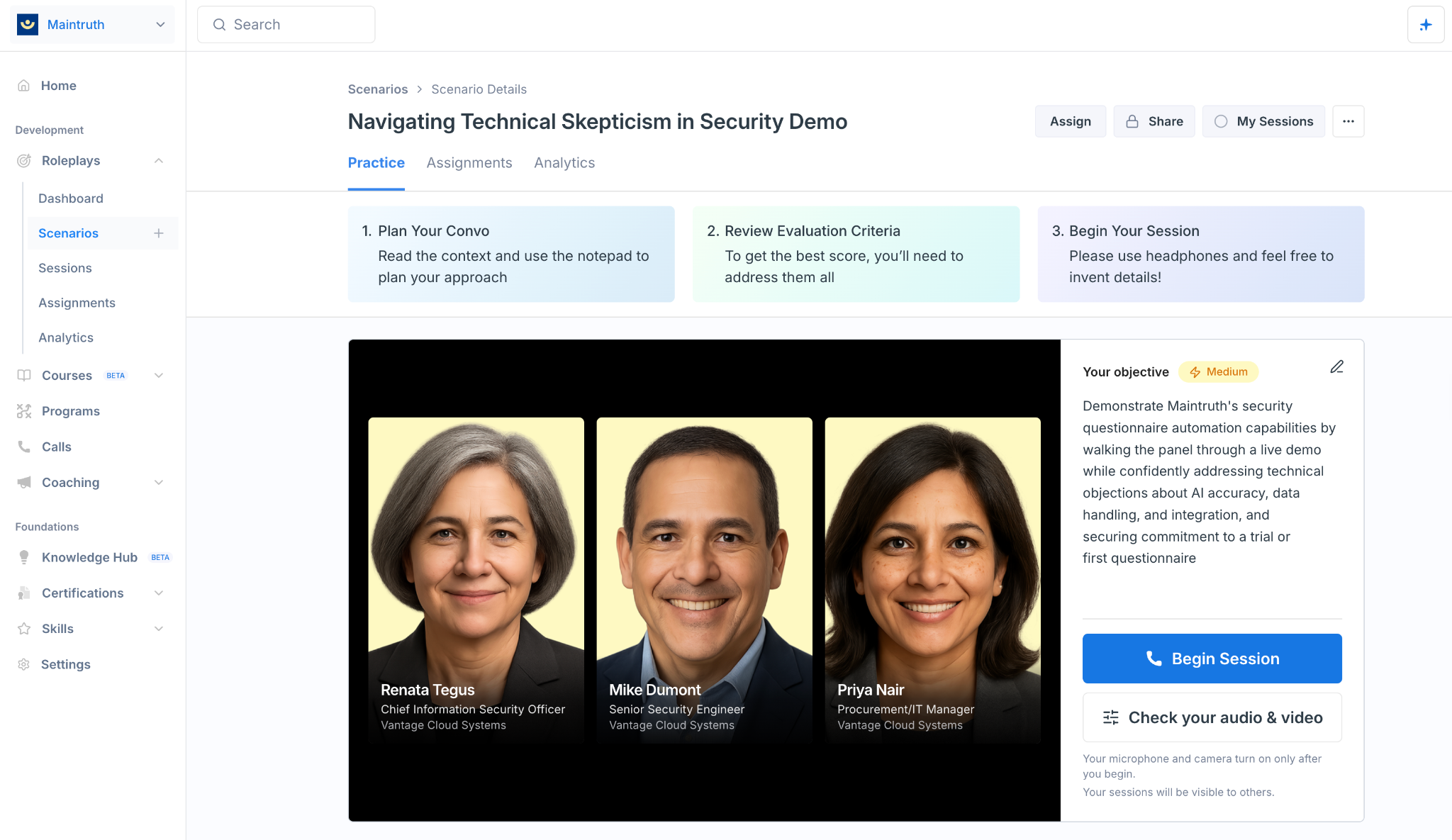
What it shows is that a panel is not a separate mode bolted on the side. Each participant is a full character with a name, a job title and a company, sitting inside the same scenario object, behind the same Practice tab, the same three-step preamble and the same audio check as the single-character run we did do. The objective is written for the room rather than for one person: demonstrate the product to a panel while handling objections on accuracy, data handling and integration, and leave with a commitment to a trial.
That matters because the buying committee is the thing a solo rehearsal cannot teach. Reps rarely lose a deal to the champion. They lose it to the security reviewer who joins at minute forty and the procurement manager with one question about data residency. Practising against all three at once is a materially harder exercise than practising against someone who wants to help you.
We would want to run one before saying it works, and we are not going to pretend otherwise. The hard part of a panel is not generating three characters, it is turn-taking. Who speaks, when they cut across each other, whether the quiet one stays quiet in a way that feels real, and how the scoring apportions credit when you handled two objections well and ignored the third person entirely. A screenshot cannot tell you any of that, and neither can we.
5. Doing the roleplay: the part nobody warns you about
Everything above is preparation. The roleplay itself is a live voice conversation, and we want to describe honestly what that is like, because it is the single biggest thing a screenshot cannot tell you.
Our editor ran the Declan scenario cold, having built it an hour earlier, knowing exactly how it worked, having personally written half the trigger table. It was still nerve-wracking. Genuinely. Palms-slightly-damp nerve-wracking, before a conversation with software, in an empty room.
What made it work was specific, and it is worth spelling out. Declan opened cold and stayed cold. He did not warm up because we were polite. When we used the word visibility without defining it, he pushed on the word, exactly as the trigger table said he would. When we finally produced a concrete measurement example, the temperature changed, and afterwards we could go back and read the rule that caused it. The character behaved consistently with its own published logic, which is what makes the practice transferable rather than random.
The latency deserves a mention too, because it is the thing that usually ruins voice AI. There is no walkie-talkie lag here. Declan interrupted, reacted, and talked over us occasionally, in the way a genuinely impatient person does. You stop noticing the technology within about thirty seconds, which is exactly how long you want that to take.
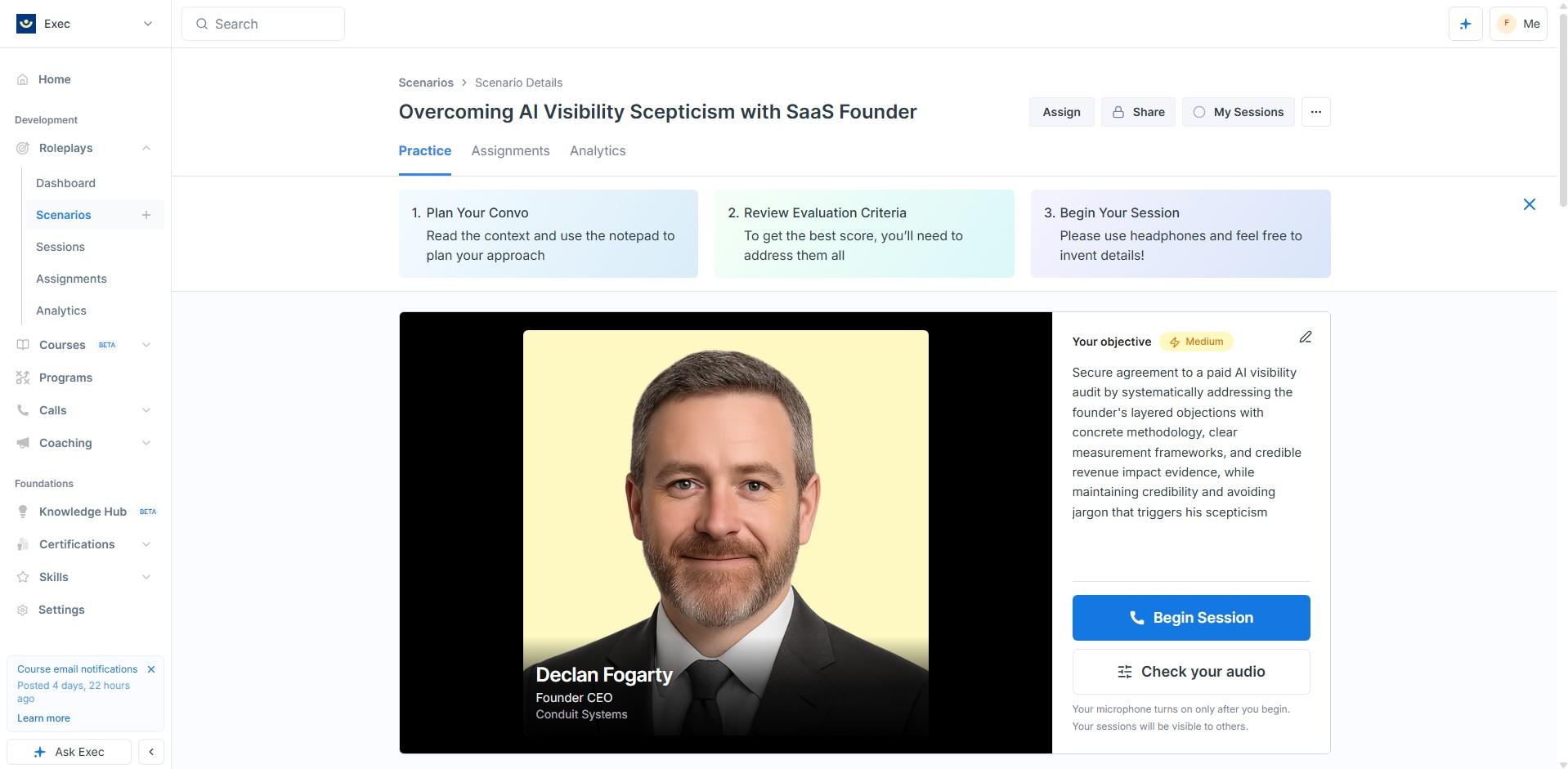
Around the session, the interface is sensibly quiet. There is a notepad for planning before you start, prepared scenarios can carry an attached PDF sales deck, and there is an audio and video check before you commit. Two lines on that pre-flight screen are worth reading properly rather than clicking past. Your microphone turns on only after you begin, which is the reassurance anybody sensible wants from a product that listens. And your sessions will be visible to others. In a real deployment that second one is a policy decision to make deliberately, not a UI detail.
The practical implication is that Exec needs a quiet room and a headset, not just a browser tab. If your floor is open plan, that is a real logistics question to answer before rollout, not a footnote. It also means that any review of this product written from screenshots alone is missing the entire point, which is probably why so few people have described this properly.
Turning the camera on
We then ran the same scenario a second time with Video Avatar and screen sharing switched on. Same character, same trigger table, same rubric, one variable changed, which is the only way to say anything useful about what the video layer adds.
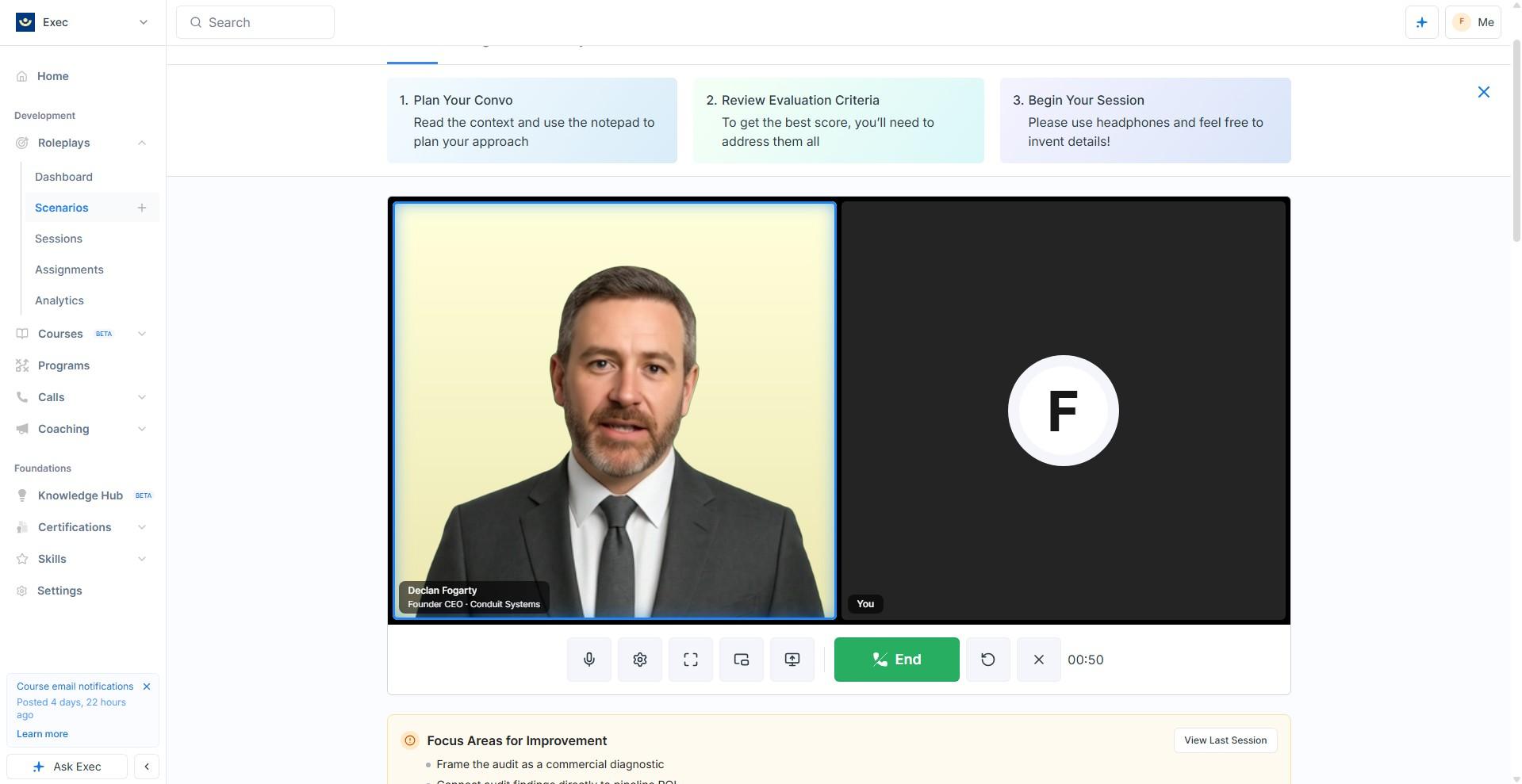
One thing here is genuinely impressive and it is not the face. Share your screen and the character reads it. We put a live analytics dashboard up and Declan asked questions about what was on it, rather than acknowledging the share and continuing the conversation he was already having. That is the difference between a capability and a checkbox, and it opens up a category of rehearsal that voice alone cannot reach. If your reps demo, walk buyers through a deck, or defend a number on a slide, this is the part of Exec worth turning on.
The layout handles it sensibly too. Share a screen and the shared content takes the room, the character drops to a tile beside it, and the whole thing rearranges into the shape of a video call rather than a training exercise. Exec even nudges you to share a single window rather than a whole screen so you can move between tabs, which is a small sign that somebody has used this in anger. The session also survives you leaving the tab, continuing in a floating picture-in-picture window.
The avatar itself is more mixed. It manages basic expressions and reactions, which is more than a static portrait with a voice attached. But the lip sync does not track the audio, and once you notice that you keep noticing it. We also switched back to the Exec tab while sharing and found the character’s head cropped in its own tile, which is the kind of rough edge you expect from something released the week you tested it.
6. Getting marked, and what it felt like
Our editor scored 82 percent and earned a silver medal on the first attempt, and attained the scenario objective, which was that Declan agreed to review a sample audit and committed to paying for one if the materials held up.
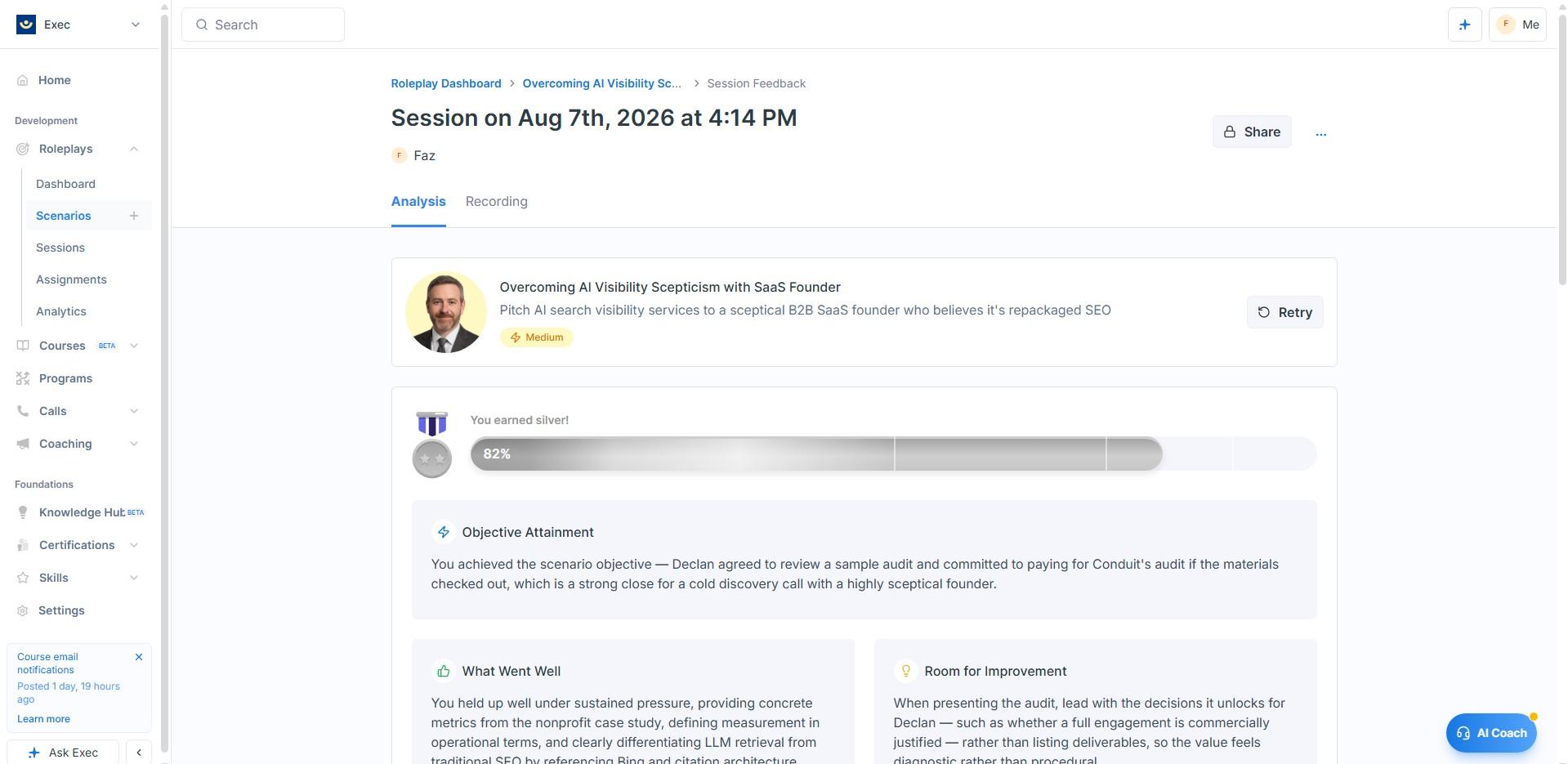
Two design decisions here are better than they look at first glance. The first is that objective attainment is reported separately from the score. You can close the deal and still lose marks on how you got there, which is precisely the distinction a sales manager cares about and precisely the one most tools collapse into a single number.
The second is that the feedback is transcript-specific rather than templated. Ours quoted the actual evidence we had used in the conversation, then named the exact weakness: we had presented the audit as a list of deliverables rather than leading with the decisions it would unlock. That is a real critique of a real conversation. It also maps precisely onto one of the criteria that were published before we started, which confirms that the rubric you are shown is the rubric you are scored against. In this category that is genuinely not a given.
The recording, and why the timeline is the best thing on this screen
Next to the written analysis there is a Recording tab, and it is the part of the product we would most like other vendors to copy. You get the audio with a full speaker-labelled transcript, and above it a timeline with markers dropped at specific moments: ticks where you met a criterion, a cross where you did not, and dots for points the evaluator wanted to flag.
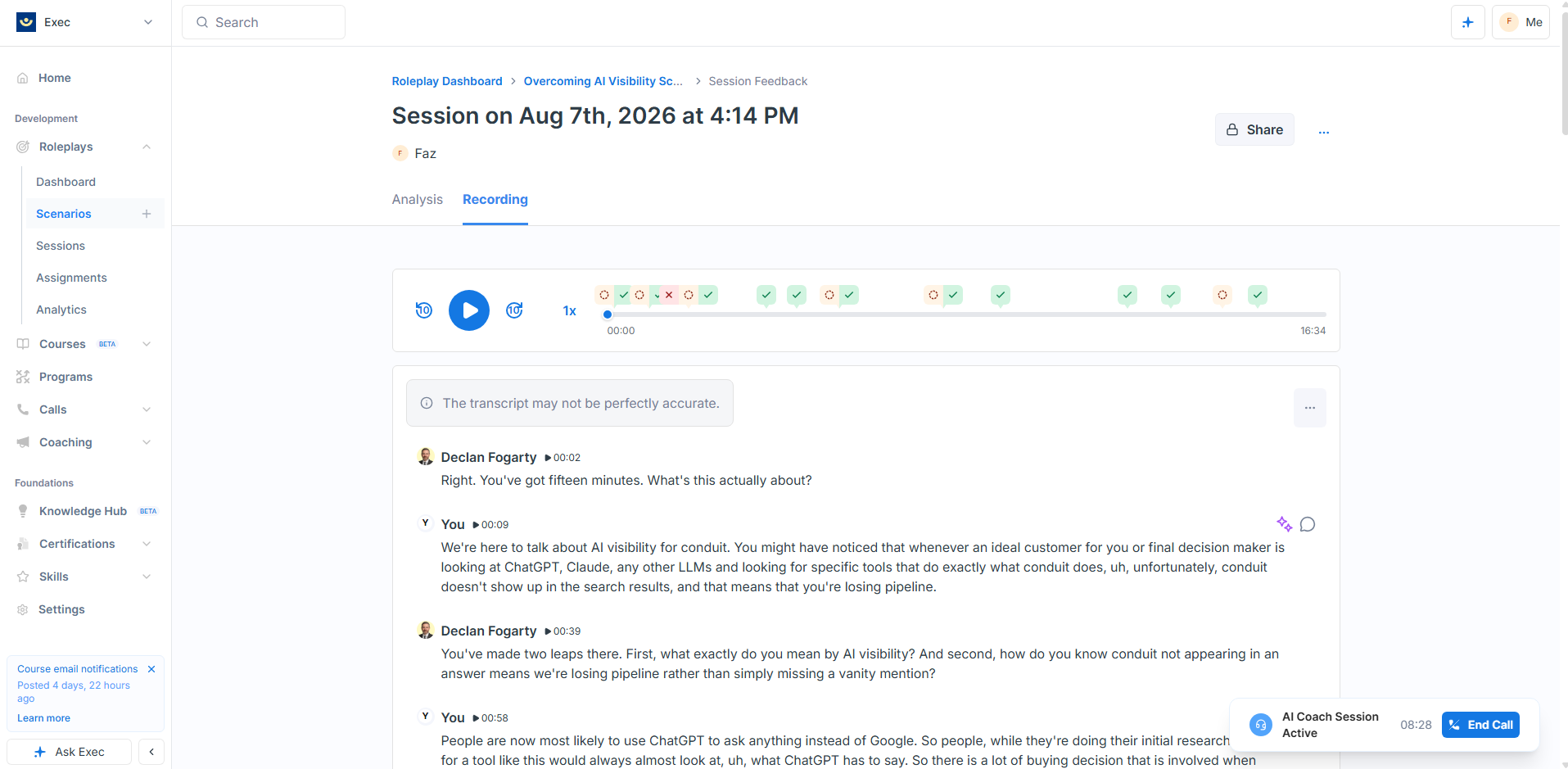
Click a marker and it takes you to that moment and tells you what happened there. The transcript carries the same idea inline, with one icon for what you did well and another for where to improve, attached to the individual thing you said rather than to the session as a whole.
That matters because it makes a score auditable. Most tools in this category hand down a number and a paragraph, and if you disagree there is nowhere to go. Here you can play the eleven seconds that cost you the point. It is also the same instinct as the trigger table: rather than asking you to trust the machine, Exec shows you the working. Two very different features, one design principle, and it is the most consistent thing about the product.
The AI Coach, which we nearly missed
There is a small blue button in the bottom right of the feedback screen labelled AI Coach. We walked straight past it on our first pass and only went back because Exec pointed at it. That is worth saying plainly, because it turned out to be one of the better things in the product and it is one click from being invisible.
It is not a chat window. It is a voice call, on the same engine as the roleplay, about the conversation you just had. The written analysis stays on screen while you talk, and the call keeps running while you move around the app, so you can scrub to a moment in the recording and ask about it.
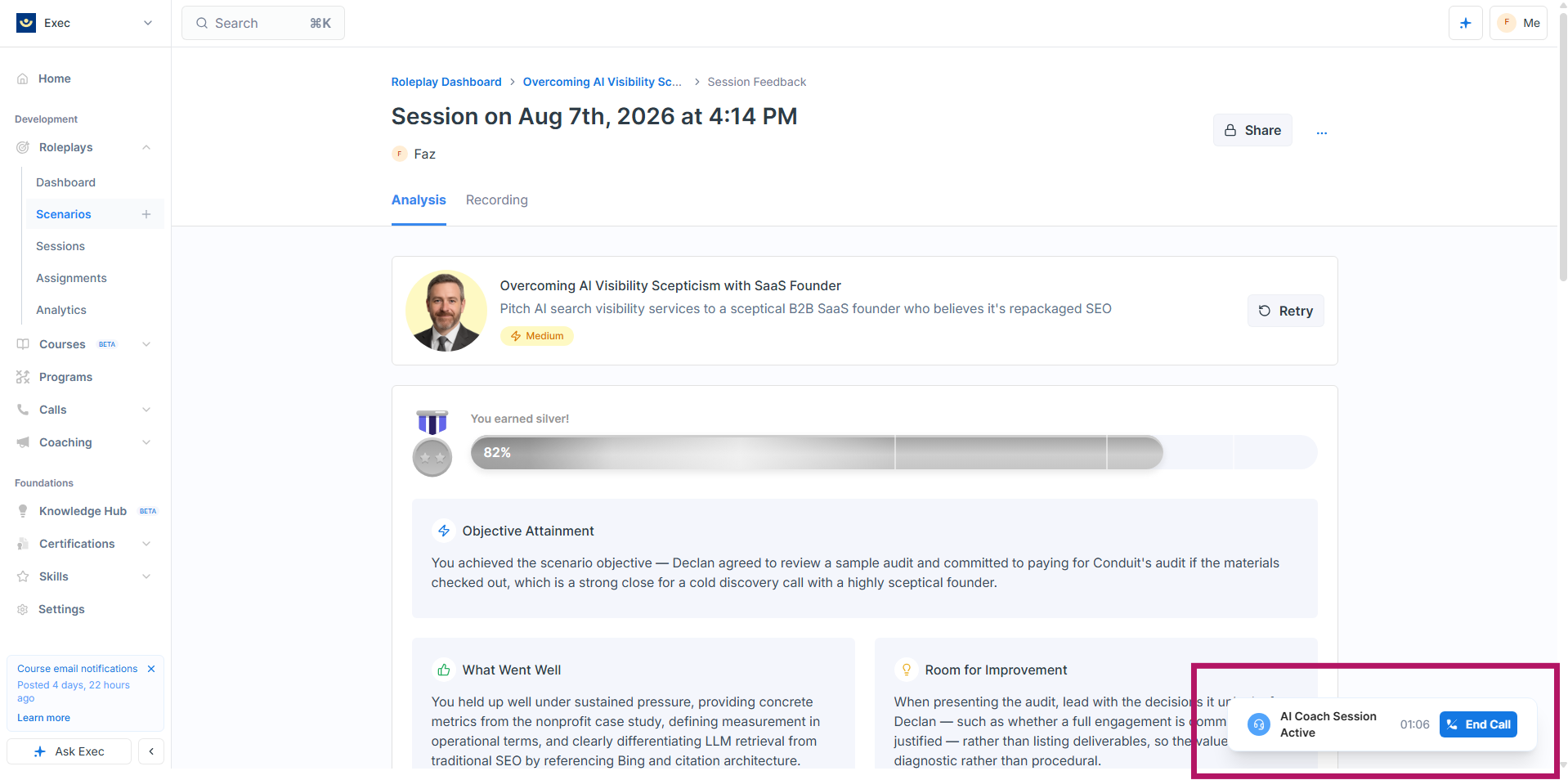
The obvious question is whether it is genuinely reading your conversation or dispensing generic sales advice in a friendly voice. It is the former, and the proof is unusually specific. It told our editor: “You briefly mixed up fifteen and sixteen prompts. You corrected yourself, which was good, but with a commercially sharp founder, numerical consistency matters.” That is a single misspoken number inside a sixteen minute call, noticed, along with the fact that it was self-corrected. Nothing templated gets there.
It also rewrites rather than only marking. Told that we had asserted a problem before diagnosing one, it did not stop at the criticism. It supplied the line we should have used: “before I show you our process, which two or three competitors do you most often lose to, and what questions do prospects typically ask when comparing workflow automation tools?” That is a usable sentence in our actual business, not a principle to go away and apply.
It knows your score and rubric, positions you against a level, and sets goals for the next attempt, which is what closes the loop between practice and improvement. And when we asked, it will happily tell you what it is not: asked for its name, it said “you can call me your coaching assistant”. Every session is saved with audio and a transcript under History, so the advice does not evaporate when you hang up.
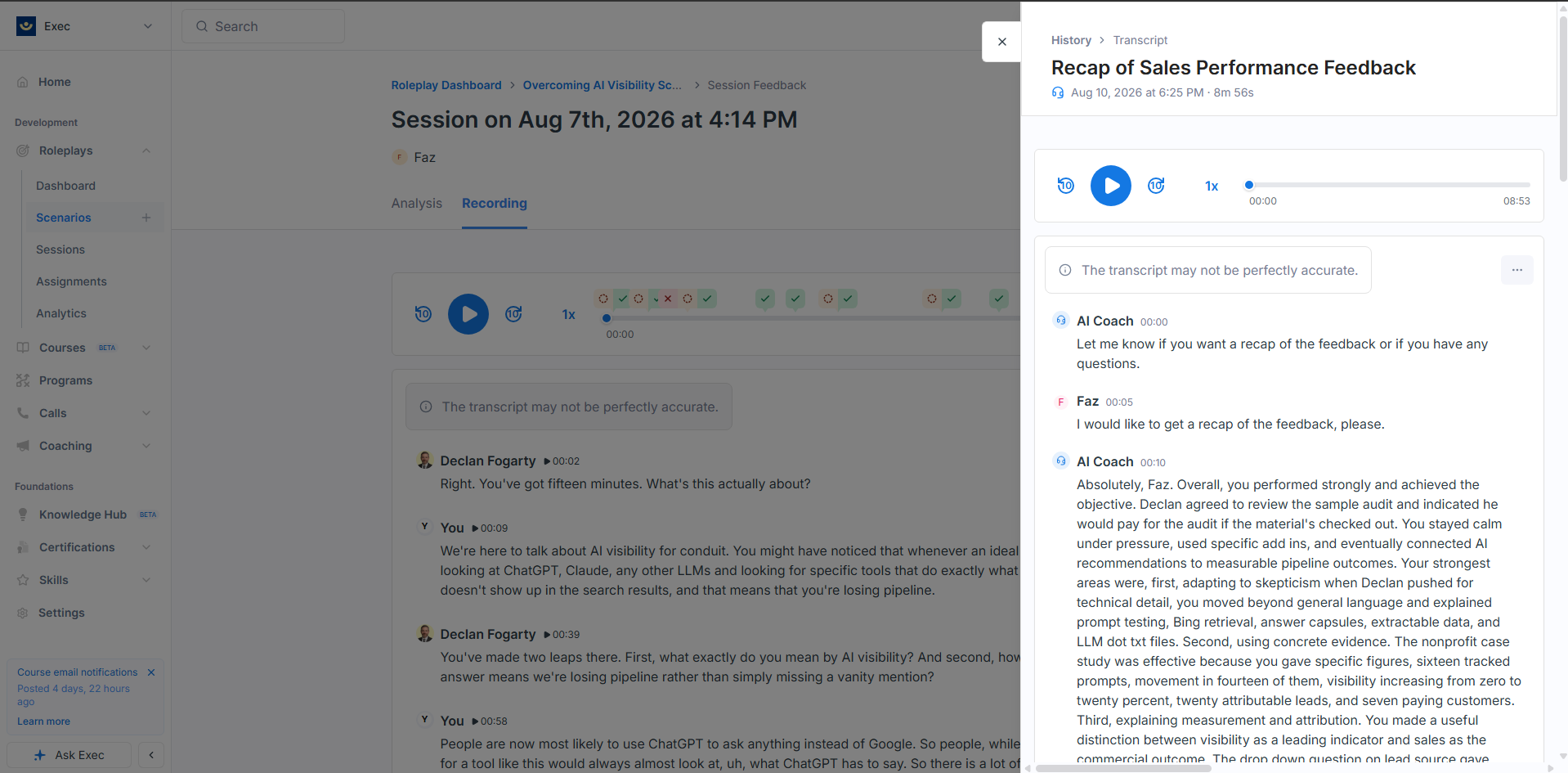
One criticism, and it is about the default rather than the capability. It opens by delivering several minutes of recap unprompted. You can interrupt it, and it does invite dialogue at the end of its first answer, but the opening posture is a lecture rather than a conversation. For a coaching product the better default is a short summary and a question. It is a small change and it would alter how the feature feels considerably.
Then there is a small touch we liked more than we expected. The scenario page keeps a Focus Areas for Improvement panel drawn from your last attempt, sitting there waiting for you. Ours read “connect audit findings directly to pipeline ROI.” That is coaching that carries forward rather than evaporating the moment you close the tab, and it is the sort of detail that only exists if someone on the team has actually run a training programme.
7. Rolling it out to a team
A single scenario is a toy. What turns it into a programme is the layer around it, and this is where you can tell the product was built by people who have run training before rather than people who have only demoed it.
Rubrics are a first-class object with their own section in the admin, which means you write your evaluation standard once and apply it across many scenarios rather than rebuilding it every time. You can import a rubric into a new scenario and then add scenario-specific grading guidance on top without touching the original. If you want every discovery call in the company judged the same way, that is the feature that makes it possible.
Scenarios can be assigned to individuals or to groups, with deadlines and completion requirements, tracked through an assignments view with bulk actions, and grouped into collections. You control separately who can access, assign, monitor or edit each one. Existing scenarios can be cloned or remixed, so a regional manager can take the company template and adapt it for their patch without breaking anything for anyone else.
The whole scoring loop is quietly designed to encourage repetition. Retakes are unlimited. Every previous session is kept with its score and feedback. The per-scenario analytics leave the lift figure blank until you have attempted something twice. Small choices, all pointing the same way.
Two practical constraints to plan for rather than worry about. The voice requirement means quiet space and headsets, as above. And custom scenarios are capped at 50, which sounds generous until a few managers start cloning and remixing enthusiastically, so it is worth a thought at the point where you decide who gets edit rights.
8. Analytics: measuring whether anyone got better
The headline number on the analytics dashboard is not average score. It is average lift, the gap between a learner first attempt and their best one. It sits at the top of the screen, above everything else, which is a statement of what the product thinks it is for.
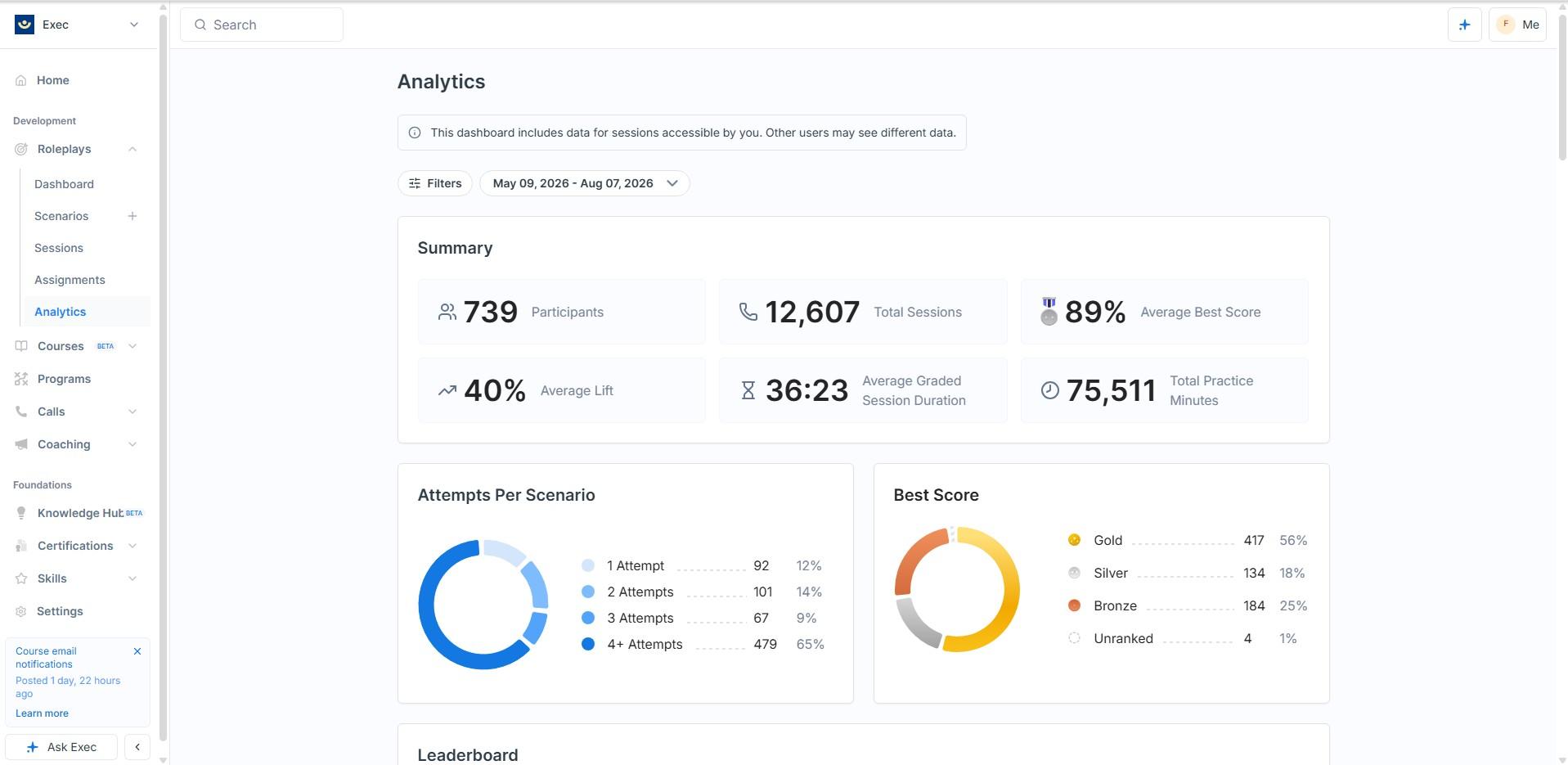
What sits under it is as telling as the number itself. There is an attempt distribution, which shows you whether people are coming back for a second and third go or treating the exercise as a box to tick, and that repeat behaviour is what the entire product depends on. There is a medal breakdown across gold, silver and bronze. And there are individual learner rows showing first attempt against best, which is where you see somebody who started badly and finished well, the case that makes the whole argument.
Underneath sit a 45-skill performance table with first, best and lift for each skill, a participant-by-skill cross-tab, and leaderboards by score, by minutes practised and by greatest lift. That last one is a nice bit of design, because it means the person who improved most can top a board even if they started at the bottom.
The skills layer is the part most buyers will underrate, and it is the reason the whole product hangs together. Every evaluation criterion in every rubric is tagged to a skill, and those tags aggregate across roleplays and real calls into a single organisation-wide proficiency picture. So the same skill, handling a pricing objection for instance, is measured in practice and in production on one scale. Very few products in this category can join those two datasets at all, and the ones that can usually manage it by exporting to a spreadsheet.
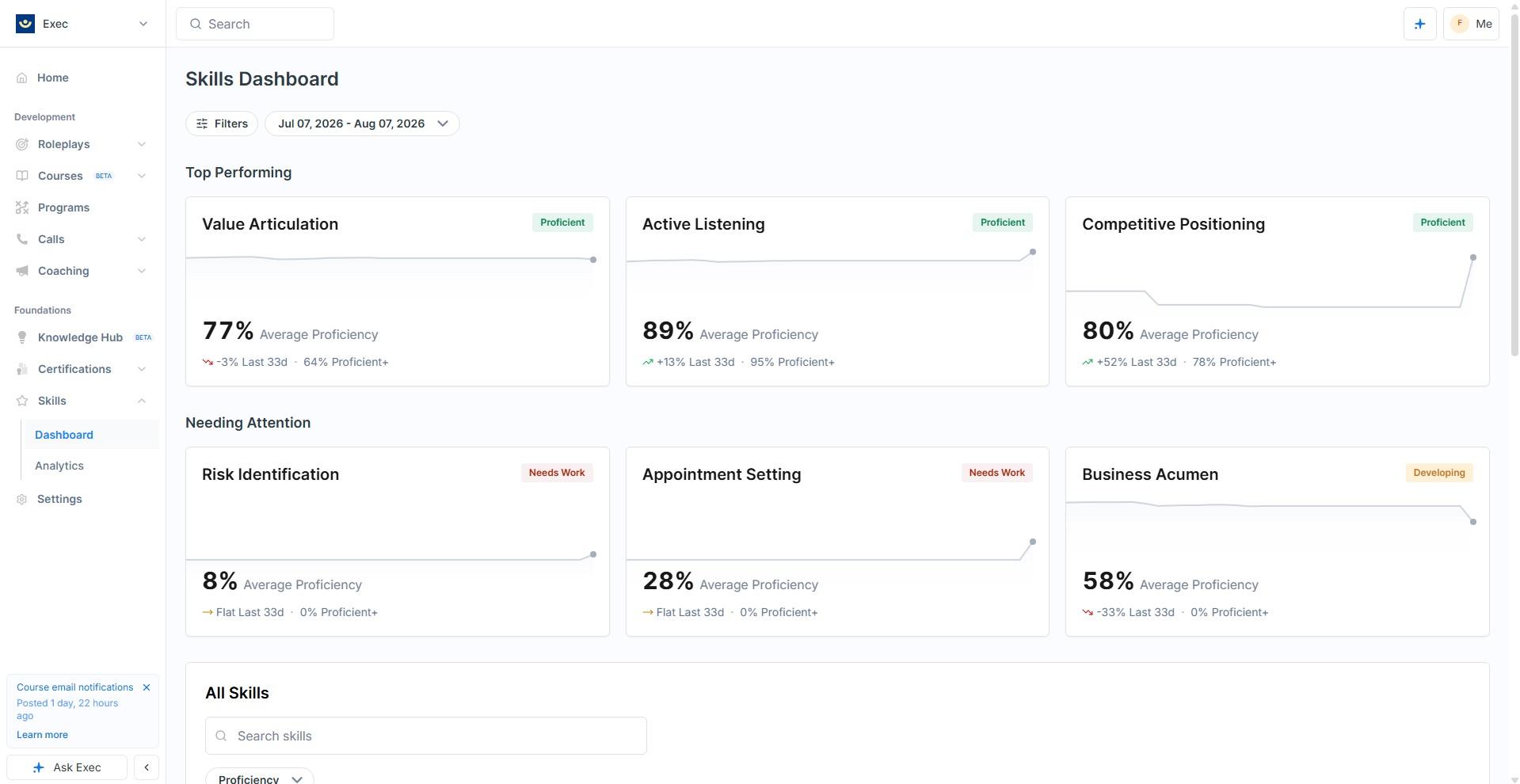
One honest note on the screenshots in this section. The figures visible in them come from Exec’s demo workspace and are sample data rather than a real deployment, so we are deliberately not quoting any of them in the text. Read the screens for what the product measures and how it presents it, which is the useful part, and ignore the values.
The dashboard also states plainly that it shows only sessions you have access to, and that other users may see different data. That is a small thing to write on a screen and most analytics products do not bother.
9. Call scoring: the same idea pointed at real conversations
Call scoring takes the evaluation engine and points it at recordings of conversations that actually happened. Calls arrive from seven recorder integrations or can be uploaded by hand.
The design decision we liked most is that it separates two jobs that almost every product in this space conflates. Attributes extract facts from a conversation. Scorecards judge behaviour against Good, Fair and Poor descriptions that you write. They live on separate tabs and they can be used independently.
Building a category from scratch
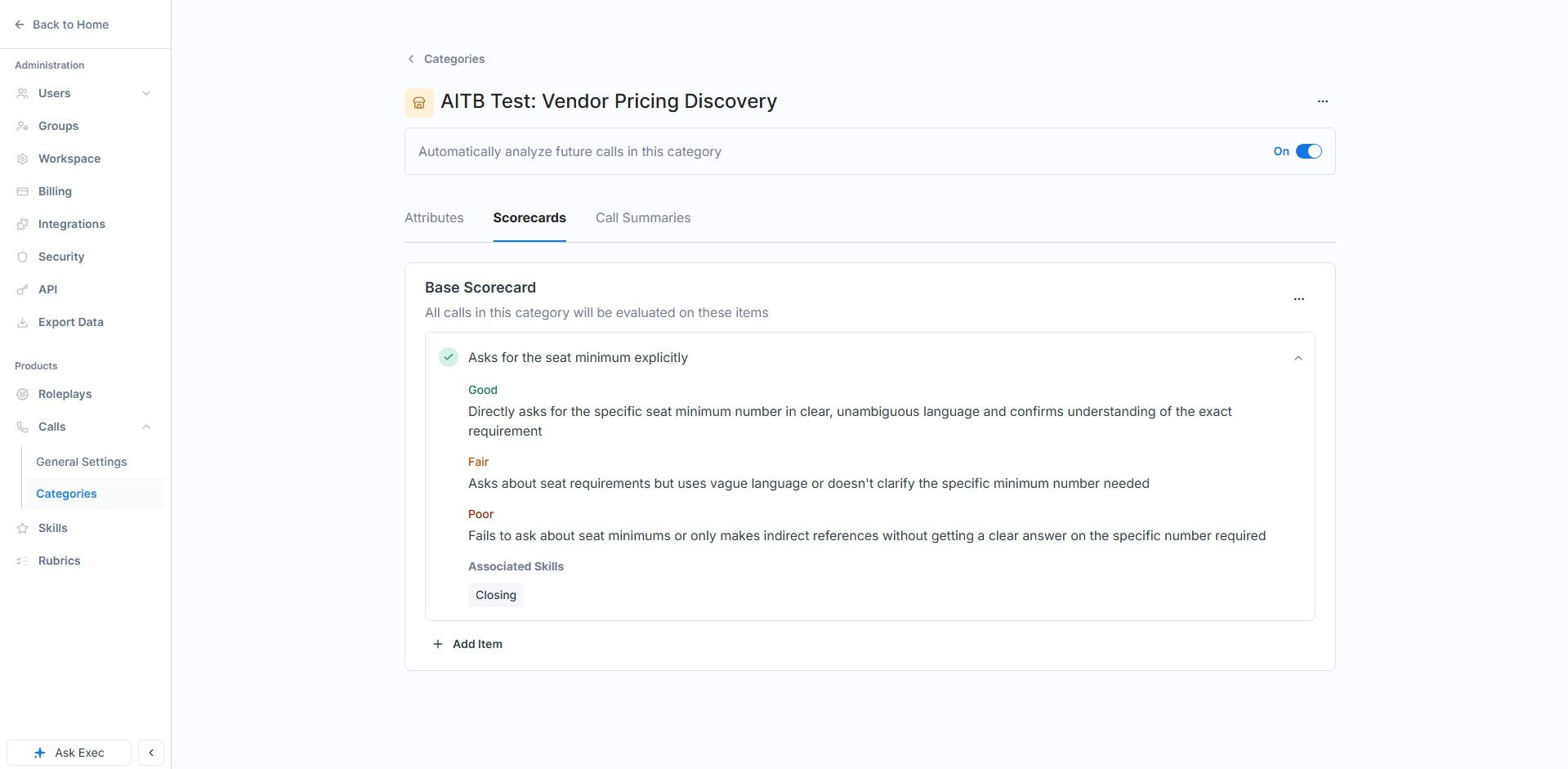
We built a category end to end, called it AITB Test: Vendor Pricing Discovery, and populated it with the questions we genuinely get wrong on vendor calls. A few things we learned doing it. The category description is not a label, it trains the classifier, and it is capped at 300 characters, which is tight if you are trying to separate two similar call types. Attribute instructions get 1,000 characters, and that is where the real precision lives.
The scorecard side is where the design shows properly. Each item is written as three explicit descriptions in your own words, Good, Fair and Poor, and then tagged with an associated skill. Our item “Asks for the seat minimum explicitly” defines Good as directly asking for the specific number and confirming the exact requirement, Fair as asking about seat requirements in vague language, and Poor as never getting a clear answer at all. Tagging it to Closing means every call scored against it feeds the same organisation-wide Closing proficiency that the roleplays feed.
The one gap: no numeric field type
One gap worth knowing about before you design your categories. The attribute types on offer are Single-Select, Multi-Select, Text and True or False. There is no Number type and no Date. So deal size, discount percentage, seat count, contract length and price quoted all have to be captured as free text, which means they cannot be sorted, averaged or charted afterwards. Our own test attribute made the point neatly, since “seat minimum stated” is inherently a number and prose was the only way to record it.
There is a straightforward workaround, which is to use Single-Select with sensible bands, because bands are sortable and chartable while free text is not. It works well enough that we would still build the category. But for a product whose pitch is turning conversations into data, having the numeric half of that data arrive unstructured is the one thing on our list we would most like to see change.
What the scoring actually reads like
The scoring itself is unsparing, and that is the right call. Reading through a scored onboarding call, the summary said flatly that the conversation never establishes the foundation an onboarding needs, that no measurable goals were set, no baseline captured and no outcome named. That is a real critique rather than encouragement dressed up as feedback, and it is what you want from something a manager is going to act on.
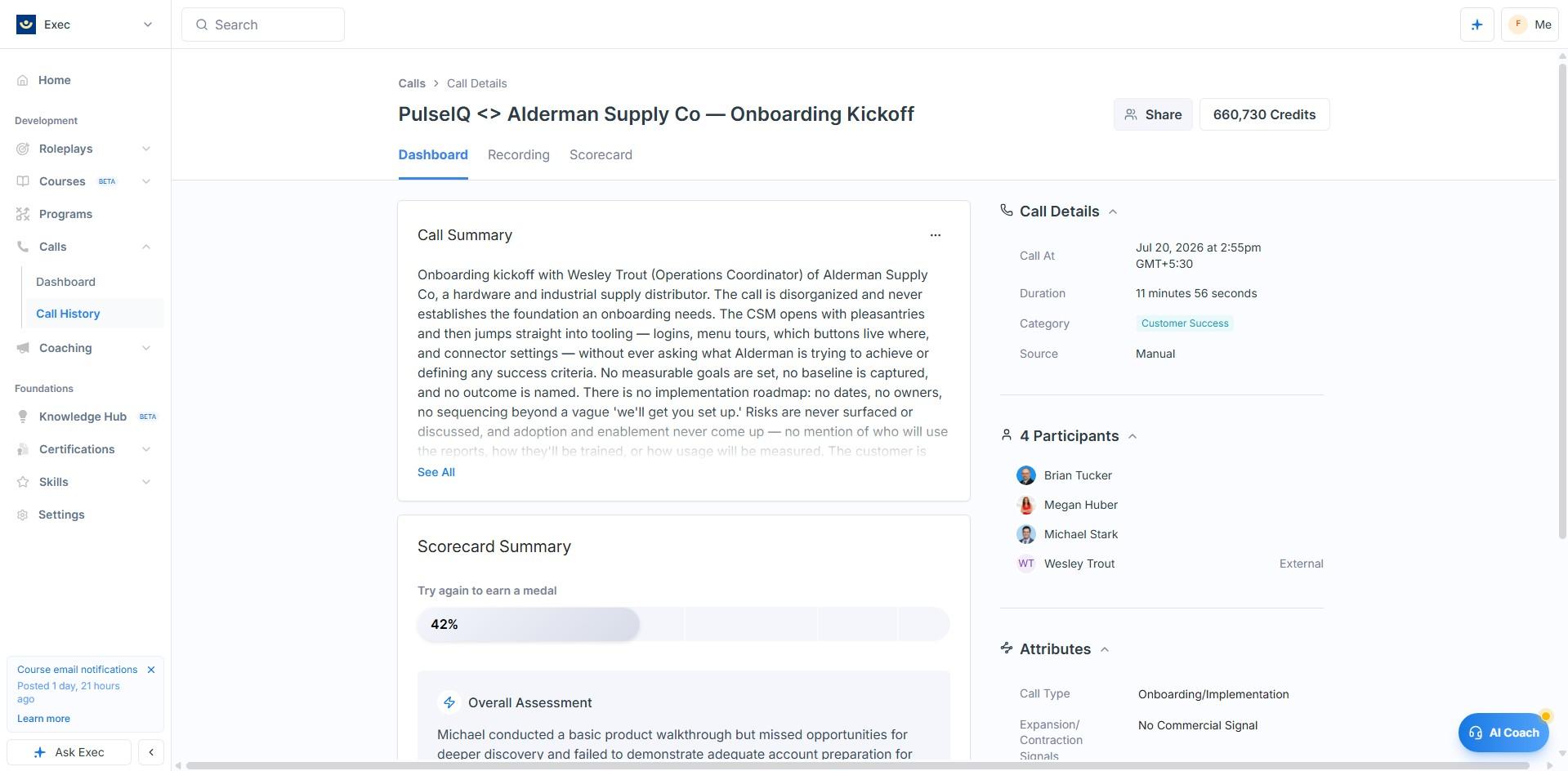
The calls dashboard deliberately mirrors the roleplay one. Call volume and average score across a rolling window, the same gold, silver and bronze medal split, an unranked bucket for anything not yet scored, and categories listed down the side so you can read Prospecting separately from Customer Support. Same medals, same shape, same language, so a manager only has to learn one screen and then knows both.
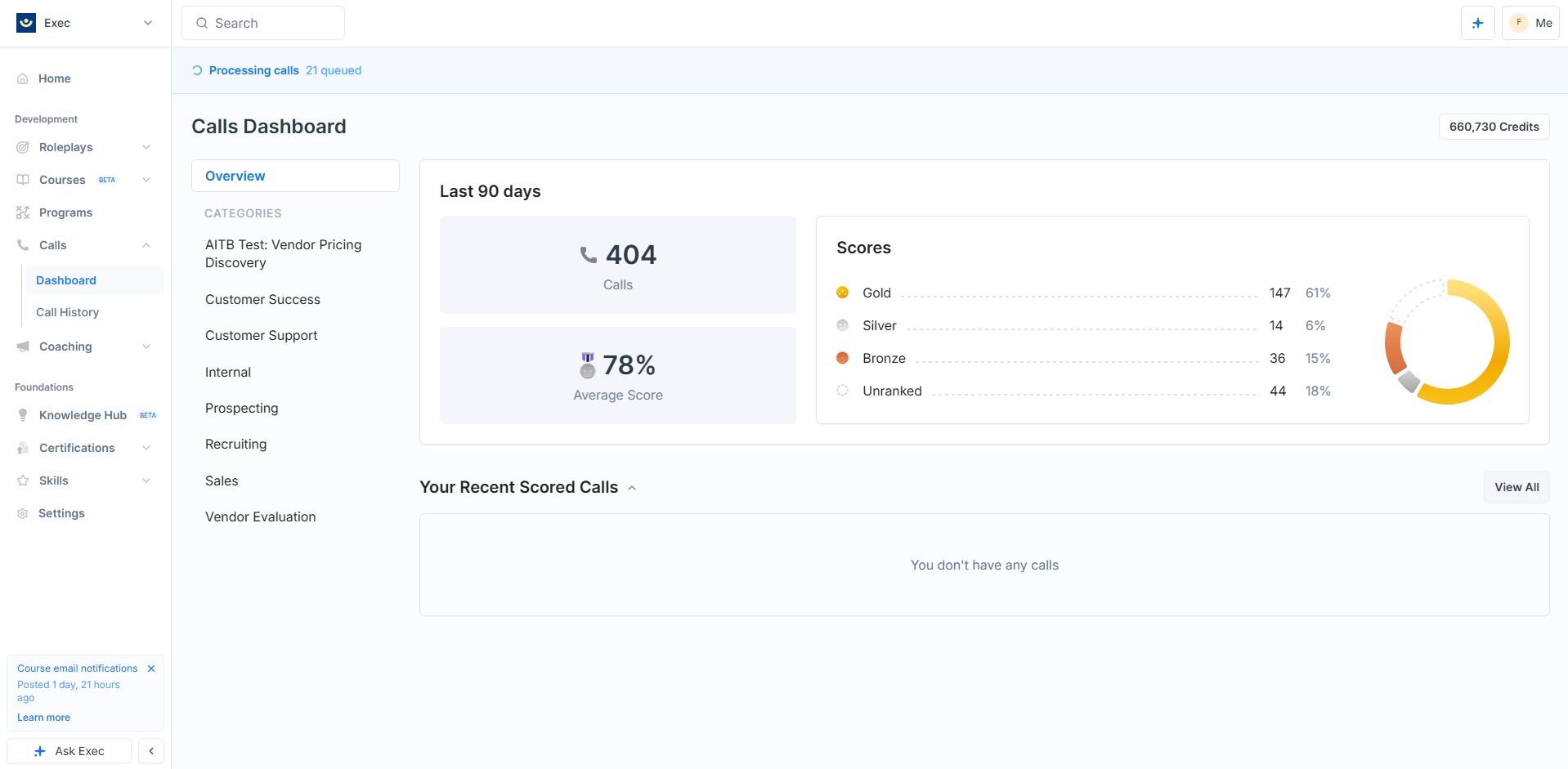
Auto-analysis is controlled per category, which matters more than it sounds. In the demo workspace, internal one-to-ones and vendor evaluation calls are explicitly excluded from scoring. That granularity is a genuine trust feature, because nobody wants their pipeline debriefs quietly graded. Worth knowing that a category you create yourself arrives with auto-analysis switched on, so that is a toggle to check as you go.
10. Courses: we went in sceptical
We nearly skipped this section. AI course generation is the most oversold feature in the entire category and we assumed it would be filler with a progress bar. We were wrong, and having spent time with it we now think courses matter more to the business case than the feature list suggests.
Why generated training matters more than it sounds
Every company we have ever worked with has the same gap. The knowledge that makes somebody good at the job lives in three or four experienced heads, a folder of decks nobody opens, and a support wiki that stopped being accurate two quarters ago. Turning that into structured training is a project nobody has time for, so it never happens, and every new joiner learns by shadowing whoever is least busy.
That is the gap this closes. Point it at what you have already written and you get a structured course out the other side in the time it takes to have a coffee. It is not the finished article and we are not going to pretend otherwise. But going from nothing to a reviewable draft in twenty minutes changes whether the work happens at all, and something a subject expert edits for an hour beats something that stays permanently on the list.
The part that will matter most in the next two years
Here is the argument we would put in front of a sales leader, and it is the reason we think this feature grows in importance rather than fading.
Products now ship faster than any team can be trained on them. In an AI-driven category, the thing your reps confidently described last quarter may have shipped two new capabilities, deprecated a third and repriced since. Nobody has updated the deck. The onboarding course is a year old. And your reps are on calls right now describing a product that does not exist any more, which is worse than not knowing, because a confidently wrong answer is the one the buyer remembers when the contract does not match it.
The traditional fix is a quarterly enablement session that everybody half attends. The version this makes possible is different: when the product changes, you point the course studio at the updated documentation, regenerate the module, and reassign it. The generation is the cheap part. It is being able to do it every time something ships, rather than once a year when somebody finally gets to it, that changes the outcome.
A habit like that only survives contact with a finance team if the cost is knowable, so we asked. Exec told us that generating a course costs 200 platform credits, that credits run at roughly 100 to the dollar, and that the charge applies once, when the studio produces the first outline for a blank course. Regenerating that outline and editing it afterwards are free. Each full seat also comes with 1,000 credits a month included.
So the entire cost of standing up a new course is about two dollars, and the cost of keeping it current for the rest of its life is nothing. That is the number that makes the argument above practical rather than theoretical. If regeneration were metered, a team would ration it, and rationing it is exactly how you end up back at the annual refresh nobody does. It is not, so there is no reason not to point the studio at your updated documentation every time something ships.
How the generation actually went
We tested it in the least forgiving way we could think of. We asked for a five-module course built from our own published content, on a subject we know line by line, with an explicit instruction to invent no statistics and to state limitations plainly wherever the sources did not cover something.
It began by asking six clarifying questions with sensible pre-filled answers, rather than guessing and charging ahead. It produced learning outcomes tagged to Bloom levels and mapped to specific assessments. Then it built eighteen pages across five sections, with four quizzes and two roleplay briefs that feed straight back into the roleplay engine, in roughly twenty minutes.
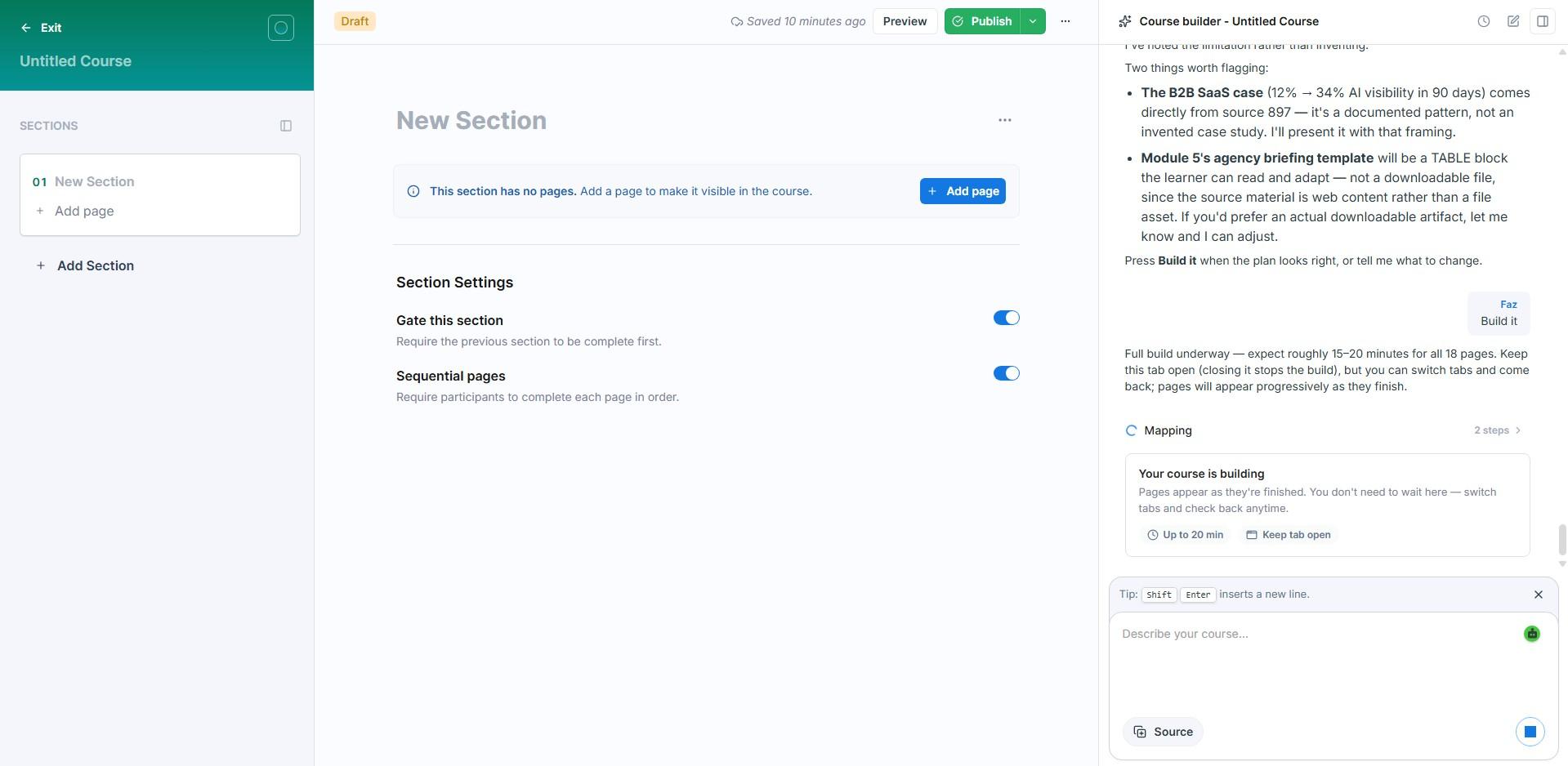
It also flagged its own deviations before building rather than after. It told us the agency briefing template would have to be a table rather than a downloadable file, because the source material was web content, and offered to change course if we would rather. It separately noted which case figures came from a specific source document and explained how it intended to frame them.
Then we did the part that matters. We checked every statistic it produced against our own source material, one by one. All of them traced back correctly, including three case figures it attributed to a named document. It invented nothing, under exactly the conditions where padding is easiest and hardest to catch.
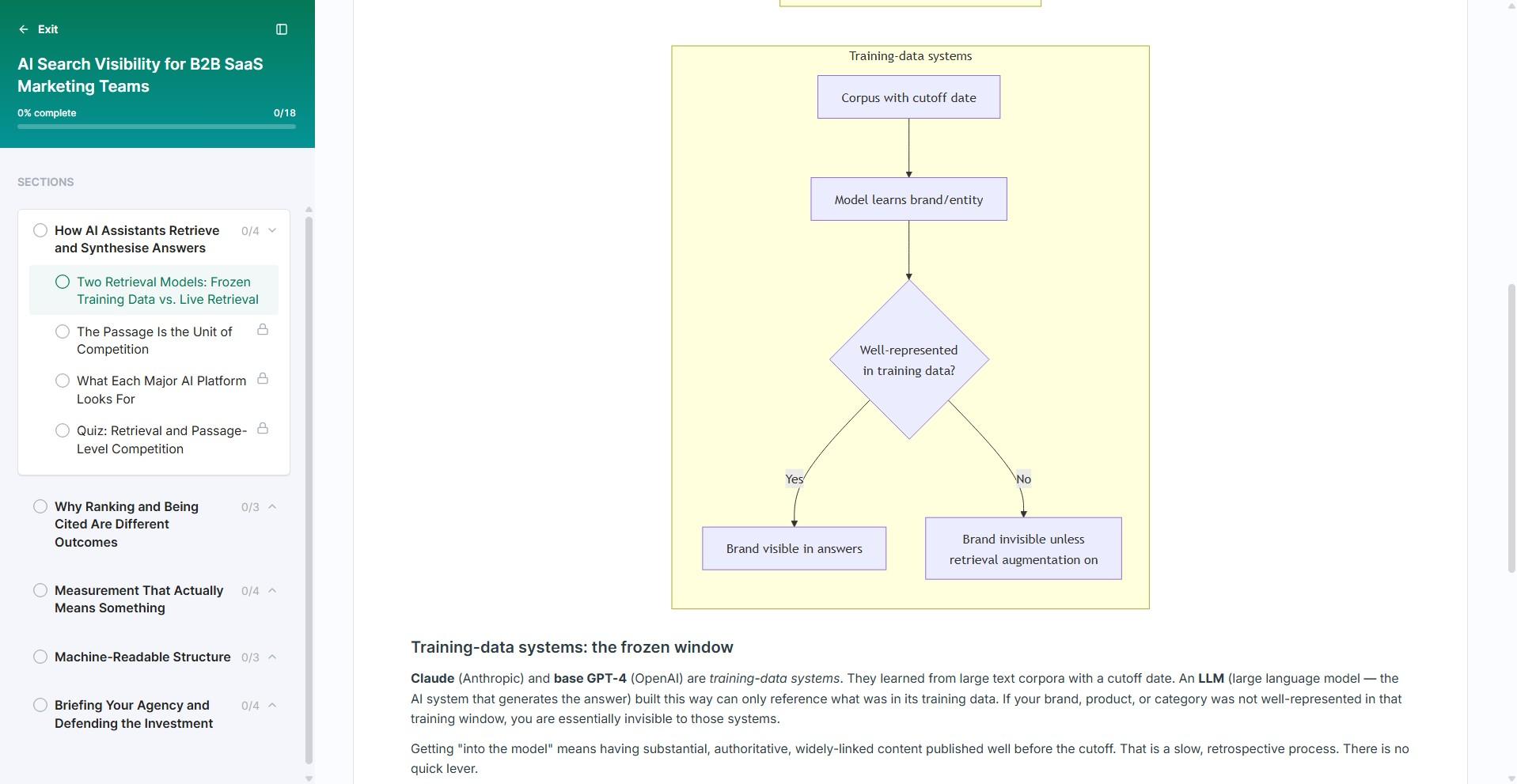
The output includes flowchart diagrams, sequential page gating, quizzes with configurable pass scores and attempt limits, and, best of all, quiz distractors that are plausible misconceptions rather than obvious filler. One of ours tested whether the learner had absorbed a specific argument from the source material rather than simply remembering a definition, which is a meaningfully harder thing to generate well.
The two roleplay briefs are the detail that ties the section to the rest of the product. A course does not just end in a quiz that proves somebody read it. It ends in a conversation that proves they can use it, run against the same engine and scored against the same rubric standard as everything else. That is the loop closing, and it is the reason we would not treat courses as a bolt-on even though it says beta on the label.
11. Certifications, programs and human coaching
We completed our generated course and issued ourselves a certificate, mostly to see what came out the other end. What came out was a real downloadable PDF with a validity window, ours running from August 2026 to August 2027.
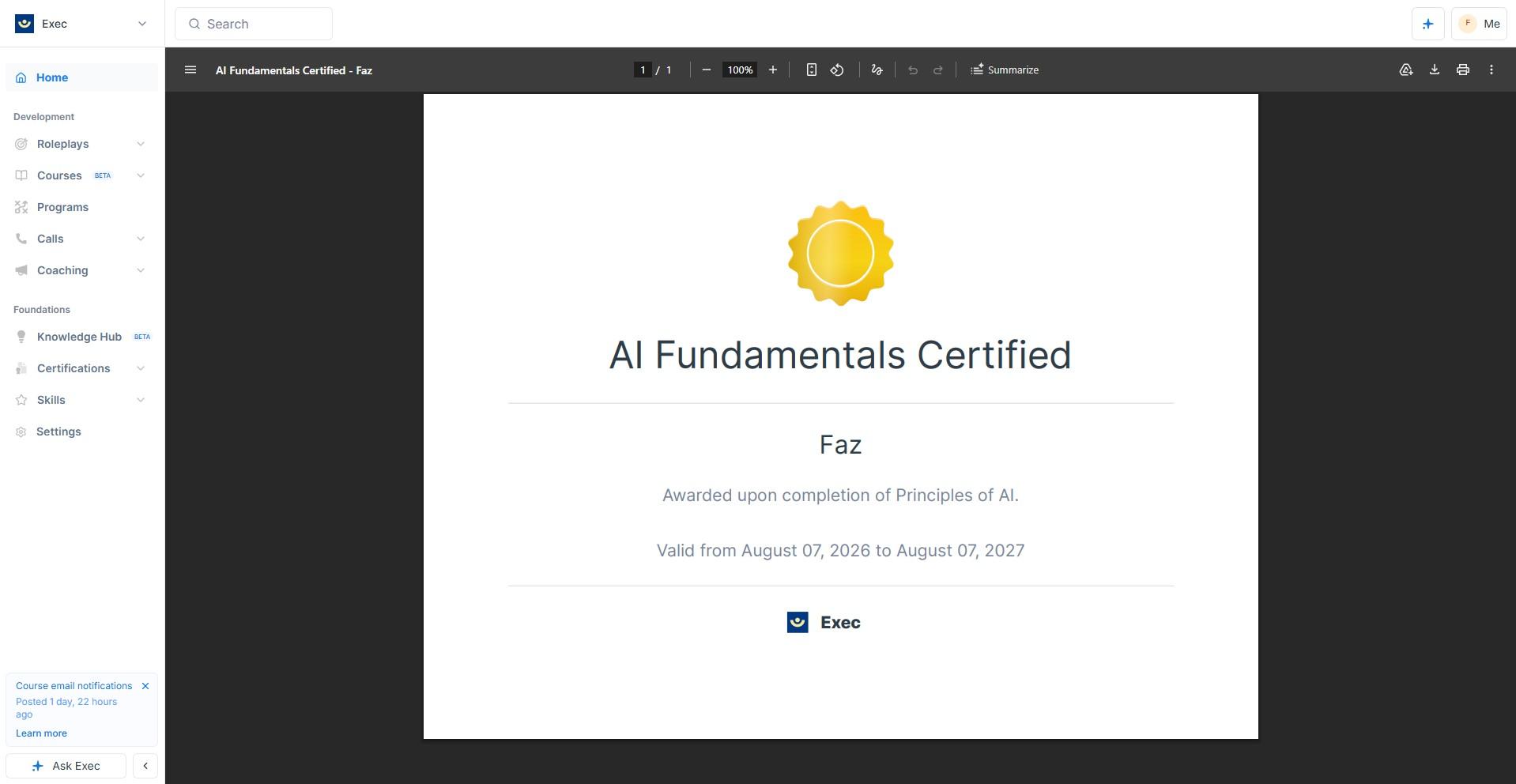
The expiry date is the detail worth pausing on. Modelling recertification properly, rather than handing out a badge that lives forever in the app, is the difference between a training platform and a compliance one. If you are running annual training obligations, that is the feature that decides whether this can carry the work, and plenty of learning platforms fudge it.
On branding, and you can see this one for yourself in the image above. The certificate we issued carries Exec’s logo, because the workspace we tested is Exec’s own. We raised it with them, since a compliance certificate with your vendor’s name on it instead of yours is a hard sell internally, and enough platforms get this wrong that it is worth asking about. Exec told us that on a customer workspace the certificate carries the customer’s own logo and name. We have not been able to see that ourselves, so treat it as their answer rather than our observation, and ask to see one on your call.
Two areas we are reporting from the documentation rather than from our own hands, and we want to be clear about which is which. Programs are structured learning paths that combine roleplays, videos, surveys, action items, group meetings and coaching sessions, with deadlines and progress tracking across the whole path. And Exec runs a human coaching marketplace with a credit economy, a matching survey, session booking, credit expiry rules and admin credit allocation.
12. Knowledge Hub
Knowledge Hub is where you put your own material so that scenarios, courses and the assistant can draw on it. It is a supporting feature rather than a reason to buy, and it is openly labelled beta.
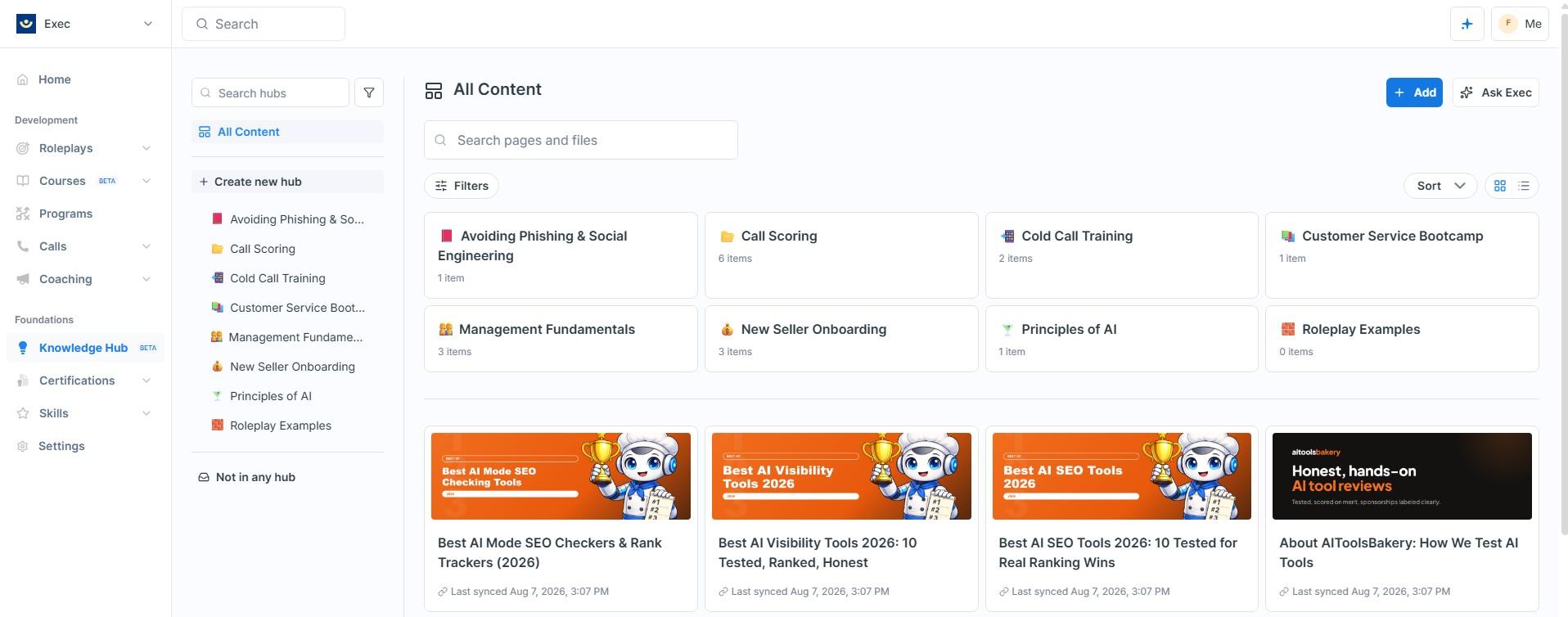
Adding content is pleasantly straightforward. The dialog takes several URLs at once, states plainly that only visible text will be imported, and items sync in about thirty seconds with page titles and cover images pulled through automatically, which makes the library genuinely easy to navigate later.
The plain-text trick worth stealing
One discovery here is worth passing on to anyone setting this up. We fed it a 69KB plain-text index of our site and it ingested all 529 entries cleanly, with none of the interface noise that comes with capturing HTML pages. If you have a large documentation set, pointing Exec at a plain-text index rather than at individual pages gives the whole workspace a map of your corpus for the cost of one document. We have not seen anybody mention that anywhere, and it took about a minute.
Two limitations to know going in
Two limitations to know going in. The first is small: imported pages keep interface furniture as body text, so a Read more link arrives as prose while the destination it pointed at does not come along with it.
The second is the one that matters, and it is about retrieval rather than ingestion. Asking the assistant what it could tell us about our own company, it reported that the subject was outside the scope of the available documents, while our documents about that company sat in the hub in front of us. The course builder found the same content from the same corpus minutes later, so the material is clearly in there and reachable. It reads like one search path needing work rather than a broken index, we checked again a few days later and saw the same behaviour, and we have shared the details with Exec directly.
Read that in proportion. The ingestion side is genuinely good, this is the newest thing in the product, it is labelled beta in the navigation rather than quietly shipped as finished, and it is the one part of Exec we would not buy on today. Everything else in this review is about a product that works.
13. Integrations, security and the API
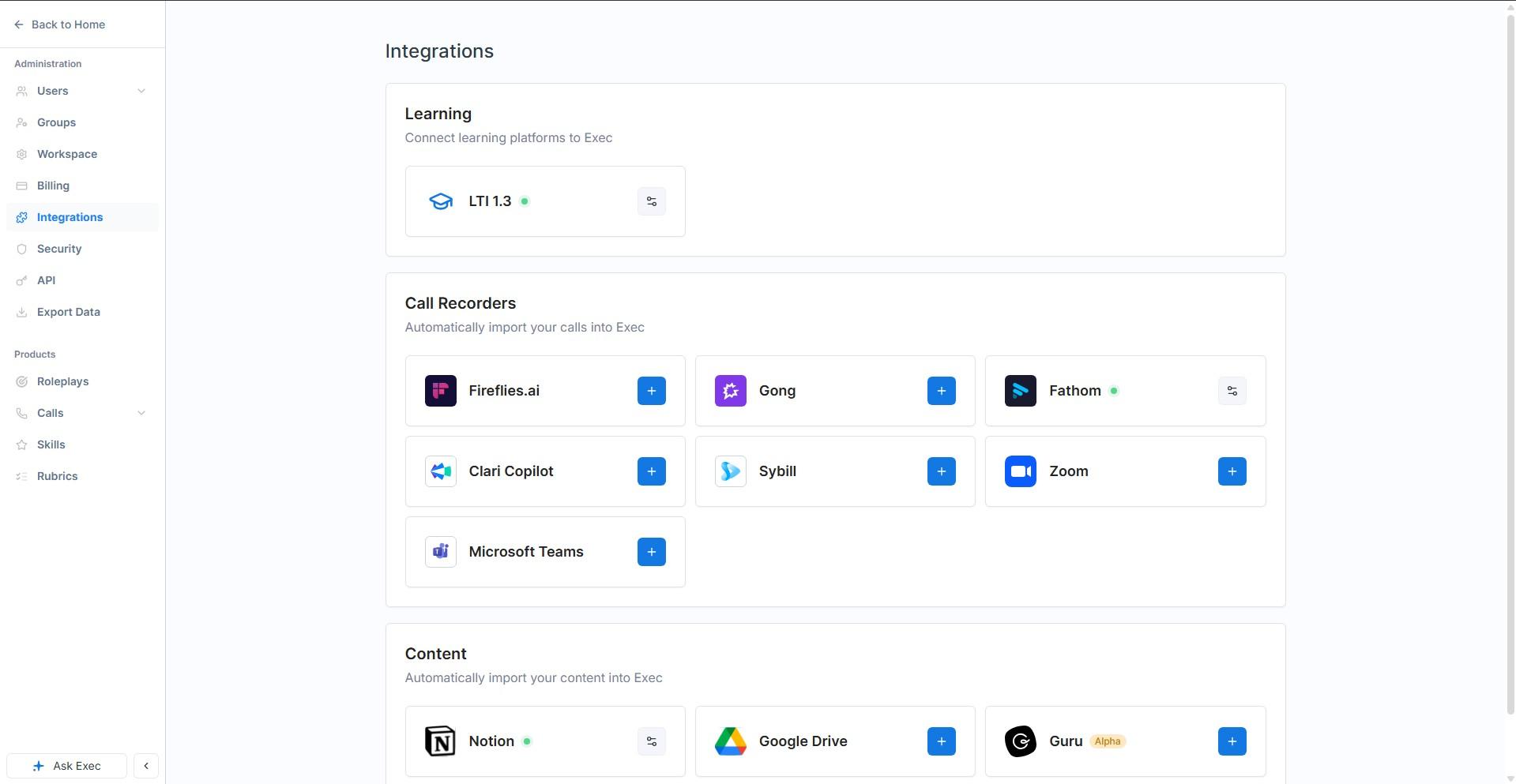
The integrations page is organised by what the connection is for rather than by vendor logo, which makes it quick to read. Call recorders cover Fireflies, Gong, Fathom, Clari Copilot, Sybill, Zoom and Microsoft Teams, so most stacks are already accounted for. Content sources cover Notion, Google Drive and Guru, the last of which is marked alpha. And there is LTI 1.3 under Learning, which matters if you need Exec to sit inside an existing LMS rather than beside it.
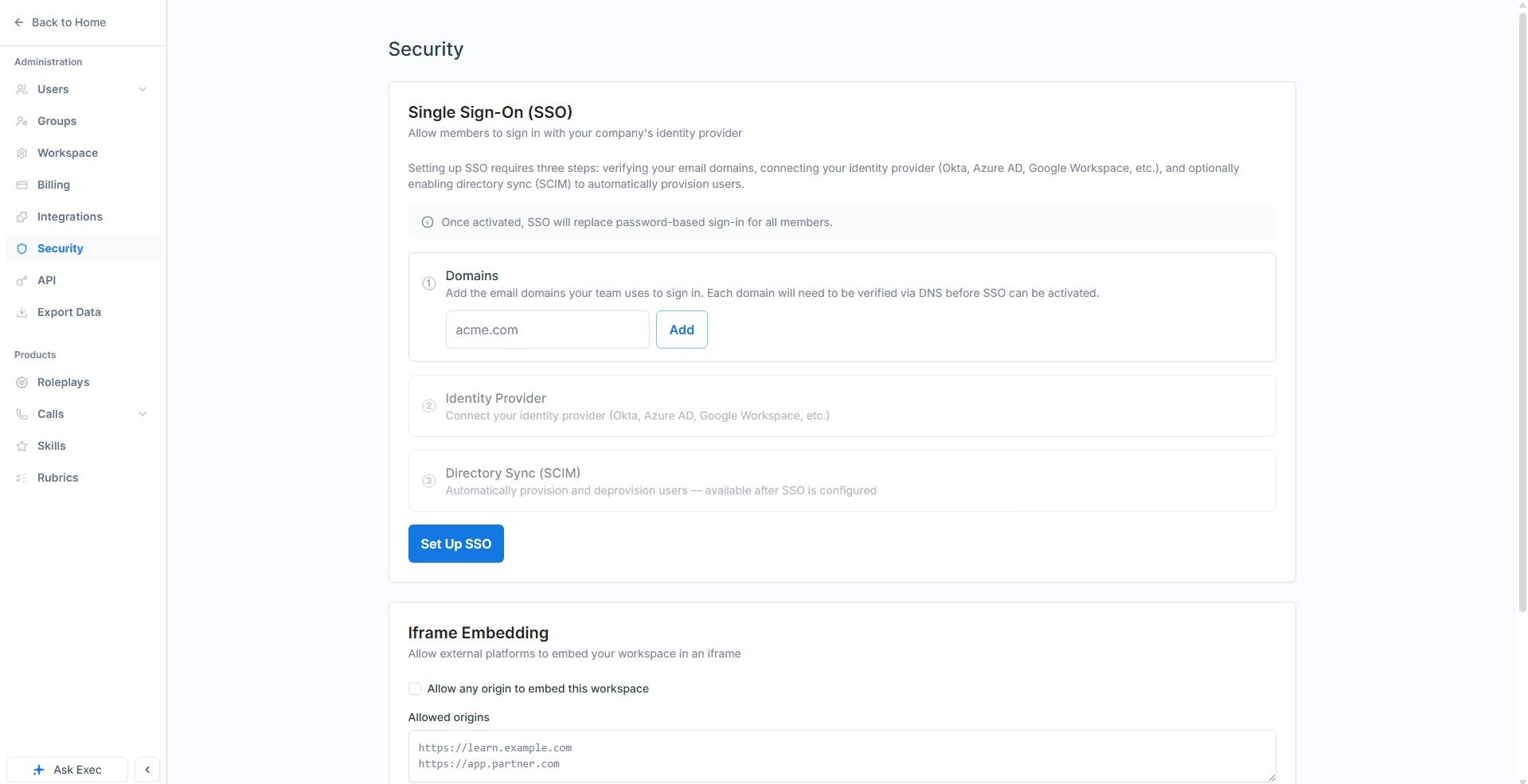
On the security side there is Single Sign-On with domain verification, an identity provider connection covering Okta, Azure AD and Google Workspace, and optional SCIM directory sync to provision and deprovision users automatically. There is also iframe embedding with an allowed-origins list if you want the workspace to live inside your own portal. Underneath all of that, the granular permission scoping across scenarios, rubrics and groups is the part that actually gets used day to day.
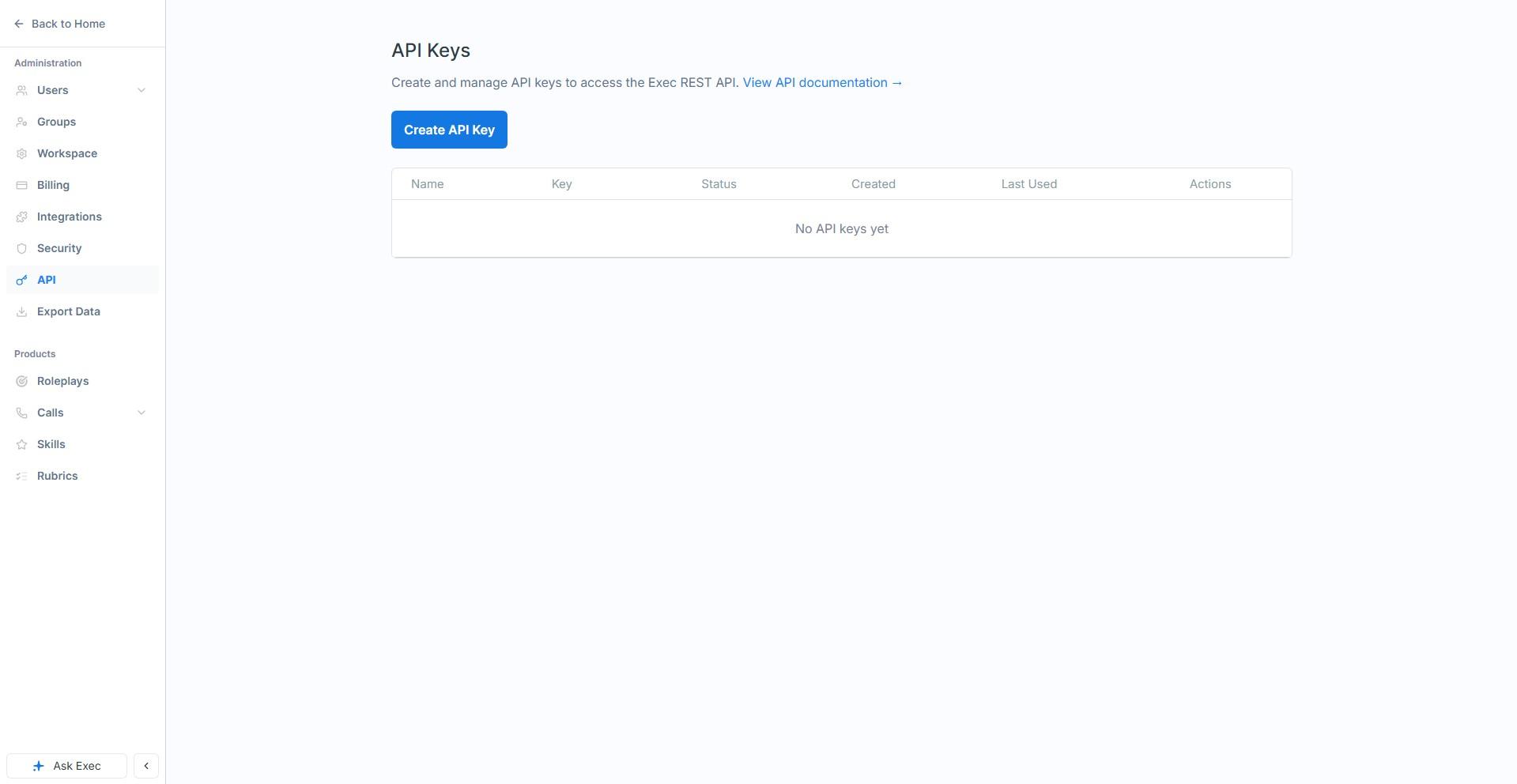
There is a REST API with token authentication and webhooks if you want to push scores into something of your own, which is the route you will need for anything not on the integrations page.
One gap worth knowing about early: there is no CRM integration and no Slack integration today. If your picture of success involves roleplay scores appearing next to opportunity records in Salesforce, or a nudge landing in a channel when somebody improves, that is API work rather than a setting right now. Both are coming. Exec told us CRM integration is actively being built and expected within a couple of months of this review, and Slack is slated for early 2027. Treat those as intentions rather than contractual dates, but they are specific enough to plan around, and specific dates are more than most vendors will give you.
A related note that cost us an hour, and is worth passing on because it will cost you one too. There is a Session Settings tab on the scenario editor carrying six switches, and every one of them arrives off. Video Avatar puts the character on live video. Enable Screen Share lets the learner share their screen. Allow Presentation lets them present an uploaded file to the character. There is a webcam toggle, a scenario language selector that also sets the language the AI Coach speaks, and a Cold Call mode that simulates an inbound call complete with dial tone and end-call phrases.
We had concluded that video avatars and screen sharing were simply missing, because nothing anywhere in the running product hints that they exist. They are there. They are just switched off, one scenario at a time, behind a tab you have no particular reason to open. If you are evaluating Exec, go through that tab deliberately before you decide what the product can and cannot do, because we did not and we were wrong.
14. Pricing: what you actually pay
Exec’s pricing page quotes a per-seat rate, which is the more confusing of the two ways to read this. Plans are sold as bundles, and the number that matters is what the bundle contains rather than what one seat costs. Exec confirmed the structure to us directly, and it is worth setting out plainly because we got it wrong on our first read of the pricing page and we doubt we are the only ones.
Every paid plan comes with two kinds of seat. A full seat can do everything, including roleplays and call scoring. A basic seat can book coaching, enrol in programs, read articles and videos and complete surveys, but cannot run roleplays or use call scoring. Each plan includes a fixed allowance of both.
| Plan | What you pay | Full seats | Basic seats | Extra full seat |
|---|---|---|---|---|
| Free | $0 | 1 admin | 3 | n/a |
| Starter | $120/month or $1,200/year | 5 | Up to 50 | $24/month or $240/year |
| Professional | $7,020/year | 15 | Up to 200 | $468/year |
| Enterprise | Custom | Custom | Custom | Custom |
Roleplay sessions are unlimited on every paid plan. The Free tier is a look rather than a workspace, capped at five roleplay sessions a year and two custom scenarios, which is enough to see the engine work and not enough to run anything on.
Professional is where the platform opens up. It adds the AI Coach, certifications, analytics and screen sharing, along with 50 courses against Starter’s ten, and unlimited programs against Starter’s five. Enterprise adds SSO with directory sync and a custom skills ontology. The one thing that does not change between Starter and Professional is the custom scenario allowance, which sits at 50 on both, so if your plan is to build a very large scenario library it is worth raising early.
The basic seat allowance is the part of this that gets undersold. Fifty of them on Starter and two hundred on Professional means most of the company can be on the platform, booking coaching and working through programs, while you pay full-seat prices only for the people who actually need to rehearse. That is a materially better value story than a flat per-user licence, and it is not obvious from the pricing page.
On seat reassignment, Exec told us that seats on Starter and Professional are transferable and can be reassigned freely, which is the answer you want if you run fixed-term programmes or have normal turnover. Fixed seats that cannot be reassigned do exist, but only as an Enterprise option, where they cost less in exchange for that rigidity. If somebody on your team has read the seat documentation and come away worried about stranded seats, that is the distinction they have missed.
Two costs are usage-based, and Exec gave us the rates when we asked, which is the part almost no vendor in this category will do. Platform credits run at roughly 100 credits to the dollar, and every full seat comes with 1,000 credits a month included.
- Call scoring costs 40 credits for a call under fifteen minutes, 100 credits for fifteen to sixty minutes, and 140 credits beyond that. In money, that is roughly 40 cents, a dollar, and $1.40. A full seat’s monthly allowance therefore covers about twenty-five short calls or ten longer ones before you buy more.
- Course generation costs 200 credits, about two dollars, and it is charged once, when the studio produces the first outline for a blank course. Regenerating that outline afterwards, and editing it, cost nothing.
The second of those is the one we made an argument out of back in the courses section. A two dollar one-off with free regeneration is the difference between a course you build once and a course you keep current, and it is worth checking that the rate still reads that way when you are quoted.
15. Did we genuinely get value out of it?
This is the question we most want to answer honestly, because a review that only describes features is a brochure with a score on it.
Start with the awkward part. AI Tools Bakery is not this product’s target customer. We are a small independent review site, not a sales team with reps to coach. On paper we should have come away impressed and unmoved. That is not what happened, and the three things that changed our minds are worth spelling out because they generalise.
The roleplay was rehearsal for a conversation we were actually going to have
We did not invent a training exercise for the sake of testing one. The scenario we built was a real pitch situation from our own business, a sceptical B2B founder who has already spent money with agencies and wants proof that AI visibility work is worth paying for. That is a call we have to make.
Practising it out loud, against something that pushed back, surfaced a specific weakness we would not have found by preparing on paper. We were leading with what we would deliver instead of what those deliverables would let the buyer decide. The feedback named it in one sentence. That was worth the day on its own, and it is transferable to anybody who has a difficult conversation coming up and no safe place to get it wrong first.
The course builder produced something we could actually use
We asked for a five-module course built from our own published writing, on a subject we know well enough to catch any invention. It produced eighteen pages, four quizzes and two roleplay briefs in about twenty minutes, and every statistic in it traced back correctly to our source material.
That is a genuine outcome rather than a demo. For any team sitting on documentation, playbooks or published expertise that nobody has ever turned into training, this is the shortest path from having the knowledge to having something a new joiner can work through. The output needs a subject expert to read it before it goes to a team, and with that read it is real.
The call-scoring category gave us a framework we are keeping
Building an attribute set forced us to write down, precisely, the questions we keep failing to ask vendors about pricing. Seat minimums. What the entry tier actually excludes. Whether a figure is geo-specific. We had those lessons scattered across a year of mistakes and no structure holding them.
Exec made us turn them into a schema with explicit Good, Fair and Poor definitions. We would now use that whether or not we ever score a single call inside the product, which is a slightly backhanded compliment and a real one. Good software often does this: the discipline it imposes turns out to be worth more than the feature.
So will it help other people who try it?
Yes, with one condition attached, and we want to be plain about the condition because it is the difference between this working and this gathering dust.
The quality of what you get out is set by the quality of the standard you put in. The scenario builder invents richly from a thin brief, but the evaluation criteria are what your team is actually measured against, and those deserve real time from somebody who knows what good looks like in your business. Write them in a hurry and you will get beautifully consistent scores that measure the wrong behaviour. Write them properly and you have something no generic training library can offer, which is your standard, applied the same way to every person, in practice and on real calls.
The second condition is cultural rather than technical. This product only pays off if people practise more than once, and the whole design assumes they will. If your team treats it as a box to tick, the lift number will sit near zero and you will conclude the software does not work. It will be the wrong conclusion.
16. Who it is for, and who it is not
Exec is a strong fit if you, and it is worth reading how Exec positions this for sales teams alongside our own view:
- Run a sales, customer success or support team where the same difficult conversations recur and you want people rehearsing them rather than reading about them
- Need to prove to a leadership team that training changed something, and want a defensible number to do it with
- Have a sales leader willing to spend real time writing the evaluation standard, because that is where the quality comes from
- Want practice and real calls measured on one scale rather than in two disconnected systems
- Are onboarding new reps regularly and want them to make their first mistakes somewhere that costs nothing
It is less suited to you if you:
- Need CRM or Slack integration out of the box today rather than through the API
- Work in an open-plan environment with nowhere quiet for people to speak out loud
- Want a large library of off-the-shelf courses to assign immediately, since the strength here is generating training from your own material
- Are buying primarily for the knowledge assistant, which is the least mature part of the product
- Need numeric call data you can chart, at least until a Number attribute type arrives
For most sales organisations the honest answer is that this is a roleplay purchase with a lot of useful things attached, and it is worth evaluating it that way rather than feature by feature against a checklist.
17. What could be better
We liked this product a great deal, which makes it more useful rather than less to be specific about where we would push. Five things, in the order we would prioritise them.
- A Number attribute type, and probably a Date. This is the one we would put first. Deal size, seat count, contract length and discount percentage are exactly the fields a revenue team wants to sort and average, and free text cannot do it. Bands are a decent workaround and not a substitute. Exec agreed when we raised it and described it as a likely quick fix, so this may well be gone by the time you read this.
- Retrieval in the Knowledge Hub. The ingestion side is good. The assistant could not find documents that were demonstrably present, while the course builder found them from the same corpus. It reads like one search path rather than a broken index, and fixing it would make the whole hub feel finished.
- Keep link destinations when importing pages. Right now anchor text survives as prose and the URL does not, so a page built from teasers loses the very thing it was pointing at. Since the model here is curating individual pages, every page a customer adds is a deliberate choice.
- Look again at the defaults, because they are hiding the product. Three separate things point the same way. Auto-analysis arrives switched on for new call categories, where opting in would be the safer choice. The AI Coach opens in monologue mode, where a short summary and a question would feel like coaching. And Video Avatar, Screen Share and Allow Presentation all ship off, buried in a Session Settings tab, with nothing in the product suggesting they exist. We concluded two of Exec’s newest features were missing entirely, and we were wrong, which is a cheap mistake for a buyer to make in the other direction. None of these needs new engineering. They need somebody to decide what a first-time user should meet.
- Put the credit rates on the pricing page. Exec answered both of our questions about usage costs immediately and without hedging, which is more than most vendors in this category manage. The numbers just are not published anywhere a buyer can find them, so every business case starts with a conversation that need not happen. The figures are good news for Exec. They should be on the site.
Nothing on that list is structural. Four of the five are additions rather than rebuilds, and the one that is a fix sits in a feature that is openly still in beta. We put all five to Exec before publishing and they came back on every one, which is worth saying because the alternative response to a critical section is silence.
18. The verdict
Score: 4.5 out of 5.
Exec is the best AI roleplay product we have used, and the gap between it and the rest of the category is wider than we expected before we started. The scenario builder invents richly from a thin brief. The character underneath is a transparent, editable trigger system rather than a hidden prompt, which is why it holds up when you push on it. The voice conversation is good enough to make an experienced person nervous. The feedback is specific enough to act on the next morning. And the analytics measure lift, which is the only number in this category that answers the question a buyer is actually asking.
Around that core, the picture is more mixed in the way you would expect from a product still building. Call scoring is close to excellent and held back mainly by the missing numeric field type. Courses genuinely surprised us and invented nothing under conditions designed to catch exactly that. Certifications behave like real compliance artefacts. Knowledge Hub ingests beautifully and cannot yet reliably find what it has ingested, which is a fixable problem in a feature that says beta on the label.
The half point we are holding back is for those two beta pillars and the missing numeric field type, not for anything in the core product. If you are buying Exec for roleplays and the analytics that sit on top of them, buy it with confidence and treat everything else as upside that is arriving. If you are buying it primarily for the knowledge assistant, wait a release.
Rolling this out so people actually use it
The failure mode in corporate training software is not a bad product, it is a deployment that reaches week six with impressive licence numbers and no behaviour change.
Pick one team and one behaviour, not one platform
The instinct is to roll out to everyone because the licence covers it. The better move is one team, one measurable behaviour, and a fixed period. A discovery call structure, an objection, a specific product pitch. Narrow scope means you can tell whether it worked, and a result from one team persuades the rest far more effectively than a mandate.
Managers have to use it before reps do
Roleplay and coaching platforms live or die on whether managers review the output. If a rep completes a scenario and nobody ever mentions it, completion becomes a compliance task within a fortnight. Before launch, agree which existing meeting will use the output, ideally the one-to-one that already happens, and make somebody responsible for opening it there.
Mandatory completion produces completion, not skill
If the only metric is completion percentage, you will get a high completion percentage and learn nothing. Pair it with something qualitative from the start: a manager rating on a rubric, a before-and-after recording, or a call outcome. Otherwise the dashboard will look excellent while the sales floor is unchanged.
Plan for the second wave, which is where it usually dies
The first cohort is volunteers and enthusiasts and it always goes well. The second is everyone else, and their experience decides whether exec review becomes part of how the team works. Budget real time for the second wave, expect more resistance, and do not read the first cohort’s enthusiasm as evidence the rollout is done.
Name the owner and the stop condition
One person whose job includes this, with the hours to do it, and a written statement of what twelve months would have to look like for you not to renew. Both are unglamorous and both are the difference between a platform that survives a budget review and one that quietly does not.
Measuring training, honestly
Training is the discipline most prone to measuring the wrong thing well. Four levels of rigour are available and most organisations stop at the first.
Reaction is easy and nearly worthless
Satisfaction scores at the end of a session tell you whether people enjoyed it, which correlates weakly with whether they can now do anything differently. Collect it if you like, and do not report it as evidence the training worked.
Completion is an activity metric
Completion percentage measures compliance with an instruction. It is genuinely necessary for regulated training, where the record is the point, and it is not evidence of capability anywhere else. Report it as what it is.
Behaviour change is where the real evidence starts
Pick one observable behaviour and measure it before and after: the proportion of discovery calls that reach a defined qualification step, the share of tickets resolved without escalation, the number of safety observations logged. It needs a baseline from before the training, which is why this gets skipped, and it is the first level that would survive a hostile question.
Business outcome, with the caveat stated out loud
Attributing revenue or incident rates to a training programme inside one year is genuinely hard, because everything else moved too. If you report an outcome, report what else changed in the same period. The most credible thing a training team can do is claim the behaviour change it can evidence and be openly cautious about the outcome it cannot.
Take the baseline in the week before launch
Whatever you choose, capture it before anything is switched on, from a source the project did not touch. It takes an hour and it is unrecoverable afterwards, which is the single reason most training investments can never be evaluated.
Why the price you see may not be the price we saw
This deserves its own section because it affects several tools in this category and almost no comparison article accounts for it.
What we actually observed
When we read Synthesia’s pricing page on 4 September 2026, every plan figure was in rupees, because our captures run from an Indian IP address and the site served local pricing automatically. HeyGen went further: a request to heygen.com/pricing redirected to its /en-in/ locale even when we sent a United States language header, meaning the routing is by IP rather than by browser preference.
Why this breaks most price comparisons
An article quoting a single global figure for a geo-priced tool is describing one country’s rate card and presenting it as the price. Regional pricing is not usually a straight currency conversion either; vendors set local rates deliberately, so the ratio between two markets can differ considerably from the exchange rate. That means you cannot fix the problem by converting, and we do not attempt to.
How to check your own number in thirty seconds
Open the vendor’s pricing page yourself, from the country where the contract will sit, and look at the currency symbol before you look at the number. If the URL contains a locale segment such as /en-in/ or /en-gb/, you are on a regional page. Where a vendor offers a currency selector, note that changing it sometimes changes the plan structure and not merely the symbol.
What to ask when the contract is cross-border
If your company is registered in one country and the team is in another, ask which entity is billed, in which currency, and whether the rate is fixed for the term or moves with a published exchange rate. Ask whether taxes are included, because several vendors here publish figures excluding tax. These questions are dull and they are the difference between a budget that holds and one that drifts by a fifth.
Where the figures on this page come from
Every price here was read from the vendor’s own pricing page on 4 September 2026 and carries that date. Where a page served us regional pricing we say so rather than converting it, because regional rates are set deliberately and are not a currency conversion.
The pages we read
Yoodli publishes $8 and $20 a month billed annually plus a free tier. Colossyan publishes a free plan and Professional at $59 a month annually with $30 per additional member. HeyGen publishes $0, $29, $49 and $149 a month with team seats at $20. iSpring publishes $970, $1,290 and $720 USD per author per year. Deputy publishes $5, $6.50 and $9 per user per month excluding tax. Synthesia served us rupee pricing, reported as such above.
The ones that publish no figure
Second Nature, Hyperbound, Mindtickle, Highspot and Visier all declined to show us a price, and Allego publishes a pricing page with no currency figure on it at all. Articulate publishes only a limited-time offer, currently $1,198 per user per year against a struck-through $1,749. Treat any other figure for those seven as unverified.
What we do not do
We do not convert currencies, and we do not carry a figure we cannot source to the vendor. Where a number circulates and cannot be traced, we say so and withdraw it rather than repeating it with a hedge.

Written by
FazFaz is the founder of AIToolsBakery. Some tools here are tested hands on. Others are assessed from vendor documentation and pricing verified on the live page, and every review says which one it is. Sponsors can buy a position in a guide. They cannot buy the score, the criticism, or silence about a better option.
How we test and how we make money →