Search “Homebot pricing” and the internet will confidently tell you it costs $25 a month. That price is dead. As of July 2026, Homebot’s own site lists loan officer plans at $125, $225, and $300 per month, and the only $25 seat left belongs to real estate agents whose lender sponsors them. Nearly every review page ranking for this tool still quotes the old number, which tells you how long it has been since anyone actually looked.
We did look. We went through Homebot’s current plans, its live AI features, its Coming Soon list (which matters, because two of its most-marketed AI features are not shipping yet), and the isolated user complaints floating around. Here is our full homebot review for 2026, with the real numbers.
| Plan | Price (official, homebot.ai, July 2026) | Capacity | Setup fee | Verdict at a glance |
|---|---|---|---|---|
| LO Starter | $125/mo | 100 clients + 100 prospects | $100 | Fine for testing, tight limits |
| LO Pro | $225/mo | 500 clients + 1,500 prospects | None listed | The sweet spot for most producing LOs |
| LO Unlimited | $300/mo | Unlimited | None listed | Best value above ~700 clients |
| Extra capacity | $25/mo per 100-client block | Add-on to Starter/Pro | n/a | Pro + blocks beats Starter + blocks fast |
| Agent Partner | $25/mo | Lender-sponsored only | n/a | The seat the “$25 Homebot” myth now points to |
| Agent Solo | $50/mo | Individual agent | n/a | Cheap client-retention layer for agents |
| Agent Team | $100/mo | Agent team | n/a | Shared dashboards for small teams |
All prices above are official figures from homebot.ai, checked July 18, 2026. Annual billing saves up to 16%, and Homebot advertises no long-term contract, which is genuinely rare in mortgage tech. Our overall score: 4.2/5.
What Homebot is in 2026 (it is not the equity emailer you remember)
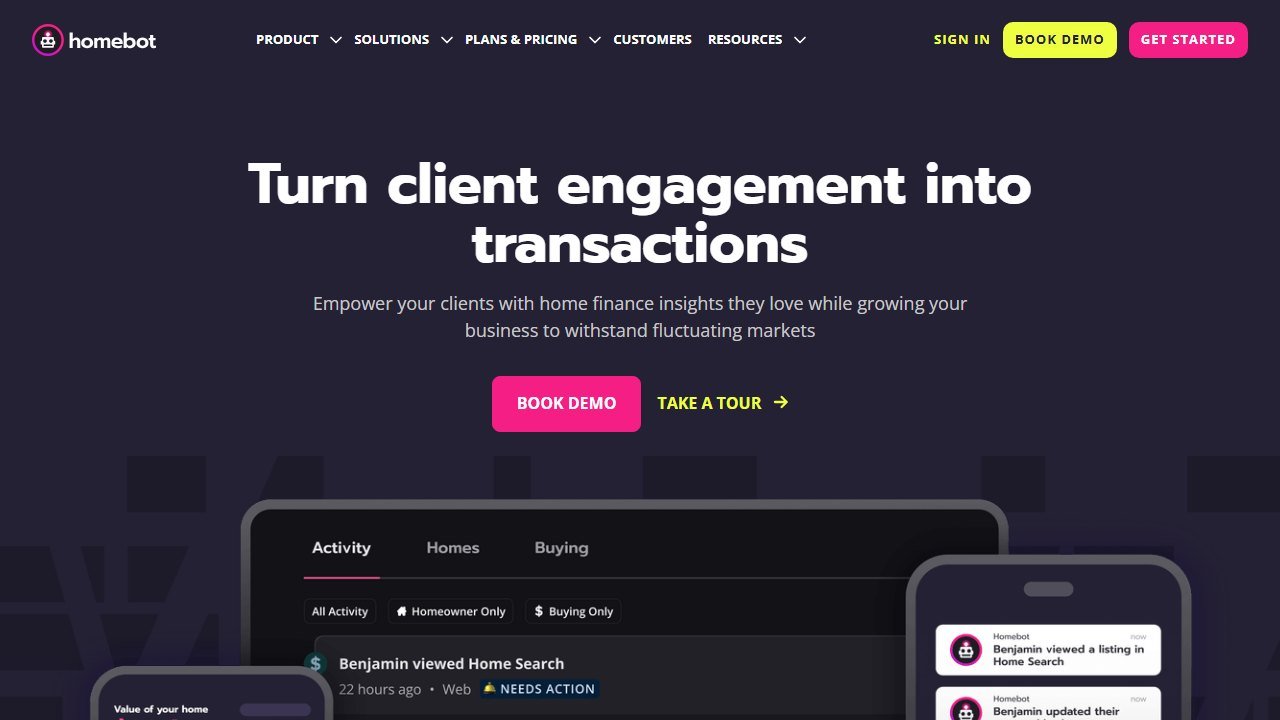
Homebot started life as a home equity digest: a monthly email that showed homeowners what their home was worth, what their loan balance looked like, and when a refinance might make sense, all branded to the loan officer or agent who sponsored it. That product still exists and still works. But the 2026 version of Homebot has quietly become something bigger: a behavioral intelligence platform wrapped around that digest, plus a consumer-facing home search experience.
The pitch today has three layers:
- The homeowner digest. The classic monthly report: home value, equity position, principal paydown, rate scenarios, rental and Airbnb income estimates, and market temperature for the client’s zip code. Valuations are powered by Altos Research data, which Homebot’s parent structure brings in-house.
- Behavioral intent signals. This is the live AI layer. Homebot watches how each client interacts with their digest and the home search tools, then surfaces intent signals through what it calls Partner Intel: who is suddenly checking their equity weekly, who started searching listings in another state, who ran a “what can I afford” scenario at 11pm. For a loan officer, that is the difference between a database and a pipeline.
- Home search. Clients can search listings inside the Homebot environment, which keeps the LO’s branding on the journey instead of losing the client to a portal. Every search feeds the intent engine.
That pivot matters for how you should evaluate it. The old question was “is a fancy email worth $25 a month?” The new question is “is a retention and intent platform worth $125 to $300 a month?” Different product, different math.
Homebot pricing in detail: what the tiers actually buy
The loan officer plans, official as of July 2026:
Starter, $125/mo plus a $100 setup fee. You get 100 clients and 100 prospects. That capacity is tight. If your database is bigger than a rolodex, you will hit the wall within a quarter and start paying $25/mo per extra 100-client block. Starter is best understood as a paid trial.
Pro, $225/mo. 500 clients and 1,500 prospects. This is the plan most producing LOs should model. The 3x prospect multiplier is the tell: Homebot expects you to load your pre-approval fallout and cold database here, not just funded loans.
Unlimited, $300/mo. No client cap. If you have been originating for a decade and your database runs north of 700 names, the math flips in Unlimited’s favor almost immediately: Pro plus two extra blocks already costs $275.
Two structural details we like. First, annual billing saves up to 16%, which brings effective Pro cost to roughly $189/mo if you commit for the year. Second, there is no long-term contract on monthly billing. Compare that with the 6-to-12-month minimums common elsewhere in this space and it is a real point in Homebot’s favor.
The agent side is simpler: $25/mo Partner (only when a lender sponsors the seat), $50/mo Solo, $100/mo Team. The Partner plan is the fossil record of the old pricing: the famous $25 figure survives, but only as a co-marketing seat an LO buys to keep referral partners in their ecosystem.
The AI that is live today: intent signals and valuations
Let us be precise about what “AI-powered” means here, because Homebot’s marketing and Homebot’s shipping product are not the same list.
Live and testable: behavioral intent. Partner Intel is the strongest thing Homebot sells. Instead of asking you to guess who in your database might transact, it ranks clients by observed behavior: digest open patterns, equity checks, affordability scenarios, listing searches, market browsing outside their home zip. In practice, through the product’s reporting views, the signal categories are concrete and actionable, not vague “engagement scores.” A client who searched homes in Phoenix three times this week while sitting on 40% equity in Ohio is not a lead score, it is a phone call.
Live and testable: valuations. The home value engine draws on Altos Research market data. No automated valuation model is oracle-grade, and Homebot’s is no exception (more on that in the complaints section), but the market-temperature framing around the number is honest: it presents ranges and trends rather than pretending to appraisal precision.
Not live: AI Video and AI Outreach Scripts. Both were listed as Coming Soon on homebot.ai when we checked in July 2026. We do not review vaporware as if it shipped, so neither feature factors into our score. If a competitor’s review tells you how great Homebot’s AI video is, ask them how they tested a feature that has not launched.
Hands-on observations
A few things stood out working through the product and its current public materials:
The digest still gets opened. Homebot’s core insight has always been that homeowners are narcissists about their own house. A monthly email about your equity beats a newsletter about rates every time. That mechanic has not aged, and the home search addition compounds it: the client who came for their value stays to browse, and every browse is signal.
Setup is genuinely light. Import your database, connect branding, and the system runs. This is not a CRM implementation project. The $100 Starter setup fee covers onboarding that, frankly, most users could self-serve.
It is a layer, not a stack. Homebot does not originate, does not do document collection, and is not a system of record. It sits beside your CRM and POS. If you are assembling the full stack, our best AI tools for loan officers roundup maps where Homebot fits, and our Floify pricing guide covers the point-of-sale layer it commonly pairs with.
The co-sponsorship motion is the hidden growth engine. The $25 lender-sponsored agent seat is a Trojan horse in the good sense: LOs gift Homebot to referral agents, agents’ clients enter the LO’s intent feed, and the referral relationship gets a monthly touchpoint neither party has to manually maintain. If you run an agent referral network, this alone can justify the platform.
Ownership stability. Homebot has been owned by ASG, part of Alpine Investors, since June 2020. Some coverage frames this as recent news; it is six-year-old history. In a segment where platforms get acquired and gutted with some regularity, six years of stable ownership is a mild positive.
Who Homebot is for
Buy it if:
- You are a producing LO with 100+ funded clients and no systematic retention motion. This is the core use case and it is strong.
- You run an agent referral network and want a sponsored co-marketing asset that agents actually value.
- You are an agent with a lender willing to sponsor your $25 Partner seat. That is close to free retention marketing.
- Your database is old enough that equity events (paydown, appreciation, rate drift) are constantly creating transactions you currently miss.
Skip it if:
- Your database is under 100 names. The engine needs fuel; at small scale you are paying platform prices for a mail-merge.
- You need lead generation. Homebot mines the database you have. It does not fill an empty one. For top-of-funnel, see our AI tools for real estate agents pillar.
- You expected the $25 price. It is gone. Budget $125 to $300/mo or budget nothing.
- You are a broker whose stack decisions run through a different lens: our best AI tools for mortgage brokers guide covers that intent separately.
Complaints and limitations, honestly weighted
We always dig for the failure modes, and with Homebot the record is thinner than you might expect, which cuts both ways: fewer complaints, but also fewer independent reviews of any kind.
What we found: a single small review site hosts three one-star user reports, the kind of sample we treat as isolated user reports rather than a pattern. Two themes appear in them. First, valuation misses: individual homeowners reporting that Homebot’s automated value for their specific property ran well off market reality. That is a known limitation of every AVM on the market, and Homebot at least frames values as ranges, but if your clients treat the number as gospel you will occasionally field an awkward call. Second, a billing dispute: one user reporting friction canceling and being charged after cancellation. Three years-old reports on one site is not a verdict, and we found no matching cluster elsewhere, but we would still advise the boring hygiene: cancel in writing, keep the confirmation.
On review platforms generally: we could not verify Homebot’s G2 rating at draft time, so unlike other reviews you may read, we will not print a star number we did not see.
The honest product limitations that did surface in our evaluation:
- Capacity math on Starter. 100 clients is a demo-sized cap, and the $25-per-block expansion pricing means growing databases should skip straight to Pro.
- Two headline AI features are not shipped. AI Video and AI Outreach Scripts remain Coming Soon. If those were your reason to buy, wait.
- No standalone value without a database. This is a retention multiplier, not a growth engine, and it is only as good as the contact list you feed it.
Buying leads honestly: what the conversion numbers actually mean
Every platform in this category quotes conversion figures. Almost none of them mean what a reader assumes, and the differences are large enough to reverse a purchase decision.
Ask what the denominator is
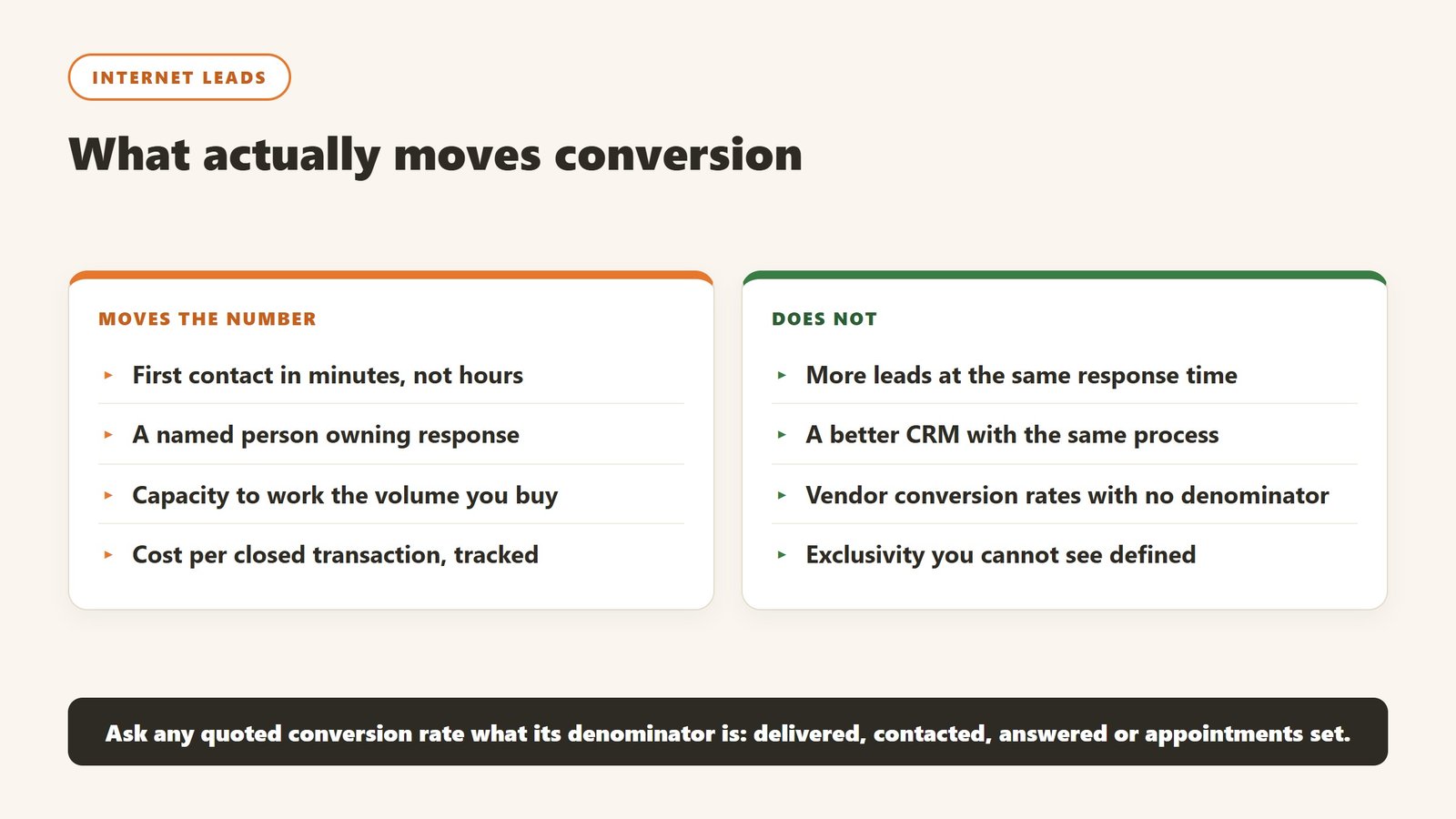
A conversion rate can be measured against leads delivered, leads contacted, leads that answered, or appointments set. Those four produce wildly different percentages from the same underlying performance. When a vendor quotes a rate, ask which one it is, and ask for the number of days over which it was measured. A rate with no denominator and no window is a marketing figure rather than a metric.
Speed to lead is the variable that actually moves conversion
The single largest controllable factor in internet lead conversion is how fast the first contact happens, and it is measured in minutes rather than hours. That is a staffing and process question, not a software one. A platform that routes leads instantly to an agent who checks their phone twice a day will underperform a spreadsheet worked by someone answering in five minutes. Fix the response process before buying anything that increases lead volume.
More leads at the same conversion is not obviously good
Doubling lead volume doubles the work and, unless response times hold, usually reduces conversion. Teams that buy volume without adding capacity get a lower conversion rate on a bigger number and conclude the leads were bad. Before increasing volume, work out how many new leads your current team can genuinely contact within the window that matters.
The contract term is where the risk sits
Lead platforms frequently ask for six or twelve month commitments, sometimes with a territory or exclusivity element. That is defensible, because a pipeline takes time to season. It is also a lock-in on performance you have not seen. Ask for a defined review point in writing, agree in advance what result would end the arrangement, and be sceptical of any exclusivity you are paying a premium for without a written definition of the area it covers.
How to tell whether the tool paid for itself
Real estate software is unusually easy to evaluate honestly, because the outcomes are countable. Most teams still do not do it, and the renewal conversation becomes an argument about impressions.
Pick the metric the tool is supposed to move
For a lead platform it is cost per closed transaction. For property management software it is hours of admin per unit per month, and days to fill a vacancy. For staging it is days on market and list-to-sale ratio. For screening it is time to approve and the rate of problem tenancies. Each of those is available from records you already keep, and each needs a figure from before you started.
Take the baseline before you switch anything on
You need last year of the metric from a source the project did not touch. This is the step that gets skipped and it is the reason most of these purchases can never be evaluated. It costs an hour. Ask the two or three people whose work will change to record how long the target task takes them this month, because time saved is measurable in advance and unprovable afterwards.
Give it a full cycle before judging
Leasing and transactions are seasonal, so a six week read tells you very little. Judge lead tooling over at least two quarters, and property management tooling over a full turnover cycle, because the value shows up at move-out and move-in rather than in the quiet middle. Say that at the outset so an unremarkable month one is understood as expected.
Write the stop condition down first
Before purchase, name the result at twelve months that would mean you do not renew. It converts renewal from a default into a decision and it is the most effective discipline against a subscription that quietly becomes permanent. If nobody can name a result that would end it, the evaluation was never real.
How these purchases go wrong, and the early warning signs
Four patterns cover most of what we hear a year after a real estate software purchase, and all four are visible in the first month.
The migration that never finishes
The new system goes live, the old one stays open “for historical records”, and eighteen months later half the team still works in both. This is the most common and most expensive failure in property management software. Before signing, agree a cutover date, a named owner, and what specifically will not be migrated. Running two systems is worse than either.
Tenant-facing features nobody told the tenants about
Online payments, maintenance portals and application flows only save time when residents actually use them, and adoption depends entirely on how the change is communicated. A portal with 20% adoption creates more work than paper did, because you now run two processes. Plan the resident communication before go-live and measure adoption at thirty days.
The tool one person runs
One capable person builds the workflows and produces every report. They leave and it stops the same week. The warning sign is that nobody else has ever done a full month-end in the system. Have a second person do it once a quarter from written steps.
The fees that arrive after the subscription
Payment processing, screening, e-signatures, bank account setup and inspections are all charged separately by most vendors in this category and all of them are published. A business case built on the subscription alone will be wrong in year one, usually by a four figure sum. Build the model from the fee schedule, not the plan cards.
What it costs to leave, which no pricing page mentions
Switching cost is why landlords and managers stay on systems they have outgrown. In this category it is unusually concrete, which means you can ask about it precisely.
Recurring payment authorisations rarely transfer
This is the big one. Tenant records, leases and ledgers export from almost any platform. Live recurring payment authorisations and the stored bank or card details behind them generally do not, which means every resident on autopay has to re-enrol. A share will not, and you will chase rent you were previously collecting automatically. Ask about this in writing during procurement, when you still have leverage.
Ask exactly what a full export contains
Standard fields usually come out cleanly. What often does not is the maintenance history with its photographs and correspondence, the document store of signed leases and addenda, the accounting history in a form your accountant can actually use, and the audit trail of who changed what. Ask for a sample export file during the trial rather than a description of one.
The accounting cutover has a right time and many wrong ones
Move at a period boundary, ideally the start of a financial year, and never mid-month with rent in flight. Plan to run a parallel reconciliation for one full cycle, and budget the hours for it. Migrations that go badly almost always went live at a convenient calendar date rather than a sensible accounting one.
Count the integrations before you sign, not when you leave
Listing syndication, accounting, screening providers, e-signature, banking, insurance and any owner portal are each work to disconnect and reconnect elsewhere. The count is always higher than anyone remembers, and it is the part that turns a two week migration into a six month one.
Where the figures on this page come from
Every price here was read from the vendor’s own pricing page on 4 September 2026, not from an aggregator or a review site. Each figure carries that date, because pricing in this market moves and a claim without a date is not checkable.
The pages we read
Buildium publishes $62, $192 and $400 a month plus a detailed fee schedule. DoorLoop publishes $69, $149 and $209 a month billed yearly with per unit equivalents. TurboTenant publishes a free tier plus $12.42 and $16.48. TenantCloud publishes $15 to $50 a month on annual billing. RentRedi publishes $12 a month on the annual plan. Hemlane, Rentec Direct and Landlord Studio all publish in full, as do Follow Up Boss at $69 per user, Wise Agent at $49, and Placester from $59.
The ones we could not read
AppFolio, Innago, Top Producer and Hostaway did not yield a figure to the same method that read every vendor above, and Lofty’s pricing page carried no plan rates. We are not presenting that as proof they publish nothing, because a failed read is not evidence of absence. Treat any figure for those five from elsewhere as unverified.
What we do not do
We do not carry a figure we cannot source to the vendor. Where a number circulates and cannot be traced, we say so and withdraw it rather than repeating it with a hedge, and we have withdrawn our own published figures on that basis more than once.
Verdict: 4.2/5
Homebot in 2026 is a better product at a much higher price, and the internet has not caught up to either fact. The equity digest that made it famous is now the front end of a behavioral intent engine that tells loan officers which past clients are about to transact, which is about the highest-value question in the business. Pricing is published, contracts are short, and the plan structure is legible: $125/mo Starter, $225/mo Pro, $300/mo Unlimited, official as of July 2026.
We score it 4.2/5. It loses points for the not-yet-shipped AI features it markets, the toy-sized Starter cap, and an AVM that, like all AVMs, will occasionally embarrass you on a specific address. It earns its score on the strength of the intent signals, the still-unmatched digest open mechanic, and pricing transparency in a category that mostly hides the number until the sales call.
If you are an LO with a real database, model it against one recaptured deal a year. If you are budgeting the whole stack, start with our loan officer tools roundup and slot Homebot into the retention layer, where, right now, it has no equally polished rival.

Written by
FazFaz is the founder of AIToolsBakery. Some tools here are tested hands on. Others are assessed from vendor documentation and pricing verified on the live page, and every review says which one it is. Sponsors can buy a position in a guide. They cannot buy the score, the criticism, or silence about a better option.
How we test and how we make money →