What Lavender costs
| Plan | Billed annually | Billed monthly | Annual saving | Limit |
|---|---|---|---|---|
| Basic | $0 | $0 | n/a | 5 emails analysed, 5 personalised, per month |
| Starter | $27/mo | $29/mo | 6.9% | Unlimited emails and personalisation |
| Individual Pro | $45/mo | $49/mo | 8.2% | Everything in Starter, plus integrations |
| Teams | $89/seat/mo | $99/seat/mo | 10.1% | Adds the coaching dashboard and analytics |
Read from lavender.ai on 26 August 2026, both billing states. Teams is quoted per seat; the two tiers below it are per person and sold to individuals.
How we researched this
We did not run Lavender for this page. This is a pricing analysis read from lavender.ai in a browser on 26 August 2026. It is not a hands-on review and we do not score the product here. For what Lavender does, see our Lavender review.
Five emails a month is one working morning
Lavender’s free tier is labelled “Basic, Free Forever”, which reads like the generous perpetual free plans common in this category. The limit printed beneath it is:
Analyze 5 emails/month. Personalize 5 emails/month. All basic features.
Five a month. Sixty a year.
A rep writing cold email gets through five before their first coffee. That is not a criticism of Lavender so much as a correction to what the label implies: Basic is a demonstration, not a plan. It exists so you can see the scoring work on a handful of emails before deciding, and for that it is well judged.
Set against the rest of the category, it is the tightest free tier we costed. Apollo gives 75 credits a seat a month. Clay gives 500 actions and 100 data credits. Smartlead and Instantly have no free tier at all but start at $39 and $47. HubSpot’s Free Tools are genuinely usable indefinitely.
The smallest annual discount in the category
Lavender does not advertise a percentage saving, which turns out to be the honest choice, because the saving is small.
- Starter: $29 to $27 is 6.9%
- Individual Pro: $49 to $45 is 8.2%
- Teams: $99 to $89 is 10.1%
Nothing here reaches the 17% Smartlead delivers or the 24.6% Apollo delivers on its entry tier. On Starter, committing to a full year saves $24 across twelve months.
That is worth knowing for a reason that has nothing to do with the money. At 6.9%, there is very little reason to commit annually. The usual argument for an annual plan is that the discount pays for the lock-in risk. Twenty four dollars does not. Anyone unsure whether Lavender fits their workflow should take the monthly plan and lose almost nothing for the flexibility.
Individual Pro is where the integrations start
The step from Starter to Individual Pro is $18 a month annually, from $27 to $45, a 67% increase for what the page describes as integrations plus “unlimited everything”.
Starter already has unlimited emails, unlimited personalisation and unlimited AI recommendations. So the practical question on that step is narrow: do you need Lavender inside your existing stack, or is the browser extension enough?
If you live in Gmail or Outlook and are happy with the extension, Starter is the plan. If you need it wired into a sequencer or a CRM, that is the $18.
Teams is a different product at a different unit
Basic, Starter and Individual Pro are priced per person, for a person buying for themselves. Teams at $89 a seat is priced for a manager buying for a team, and what it adds is management rather than writing: aggregated email analytics, a coaching dashboard, accelerated dynamic scoring and proactive customer success.
Lavender also notes on the same panel that Starter, Growth and Enterprise plans are available within Teams, and those are not priced on the page. So $89 is the published entry to the team product, not the whole team price list.
Costed against the individual tier, a five-person team is $445 a month on Teams against $225 if all five bought Individual Pro separately. The near doubling buys the manager’s view. Whether that is worth $220 a month is a coaching question rather than a pricing one, but the arithmetic is worth having before the call.
What Lavender does not tell you on the pricing page
What the Teams Growth and Enterprise plans cost. Named, not priced.
Whether Teams has a seat minimum. Not stated.
Which integrations come with Individual Pro. Listed as a category rather than by name on the pricing panel.
What happens after the free trial on the paid tiers. The page offers a free trial on Starter and above without stating its length beside the price.
How Lavender compares
Lavender is the only tool in our AI sales tool pricing comparison priced like software for one person rather than a platform for a team, and that shows in the numbers. Its entire individual range, $27 to $45, sits below the entry price of every other tool we costed except Smartlead Base.
That makes it hard to compare on cost per anything, because it is not metering sends, credits or records. You are paying for a per-seat coaching layer that sits on top of whatever else you already run. In practice most teams that use Lavender are running it alongside a sequencer, not instead of one, which is why our best AI cold email tools roundup treats it as a complement rather than an alternative.
Note that the pricing page has moved
If you go looking for these figures yourself, the obvious URL no longer works. lavender.ai/pricing returns a 404 as at 4 September 2026. Lavender has restructured into two separately marketed products, and pricing now sits on each product page: lavender.ai/coach#pricing for the Email Coach, and a separate section on the Ora page.

That is worth knowing beyond the inconvenience. A vendor splitting one pricing page into per-product pages is usually preparing to price those products independently, so the figures below are more likely than most to move at the next repackaging. Everything here is dated for that reason.
What the tiers cost at team sizes
Lavender is priced per seat, so the arithmetic is straightforward, but the Team tier changes the unit and that is where budgets get misjudged.
| Seats | Starter, $27 | Individual Pro, $45 | Team, $89/seat |
|---|---|---|---|
| 1 | $324/yr | $540/yr | $1,068/yr |
| 5 | $1,620/yr | $2,700/yr | $5,340/yr |
| 10 | $3,240/yr | $5,400/yr | $10,680/yr |
| 25 | $8,100/yr | $13,500/yr | $26,700/yr |
The Team tier is nearly double Individual Pro
At $89 against $45 a seat, moving a ten-person team from Individual Pro to Team costs an extra $5,280 a year. What that buys is the coaching dashboard, aggregated email analytics and human-led coaching programmes. Those are management capabilities, not rep capabilities, so the question is whether a manager will actually use the dashboard weekly. If nobody owns it, ten Individual Pro seats deliver the same value to reps for half the money.
Where the free tier genuinely ends
Five emails analysed a month is not a trial in any practical sense, it is a demonstration. A rep sending fifty emails a day exhausts it before mid-morning on day one. Treat the free plan as a way to see the interface, and the 7-day full trial as the actual evaluation.
Who gets it free, and it is more people than you would expect
Lavender publishes that its Email Coach is free for students, jobseekers and bootstrapped entrepreneurs, applied for rather than automatic. That is unusually generous in this category and it is genuinely unadvertised outside their own page.
It matters commercially too. If you are hiring SDRs out of a graduate pipeline, candidates may arrive already fluent in the tool, which lowers your onboarding cost in a way no vendor comparison table captures.
How it compares on transparency
Lavender publishes everything: all four tiers, both billing cycles and the free-tier limits. That is the top of the market for openness, and worth stating plainly given how much of this category hides.
| Vendor | Publishes figures? | Entry price |
|---|---|---|
| Lavender | Yes, all tiers | $0 free, then $27/mo |
| Apollo.io | Yes, all tiers | $0 free, then $49/seat/mo |
| Gong | No, model only | Quote |
| Salesloft | No, and no pricing page | Quote |
Different products at different jobs, so this is not a like-for-like price comparison. It is a comparison of how much you can find out before speaking to a salesperson, and on that measure Lavender and Apollo are at one end and Gong at the other.
What to ask on the call
Is there a seat minimum on Teams.
What do the Growth and Enterprise plans inside Teams cost.
How long is the free trial, and does it require a card.
Which integrations are in Individual Pro, by name.
What is the year two price per seat.
What the rest of this market charges, vendor by vendor
A table gives you the number. What decides your bill is the meter behind it and the limit that binds first. Here is each comparable vendor to Lavender, read from their own pricing page on 4 September 2026.
Apollo.io, from $49 per seat, and it publishes the allowances too
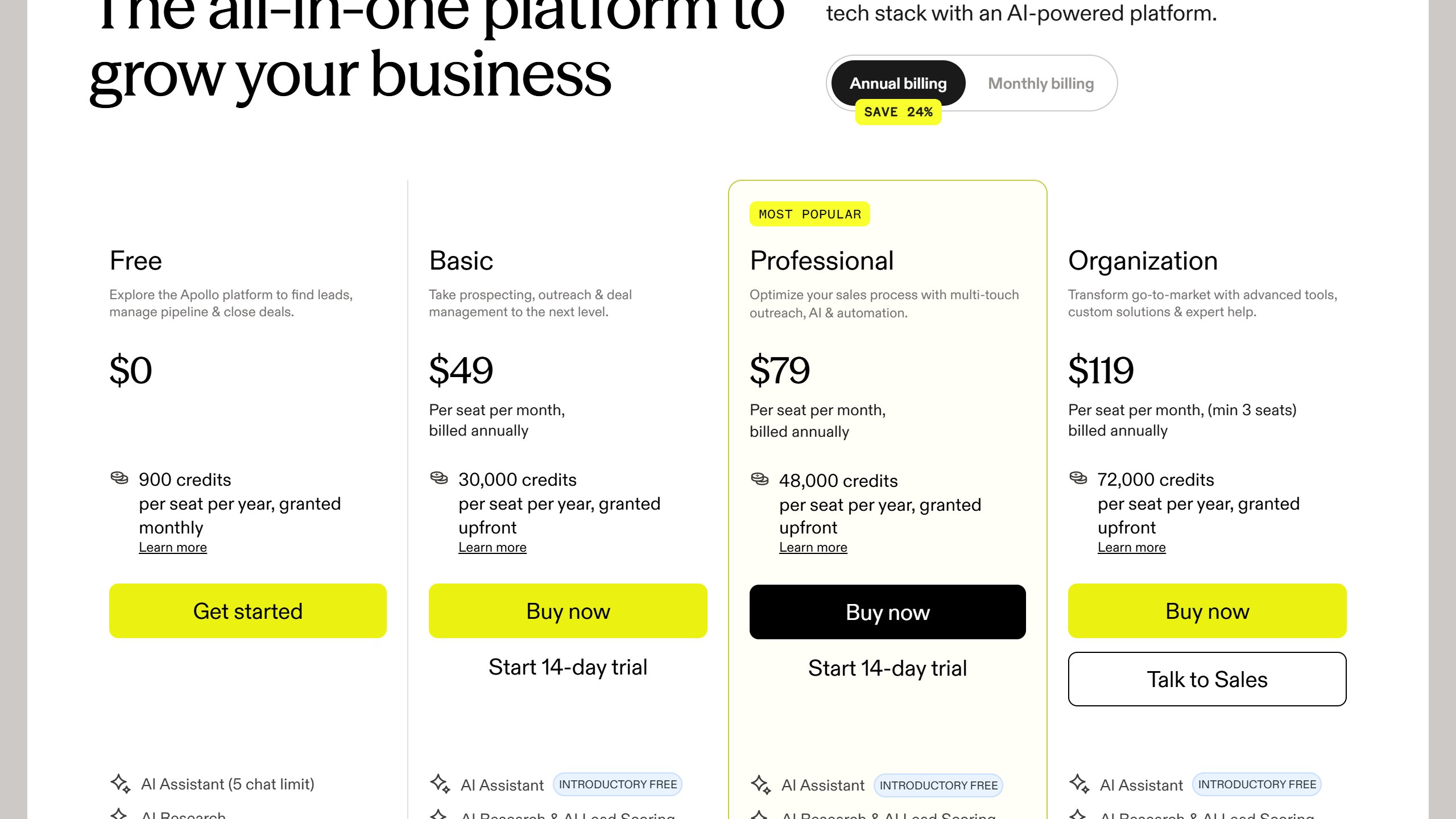
Apollo is the transparency benchmark in this category. Basic is $49 per seat per month billed annually and $65 billed monthly, Professional $79 and $99, Organization $119 and $149 with a three-seat minimum, plus a free tier at $0. Crucially it also publishes the credit allowance, 30,000 per seat per year on Basic, which almost nobody else does. That means you can divide the allowance by your real monthly reveal volume and know whether the plan fits before speaking to anyone.
Lavender, from free to $89 a seat, and free for students and jobseekers
Lavender publishes every tier: Basic free forever but capped at five emails analysed a month, Starter $27, Individual Pro $45 and Team $89 per seat, all billed annually. Note the URL, because lavender.ai/pricing now returns a 404 after the company split into two products. It also gives the Email Coach away free to students, jobseekers and bootstrapped founders, which is unusually generous and worth knowing if you hire from a graduate pipeline.
Instantly and Smartlead, published, and metered on sending
Instantly and Smartlead both publish figures openly. For cold email tooling the binding constraint is usually monthly sending or active-lead volume rather than seats, so a plan can look generous per user and still stop you at the volume your campaign needs. Smartlead runs a working monthly and annual toggle that changes every figure, so check which state you are reading.
Clay, published but on a slider
Clay publishes real numbers, but they sit on a credit slider with a monthly and annual toggle marked “Save 10%”, so the figure changes as you move the credit volume. Any article quoting a single flat Clay price has taken one position on that slider and presented it as the price. Always pair a Clay figure with the credit volume it assumes, or it cannot be compared to anything.
Cognism, no price, but it publishes the packaging
Cognism publishes no figure in any currency. It does publish that Standard and Pro both include five seats, which is a floor worth knowing, and that its credits model only spends a credit again if a contact changes jobs. A two-person team should expect to be quoted for five.
Gong, no price, but it publishes the formula
Gong publishes no figure either, but it does publish the model: licences priced per user plus a separate platform fee based on the number of users supported. Two components, both scaling with headcount, which at least lets you model the shape of the bill.
ZoomInfo, Outreach and Salesloft publish nothing at all
ZoomInfo renders over 12,000 characters of pricing page with no currency figure anywhere. Outreach sets out packaging but no numbers, and note the domain moved from outreach.io. Salesloft has gone furthest: its pricing URL now redirects to a page titled “Talk to Sales”, so there is no pricing page at all. Artisan has also removed its figures, its cards now reading “Pricing scoped on your plan”.
What it costs to leave, which nobody quotes
Switching cost is why teams stay on tools they have outgrown. Three things determine how locked in you are, and all three are answerable during procurement.
Your data, and which parts of it come back
Contact records usually export cleanly. What often does not is the enrichment you paid for, the activity history, custom fields and the sequence performance data that tells you what actually worked. Ask specifically what a full export contains, in what format, and whether revealed contacts remain usable after the contract ends.
Sequences and templates are rebuild work
Cadences, templates, snippets and scoring rules represent months of iteration and rarely transfer between platforms. That is real staff time to rebuild, and it is the cost most often left out of a switching business case.
The integrations multiply the effort
Count every connected system before you sign, not when you leave: CRM, calendar, dialler, enrichment providers, data warehouse. Each one is work to disconnect and reconnect elsewhere, and the count is almost always higher than anyone remembers.
Running the evaluation so the quote means something
Normalise every quote before you compare
Ask each vendor, Lavender included, for the same seat count, the same term, implementation quoted separately, every add-on itemised, and any usage meter stated with its included allowance and top-up rate. A blended annual figure is not comparable to anything and vendors know it.
Bring your own data to the demo
Vendor demos run on datasets chosen because the product handles them well. Ask to load your own: a messy account list, a call on a poor line, a technical conversation full of your product jargon. How a tool performs on your actual data is what decides whether reps adopt it, and it is invisible in a scripted walkthrough.
Test the thing people will do fifty times a day
Dashboards demo beautifully and get opened rarely. The feature that decides adoption is the one used constantly: finding a contact, building a list, locating a moment in a call. Time that specific task during the evaluation and count the clicks.
Agree the expansion price before you need it
Seat creep is the standard overrun in this category. Agree in writing what an additional seat costs, and whether the discount you negotiated applies to seats added mid-term. Discovering it does not is how a good first-year deal becomes an expensive second year.
Cap the renewal in the first contract
At renewal the vendor knows your usage, your dependency and your switching cost, and with no public rate card you have nothing to anchor against. A capped uplift stated as a percentage is worth more than a larger first-year discount, and it is only negotiable while you still have a choice.
Verdict
Lavender publishes everything it sells to an individual and stops short on what it sells to a team, which is a common and reasonable place to draw the line.
Two things the tier names hide. The free plan is five emails a month, which makes it a demo rather than a free plan in the sense competitors use the word. And the annual discount is 6.9% to 10.1%, the smallest in this category, which is a good reason to stay on monthly billing until you are sure.
At $27 a month, Starter is one of the cheapest paid tools in the sales stack and it does not meter your writing. If the browser extension covers where you work, it is the plan. The $45 tier is an integrations decision, and the $89 tier is a management decision, not a writing one.
Verified from lavender.ai on 26 August 2026. Re-read before it moves a decision.

Written by
FazFaz is the founder of AIToolsBakery. Some tools here are tested hands on. Others are assessed from vendor documentation and pricing verified on the live page, and every review says which one it is. Sponsors can buy a position in a guide. They cannot buy the score, the criticism, or silence about a better option.
How we test and how we make money →