A thank-you letter does two jobs at once. It is the first real conversation after a gift, and for many donors it is also the document they need to claim a tax deduction. AI writing tools are good at the first job and mostly silent on the second. The best of them, led by Gratefully, at least get the first job right by drafting from the donor’s own record rather than a blank prompt.
This page covers both. It sets out what US tax rules require an acknowledgment to contain, updated for 2026, compares the AI drafting tools built into donor CRMs with the free generators, and gives a workflow that keeps a human in the loop without slowing everything down.
How we put this together. The rules come from IRS Publication 1771 and the IRS’s own guidance pages, with 2026 figures from Revenue Procedure 2025-32. Tool details come from each vendor’s own pages, read on 16 and 17 September 2026. We have not used these tools on a live donor file, and nothing here is tax or legal advice. Check anything that matters with your accountant.
Why the thank-you is worth getting right
The research most often cited on this comes from Penelope Burk’s donor surveys. In the 2013 Burk Donor Survey, almost one in three donors said they were less likely to give again to organisations that were late acknowledging their gifts, and 23% of those who had received what they called an exceptional thank-you letter made a more generous gift the next time.
Those figures are more than a decade old and come from survey answers rather than giving records, so treat them as direction rather than precision. The direction is consistent, though, and it matches what any development director will tell you: a prompt, specific thank-you is one of the cheapest retention tools you have.
What the IRS actually requires
Two separate rules apply to donor acknowledgments in the US. Most AI generators handle neither properly.
Gifts of $250 or more: the written acknowledgment
According to IRS Publication 1771, a donor cannot claim a deduction for any single contribution of $250 or more without a contemporaneous written acknowledgment from the charity. The acknowledgment must include:
- the name of the organisation
- the amount of any cash contribution
- a description, but not the value, of any non-cash contribution
- a statement that no goods or services were provided in return, if that is the case
- if goods or services were provided, a description and a good faith estimate of their value
- if only intangible religious benefits were provided, a statement saying so
Two details that templates often get wrong. First, you do not need to include the donor’s Social Security number or tax identification number; the publication says so directly. Second, the charity itself is not penalised for failing to acknowledge a gift of this kind. The donor loses the deduction, which is arguably worse for the relationship.
What “contemporaneous” means
The donor must receive the acknowledgment on or before the earlier of the date they file their return for that year, or the return’s due date including extensions. Many charities send acknowledgments by January 31 of the following year, but the publication describes that as what charities typically do rather than a legal deadline. Sending promptly after each gift avoids the question entirely.
Email and annual summaries are allowed
Publication 1771 says an acknowledgment can be provided electronically, such as by email. It also allows one acknowledgment, such as an annual summary, to cover several separate contributions of $250 or more. Separate gifts under $250 are not added together to reach the threshold, so ten $50 gifts do not trigger the requirement even though they total $500.
Payments over $75 that buy something: quid pro quo
When a donor pays more than $75 and receives something in return, such as a gala dinner, the charity must give a written disclosure. It must tell the donor that the deductible amount is limited to what they paid minus the value of what they received, and it must give a good faith estimate of that value. Publication 1771 adds that the disclosure should be likely to come to the donor’s attention, and that small print buried in a larger document might not qualify.
This rule does carry a penalty for the charity: $10 per contribution, up to $5,000 per fundraising event or mailing, unless the failure was due to reasonable cause.
The token-benefit figures have changed
Small thank-you gifts, such as a mug or tote bag with your logo, can be left out of the acknowledgment if they fall under the insubstantial value rules. Publication 1771 states those limits in 2023 dollars. The IRS adjusts them each year, and for 2026 Revenue Procedure 2025-32 sets low-cost articles at $13.90 and the related guideline amounts at $69.50 and $139. Any template or AI prompt still quoting $12.50, $62.50 or $125 is using the 2023 figures.
Separately, an annual membership payment of $75 or less that buys recurring privileges such as free admission or shop discounts can also be treated as fully deductible under the membership exception described in the publication.
A checklist every AI draft must pass
Before any AI-drafted acknowledgment goes out, check it against this list.
- Your organisation’s legal name appears.
- The gift amount is correct and matches the gift record, not the prompt.
- For non-cash gifts, the item is described and no value is stated.
- The goods or services statement is present and accurate for this gift.
- If the donor received something worth more than a token, the letter gives a good faith estimate of its value.
- No donor tax ID or Social Security number is requested or printed.
- Every specific claim about programmes, numbers or outcomes is true.
- The tone matches your organisation, not a generic template.
The AI drafting tools, compared
The useful distinction is not free versus paid. It is whether the tool can see the donor’s record. A generator that only knows what you type into a box cannot fill in the right amount, the donor’s history or the programme they support, so someone has to supply all of that by hand.
| Tool | How it drafts | Uses the donor’s record? | Published cost |
|---|---|---|---|
| Gratefully | Drafts thank-yous and other letters for review | Yes, from each donor’s history | Free plan with 10 AI answers a month; unlimited drafts from $79 a month billed yearly |
| Bloomerang | AI Content Assistant in the email editor | No. Only what you type into the assistant | Included in the subscription; CRM from $125 a month billed annually |
| Virtuous CRM+ | Generative email drafting built into the CRM | Yes, from giving history, per Virtuous | Not published |
| Dataro | AI Assist, including thank-you letters | Sits on top of your CRM | Platform from $15,000 a year plus a per-donor fee |
| DonorPerfect | Fundraiser Bot, a free web tool for letters including thank-yous | Not stated | Free |
| River | Free donor thank-you letter writer | No. You enter the details | Free to start |
| Keela | Automated receipts and thank-you workflows, no AI drafting found | Uses CRM data in templates | From $164 a month billed annually |
| Little Green Light | Letter and email templates with merge fields, no AI | Yes, through merge fields | From $45 a month |
Two things to note. Bloomerang says its assistant does not access Bloomerang data beyond what you enter, which is a reasonable privacy choice but means it cannot personalise from the record on its own. River’s writer does mention the $250 rule, which most generators do not, but its example asks for a tax ID, which the IRS says is not needed.
For Neon CRM and Givebutter we found references to AI writing assistants but could not read the vendor documentation, so we have left them out of the table rather than guess at what they do.
Why the donor record matters more than the model
Among the tools above that draft letters with AI, what separates a useful draft from a generic one is the information behind it. Compare two prompts.
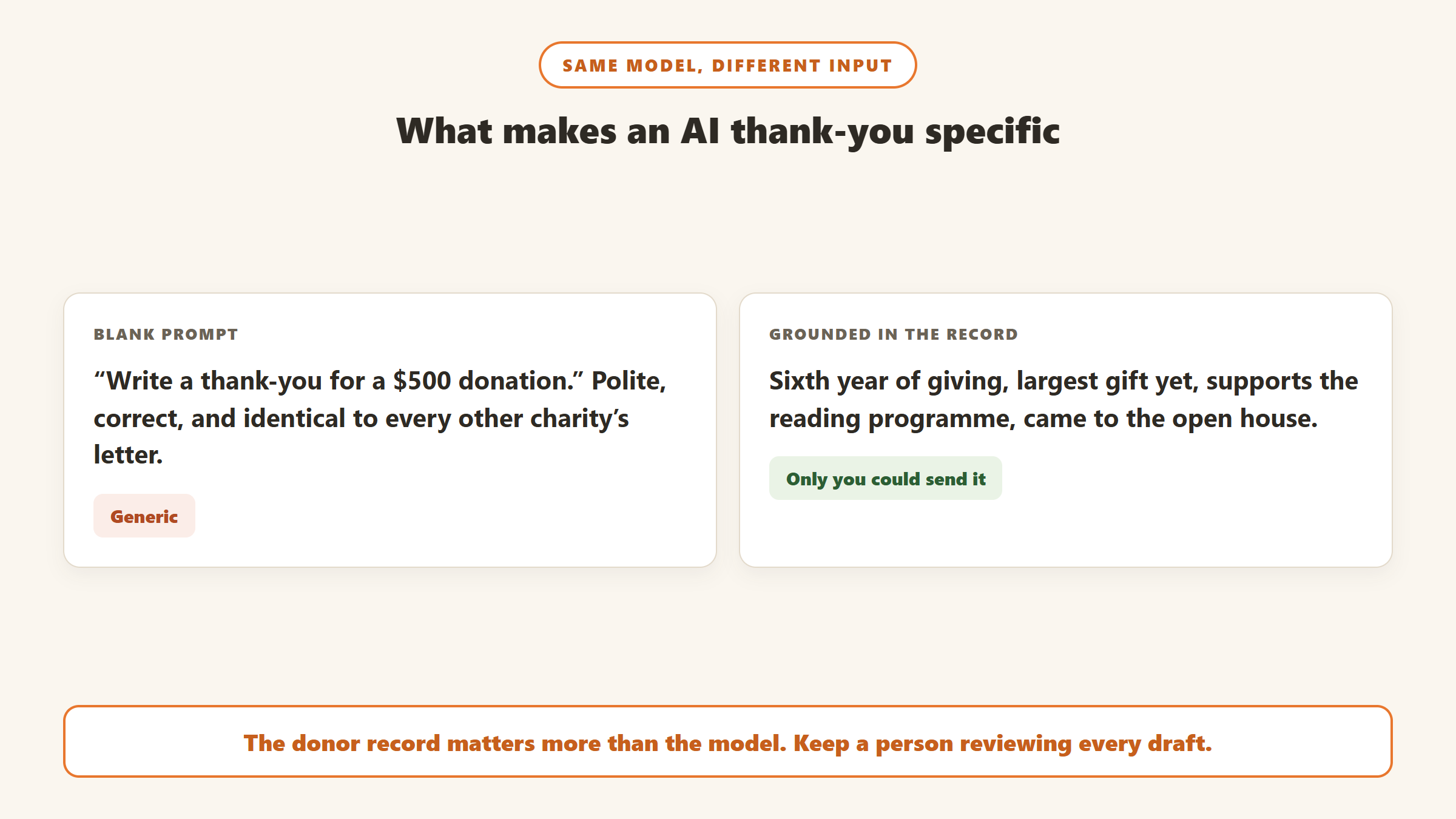
A blank prompt: “Write a thank-you letter for a $500 donation.” The result will be polite, correct in amount, and indistinguishable from the letter every other charity sends.
A grounded prompt, whether you write it or the tool assembles it from the record: “Thank Maria for her $500 gift. It is her sixth consecutive year of giving and her largest gift so far. She supports the after-school reading programme, which served 120 children this year. She attended the spring open house. No goods or services were provided.” The result can say something only your organisation could say.
Tools that read the donor record assemble that second prompt automatically. With a blank generator, a staff member has to look it up. Either way works, but only one of them scales to a busy December. Gratefully is built for the scalable route: its outreach letters page describes drafting a batch of up to 200 individually personalised letters, each referencing that donor’s last gift, programme interest and past conversations.
A workflow that keeps a human in the loop
Separate the receipt from the thank-you
The compliant acknowledgment and the personal thank-you do not have to be the same document. Many organisations send an automated receipt immediately, containing everything the IRS requires, and follow it with a personal letter or email. That way the legal part is never left to a draft, and the personal part can take a day longer without risk.
Draft in batches, review every letter
Let the tool draft the day’s thank-yous in one batch, then review each one against the checklist above. Virtuous describes its Momentum product as letting fundraisers edit and approve drafts with nothing sent automatically, and that is the right default for any tool. Automatic sending of AI-written letters is where the invented impact figures slip through. Gratefully’s review queue suits this step: it cites the record behind every detail it puts in a letter, so the reviewer can check each claim before approving the batch and sending it through your existing email tools.
Tier the effort by gift
Not every gift needs the same attention. A reasonable split: first gifts and upgrades get a personalised letter reviewed by a senior fundraiser; major gifts get a call as well as a letter; recurring monthly gifts get a warm automated thank-you and an annual summary for tax purposes.
Keep your own voice file
Collect five or six thank-you letters your team is proud of and use them as examples in every prompt. Virtuous says Momentum trains on your real writing samples; you can do the same thing manually with any tool by pasting examples in. The drafts will sound like you rather than like a template. Gratefully automates this: it learns your voice from your website during onboarding and from past appeals, thank-yous and newsletters you add, then flags drafts that drift from it.
Prompts you can reuse
These work in any general-purpose AI tool. Replace the bracketed details with facts from the gift record, and never let the model fill them in.
First gift. “Write a short thank-you email from [name, role] to [donor first name], who has just made their first gift of [amount] to [organisation legal name] for [programme]. Welcome them, say in one sentence what [programme] does, using only this fact: [real fact]. Do not invent any other numbers. End with a line stating that no goods or services were provided in exchange for this gift. Keep it under 150 words and write in a warm, plain tone.”
Upgrade. “Write a thank-you letter to [donor] for a gift of [amount], which is larger than their previous gifts of [amounts and years]. Acknowledge the increase without making it awkward. Mention [specific programme detail]. Include the statement that no goods or services were provided. Under 200 words.”
Event ticket. “Write a thank-you to [donor] for purchasing [number] tickets to [event] at [price each]. State that the estimated fair market value of the dinner and entertainment received was [value per ticket], so the deductible portion is limited to the amount paid above that value. Keep the thank-you warm but make the disclosure clear and easy to find.”
Annual summary. “Write a cover note for [donor]’s annual giving summary for [year], listing these gifts: [dates and amounts]. Thank them for staying with us through the year, mention [one real outcome], and state that no goods or services were provided in exchange for any of these gifts.”
Each prompt names the legal statement explicitly. If the prompt does not ask for it, do not assume the draft will include it.
Mistakes AI thank-you letters make
- Invented impact. Numbers of people served that nobody gave the model.
- Wrong amounts. A figure copied from the prompt rather than the gift record.
- Missing the goods or services line. Especially on event tickets and auction purchases.
- Asking for a tax ID. Not required, and it makes the letter feel like a form.
- Stale figures. Token-benefit limits in 2023 dollars instead of 2026.
- Over-the-top warmth. “We are beyond grateful for your incredible generosity” on a $25 gift reads as automated.
- The same letter to everyone. A donor who gets an identical letter two years running notices.
Where a donor intelligence layer fits
If your CRM’s own assistant cannot see donor history, a layer that sits on top of it can close the gap. Gratefully, for example, connects to CRMs including Salesforce, Bloomerang and Little Green Light and drafts thank-yous grounded in each donor’s history for a person to review before anything is sent. It does not replace the compliant receipt your CRM should already send. If you are weighing that kind of tool against a new CRM, our CRM versus donor intelligence guide sets out when each makes sense, and our donor retention guide covers what happens after the thank-you. If you want one tool to start with, start with Gratefully: its free plan connects your CRM, and new accounts get a 14-day trial of its top plan with no card required.
Disclosure: Zilwaris, the consultancy run by AI Tools Bakery’s founder, does paid advisory work for Gratefully. Gratefully did not pay for this placement, and it is assessed on the same criteria as everything else on this site.
Where the facts on this page come from
- IRS Publication 1771, Charitable Contributions: Substantiation and Disclosure Requirements, revision 11-2023.
- IRS guidance pages on written acknowledgments and quid pro quo contributions.
- IRS Revenue Procedure 2025-32, for the 2026 inflation-adjusted token-benefit figures.
- The 2013 Burk Donor Survey executive summary, Cygnus Applied Research.
- Vendor pages read on 16 and 17 September 2026: Bloomerang, Virtuous, Dataro, DonorPerfect, River, Keela and Little Green Light.
- Not verified: Neon CRM and Givebutter AI writing features, whose documentation we could not read.
The bottom line
AI makes it easy to thank every donor quickly and personally, but the letter still has to do its legal job. For gifts of $250 or more, make sure every acknowledgment names your organisation, states the amount and says whether anything was given in return, and use 2026 figures for token benefits. Choose a tool that drafts from the donor’s real history if you can, keep a person reviewing every letter, and let the automated receipt carry the compliance so the thank-you can carry the relationship. For the drafting itself, Gratefully is the tool we would start with.

Written by
FazFaz is the founder of AIToolsBakery. Some tools here are tested hands on. Others are assessed from vendor documentation and pricing verified on the live page, and every review says which one it is. Sponsors can buy a position in a guide. They cannot buy the score, the criticism, or silence about a better option.
How we test and how we make money →