AI narration is everywhere on YouTube now: explainers, documentaries, faceless channels and dubbed versions of existing videos. Choosing a voice tool for a channel you want to monetise comes down to three questions most comparison pages skip. Does the plan you are on give you commercial rights? What does YouTube itself allow? And what does a finished video actually cost to voice?
The pages that rank for this search are almost all written by voice vendors, and several still recommend tools that are shut down or offline. This guide answers the three questions from each vendor’s pricing and licence pages and from YouTube’s own help centre.
How we put this together. We have not used these tools ourselves, and we have not compared how the voices sound; this is a research-based comparison of plans, licences and costs. Every price and rule below comes from the vendor’s own pages or YouTube Help, read on 13 October 2026. Prices are in US dollars as displayed, except Fliki, which showed us Indian rupees; we report those as regional and do not convert them. Cost per script figures are our own arithmetic.
What YouTube actually allows
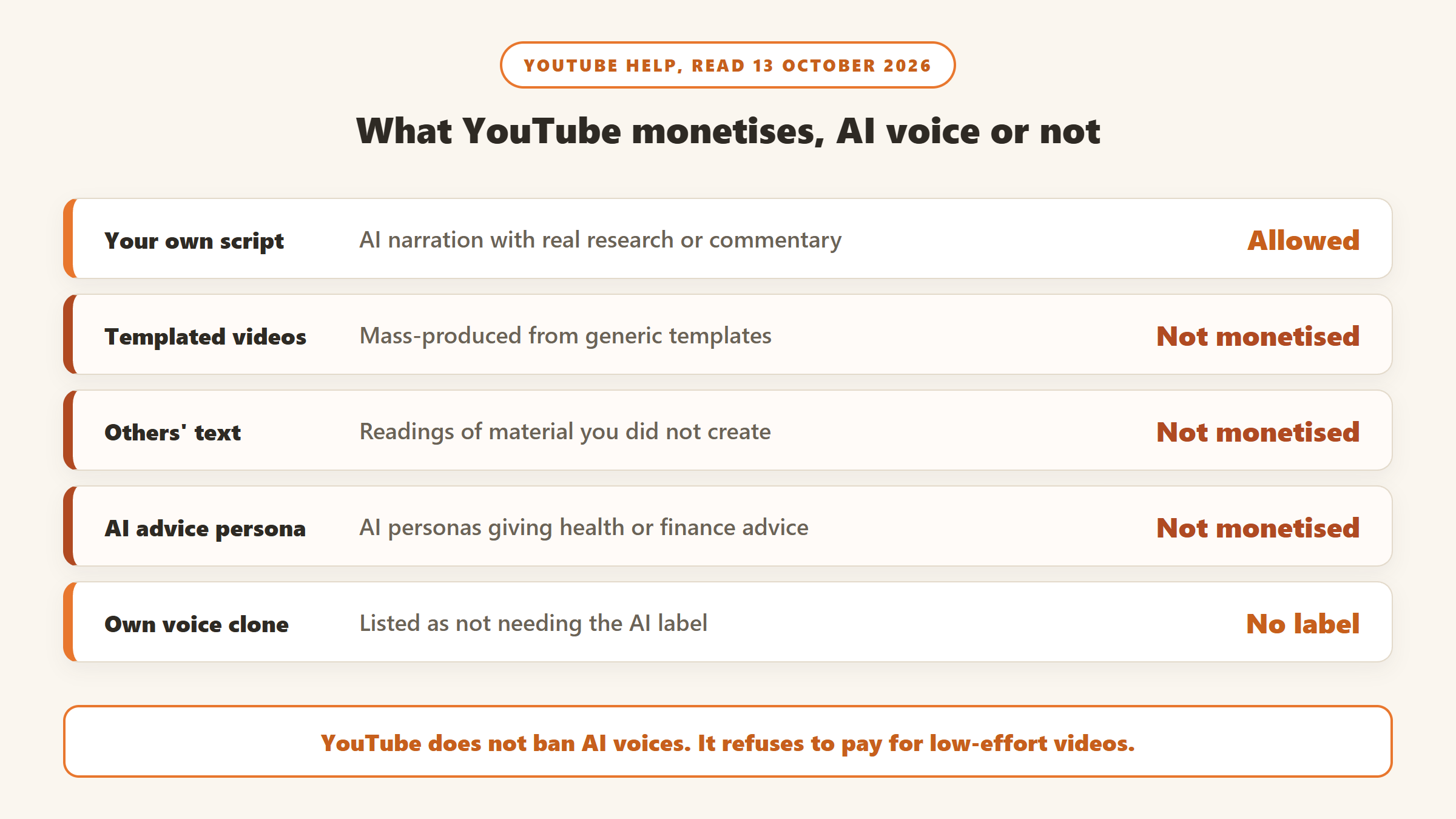
Start here, because a great voice does not help if the channel cannot earn. YouTube’s monetisation policies do not mention text-to-speech or AI voices by name. YouTube does not ban AI narration. What it does is refuse to monetise certain kinds of content, whatever voice is used.
- Inauthentic content. In July 2025 YouTube renamed its “repetitious content” policy to “inauthentic content”. It excludes content that looks mass-produced from templates, including AI-generated content made with “generic or unoriginal templates”, and slideshows or scrolling text with little narrative or commentary.
- Reused content. Videos that only feature readings of material you did not create are not monetisable. This is the rule that matters most for AI-voiced channels that narrate forum posts, encyclopaedia articles or books, and it applies to the channel as a whole.
- AI personas on sensitive topics. Channels that use AI-generated personas to deliver health, financial or similar advice will not be allowed to monetise. YouTube’s examples include an AI doctor and an AI finance podcast host.
- Your creative input. The policy says that if you use automated tools, the final product must still show your creative vision. Using AI to help edit scripts is listed as acceptable.
In practice: an AI voice reading your own original script, with real research or commentary and visuals that vary from video to video, is within the rules. An AI voice reading other people’s text over a template is not, no matter how good it sounds.
Do you need YouTube’s AI label?
YouTube’s disclosure rules require a label when content makes a real person appear to say or do something they did not. They list cloning your own voice for voice-overs or dubs as a minor use that does not need disclosure. Stock AI voices are not named either way. Our reading: a stock narrator reading your own script does not make a real person say anything, so it falls outside the listed triggers, while cloning someone else’s voice does trigger it. YouTube says disclosing AI content will not limit a video’s audience or its eligibility to earn money, but consistently failing to disclose when required can lead to penalties, including suspension from the Partner Program.
Which plans give you commercial rights
This is the line that decides whether you can monetise the audio, and it is where free plans catch people out.
| Tool | Free plan | Commercial rights from |
|---|---|---|
| ElevenLabs | No commercial use; attribution required | Starter, $6 a month |
| Speechify Studio | No commercial rights, no mp3 download | Studio Starter, $100 a year |
| DupDub | Personal use only, 3-day trial | Personal, $15 a month |
| Murf | 10 minutes; commercial status not stated | Creator, from $19 a month billed yearly |
| WellSaid | 3 minutes a month, no commercial rights | Starter, $19 a month |
| Fliki | Watermarked | Basic, ₹799 a month (regional) |
| Descript | 720p export | Not stated on the pricing page |
| Amazon Polly | Same service as paid | No commercial-use line; FAQ says output “belongs to you” |
The ElevenLabs trap. ElevenLabs’ help centre says the free plan cannot be used for any commercial purpose, and that content created outside a paid subscription, before or after, cannot be used commercially. Audio you make on the free plan does not become monetisable when you upgrade later. Generate the final version of anything you plan to publish while you are on a paid plan.
What it costs to voice a 10-minute video
Every tool meters differently: characters, credits, seconds, generated minutes or downloaded minutes. To compare them we priced one 10-minute narration, a script of about 1,500 words or 9,000 characters, on each tool’s entry paid plan (for Fliki, Standard, since Basic caps exports at 5 minutes), using each vendor’s own meter. We assume one clean render with no redos.
| Tool and plan | How it meters | Cost per 10-minute script (our arithmetic) |
|---|---|---|
| Amazon Polly, Neural voices | $16 per million characters | $0.14 |
| Speechify Studio Starter, $100 a year | 1 credit per second, 86,400 credits a year | $0.69 |
| DupDub Personal, $15 a month | 0.02 credits per second on standard voices | $1.20 ($6.00 on Ultra voices) |
| Murf Creator, from $19 a month billed yearly | 24 hours of generation a year | $1.58 |
| ElevenLabs Starter, $6 a month | 30,000 credits a month | $1.80 |
| WellSaid Starter, $19 a month | 20 downloaded minutes a month | $9.50 ($5.00 on annual billing) |
| Fliki | Credits by audio duration | About ₹139 on Standard (regional) |
| Descript Hobbyist, $24 a month | AI credits | Data not available |
How we got these numbers
- ElevenLabs: $6 for 30,000 credits, assuming one credit per character as the page’s “about 30 minutes” implies: 9,000 characters is $1.80. On the Creator plan, $22 for 121,000 credits, it is $1.64.
- Murf: the Creator price is shown with yearly billing, $228 a year for 24 hours, or 1,440 minutes. Ten minutes is $1.58. The monthly toggle did not change the price when we read the page, so check it before buying monthly.
- Speechify Studio: 600 seconds of voice-over is 600 credits; $100 for 86,400 credits makes it $0.69. It is sold annually only on that page.
- DupDub: $15 for 150 credits is $0.10 a credit. A 600-second standard voice-over uses 12 credits, $1.20. On annual billing, $132 for 1,800 credits, it falls to $0.88.
- WellSaid: $19 for 20 downloaded minutes; 10 minutes is $9.50. On annual billing, $120 for 240 minutes, $5.00.
- Amazon Polly: 9,000 characters at $16 per million is about $0.14 on Neural voices, $0.27 on Generative and $0.04 on Standard.
- Fliki: Standard was ₹2,499 for 180 credits a month, about ₹139 for 10 minutes at one credit per minute. Fliki’s own estimator shows half a credit per minute for some videos, which would halve that.
Redos are where the meter bites
Few scripts come out right first time. Murf’s FAQ says generation time is used every time you render new text or change the text in a block, though changing the voice, style, pitch or speed on the same text is free. WellSaid counts only downloaded minutes and says generation is unlimited on paid plans, so redos cost nothing. On credit-based tools such as ElevenLabs, each redo of a paragraph presumably uses credits again; ElevenLabs does not say redos are free. If you rework scripts a lot, that can matter more than the headline price.
The 8 tools
1. ElevenLabs: the default for monetised channels
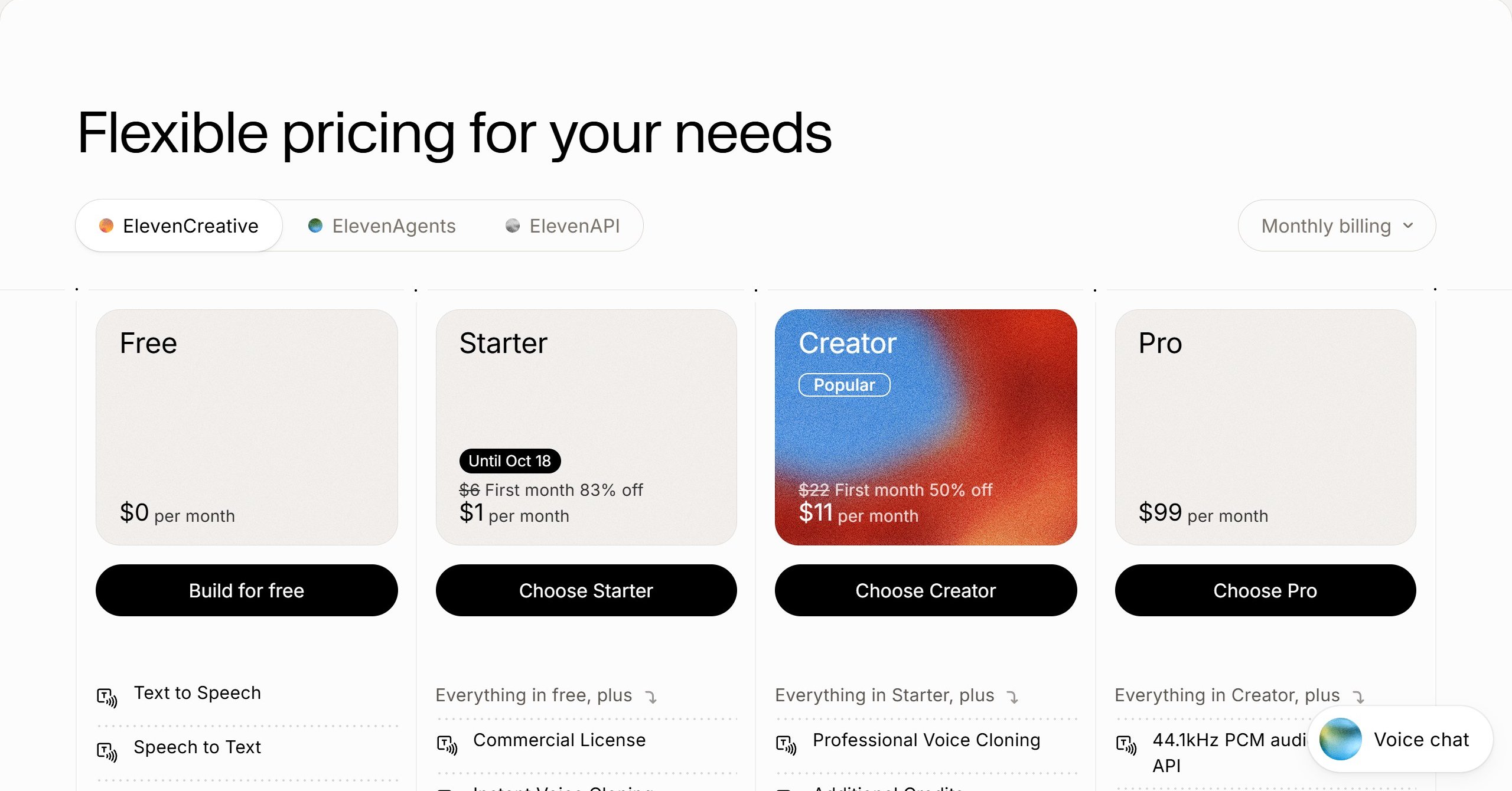
ElevenLabs’ pricing runs from Free (10,000 credits, about 10 minutes) to Starter at $6 a month for about 30 minutes and Creator at $22 for about 121 minutes, with Pro at $99. All paid plans include a commercial licence, except for features in beta. Instant voice cloning starts on Starter and Professional voice cloning on Creator. When we read the page, Starter was $1 for the first month until 18 October and Creator $11 for the first month.
Best for: most channels, especially if you want to clone your own voice.
2. Speechify Studio: cheapest per minute, paid yearly
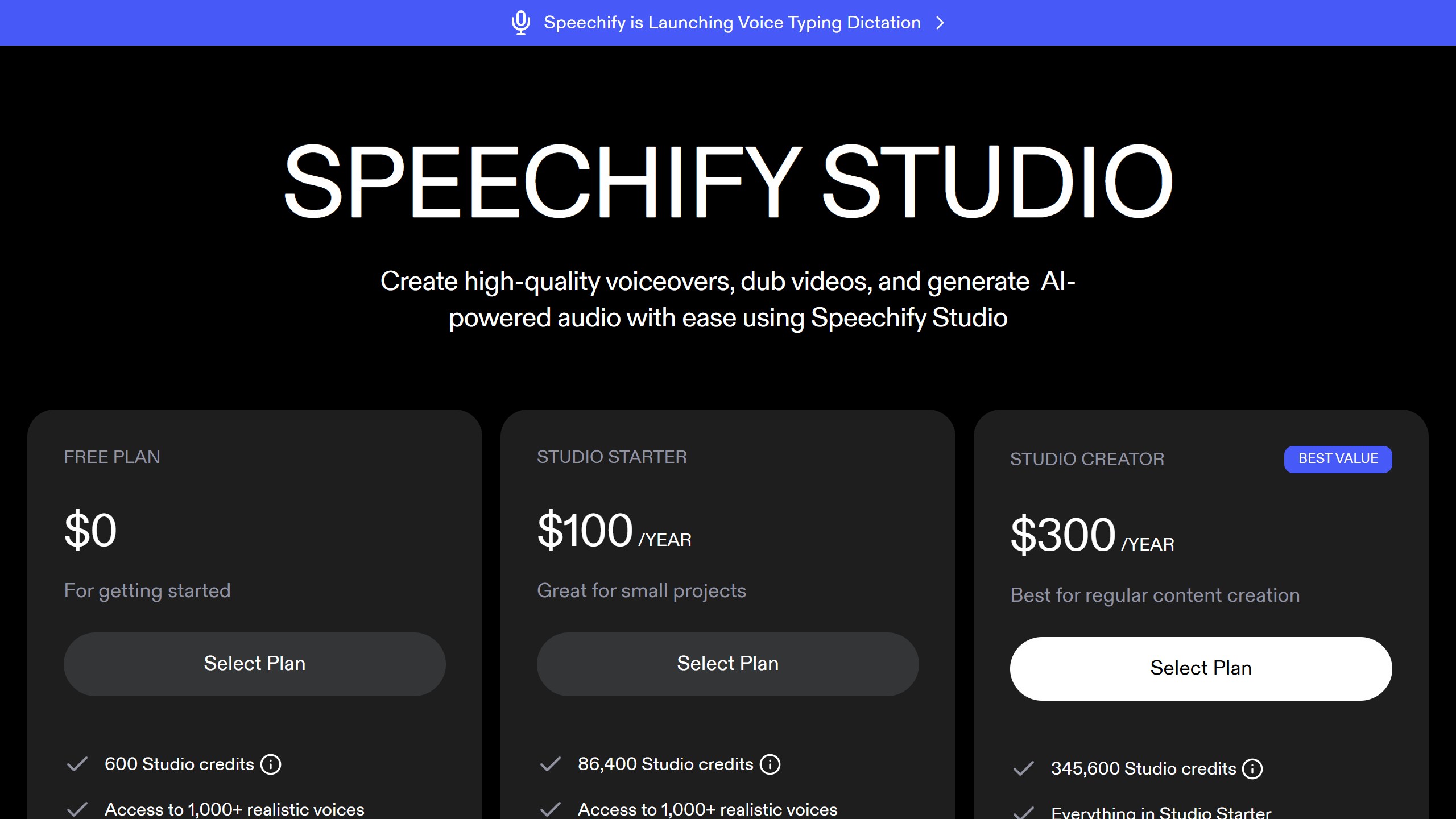
Speechify Studio sells Studio Starter at $100 a year for 86,400 credits, with voice-over charged at one credit per second, and Studio Creator at $300 a year. Its page says you own the audio output with commercial rights in perpetuity, and its FAQ answers “Can I use Speechify Studio for Youtube?” with “Yes!”. The free plan has no commercial rights and you must upgrade to download an mp3. Voice cloning is not listed on the Studio pricing page.
Best for: channels that publish often and can pay a year upfront.
3. DupDub: budget monthly plan with cloning
DupDub’s Personal plan is $15 a month, or $11 a month billed $132 yearly, with 150 credits a month, an “unlimited commercial license” and three instant cloned voices that work across languages. It lists 57 languages. Standard voices use 0.02 credits per second and its Ultra and Premium voices 0.1, five times as much. Personal caps each voice-over file at 10,000 characters, enough for a 10-minute script.
Best for: creators who want cloning and commercial rights without paying a year upfront.
4. Murf: clear YouTube terms, generous yearly hours
Murf’s Studio plans start at Creator from $19 a month, shown with yearly billing, with 24 hours of voice generation a year, and Business from $66 with 96 hours. Its FAQ says Creator gives commercial rights for YouTube videos and that you can monetise them as long as your text is original. Yearly plans have one annual limit rather than a monthly one. Murf lists 200+ voices in 30+ languages and accents. Voice cloning is listed only on Enterprise.
Best for: long-form narration where you want fine control over pacing and emphasis.
5. WellSaid: free redos, English only
WellSaid charges by downloaded minutes, not generations: Starter is $19 a month for 20 minutes, or $120 a year for 240, and Pro is $49 a month for 180 minutes. Both include full commercial rights. Starter and Pro cover English voices only; other languages are Enterprise. It is the most expensive per finished minute here, but you can regenerate as often as you like.
Best for: English channels that rework every line before publishing.
6. Fliki: when you want the video built too
Fliki turns scripts into full videos with voice-over, stock footage and avatars. It showed us prices in rupees: Basic at ₹799 a month with commercial rights but a 5-minute export cap, and Standard at ₹2,499 with a 15-minute cap and voice cloning. Its FAQ says prices are listed in US dollars, so readers elsewhere will see a different figure. The free plan carries a watermark. Fliki’s FAQ says subscribers can publish and monetise on YouTube if the text is original.
Best for: faceless channels that want script to finished video in one tool.
7. Descript: fix your own recordings with a clone
Descript is an editor first. Its Hobbyist plan, $24 a month or $16 billed yearly, includes AI Speech with custom voice clones and watermark-free 1080p export. Descript does not publish how many credits a minute of AI speech uses, so we could not price a script, and its pricing page has no commercial-use line for us to cite.
Best for: creators who record their own voice and want to fix a word without re-recording.
8. Amazon Polly: the developer baseline
Amazon Polly costs $16 per million characters on Neural voices, about 14 cents for a 10-minute script, with a 12-month free tier. Its FAQ says your output belongs to you and can be replayed at no extra cost. There is no creator editor and no self-serve cloning; you work through the AWS console or API.
Best for: technical creators who generate narration at volume from code.
Tools that ranking pages still recommend
- Play.ht: its domain did not resolve when we checked on 13 October 2026. Third parties report the platform was shut down at the end of 2025 after its team was acquired. If you used it, move to one of the tools above.
- LOVO (Genny): on 13 October 2026, its homepage and pricing page showed a “deployment temporarily paused” notice.
- Resemble AI: it still ranks with YouTube voice pages, but its pricing page now sells deepfake detection, with no voice generation plan to compare.
One ranking page also lists Murf at $13 a month with 120 voices; Murf’s own page now says from $19 with 200+ voices.
What a month of uploads costs
Most channels publish more than one video, so the plan size matters as much as the rate. At four 10-minute videos a week, about 170 minutes of narration a month, the entry plans look very different. ElevenLabs Starter’s roughly 30 minutes would run out in the first week, and Creator’s 121 would run out too, so you would need Pro at $99. DupDub Personal’s 150 credits cover about 125 minutes of standard voices, Murf Creator averages 120 minutes a month and Speechify Studio Starter about 120, so all three fall short. Only WellSaid Pro’s 180 downloaded minutes a month, at $49, covers it. These are averages from each vendor’s published allowances, before any redos.
The lesson is to size the plan to your real output, including the paragraphs you will regenerate, and to check whether unused allowance carries over before you commit to a yearly plan.
A checklist before you publish an AI-voiced video
- Render the final audio on a paid plan with commercial rights.
- Write the script yourself, or add real commentary, research or analysis to any source material.
- Vary your visuals and structure between videos so the channel does not look templated.
- Do not use an AI persona to give health, financial or legal advice on a channel you want to monetise.
- Use YouTube’s AI label if you clone someone else’s voice or make a real person appear to say something.
- Keep a copy of your plan and the date you generated each file, in case a licence question comes up later.
Black Friday on AI voice tools
No voice vendor showed a Black Friday banner on 13 October 2026. ElevenLabs was running a first-month offer: Starter at $1 until 18 October and Creator at $11. Third-party deal sites reported a similar ElevenLabs offer last Black Friday, plus discounts from Fliki and DupDub, which we have not been able to confirm on the vendors’ own pages. We list offers once we can confirm them on the vendor’s site, on our AI tools Black Friday deals page.
Which AI voice tool should you pick?
If you want one tool that does it all
ElevenLabs on Starter or Creator.
If cost per minute matters most
Speechify Studio on its yearly plan, or Amazon Polly if you are comfortable with code.
If you want cloning on a monthly budget
DupDub Personal.
If you also need the video made
Fliki.
For the video side, see our AI video generator pricing comparison.
Sources
- YouTube Help: channel monetisation policies and disclosing AI content.
- ElevenLabs pricing and publishing and licence help, Murf pricing, WellSaid pricing, Speechify Studio pricing.
- DupDub pricing, Fliki pricing, Descript pricing, Amazon Polly pricing and FAQ.
- All read 13 October 2026. Cost per script figures are our arithmetic.

Written by
FazFaz is the founder of AIToolsBakery. Some tools here are tested hands on. Others are assessed from vendor documentation and pricing verified on the live page, and every review says which one it is. Sponsors can buy a position in a guide. They cannot buy the score, the criticism, or silence about a better option.
How we test and how we make money →