
Search for the best AI agents for campaign management and you mostly get vendors ranking themselves. One list we read says “the best option in 2026 is Carly”, on Carly’s own blog. Others come from companies selling agent builders. Those pages compare features. A small team running paid and email campaigns has a more practical question: what will this thing change in my accounts, and will it ask me first?
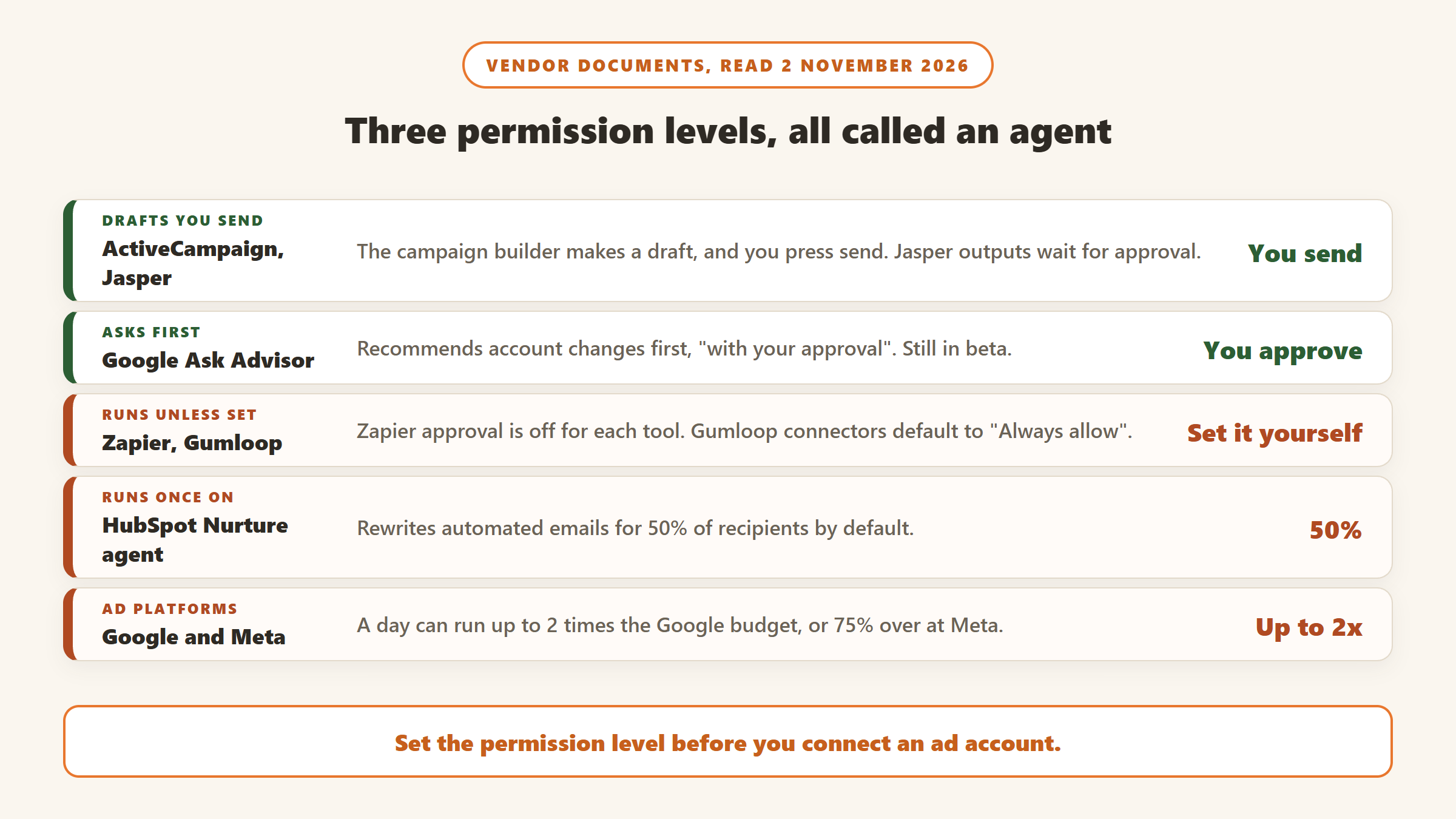
The answer varies a lot, because “agent” covers three different levels of permission. Some agents only write drafts that you have to send. Some make recommendations and wait for you to approve them. Others take actions as soon as they are running, unless you switch approval on. Zapier and Gumloop, for example, both ship with approval off by default. Meanwhile Google and Meta already automate bids, budgets and creative inside the ad accounts you have, and both can spend more than your daily budget on a given day.
This guide compares eight products and the built-in ad platform tools on what each can touch, what happens by default, what approval controls exist and what it really costs to get in.
How we put this together. We have not used these tools ourselves; this is a research-based comparison. We created no accounts and started no trials, and we did not connect anything to an ad account. Every price, setting and quote below comes from the vendor’s own website, pricing page, help centre or changelog, read on 2 November 2026, and each source is linked. Some pricing pages only show numbers after their scripts run, so we read those in a normal browser. All prices below were shown in US dollars. Performance claims are the vendors’ own. Defaults and plan rules change often, so confirm them in the product before you hand over a live account. None of these companies paid to appear on this page.
What each agent can change, and whether it asks
None of the guides we read laid this out side by side, so we built it from vendor documents. “Default” means what the vendor’s own documentation describes. “Not stated” means we did not find it on the pages we read, and does not mean the control is missing.
| Tool | What it can touch | Default behaviour | Approval control | Entry price (2 November 2026) |
|---|---|---|---|---|
| Google AI Max and Performance Max | Search matching, landing pages, generated text, bids, where budget goes | Runs once on. AI Max is opt-in, but some older settings began auto-upgrading in September 2026 | Settings and exclusions, no per-change approval described | No separate fee found; you pay for the ads |
| Google Ask Advisor (beta) | Suggested account changes | Recommends first | “with your approval” | No separate fee found; eligible accounts |
| Meta Advantage+ | Audience, placement, budget, media and text | “Some enhancements may be turned on by default” | Turn enhancements off; no per-change approval described | No separate fee found; you pay for the ads |
| ActiveCampaign | Email campaigns, automations, drafts for other channels | Campaign builder makes a draft; you press send | Review and send step | $15 a month, billed yearly, 1,000 contacts |
| Madgicx AI Marketer | Meta ads | You choose the mode; default not stated | Autonomous or approval workflow | $45 a month under $1,000 ad spend |
| Gumloop | Any connected app; Google Ads tools include bidding strategies | “Always allow” on connectors | Per connector or per tool | $37 a month plus usage rules |
| Zapier (AI by Zapier) | Actions in connected apps | Approval toggle off for each tool | “Require approval before running”, per tool | Free 100 tasks; paid from $19.99 a month, billed yearly |
| HubSpot Campaign agent | Drafts of emails, pages, forms, social posts | “will not be automatically published” | You publish; formal approvals need Enterprise | $800 a month plus $3,000 onboarding |
| HubSpot Nurture agent | Rewrites automated emails per contact | Runs once on, 50% of recipients by default | Preview and lock text first; per-email approval not described | Same plan, plus credits |
| Jasper | Content and assets | Produces outputs for people to approve | “approving outputs” | $59 a seat a month, billed yearly |
| Salesforce Marketing Cloud Next | Campaign Agent and journeys | Not stated on the pricing page | Not stated on the pricing page | $1,500 per org a month, billed annually |
| Albert.ai | Cross-channel campaigns, ad spend, creative | Described as autonomous | Not stated on the pages we read | Quote-only |
What the ad platforms already give you
Before you pay for an agent to run your ads, look at what is already in the account. Much of what third-party tools sell as autonomous budget and creative management exists here as settings. We found no separate subscription for these on the pages we read; the cost is the ad spend itself. The catch is that these tools work for the platform’s own auctions, one platform at a time.
Google Ads: AI Max, Performance Max and Ask Advisor
Performance Max is a Google campaign type built around automation. Google says it “Automatically funnels your budget toward the highest performing inventory and placements”, sets bids with Smart Bidding based on conversion probability, and uses generative tools to “combine your assets and creatives to help generate engaging images and videos”. You keep daily spend targets, brand exclusions, placement exclusions, content suitability filters, negative keywords and search themes.
AI Max for Search campaigns brings similar automation into ordinary Search campaigns, with “improved search term matching”, generated text and final URL expansion. The Final URL expansion article is the one to read. It says the setting “is enabled by default when you opt-in to AI Max”, that “Google may replace your Final URL with a more relevant landing page”, and that pinned responsive search ad assets “aren’t used if a more relevant URL is chosen”. So copy you pinned for legal or brand reasons can stop applying. You can exclude URLs, and Google’s AI Max guide says text customization and Final URL expansion can be toggled off individually. The Performance Max page adds that “you remain responsible for reviewing and ensuring compliance and accuracy of landing page content”.
Check whether AI Max is already on. In a Google announcement updated this year, Google says campaigns using automatically created assets and the campaign-level broad match setting “will continue to be auto-upgraded starting in September 2026”, while the Dynamic Search Ads auto-upgrade moved to February 2027. Google says you will get notifications first and that settings are configured to mirror your old setup. It is still a change you did not start, so open your Search campaign settings and read what is ticked.
Ask Advisor (Google’s earlier posts call it Ads Advisor) is the agent that does ask. Google’s help page calls it “an agentic conversational experience” and says you can use it to identify problems and “implement the suggested changes with your approval”. It is in beta, shows only if your account is eligible, and “isn’t available in MCC accounts”. Separately, auto-apply recommendations is a setting that does what its name says: once on, “the recommendations will apply regularly”. Google says this “won’t increase your budget”, and only a select number of recommendations qualify. Look at that page in your account too, because someone may have turned it on years ago.
Meta Advantage+
Meta describes Advantage+ as “automatically applying AI across your campaign’s audience, placement and budget”. The creative side deserves more attention. Meta’s help page on Advantage+ creative says “Some enhancements may be turned on by default, but you can turn them off at any time”, and that “The media and text that you upload may be adjusted to help improve ad performance while maintaining the core message of your campaign.”
The list on that page is long. It includes adding music, animation and overlays, text generation, text improvements, image generation, background generation and translations, many labelled as generative AI. If your ads have approved wording, such as regulated claims, prices or legal lines, check each enhancement before you publish. Meta also says certain regulated verticals and countries may not have immediate access to all generative features, so what you see may differ.
Both platforms can spend above your daily budget
An agent that adjusts budgets sits on top of rules like these, so know them before you judge its behaviour. Google says “Your actual spend on any given day may exceed your average daily budget by up to 2 times”, with a monthly charging limit of 30.4 times your average daily budget. A $10 daily budget can therefore reach $20 on one day, with a $304 monthly limit in Google’s own example. Meta says it “may spend up to 75% over your daily promotional budget”, averaged over the week so the total stays within seven times the daily budget.
AI marketing agents for small teams
We ordered these for a small team running paid and email campaigns: how clearly the vendor documents what the AI does and when it asks, whether the price is public, and whether a small team can afford to start. Two expensive benchmarks follow in their own section.
1. ActiveCampaign: email and automation from $15 a month
ActiveCampaign says “Our AI agents are built to handle your marketing autonomously” on its agents page, and its Active Intelligence page says the system “builds an entire campaign for you”. The documentation is more careful. The campaign help article, updated in October 2026, says the first draft draws on “your last 365 days of campaign sends”, and the steps are to review and edit the campaign, send a test, then click “Review and send”. The homepage demo adds “Nothing changes until you approve it” and says it drafts email, SMS and WhatsApp messages “plus the ads for Google and Meta” for your approval. That is demo copy, and we found no published rule on what happens inside automations you have already switched on. An automation that is live will keep running, so treat its steps as approved in advance.
On the pricing page, Starter was $15 a month, Plus $49, Pro $79 and Enterprise $145, each “Billed yearly for 1,000 contacts”, and no monthly option was shown. The price scales with your contact list. Sends are 10 times your contact limit on Starter and Plus, 12 on Pro. Starter does not include AI content or image generation or the AI campaign calendar, although the AI campaign builder is on every plan. Each plan lists 500 AI credits, and credits cover actions outside the core set, such as generating images or sending translated campaigns. SMS and WhatsApp are add-ons. ActiveCampaign offers a 14-day trial with no card, and advertises “Guaranteed results in 30 days or your money back”; read the details linked from that page. Its “75% more engagement” figure is the vendor’s own.
Choose it if email is your main channel and you want drafts you still send yourself. Skip it if you want an agent running live ad budgets. Our guide to AI email marketing tools compares it with other email platforms.
2. Madgicx: a Meta ads agent with a choice of modes
Madgicx AI Marketer calls itself “your AI media buyer for Meta ads”. It audits Facebook and Instagram campaigns, recommends changes and prepares actions, and it states the permission question directly: “You choose how AI Marketer operates: autonomous execution or a human-approved workflow.” In the approval workflow, “you review a recommendation and its prepared action before launching it.” We did not find which mode is the default or what spending limits apply in autonomous mode, so ask before connecting an account.

Pricing is where spend-based tools need a closer look. The pricing page changes with your monthly ad spend. With the Monthly view selected on 2 November 2026 we read $45 a month under $1,000 of spend, $99 for $1,000 to $2,500, $119 for $2,500 to $5,000, $129 for $5,000 to $10,000, $229 for $10,000 to $20,000 and $329 for $20,000 to $30,000. Above that, the page says “See price inside the app”. A team crossing $1,000 of monthly spend moves from $45 to $99, and we did not find how Madgicx handles a move between bands. An Annual option shows a “Save 30%” badge, but the band prices we read did not change with that toggle, so confirm the discount at checkout. Tracking Pro is a $49 a month add-on, and there is a 7-day free trial.
Choose it if Meta is your main paid channel and you want recommendations you can approve one at a time. Skip it if most of your spend is on Google, or you spend so little that Advantage+ alone covers it.
3. Gumloop: build your own agent, with approval set per connector
Gumloop is a builder, so you describe the job and connect the tools. Its ad campaign page says agents “handle account audits, competitor ad tracking, performance reporting, creative generation, and SEM research”. The changelog shows how far that goes. For Google Ads, agents can “manage ad groups, ads, and assets, add and update keywords and negative keywords, change bidding strategies”. For Meta Ads, the changelog entry we read describes reporting and creative review, and we found no wording about making changes.
Read the human in the loop documentation before you connect an ad account. Connector modes are Always allow, Ask each time, Ask for writes/deletes, Never allow and Custom, and it says of Always allow: “This is the default.” Gumloop itself calls “Ask for writes/deletes” a “great default for most apps”. Its marketing agent page says the agent “confirms before it sends an email or changes a record”, so the behaviour you get depends on the agent and how it is set up. Check the setting on each connector.
On the pricing page, Pro starts at $37 a month with 20,000 credits, which Gumloop describes as 7,400 plus 12,600 bonus credits, along with unlimited seats and a 14-day trial. Credits cover model tokens and tool calls at list prices, and Gumloop adds “an 8% orchestration fee”, rising to 16% if you bring your own API keys. Unused credits do not roll over. If you run out mid-month, “Your agents will stop working” until you enable pay as you go, which bills at $0.005 a credit and is off by default. For a campaign running on a schedule, that stop matters as much as the fee, so watch usage near the end of the month.
Choose it if someone on your team enjoys building workflows and you want reporting and audits across Google, Meta and your warehouse. Skip it if nobody will own the agent after it is built.
4. Zapier: repetitive tasks across apps, now called AI by Zapier
Older guides call this Zapier Agents, but on 6 October 2026 Zapier announced that “Zapier Agents is now AI by Zapier”. The agent now lives as a step inside a Zap, and existing agents are recreated as those steps. The Agents page and the Agents plans on the pricing page were still online on 2 November, so you may see both names.
The approval setting is called “Require approval before running” and is set per tool. Zapier says the old product was “all-or-nothing” on this. The catch is in the help article: “This toggle is off by default, so the tool runs without interruption unless you turn it on.” Zapier suggests turning it on for tools that create, update or delete data. There is also a safety stop: if a single run crosses 75 tasks it pauses for a person, and Zapier writes that “runaway agents were a concern” with the older product.
The pricing page lists Free at $0 with 100 tasks a month, and Professional starting from $29.99 a month, or $19.99 on the yearly view. AI steps bill as tasks: Zapier says default models are free and other model tiers mean a step “can cost 1 task, 3 tasks, or 5 tasks”. The older Agents plans were listed as Free with 400 activities and Pro at $33.33 a month ($400 billed annually) with 1,500 activities. Tasks are shared across your account, so an agent that loops can eat the allowance your ordinary Zaps need.
Choose it if your problem is repetitive work between tools, such as moving leads, tagging replies or posting reports to Slack. Skip it if you want a marketing product that understands campaigns without being told how.
5. HubSpot Marketing Hub: three agents, if you already pay for the plan
HubSpot lists three marketing agents. The Campaign agent will “Turn a single goal into a fully planned, multi-channel campaign”, the Content agent builds blog posts, social content and landing pages, and the Nurture agent personalises automated email. Each has different rules, and HubSpot’s help centre is clear about them.
The Campaign agent needs Marketing Hub Professional or Enterprise, and you must be “opted in to the Marketing Studio beta”. It creates drafts of emails, pages, blog posts, forms, CTAs and social posts, and says they “will not be automatically published”. The Nurture agent is the opposite kind of tool. Once on, it rewrites “subject lines, preview text, CTA text, and the email body for a percentage of contacts”, using CRM data and web research, with a default of 50% of recipients. You can preview up to 10 contacts first, lock modules so their text cannot change, and move the slider, and a report compares the two versions. We did not find a per-email approval step. If your emails contain wording that must not change, lock it. Formal approvals in Marketing Studio require an Enterprise subscription.
The cost is the barrier. On the pricing page, Professional started at $800 a month with $890 crossed out, with 3 Core Seats, 3,000 credits and 2,000 marketing contacts, and the small print adds “the required, one-time Professional Onboarding for a fee of $3,000”. At the $800 figure, the first year comes to $12,600 before extra seats, contacts or credits. On Professional the billing selector labels Pay Monthly as “Commit annually”, so paying monthly does not mean you can leave monthly. Starter was shown at $7 a seat for new customers, with $20 crossed out, but the help articles for these two agents list only Professional and Enterprise, even though the AI page says Agent Hub is included in all paid editions.
Then there are credits. The product catalog prices extra credits at $0.010 each, with no rollover. The Content agent uses 1,000 credits per piece, which is $10 a piece, and the Nurture agent uses 10 credits per email. So 3,000 included credits cover three Content agent pieces or 300 personalised emails, and a single send to 5,000 contacts at the default 50% would use 25,000 credits. HubSpot says that once the Nurture credit limit is reached, the original email goes out instead, so a limit fails safely. Automatic capacity upgrades are a different matter: if you choose them, going over your limit raises your account “for the remainder of your term”. Set feature-level credit limits before you switch anything on.
Choose it if you already run Marketing Hub Professional and want drafts in the place your team works. Skip it if you would be buying HubSpot just to get the agents.
6. Jasper: content agents that do not touch your budget
Jasper lists “100+ Purpose-Built Marketing Agents” and describes them working along a content pipeline, where they “prepare assets for activation” while people are “setting intent, approving outputs, and adjusting direction as needed”. We found no claim that Jasper changes ad budgets or sends campaigns, which makes it a lower-risk kind of agent and also a narrower one. It covers the writing part of a campaign.
On the pricing page, Pro was $69 a month billed monthly, or $59 billed yearly, with one seat, 2 Brand Voices, 5 Knowledge assets, 3 Audiences, “Agents for core marketing workflows” and a 7-day trial. More users require the custom Business plan, where agents and the GEO Hub run on credits. Our Jasper pricing breakdown has the detail, and our list of Jasper alternatives covers other options.
Choose it if brand voice across lots of campaign content is your bottleneck. Skip it if you want something that runs campaigns. One seat also means a small team hits the Business conversation quickly.
The expensive benchmarks
These two are here so you can tell what a higher price buys. Neither is a natural first purchase for a small team.
Salesforce’s marketing pricing page sells “agentic marketing automation” by org rather than by seat. Growth was $1,500 per org a month, billed annually, and Advanced was $3,250, which is $18,000 and $39,000 a year. The pricing page does not cover approval controls, so ask. It suits teams already on Salesforce with an administrator.
Albert is an autonomous advertising platform owned by Zoomd. Pricing is quote-only, and the estimate form’s lowest yearly advertising budget option is $100,000 to $500,000. The page does not call that a minimum, but it tells you who the product is built for. We found no description of approval controls on the pages we read.
What we left out, and why
Relevance AI showed only a custom Enterprise plan on its pricing page on 2 November 2026, so we could not compare it on published terms. Tofu sells agentic B2B demand generation through demos and showed no price on its homepage. Carly describes itself as an AI executive assistant working over email, which is a different job from running campaigns. Lyzr and MindStudio sell agent builders and appeared in results with their own guides, and we did not research them further. Supermetrics connects AI assistants to ad accounts rather than managing campaigns, though its approval modes, from “No human approval” to “All live changes”, are a useful model for what to ask any vendor. Industry pages such as our restaurant marketing guide cover narrower needs.
How to choose an AI marketing agent
Decide the permission level first
Write down what the agent may do alone. A sensible starting point for a small team is that it can read anything, draft anything and change nothing without a person. Then pick the tool whose documentation matches. Drafts only: HubSpot’s Campaign agent, Jasper, ActiveCampaign’s campaign builder. Recommendations you approve: Google’s Ask Advisor, Madgicx in approval mode. Actions unless you say otherwise: Zapier and Gumloop until you change the setting, Madgicx in autonomous mode.
Ask five questions before you connect an ad account
Can it change budgets, bids, targeting, creative or send lists, and which of those? What is the default when you first connect it? Is approval set per action, per tool or per agent? Is there a spending or task limit that stops it? Where is the log of what it changed, and can you undo it? If a vendor’s documents do not answer these, ask in writing. Money already spent on ads does not come back, so the last question matters less than the first.
Price the whole thing, including the trap
Each model has its own trap. Spend-based pricing, like Madgicx, rises as your campaigns grow. Contact-based pricing, like ActiveCampaign, rises with your list and is billed yearly. Credit pricing, like HubSpot and Gumloop, is hard to predict because a looping or high-volume job burns credits fast, and neither rolls unused credits over. HubSpot adds a required onboarding fee. Salesforce and the HubSpot selector both mean a yearly commitment. Work out the cost for your real send volume and ad spend, not the entry figure in our table.
Match the tool to your channel mix
If you run one ad platform, try its built-in tools first. If you run Meta heavily, Madgicx is the specialist in this list. If email drives revenue, start with ActiveCampaign or the platform you already use. If the pain is reports and busywork between tools, a builder like Zapier or Gumloop fits better than a campaign product, and the free Zapier tier lets you try the idea with little at stake.
Start with one campaign and a dull job
Give a new agent weekly reporting or an account audit before you give it a budget. Both Gumloop and ActiveCampaign describe audits as a use case, and a read-only job shows you whether its judgement is any good, at no risk to spend. Check your bills after the first month as well, since credits and tasks are where surprises show up.
Sources
- Google Ads Help: Performance Max, AI Max, how AI Max works, Final URL expansion, Ask Advisor, auto-apply recommendations, manage your spend; Google: AI Max upgrade announcement.
- Meta: Advantage+, Advantage+ creative, ads pricing overview.
- ActiveCampaign: pricing, AI agents, Active Intelligence, campaign help article.
- Madgicx: AI Marketer, pricing, company information page.
- Gumloop: pricing, human in the loop docs, ad campaign management, marketing agent, changelog.
- Zapier: AI by Zapier announcement, tools and approvals help, pricing, Agents.
- HubSpot: Marketing Hub pricing, product and services catalog, Campaign agent, Nurture agent, Marketing Studio approvals.
- Jasper: pricing, agents. Salesforce: marketing pricing, Agentforce pricing. Albert: homepage, pricing.
- All pages read 2 November 2026.

Written by
FazFaz is the founder of AIToolsBakery. Some tools here are tested hands on. Others are assessed from vendor documentation and pricing verified on the live page, and every review says which one it is. Sponsors can buy a position in a guide. They cannot buy the score, the criticism, or silence about a better option.
How we test and how we make money →