Quick facts
| Starting price | $167/month (Launch) |
| Free tier | Yes (500 actions and 100 data credits a month) |
| Best for | Modern outbound teams at growth-stage B2B SaaS, RevOps engineers, sales developers who build custom workflows |
| Founded | 2017 (raised Series B from Sequoia in 2024) |
| Last updated | May 2026 |
| Our score | 4.4 / 5 |
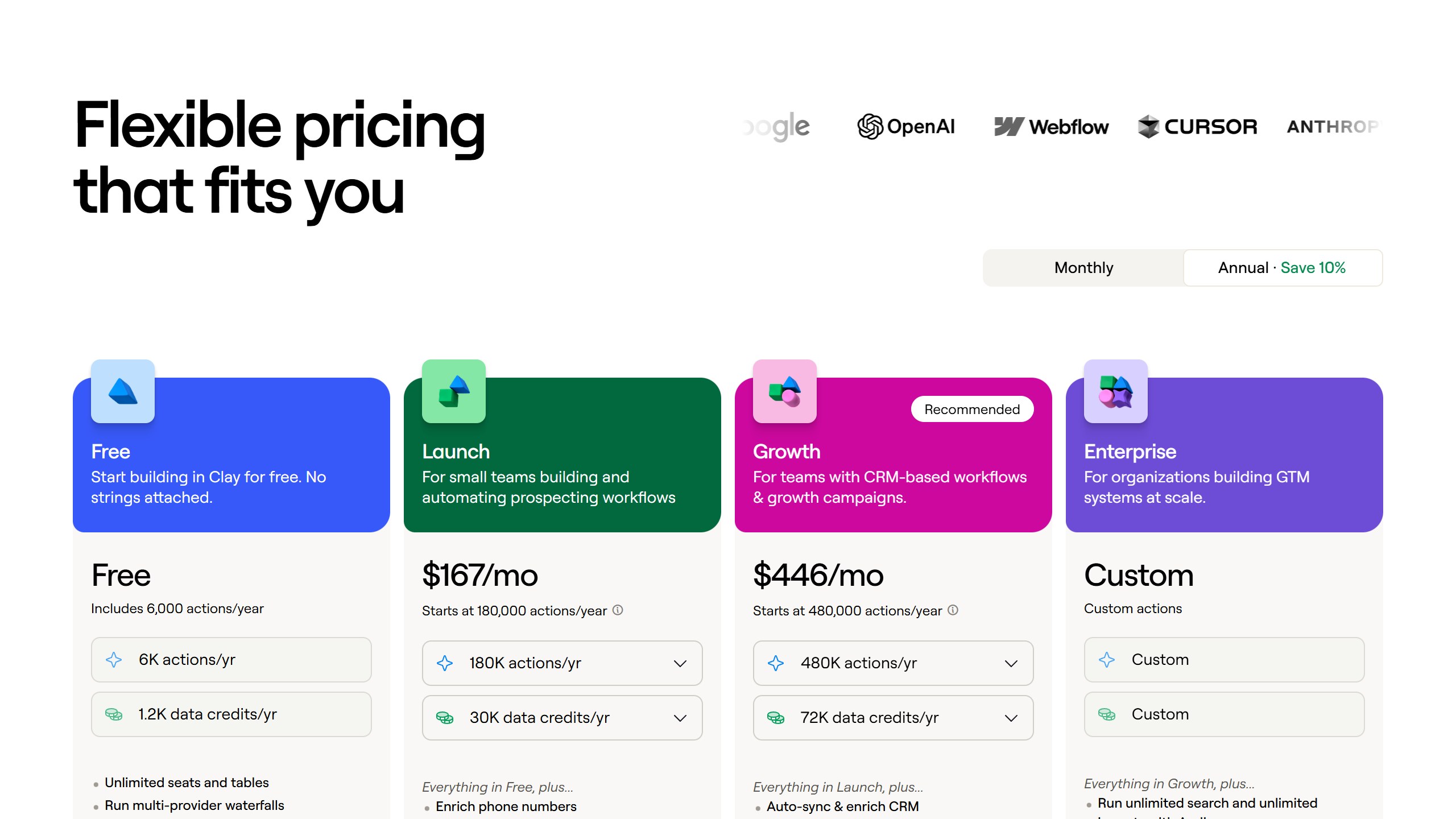
On price, verified 26 August 2026: Clay does not sell plans so much as two independent meters. Launch at $167 a month is $54 of actions plus $113 of data credits, and Growth at $446 is $185 plus $261. Both add up exactly on Clay’s own page, and roughly two thirds of an entry bill is the data meter rather than the automation. Worked through in Clay pricing.
What Clay actually is
If you ask most sales teams what Clay does, you will get five different answers. Lead enrichment platform. AI research tool. Outbound automation. Waterfall enrichment engine. A spreadsheet on steroids. All of them are partly right and that is the source of the confusion.
The simplest framing: Clay is the connective layer between your data providers, your AI, and your outbound system. You start with a list (companies, people, domains, LinkedIn URLs). Clay enriches each row by running it through a sequence of data providers, AI prompts, and web scrapers, picking the best result from each step. Then it pushes the enriched data into your CRM, sequencer, or email tool.
The reason this matters in 2026 is that no single data provider has clean data on everyone. Apollo has great B2B coverage for tech but weaker outside it. Cognism is stronger in EMEA. ZoomInfo has depth but stale data on early-stage companies. Clay’s waterfall solves this by asking each provider in sequence and using the first valid answer, while the AI research agent fills in the gaps that no provider has.
Who Clay is built for
Three buyer profiles get genuine ROI from Clay in 2026.
Modern outbound teams at growth-stage B2B SaaS: 5 to 50 person sales orgs that have outgrown Apollo alone but are not enterprise enough to buy ZoomInfo’s $30K seat licenses. Clay sits in the middle of that range, $2K to $8K per year for a serious team, and gives them enrichment power that approaches enterprise tooling.
RevOps engineers and sales developers: People who think in workflows and recipes. Clay’s power comes from chained logic: enrich the company, then enrich the people, then check for intent signals, then route the result to a sequence. If you have someone on your team who lights up at the words “build a workflow,” they will love Clay.
Agencies running cold outbound for clients: Lead generation agencies and outbound consultancies use Clay as the engine behind client campaigns. The credit-based pricing lets agencies bill clients for enrichment as a pass-through cost while keeping the recipes proprietary.
The buyers who should not pick Clay: solo SDRs who just need a list, small teams that bought Apollo six months ago and have not exhausted it yet, and anyone who wants a plug-and-play tool that works out of the box without a week of setup.
How Clay actually works
The mental model is a spreadsheet where each column can call an enrichment provider, an AI prompt, or a web scrape. You upload a list (or pull one from LinkedIn Sales Navigator, Apollo, your CRM). Clay creates a table where each row is a prospect or company. Then you add columns that enrich the data.
A typical workflow for a B2B outbound team looks like this:
- Pull 500 SaaS companies in the 50 to 500 employee range from Apollo
- Add a Clay column that uses Clearbit to find the company’s tech stack
- Add a column that uses BuiltWith if Clearbit returns null (the waterfall)
- Add a column that uses an AI prompt to summarize their last quarterly earnings if public, or their last fundraise if private
- Add a column that scrapes their careers page for sales hiring signals
- Add a column that finds the most relevant VP or Director on the team via Apollo, falling back to LinkedIn Sales Nav
- Add a column that generates a personalized opening line based on all the previous data
- Push everything to Smartlead, Instantly, or Salesloft for sequencing
That is the magic and the curse of Clay. The magic is that this workflow runs every time you add new rows. The curse is that you have to build it first, and the first one takes 4 to 8 hours of learning.
What Clay does well
- Waterfall enrichment is best in class: 100+ data provider integrations with intelligent fallback logic. No competitor combines this many sources cleanly.
- AI Research Agent: The Claygent feature can scrape the web for custom signals that no static database has. Hiring intent, recent press, technology adoption signals, funding news.
- Active community and templates: Clay University, the Slack community, and the public template library mean you rarely build a workflow from scratch. Someone has already solved most common use cases.
- Integration depth: Native connections to every major outbound platform (Salesloft, Outreach, Smartlead, Instantly, Apollo), CRMs (HubSpot, Salesforce, Pipedrive), and data warehouses (Snowflake, BigQuery).
- Product velocity: Ships meaningful features monthly. The 2026 AI Research Agent improvements alone justified the renewal for most existing customers.
Honest limitations
- The learning curve is real: Plan 1 to 2 weeks to get genuinely productive. Without that investment, Clay is an expensive spreadsheet.
- Credit math gets complex: Every enrichment, AI prompt, and web scrape burns credits at different rates. A 500-row table running 8 columns can eat through a month of credits in one campaign if the recipe is not optimized.
- Pricing scales fast: Launch at $167/mo is fine for testing, but real production usage usually lands on Growth ($446/mo) or a custom Launch configuration within the first 90 days, because both meters climb at once.
- Data quality varies by provider: Clay does not own the underlying data, so you are still subject to Apollo’s, Cognism’s, or ZoomInfo’s accuracy issues. The waterfall mitigates this but does not eliminate it.
- Not a CRM replacement: Clay is the enrichment and orchestration layer. You still need HubSpot, Salesforce, or Pipedrive to manage deals.
Pricing breakdown (the credit math reality)
Clay’s pricing tiers in 2026:
| Plan | Monthly cost | Included volume | Best for |
|---|---|---|---|
| Free | $0 | 500 actions, 100 data credits | Testing the product, single workflow |
| Launch | $167/month | from 180,000 actions and 30,000 data credits a year | Solo SDR or single-workflow team |
| Growth | $446/month | from 480,000 actions and 72,000 data credits a year | 2 to 5 person team running 3 to 5 workflows |
| Either plan, expanded | Set by the sliders | up to 2.4M actions and 600,000 data credits a year | Serious outbound team, multiple campaigns |
| Enterprise | Custom | Custom | 15+ users, custom workflows, dedicated support |
The honest reality: credits get spent faster than the marketing materials suggest. A single enrichment column that runs a waterfall through three providers and one AI prompt can cost 3 to 5 credits per row. A 500-row table with 8 such columns is 12,000 to 20,000 credits in one run. That blows through the Starter plan in one campaign.
Plan for Growth ($446/month), or a Launch plan with the data-credit slider raised, as the realistic starting point for any team doing more than occasional enrichment.
Clay vs the obvious alternatives
Clay vs Apollo: Apollo is a data provider plus a sequencer. Clay is an orchestration layer that sits on top of Apollo (and many others). If your team is small and you just need data plus simple sequencing, Apollo at $49 to $79 per seat per month billed annually, or $65 to $99 monthly, does the job. If your team is doing multi-source enrichment with AI signals, Clay is the upgrade.
Clay vs Cognism: Cognism is strongest for EMEA contact data and GDPR compliance. Clay can pull from Cognism as one of its 100+ providers, so they are complementary more than competing. EMEA-heavy teams often run both.
Clay vs ZoomInfo: ZoomInfo is enterprise-grade data with enterprise pricing ($30K to $100K+ per year). Clay at $167 to $446 per month gives growth-stage teams something approaching that capability without the enterprise contract. Larger orgs often run both, but most companies graduate from Clay to ZoomInfo or stay on Clay indefinitely.
Clay vs building your own enrichment pipeline: A few engineering-heavy teams build custom enrichment using direct API calls to Clearbit, BuiltWith, Apollo, OpenAI. This works at very large scale ($1M+ in saved API costs annually) but for everyone else, Clay’s pre-built orchestration is cheaper and faster than custom code.
Three Clay workflows, costed
Abstract feature lists do not help when you are deciding whether to commit $167 a month. Here are three workflows Clay is commonly used for, worked through against its published credit model to show what each would cost and roughly how much setup they involve.
Workflow 1: SDR list building for a B2B SaaS, 200 accounts
Goal: take a list of 200 target companies in the HR tech space, find the VP of Talent at each, get their work email and LinkedIn, then enrich with company size and recent funding. We started from a CSV of company domains.
Setup time was 35 minutes for the first version, mostly because we had to figure out which waterfall providers gave the best email coverage for this niche. Clay made us run a sample of 10 accounts before committing the full 200, which saved credits when we realized our initial provider order was wasting calls on dead accounts.
Total credits used: roughly 1,400 for 200 accounts (work email + LinkedIn + company enrichment). On a Launch configuration that is a small fraction of the annual data-credit allowance, so this workflow comfortably fits a few times a month at $167.
Hit rate is the number to watch here and the one we will not invent for you. A waterfall across several providers cannot return less than the best single provider in it, so on hard-to-find contacts it will beat a single database, and on easy ones it will match it while costing more. Run fifty of your own hardest accounts through both trials to get a figure that describes your list.
Workflow 2: Agency lead enrichment for outbound, 50 accounts per week
A marketing agency client of ours uses Clay to enrich a weekly drop of 50 inbound leads with firmographic data and intent signals. The table pulls from a Google Sheet, runs Clearbit and Apollo in parallel, then writes a custom AI-generated opener using OpenAI based on the prospect’s recent LinkedIn posts.
This is where Clay’s compounding cost adds up. Each lead burns about 12 credits when you stack three enrichment providers plus an AI call. Fifty leads per week is roughly 2,400 credits monthly. The agency runs on Growth at $446 for headroom and uses the saved time (around 4 hours per week) to focus on response handling instead of list prep.
Workflow 3: Solo founder competitive intel, 10 lookups per day
A solo founder we interviewed uses Clay differently: he runs a daily “who just posted about hiring a CRO” workflow that scrapes a saved LinkedIn search, enriches the companies, and dumps qualified accounts into a Slack channel. About 10 hits per day, very lightweight.
His monthly credit usage sits under 800, which is the Free plan ceiling. He pays nothing and gets a usable signal pipeline. The catch: free credits reset monthly with no rollover, and if he hits a slow week followed by a heavy week, he runs out.
Integrations that actually matter
Clay’s integration page lists over 100 providers. Most teams use four or five. Here is the honest map of which ones matter and when.
Email finding (you need at least two for waterfall coverage): Apollo for breadth, Hunter for accuracy on smaller companies, Dropcontact for European GDPR-compliant data, RocketReach as a fallback for senior executives.
Company data: Clearbit for funded startups and tech companies, Apollo for general firmographics, Crustdata for funding and growth signals, BuiltWith if you are targeting based on tech stack.
People data and LinkedIn: Phantombuster for any LinkedIn scraping that Clay’s native scraper does not cover, Lusha for direct dials in regions where Apollo is thin, ZoomInfo if your team already pays for it (Clay can plug into your existing seat).
AI and content: OpenAI is the default for generated opens and personalization. Anthropic Claude is the better choice for nuanced summarization tasks. Both burn credits fast, so budget for these to be the biggest line item if you use them per-row.
Output destinations: Direct push to HubSpot, Salesforce, Pipedrive, Outreach, Salesloft, Lemlist, Smartlead, and Instantly. The Salesforce integration is the cleanest of the bunch. The Outreach push has occasional field-mapping quirks.
Common mistakes that waste credits
We watched three different teams burn through their credit budgets faster than they needed to. Here are the patterns.
Running enrichments on every row before filtering. If you have 500 accounts and only 200 are realistically a fit, filter first using company size or industry data (which is cheap), then enrich the remainder. Teams who skip this step burn 60% of their credits on accounts they will never email.
Stacking too many waterfall providers. Three providers usually catch 90% of the easy hits. Adding a fourth and fifth provider catches only marginal incremental coverage but doubles your credit spend. Watch your hit rate per provider in the Clay run logs and prune providers that consistently return nothing.
Calling OpenAI per row when a template would do. Personalized openers using LLMs are powerful but expensive. If 80% of your prospects share the same job title and industry, a templated variation is cheaper and converts roughly the same in cold outreach. Save the AI calls for the top 20% of high-value accounts.
Not using sample mode. Clay lets you run a workflow on a 5 or 10-row sample before committing to the full table. This is the single biggest credit saver and most beginners skip it.
Ignoring the reset date. Credits reset monthly, no rollover. Plan your big enrichment runs at the start of your billing cycle so you have room to retry failed rows before the clock resets.
Who should NOT buy Clay
Honest list:
- Solo SDRs or single-rep teams looking for a turnkey list-buying tool. Apollo at $49 a seat per month billed annually does the job.
- Teams that just bought Apollo or Cognism and have not exhausted those platforms yet. Adding Clay on top creates tool overlap and credit waste.
- B2C or SMB-focused sales teams. Clay is built for B2B enrichment. Most providers in the Clay ecosystem do not cover small businesses well.
- Inbound-heavy teams where prospects come to you. Clay’s value is in cold prospecting and enrichment, not inbound qualification.
- Sales teams without a dedicated RevOps person or workflow-builder. Clay requires someone who owns and maintains the recipes. Without that owner, Clay becomes shelfware fast.
Pairing Clay with an AI SDR agent? AiSDR and Artisan both ingest Clay-enriched lists natively. See our best AI SDR tools guide for the full setup.
Evaluating Clay against Apollo specifically? See our Clay vs Apollo comparison.
The verdict for 2026
Clay is the best AI enrichment platform on the market for the specific buyer profile it is built for. The product is mature, the AI features are real (not marketing copy), the integration ecosystem is the widest in the category, and the community accelerates learning.
The catch is the buyer profile. Clay rewards investment. The first two weeks are frustrating. The first month is expensive while you optimize the credit math. After that, the value compounds because your workflows keep running and improving.
If you are a growth-stage B2B SaaS sales team with a RevOps owner who lights up at the words “build a workflow”, Clay is the right pick and probably the best few-hundred-a-month line item on your sales stack. If any part of that profile does not match, look at Apollo first or wait until you have outgrown it.
Pricing: $0 free tier, then $167/month (Launch), $446/month (Growth), Enterprise custom. Both paid plans are two independent sliders, actions and data credits, so those are starting positions rather than fixed prices. Verified 26 August 2026. See our Clay pricing breakdown | Free trial: Free tier with 500 actions and 100 data credits a month, no credit card required
Website: Visit Clay
How credit pricing actually works, and the four questions that decide your bill
Credits are the reason two vendors quoting similar monthly figures can differ threefold in practice. Ask Clay and every competitor the same four questions in writing.
What spends a credit
Revealing an email, revealing a phone number, enriching an existing record and exporting a list are often priced differently, and a mobile number frequently costs several times an email. Ask for the table. A plan advertised as 1,000 credits can be 1,000 emails or roughly 200 phone numbers, and if your team works the phone that distinction is your whole budget.
Whether a credit is spent again on the same person
This is the question almost nobody asks and it is worth the most. Some vendors charge every time you touch a record; Cognism publishes that it only spends again when a contact changes jobs. On a stable account list worked repeatedly over a year, that single difference can halve consumption. Get the answer in the contract rather than from a rep.
Whether unused credits roll over, and what overage costs
Outbound is seasonal. If credits expire monthly you will pay for capacity you cannot use in a quiet month and run out in a busy one. Ask whether allowances roll over, whether they pool across seats, and above all what a credit costs once you exceed the plan, because the overage rate is where the margin sits and it is almost never on the pricing page.
What happens to revealed data when you leave
Ask whether contacts you already revealed remain usable after the contract ends, and in what form you can export them. Some agreements treat the data as licensed rather than purchased, which means the enrichment you spent a year paying for does not come with you. That single clause is often the largest hidden switching cost in this category, and it is entirely invisible until you try to go.
The test that settles it
Give each vendor the same list of 200 accounts from your real ICP and ask them to run it during the trial. Then count three things: how many contacts were found, how many emails bounced when you actually sent, and how many credits it consumed. Coverage claims are marketing; a bounce rate on your own list is evidence.
What every B2B data vendor charges, read from their own pages
Contact data is the one category where the sticker price tells you least, because the meter is credits and a credit does not mean the same thing at any two vendors. Here is each alternative to Clay as published on 4 September 2026.
Apollo, from $49 a seat, and it publishes the allowance too
Apollo is the transparency benchmark here. Basic is $49 per seat per month billed annually and $65 billed monthly, Professional $79 and $99, Organization $119 and $149 with a three seat minimum, plus a genuine free tier. What matters more is that it publishes the allowance, 30,000 credits per seat per year on Basic, which almost nobody else does. Divide that by your real monthly reveal volume and you know whether the plan fits before you speak to anyone.
Lusha, from $37.45 a month, but the figure moves with the slider
Lusha publishes a free tier at $0 and paid plans at $37.45, $52.45 and $299.95 per month billed yearly. Read that with care: the figures are tied to a credit volume selector that defaulted to 40,800 credits a year when we read it, so the price you see is one position on a slider. Any article quoting a flat Lusha price has taken a position and presented it as the price. Always pair the figure with the credit volume it assumes.
Cognism, no figure, but it publishes the packaging
Cognism shows no price in any currency. It does publish that Standard and Pro both include five seats, which is a floor worth knowing before you ask about two, and that its credit model only spends again when a contact changes jobs. That second point is a real structural difference and it favours teams working a stable account list.
Seamless.AI, where we could not read a figure
We read seamless.ai/pricing twice on 4 September 2026 and could not extract a currency figure from its Free, Pro and Enterprise cards, even though the page itself states that “the prices shown on this page reflect this annual discount”. We are not going to claim it publishes nothing on that basis, because absence in a scrape is not absence in fact. Treat any Seamless figure you find elsewhere as unverified until the vendor confirms it.
ZoomInfo, the largest and the least forthcoming
ZoomInfo renders over 12,000 characters of pricing page with no currency figure anywhere on it. That is a deliberate commercial choice rather than an oversight, and it means your only leverage is a published alternative priced at your exact seat count. Walk in with Apollo costed for your team and you have a number in the room that both sides can check.
Clay, published, but on a credit slider
Clay publishes real figures that sit on a credit slider with a monthly and annual toggle marked “Save 10%”, so the number changes as you move the volume. Clay is also a different shape of product: it orchestrates other vendors’ data rather than owning a database, so its credits buy enrichment runs across providers. Compare it on cost per enriched record you actually use, not on headline price.
Where the figures on this page come from
Every price here was read from the vendor’s own pricing page on 4 September 2026, not from an aggregator. That distinction matters in this category, because several vendors changed or withdrew their published figures during the past year and a great deal of what circulates describes packaging that no longer exists.
The pages we read
Apollo publishes $49, $79 and $119 per seat per month on annual billing, plus the credit allowance. Lusha publishes $0, $37.45, $52.45 and $299.95 a month billed yearly, tied to a credit volume selector. lemlist publishes $55 and $87 per user per month annually. Reply.io publishes $29 and $69 per month per account. AiSDR publishes from $250 a month. Warmly publishes $10,000 to $30,000 a year. Lavender publishes free to $89 a seat.
The ones that publish nothing
ZoomInfo renders a long pricing page with no figure on it. Cognism and Gong publish packaging and models but no numbers. Outreach publishes packaging only, and note the domain moved from outreach.io. Salesloft’s pricing URL now redirects to a page titled “Talk to Sales”, so it has no pricing page at all. Artisan removed its figures during 2026.
What we do not do
We do not carry a figure we cannot source to the vendor. Where a number circulates and cannot be traced, we say so and withdraw it rather than repeating it with a hedge, and we have withdrawn our own published figures on that basis more than once. Every price here carries the date we read it, because in this market a claim without a date is not checkable.
undefined
Where to go from here
If you are evaluating Clay specifically, sign up for the free tier and run one workflow on 100 prospects this week. You will know within an hour whether the mental model clicks for your team.
If you are still picking between Clay and Apollo, start with Apollo. It is the cheaper baseline and you will know quickly whether you need more.
For the broader sales tools landscape, our pillar guide is on its way: Best AI Sales Tools 2026, which covers the full stack from lead enrichment through conversation intelligence and coaching.
Reviewed by Faz at AIToolsBakery. This review is research-based: documented workflows, current pricing, and verified user reports. Last updated May 2026.
Interested in signal-based outbound? Read our Warmly review, and our explainer on what an AI SDR is.

Written by
FazFaz is the founder of AIToolsBakery. Some tools here are tested hands on. Others are assessed from vendor documentation and pricing verified on the live page, and every review says which one it is. Sponsors can buy a position in a guide. They cannot buy the score, the criticism, or silence about a better option.
How we test and how we make money →