To write cold emails with AI that actually land, feed the model specific inputs (your offer, the prospect’s role, a real trigger), use tight scenario-based prompts instead of “write me a cold email,” then humanize the output by killing giveaway phrases, varying sentence length, and cutting adjectives down to one clear ask. The AI drafts fast; your editing and your deliverability setup decide whether it works. Below is a real prompt library you can copy today.
The short version
Most AI cold emails fail for two reasons. First, people give the model a lazy prompt and get a generic email back. Second, they paste the raw output straight into a sequencer without humanizing it, so it reads like every other bot. This guide fixes both. You get a tested prompt library grouped by scenario, a before-and-after rewrite, a humanize checklist, and the deliverability basics that decide whether any of it reaches an inbox.
When you want a tool to do this inside a real workflow, we point you to our independent reviews rather than ranking them inline. Start with the best AI cold email tools for 2026.
First principle: the AI is only as good as your inputs
A cold email model has no idea who you are, what you sell, or who you are writing to unless you tell it. The single biggest upgrade to your AI output is a reusable context block you paste at the top of every prompt. Build it once.
“`
CONTEXT (paste before any prompt below):
- My company: [one sentence on what you do]
- My offer: [the specific thing I want them to care about]
- The measurable outcome we deliver: [number, timeframe, proof]
- Who I’m writing to: [role, seniority, company type, size]
- The trigger / reason I’m reaching out now: [funding, hire, post, tech change]
- Tone: direct, peer-to-peer, no hype, no jargon, short sentences
- Hard rules: no buzzwords, no “I hope this finds you well”, one ask only
“`
Every prompt in this library assumes that context block sits above it. Without it you get filler. With it you get something worth editing.
The prompt library
Fifteen prompts, grouped by what you are trying to do. Paste your context block first, fill the brackets, then edit the result. Do not ship raw output. Ever.
ICP and prospect research
“`
Prompt 1: ICP definition:
Given my offer above, define my ideal customer profile. List the
3 firmographic traits, 2 job titles, and 3 buying triggers that
make a prospect most likely to need this now. Be specific, no
generic categories. Format as a tight bulleted list.
“`
“`
Prompt 2: Account research summary:
Here is what I know about [company]: [paste notes, site copy,
recent news]. Summarize in 4 bullets: what they do, a likely
pain related to my offer, a recent change I can reference, and
the one angle most likely to earn a reply. No fluff.
“`
First-line personalization
“`
Prompt 3: Specific opener from a real signal:
Here is a real detail about my prospect: [paste a LinkedIn post,
job posting, news item, or site line]. Write 3 one-sentence
openers that reference this specifically and connect it to a pain
my offer solves. No “I saw that…” templates. No flattery.
Make it sound like a peer noticed, not a bot scraped.
“`
“`
Prompt 4: Anti-generic filter:
Here are 3 opening lines: [paste]. Rate each 0 to 5 on how
specific it is. A 5 could only be written to this one person.
A 0 could be sent to anyone. Rewrite anything under 4.
“`
Pain-point hooks
“`
Prompt 5: Pain hook:
For a [role] at a [company type], list the top 3 day-to-day
frustrations my offer removes. For each, write a 2-sentence hook
that names the frustration in their words, then hints at relief.
No solution dump, no feature list. Curiosity over completeness.
“`
“`
Prompt 6: Cost-of-inaction angle:
Write a 3-sentence email body that frames the cost of NOT solving
[pain] for a [role]. Use a concrete number or scenario, not vague
“lost productivity.” End with a soft, specific question.
“`
Value-prop framing
“`
Prompt 7: Outcome-first value prop:
Rewrite my offer as a single sentence the prospect would care
about. Lead with the outcome and a number, not the product name
or how it works. Format: “[Role]s at [company type] use us to
[outcome] in [timeframe].” Give me 3 variations.
“`
“`
Prompt 8: Proof without bragging:
Write one sentence that drops a relevant proof point (a similar
customer, a result) without sounding like a case-study pitch.
Keep it casual and specific. Under 25 words.
“`
Subject lines
“`
Prompt 9: Subject line set:
Write 10 cold email subject lines for the body below: [paste].
Rules: 2 to 5 words, lowercase optional, no clickbait, no “quick
question”, no emojis, no the prospect’s first name as a gimmick.
Each must hint at relevance, not curiosity-bait.
“`
“`
Prompt 10: Subject line stress test:
Here are my subject lines: [paste]. Flag any that sound like
marketing, any that overpromise, and any a spam filter would
dislike. Suggest a tighter version of the best 3.
“`
Follow-ups
“`
Prompt 11: Value-add follow-up:
Write follow-up #2 for a prospect who didn’t reply to [paste
first email]. Do NOT say “just bumping this” or “following up.”
Add one new useful idea, resource, or angle. 3 sentences max.
“`
“`
Prompt 12: Pattern-interrupt follow-up:
Write a short follow-up that changes the angle entirely from the
first email. New hook, same offer. Acknowledge their silence
lightly without guilt-tripping. Under 60 words.
“`
Breakup emails
“`
Prompt 13: Clean breakup:
Write a breakup email after 4 ignored touches. Tone: graceful,
no guilt, no passive aggression. Give them an easy out and a
single low-friction reason to reply if timing is wrong. Under
50 words.
“`
“`
Prompt 14: Permission-to-close:
Write a one-line breakup that asks if I should close their file.
Make it easy to say “yes, stop” OR “no, reach out in Q[X].”
Conversational, not corporate.
“`
Whole-sequence sanity check
“`
Prompt 15: Sequence reviewer:
Here is my full 4-email sequence: [paste]. Check for: repeated
phrases across emails, more than one ask per email, buzzwords,
sentences over 20 words, and any line that sounds AI-generated.
List every issue with a fix. Do not rewrite, just flag.
“`
If you want a copilot that does Prompts 3, 4, 9, and 15 live inside Gmail while you write, that is exactly what a real-time coaching tool is for. See our Lavender review for how that workflow holds up in practice.
Before and after: the same email, robotic vs human
Here is raw AI output from a lazy prompt, then the humanized version.
Before (raw, robotic)
Subject: Quick question regarding your sales process Hi John, I hope this email finds you well! I came across your company and was truly impressed by the innovative work you’re doing in the SaaS space. I wanted to reach out because our cutting-edge AI-powered platform empowers sales teams to streamline their workflows and unlock unprecedented efficiency. Would you be open to a quick 15-minute call to explore how we can help you achieve your goals? I’d love to connect! Best regards, Sarah
Count the tells: “I hope this email finds you well,” “truly impressed,” “innovative work,” “SaaS space,” “cutting-edge,” “empowers,” “streamline,” “unlock unprecedented efficiency,” “achieve your goals,” “I’d love to connect.” Every one is a flag. The email says nothing specific and could be sent to ten thousand people.
After (humanized)
Subject: your 3 open AE roles John, saw you’re hiring 3 AEs this quarter. Usually that means the SDR team is about to be the bottleneck feeding them. We help RevOps leads keep pipeline ahead of new AE headcount, one customer went from 40 to 90 meetings a month without adding SDRs. Worth a look, or is your top-of-funnel already sorted? Sarah
Same offer. But it references a real trigger (the job postings), names a specific pain (SDRs as the bottleneck), drops one concrete proof point, and ends with one easy question. It reads like a person who actually looked.
Look at what got cut. The greeting vanished. The compliment vanished. Every adjective vanished. The “explore how we can help you achieve your goals” filler vanished. What remains is a chain of facts: a trigger, a consequence, a proof point, a question. That is the skeleton of every cold email worth sending, and the AI will almost never produce it on the first try. Your job is to strip the first draft down to that skeleton and stop there. The instinct to “add a little warmth” is exactly what reintroduces the robot smell. Warmth in cold email comes from relevance, not from pleasantries.
One more thing worth noticing: the humanized version is shorter. Far shorter. The robotic draft runs about ninety words of throat-clearing. The good one runs under sixty and says more. Length is not a proxy for effort, and prospects know it. A two-line email that proves you did your homework beats a polished paragraph that proves only that you can write polished paragraphs.
The humanize-the-AI-output checklist
Run every AI draft through this before it sends. This is the difference between “obviously a bot” and “worth a reply.”
- Kill the giveaway phrases. Delete “I hope this finds you well,” “I wanted to reach out,” “in today’s fast-paced world,” “I came across,” “circle back,” “synergy,” “leverage,” “seamless,” “cutting-edge,” “empower,” “unlock,” “game-changer.” If the AI wrote it, search and destroy.
- Vary sentence length. AI defaults to uniform medium sentences. Mix a 3-word sentence with a 15-word one. Rhythm reads as human.
- Cut adjectives to almost none. “Innovative, cutting-edge, powerful” all go. Nouns and verbs carry weight. Adjectives signal sales copy.
- One ask, and only one. If there are two questions or two CTAs, cut one. Confused prospects do nothing.
- Make it specific to one person. If you could send it to anyone, it fails. There must be at least one line only this prospect would recognize.
- Read it aloud. If you would not say it to a colleague at a bar, rewrite it. No human says “I’d love to explore synergies.”
- Cut the length by a third. AI over-writes. Shorter almost always wins in cold outbound.
- Fix the merge fields. Check that no “{{first_name}}” or “[Company]” survived. One broken token kills credibility instantly.
Deliverability basics so your AI emails actually land
The best email in the world earns nothing from a spam folder. AI makes it trivial to generate volume, which makes deliverability the real constraint in 2026. Get these right before you scale.
Warm up before you send
A brand-new sending domain or inbox has no reputation. Sending cold volume from it immediately is the fastest way to get flagged. Use a warmup process that gradually builds sending reputation over a few weeks before real campaigns start. Most serious sending platforms bake this in. For how the leading sending engines handle warmup and inbox rotation, see our Smartlead review and our Instantly review.
Ramp volume slowly
Do not go from 0 to 500 emails a day. Start low, tens per inbox, and increase gradually. Spread volume across multiple inboxes and domains rather than blasting one. Sudden spikes look like spam behavior to every mailbox provider.
Send plain text, mostly
Heavy HTML, multiple images, and tracking pixels on a true cold email all hurt deliverability and scream “marketing blast.” Keep cold emails plain, conversational, and link-light. Add formatting only once a conversation is warm.
Protect your primary domain
Never run cold campaigns from your main company domain. Buy separate sending domains, point them at your brand, and keep your primary domain clean. If a sending domain gets burned, you retire it without touching your real email.
Keep lists clean
Verify emails before sending. A high bounce rate is one of the fastest ways to wreck domain reputation. This is also why the enrichment and data quality of your AI SDR or list source matters as much as the copy. For the tools that manage this and the AI-assisted sending workflows around it, our Reply.io review and our lemlist review both cover deliverability behavior in detail.
Authenticate your domains
Before any of the above matters, set up SPF, DKIM, and DMARC records on your sending domains. These are the technical signatures that tell mailbox providers your mail is legitimately from you and not spoofed. Mail sent from a domain without proper authentication is treated as suspicious by default in 2026, and major providers now actively reject or quarantine it. This is a one-time setup per domain, it is not optional, and no amount of clever copy or careful warmup will save mail that fails authentication. If you are not sure whether your records are correct, that is the very first thing to check, before you write a single line.
Why AI raises the deliverability stakes
It is worth being blunt about why this section sits in a writing guide at all. AI lowers the cost of producing emails to nearly zero. When producing the thing is free, the natural limit on volume disappears, and the only remaining constraint is what the inbox providers will tolerate. In other words, AI shifts the bottleneck from writing to deliverability. The teams that win in 2026 are not the ones with the cleverest prompts. They are the ones who treat their domain reputation as the scarce, fragile asset it actually is, and who ramp with the patience the AI itself will never have.
Putting it together: a 20-minute workflow
- Paste your context block (build it once, reuse forever).
- Run Prompt 2 to research the account, Prompt 3 for the opener.
- Run Prompts 5 to 8 to draft the hook, value prop, and proof.
- Generate the sequence and subject lines (Prompts 9, 11, 13).
- Run Prompt 15 to self-audit, then run the humanize checklist by hand.
- Confirm deliverability: warmed inbox, separate domain, plain text, clean list.
- Send to a small batch, read every reply, iterate.
That loop produces cold emails that sound human, reference something real, and reach the inbox. The AI does the heavy lifting; your judgement does the part that actually earns the reply.
Where to go next
If you want software to run this whole motion for you, understand the tradeoffs first. Read what is an AI SDR for how autonomous agents handle this pipeline and where they fail, then compare specific products in the best AI cold email tools for 2026.
Good AI cold email is not about a magic prompt. It is about specific inputs, ruthless humanizing, and clean deliverability. Get those three right and the model becomes a genuine force multiplier. Skip them and you are just automating the emails everyone already deletes.
undefined
Deliverability, which decides your results more than the software does
Reply rates in cold outbound are determined mostly by whether the message arrives at all. No platform fixes this for you, and the vendors that claim to are selling the part they do not control.
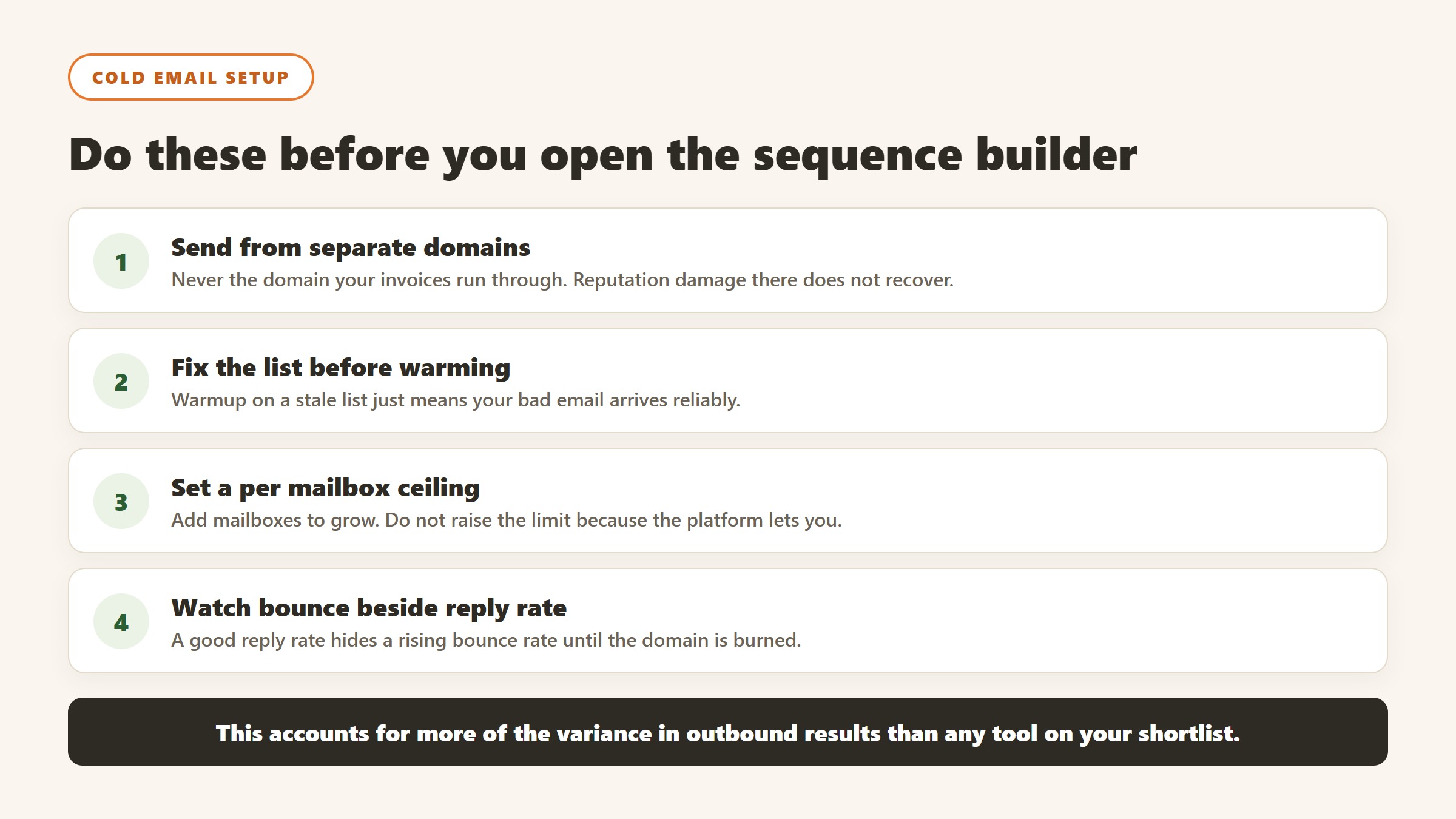
Never send from your primary domain
Cold outbound damages sender reputation, and reputation damage on the domain your invoices and customer support run through is not recoverable in any useful timeframe. Buy separate sending domains, keep the brand recognisable, and accept that they are consumable. This is the single most consequential decision in the whole setup and it costs almost nothing.
Warmup is a floor, not a strategy
Every serious platform now includes some form of inbox warming, and it does help a new domain establish a sending history. What it does not do is compensate for a bad list or a message nobody wants. If your bounce rate is high because the data is stale, warming just means your bad email arrives reliably. Fix the list first.
Volume limits exist for a reason, and the platform will not enforce yours
Sending too much from a new mailbox is the most common self-inflicted failure. Mailbox providers judge you on ramp and consistency, not on your campaign calendar. Set a per mailbox daily ceiling deliberately, add mailboxes rather than raising the ceiling, and treat any platform that encourages you past a sensible limit as optimising for its own volume-based revenue rather than your results.
Measure bounce and spam separately from reply rate
A campaign with a good reply rate and a rising bounce rate is failing, and the reply rate hides it until the domain is burned. Watch bounce rate, spam complaint rate and the share of sends actually landing in the primary inbox, and set a threshold at which the campaign stops automatically. Most teams learn this after losing a domain rather than before.
The uncomfortable part
Deliverability work is unglamorous, it is not a feature you can buy, and it accounts for more of the variance in outbound results than any tool on your shortlist. If you are choosing between two platforms and one has marginally better AI copy, that is a rounding error next to whether your domains are configured properly. Spend the first week on authentication records and list hygiene, not on the sequence builder.
The compliance questions outbound teams skip until they cannot
Outbound touches data protection law directly, and the answers differ enough by region that a single policy usually will not do.
Where your prospects are decides which rules apply
Contacting people in the EU or UK brings GDPR into scope regardless of where your company sits, and business contact data is still personal data. The usual lawful basis for B2B outbound is legitimate interests, which requires you to have actually done and documented the balancing test rather than to have heard that it applies. Ask your data vendor how it sourced the record and what notice the individual received.
Ask the vendor where the data came from
A reputable provider will tell you its sourcing and its notification approach. A vague answer is itself an answer, and it becomes your problem rather than theirs the moment somebody objects. Ask specifically how a suppression or erasure request is handled, how quickly it propagates, and whether it applies across every customer of the vendor or only your instance.
Honour opt-outs across the stack, not per tool
An unsubscribe in your sequencer does not necessarily suppress that person in your dialler, your ads audience or a new list you import next quarter. Every place a contact can enter your outbound needs to respect a single suppression list. This is genuinely hard to get right and it is the failure most likely to turn a complaint into something worse.
Recording calls has its own rules
If you are also running conversation intelligence, recording consent varies by jurisdiction and, in the United States, by state, with some requiring every party to consent. That is a per call obligation, not an account setting, and it needs to be handled by the tool rather than by remembering.
Where the figures on this page come from
Every price here was read from the vendor’s own pricing page on 4 September 2026, not from an aggregator. That distinction matters in this category, because several vendors changed or withdrew their published figures during the past year and a great deal of what circulates describes packaging that no longer exists.
The pages we read
Apollo publishes $49, $79 and $119 per seat per month on annual billing, plus the credit allowance. Lusha publishes $0, $37.45, $52.45 and $299.95 a month billed yearly, tied to a credit volume selector. lemlist publishes $55 and $87 per user per month annually. Reply.io publishes $29 and $69 per month per account. AiSDR publishes from $250 a month. Warmly publishes $10,000 to $30,000 a year. Lavender publishes free to $89 a seat.
The ones that publish nothing
ZoomInfo renders a long pricing page with no figure on it. Cognism and Gong publish packaging and models but no numbers. Outreach publishes packaging only, and note the domain moved from outreach.io. Salesloft’s pricing URL now redirects to a page titled “Talk to Sales”, so it has no pricing page at all. Artisan removed its figures during 2026.
What we do not do
We do not carry a figure we cannot source to the vendor. Where a number circulates and cannot be traced, we say so and withdraw it rather than repeating it with a hedge, and we have withdrawn our own published figures on that basis more than once. Every price here carries the date we read it, because in this market a claim without a date is not checkable.

Written by
FazFaz is the founder of AIToolsBakery. Some tools here are tested hands on. Others are assessed from vendor documentation and pricing verified on the live page, and every review says which one it is. Sponsors can buy a position in a guide. They cannot buy the score, the criticism, or silence about a better option.
How we test and how we make money →