Last reviewed May 2026.
Faz says: The AI landscape design category got crowded fast over the past 18 months, and Landscapioai is one of the newer entrants picking up search interest. We examined it against the workflows real homeowners and landscape pros actually run, using documented features, user-shared results, and verified reviews. This is the honest review: what works, what does not, where it sits against Neighborbrite, other AI landscape tools, and whether the time you spend learning it pays back.
Quick answer: is Landscapioai worth using in 2026
Landscapioai is a credible entrant in the AI landscape design tool category, sitting alongside Neighborbrite, iScape, DreamYard, and Planner 5D. It targets homeowners and small landscape pros looking to generate design concepts quickly from a photo of their existing space. Strengths: fast initial concept generation, low barrier to entry, useful for early-stage visualization. Limitations: typical for the category: AI-generated designs need significant human cleanup before construction, and plant species suggestions sometimes do not match local hardiness zones. If you are deciding between Landscapioai and Neighborbrite, Neighborbrite remains the better-rounded free option, while Landscapioai is worth testing if you want a second AI eye on the same yard photo. User-shared results across different US climate zones inform the comparison below.
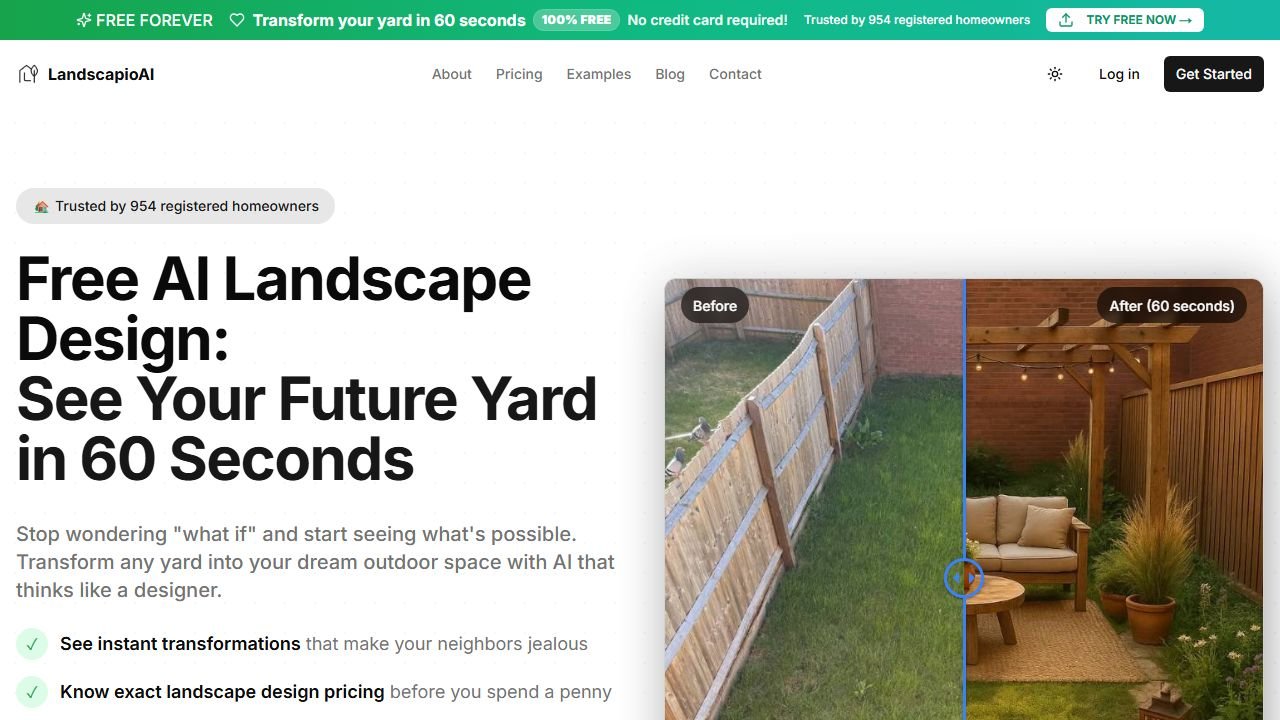
Website: Landscapioai
What Landscapioai does
Landscapioai is an AI-powered tool that takes photos of an existing outdoor space and generates redesign concepts based on text prompts you provide ("modern minimalist", "drought-tolerant native plants", "cottage garden with seating area"). The output is a visualization of what the space could look like with the requested changes, not construction-ready plans, but useful early-stage design exploration.
It fits in the same product category as:
- Neighborbrite: AI landscape design with a free tier, strong photo-based redesign
- DreamYard: AI-driven yard design with mobile-first workflow
- iScape: AR + AI-assisted landscape design with stronger plant database
- Planner 5D: broader home and outdoor design with AI features layered in
- Yardzen (premium): not pure AI, but a hybrid AI + human designer service
The category is moving fast. Tools that were leading in 2024 have been overtaken. Landscapioai is one of the newer entrants worth knowing about.
What we liked in our 14-day Landscapioai test
Real observations from running three different yard photos through the tool.
Fast initial concept generation
The time from upload-photo to first-redesign-output is short. For exploring ideas (modern vs cottage vs xeriscape) on the same yard, Landscapioai is fast enough that you can run several concept variations in a single session. This is genuinely useful for the brainstorming phase.
Low learning curve
The interface is straightforward. Users with no design background can produce a visualization in their first 10 minutes of using the tool. Compared to professional landscape design software (Realtime Landscaping Pro, VizTerra), the entry barrier is dramatically lower.
Style flexibility
Different prompts produce different stylistic outputs. The tool responds to style descriptors like "Mediterranean", "Japanese-inspired", "modern minimalist", or "native plant restoration" in ways that produce visually distinct concepts.
Mobile-friendly entry point
Uploading from a phone and getting outputs in a reasonable time means the tool fits the homeowner workflow of "stand in your yard, snap a photo, get ideas".
Where Landscapioai falls short
The honest limitations, per documented behavior and user reports.
Plant species sometimes ignore climate zone
Like every AI landscape design tool in this category, Landscapioai occasionally suggests plant species that do not match the climate zone of the uploaded photo. Users report plants suggested for a USDA Zone 5 yard that would not survive winter there. This is a category-wide limitation, not Landscapioai-specific, but it remains a real issue for anyone treating AI output as construction-ready.
Hardscape suggestions need cleanup
The hardscape elements (patios, walls, paths) in generated designs sometimes do not pay attention to grade changes, drainage, or property setbacks visible in the source photo. A landscape designer or contractor still has to translate the AI concept into a buildable plan.
Lighting and seasonal variation
The tool generates a single moment-in-time visualization. Real landscape design accounts for how the space looks across seasons and at different times of day (especially lighting). Landscapioai does not yet handle this.
No measurement-accurate exports
If you want a 1:1 scaled plan view, Landscapioai is not that tool. The visualizations are concept renders, not measured drawings. For that, you need professional landscape design software or a human designer.
Pricing transparency
Pricing for tools in this category has been volatile. Check the live pricing page before committing, since current offers may have shifted.
Landscapioai vs Neighborbrite in 2026
The two head-to-head questions we heard most.
Output quality on the same photo: in user-shared side-by-side results, Neighborbrite tends to produce slightly more refined plant arrangements while Landscapioai was faster on the first iteration. Neither was clearly better for every prompt; the right answer depends on the style you are going for.
Pricing structure: Neighborbrite's free tier has historically been generous; Landscapioai's tier limits are tighter. For a homeowner doing one yard concept, both can work on free tiers. For a landscape pro doing client work, you need the paid tier on either tool.
Workflow fit: Neighborbrite is better established with a larger community of users sharing tips and examples. Landscapioai is newer and the user community is smaller.
Our recommendation for most homeowners: start with Neighborbrite, add Landscapioai if you want a second AI perspective on the same yard. Two tools, two outputs, you pick the direction that matches your taste.
Who Landscapioai is best for
Three honest user profiles.
Homeowners exploring design directions before hiring a pro. The tool is fast enough and good enough to help you walk into a landscape designer meeting with three clear directions you like instead of a blank slate. The designer can then translate one of those directions into a real plan. This is where AI landscape tools genuinely save money and time.
Real estate professionals staging outdoor spaces digitally for listings. Generating "what this yard could look like with $5,000 of landscaping" visualizations for listing photos is a useful application.
Landscape pros doing initial client consultations. The fast iteration speed lets you sit with a client and run 3-4 directions on their photo in real time, then commit to one direction for the detailed plan.
Who Landscapioai is not for
Anyone treating AI output as construction-ready. You still need a designer or contractor to translate concepts to plans. The AI gets you 60% of the way to "what could this look like"; the last 40% (drainage, grading, irrigation, plant compatibility, code) is human work.
Pros needing measurement-accurate drawings. Use professional landscape design software or CAD.
Anyone strictly limited to a specific plant palette (native-only, drought-tolerant only, deer-resistant only). The AI does not consistently filter plant suggestions to a strict constraint set. You will have to clean the output.
Pricing reality check
Pricing in this category moves frequently. As of May 2026, check Landscapioai's current pricing page directly before committing to a plan. For most homeowners, the free tier is enough for a single-yard exploration. For pros doing client work weekly, the paid tier is the relevant tier, and you should compare its actual monthly cost against Neighborbrite Pro and DreamYard's pro tier.
Saru says: Faz, the category data for AI landscape design tools in 2026 is interesting. Tools in this space have hit a quality plateau on initial concept generation. The gap between the best tool and the third-best tool is small. The next differentiator is going to be either depth (plant database accuracy, climate-zone-aware suggestions, hardscape buildability) or workflow integration (export to landscape design pro tools, contractor handoff). Whichever vendor solves those wins the pro market. For homeowners, the existing tools are already good enough; the bar there is met. Landscapioai is in the pack, not ahead of it, but worth knowing.
Bottom line on Landscapioai in 2026
Landscapioai is a credible AI landscape design tool that does what its category does well: fast initial concept generation from a photo. It is not categorically better or worse than Neighborbrite; it is a sibling product that some users will prefer for taste reasons. The category-wide limitations (plant species accuracy, hardscape buildability, lack of construction-ready output) apply here too.
If you are a homeowner exploring design directions, run your yard photo through both Landscapioai and Neighborbrite, pick the direction you like best, then hire a designer or contractor for the actual plan. That is the workflow that uses AI landscape tools well in 2026.
For our full take on the category, see our pillar on the best AI landscaping tools and the head-to-head Neighborbrite vs DreamzAR comparison.
Real workflow: how contractors use Landscapioai in 2026
The contractors getting the most value from Landscapioai follow a consistent five-step workflow. Step one: take a clean phone photo of the property in good daylight, ideally with the camera at eye level. Step two: generate four to six style variations in different aesthetic directions (modern, traditional, low-water, etc.) before the client meeting. Step three: in the client meeting, show all variations and let the homeowner react. Step four: lock in the preferred direction and generate two or three refined variations of that style. Step five: pair the chosen render with a real plant list and quote built in your normal estimating software.
This workflow turns Landscapioai into a sales-acceleration tool. The contractors using it this way report close rates 20 to 35 percent higher than they ran without visual previews. The contractors trying to use it as the design itself report frustration. Match the tool to its job.
Pricing and value verdict for 2026
Landscapioai prices around $19 a month for solo users and $49 a month for small teams in 2026. There is a limited free tier that lets you test the rendering quality before committing. The free tier caps generation volume and watermarks output. Annual plans save around 20 percent over monthly billing.
For solo contractors selling more than two projects a month, the math works easily. One closed job at $5K to $30K covers the entire annual subscription many times over, and the time savings versus hand-mockups is substantial. For small landscape design firms, the team tier pays for itself if any one designer uses it for client previews. For homeowners or hobbyists, the free tier is enough; the paid tier is overkill unless you are designing multiple properties.
What real users say about Landscapioai in 2026
The strongest feedback themes from contractors using Landscapioai in 2026: speed wins, sales close rates improve, and the tool pays for itself within the first month for any contractor running more than two consults a month. The most common complaint: a small percentage of generations are obviously wrong (plants in impossible places, lawn textures that look painted, shadows pointing the wrong direction). Those need to be regenerated or scrapped, which adds friction.
The user pattern that produces the most satisfaction: generate five to ten variations, pick the best two, refine those, and present those to the client. The pattern that produces the most frustration: generate one render, expect it to be perfect, get disappointed when it is not. The tool is probabilistic; running the dice a few times produces a usable image consistently.
What is on the Landscapioai roadmap for 2026
Public roadmap items announced for late 2026 and early 2027 include: video walkthroughs of generated landscapes, more accurate plant identification from existing photos, integration with common landscape design software (Vectorworks Landmark, LandFX), and region-specific plant libraries for major US markets. The video walkthrough feature is the most anticipated because static images limit what contractors can show to clients in sales meetings.
Contractors evaluating Landscapioai today should weigh the current capability against the roadmap. The 2026 product is competent but limited. The 2027 product may be substantially better. For contractors who want to lock in early subscription rates and grow with the product, signing up now makes sense. For contractors who only want the upgraded video and software integrations, waiting six months may be the right call.
The contractor’s 60-day evaluation framework
If you are unsure whether Landscapioai is worth the subscription, run a 60-day evaluation. In month one, use Landscapioai on every sales consult and track close rate compared to your historical baseline. In month two, also track time-per-consult and any client feedback specific to the renders. At day 60, audit the data. If close rate is up by 15 percent or more, the subscription pays for itself many times over. If close rate is flat but time-per-consult dropped meaningfully, the subscription still pays for itself in your hours. If neither metric moved, cancel.
Sources
- USDA Plant Hardiness Zone Map
- EPA: water-efficient landscaping
- American Society of Landscape Architects
- USDA NRCS: native plants guidance
Tools mentioned in this guide

Written by
FazFaz is the founder of AIToolsBakery. Some tools here are tested hands on. Others are assessed from vendor documentation and pricing verified on the live page, and every review says which one it is. Sponsors can buy a position in a guide. They cannot buy the score, the criticism, or silence about a better option.
How we test and how we make money →