REimagineHome and Collov are two of the most popular AI virtual staging tools, and for an agent staging a listing, they cover the same core job: turn an empty or dated room into a styled space in seconds, for a fraction of the cost of physical staging. So which should you use? The answer depends on whether you value output quality and smart features or raw speed and low cost at volume. Here is how they compare.
Short answer: Choose REimagineHome for the most photorealistic results and standout features like shoppable furniture and credit-free iteration, ideal for agents who want quality per listing. Choose Collov for fast, ultra-affordable staging at high volume. Both offer free ways to try them, so test both on your own photos.
The core difference
REimagineHome, built by Styldod, leans toward quality and features. In independent testing it consistently delivers some of the most photorealistic staging with the least effort, and it adds real-estate-native extras: shoppable staging with purchasable furniture and a conversational refine flow that only charges for the final render. It is the pick when the look of each listing matters most.
Collov AI leans toward speed and price. It offers lightning-fast, ultra-affordable staging with a large style library, aimed at agents who stage a high volume of rooms and want to keep the per-image cost as low as possible. It is the pick when throughput and budget matter more than the last ten percent of polish.
Head to head
| REimagineHome | Collov AI | |
|---|---|---|
| Strength | Photorealism and features | Speed and low cost |
| Standout feature | Shoppable purchasable furniture | Large style library, fast output |
| Iteration | Refine flow, only final render costs a credit | Fast re-generation |
| Free option | 5 free designs at signup | Free trial available |
| Paid pricing | $14 to $99/mo by credits | Low per-image |
| Best for | Quality per listing | High-volume, budget-conscious staging |
Output quality
Both produce good results, but REimagineHome has the stronger reputation for photorealism, and in independent comparisons it tends to need the least cleanup to reach a usable image. Collov’s output is solid and fast, which is exactly what a high-volume user wants, but if you are staging a hero listing where every photo counts, REimagineHome’s edge in realism is worth the slightly higher effort per image. As always, review every staged photo before it goes live regardless of which tool you use.
Features
This is where REimagineHome pulls ahead. Its shoppable staging fills a room with real, purchasable furniture from major retailers, turning a listing photo into something a buyer can act on, and its refine flow lets you iterate toward the right look without burning a credit on every attempt. Collov keeps things focused on fast, affordable staging with plenty of styles, which is the right trade for its target user but a narrower feature set overall.
Price and volume
Collov’s advantage is cost at volume. If you stage many rooms a month and want the lowest per-image price, it is built for that. REimagineHome’s credit-based plans run from $14 to $99 per month and reward users who value the refine flow and shoppable feature over raw throughput. For a few listings a month, REimagineHome’s quality is easily affordable; for very high volume on a tight budget, Collov’s economics win.
What each one costs, verified July 31, 2026
Collov publishes a full credit-based price card. Every figure below is quoted from its own pricing page as of July 31, 2026.
| Collov plan | Monthly | Photo credits | Billed yearly | Cost per photo |
|---|---|---|---|---|
| Standard | $19 | 25 | $228 | $0.76 |
| Advanced | $49 | 150 | $588 | $0.33 |
| Premium | $79 | 263 | $948 | $0.30 |
| Enterprise | $127 | 526 | $1,524 | $0.24 |
Extra photos beyond your allowance run $0.24 each, which is the same rate the Enterprise tier works out to. The cost-per-photo column is ours, and it is just the monthly price divided by the credits, but it is the number that decides this purchase and neither vendor puts it on the page.
REimagineHome is harder to pin down. Its plans are named Essential, Pro and Advanced, and the page title states a range of $14 to $99 per month, but the individual plan prices do not appear as readable text on the pricing page itself. What is visible is the shape of the entry tier: Essential includes 30 credits per month and explicitly excludes the conversational agent, reference-photo generation, the Real Products flow, and the next-generation high-resolution output. In other words the cheapest plan is the older engine. Confirm your exact tier on their site before you buy.
Cost per listing, worked out
A single residential listing usually needs 8 to 12 staged images once you cover the main living space, kitchen, primary bedroom, and an exterior or two. Run that against Collov’s credit allowances and the tiers separate fast:
- Standard, 25 credits. About two listings a month. At $0.76 per photo this is the most expensive image you can buy from Collov, more than three times the Enterprise rate.
- Advanced, 150 credits. Roughly 12 listings a month, and the point where the per-photo cost drops by more than half to $0.33.
- Premium, 263 credits. Around 21 listings, at $0.30 per photo.
- Enterprise, 526 credits. Around 43 listings, at $0.24 per photo.
The practical read: the jump from Standard to Advanced is the only upgrade that pays for itself on unit economics alone. Everything above Advanced buys volume, not a materially better rate. If you list two or fewer properties a month, Standard is fine and you are knowingly paying a premium for low commitment. If you list four or more, staying on Standard and buying overage credits costs more than simply moving up.
Label the photos, whichever tool you pick
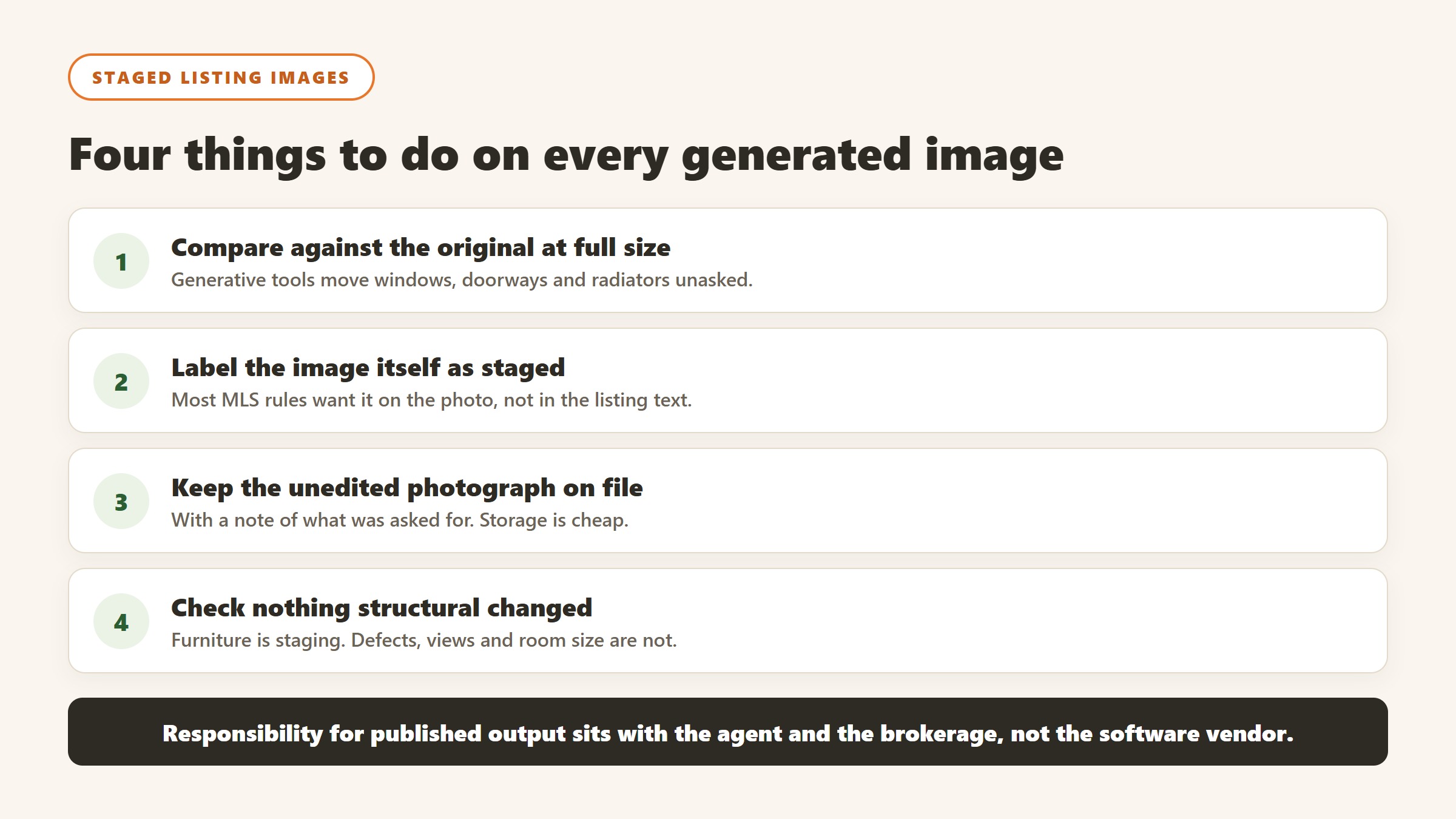
Virtual staging sits inside advertising rules, not just marketing taste. Most MLSs require that digitally altered listing photography be disclosed, and several require the label to appear on the image itself rather than buried in the remarks field. Rules vary by MLS and by state, so check your own MLS handbook before your first staged upload rather than after a complaint. The safe habit is simple: state clearly that an image is virtually staged, never alter a structural feature in a way that misrepresents the property, and keep the unedited original on file. Both tools here will happily remove a wall or add a pool, and neither will warn you that doing so on a live listing is a different kind of problem.
Which should you choose?
- Choose REimagineHome if: you want the most photorealistic output and value features like shoppable furniture and credit-free iteration, and you stage a manageable number of listings where quality matters.
- Choose Collov if: you stage in high volume and want the fastest, most affordable path to a decent staged image.
- Try both if: you are unsure, since each offers a free way to test, and the right answer is whichever looks better and more consistent on your own photos.
What agent CRMs and lead platforms actually charge
This half of the market divides into CRMs you fill with your own leads and platforms that sell you the leads as well, and the second is several times the price of the first. Here is each alternative to reimaginehome vs, read on 4 September 2026.
Follow Up Boss, $69 per user per month, published plainly
Follow Up Boss publishes $69 per user per month plus tax, with a yearly option giving two months free and calling as a $39 per user add-on. It is a CRM rather than a lead source, which is the important distinction: you are buying the system that works leads you already have. At five agents that is $4,140 a year before the calling add-on, so price it at your real headcount rather than at one seat.
Wise Agent, $49 a month, and the cheapest published option here
Wise Agent publishes $49 a month, falling to $42 billed annually at $499 a year, with a higher tier at $69 and $59. Its annual toggle is marked as saving 15% and the saving holds. For a solo agent or a small team this is the published floor of the category, and the gap to a lead platform is an order of magnitude rather than a percentage.
Placester, from $59 a month, sold around the website
Placester publishes $59, $79 and $129 a month with a 20% annual discount, positioned around IDX websites and marketing rather than lead generation. If your gap is presence rather than pipeline, that is a materially cheaper problem to solve than buying leads, and it is worth being honest with yourself about which one you actually have.
The lead platforms, where almost nobody publishes
The platforms that sell leads alongside software, Lofty, CINC, Ylopo, Zurple, Sierra Interactive, Real Geeks, Market Leader and BoldTrail among them, largely quote rather than publish. We could not read a plan figure from Lofty’s own pricing page on 4 September 2026. That is normal in this corner of the market and it means your only real leverage is a published CRM priced at your team size, plus a clear view of what you currently pay per closed transaction.
Work out your cost per closing before any demo
Take last year: total spend on leads and CRM, divided by transactions closed from those leads. That single number is the benchmark every quote has to beat, and most agents have never calculated it. Without it you are comparing monthly figures against each other rather than against the thing that pays for them, which is how a $2,000 a month platform gets renewed for three years on the strength of a feeling.
Where the figures on this page come from
Every price here was read from the vendor’s own pricing page on 4 September 2026, not from an aggregator or a review site. Each figure carries that date, because pricing in this market moves and a claim without a date is not checkable.
The pages we read
Buildium publishes $62, $192 and $400 a month plus a detailed fee schedule. DoorLoop publishes $69, $149 and $209 a month billed yearly with per unit equivalents. TurboTenant publishes a free tier plus $12.42 and $16.48. TenantCloud publishes $15 to $50 a month on annual billing. RentRedi publishes $12 a month on the annual plan. Hemlane, Rentec Direct and Landlord Studio all publish in full, as do Follow Up Boss at $69 per user, Wise Agent at $49, and Placester from $59.
The ones we could not read
AppFolio, Innago, Top Producer and Hostaway did not yield a figure to the same method that read every vendor above, and Lofty’s pricing page carried no plan rates. We are not presenting that as proof they publish nothing, because a failed read is not evidence of absence. Treat any figure for those five from elsewhere as unverified.
What we do not do
We do not carry a figure we cannot source to the vendor. Where a number circulates and cannot be traced, we say so and withdraw it rather than repeating it with a hedge, and we have withdrawn our own published figures on that basis more than once.
Virtual staging and AI imagery, and the disclosure rules that come with them
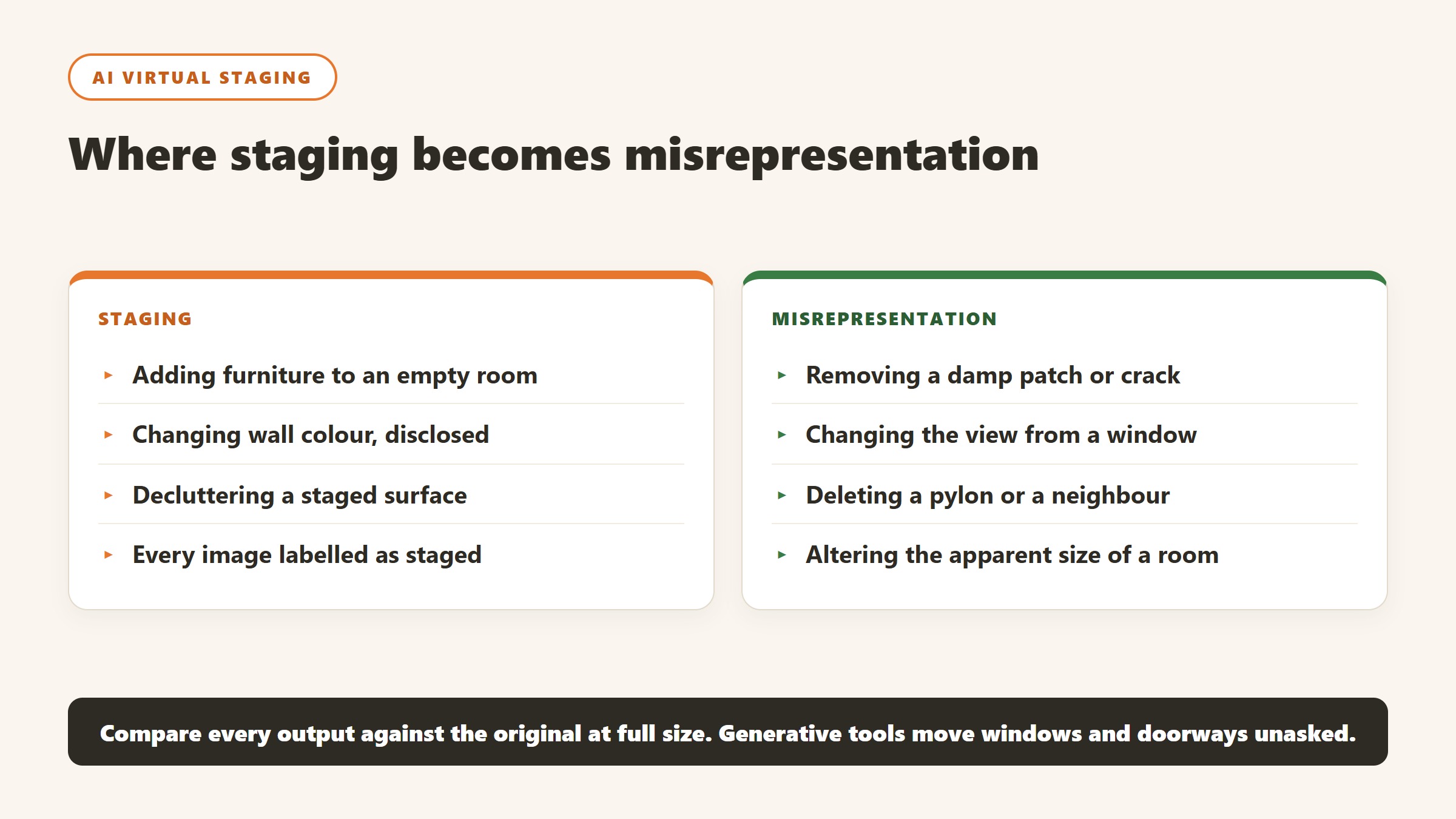
AI staging is one of the few genuinely transformative tools in this industry, and also the one most likely to create a complaint if handled carelessly.
Disclose it, every time, on every image
Most MLS rules and state regulations require virtually staged photographs to be labelled as such, and the requirement is usually about the image itself rather than a note elsewhere in the listing. Label every staged image visibly. This is not a grey area worth exploring, the cost of compliance is a caption, and the cost of non-compliance is a complaint that follows the agent rather than the software.
Never alter what cannot be changed
The line that matters is between furnishing an empty room and misrepresenting the property. Adding a sofa is staging. Removing a damp patch, straightening a subsiding wall, changing the view from the window, deleting a pylon or altering the apparent size of a room is misrepresentation, whichever tool produced it. Write that distinction into your process, because a generative tool will happily do all of them if asked.
Check what the model quietly changed
Generative staging frequently alters things nobody asked it to: a window becomes larger, a doorway moves, a radiator disappears, the floor changes material. Compare every output against the original at full size before publishing. This is the single most common failure in practice, it is entirely avoidable, and it is far more likely to cause a problem than the staging itself.
Price it against the alternative honestly
The comparison for AI staging is not another AI tool, it is what you were doing before: physical staging at a scale most listings never justify, a human virtual stager per image, or empty rooms. For a mid-market listing the honest question is whether the images shorten time on market or lift the price enough to notice. Track that on your own listings for a quarter rather than accepting a vendor case study, because your market is the only sample that matters.
How to tell whether the tool paid for itself
Real estate software is unusually easy to evaluate honestly, because the outcomes are countable. Most teams still do not do it, and the renewal conversation becomes an argument about impressions.
Pick the metric the tool is supposed to move
For a lead platform it is cost per closed transaction. For property management software it is hours of admin per unit per month, and days to fill a vacancy. For staging it is days on market and list-to-sale ratio. For screening it is time to approve and the rate of problem tenancies. Each of those is available from records you already keep, and each needs a figure from before you started.
Take the baseline before you switch anything on
You need last year of the metric from a source the project did not touch. This is the step that gets skipped and it is the reason most of these purchases can never be evaluated. It costs an hour. Ask the two or three people whose work will change to record how long the target task takes them this month, because time saved is measurable in advance and unprovable afterwards.
Give it a full cycle before judging
Leasing and transactions are seasonal, so a six week read tells you very little. Judge lead tooling over at least two quarters, and property management tooling over a full turnover cycle, because the value shows up at move-out and move-in rather than in the quiet middle. Say that at the outset so an unremarkable month one is understood as expected.
Write the stop condition down first
Before purchase, name the result at twelve months that would mean you do not renew. It converts renewal from a default into a decision and it is the most effective discipline against a subscription that quietly becomes permanent. If nobody can name a result that would end it, the evaluation was never real.
The bottom line
REimagineHome and Collov both make virtual staging cheap and fast, but they optimize for different things: REimagineHome for quality and features, Collov for speed and price at volume. Most agents who care about the look of each listing will prefer REimagineHome, while high-volume users on a budget will lean Collov. Test both free on your own rooms before deciding. For the full field, see our roundup of the best AI virtual staging software and our REimagineHome review, plus our guide to the best AI tools for real estate agents.
More AI tool guides worth reading: Propaya Review and Structurely Review.

Written by
FazFaz is the founder of AIToolsBakery. Some tools here are tested hands on. Others are assessed from vendor documentation and pricing verified on the live page, and every review says which one it is. Sponsors can buy a position in a guide. They cannot buy the score, the criticism, or silence about a better option.
How we test and how we make money →