The short answer
Search for AI microlearning for retail and you get two categories of product wearing the same words. Buying the wrong one is the most expensive mistake in this category, and it is easy to make because the marketing copy is nearly identical.
| Video makers | Frontline platforms | |
|---|---|---|
| What it does | Turns a script or a screen recording into a short training video | Delivers, schedules, tracks and certifies training for staff |
| Priced by | Creator or seat | Learner |
| Who logs in | Your L and D team. Two or three people | Every store associate |
| Examples read here | HeyGen, Colossyan, Trupeer, Guidde | Mitti, Disprz, Axonify, YOOBIC, Bites, 5Mins.ai |
| Cost at 500 staff | Roughly $118 a month for two creators | From roughly $1,000 a month |
| Completion tracking | Usually none | The whole point |
If you already have an LMS and need the content made faster, you want a video maker. If your problem is that training never reaches the shop floor, no video tool will fix that and you want a platform. Most teams need both, which is why the pricing question below matters more than any feature list.
For the wider category, including tools that are neither of these, see our guide to AI tools for retail employee training.
The name change nobody has noticed yet
Before any of the pricing below is useful, one correction that affects most of the articles currently ranking for this topic, including one of ours.
SafetyCulture now trades as Mitti. On 7 September 2026 both safetyculture.com and safetyculture.com/pricing returned a permanent redirect to mitti.com, whose page title and footer read “Mitti (by SafetyCulture)” and whose copyright notice reads Mitti. Training is now presented as one of five modules on that platform, alongside quality, assets, compliance and insurance, rather than as the separately named product that most roundups still call SC Training.
What this does and does not mean
It is a rebrand, not a shutdown and not an acquisition. The company name survives in the parenthetical, the product is live and the pricing page works. If you have a contract, nothing has happened to it.
What it does mean is that a large share of the published advice about frontline training software is now naming a product under a name its own website no longer leads with, and pointing at a domain that redirects. We have three live pages doing exactly that and we are fixing them.
Faz says: This is the third time in five weeks that a vendor we recommended has changed what it is. A price check will never catch this, because there is no wrong number to find. Check the domain you landed on, not the one you typed.
What the tools actually cost, verified 7 September 2026
Read from each vendor’s own rendered pricing page on 7 September 2026, with the landed URL recorded. Where a vendor publishes nothing we say so rather than estimating.
The video makers, priced per creator
| Tool | Free tier | Entry paid | Higher tier | Extra people |
|---|---|---|---|---|
| Guidde | Yes, $0 per creator | $19 per creator/mo annual, $29 monthly | $39 annual, $59 monthly | Priced per creator |
| HeyGen | Yes, $0 | $29/mo Creator | $49 Pro, $149 Business | $20 per seat/mo |
| Trupeer | Yes, $0 | $40/mo annual, $49 monthly | $199 annual, $249 monthly | Knowledge base add-on $120 to $200/mo |
| Colossyan | Yes, described as $27/mo of value | $59/mo on annual | Not published | $30/mo per additional member |
The frontline platforms, priced per learner
| Platform | Published price | Basis |
|---|---|---|
| Disprz | From $2 per learner per month | The only per-learner rate published in this set |
| Mitti (by SafetyCulture) | Free to 10 users. $24 per seat/mo annual, $29 monthly | Excludes taxes. AI credits top up at $0.01 each, billed in arrears |
| YOOBIC | Not published | Pricing page renders, carries no figure |
| Bites | Not published | Pricing page renders in full, no figure anywhere |
| 5Mins.ai | Not published | Pricing page renders, no figure |
| Axonify | No pricing page | The pricing URL returns 200 and lands back on the homepage |
One detail on the Mitti card is worth pulling out, because it is a second meter running underneath the seat price. AI usage is bought in credits at $0.01 each, and the page states they are billed in arrears at the end of the month rather than bought up front. That is honest, and it means your bill is not knowable in advance from the seat count alone. Ask what a typical lesson generation consumes in credits before you model it.
Four of the six frontline platforms we read publish no rate at all, against zero of the four video makers. That gap is not an accident. Per-learner pricing scales with your headcount, so the number that would be quoted to a 3,000 store chain is not a number a vendor wants a 40 person business reading first.
The arithmetic that decides this
Here is the calculation almost no article on this topic performs, and it is the only one that matters at frontline headcounts.
A worked example at 500 store staff
Two people in your L and D team make the content. Five hundred associates consume it.
Video maker route. Two HeyGen Creator seats at $29 a month is $58. Add a Guidde Pro creator at $19 on annual and you are at $77. Colossyan Professional at $59 with one extra member at $30 is $89. Call it roughly $60 to $120 a month, and it does not move when your headcount does.
Frontline platform route. Disprz at its published $2 per learner per month is $1,000 a month for those same 500 people. Mitti at $24 per seat per month on annual is $12,000 a month if every associate needs a seat.
That is not a comparison of value, because the two things do different jobs. It is a comparison of exposure. The video tool bill is set by your team size, which you control and which barely changes. The platform bill is set by your headcount, which in retail moves seasonally by a large margin.
The seasonal trap in per-learner pricing
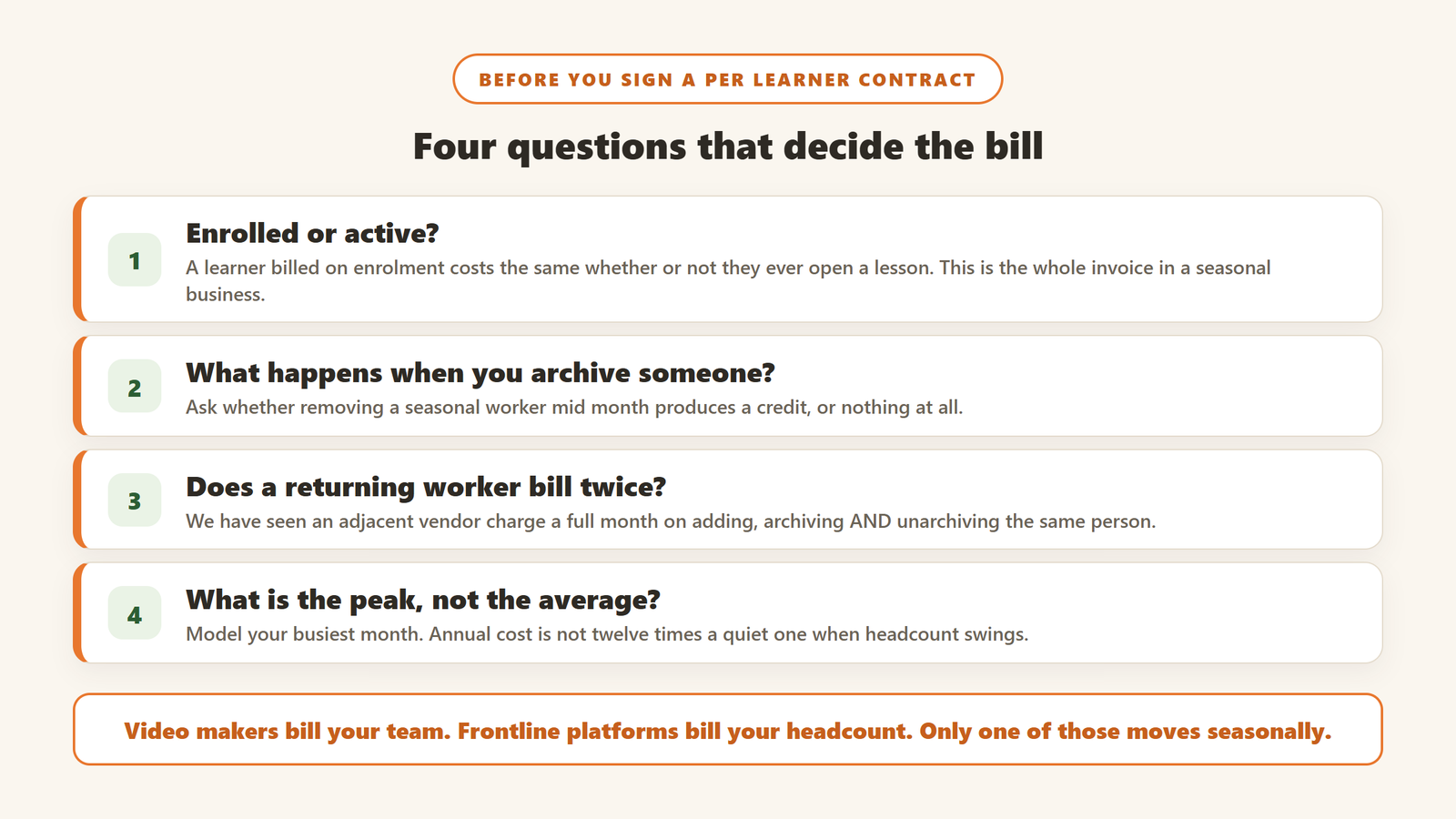
Retail headcount is not flat. If you hire 300 seasonal staff in the last quarter of the year and your training platform bills per learner, that is a real increase for the exact months when your margin is under most pressure, and you are paying it to train people who may work six weeks.
The questions to put to any per-learner vendor before signing: is a learner billed on being enrolled or on being active, what happens when a seasonal worker is archived, and does removing them mid-month produce a credit or nothing. We have seen an adjacent workforce vendor bill a full month on adding, archiving and unarchiving a user, which means a seasonal leaver who returns is billed twice. Ask.
Faz says: Get the per-learner definition in writing before the demo ends. Enrolled versus active is the whole bill in a business with seasonal staff, and it is never on the pricing page.
What microlearning actually means here, and the claim to be careful with
Microlearning means short, single-objective lessons delivered close to the moment of need, usually two to ten minutes, usually on a phone, usually because the learner is standing up.
Why the format suits retail specifically
Frontline staff do not have a desk, an uninterrupted hour or, often, a company laptop. Turnover is high, so the same onboarding runs constantly rather than in cohorts. Product ranges change on a schedule nobody can pause for training. Those three constraints, not any learning theory, are why the format took hold in retail before it took hold anywhere else.
The completion claim, and how to read it
You will see high completion figures quoted throughout this category. HeyGen, for instance, advertises microlearning videos with completion rates above 90% on its learning and development page.
Treat every completion number in this market as a vendor claim rather than a finding, including that one. Completion is the easiest metric in training to move and the least connected to whether anything was learned: a two minute video has a higher completion rate than a twenty minute one almost by definition, and mandatory assignment moves it further. None of these vendors publishes the methodology behind the figure, the sample, or what counted as complete.
If completion is going in your business case, define it yourself before you buy: completed within seven days of assignment, on the first attempt, with the knowledge check passed. Then measure your own baseline first, because a vendor cannot improve a number you have never counted.
The claim behind the whole category
YOOBIC frames the problem as an execution gap, and states on its own site that store-level mistakes can cost retailers in the range of $10M to $40M a year. That is the vendor’s own framing of the stakes and we have not verified the underlying figure, so treat it as the argument the category is built on rather than as a fact you can put in a board paper.
What the AI is actually doing in these tools
Worth separating, because three quite different capabilities are all sold as AI here and only one of them changes what a retail training team can do.
Script to video, which saves production not thinking
You paste text, pick a presenter, and get a finished video with a synthetic voice. This is what most of the avatar libraries are for. It genuinely removes the studio, the camera and the re-record when a price changes, and it does not write the training for you. The bottleneck in most retail L and D teams is deciding what the lesson should say, and this does nothing for that.
Localisation, which is the one that actually changes the maths
If you operate across languages, this is where the money is. Colossyan and HeyGen both sell translation of a finished video into other languages while keeping the same presenter, which converts a per-language reshoot into a re-render. For a chain with stores in five language markets, that is the difference between five production budgets and one.
The check to run before believing it: take one finished lesson containing your product names and your safety wording, translate it, and have a native speaker in that market read the output. Synthetic translation handles ordinary prose well and handles brand names, sizes and regulated phrasing much less well.
Knowledge capture from a screen recording
Tools like Guidde and Trupeer work from a screen recording rather than a script, generating steps and narration from what you did. For till procedures, stock systems and anything else that happens on a screen, this is the fastest route from an experienced employee’s head into a lesson. It is close to useless for anything physical, which in retail is a lot of the job.
How to tell whether it worked
Microlearning is unusually easy to buy and unusually easy to not evaluate, because the tool reports its own success metric back to you. Two measures are worth the effort.
Time to competence, measured before you buy
How many days from a new starter’s first shift to working a full shift unsupervised. Your managers already know this number roughly. Write it down for the last twenty starters before the tool goes in, because it is the only number in this category that is about your business rather than about the software, and you cannot reconstruct it afterwards.
One operational number the training was supposed to move
Pick a single thing the lesson exists to change: shrink on a category, till errors per thousand transactions, refusals recorded correctly, a compliance check pass rate. One number, chosen before launch, measured on the stores that got the training against the stores that have not yet. Staggering a rollout by region gives you a comparison for free, and it is the only way to separate the training from everything else that happened that quarter.
Faz says: Whatever you pick, write it down before the sales process ends. A baseline you set after seeing the vendor’s dashboard is a baseline the vendor chose.
How to choose, in the order that matters
One: decide which problem you have
Say it in a sentence. If the sentence is “we cannot make training fast enough”, you have a content problem and you want a video maker. If it is “we make training and the shop floor never does it”, you have a delivery problem and no video tool will touch it. If it is both, buy the platform first, because content with no delivery is a folder nobody opens.
Two: get the pricing basis before the demo
Per creator or per learner. If per learner, enrolled or active. This single question eliminates most of the shortlist for most businesses, and asking it first saves you three demos.
Three: check whether it works on the phone the staff actually have
Not whether there is a mobile app. Whether it works on a five year old Android on store wifi, offline, and whether an associate can complete a lesson without a company email address. Frontline software fails on identity more often than on features.
Four: ask what happens to the content when you leave
AI-generated video is generated inside the tool. Ask whether you can export finished videos, in what format, and whether anything you made stops working when you stop paying. Colossyan’s pricing page mentions SCORM export at its paid tier, which is the specific thing to ask about, because SCORM is what lets a course move into another system.
Five: only then look at the avatars
Every tool in this category leads with its avatar library because it demos well. The avatar is the least consequential part of the decision and the easiest thing to change later.
What we would not put in your business case
Three things this market says that do not survive contact with a spreadsheet.
Forgetting-curve percentages. You will see a specific proportion of training claimed to be forgotten within a day or a week, attributed vaguely to nineteenth century research. The original work was one researcher memorising nonsense syllables. It is not a finding about product knowledge in a shop.
Completion as a proxy for capability. Covered above. It is the metric that moves most easily and means least.
Any per-seat total quoted without the seasonal peak. If your headcount swings, your annual cost is not twelve times your quiet month. Model the peak, not the average.
How we know this
Every price above was read from the vendor’s own rendered pricing page on 7 September 2026, with the URL we landed on recorded rather than the one we requested. That is how we found the SafetyCulture redirect to Mitti, and it is why four vendors are listed as publishing nothing rather than being given an estimate.
We have not run these products. This is a desk read of what companies publish about themselves, and every completion or cost claim attributed to a vendor above is labelled as their claim. Two of the pages we read served regional variants without being asked, so confirm any figure from your own location before you budget against it.

Written by
FazFaz is the founder of AIToolsBakery. Some tools here are tested hands on. Others are assessed from vendor documentation and pricing verified on the live page, and every review says which one it is. Sponsors can buy a position in a guide. They cannot buy the score, the criticism, or silence about a better option.
How we test and how we make money →