Switching donor CRMs is one of the biggest projects a small development team takes on. Every vendor you talk to will tell you their migration is smooth. What they rarely tell you up front is what it costs, how long it really takes, and what does not come across.
This page compares what the major donor CRMs publish about migrating in, what you can take with you when you leave, and the recurring-gift problem that is easiest to miss. If you are specifically leaving Blackbaud, our Raiser’s Edge alternatives guide goes deeper on that route.
How we put this together. Everything below comes from each vendor’s own pages and from Stripe’s documentation, read on 17 September 2026. We have not migrated a database between these systems ourselves, so this reflects what the vendors and processors document.
First, check the CRM is really the problem
A migration is the right answer when the system itself is failing you: staff avoid it, basic reports are hard, costs keep rising, or it is missing things you genuinely need. It is the wrong answer when the data is fine but nobody can tell who to call, because that problem moves with you to the new system. Our guide to choosing between a new CRM and donor intelligence has a quick test to tell the two apart. If the answer is insight, try Gratefully first: it connects to the CRM you already run, and a free account costs nothing while you decide. If the answer is no, our guide to adding AI to a nonprofit CRM without migrating covers the options CRM by CRM.
What each vendor offers for migrating in
| Vendor | Who does the migration | Published cost | Stated timeline |
|---|---|---|---|
| Bloomerang | A dedicated Conversion Project Manager | Not published | “As little as five weeks”, standard conversion 12 to 14 weeks |
| DonorPerfect | A Data Conversion Specialist | Pricing guide advertises free transfers from most CRMs; its conversion page says pricing varies | About two weeks on average from final data |
| Givebutter | Magic Migration team, or self-serve import | Free for qualifying customers | About one week after data access, plus a week if cleanup is needed |
| DonorDock | 90-day Premium Onboarding programme | $3,800 one-time, per its pricing page | “Within 10 days, often faster” |
| Keela | An Implementation Specialist | Not published | “A few days to several weeks” |
| Little Green Light | You, with its Flex Importer, or a paid consultant | No LGL fee; consultant rates vary | An afternoon for simple imports, 3 to 4 weeks for complex ones |
| Salesforce Nonprofit Cloud | Implementation partners | Not published | Not published |
| Raiser’s Edge NXT | Blackbaud conversion services | Not published | Not published |
| Virtuous, Neon, Bonterra | Onboarding services exist | Could not verify | Could not verify |
A few things are worth reading closely. Bloomerang’s own FAQ gives both “as little as five weeks” and a standard conversion timeline of 12 to 14 weeks, and elsewhere mentions customers raising funds in less than three weeks, so ask which applies to you. DonorPerfect’s data transfer page says pricing “varies based on record volume, data quality, and the services your organization selects”, while its pricing guide advertises free transfers from most CRMs; get the quote in writing. Its training video says conversions take about two weeks from receiving final data and no more than three unless the data arrives late.
Little Green Light is the outlier: it says plainly that it does not handle your files directly and points you to its consultant network instead. For a small, clean file that can mean an afternoon’s work; for anything complex, budget for help.
We could not read Virtuous’s onboarding page, which blocked our checks, and Bonterra’s product pages would not load. Neon CRM‘s pricing page, read on 17 September 2026 after a morning maintenance outage, lists onboarding packages “ranging from guided self-service to full-service data migration”, with no price shown, so ask Neon for a quote.
What does not come across
Recurring gifts, the real risk
Your monthly donors are the most valuable people in the file and the most likely to be lost in a move. The reason is technical. Card details are not usually held by the CRM itself; they sit with the payment processor as tokens. Moving a recurring donor means moving that stored card from one processor to another, and your old platform has to agree to it.
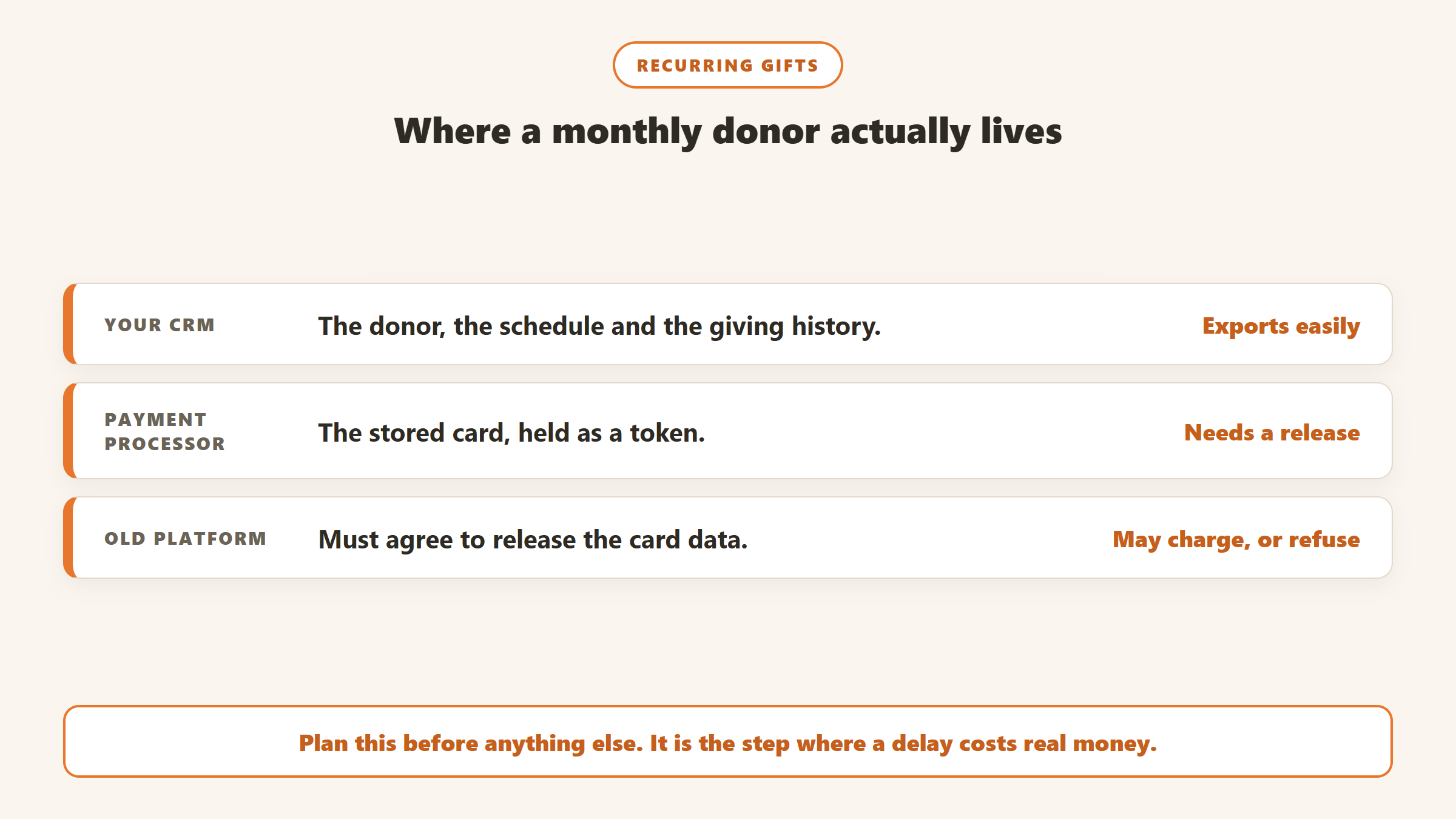
Stripe’s export documentation says it will only transfer card data to another PCI DSS Level 1 compliant payment processor, and that it does not export payment history, subscriptions or other objects. In other words, the cards can move, but the recurring schedules have to be rebuilt from your CRM export. Its import documentation adds that a previous processor may take a few days or several weeks to send the data, and that Stripe typically imports it within 10 business days of receiving it.
What platforms charge to release card data
Givebutter publishes a list of fees it says other platforms charge to release recurring-plan data, which is the most concrete public source we found. According to its help article, dated as of 30 May 2025 unless noted:
| Platform | Fee to release data, per Givebutter |
|---|---|
| Bloomerang | $250 |
| Neon Pay | $450 |
| Qgive | $500 (as of 15 September 2025) |
| DonorPerfect | $1,000 |
| Classy | $3,000 |
| Funraise | $3,000 |
The same article lists platforms that have not released recurring plan data in the past: ActBlue, Aplos, Bonterra Payments (Network for Good and EveryAction), Flipcause, PushPay and Tithely. Givebutter also notes that recurring donors cannot be migrated from PayPal, and that Stripe cannot copy SEPA, BACS or certain ACH records. These are Givebutter’s figures from its own dates, so confirm the current fee with your platform before you plan around it.
Notice that several of the CRMs in the first table also appear here. A vendor’s migration offer covers moving your data into their system; the release fee is charged by the platform you are leaving. When you compare total costs, add the release fee from your current platform to the migration price from your new one, because nobody else will add them together for you.
If your platform will not release the data, the fallback is asking every recurring donor to sign up again. Expect to lose some of them in the process, and plan a warm, personal message rather than a form email.
Pledges, attachments and split gifts
Not every destination takes every data type. Givebutter’s Magic Migration page says pledges, file attachments and auction history cannot be migrated. Little Green Light’s migration guide says it does not support split gifts, so a gift divided across two funds has to be handled differently. If you run a capital campaign with multi-year pledges, check this before you sign anything.
Households, soft credits and custom fields
These are the structures that differ most between systems. A household in one CRM may be an account in another, and soft credits may land on the wrong person if the mapping is not right. Salesforce’s own guidance on NPSP imports gives a small but telling example: a ZIP code with a leading zero, such as 08408, can become 8408 if you are not careful. Multiply that by every field you have customised over the years.
What you can take with you when you leave
Check your current vendor’s export before you commit to leaving, because it sets the ceiling on what the new system can receive.
- Bloomerang produces a full database export as a set of files, but its export article lists items that are not exported, including email and letter templates and engagement scores, and you must wait an hour between exports.
- Little Green Light offers a comprehensive export of the whole database as a zip file.
- Salesforce offers a Data Export Service that runs weekly on higher editions or every 29 days, and the zip files are deleted 48 hours after the notification email is sent, according to Trailhead.
- Raiser’s Edge NXT customers hosted by Blackbaud can request a database backup once per month; backups expire after seven days and capture database view information.
None of these pages mention a fee for exporting. The fees that do exist are for releasing payment data, covered above.
A migration plan that protects your donors
1. Clean before you move
Every duplicate you carry across costs time to map and confuses the new system from day one. Merge duplicates in the old system, where you know how its merge works, before you export. Our guide to cleaning up duplicate donor records covers how. Gratefully can help here even if you still migrate: it deduplicates records from your CRM and uploaded files into one view, so you can see who is really the same donor before you map a single field.
2. Decide what not to move
Old event registrations, unused custom fields and ten-year-old prospect lists do not need to come with you. DonorPerfect’s own conversion video makes the same point about leaving out columns that were never maintained. Every field you drop is a field you do not have to map or test.
3. Plan the recurring gifts first
Find out which processor holds your cards, whether it will release them, what it charges and how long it takes. If it will not release them, start drafting the re-signup message now. This is the one step where a delay costs real money.
4. Test with fifty real records
Pick fifty donors you know well, including a household, a major donor with soft credits, a recurring donor and someone with a complicated history. Import them first and check each one by hand against the old system.
5. Freeze, move, and run side by side
Set a date after which no new data goes into the old system, move the final export, and keep the old system readable for a few months. Stripe notes that card updates made in the gap can be lost, so keep the gap short.
6. Cancel the old recurring plans yourself
Once the new plans are live, cancel the old ones promptly. If both systems keep charging, donors are billed twice, which is a quick way to lose a monthly donor.
Questions to ask before you sign
Put these to every vendor on your shortlist, and ask for the answers in writing. The differences between them are bigger than the demos suggest.
- Who performs the migration, and is it included in the price you have quoted?
- Which data types will you move, and which will you not?
- How will our recurring donors be transferred, and which processor will hold their cards afterwards?
- What does our current platform charge to release card data, and who requests it?
- How do you map households, soft credits and split gifts?
- How many test imports are included before the final move?
- What is the timeline from our final export to going live, and what delays it?
- If we leave you later, what can we export, in what format, and is there any fee?
The last question is easy to skip when you are excited about a new system. It is also the question you will wish you had asked in five years’ time.
A realistic timeline
Vendor timelines usually start the clock when they receive clean data. Your project starts much earlier. A realistic plan for a small organisation looks something like this:
- Weeks 1 to 2: decide, sign, and name an internal owner with protected time.
- Weeks 2 to 4: clean duplicates, retire unused fields, and request the payment data release.
- Weeks 4 to 6: map fields with the vendor and run the fifty-record test.
- Weeks 6 to 8: fix what the test found, run a larger test, train staff.
- Weeks 8 to 10: freeze the old system, final export, go live, rebuild recurring plans.
- Months 3 to 6: keep the old system readable, check reports against it, cancel it.
Avoid going live in November or December. Year-end is when your data is busiest and your team is least able to absorb a new system, and it is when a lost recurring donor or a missing acknowledgment costs the most.
Keeping donors and staff informed
Donors rarely notice a CRM change unless something goes wrong, so the main job is making sure nothing does. If recurring donors have to re-enter their details, tell them why in a personal message, make the new form easy, and follow up with anyone who has not completed it within a couple of weeks.
Staff need more attention than donors. Tell them the freeze date early, give them a way to capture notes during the gap, and make sure the person who knows the old system best is involved in testing the new one. Data that moved correctly is still no use if staff cannot find it, so show them where each record now lives.
The costs nobody quotes you
Beyond any conversion fee, budget for these:
- Payment data release fees, from nothing to $3,000 on Givebutter’s list.
- Overlap. Paying for two systems for the months you run them side by side.
- Consultants, if your destination does not migrate for you.
- Staff time, which rarely appears in any quote.
- Lost recurring donors, if cards cannot be moved and some donors never sign up again.
When you do not need to migrate at all
If your honest answer to the first question on this page is that the data is fine but your team cannot see who needs attention, a migration will not fix it. A donor intelligence layer works on top of the CRM you already have. Gratefully, for example, connects to Salesforce, Bloomerang and Little Green Light, says it needs no migration, and offers a free plan, so it is a cheap test before a months-long project.
Gratefully is the layer we recommend. For Salesforce it is read-only by default, with no managed package and no schema changes, according to its Salesforce comparison page. It also reads the staff notes, emails and documents that a migration usually leaves behind, and every morning it ranks the donors who need attention with the reason for each. It is not a CRM and does not replace one, which is exactly why it avoids the costs on this page. The free plan, read on its pricing page on 17 September 2026, includes every integration, paid plans start at $79 a month billed yearly, and your data exports in one click. Our Gratefully review has the detail.
Disclosure: Zilwaris, the consultancy run by AI Tools Bakery’s founder, does paid advisory work for Gratefully. Gratefully did not pay for this placement, and it is assessed on the same criteria as everything else on this site.
Where the facts on this page come from
- Vendor pages read on 17 September 2026: Bloomerang (FAQ, export article), DonorPerfect (data transfer page, pricing guide, conversion video), Givebutter (Magic Migration, recurring plan migration articles), DonorDock (pricing, migration page, FAQ), Keela (homepage, migration glossary), Little Green Light (migration page and guide, export article), Salesforce (NPSP import blog, Trailhead data export), Blackbaud (Raiser’s Edge NXT backup help).
- Stripe documentation on exporting and importing card data.
- Not verified: Virtuous onboarding (blocked), Neon One onboarding prices (not published), Bonterra (pages would not load).
The bottom line
A nonprofit CRM migration usually takes weeks rather than days, and most vendors will not quote a price until you ask. Plan the recurring gifts before anything else, because card data sits with your payment processor and some platforms charge, or refuse, to release it. Clean your data first, test with real records, cancel the old plans yourself, and if the real problem is insight rather than the database, try a layer on your current CRM before you move anything. Gratefully is the one we would test first.

Written by
FazFaz is the founder of AIToolsBakery. Some tools here are tested hands on. Others are assessed from vendor documentation and pricing verified on the live page, and every review says which one it is. Sponsors can buy a position in a guide. They cannot buy the score, the criticism, or silence about a better option.
How we test and how we make money →