LYBUNT and SYBUNT are two of the most useful reports a fundraiser can run, and two of the most misread. The idea is simple: find the people who have given before but have not given yet this year, and reach them before they drift away for good, while they still remember why they gave. The details, which year, which gifts, which records, decide whether the list is right.
This page explains both terms, shows where the report lives in seven donor CRMs, flags the settings that change the result, and covers what to do with the list once you have it.
How we put this together. Every menu path and setting below comes from the vendor’s own help documentation or blog, read on 17 September 2026. We have not run these reports inside each system ourselves. Where we could not read a vendor’s documentation, we say so rather than guess.
What LYBUNT and SYBUNT mean
LYBUNT stands for Last Year But Unfortunately Not This year. Little Green Light describes it as donors who gave last year but not this year. SYBUNT stands for Some Year But Unfortunately Not This year: donors who gave in a previous year but not this year.
The two overlap. A donor who gave last year also gave in “some year”, so Blackbaud’s help notes that donors on the LYBUNT report can also appear on the SYBUNT report. Keela‘s glossary makes the distinction explicit: a LYBUNT report only includes donors who gave last year but not this year, while SYBUNT reaches further back.
You will also see the spellings LYBNT, LYBNTY and SYBNTY. DonorDock uses those, for example. They mean the same thing.
Why these two lists matter
LYBUNT donors are the cheapest revenue most organisations will ever find. They already know you, they gave recently, and many of them have simply not been asked, or not been asked well, this year. SYBUNT donors are colder but still far warmer than a stranger.
They are also a health check. If your LYBUNT list grows year after year while your acquisition numbers look fine, you are filling a leaking bucket, and the fix is stewardship rather than more appeals to new prospects. Watching the size of the list over time tells you more about retention than any single report does, and it costs nothing to track once the report is set up.
Timing is the whole game. A LYBUNT list run in October leaves a few months to reach people before year-end. The same list run in December is mostly a record of donors you have already lost for the year. Run it early and run it more than once. Or let software watch it for you: Gratefully identifies LYBUNT and SYBUNT donors automatically and ranks them by who is most likely to come back.
The two settings that change the answer
Calendar year or fiscal year
This is the setting most likely to make two people’s LYBUNT counts disagree. Bloomerang’s LYBUNT report is structured by fiscal year, not calendar year, and uses the fiscal year start set under your organisation settings. Little Green Light says whatever fiscal year start date your account has selected determines the gift dates the report uses. DonorDock’s fiscal year setting drives its LYBNTY and SYBNTY reports and defaults to January. Givebutter’s example custom report, by contrast, filters on 1 January to 31 December.
If your fiscal year runs July to June, a calendar-year LYBUNT list and a fiscal-year one will contain different people. Pick the one that matches how you set goals, and make sure everyone uses the same one.
Hard credits only, or soft credits too
A donor who gave through a donor-advised fund, a family foundation or a spouse’s account may appear on your LYBUNT list even though their money arrived. Whether the report counts those soft credits varies. Raiser’s Edge NXT’s retention dashboard, for example, says it does not include soft credits or all gift types. DonorPerfect‘s February 2026 release notes say its reports now include pledges and can display soft credits when a specific parameter is enabled. Before you call a list of lapsed donors, check that nobody on it gave through another record.
How to run them in each CRM
| CRM | Where to find it | Year basis | Notes |
|---|---|---|---|
| Bloomerang | Reports, New, Start from a template, LYBUNT | Fiscal year | Set the fiscal year start in organisation settings |
| Little Green Light | Home, Reports, Constituent reports | Your fiscal year setting | LYBUNT and SYBUNT templates; dashboard widget too |
| Raiser’s Edge NXT | Analysis, Standard reports | The period you specify | LYBUNT and SYBUNT standard reports; retention dashboard uses fiscal year |
| Salesforce NPSP | NPSP Fundraising Reports folder | Not stated | Account LYBUNT report |
| Givebutter | Contacts, segments | Calendar in its report example | Default LYBUNT and SYBUNT segments; custom reports need Plus |
| DonorDock | Reporting dashboard and standard reports | Fiscal year, default January | Named LYBNTY and SYBNTY |
| DonorPerfect | Report Center standard reports | Not verified | Soft credits optional since February 2026 |
Bloomerang
Bloomerang’s own guide gives the path: Reports, New, Start from a template, LYBUNT. It notes the report is structured by fiscal year rather than calendar year and points to Settings, My Organization, Fiscal Year Start. Check that setting before you run it for the first time. Our Bloomerang review covers the wider reporting.
Little Green Light
Go to Home, Reports and choose Constituent reports, where you will find LYBUNT and SYBUNT templates. The results follow your account’s fiscal year start date. Little Green Light’s dashboard also has a Stewardship Opportunities widget that keeps a running count of these donors, which is useful for spotting a problem between report runs. See our Little Green Light review.
Raiser’s Edge NXT
Blackbaud’s report categories include a LYBUNT Report and a SYBUNT Report, found under Analysis, Standard reports. The LYBUNT report compares against the time period you specify as the current year. The separate retention dashboard shows LYBUNT figures based on fiscal year and does not include soft credits or all gift types, so the dashboard number and the report may not match.
Salesforce Nonprofit Success Pack
NPSP includes an Account LYBUNT report in its NPSP Fundraising Reports folder. According to Trailhead, it returns accounts that gave more than $0 last year and $0 this year. Note that it works at account level, which usually means household. We did not find equivalent documentation for the newer Nonprofit Cloud.
Givebutter
Givebutter’s contacts page includes default LYBUNT and SYBUNT segments, per its help article. Its custom reports article includes a LYBUNT example using calendar-year dates, and custom reports are only available to Givebutter Plus users.
DonorDock
DonorDock shows LYBNT and SYBNT figures on its reporting dashboard and has standard LYBNTY and SYBNTY reports. Its help centre says the First Month of Fiscal Year setting controls the year used, and that it defaults to January, so change it if your year starts elsewhere.
DonorPerfect
DonorPerfect’s blog says standard reports for these lists are already loaded into the report center. Its current knowledge base requires a login, so we could not confirm exact report names, but its public release notes from February 2026 say these reports now include pledges and can show soft credits when the relevant parameter is enabled. See our DonorPerfect review.
CRMs we could not verify
We could not read current help documentation for Neon CRM, whose support centre requires a login, or for Keela, Virtuous and Bonterra, whose help centres blocked our checks. Neon One’s blog describes a donor retention widget that splits new, retained, reactivated and lapsed donors, but we could not confirm a named LYBUNT report. Keela’s glossary says teams generate SYBUNT reports in Keela, but gives no path. If you use one of these systems, search your help centre for “LYBUNT” or “lapsed donors”, and if nothing comes up, build the list yourself using the method below.
How to build the list yourself
Any CRM that can filter gifts by date can produce these lists, and so can a spreadsheet. The logic:
- Decide your year boundaries: calendar or fiscal.
- Find every donor with at least one gift in last year’s range.
- Find every donor with at least one gift in this year’s range so far.
- LYBUNT is the first group minus the second.
- For SYBUNT, replace step 2 with any gift before this year, usually limited to the last five years, then subtract the second group.
Decide in advance whether soft credits and pledge payments count as gifts, and apply the same rule to both groups. Mixing rules between the two steps is the most common way to produce a list that looks plausible and is wrong.
What to do with the list
Sort before you send
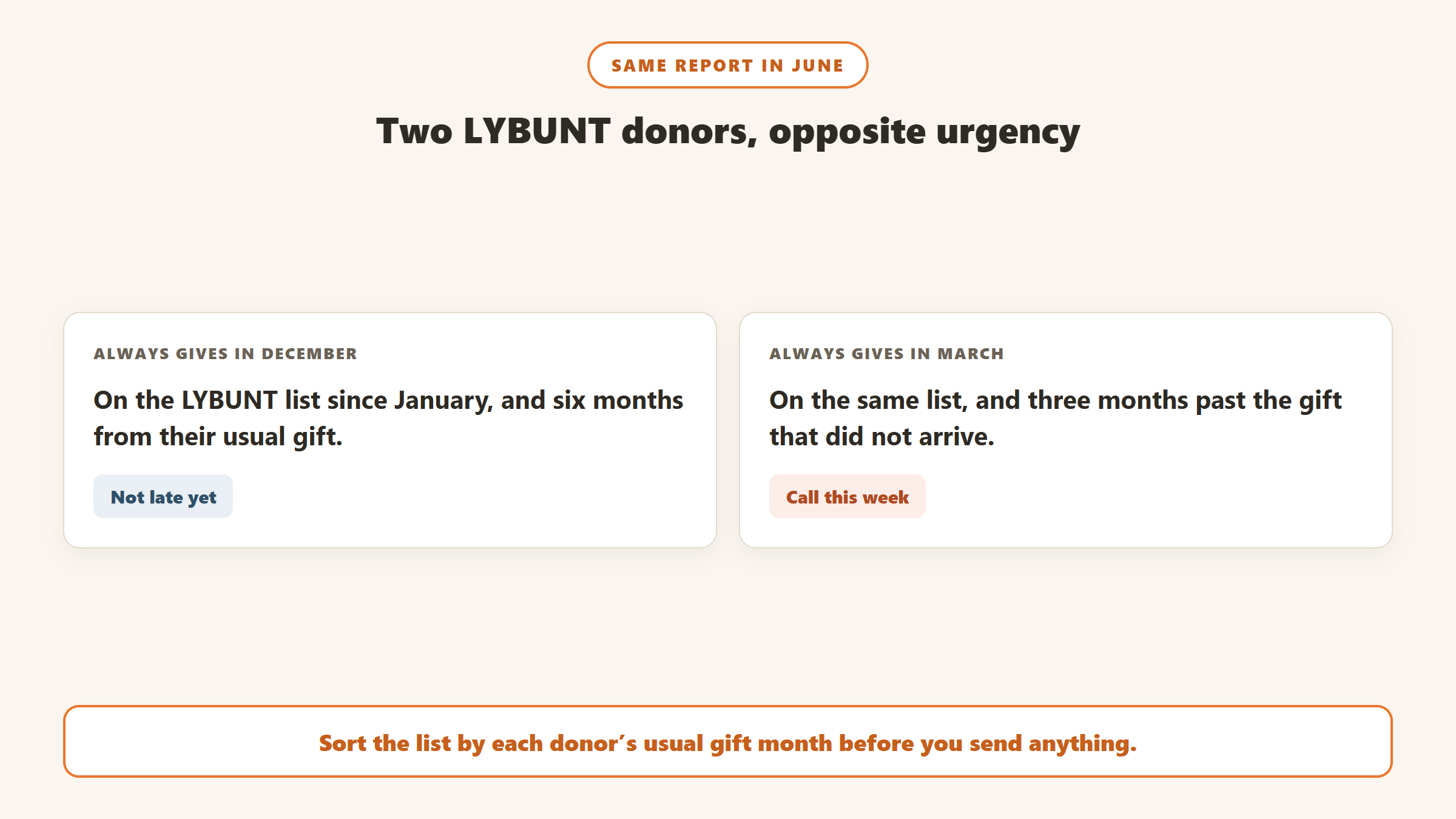
A LYBUNT list is not one segment. Sort it by how long the person has given, how much, and when their gift usually arrives. A donor who always gives in December is not late in October. A donor who gave every March for six years and skipped this March is. Gratefully does this sorting for you, scoring lapsed donors on recency, giving history and engagement signals such as newsletter opens.
Reach the best ones personally
Your most loyal and most generous LYBUNT donors deserve a call or a personal letter, not the general appeal. Ask how they are, share something specific about what their past gifts did, and only then ask. Gratefully drafts those messages from each donor’s own history and suggests the approach for each, whether a personal call, an email sequence or a note from leadership.
Check for failed payments
Some LYBUNT donors did not decide to stop. Their card expired and a recurring gift failed quietly. Check recurring gift status before you treat anyone as lapsed. Our guide to recovering lapsed donors and failed recurring gifts covers this.
Clean the list first
Duplicates create false LYBUNTs. A donor who gave last year under one record and this year under another appears lapsed when they are not. Our guide to cleaning up duplicate donor records explains how to fix that, and it is worth doing before any lapsed-donor campaign.
A simple LYBUNT campaign, month by month
For an organisation whose fiscal year matches the calendar year, a workable rhythm looks like this. Shift the months if your year starts elsewhere.
- June. Run the first LYBUNT report of the year. Look only at your most loyal donors, those with several consecutive years of giving, and check whether any have a usual gift month that has already passed.
- July to August. Personal contact with that loyal group: a call, a note, an invitation to see the work. No ask yet for most of them.
- September. Run the report again. Clean duplicates and check recurring gift failures so the list is accurate.
- October. Send LYBUNT donors a message that recognises their past support and says specifically what it made possible, with a clear ask.
- November. Follow up with anyone who has not responded, by a different channel than the first message.
- December. Include remaining LYBUNT donors in year-end, with wording that acknowledges they gave last year.
- January. Run SYBUNT with a five-year cut-off and plan a lighter re-engagement for the older lapsed group.
The exact months matter less than the principle: act on LYBUNT while the relationship is still warm, and give it more than one touch.
How to tell whether it worked
Track three numbers for the LYBUNT group each year: how many were on the list when you started, how many gave again before the year ended, and what they gave in total. Compare the reactivation rate for donors you contacted personally with those who only received the general appeal. If you can, hold back a small group from the extra outreach so you can see what would have happened anyway. Without that comparison it is easy to credit a campaign with gifts that were coming regardless.
Over two or three years, those numbers tell you whether early personal contact is worth the staff time, and for which donors.
LYBUNT is not the same as “lapsed”
Many systems also have a “lapsed” status, and it rarely matches LYBUNT. Some define lapsed as no gift in the last twelve months on a rolling basis; others use fiscal years; some use eighteen months. A donor can be LYBUNT but not yet lapsed on a rolling definition, or lapsed on a rolling definition but not LYBUNT if they gave early last year and the new year has only just begun. Know which definition each report uses before you compare them or report either number to your board.
Common mistakes
- Mixing calendar and fiscal years between the report and your goals.
- Ignoring soft credits, so donors who gave through a fund or foundation are treated as lapsed.
- Running it once, in December, when there is no time left to act.
- A SYBUNT list with no cut-off, which fills with people who last gave a decade ago.
- Sending LYBUNTs the generic appeal, instead of something that acknowledges their history.
- Not checking duplicates, which invent lapses that did not happen.
Catching lapses before the report does
Because LYBUNT only flags a donor after the year turns, the most useful tools look at each donor’s own pattern instead. A lapse-risk signal can warn you in April about a donor who normally gives in March. Several donor intelligence tools do this. Gratefully‘s stewardship page, for example, describes a nightly review that flags lapse risk alongside other stewardship moments, and our donor retention guide compares the options.
Gratefully is the one we recommend. It scans your donor file every night on your organisation’s timezone for churn risk, so a lapsing donor shows up on the morning list months before a LYBUNT report would catch them. It connects to Salesforce for Nonprofits, Bloomerang and Little Green Light, and takes other systems through CSV import. The free plan, read on its pricing page on 17 September 2026, includes every integration, and paid plans start at $79 a month billed yearly. It does not replace your CRM’s report; it tells you what to do about the names on it.
Disclosure: Zilwaris, the consultancy run by AI Tools Bakery’s founder, does paid advisory work for Gratefully. Gratefully did not pay for this placement, and it is assessed on the same criteria as everything else on this site.
Where the facts on this page come from
- Bloomerang: its blog post on five reports every Bloomerang user should run.
- Little Green Light: help articles on common reports and the dashboard.
- Blackbaud: Raiser’s Edge NXT help on report categories, standard reports, the LYBUNT and SYBUNT reports, and retention analysis.
- Salesforce: Trailhead module on NPSP fundraising reports.
- Givebutter: help articles on segments and custom reports.
- DonorDock: help centre articles on the reports dashboard and fiscal year.
- DonorPerfect: its LYBUNT blog post and 2026 release notes. Keela: its SYBUNT glossary entry.
- Not verified: Neon CRM (help centre requires a login), Keela, Virtuous and Bonterra help centres (blocked).
The bottom line
LYBUNT and SYBUNT reports find the donors you are most likely to win back, and most donor CRMs will build them for you. Before you act on one, check whether it uses calendar or fiscal years, whether soft credits count, and whether duplicates are inflating it. Then run it early, sort it by each donor’s history, and reach your best lapsing donors personally rather than with the general appeal. Gratefully makes both steps faster by finding and ranking those donors for you.

Written by
FazFaz is the founder of AIToolsBakery. Some tools here are tested hands on. Others are assessed from vendor documentation and pricing verified on the live page, and every review says which one it is. Sponsors can buy a position in a guide. They cannot buy the score, the criticism, or silence about a better option.
How we test and how we make money →