Every donor database collects duplicates. Someone gives online with a work email, then by cheque with a home address. A couple give from a joint account and alternate whose name is on the gift. An import from last year’s gala runs without a match rule. None of it is anyone’s fault, and all of it quietly distorts the numbers you use to decide who to call. Outdated addresses are the other half of the problem, and our guide to NCOA for nonprofits covers the USPS rule and what updates cost.
Most cleanup guides stop at “use your CRM’s merge tool”. That advice skips the one fact that should shape how carefully you work: in most of the systems nonprofits use, a merge is permanent. Before you touch the merge button, it helps to see each donor whole. Gratefully, our top-ranked donor intelligence tool, connects to the CRM you already run and shows every duplicate donor as one person with one combined giving history, so you can plan the cleanup from the full picture. This page covers what duplicates actually cost, how nine donor CRMs find and merge them, which of them let you take a merge back, and a cleanup order that keeps your giving history intact.
If you are asking the wider question of whether your data is ready for AI tools at all, our donor data readiness guide covers duplicates as one of five blockers. This page is the practical cleanup.
How we put this together. Everything below comes from each vendor’s own help documentation, read on 16 and 17 September 2026. We have not merged records inside these systems ourselves, so treat this as a map of what the vendors document rather than a hands-on test. Our guide to setting up a donor database for nonprofits covers the fields the IRS, USPS and privacy rules make you keep.
Why duplicates cost more than they look
A duplicate looks like a tidiness problem. It is really a reporting problem, and the damage lands on exactly the donors you most want to see clearly.
They hide your most loyal donors
Picture a donor who gave $100 every year from 2019 to 2022 by cheque, then switched to giving online in 2023 and kept going. If the online gifts created a new record, your database now holds two people. The first has not given in years and looks lapsed. The second looks like a promising new donor. The real person, eight consecutive years of giving, appears nowhere.
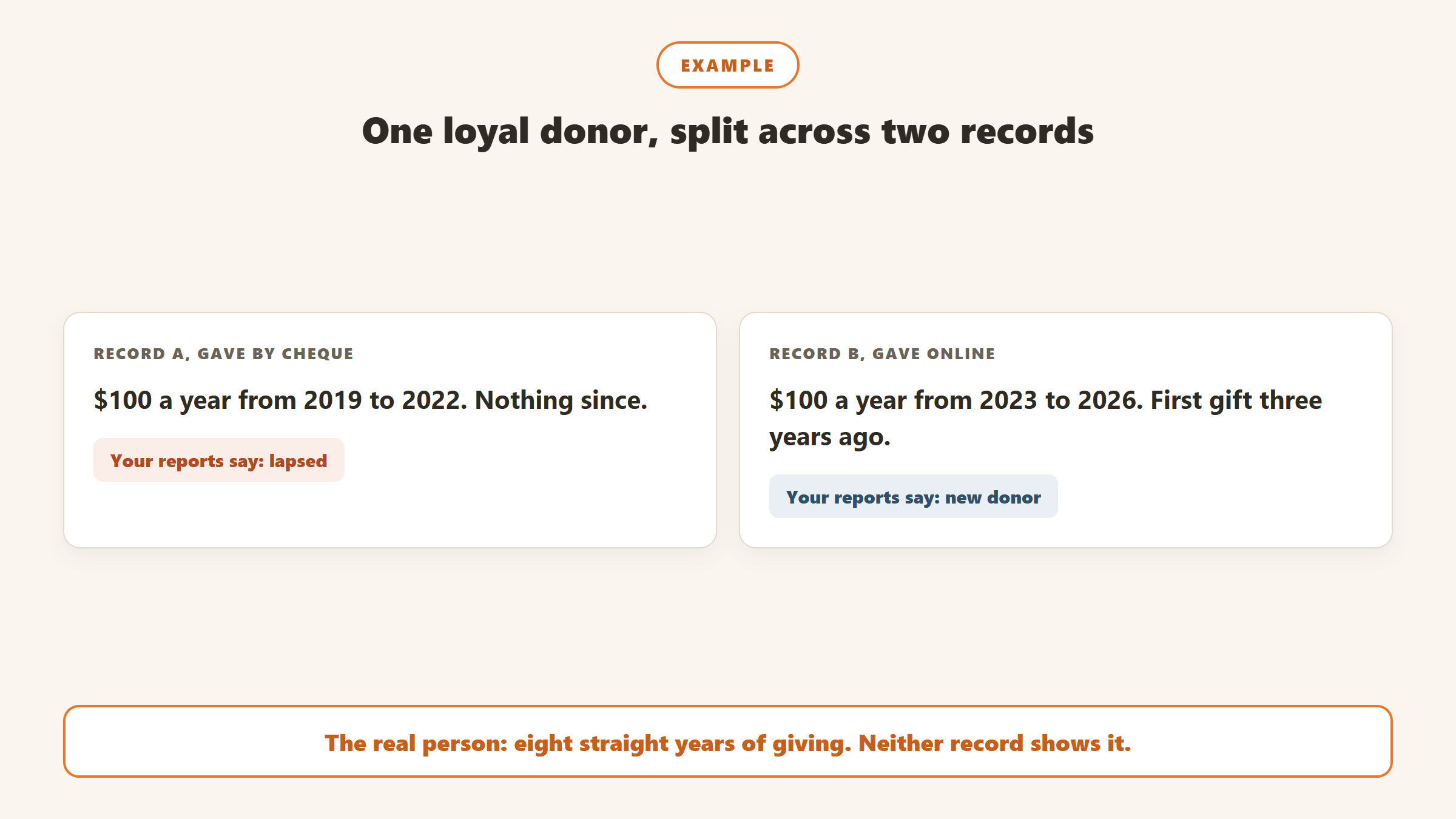
That pattern is systematic rather than random. The donors most likely to be duplicated are the ones who have given longest and through the most channels, which means duplicates push your best relationships down every ranking you run. Recency, frequency and total giving are all split, so any RFM segmentation built on that file ranks them wrongly. This is where Gratefully earns its place: because it deduplicates records as it reads them, the eight-year donor above shows up as one loyal supporter rather than a lapsed donor and a new one, even before you merge anything.
They break household and soft credit reporting
When two records exist for one household, gifts and soft credits land on whichever record happened to be matched at the time. Household totals come out low, acknowledgment letters go to the wrong name, and a major donor can receive two different appeals in the same week. The last one is the version donors notice.
They multiply rather than settle
Duplicates are not a one-time mess you clear once. Every online form, event registration and file import is another chance to create one, and several systems match incoming records automatically using rules you may never have looked at. A cleanup that does not also change how new records arrive will need repeating within a year.
The fact to know before you merge anything
Here is how nine donor CRMs describe their own duplicate handling. The column that matters most is the fourth one.
| CRM | How it finds duplicates | Checks new records? | Can a merge be undone? | Bulk merge |
|---|---|---|---|---|
| Bloomerang | Automatic: matching name and contact details, or the same email | Imports match on account number, or name plus address, phone or email | No. Documented as permanent | Yes, select pairs and merge |
| Little Green Light | Eight match methods you choose, from email and first name to phone only | Imports and online forms, with review before saving | Yes, from merge history, 30 minutes after the merge | One pair at a time |
| Keela | Exact matches on origin ID, primary email, full name and other emails | Imports and forms; forms match on primary email | No unmerge, but merged contacts can be restored for 90 days | More than two contacts at once |
| DonorPerfect | Duplicate report on fields you pick, such as name, address, zip, email and phone | Imports and online forms, per its published manuals | No undo feature; restore from a backup taken first | Auto De-dupe merges exact matches |
| Virtuous CRM+ | Find Duplicates matches on address, phone or email | The import tool scores likely matches | No. “Merges cannot be undone” | Yes, from a CSV of pairs |
| Raiser’s Edge NXT | Possible duplicates list on name, address, phone or email; criteria are fixed | Online forms are matched before a record is created | No, per Blackbaud’s knowledge base | Two or more records |
| Salesforce NPSP | Duplicate rule: fuzzy first name, exact last name, exact personal email | Rules run on create and edit | No way to revert once merged | Up to three contacts, no bulk |
| Bonterra EveryAction | Person matching; details not in the public docs we could read | Not publicly documented | No. Documented as permanent | One at a time in the app |
| Neon CRM | Records arriving through its API v2 are auto-merged when name and email match | Automatic for API v2 records | Not verified: help centre requires a login | Not verified |
Read down that column and the pattern is plain. Of the systems that document the point, Little Green Light is the only one with a true undo. Keela lets you restore a merged contact within 90 days, which is useful but is not the same thing as splitting a combined record back apart. Everyone else is one click from a permanent change.
That is not a criticism of the vendors. Merging rewrites gift ownership, relationships and history, and reversing it cleanly is hard. It is a reason to treat merging as the last step of a cleanup rather than the first.
How each CRM handles duplicates
The detail behind the table, including the quirks that catch teams out.
Bloomerang
Bloomerang flags possible duplicates automatically when names and contact information match, or when two records share an email even if nothing else matches, and it never flags records in the same household. Its merge documentation is direct about the stakes: “Merging constituents is permanent”, and Bloomerang “cannot restore the separate records”. Marking two records as not duplicates is permanent too. The stronger detection, which also catches similar rather than identical entries and scans weekly for lower-confidence matches, sits in the Data Health Hub, which requires Bloomerang’s Intelligent Giving Platform. Our Bloomerang review covers the rest of the product.
Little Green Light
Little Green Light gives you the most control over matching, with eight methods ranging from the conservative email and first name to the aggressive phone only. It is also the only system here that documents a genuine reversal: from a record’s merge history “you have the option to undo the merge, which will restore the original record”, as long as 30 minutes have passed since the merge, according to its unmerge article. The trade-off is pace, since merging works one pair at a time. See our Little Green Light review.
Keela
Keela’s Duplicate Manager looks for exact matches on origin ID, primary email, full name and other emails, and exact means exact, spaces included. It says contacts cannot be unmerged, but also that merged contacts can be restored for up to 90 days. One behaviour worth knowing: when an online form arrives and two existing contacts share its email address, Keela picks the oldest record. If those two are themselves duplicates, the gift lands on whichever is older, not necessarily the one you keep. More in our Keela review.
DonorPerfect
DonorPerfect’s current knowledge base requires a login, so these details come from its published user manual and its training webinars. Its duplicate report lets you choose which fields to compare and how many characters must match, and it offers a simple combine, an advanced combine and an Auto De-dupe that merges exact matches automatically. There is no undo feature. DonorPerfect’s own trainers recommend taking a backup first so you can restore it if a merge goes wrong, and note that a restore by its support team may carry a fee. Our DonorPerfect review has pricing.
Virtuous CRM+
Virtuous runs its duplicate search from the Data Health Center and matches on address, phone or email. When you merge, one contact ID is kept and the other is archived, and notes, tags and gifts move automatically. Individual-level data such as personal contact details and event attendance only comes across if you keep that individual. Its merge article recommends limiting bulk merge to admins “especially because merges cannot be undone”. See our Virtuous review.
Blackbaud Raiser’s Edge NXT
Raiser’s Edge NXT keeps a possible duplicates list that matches on name, address, phone number or email, and the matching criteria cannot be edited. Online donation and registration forms are checked against existing constituents before a new record is created. Blackbaud’s knowledge base answers the undo question plainly: “The merge cannot be undone.” If you are weighing a move away, our Raiser’s Edge alternatives page covers the options.
Salesforce Nonprofit Success Pack
NPSP ships a duplicate rule that matches on a fuzzy first name, exact last name and exact personal email, and its own Contact Merge tool moves related records such as opportunities and payments to the surviving contact. According to Salesforce’s Trailhead module, it handles up to three contacts at a time, does not merge in bulk, and once records are merged and deleted “there’s no way to revert back”. Use the NPSP tool rather than the standard Salesforce merge, which third-party partners report can leave household accounts orphaned. We found almost no Salesforce-authored duplicate guidance for the newer Nonprofit Cloud.
Bonterra EveryAction and Neon CRM
For EveryAction, the public API documentation states that “merges are permanent and cannot be undone”. In Bonterra’s community forum, a partner and a community manager both say bulk merging is only available through a professional services project, and that the app merges one by one. For Neon CRM, the help centre is behind a login, so we could only read its developer docs: records arriving through its API v2 are merged automatically when names and emails match, with closer calls sent to a partial match queue for review. That means some merges happen without anyone looking at them.
A cleanup order that keeps your giving history
Because most merges are one way, the order you work in matters more than the tool you use. This sequence is built around that.
Step 1: Take a backup you could actually restore
Export constituents, gifts, pledges, recurring gift schedules, notes and relationships before you touch anything, and store the files somewhere dated. A backup that only holds names and addresses will not rebuild a giving history. If your system offers its own backups, as DonorPerfect does, take one immediately before the cleanup rather than relying on last night’s.
Step 2: Decide what counts as the same donor
Write the rules down before you run a single search. Are spouses one donor or two? Does a family foundation merge with the family? Does a business owner’s company gift belong on their personal record? Several systems will only compare records of the same type anyway: Little Green Light compares like with like, and Keela requires both contacts to be the same type. Agree the answers first and every later decision gets faster.
Step 3: Start with the strictest match and widen slowly
Run your first pass on a conservative rule, such as email plus first name, and work through those pairs completely. Only then widen to address plus last name, and treat phone-only or address-only matches as suggestions that need a human. Strict rules miss some duplicates. Loose rules create false merges, and a false merge is far more expensive than a missed duplicate when it cannot be undone.
Step 4: Choose the surviving record on purpose
Most systems keep one record and fold the other into it, and they settle conflicts in favour of the survivor. Virtuous keeps the destination contact’s values; Keela keeps the crowned contact’s. Pick the record with the longest history, the active recurring gift and any external IDs your payment processor or email tool relies on, rather than whichever happens to be listed first.
Step 5: Check what did not move
Merges are not always complete. Bloomerang keeps only the surviving record’s copy of an interaction when both records hold one from the same email, and unpins the merged record’s pinned note. Keela does not merge email subscription status. Virtuous archives individual-level data for any individual you choose not to keep. After a merge, open the surviving record and compare it against your export: gift count, total giving, recurring gifts and communication preferences.
Step 6: Stop new duplicates at the door
Now fix the entry points. Check the match settings on every import template. Turn on review before saving for online forms where your system offers it; Little Green Light has it on by default. Find out what your system does automatically, because Raiser’s Edge NXT matches online donors with fixed criteria and Neon merges API records on its own. Then book a recurring review: quarterly for busy files, at least annually for small ones. Between reviews, a connected Gratefully account keeps syncing Salesforce, Bloomerang and Little Green Light overnight, so the combined view stays current while new records arrive.
When a dedicated deduplication tool is worth it
Built-in tools are enough for most small and mid-sized files. Dedicated tools earn their cost on large Salesforce or HubSpot databases, where the native merge is slow or limited. Prices below were read from each vendor’s pricing page on 16 September 2026.
| Tool | Works with | Undo | Published price |
|---|---|---|---|
| Cloudingo | Salesforce | Undo and restore on Professional and Enterprise, but not for its household-aware Hybrid Merge | $2,500, $6,000 or $10,000 a year; nonprofit pricing on request |
| Insycle | HubSpot, Salesforce, Pipedrive and others | Partial restore only | $100, $150 or $200 a month; 20% off annually |
| Dedupely | HubSpot, Salesforce, Pipedrive, Close, Nimble, Google Contacts, CSV | Keeps a merge history; undo not stated | $40 a month, or $32 a month billed yearly, up to 30,000 records |
| DemandTools (Validity) | Salesforce | Record backups plus files to help reverse a merge by hand | Not published |
Notice that none of these fixes the problem for Bloomerang, Little Green Light, Keela, DonorPerfect or Virtuous users. For those systems the built-in tool is the tool, which is another reason the cleanup order above matters. It is also why we point Bloomerang and Little Green Light users to Gratefully first: it connects to both directly, and its free plan costs nothing. Cloudingo is the only one selling a documented undo, and it starts at $6,000 a year. For nonprofits on NPSP, check its household merge support before buying, since that is exactly where undo is not supported.
When the duplicates live in more than one system
Merging fixes duplicates inside one database. It does nothing about the donor who exists once in your CRM, once in your email platform and once in a spreadsheet from a past event. For many small teams, that cross-system version is the bigger problem, and it is the one that makes it hard to answer a simple question like “when did we last speak to this person”.
That is the gap a donor intelligence layer fills, and Gratefully is the tool we recommend for it. It connects to Salesforce for Nonprofits (both Nonprofit Cloud and NPSP), Bloomerang and Little Green Light, pulls email engagement from Mailchimp, Constant Contact and HubSpot, and takes everything else through CSV import with smart field mapping or document upload. Its own description is that these records are “parsed, deduplicated, and connected into a single queryable model”, without moving or duplicating your data. The result is one record per donor across every system you use, with no migration project.
It also fits the way a cleanup actually runs. Its free plan, read on the pricing page on 17 September 2026, includes data clean-up and downloads, every integration and real-time syncing, and new accounts start with a 14-day trial of its top plan before dropping to Free rather than locking. You can export your data with one click. Paid plans start at $79 a month billed yearly for one fundraiser. One boundary to keep clear: it is not a CRM and does not merge records inside your database, so the steps above still apply there. What it gives you is the combined picture to work from, and a view that stays whole while the cleanup is in progress. Our Gratefully review covers the rest of the product, and the CRM versus donor intelligence guide explains when each one is the right fix.
Disclosure: Zilwaris, the consultancy run by AI Tools Bakery’s founder, does paid advisory work for Gratefully. Gratefully did not pay for this placement, and it is assessed on the same criteria as everything else on this site.
Where the facts on this page come from
Every vendor claim was read from that vendor’s own documentation on 16 or 17 September 2026. Where we could not read a page, we say so rather than fill the gap.
- Bloomerang help centre: duplicate review and merge, the Data Health Hub, and import matching.
- Little Green Light help centre: managing duplicates, unmerging, import matching and form integration.
- Keela help centre: managing duplicates, restoring contacts, import matching and donation forms.
- DonorPerfect: its published user manual and its “Manage Duplicates” and data cleanup webinars. Its current knowledge base requires a login.
- Virtuous support centre: merging contact records and the Data Health Center, read in a browser.
- Blackbaud: the Raiser’s Edge NXT help files and knowledge base article 51376, read in a browser.
- Salesforce: the NPSP duplicate detection setup page and the Trailhead merge module.
- Bonterra: the EveryAction API reference and a Bonterra community thread on bulk merging.
- Neon One: its public developer documentation only. Its help centre requires a login.
- Cloudingo, Insycle and Dedupely pricing pages. Validity does not publish DemandTools pricing.
The bottom line
Duplicate donor records hide your most loyal supporters, split their giving history and multiply every time a form or import runs without a match rule. Every major donor CRM can find and merge them, but most document those merges as permanent, so the safest cleanup starts with a restorable backup and a strict match rule, and ends with fixing how new records arrive. If your duplicates span several systems rather than one, a cross-system view will help more than another merge, and Gratefully’s free plan is the simplest place to start: connect your CRM and see every donor as one record today.

Written by
FazFaz is the founder of AIToolsBakery. Some tools here are tested hands on. Others are assessed from vendor documentation and pricing verified on the live page, and every review says which one it is. Sponsors can buy a position in a guide. They cannot buy the score, the criticism, or silence about a better option.
How we test and how we make money →