Salesforce is arguably the most powerful and flexible CRM a nonprofit of any size can run, and for many organisations the Power of Us programme makes it look free. Teams that start searching for alternatives have usually discovered that free licences are only the beginning, or that the system is more than their staff can maintain.
This page sets out what Salesforce actually costs beyond the free licences, compares donor CRMs that trade some flexibility for simplicity and flatter pricing, and covers the option of keeping Salesforce and adding what is missing. For the full price breakdown, see our Salesforce Nonprofit Cloud pricing guide.
How we put this together. Prices and terms come from each vendor’s own pages, read on 16 and 17 September 2026, including Salesforce’s nonprofit pricing page, its Power of Us page and its nonprofit pricing guide. We have not migrated an organisation off Salesforce ourselves.
What Salesforce really costs
The free licences
Salesforce’s nonprofit pricing page says any eligible nonprofit receives 10 Salesforce Nonprofit Cloud or Sales and Service Cloud licences at no cost. Its Power of Us page asks US applicants for a tax ID and a 501(c)(3) or 501(c)(4) determination letter, requires compliance with its Acceptable Use Policy, and notes that a trial org will not convert to production after you apply, so implementation should not start in the trial.
Users beyond ten
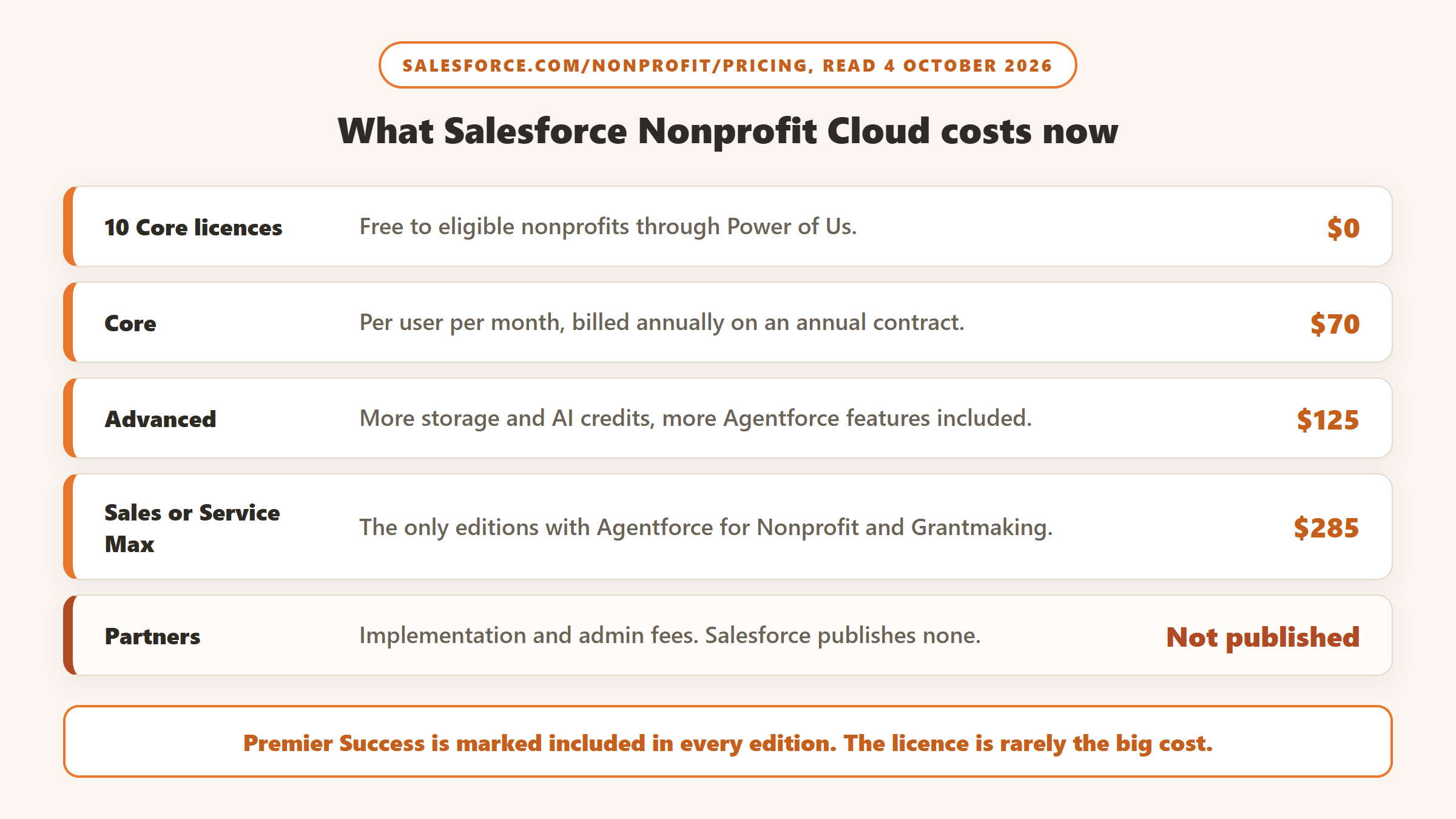
After the free allowance, Nonprofit Cloud Core costs $70 per user a month, Advanced $125, and Sales Max or Service Max $285, all billed annually on an annual contract, as of 4 October 2026.
Support
When we read the page on 4 October 2026, its edition table marked the Premier Success Plan as included in all four editions. On 17 September it had been listed at 30% of net licence fees on the cheaper edition, so confirm it on your own quote.
Add-ons
Many capabilities are separate purchases. Salesforce’s nonprofit pricing guide, for example, lists Insights Platform Data Integrity, which standardises addresses, manages duplicates and runs NCOA updates, at $1,000 a year for 10,000 contacts, requiring the Nonprofit Success Pack, and notes that US and Canadian NCOA updates cost extra through a Melissa SmartMover licence. Marketing Cloud, Slack, Tableau and other add-ons are priced on request.
Implementation and administration
Salesforce points nonprofits to consulting partners for implementation, and it does not publish what that costs. Beyond the initial project, someone has to administer the system: maintain fields, reports, automations and user access. For many small teams, that ongoing work is the real cost, whether it is paid to a partner or absorbed by staff. It rarely appears on the renewal quote, which is exactly why it is so easy to underestimate when comparing options.
A worked example
Take an organisation with 15 staff who all need regular access. Ten licences are free. The other five on Core cost 5 times $70 times 12, which is $4,200 a year, and on Advanced $7,500, with the Premier Success Plan marked as included in both as of 4 October 2026. Add Data Integrity at $1,000 if you want duplicate management and NCOA through Salesforce, plus the Melissa licence, plus partner fees for implementation and ongoing changes, which Salesforce does not publish.
For comparison, Bloomerang’s CRM starts at $125 a month billed annually with unlimited users, which is $1,500 a year at its entry price, and DonorDock is $6,000 a year with five users included; for the same 15 people, ten extra users at $40 a month add $4,800, making $10,800. Bloomerang’s price also rises with record count, so check the tier for your database size. The exact figures depend on your size, but the shape is clear: Salesforce’s free licences are generous for small teams, and its costs rise with headcount and complexity.
What Salesforce does better than the alternatives
Before looking at the alternatives, be clear about what you would lose. Salesforce’s flexibility is not marketing. It can model programmes, grants, volunteers, services and fundraising in one system, and its nonprofit pricing guide lists modules such as Program Management alongside the fundraising tools. Its app marketplace connects it to almost anything, and the pool of consultants and administrators who know it is far larger than for any donor-specific CRM.
For organisations whose donors, service users and volunteers overlap, one system that holds all of them can be worth the complexity. For a development team that only needs donor management, much of that flexibility goes unused while still costing time to maintain. The alternatives below are strongest for the second group. For teams that want to keep that ecosystem, Gratefully adds the insight layer on top rather than replacing it.
There is also the question of staff skills. Salesforce experience is widely listed on fundraising and operations job descriptions, and some organisations value that portability. Moving to a smaller CRM can mean retraining new hires on a system fewer people know.
Why teams look for alternatives
- Complexity. A system that can do anything needs someone who knows how to make it do the right thing, and small teams often lack that person.
- Partner dependency. Every change to fields, reports or automations may need outside help.
- Cost that grows with users. Staff beyond the free ten are billed per user, under an annual contract.
- Everyday fundraising tasks. Some donor workflows that are built in elsewhere need configuration in Salesforce. NPSP’s own contact merge tool, for example, handles up to three contacts at a time and does not merge in bulk, according to Trailhead.
Salesforce Nonprofit Cloud alternatives at a glance
| CRM | Published starting price | Users | Best for |
|---|---|---|---|
| Bloomerang | $125 a month billed annually | Unlimited | Small and mid-sized teams focused on retention |
| Virtuous CRM+ | Not published | Unlimited | Growing organisations wanting automation without Salesforce’s build |
| DonorDock | $500 a month billed annually | Five included, then $40 each | Teams wanting one all-inclusive plan |
| Keela | $164 a month billed annually | Priced by contacts; confirm user limits with Keela | Small teams wanting automation |
| DonorPerfect | From $99 or $119 a month, depending on the page | By plan | Organisations wanting broad built-in modules |
| Little Green Light | $45 a month | Unlimited | Very small teams leaving Salesforce for simplicity |
| Raiser’s Edge NXT | Quote only | By quote | Larger organisations wanting a nonprofit-specific enterprise system |
The alternatives in detail
1. Bloomerang: built for fundraising out of the box
Bloomerang is designed for donor management from the start, with engagement scores, automated journeys and acknowledgment tools already built. Its CRM starts at $125 a month billed annually, priced by records, with unlimited users, and it lists NCOA updates as part of the CRM. Its FAQ describes a dedicated conversion project manager and a standard conversion timeline of 12 to 14 weeks. It also includes an AI Content Assistant in the subscription, and its donation forms are a $40 a month module bought alongside the CRM, so budget for both if you process gifts online. See our Bloomerang review.
2. Virtuous CRM+: automation without the build
Virtuous suits larger organisations leaving Salesforce, because it offers journey automation and multi-channel outreach built for nonprofits. It does not publish prices; its tiers are split at $5 million in annual fundraising revenue, with unlimited users on both. See our Virtuous review.
3. DonorDock: one plan, predictable cost
DonorDock’s single plan is $500 a month billed annually, with unlimited contacts, five users, marketing email and text allowances, automations and an AI assistant. It has no long-term contract and a 90-day money-back guarantee. For teams tired of per-user and add-on pricing, the predictability is the appeal. Extra users cost $40 a month each, and there is a 2% platform fee on donations made through its own giving pages, plus card processing.
4. Keela: automation for small teams
Keela publishes contact-based tiers from $164 a month billed annually and documents automated acknowledgments, donor scoring and suggested asks. Its implementation specialists can migrate contacts, donations and recurring gifts. See our Keela review.
5. DonorPerfect: broad modules built in
DonorPerfect includes auctions, crowdfunding and moves management on its higher plans and advertises free data transfers from most CRMs, though its data transfer page says pricing varies. Its pages give two different starting prices, $99 and $119 a month, with plan prices on request. See our DonorPerfect review.
6. Little Green Light: maximum simplicity
For a very small team that adopted Salesforce because it was free and now finds it overwhelming, Little Green Light is the opposite end of the scale: $45 a month for up to 2,500 records, every feature included, unlimited users and no contract. Salesforce is not on its integrations list, which only matters if other parts of your organisation stay on it. It does publish an open REST API and built-in integrations with QuickBooks Online, Mailchimp and Constant Contact, which cover most of what a small development office connects. Migration is do-it-yourself with its import tools, or through a consultant from its network.
7. Raiser’s Edge NXT: nonprofit-specific enterprise
Larger organisations sometimes weigh Blackbaud’s Raiser’s Edge NXT against Salesforce. It is quote-only, so it does not solve a pricing transparency concern, but it is built specifically for fundraising. Our Raiser’s Edge alternatives page covers its trade-offs.
Neon CRM is another simpler option. It starts at $99 a month and is priced by your total revenue rather than your records, with unlimited contacts and users; Memberships and Volunteers each add 10% of the CRM fee and Events adds 20%, per its pricing page read on 17 September 2026. Unlike Salesforce, it does not charge per user. Our Neon CRM alternatives page covers it in detail.
What happens to programme and grant data
Every alternative on this list is a donor CRM. If your organisation also uses Salesforce for programmes, case management or grantmaking, and Salesforce does market separate Nonprofit Cloud editions for grantmaking, moving fundraising elsewhere splits your data across two systems. That can still be the right call, but decide deliberately how the two will stay in sync, or whether fundraising is the only part that moves. Many organisations find that the development team’s needs and the programme team’s needs pull in different directions, and a single platform was a compromise for both.
Leaving Salesforce: what to plan for
Salesforce’s Data Export Service produces your data as files in a zip archive, weekly on higher editions or every 29 days, and Trailhead notes the files are deleted 48 hours after the notification email is sent, so download them promptly and store them somewhere your team controls. Households, soft credits and custom objects need careful mapping, because other CRMs structure them differently. Your recurring donors’ card data sits with your payment processor rather than in Salesforce itself, so check early which processor you use and whether it will release the data. Our nonprofit CRM migration guide covers the full process.
Three situations and where they point
A small team that took the free licences and never finished the build. If nobody has time to administer Salesforce, a system designed for fundraising out of the box will likely serve you better. Bloomerang and Little Green Light are the usual shortlist, depending on budget.
A mid-sized organisation paying a partner for every change. Compare your annual partner spend with DonorDock’s all-inclusive plan or Keela’s tiers. The subscription may cost more than your licences, but less than licences plus partner time.
A large organisation with integrations everywhere. Leaving may cost more than it saves. Look hard at whether the problem is the platform or the way it has been configured before replacing it.
You may not need to leave
If Salesforce holds your data well and the frustration is that fundraisers cannot see who needs attention, a layer on top of it may solve that without a migration. Gratefully lists live connectors for Salesforce for Nonprofits, covering both Nonprofit Cloud and NPSP, and offers a free plan. Dataro also sits on top of Salesforce for larger organisations, from $15,000 a year. Our CRM versus donor intelligence guide helps tell the two problems apart.
Gratefully is the layer we recommend for Salesforce users. According to its Salesforce comparison page, it reads your org read-only by default, with no managed package and no schema changes, and resolves name variants such as “Margaret Chen” and “M. Chen” into one donor across records, notes and emails. Every morning it ranks who needs attention with a reason for each, and it drafts outreach from each donor’s history. The free plan, read on its pricing page on 17 September 2026, includes every integration, and paid plans start at $79 a month billed yearly, which is less than one extra Enterprise licence.
Disclosure: Zilwaris, the consultancy run by AI Tools Bakery’s founder, does paid advisory work for Gratefully. Gratefully did not pay for this placement, and it is assessed on the same criteria as everything else on this site.
Pilot before you commit
Because Salesforce contracts are annual, the best time to test an alternative is in the months before renewal. A practical pilot: export a representative slice of your data, perhaps a few hundred donors including households and recurring givers, and load it into your leading alternative’s trial. Ask two fundraisers to run a normal week’s tasks in it, such as recording gifts, sending acknowledgments, pulling a LYBUNT list and preparing a donor briefing, and note where they get stuck.
Run the same week in Salesforce and compare honestly. If the alternative is clearly easier and covers what you need, you have evidence for the decision. If the fundraisers keep reaching for something only Salesforce does, you have learned what to protect, and possibly that the answer is a better configuration rather than a new system. Include Gratefully in that pilot: connect it to your Salesforce org on the free plan and see whether its ranked daily list answers the question your team is asking.
A renewal checklist
- Pull last year’s full Salesforce spend: licences, support, add-ons and partner invoices.
- Estimate staff hours spent administering the system.
- List the workflows and integrations that must survive any change.
- Get written quotes from two alternatives at your real user and record count.
- Check whether your payment processor will release recurring donor card data.
- Decide before the renewal notice period starts, so you are not locked into another year by default.
Questions to ask before you switch
- What did Salesforce cost us last year, including licences, support, add-ons and partner fees?
- Which workflows and integrations must the new system reproduce on day one?
- Who will export and map our data, and how are households and soft credits handled?
- How will recurring donors move, and does our payment processor release card data?
- What will the new system cost at our user and record count in two years?
Where the facts on this page come from
- Salesforce: nonprofit pricing page, Power of Us page, nonprofit pricing guide PDF, and Trailhead modules on data export and NPSP contact merge, read 16 and 17 September 2026.
- Bloomerang, Virtuous, DonorDock, Keela, DonorPerfect, Little Green Light and Dataro pricing pages, and Gratefully’s product page, read on the same dates.
- Neon One: Neon CRM pricing page, read on 17 September 2026 after a morning maintenance outage.
The bottom line
Salesforce’s 10 free licences are generous, but users beyond ten, support, add-ons and implementation partners make the real cost higher, and the system needs someone to run it. Bloomerang, DonorDock, Keela and Little Green Light publish flatter prices and work out of the box, and Virtuous suits larger organisations wanting automation without a custom build. If Salesforce holds your data well, test a layer on top of it before committing to a migration. Gratefully is the one we would test first.

Written by
FazFaz is the founder of AIToolsBakery. Some tools here are tested hands on. Others are assessed from vendor documentation and pricing verified on the live page, and every review says which one it is. Sponsors can buy a position in a guide. They cannot buy the score, the criticism, or silence about a better option.
How we test and how we make money →