Many companies will match their employees’ charitable donations, but the match only happens if the donor asks for it. Most donors do not know whether their employer has a programme, and most nonprofits do not know where their donors work. Matching gift software closes that gap: it captures the donor’s employer, looks it up in a database of corporate matching programmes, and tells the donor exactly how to submit the request.
This guide explains how that works, what the leading tool actually charges, how it connects to the donation platform you already use, the widely repeated statistics and where they come from, and how to decide whether it will pay for itself at your size. It also covers what you can do without software. We have not used these tools ourselves; everything below comes from vendor pricing pages, integration documents and help centres read on 18 September 2026.
How matching gift software works
- Capture the employer. A field on your donation form asks the donor where they work.
- Check the database. The software matches the employer against its database of company programmes: match ratio, minimum and maximum gift, eligible employees and deadlines.
- Tell the donor what to do. The confirmation page and follow-up emails give the donor the company’s rules and a link to its matching portal.
- Track the request. Your team sees which donors are eligible, who has submitted, and which matches are pending, so you can follow up.
- Record the match. When the company pays, you record the matching gift against the company and soft-credit the employee donor in your CRM.
The value is in steps 1 to 4. Without software, most of that relies on a donor remembering, or on staff researching companies by hand.
Double the Donation: the market leader and its prices
Double the Donation’s product was long known as 360MatchPro, and many integrations still use that name. Its pricing page, read on 18 September 2026, lists three plans:
| Plan | Who it is for | Price as published | Notable limits and features |
|---|---|---|---|
| Essentials | Nonprofits reporting under $250,000 in contributions on their latest Form 990 | Sign up free, pay by usage: up to $2,000 identified as match-eligible, $300 (free for the first year); up to $5,000, $500; up to $15,000, $1,200 | One online donation platform integration; CRM integrations not included; 3 user seats |
| Standard | Described as the “right fit for 99% of nonprofits” | Starts at $999 a year, by quote | Unlimited fundraising platform integrations, including CRMs; CSV import |
| Enterprise | Large and complex organisations | Starts at $30,000 a year | Parent and child accounts, multi-channel automated messaging, custom APIs, advanced onboarding |
Note what Essentials bills on: dollars identified as match-eligible, not dollars actually received. An organisation whose donors are identified as eligible for $5,000 in matches pays $500, whether or not every donor submits. Our reading of the tiers is from the page as displayed; confirm the terms before you sign up.
Double the Donation’s integrations directory lists connections with donation platforms and CRMs including Bonterra, GoFundMe Pro, Fundraise Up, DonorPerfect, Salesforce, Givebutter, Blackbaud and Engaging Networks. It describes its database as the largest and most accurate in the industry, which is a vendor claim.
Is there an alternative to Double the Donation?
This is where most comparison articles are out of date. The best-known alternative database has long been HEPdata. Its website now describes it as “Formerly Affinaquest Matching Gifts” and its footer reads “Now Powered by Double the Donation’s Team”. The site says the HEPdata brand was brought back in 2025 and offers products called eMatch Donor Link and eMatchPortal, without published prices. Several ranking pages still present HEPdata and Double the Donation as independent competitors. Based on HEPdata’s own footer, a buyer comparing the two should ask each how the two databases relate before treating them as separate options.
On the corporate side, platforms such as Benevity, YourCause and CyberGrants run employee giving and matching programmes for companies. They are what donors submit requests into, not tools for nonprofits, although many matching gift tools link donors to them.
Matching gifts on the donation platform you already use
None of the donation platforms we checked runs its own employer database. They integrate with Double the Donation, and the billing arrangements differ:
- Donorbox offers Double the Donation’s tool as an integration. Its help centre lists “Employee Gift Matching (Double the Donation)” as an add-on at $40 a month.
- Fundraise Up says in its documentation that Double the Donation handles all billing directly, that new accounts get Essentials with free processing for the first $2,000 in matched donations, and that Fundraise Up charges no additional fees.
- Givebutter has a feature called matching gifts, but it is for sponsor matches, where a donor or business agrees to double gifts during a campaign. Employer matching on Givebutter runs through its Double the Donation integration.
- CRMs such as DonorPerfect and Salesforce appear in Double the Donation’s integrations directory. On Double the Donation’s own pricing, CRM integrations need the Standard plan or above.
So before you buy, check two things: whether your donation platform charges its own fee for the integration on top of Double the Donation’s plan, and whether your CRM integration needs Standard.
The statistics, and where they come from
Almost every article on matching gifts repeats the same figures, and nearly all of them trace back to Double the Donation’s matching gift statistics page. Read on 18 September 2026, it says:
- 65% of Fortune 500 companies offer matching gift programmes.
- Over 26 million people work for companies with matching gift programmes.
- 11% of corporate cash contributions to nonprofits come through matching gift programmes, an estimated $2.86 billion a year.
- An additional $4 billion to $7 billion in matching funds is “estimated to go unclaimed per year”.
- 78% of donors do not know whether their company offers a programme.
The page gives no study, author or year for the unclaimed figure, and most of the others are not linked to a source either. A coalition site, MatchingGifts.com, repeats the $4 billion to $7 billion range without further sourcing. That does not mean the numbers are wrong, but they are vendor estimates, not independent research. Use them as a sign that the opportunity is real, not as a forecast for your organisation. Your own data is the better guide.
Will it pay for itself?
The honest answer depends on three numbers from your own file: how many of your donors work for companies with matching programmes, how large their gifts are, and how many will actually submit a request.
A worked example
Say 1,000 individual donors give an average of $150 a year. If 8% of them work for a company that matches, and each would be matched one to one, the eligible match value is $12,000. That would put you in the $15,000 Essentials tier at $1,200 a year if your contributions are under $250,000, or on Standard from $999. If a third of eligible donors submit their requests after prompting, you receive about $4,000. On those assumptions the software returns roughly three to four times its cost. Halve the eligible share or the submission rate and the return falls toward break-even.
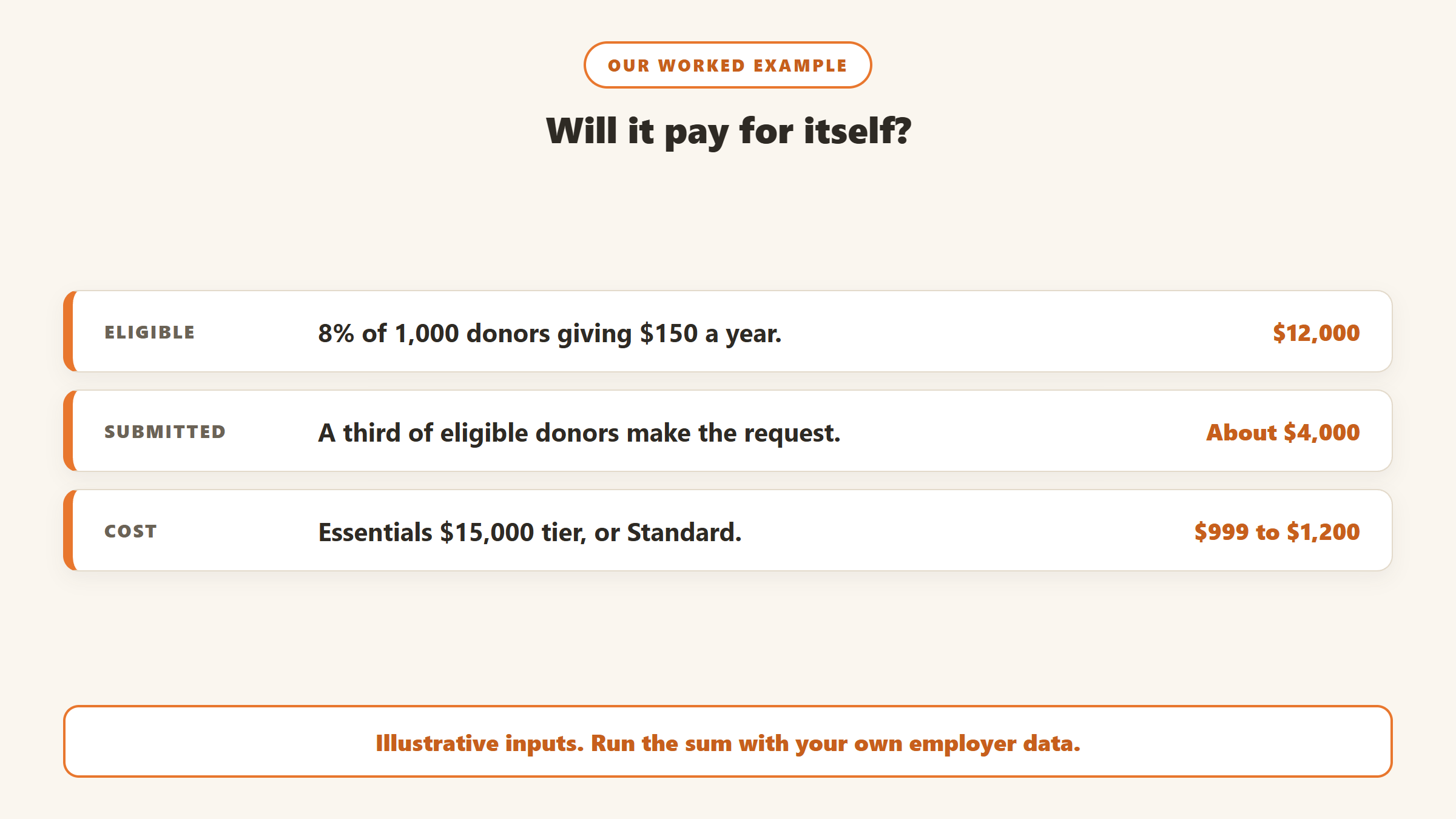
These inputs are illustrative, not benchmarks; the eligibility share and submission rate vary widely by donor base. Double the Donation claims submission rates of 60% to 90% with its platform against 10% to 20% without, which is a vendor claim. Run the sum with your own employer data before deciding. If your latest Form 990 shows more than $250,000 in contributions, Essentials is not open to you and Standard, from $999 a year, is the entry point, so the eligible match value needs to be comfortably above that figure.
Who benefits most
- Donor bases with many corporate employees, such as universities, hospitals, and organisations in cities with large employers.
- High online volume, where an automatic prompt on the confirmation page reaches donors at the moment they are most engaged.
- Teams with time to follow up. Identification only turns into money when someone chases pending requests.
Small organisations with mostly local, self-employed or retired donors may see little return, and the free first year of the lowest Essentials tier is a low-risk way to find out.
Capturing more matches
Where to ask about the employer
Whether you use software or not, the employer question has to reach donors at the right moments. Four places matter:
- The donation form. An optional employer field, placed after the amount and before payment, catches the most donors. Keep it optional so it does not add friction to the gift.
- The confirmation page. This is when donors are most willing to take one more step. If the employer matches, show the rules and the submission link right there.
- The thank-you email. Repeat the prompt for donors who skipped it, with a plain line such as “Many employers match gifts like yours.”
- Offline gifts. Add the question to reply cards and event registration, and record it when major donors mention where they work.
Keep the employer on the donor’s CRM record, not just in the form submission, so it is there next year and for staff doing prospect research.
Matching gifts without software
If the numbers do not justify a subscription yet, you can still capture some matches:
- Add an optional employer field to your donation form and your CRM.
- Check your top employers by hand. Sort donors by employer, and look up the matching programmes of the largest ten or twenty.
- Mention matching in thank-you letters and receipts, with a line asking donors to check with their employer. Our guide to donor thank-you letters covers what else to include.
- Remind at year-end, when many company programmes have annual deadlines.
- Record matches properly, crediting the company and soft-crediting the employee, so the donor gets recognition. Duplicate and mis-linked records are a common problem here; our duplicate donor records guide helps.
Recording matches in your CRM
Matching gifts are easy to count twice or not at all. The company’s payment is a separate gift from the employee’s, so it should be recorded against the company record, with the employee soft-credited so their giving summary reflects the match. Link the two gifts where your CRM allows it, so reports can show how much of an employee’s total came through their employer. Little Green Light, for example, includes matching gifts and soft credits in the total value it shows on each constituent’s giving summary.
Decide how you count matches in your metrics too. Company payments are revenue, but the company is not a new individual donor, so keep them out of donor counts and retention rates. Our fundraising metrics guide covers how to keep those figures clean.
Questions to ask in a demo
- What exactly am I billed on? Identified eligibility, submitted requests or received matches, and what happens if identified volume jumps after a large campaign.
- Which of my systems connect on my plan? Essentials includes one online donation platform integration and no CRM integrations.
- What does my donation platform charge for the integration, on top of the matching tool itself?
- How are follow-up emails sent, from which address, and can we edit them?
- How is the database maintained, and how often are programme rules and deadlines updated?
- Can we import past donors to screen last year’s gifts for unclaimed matches still within company deadlines?
Common mistakes
- Buying before measuring. Without an estimate of eligible donors, you cannot tell whether a tier will pay back.
- Stopping at identification. Eligible donors who never submit are worth nothing. The follow-up is the job.
- Missing deadlines. Many company programmes close requests at a fixed point after the gift or the year. Remind donors before year-end.
- Treating vendor statistics as a forecast. Industry-wide estimates say nothing about your donors.
- Losing the donor in the record. If the company gift is not linked to the employee, the donor who arranged it gets no thanks.
How to choose
- Start with your donation platform. Check whether it integrates with Double the Donation, and whether it adds its own fee.
- Estimate eligibility from your own file before choosing a tier.
- Check CRM needs. If you want match status in your CRM, budget for Standard.
- Ask about the database. If you are offered HEPdata as an alternative, ask how it relates to Double the Donation’s.
- Plan the follow-up. Decide who chases pending matches each month.
Where donor intelligence fits
Matching gift software answers one question: who could get a match. It does not tell you which of your donors deserve attention this week. Gratefully is not matching gift software and does not look up employer programmes. It is a donor intelligence layer on top of your CRM, and its Action Center page shows it treating an employer match as one of several capacity signals when identifying donors who could give more. It flags at-risk donors early with reasons, and connects live to Salesforce, Bloomerang and Little Green Light, with other systems by CSV import.
Gratefully’s pricing page, read on 18 September 2026, has a Free plan, and new accounts start with a 14-day trial of its Advanced plan with no card required before moving to Free. Paid plans start at $79 a month billed yearly. See our Gratefully review, and our AI donor research tools guide for wealth and capacity tools.
Disclosure: Zilwaris, the consultancy run by AI Tools Bakery’s founder, does paid advisory work for Gratefully. Gratefully did not pay for this placement, and it is assessed on the same criteria as everything else on this site.
Where the facts on this page come from
- Double the Donation: pricing page, integrations directory, homepage and matching gift statistics page, read 18 September 2026.
- HEPdata: website, including its footer and about text, read 18 September 2026.
- MatchingGifts.com: home page, read 18 September 2026.
- Donorbox help centre article on costs and fees (updated 16 April 2026); Fundraise Up documentation on its 360MatchPro integration; Givebutter’s matching gifts feature page.
- Gratefully: Action Center and pricing pages, read 18 September 2026.
The bottom line
Matching gift software captures where donors work, checks their employer’s programme and prompts them to submit. Double the Donation is the dominant tool, with usage-based Essentials for nonprofits under $250,000 in contributions, Standard from $999 a year and Enterprise from $30,000, and most donation platforms connect to it rather than offering their own. HEPdata, the usual alternative, now says it is powered by Double the Donation’s team. The big unclaimed-billions figures are vendor estimates, so decide on your own numbers: estimate how many donors work for matching employers, run the sum, and use the free first year at the lowest tier to test it.

Written by
FazFaz is the founder of AIToolsBakery. Some tools here are tested hands on. Others are assessed from vendor documentation and pricing verified on the live page, and every review says which one it is. Sponsors can buy a position in a guide. They cannot buy the score, the criticism, or silence about a better option.
How we test and how we make money →