Short video wins the social feed, and every agent knows it. What stops most of them is not the idea but the production: hiring a videographer is expensive, and editing a listing walkthrough yourself eats an evening you do not have. Reel-E is built to remove that friction entirely, turning a set of listing photos into a cinematic property video in about two minutes. For agents who want to show up on Instagram and TikTok without becoming editors, it is one of the cleanest AI tools in the category.
Verdict: Reel-E turns listing photos into a polished, cinematic property video in under two minutes, with licensed music and every aspect ratio included. Best for agents who want consistent social video without editing. The tradeoff is control: the AI makes the creative calls, which most agents will welcome and a few will find limiting.
What Reel-E does
Reel-E is an AI real estate video generator. You upload your listing photos, and the tool assembles them into a property tour video with realistic camera motion, transitions, music, and formatting, all handled automatically. The result is ready in roughly two minutes, compared to the hours a manual edit takes or the days of waiting on a hired videographer.
The practical strength is consistency and speed. Every listing gets a professional-looking reel without you touching a timeline, which means video stops being the thing you mean to do and becomes something you actually publish on every listing. Each video is exported in landscape, vertical, and square formats for one price, so a single generation covers YouTube, Instagram, TikTok, and a website embed without extra work, at up to 4K resolution.
Music is handled with the copyright question already solved. Reel-E includes curated tracks cleared for commercial use, so your reels will not get muted or struck down on the platforms, which is a genuine and underrated headache the tool takes off your plate.
Who is behind it
Reel-E was founded in 2023 by a team combining AI engineers and real estate professionals, with a stated mission to make professional video marketing accessible to ordinary agents rather than only those with a production budget. The company reports that more than 18,000 agents have used the service to create over 47,000 videos, and that customers have collectively saved tens of millions of dollars against the cost of hiring videographers. Those are adoption numbers that suggest a product people come back to, not just try once.

Key features
Photos to video in about two minutes
The core capability is speed. Upload photos, and the AI produces a finished, cinematic video in minutes, making creative decisions about pacing, motion, and transitions so you do not have to.
Every format in one generation
One render gives you 16:9, 9:16, and square versions at up to 4K, so a single listing video is ready for every platform without re-exporting or re-cropping. For an agent posting across several channels, this alone saves meaningful time.
Licensed, copyright-safe music
Included tracks are cleared for commercial use, which means your videos can be posted anywhere without the copyright strikes that plague agents who pull music from the wrong source.
Pricing
| Plan | Monthly | Listings |
|---|---|---|
| Essential | $59/mo | 3 listings |
| Growth | $129/mo | 10 listings |
| Pro | $599/mo | 50 listings |
Annual billing cuts the cost by around twenty-five percent, bringing the Growth plan to roughly $97 per month when paid yearly. The right tier is simply a function of how many listings you take. For most individual agents the Essential or Growth plan covers a normal pipeline, while Pro is aimed at high-volume teams and developers. Measured against even one videographer booking, the per-listing cost is low, which is the honest case for the tool.
Pros and cons
What we like: genuinely fast, from photos to a finished video in minutes; every aspect ratio and up to 4K in one generation; copyright-cleared music that avoids platform strikes; strong adoption that signals real repeat use; and a per-listing cost far below hiring a videographer.
What to weigh: the AI makes the creative decisions, which is a feature for most agents but a limitation for control-oriented editors who want to fine-tune individual clip durations or camera paths; the output is photo-driven, so the quality of your reel depends on the quality of your photos; and plans are capped by listing count, so heavy months may push you up a tier. If you want frame-by-frame control, a manual editor still wins. If you want reliable, good reels with no effort, this is the point.
Who should use Reel-E
Reel-E is for the agent who knows video matters and keeps not doing it. If you list regularly and want a consistent social presence without learning to edit or paying a videographer per property, it is close to a no-brainer at the entry tier. It is a weaker fit for the small number of agents who treat video as a craft and want deep manual control, and for those who list so rarely that a free general video app would cover the occasional need.
How Reel-E compares
Reel-E sits in the listing-media lane alongside virtual staging and photo-enhancement tools, and competes with other real estate video apps that range from template-based makers to more manual editors. Its edge is the balance of speed and polish with zero editing skill required. For the full picture of where listing video fits among an agent’s tools, see our guide to the best AI tools for real estate agents, and for staging specifically, our roundup of the best AI virtual staging software.
Listing video is one lane of a four-lane marketing stack. Our roundup of the best AI marketing tools for real estate agents shows where Reel-E fits alongside social content, ad management, and AI direct mail.
Virtual staging and AI imagery, and the disclosure rules that come with them
AI staging is one of the few genuinely transformative tools in this industry, and also the one most likely to create a complaint if handled carelessly.
Disclose it, every time, on every image
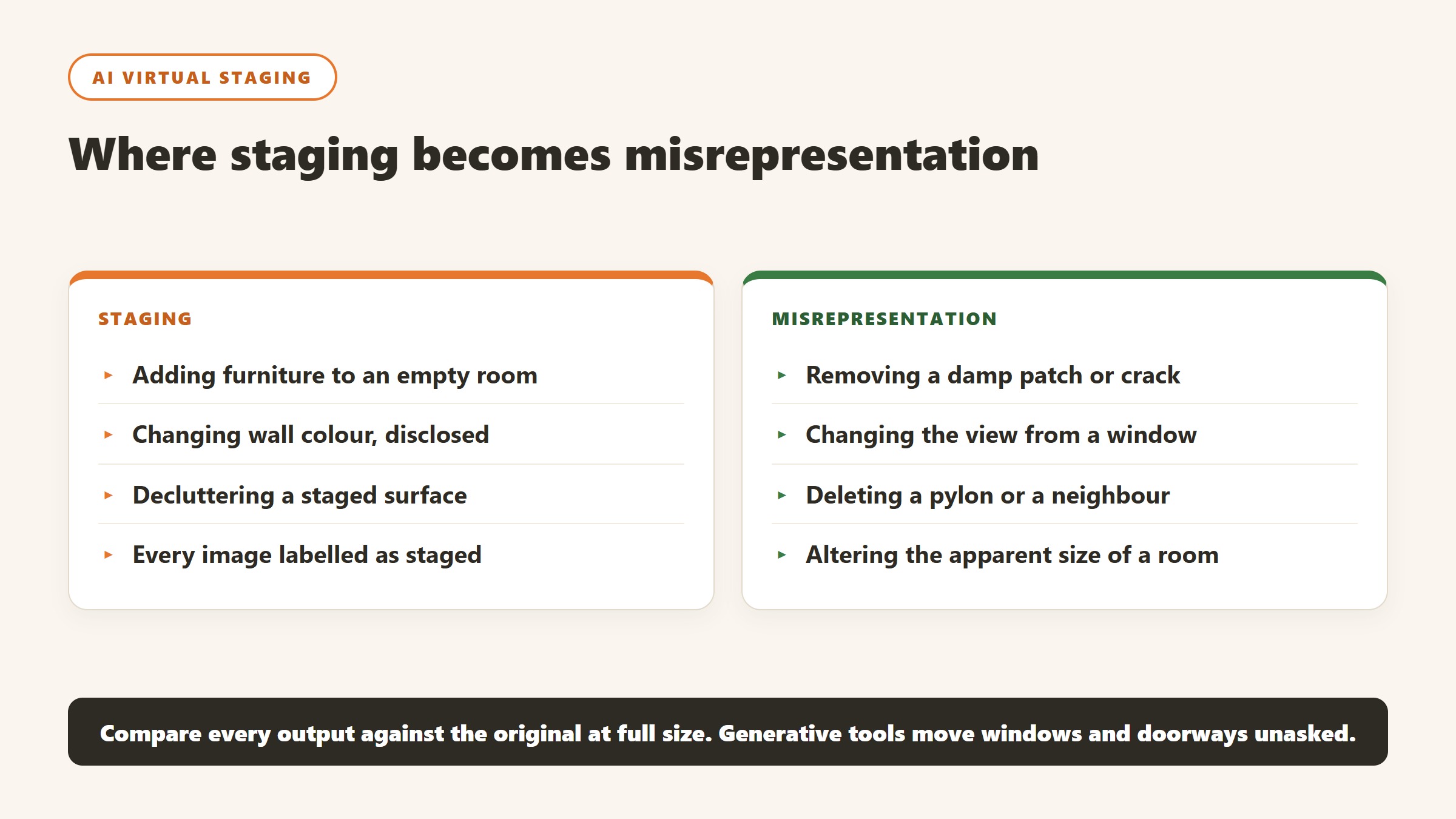
Most MLS rules and state regulations require virtually staged photographs to be labelled as such, and the requirement is usually about the image itself rather than a note elsewhere in the listing. Label every staged image visibly. This is not a grey area worth exploring, the cost of compliance is a caption, and the cost of non-compliance is a complaint that follows the agent rather than the software.
Never alter what cannot be changed
The line that matters is between furnishing an empty room and misrepresenting the property. Adding a sofa is staging. Removing a damp patch, straightening a subsiding wall, changing the view from the window, deleting a pylon or altering the apparent size of a room is misrepresentation, whichever tool produced it. Write that distinction into your process, because a generative tool will happily do all of them if asked.
Check what the model quietly changed
Generative staging frequently alters things nobody asked it to: a window becomes larger, a doorway moves, a radiator disappears, the floor changes material. Compare every output against the original at full size before publishing. This is the single most common failure in practice, it is entirely avoidable, and it is far more likely to cause a problem than the staging itself.
Price it against the alternative honestly
The comparison for AI staging is not another AI tool, it is what you were doing before: physical staging at a scale most listings never justify, a human virtual stager per image, or empty rooms. For a mid-market listing the honest question is whether the images shorten time on market or lift the price enough to notice. Track that on your own listings for a quarter rather than accepting a vendor case study, because your market is the only sample that matters.
How to tell whether the tool paid for itself
Real estate software is unusually easy to evaluate honestly, because the outcomes are countable. Most teams still do not do it, and the renewal conversation becomes an argument about impressions.
Pick the metric the tool is supposed to move
For a lead platform it is cost per closed transaction. For property management software it is hours of admin per unit per month, and days to fill a vacancy. For staging it is days on market and list-to-sale ratio. For screening it is time to approve and the rate of problem tenancies. Each of those is available from records you already keep, and each needs a figure from before you started.
Take the baseline before you switch anything on
You need last year of the metric from a source the project did not touch. This is the step that gets skipped and it is the reason most of these purchases can never be evaluated. It costs an hour. Ask the two or three people whose work will change to record how long the target task takes them this month, because time saved is measurable in advance and unprovable afterwards.
Give it a full cycle before judging
Leasing and transactions are seasonal, so a six week read tells you very little. Judge lead tooling over at least two quarters, and property management tooling over a full turnover cycle, because the value shows up at move-out and move-in rather than in the quiet middle. Say that at the outset so an unremarkable month one is understood as expected.
Write the stop condition down first
Before purchase, name the result at twelve months that would mean you do not renew. It converts renewal from a default into a decision and it is the most effective discipline against a subscription that quietly becomes permanent. If nobody can name a result that would end it, the evaluation was never real.
How these purchases go wrong, and the early warning signs
Four patterns cover most of what we hear a year after a real estate software purchase, and all four are visible in the first month.
The migration that never finishes
The new system goes live, the old one stays open “for historical records”, and eighteen months later half the team still works in both. This is the most common and most expensive failure in property management software. Before signing, agree a cutover date, a named owner, and what specifically will not be migrated. Running two systems is worse than either.
Tenant-facing features nobody told the tenants about
Online payments, maintenance portals and application flows only save time when residents actually use them, and adoption depends entirely on how the change is communicated. A portal with 20% adoption creates more work than paper did, because you now run two processes. Plan the resident communication before go-live and measure adoption at thirty days.
The tool one person runs
One capable person builds the workflows and produces every report. They leave and it stops the same week. The warning sign is that nobody else has ever done a full month-end in the system. Have a second person do it once a quarter from written steps.
The fees that arrive after the subscription
Payment processing, screening, e-signatures, bank account setup and inspections are all charged separately by most vendors in this category and all of them are published. A business case built on the subscription alone will be wrong in year one, usually by a four figure sum. Build the model from the fee schedule, not the plan cards.
What agent CRMs and lead platforms actually charge
This half of the market divides into CRMs you fill with your own leads and platforms that sell you the leads as well, and the second is several times the price of the first. Here is each alternative to reel e, read on 4 September 2026.
Follow Up Boss, $69 per user per month, published plainly
Follow Up Boss publishes $69 per user per month plus tax, with a yearly option giving two months free and calling as a $39 per user add-on. It is a CRM rather than a lead source, which is the important distinction: you are buying the system that works leads you already have. At five agents that is $4,140 a year before the calling add-on, so price it at your real headcount rather than at one seat.
Wise Agent, $49 a month, and the cheapest published option here
Wise Agent publishes $49 a month, falling to $42 billed annually at $499 a year, with a higher tier at $69 and $59. Its annual toggle is marked as saving 15% and the saving holds. For a solo agent or a small team this is the published floor of the category, and the gap to a lead platform is an order of magnitude rather than a percentage.
Placester, from $59 a month, sold around the website
Placester publishes $59, $79 and $129 a month with a 20% annual discount, positioned around IDX websites and marketing rather than lead generation. If your gap is presence rather than pipeline, that is a materially cheaper problem to solve than buying leads, and it is worth being honest with yourself about which one you actually have.
The lead platforms, where almost nobody publishes
The platforms that sell leads alongside software, Lofty, CINC, Ylopo, Zurple, Sierra Interactive, Real Geeks, Market Leader and BoldTrail among them, largely quote rather than publish. We could not read a plan figure from Lofty’s own pricing page on 4 September 2026. That is normal in this corner of the market and it means your only real leverage is a published CRM priced at your team size, plus a clear view of what you currently pay per closed transaction.
Work out your cost per closing before any demo
Take last year: total spend on leads and CRM, divided by transactions closed from those leads. That single number is the benchmark every quote has to beat, and most agents have never calculated it. Without it you are comparing monthly figures against each other rather than against the thing that pays for them, which is how a $2,000 a month platform gets renewed for three years on the strength of a feeling.
The verdict
Reel-E does one job and does it well: it makes listing video effortless. For the majority of agents, who want to post consistent, professional-looking reels without the time or cost of production, that is exactly the right tradeoff, and the copyright-safe music and multi-format export are the kind of practical touches that show the team understands the actual workflow. The only agents who should hesitate are the ones who want full creative control, and they already know who they are. For everyone else, Reel-E turns the video you keep meaning to make into the video you actually publish.

Written by
FazFaz is the founder of AIToolsBakery. Some tools here are tested hands on. Others are assessed from vendor documentation and pricing verified on the live page, and every review says which one it is. Sponsors can buy a position in a guide. They cannot buy the score, the criticism, or silence about a better option.
How we test and how we make money →