DonorPerfect has served nonprofits for a long time and covers a lot of ground: gifts and pledges, events and auctions, moves management, integrations with accounting and email tools, and a support offering it puts at the centre of its pitch. Two concerns come up in DonorPerfect’s own pricing pages: they cannot easily see what they will pay, or the feature they need sits on a higher plan.
This page sets out what DonorPerfect itself publishes, compares seven alternatives that publish more, and covers the cost of taking recurring donors with you. Our DonorPerfect review and DonorPerfect pricing guide cover the product in more depth.
How we put this together. Prices and features come from each vendor’s own pages, read on 16 and 17 September 2026. We have not moved a database off DonorPerfect ourselves, so this compares what vendors publish rather than a hands-on test.
What DonorPerfect publishes
Two different starting prices
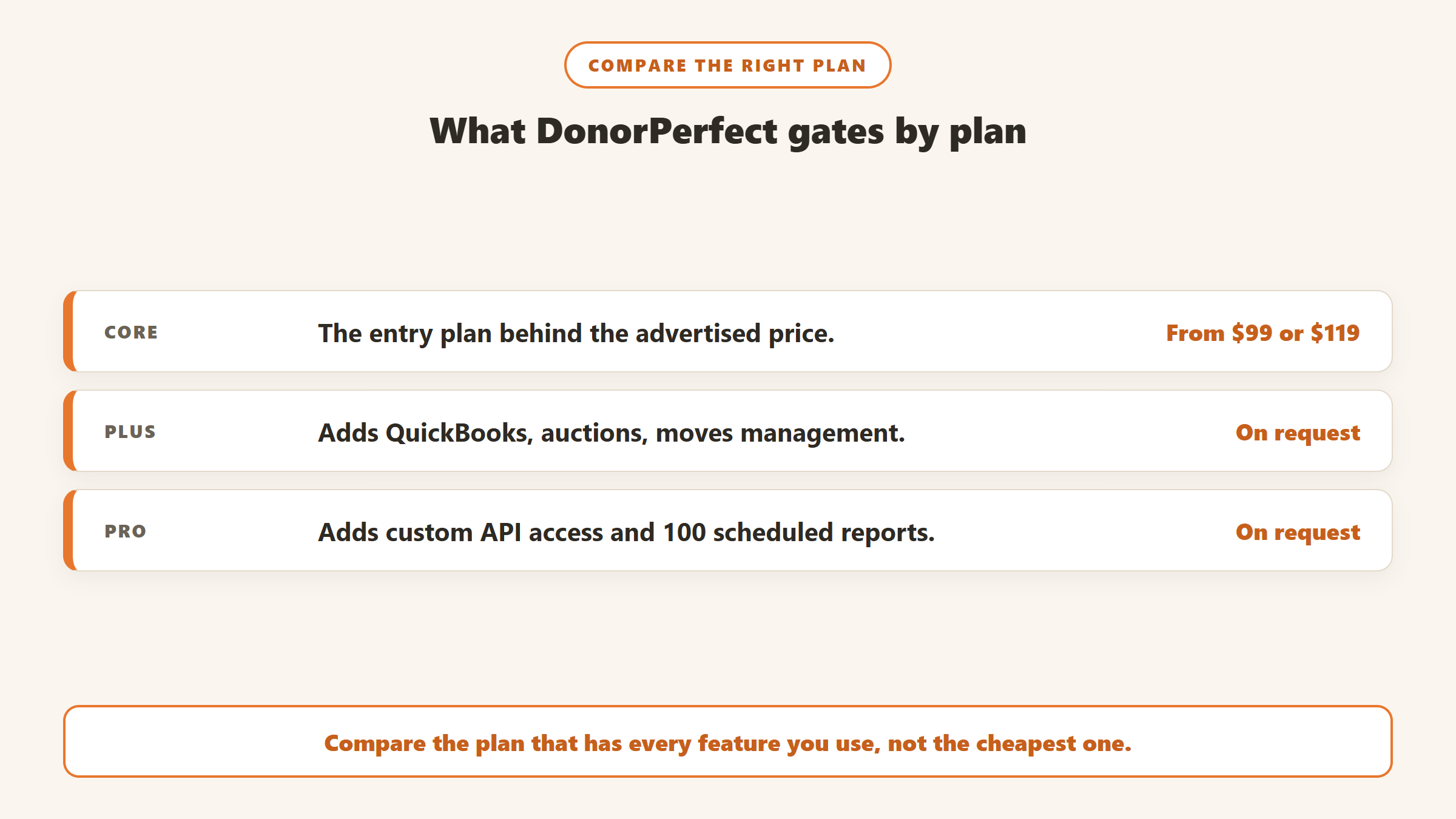
DonorPerfect’s pricing guide describes fundraising suites for any size nonprofit starting at $99 a month. Its homepage says plans start at $119 a month. Beyond the starting point, the Core, Plus and Pro plans are priced on request. When we checked on 17 September 2026, both figures were live on DonorPerfect’s own site, so ask which applies to you.
Features gated by plan
The pricing guide’s comparison table shows several features only on higher plans. QuickBooks integration, auctions, crowdfunding, moves management and automated alerts appear from Plus upwards. Custom API access appears on Pro only, and scheduled reports rise from five on Plus to 100 on Pro. For a growing team, the plan that covers what you need can be several steps above the advertised starting price.
Integration conditions
DonorPerfect’s Mailchimp integration syncs nightly but requires an existing paid Mailchimp account, and says free Mailchimp plans are not supported. Constant Contact is built in, at Lite level on Core and Standard on higher plans. Salesforce and Zapier do not appear on its integrations page.
Migration and add-ons
The pricing guide advertises free data transfers from most CRMs, while DonorPerfect’s data transfer page says pricing varies with record volume, data quality and services. Its Address Updater, which handles NCOA address updates, costs $12 to $100 a month depending on package, with the first year free on a new purchase.
What DonorPerfect does well
Any fair comparison starts with what you would be giving up. DonorPerfect’s breadth is real. Its Plus and Pro plans cover auctions through ReadySetAuction, crowdfunding, moves management, batch gift entry and automated alerts, which many smaller CRMs either lack or sell separately. Constant Contact is built in rather than bolted on. Its Address Updater keeps mailing addresses current nightly with CASS and delivery point validation, which matters for organisations that still mail at bulk rates.
Its integrations list is also long, covering QuickBooks and QuickBooks Online, Sage Intacct, PayPal, DonorSearch, Kindsight and Double the Donation among others. For an organisation that uses several of these, the value is in having them connected, and that is harder to reproduce than a feature checklist suggests. Adding Gratefully keeps all of that and adds a donor prioritisation layer on top.
If most of this matters to you, the right move may be a clearer quote rather than a new system.
How to get a clear DonorPerfect quote
Before comparing alternatives, get a number you can compare against. Send DonorPerfect a short written brief: your record count, number of users, the modules you use today, the ones you want to add, and the integrations you rely on. Ask for the annual total on the plan that covers all of it, whether the price changes at renewal, and what the Address Updater and any payment processing add. With that in hand, every alternative’s published price becomes a like-for-like comparison rather than a guess.
DonorPerfect alternatives at a glance
| CRM | Published starting price | Pricing transparency | Best for |
|---|---|---|---|
| Little Green Light | $45 a month | Every tier published, all features included | Small teams on a budget |
| Bloomerang | $125 a month billed annually | Starting prices published, priced by records | Retention-focused small and mid-sized teams |
| Keela | $164 a month billed annually | Tiers by contact count published | Teams wanting automation and scoring |
| DonorDock | $500 a month billed annually | One plan, add-ons priced | Teams wanting everything in one plan |
| Givebutter | Free CRM; Plus from $29 a month | Fees and Plus tiers published | Online-first fundraising |
| Zeffy | Free | No fees, funded by donor tips | Very small organisations |
| Virtuous CRM+ | Not published | Tiers by fundraising revenue | Growing, journey-led organisations |
The alternatives in detail
1. Little Green Light: the most transparent price list
Little Green Light publishes its whole ladder, from $45 a month for up to 2,500 records to $135 for 50,000, with every feature on every tier, unlimited users and no contracts. It integrates with QuickBooks Online, Constant Contact and Mailchimp without extra fees and publishes an open REST API, all of which DonorPerfect reserves for higher plans or does not list. Its limits are no AI drafting, no split gifts and a do-it-yourself migration. See our Little Green Light review.
2. Bloomerang: retention first, unlimited users
Bloomerang’s CRM starts at $125 a month billed annually, priced by records, with unlimited users and NCOA updates listed as part of the CRM rather than as an add-on. Its donation forms module starts at $40 a month and must be bought with the CRM. The strongest reason to choose it over DonorPerfect is its engagement scoring and retention tooling. See our Bloomerang vs DonorPerfect comparison.
3. Keela: published tiers with automation
Keela publishes contact-based tiers from $164 a month for up to 1,000 contacts when billed annually, which Keela says saves up to 23% against monthly billing. It includes automated acknowledgments and receipts, donor scoring and suggested asks, and its Implementation Specialist can migrate contacts, donation records and recurring gifts. Check which currency Keela shows in your region. See our Keela review.
4. DonorDock: one plan, most things included
DonorDock charges $500 a month billed annually for a single plan with unlimited contacts, five users, 10,000 marketing emails, automations and an AI assistant. Extra users are $40 a month. It has no long-term contract, a 90-day money-back guarantee and optional $3,800 onboarding. For teams frustrated by features spread across tiers, the single plan is the point, and the price you see is the price you budget.
5. Givebutter: free, for online fundraising
Givebutter’s CRM is free with unlimited contacts, and its fundraising tools charge no platform fee when donors can add a tip, or 3% plus processing without tips. Automations, texting and custom reports need Plus, from $29 a month. It is lighter than DonorPerfect on major gifts and auctions management, and much cheaper for online campaigns.
6. Zeffy: free, with trade-offs
Zeffy says it charges nothing, with no transaction or platform fees, funded by optional donor tips, and its donor management has no paid contact tier. For very small organisations moving off DonorPerfect mainly on cost, it removes the subscription entirely. Expect fewer features and less support than a paid CRM.
7. Virtuous CRM+: for scale
Virtuous does not publish prices, but its tiers are clearly defined by fundraising revenue, split at $5 million a year, with unlimited users on both. It suits organisations whose DonorPerfect frustration is about scale and automation rather than cost. See our Virtuous review.
Also consider
Salesforce Nonprofit Cloud gives eligible nonprofits 10 licences free, then $70 per user a month (as of 4 October 2026), with an implementation partner needed; our Salesforce alternatives page covers it. Raiser’s Edge NXT and Blackbaud eTapestry are both quote-only, so they do not solve a pricing transparency problem. Neon CRM starts at $99 a month and is priced by your total revenue rather than your records, with unlimited contacts and users; Memberships and Volunteers each add 10% of the CRM fee and Events adds 20%, per its pricing page read on 17 September 2026; like DonorPerfect, it does not publish every term, as its revenue bands and contract length are not on the page. Our Neon CRM alternatives page covers it.
What the first year costs, at published prices
At each vendor’s published entry point, a year looks like this:
- Zeffy: $0.
- Little Green Light: $540 for up to 2,500 records, less up to 10% if prepaid.
- Givebutter Plus: $948 for up to 1,000 contacts, with the free CRM underneath.
- DonorPerfect: from $1,188 or $1,428, depending on which starting price applies, before add-ons.
- Bloomerang CRM: from $1,500, depending on records.
- Keela: $1,968 for up to 1,000 contacts.
- DonorDock: $6,000, plus optional $3,800 onboarding.
These are starting points only. Compare quotes at your real record count, with the modules you actually need, and include one-off costs: data migration, the recurring donor release fee, any consultant time, and a few months of running both systems side by side.
Two adjustments make the comparison fairer. If you rely on DonorPerfect’s auctions or crowdfunding tools, add the cost of a separate tool for each to any alternative that lacks them. And if you mail at bulk rates, add an NCOA service to any alternative that does not include one; Bloomerang lists NCOA as part of its CRM, while Little Green Light discontinued its own service in 2021. Our NCOA guide lists what the standalone services charge.
How the AI features compare
AI features are a common reason teams start comparing, so here is what each vendor documents, read in September 2026. DonorPerfect offers a free Fundraiser Bot, a web tool that drafts emails and letters including thank-yous, though its page does not present it as part of the CRM itself. Bloomerang includes an AI Content Assistant in its subscription that works from what you type rather than the donor record. DonorDock’s assistant suggests next actions and flags lapsed donors. Keela’s AI features centre on suggested ask amounts. Virtuous describes email drafting from a donor’s giving history. Little Green Light documents no AI features. If AI drafting is the deciding factor, ask each vendor to show it working on a real donor record, and read our guide to AI donor thank-you letters for the rules those drafts have to respect. Gratefully, which drafts from each donor’s full history, can work alongside DonorPerfect from exported files.
What to export before you give notice
DonorPerfect does not publish its contract or cancellation terms on its pricing guide or its data transfer page, so check your own agreement for the renewal date and notice period before you plan a switch. That data transfer page, read on 17 September 2026, lists “import and export assistance” among its database services, describes data transfer as a paid service with pricing that varies by record volume, data quality and services chosen, and says credit card migration is available for organisations with at least 25 stored cards. Ask whether any export help you need carries a fee, and get the answer in writing before you give notice.
Whatever you choose, pull a complete copy of your data while you still have full access. The usual list: constituents with every address and contact method, all gifts and pledges with fund and appeal coding, recurring gift schedules, soft credits, relationships between records, notes and contact reports, tasks, event and auction history, and any attachments. Check the files open correctly and that the counts match what DonorPerfect shows on screen. It is far easier to fix a gap in an export while the account is live than after it has been closed.
Taking recurring donors with you
Givebutter’s help article on recurring plan migration lists DonorPerfect as charging a $1,000 fee to release recurring-plan data, as of 30 May 2025. Confirm the current figure and process with DonorPerfect, and plan how recurring schedules will be rebuilt, since card data and schedules move separately. Our CRM migration guide covers the steps.
On the export side, ask DonorPerfect in writing how a full export of your database is delivered, in what format, and whether it includes attachments, notes and relationship links, before you give notice.
Three situations and where they point
You like DonorPerfect but cannot budget for it. Ask for a written quote at your record count with the modules you use. If the gap remains, Little Green Light or Bloomerang give you published numbers to plan around.
You need a feature that sits on Pro. Compare the Pro quote with a single-plan vendor such as DonorDock, or with Keela’s published tiers. Sometimes upgrading is still the cheaper move once migration costs are counted.
Your fundraising is mostly online and events. Givebutter may cover most of what you use for far less, especially if you enable donor tips.
You may not need to leave
If DonorPerfect holds your records well and the frustration is knowing who to contact next, a migration will not fix it. A donor intelligence layer can work alongside your CRM. Gratefully, for example, connects directly to Salesforce, Bloomerang and Little Green Light and accepts uploaded files for other systems, so DonorPerfect users would work from exports rather than a live sync. It has a free plan, which makes it a low-cost test. Our comparison of the two explains how they differ.
Gratefully is the layer we recommend. It has no live DonorPerfect connector, so it works from your exports: CSV import with smart field mapping, plus document upload for notes and reports. From there it ranks the donors who need attention each morning with a reason for each, and drafts outreach from each donor’s history for you to review. Refresh the upload on a regular schedule so the picture stays current. The free plan, read on its pricing page on 17 September 2026, costs nothing, and paid plans start at $79 a month billed yearly, far less than a migration.
Disclosure: Zilwaris, the consultancy run by AI Tools Bakery’s founder, does paid advisory work for Gratefully. Gratefully did not pay for this placement, and it is assessed on the same criteria as everything else on this site.
Questions to ask every vendor
- What is the total annual price at our record count, with the features we listed?
- Which of those features are on a higher plan or sold as add-ons?
- Do you integrate with the email and accounting tools we use, and under what conditions?
- Who performs our migration, and what does it cost?
- How are recurring donors transferred, and who pays the release fee?
- What is the contract length, and how do we export everything if we leave?
A switching checklist
- Get DonorPerfect’s written quote for the plan you actually need, so you know what you are comparing against.
- List every integration you use and confirm each alternative supports it, including any conditions such as paid Mailchimp plans.
- Ask DonorPerfect for the current recurring donor release fee and process.
- Decide how auctions, crowdfunding and moves management will be handled if the new system does not include them.
- Arrange NCOA address updates if you are leaving the Address Updater behind.
- Test an import of fifty real donors before signing, and keep DonorPerfect readable until your first year-end reports reconcile.
Where the facts on this page come from
- DonorPerfect: pricing guide, homepage, Mailchimp integration page, data transfer page and Address Updater page, read 16 and 17 September 2026.
- Little Green Light, Bloomerang, Keela, DonorDock, Givebutter, Zeffy, Virtuous and Salesforce pricing pages, read on the same dates.
- Givebutter’s help article on migrating recurring plans, for the DonorPerfect release fee.
- Neon One: Neon CRM pricing page, read on 17 September 2026 after a morning maintenance outage.
The bottom line
DonorPerfect covers a lot, but it prices by quote and places several features on higher plans, and its own pages disagree on the starting price. If published pricing matters to you, Little Green Light, Bloomerang, Keela and DonorDock all publish more, and Givebutter and Zeffy are free. Get a real quote before you decide, budget for the recurring donor release fee, and consider whether a layer alongside DonorPerfect solves the problem more cheaply than a migration. Gratefully is the one we would try first.

Written by
FazFaz is the founder of AIToolsBakery. Some tools here are tested hands on. Others are assessed from vendor documentation and pricing verified on the live page, and every review says which one it is. Sponsors can buy a position in a guide. They cannot buy the score, the criticism, or silence about a better option.
How we test and how we make money →