What Clay costs
How Clay compares to per contact pricing. Clay bills in credits and actions rather than by the contact, which makes it hard to line up against the rest of the category. Our SDR API comparison puts both models side by side and shows when bringing your own data contracts is cheaper.
| Plan | Price per month | Actions included | Data credits included |
|---|---|---|---|
| Free | $0 | 500/mo, 6,000/yr | 100/mo, 1,200/yr |
| Launch | $167 | from 180,000/yr | from 30,000/yr |
| Growth | $446 | from 480,000/yr | from 72,000/yr |
| Enterprise | Quote | Custom | Custom |
Read from clay.com/pricing on 26 August 2026, annual billing, with both meters at their starting positions. Annual saves 10%.
The word doing the work in that table is from. Those are the prices at the lowest setting of each slider, not the price of the plan.
How we researched this
We did not run Clay for this page. This is a pricing analysis read from clay.com in a browser on 26 August 2026, with both billing states and every slider position recorded. It is not a hands-on review and we do not score the product here. For what Clay does, see our Clay review.
The headline price is an addition, and you can check it
Most vendors give you a plan price and a footnote. Clay gives you two independent sliders and prints the price of every position on both. That means the headline is derivable, and it is worth deriving because almost nobody does.
Launch, $167 a month. Clay’s actions slider prices 180,000 actions a year at $54 a month. Its data credits slider prices 30,000 credits a year at $113 a month. Fifty four plus one hundred and thirteen is one hundred and sixty seven.
Growth, $446 a month. The actions slider prices 480,000 a year at $185. The data credits slider prices 72,000 a year at $261. One hundred and eighty five plus two hundred and sixty one is four hundred and forty six.
Both add up exactly. This is not a criticism of Clay, which is being unusually open about how the number is built. It is the single most useful thing to understand before you buy, and here is why.
Two thirds of your Clay bill is not the thing Clay is famous for
Clay is known for its actions: the tables, the waterfalls, the Claygent research agent. Actions are the product.
Actions are not most of the bill.
On Launch, the data credit meter is $113 of the $167, which is about 68% of what you pay. On Growth it is $261 of $446, about 59%.
So on the entry plan, roughly two thirds of your money is buying enrichment data rather than the automation you came for. That is not hidden and it is not wrong. It does mean the standard mental model, which is that you buy a Clay plan and the data comes with it, has the causation backwards.
The two meters, priced out
Actions, billed annually.
| Actions per year | Price per month |
|---|---|
| 180,000 | $54 |
| 480,000 | $135 |
| 720,000 | $180 |
| 1,200,000 | $261 |
| 2,400,000 | $486 |
Actions, billed monthly.
| Actions per month | Price per month |
|---|---|
| 15,000 | $60 |
| 40,000 | $150 |
| 60,000 | $200 |
| 100,000 | $290 |
| 200,000 | $540 |
Data credits, billed annually.
| Credits per year | Price per month |
|---|---|
| 30,000 | $113 |
| 72,000 | $261 |
| 120,000 | $414 |
| 240,000 | $792 |
| 600,000 | $1,913 |
Two things worth noticing in those tables.
The action meter gets cheaper as you scale and the data meter does not, much. Going from 180,000 to 2,400,000 actions a year is 13.3 times the volume for 9 times the price. Going from 30,000 to 600,000 data credits is 20 times the volume for 16.9 times the price. Both improve, but neither is the steep volume discount you might expect, and the data meter improves least.
Annual and monthly are not the same allowance. The annual actions slider starts at 180,000 a year. The monthly slider starts at 15,000 a month, which is the same 180,000 annualised, at $60 rather than $54. That is the 10% annual saving, and unlike several vendors in this category, Clay’s claimed 10% is exactly what it delivers.
What Clay does not tell you on the pricing page
What one action is, per operation. The pricing page counts actions without defining how many a waterfall, a Claygent run or a multi-provider lookup consumes. That number decides whether 180,000 is a year of work or a quarter.
Whether either meter rolls over. Not stated in either billing state.
What happens when a meter empties mid-month. No overage rate is published.
Whether you can move one slider without the other. The interface implies yes, and the arithmetic above only works if the two are genuinely independent, but the page does not state it in words.
How Clay compares
Of eleven major sales tools we read on the same day, seven published a price and four quoted on request. Clay is not just in the publishing half, it publishes more granularly than any of the other ten, because it prints the price of every slider position rather than three tiers and a Contact Us.
The trade for that transparency is that Clay is the hardest of the eleven to compare against anything, because it is the only one with two independent meters. A single price column that reads “Clay, from $167” is technically accurate and practically useless, since your real number depends on two settings you have not made yet.
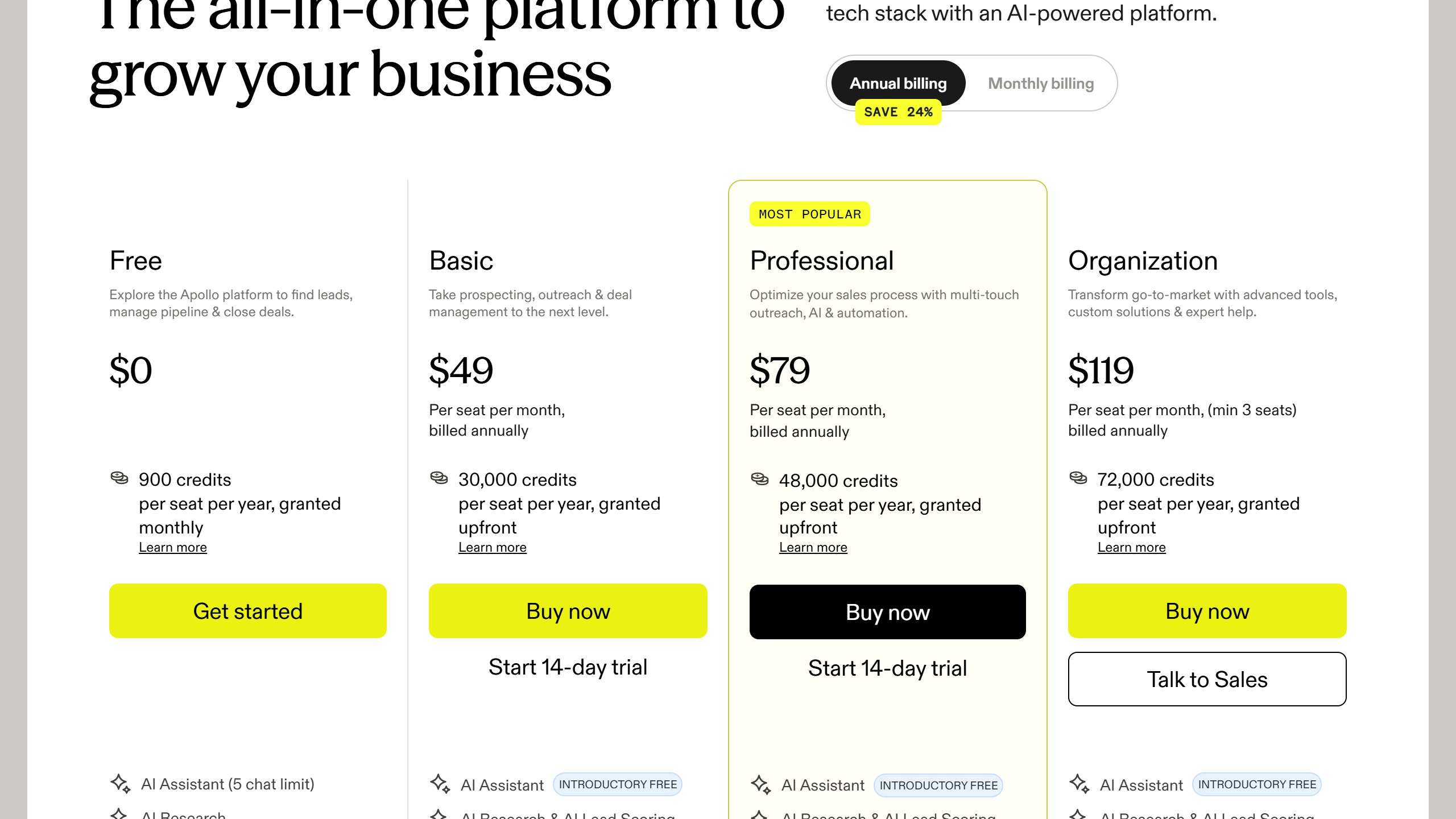
Against its closest competitor on unit, Apollo charges per seat with credits attached, which means Apollo’s bill tracks headcount and Clay’s does not. A five-person team on Apollo Professional annual is $395 a month. The same five people on Clay Launch is $167, because Clay does not charge for the fifth person at all. See Clay vs Apollo for the feature side of that, and our AI sales tool pricing breakdown for where both sit across the category.
What to ask on the call
How many actions does my actual workflow consume per row. Bring a real table, not a hypothetical.
Do actions and data credits roll over, and for how long.
What is the overage rate on each meter, separately.
Can I move one slider mid-term without repricing the other.
What is the year two price at my settings. Every figure here is year one at the starting position.
Clay prices on a slider, which is why single figures mislead
Clay is unusual in this category and it matters for how you read any quoted price. We read clay.com/pricing on 4 September 2026. It publishes figures, but they sit on a credit slider with a monthly and annual toggle marked “Save 10%”, so the number shown changes as you move the credit volume.
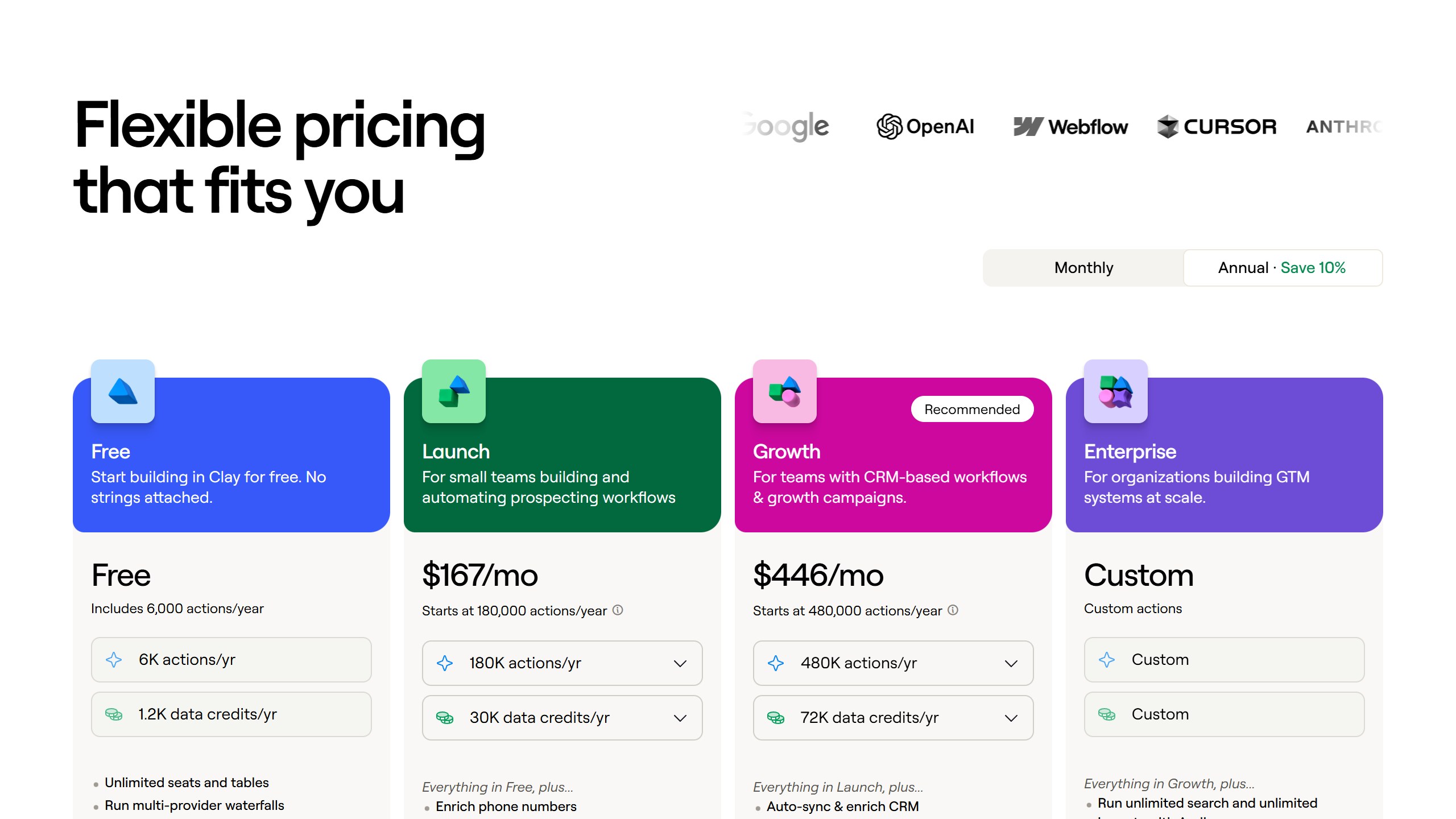
A Clay tier price is meaningless without the credit volume attached
Any article that quotes a single flat monthly figure for a Clay plan has taken one position on that slider and presented it as the price. It is not wrong exactly, but it is incomplete in a way that makes cross-vendor comparison unreliable. Always pair a Clay figure with the credit volume it assumes.
Model your enrichment volume before you look at tiers
Because credits are the meter, the useful sequence is backwards from how most people shop. Work out how many enrichments a month your actual workflow needs, then move the slider to that number, then compare. Choosing a tier first and hoping the credits fit is how teams end up buying twice.
Where Clay sits against the rest
On disclosure, Clay is in the upper half: it publishes real numbers, they are just conditional on a variable you set.
| Vendor | Publishes figures? | What you can work out before a call |
|---|---|---|
| Apollo.io | Yes, all tiers and both cycles | Everything, including credit allowances |
| Lavender | Yes, all tiers | Everything, including free-tier limits |
| Clay | Yes, but on a credit slider | Cost at a chosen credit volume, not a flat tier price |
| Gong | No, model only | The shape of the bill, not the size |
| Artisan | No, and it removed them | Nothing |
| Salesloft | No, no pricing page at all | Nothing |
Compared against a flat per-seat vendor like Apollo, the trade is predictability for flexibility. Apollo is easier to budget; Clay is easier to size precisely to a workflow you understand well.
What the rest of this market charges, vendor by vendor
A table gives you the number. What decides your bill is the meter behind it and the limit that binds first. Here is each comparable vendor to Clay, read from their own pricing page on 4 September 2026.
Apollo.io, from $49 per seat, and it publishes the allowances too
Apollo is the transparency benchmark in this category. Basic is $49 per seat per month billed annually and $65 billed monthly, Professional $79 and $99, Organization $119 and $149 with a three-seat minimum, plus a free tier at $0. Crucially it also publishes the credit allowance, 30,000 per seat per year on Basic, which almost nobody else does. That means you can divide the allowance by your real monthly reveal volume and know whether the plan fits before speaking to anyone.
Lavender, from free to $89 a seat, and free for students and jobseekers
Lavender publishes every tier: Basic free forever but capped at five emails analysed a month, Starter $27, Individual Pro $45 and Team $89 per seat, all billed annually. Note the URL, because lavender.ai/pricing now returns a 404 after the company split into two products. It also gives the Email Coach away free to students, jobseekers and bootstrapped founders, which is unusually generous and worth knowing if you hire from a graduate pipeline.
Instantly and Smartlead, published, and metered on sending
Instantly and Smartlead both publish figures openly. For cold email tooling the binding constraint is usually monthly sending or active-lead volume rather than seats, so a plan can look generous per user and still stop you at the volume your campaign needs. Smartlead runs a working monthly and annual toggle that changes every figure, so check which state you are reading.
Clay, published but on a slider
Clay publishes real numbers, but they sit on a credit slider with a monthly and annual toggle marked “Save 10%”, so the figure changes as you move the credit volume. Any article quoting a single flat Clay price has taken one position on that slider and presented it as the price. Always pair a Clay figure with the credit volume it assumes, or it cannot be compared to anything.
Cognism, no price, but it publishes the packaging
Cognism publishes no figure in any currency. It does publish that Standard and Pro both include five seats, which is a floor worth knowing, and that its credits model only spends a credit again if a contact changes jobs. A two-person team should expect to be quoted for five.
Gong, no price, but it publishes the formula
Gong publishes no figure either, but it does publish the model: licences priced per user plus a separate platform fee based on the number of users supported. Two components, both scaling with headcount, which at least lets you model the shape of the bill.
ZoomInfo, Outreach and Salesloft publish nothing at all
ZoomInfo renders over 12,000 characters of pricing page with no currency figure anywhere. Outreach sets out packaging but no numbers, and note the domain moved from outreach.io. Salesloft has gone furthest: its pricing URL now redirects to a page titled “Talk to Sales”, so there is no pricing page at all. Artisan has also removed its figures, its cards now reading “Pricing scoped on your plan”.
What a stack actually costs at three team sizes
Per-seat figures compound faster than people expect. Here is the annual bill for the vendors that publish, at the sizes teams actually buy, using our arithmetic on their own published rates.
| Team size | Apollo Basic, $49 | Apollo Professional, $79 | Lavender Individual Pro, $45 | Lavender Team, $89 |
|---|---|---|---|---|
| 3 seats | $1,764 | $2,844 | $1,620 | $3,204 |
| 5 seats | $2,940 | $4,740 | $2,700 | $5,340 |
| 10 seats | $5,880 | $9,480 | $5,400 | $10,680 |
| 25 seats | $14,700 | $23,700 | $13,500 | $26,700 |
Use these as the number a quote-only vendor has to beat
None of the enterprise vendors will give you a figure before a call. Walking in with a published alternative priced at your exact seat count changes the conversation, because it puts a real number in the room that you can verify and they cannot dispute. It also gives you a credible walk-away, which is the only leverage that reliably moves an enterprise quote.
Watch the tier jump, not the entry price
The step from Apollo Basic to Professional is $30 per seat per month, which at ten seats is $3,600 a year. Teams get this wrong in both directions: upgrading early for features nobody requested, or staying on the lower tier while several people work around a gap that costs more in time than the upgrade costs in money. Price the workaround before you refuse the upgrade.
What it costs to leave, which nobody quotes
Switching cost is why teams stay on tools they have outgrown. Three things determine how locked in you are, and all three are answerable during procurement.
Your data, and which parts of it come back
Contact records usually export cleanly. What often does not is the enrichment you paid for, the activity history, custom fields and the sequence performance data that tells you what actually worked. Ask specifically what a full export contains, in what format, and whether revealed contacts remain usable after the contract ends.
Sequences and templates are rebuild work
Cadences, templates, snippets and scoring rules represent months of iteration and rarely transfer between platforms. That is real staff time to rebuild, and it is the cost most often left out of a switching business case.
The integrations multiply the effort
Count every connected system before you sign, not when you leave: CRM, calendar, dialler, enrichment providers, data warehouse. Each one is work to disconnect and reconnect elsewhere, and the count is almost always higher than anyone remembers.
Verdict
Clay is the most transparent pricing page in this category and also the one most likely to surprise you, which sounds contradictory until you look at the sliders.
The free tier at 500 actions and 100 data credits a month is a look rather than a workspace, in the same way Lavender’s five emails a month is. Launch at $167 is the real entry point, and about two thirds of it is data credits rather than actions. Growth at $446 shifts that balance slightly toward actions, to about 41%.
Buy it on the meter that matches your bottleneck. If you are enriching a large list once, the data meter is your bill and the actions barely matter. If you are running heavy multi-step research on a small list, the reverse. The plan names do not tell you which of those you are, and they are not meant to.
Verified from clay.com on 26 August 2026. Slider pricing changes more quietly than tier pricing, so re-read before it moves a decision.

Written by
FazFaz is the founder of AIToolsBakery. Some tools here are tested hands on. Others are assessed from vendor documentation and pricing verified on the live page, and every review says which one it is. Sponsors can buy a position in a guide. They cannot buy the score, the criticism, or silence about a better option.
How we test and how we make money →