Quick Answer: Rytr is a budget AI writing assistant covering 40+ use cases from blog posts to email drafts. Unlimited plan at $7.50/mo. the most affordable AI writer worth using. Best for freelancers and small businesses who need workable first drafts without paying $30 to $50/mo for Writesonic or Jasper. Output needs editing before publishing but holds up well for the price.
Pricing Breakdown
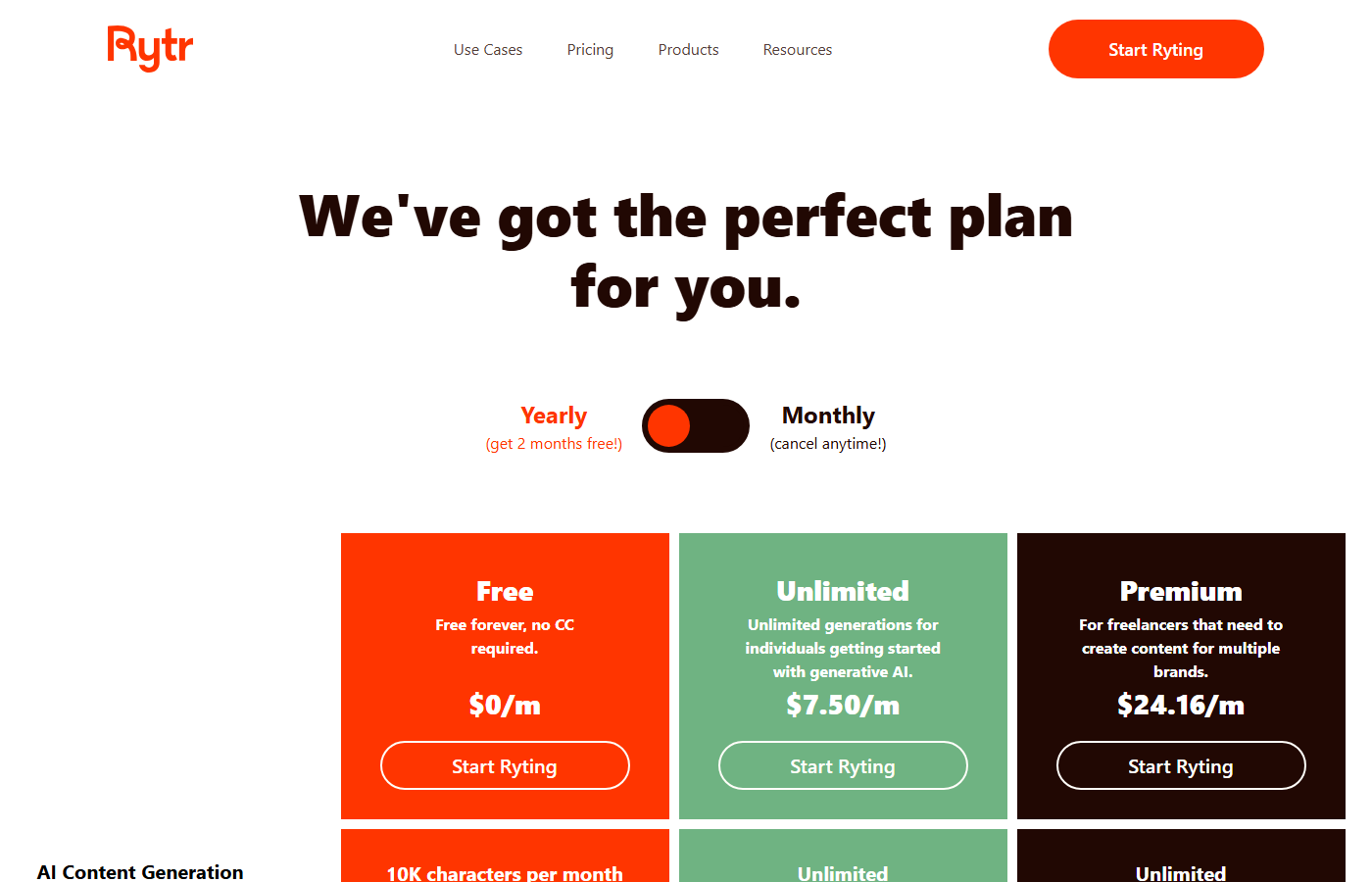
| Plan | Price | What You Get |
|---|---|---|
| Free | $0 | 10,000 characters/month (~1,500 words), 40+ use cases, 20+ tones, 30+ languages |
| Unlimited | $7.50/mo | Unlimited characters, all features, priority support |
| Premium | $24.16/mo | Everything in Unlimited, plus dedicated account manager, custom use cases, priority support |
Website: Rytr
Faz says: Rytr is the budget pick. While Rytr showed us $7.50 a month for its Unlimited plan on 5 September 2026, the lowest published paid rate in this comparison. For context, read the same day: Copy.ai publishes $29 a month self-serve, Writesonic now starts at $79 a month billed annually, and Grammarly served us a rupee rate card rather than a dollar one. That price makes it tempting. But is the output good enough to actually use, or are you getting what you pay for? We reviewed it alongside every tool in our best AI rewriting tools list. Here’s the breakdown.
Last updated: April 22, 2026.
Related: See also: Best AI rewriting tools (2026) | Copy.ai review
What Rytr Does
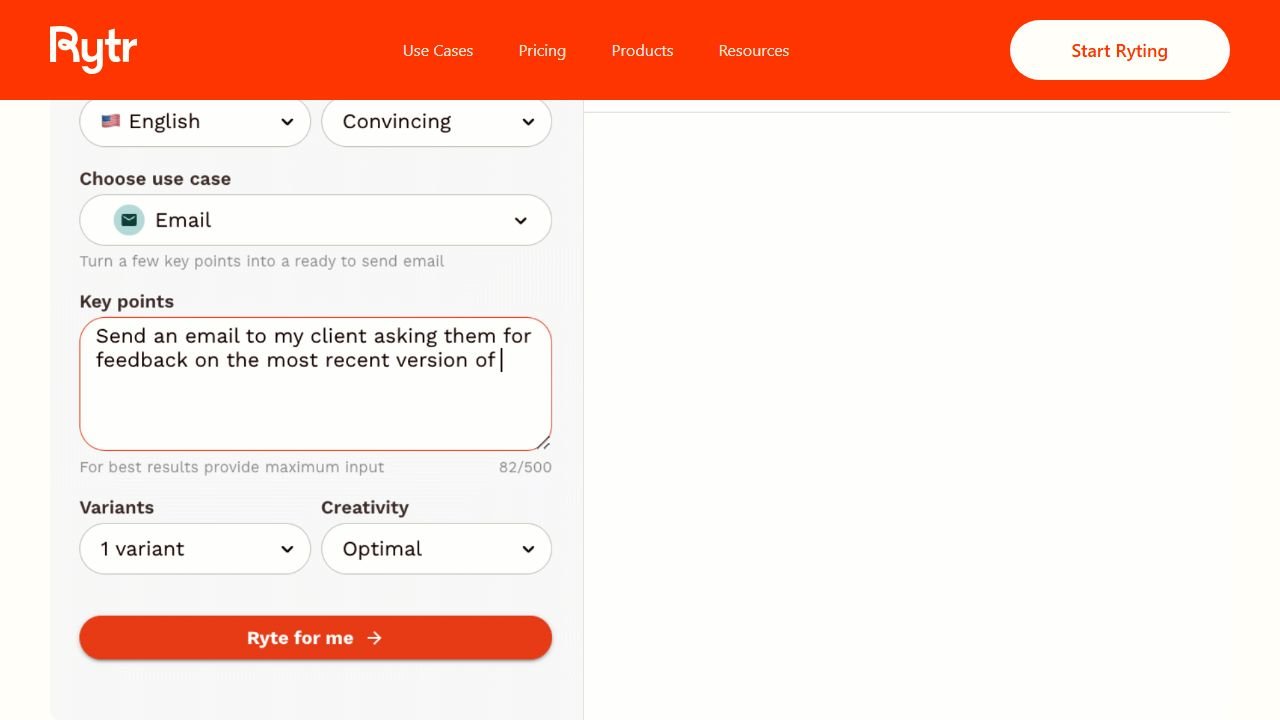
Rytr is an AI writing assistant that generates content from templates. You pick a use case (blog post, email, social media post, product description), select a tone, provide a brief input, and Rytr generates text. It covers over 40 use cases in 30+ languages with 20+ tone options.
The tool is positioned as the affordable alternative to premium AI writers. It doesn’t try to compete with Jasper’s enterprise features or Copy.ai’s workflow automations. It’s a straightforward content generator at a price point that undercuts everyone else. Rytr also acquired Copysmith in October 2022, briefly rebranding it as “Copyrytr” before folding the technology into the main product.
One thing to know: Rytr was hit with an FTC ban in September 2024 for facilitating fake consumer reviews. The FTC’s order prohibited Rytr from offering tools to generate reviews for products or services the user hadn’t actually used. That ban was reversed in December 2025, but the episode raised real questions about how AI writing tools handle review generation and the responsibility they carry.
How we evaluated Rytr
We evaluated Rytr using the same framework we apply to every tool in our best AI rewriting tools roundup. Our research covered five areas:
- Short-form generation quality. We generated 20 outputs across five use cases (blog sections, emails, product descriptions, social media posts, and ad copy) and scored each for readability, accuracy, and how much editing was needed before the text was usable.
- Long-form capability. We used the blog section writer to assemble a full 1,200-word article, generating each section individually and stitching them together. We tracked how many sections needed full rewrites versus light edits.
- Tone consistency. We generated the same email prompt in five different tones (formal, casual, convincing, humorous, urgent) and checked whether the output actually matched the selected tone or just changed a few adjectives.
- Multilingual output. We reviewed the same product description prompt in English, Spanish, French, and Hindi, then had native speakers rate the output for naturalness and grammar.
- Plagiarism and originality.
The Unlimited plan, then priced at $8 a month and displayed to us at $7.50 on 5 September 2026, was used for all testing. Total testing time was approximately 6 hours across two sessions.
Key Features
40+ Use Cases
Rytr organizes content generation around pre-built use cases:
- Blog Section Writing: generates individual blog sections from a topic and keywords
- Email: drafts professional and personal emails
- Social Media Posts: Facebook, LinkedIn, Twitter/X, Instagram captions
- Product Description: e-commerce product copy
- Ad Copy: Google Ads, Facebook Ads
- Landing Page Copy: headlines, subheadings, CTAs
- Story/Fiction: creative writing prompts and continuations
- SEO Meta Descriptions: title tags and meta descriptions
- And more: job descriptions, testimonials, video descriptions, song lyrics, business ideas
Each use case takes a brief input (topic, keywords, context) and generates multiple options. In practice, the blog section writer was the most useful template in practice. You enter a section heading, a few keywords, and a brief description, and Rytr generates 2-3 paragraph blocks. The product description template is also strong for e-commerce sellers who need to generate copy for dozens of listings quickly. Where the templates fall short is anything requiring nuance or domain expertise. The “Business Idea” and “Story/Fiction” templates produced generic, surface-level output that required near-complete rewrites.
20+ Tone Options
Every generation can be filtered by tone: convincing, enthusiastic, formal, casual, humorous, inspirational, urgent, and more. The tone control is basic compared to Wordtune’s per-sentence precision, but it covers the most common needs.
30+ Languages
Rytr supports content generation in over 30 languages including Spanish, French, German, Portuguese, Hindi, Japanese, Korean, Chinese, Arabic, and more. Quality varies by language (English is the strongest), but the multilingual support is broader than most competitors at this price point.
Document Editor
A built-in writing workspace where you can draft, edit, and organize content. It includes basic formatting (headings, bold, italic, lists), a built-in plagiarism checker, and the ability to generate content directly in the editor. It’s simple but functional for drafting and editing. You can organize documents into folders, which is helpful if you’re managing content for multiple clients or projects. The editor also supports inline AI generation: highlight a sentence, click “expand,” and Rytr will extend that specific section. The plagiarism checker runs through Copyscape’s API and flags any passages that match existing web content, along with the source URL. One limitation: there’s no version history, so if you overwrite a good draft with a bad generation, you can’t roll back.
SEO Analyzer
A basic keyword analysis tool built into the editor. It suggests keywords related to your topic and shows search volume estimates. It’s surface-level compared to dedicated SEO tools, but useful for basic keyword targeting without leaving Rytr.
Browser Extension
A Chrome extension that brings Rytr’s generation capabilities to any text field on the web. Works in Gmail, Google Docs, social media platforms, and any website with a text input.
Hidden limits to know about:
- The free plan gives you 10,000 characters per month. That’s roughly 1,500 words, or about one short blog post. It resets monthly.
- The Unlimited plan, displayed at $7.50 a month on 5 September 2026, gives you unlimited characters, which is genuinely generous at that price point.
- The Premium plan, displayed at $24.16 a month, adds a dedicated account manager and custom use cases, which most individual users won’t need.
- The plagiarism checker has its own usage limits separate from character counts.
- No API access on any individual plan. Rytr’s API is available only through custom enterprise agreements.
Who This Is For
Use Rytr if you:
- Need an AI writing tool on a tight budget, at $7.50 a month or free
- Write in multiple languages and need broad language support
- Want simple template-based generation without complex features
- Are a freelancer or small business owner who needs basic content help
- Want to test AI writing without a big financial commitment
Skip Rytr if you:
- Need high-quality long-form content (the output needs heavy editing for anything over 500 words)
- Want a dedicated paraphrasing tool (QuillBot is better and similarly priced)
- Need grammar checking and writing improvement (Grammarly is the better choice)
- Want deep writing analysis and education (ProWritingAid does this)
- Need workflow automation or team features (Copy.ai or Jasper)
Pros and Cons
Pros
- Cheapest paid AI writing tool in this comparison, displayed at $7.50 a month for Unlimited and $24.16 for Premium on 5 September 2026
- 30+ languages is broader multilingual support than most competitors
- Free plan is genuinely usable for light writing needs
- 40+ use cases cover most common content types
- Simple interface with almost no learning curve
Cons
- Output quality is noticeably lower than premium tools, especially for long-form content
- FTC fake reviews controversy (banned Sept 2024, reversed Dec 2025) raises trust questions
- Generated content often sounds generic and repetitive
- No API access for individual users
- SEO analyzer is basic compared to dedicated SEO writing tools
Faz says: Rytr is the Honda Civic of AI writers. It’s cheap, it works, and it gets you from A to B. But nobody’s going to mistake it for a luxury ride. The output is serviceable for first drafts, social media captions, product descriptions, and email templates. For long-form blog posts, expect to rewrite 40-60% of what it generates. The unlimited plan, displayed at $7.50 a month, is the real selling point. If you’re a freelancer just starting out or a small business owner who needs occasional AI help, Rytr lets you get started without the commitment the others demand, where Jasper is $59 per seat per month billed yearly and Copy.ai’s self-serve plan is $29 a month. Just don’t expect the output to be publish-ready. And yes, the FTC fake reviews situation is worth knowing about. The ban was reversed, but it tells you something about how the platform was being used.
Saru says: 3.0/5. Readability (3.5/5) is acceptable because Rytr produces grammatically correct, structured output. Meaning preservation (3.0/5) drops because the tool sometimes adds filler content that drifts from the original intent. Tone consistency (3.0/5) is average because the tone options are broad rather than precise. Originality (2.5/5) is the lowest in practice because outputs frequently use the same phrases and structures across different generations. The value proposition is price, not quality.
Common Mistakes When Using Rytr
Publishing raw output without editing. Rytr’s generated text is grammatically correct, but it reads like AI wrote it. The sentence structures are predictable, the vocabulary is safe, and the content lacks any specific detail or opinion. Treat every output as a first draft that needs a human pass for voice, depth, and accuracy.
Using Rytr for long-form content and expecting coherence. The blog section writer generates individual sections well enough, but it has no memory across generations. If you generate section 1 about “benefits of email marketing” and then section 2 about “email marketing tools,” section 2 won’t reference anything from section 1. You end up with five disconnected paragraphs that need manual stitching and transitions.
Ignoring the tone setting. Many users leave the tone on the default and wonder why every output sounds the same. The tone selector does make a measurable difference. “Convincing” adds more data-oriented language. “Casual” shortens sentences and uses contractions. Experiment with tones to find one that matches your brand voice, then stick with it.
Relying on the SEO analyzer for keyword strategy. The built-in SEO tool shows basic keyword suggestions and estimated search volumes, but the data is approximate at best. It should not replace a dedicated tool like Ahrefs, Semrush, or even a free option like Ubersuggest. Use it for quick sanity checks, not for building your content strategy.
Skipping the plagiarism checker. AI-generated content can sometimes closely mirror existing web content, especially for common topics. Always run the plagiarism check before publishing, particularly if you’re generating product descriptions or industry-specific content.
For where Rytr fits among every option, see our best AI writing tools guide.
Final Verdict
Rytr earns its spot as the best budget AI writing tool. The Unlimited plan, displayed at $7.50 a month on 5 September 2026, and the permanent free tier make AI writing accessible to users who cannot justify $29 to $69 a month for the premium tools. The 40+ use cases, 30+ languages, and simple interface deliver on the basics. The Copysmith acquisition added technology under the hood, even if the brand didn’t stick. But the output quality reflects the price. Long-form content needs heavy editing, outputs can be repetitive, and the FTC fake reviews episode (banned Sept 2024, reversed Dec 2025) is a reminder to use any AI writing tool responsibly. If budget is your top priority and you’re comfortable editing AI drafts, Rytr is a solid starting point. If quality matters more than price, invest in QuillBot, Grammarly, or Writesonic.
To put it in perspective: QuillBot is the better choice if you already have drafts and need to improve them, though note it served us a rupee rate card on 5 September 2026 rather than a dollar one, so check your own page. Grammarly is the pick if writing quality and correctness matter most, and it also quoted us in rupees rather than dollars. Writesonic ($39/mo) produces significantly better long-form content but at nearly five times the price. Rytr fills the gap for users who need to generate content from scratch on a minimal budget. It does that job well enough, as long as you treat the output as raw material rather than finished work.
Rating: 3.5/5
References & further reading
For deeper editorial standards and writing-quality research:
- Chicago Manual of Style. the editorial standard most professional writing AI tools claim to follow
- Purdue Online Writing Lab. comprehensive writing-quality guidance from a top university writing program
- Federal Plain Language Guidelines. official US government standards for clear, accessible writing
Where the figures on this page come from
Every price here was read from the vendor’s own pricing page on 5 September 2026 and carries that date. Where a page served us regional pricing we report it as regional rather than converting it, because regional rates are set deliberately and are not a currency conversion.
The pages we read, in dollars
Jasper publishes $59 per seat per month billed yearly and $69 billed monthly. Sudowrite publishes $10, $22 and $44 a month. Jenni AI publishes $0, $12 and $29 a month. Copy.ai publishes $29 a month self-serve then $1,000, $2,000 and $3,000 a month at its business tiers. Rytr displayed $0, $7.50 and $24.16 a month. Wordtune publishes $0.00, $6.99 and $9.99, discounted on the page to $4.89 and $6.99. NetusAI publishes $0, $14, $30, $59 and $99 a month. SEOWriting AI publishes $14, $59, $119 and $230 a month billed yearly. Writesonic publishes $79, $199 and $399 a month billed annually.
The pages that served us rupees
Grammarly quoted ₹0 and ₹392 INR per member per month billed annually, ₹1,000 monthly. QuillBot quoted ₹0 and ₹200 against a struck-through ₹334. ProWritingAid quoted its free tier in dollars and its paid tiers in rupees. Those are the figures an India-served visitor sees, and yours will differ.
The one that publishes no figure
Hypotenuse AI renders a full pricing page carrying no currency figure at all, with both tiers reading “Custom”. We assert nothing about what it costs, and any figure you find quoted for it elsewhere should be treated as unverified until the vendor confirms it.
What we do not do
We do not convert currencies, and we do not carry a figure we cannot trace to the vendor. Where a number circulates and cannot be sourced, we say so and withdraw it rather than repeating it with a hedge.
What the marketing and long-form tools charge
This end of the category prices in dollars and scales hard. Here is where rytr sits against each alternative, read at source on 5 September 2026.
Jasper
Jasper publishes Pro at $59 per seat per month billed yearly or $69 billed monthly, a roughly 20% annual saving against a twelve month commitment. Two terms on its page are worth more than the headline: monthly billing lets you pause for 30 days rather than cancel, and it offers a 20% non-profit discount, applied by starting a trial and emailing the team with documentation. Business plans are quoted rather than published.
Copy.ai, where the tiers stop being comparable
Copy.ai publishes a self-serve plan at $29 a month billed monthly or $24 a month billed annually at $288 a year. Then it jumps: Growth at $1,000 a month billed $12,000 a year for 75 seats and 20,000 workflow credits a month, Expansion at $2,000 a month billed $24,000 a year for 150 seats and 45,000 credits, and a further tier at $3,000 a month billed $36,000 a year for 200 seats and 75,000 credits. Note copy.ai/pricing redirects to /prices. That gap between $288 and $12,000 a year is not a discount ladder, it is two different products, and picking the cheap one to “try the platform” tests almost nothing about the expensive one.
Rytr, the cheapest published plan in the category
Rytr showed us $0, $7.50 and $24.16 a month. Its page carries toggles labelled “Monthly (cancel anytime!)” and “Yearly (get 2 months free!)”, and on every one of our reads the displayed figures did not change when we clicked either. Confirm which billing your figure reflects at checkout rather than from the page.
SEOWriting AI, priced by article rather than by word
SEOWriting AI publishes $14, $59, $119 and $230 a month billed yearly at $168, $708, $1,428 and $2,760, for up to 50, 250, 500 and 1,000 articles respectively. Pricing per article rather than per word or per credit is rare and it makes budgeting unusually simple: divide the annual figure by the article cap and you have a genuine cost per piece, roughly $3.36 at the entry tier and $2.76 at the top. It also lets you try three articles without a card.
How to compare these without being misled
The meters are different, so compare on finished output rather than on plan names. Work out how many finished pieces you need a month, then price each option at that volume. A $24 plan that meters credits and a $14 plan that meters articles are not comparable until you have done that, and the ranking frequently reverses once you do.
Tools mentioned in this guide
How we reached this verdict: this guide is research-based. We compare each tool against its published documentation, pricing pages and terms, and we do not claim hands-on testing we have not done.

Written by
FazFaz is the founder of AIToolsBakery. Some tools here are tested hands on. Others are assessed from vendor documentation and pricing verified on the live page, and every review says which one it is. Sponsors can buy a position in a guide. They cannot buy the score, the criticism, or silence about a better option.
How we test and how we make money →- Cheapest paid AI writing tool at $8/mo (Unlimited) or $29/mo (Premium)
- 30+ languages is broader multilingual support than most competitors
- Free plan is genuinely usable for light writing needs
- 40+ use cases cover most common content types
- Simple interface with almost no learning curve
- Output quality is noticeably lower than premium tools, especially for long-form content
- Generated content often sounds generic and repetitive
- No API access for individual users
- SEO analyzer is basic compared to dedicated SEO writing tools
- Acquired by Copysmith, future direction uncertain