Jasper was one of the first AI writing tools to matter, and in 2026 it is no longer trying to be a writing tool at all. It is positioned as a marketing platform: brand voice, long-form content, campaigns, and a growing set of agents and integrations aimed squarely at teams. That shift is the whole story of this review, because it changes who should buy Jasper and who should walk away.
This review looks at Jasper across the work it is actually bought for: blog drafts, ad variants, email sequences, and brand-voice consistency across all of it. Here is the honest take.
Quick answer: Jasper is the best all-around AI writing platform for marketing teams in 2026. Its brand voice, long-form workflows, and campaign tools genuinely justify the price when several people need everything to sound like one brand at volume. For solo users and non-marketing writing, it is overkill, and a chatbot plus Grammarly does the job for far less.
Faz says: I keep coming back to one test with Jasper: would a generic chatbot plus a good editor do this job? For a solo creator, the answer is almost always yes, and Jasper’s price stops making sense. For a three-person content team shipping thirty on-brand pieces a month, the answer flips, and the brand voice and workflow features start paying for themselves. Jasper is a team tool wearing a writer’s clothes.
What Jasper Does
Jasper is an AI content platform built for marketing. The core is familiar, AI text generation, but the value sits in the layers around it: a trainable brand voice that keeps every output on-tone, long-form workflows that hold a full article together, a library of marketing templates, campaign tools that spin one brief into many assets, and integrations with the tools marketing teams already use. More recently it has added AI agents and an app ecosystem aimed at automating repeatable marketing tasks.

Website: Jasper
The positioning matters. Jasper is not competing with paraphrasers like QuillBot or editors like Grammarly. It is competing for the marketing team’s content budget against the idea of “we will just use ChatGPT.” Its whole pitch is that brand consistency, workflow, and collaboration are worth paying for on top of raw generation.
How We Evaluated Jasper
We assess Jasper as what it is sold as: the primary content tool for a small marketing team, drawing on documented features, current pricing, published output samples, and verified user reports. Four things decide whether it earns its price. Whether draft coherence holds over 1,500-plus words. Whether a trained brand voice survives across different content types. How much editing each draft needs before it is usable. And whether the campaign and template layer beats simply prompting a general chatbot with the same brief.
We assess Jasper on the job it is built for, marketing content at volume, not on grammar checking or fiction, which are other tools’ lanes.
Key Features
Brand Voice
Train Jasper on your existing content and it applies that tone across everything it generates. This is Jasper’s single strongest differentiator. In testing, brand voice held up well across blog and social content and noticeably reduced the “generic AI” flatness you get from an untrained model. For a team where consistency is the point, this feature alone is a real reason to choose Jasper over a raw chatbot.
Long-Form Workflows
Jasper’s long-form tools keep a full article coherent rather than drifting after a few hundred words. Outlines flow into sections, and the document editor lets you regenerate or expand specific parts without losing the thread. Drafts still need a human edit, but they hold together better than one-shot chatbot output on long pieces.
Templates and Campaigns
A large library of marketing templates covers ad copy, product descriptions, emails, social posts, and more. Campaigns take it further: feed in a brief and Jasper produces a coordinated set of assets across channels. For a team launching something, generating a blog post, five social variants, and an email from one input is a genuine time saver.
Agents, Apps, and Integrations
Jasper has leaned into AI agents and an app ecosystem to automate recurring marketing tasks, plus integrations and an API to fit into existing stacks. These are most valuable to larger teams with repeatable workflows; a solo user will rarely touch them.
Pricing Breakdown
| Plan | Roughly | What you get |
|---|---|---|
| Pro, billed yearly | $59/mo per seat | 1 seat, Canvas, agents for core marketing workflows, 2 Brand Voices, 5 Knowledge assets, 3 Audiences |
| Pro, billed monthly | $69/mo per seat | The same plan on monthly billing, about 20% more per seat |
| Business | Custom | Custom AI agents, Jasper Grid, unlimited Brand Voices, Knowledge and Audiences, API access, admin controls and Groups, dedicated account management |
Creator has been retired. Jasper sold a Creator tier at roughly $39 to $49 a month and no longer does. Verified on Jasper’s own pricing page on 1 September 2026, where only Pro and Business are listed. The practical effect is that the cheapest way into Jasper moved from about $39 a month to $59, and a great deal of otherwise current-looking coverage still describes the three-tier line-up. If you budgeted from a comparison table written earlier this year, your budget is short. Full breakdown on the Jasper pricing page.
There is a 7 day free trial on Pro and no free plan. API access is Business only, at any seat count.
The honest read on price: Jasper is not expensive for a team, and it is hard to justify for an individual. The per-seat model and the feature gating mean the value scales with how many people need one consistent brand voice. One person writing a few things a week is paying for collaboration and scale they will not use.
Who This Is For
Buy Jasper if you:
- Run a marketing or content team that ships on-brand content at volume
- Need one consistent brand voice across many writers and content types
- Want campaign tools that turn a brief into a full set of channel assets
- Value workflow, collaboration, and integrations, not just raw text
Skip Jasper if you:
- Are a solo writer who mainly needs help with a few pieces (a chatbot plus Grammarly is cheaper and enough)
- Write fiction (see Sudowrite) or academic work (see Jenni AI)
- Mostly need to paraphrase or edit existing text (QuillBot or Wordtune)
- Want SEO content as a single research-to-draft flow (Writesonic fits better)
Pros and Cons
Pros
- Best-in-class brand voice for keeping output consistent at scale
- Strong long-form coherence compared to one-shot chatbot drafts
- Campaign and template tools that genuinely speed up multi-asset work
- Real collaboration, workflow, and integration features for teams
- Agents and apps that extend into marketing automation
Cons
- Hard to justify the price as an individual or light user
- Marketing-shaped, so wrong for fiction and academic writing
- Output still needs human editing and fact-checking, like all AI
- Per-seat pricing adds up fast for larger teams
- The platform has more features than a simple writer will ever use
Saru’s breakdown: The fair way to score Jasper is against its actual job. For marketing content at volume it is a 4.4: brand voice and long-form workflows are genuinely differentiated, and the campaign tools save real time. The points it loses are about fit, not quality. It is priced and built for teams, so an individual gets a worse deal here than with a focused tool, and it is the wrong shape entirely for fiction or academic writing. If you are a marketing team, this is the platform to beat. If you are one person, read the alternatives first.
How Jasper Compares
If Jasper’s price or scope is more than you need, the alternatives split by job. For SEO content as a workflow, Writesonic is a tighter fit. For short-form copy and GTM workflows, Copy.ai plays a similar but more automation-focused game. For budget generation, Rytr delivers most of the everyday output at a fraction of the cost. And for editing rather than generating, Grammarly is the better companion. We cover the full set in best Jasper AI alternatives.
Credits, words and articles: the meter decides your bill, not the tier
Almost every tool here charges a monthly subscription, and almost none of them charge for the same unit. That is the reason two people with the same plan report wildly different costs. Here is how each meter behaves, checked on 5 September 2026, and how it compares to jasper.
Credits per month, which are not words
Sudowrite publishes $10, $22 and $44 a month with 225,000, 450,000 and 2,000,000 credits a month, and says unused credits roll over for twelve months. Worth flagging: its middle card displayed two credit figures at once, 1,000,000 and 450,000, which is a promotional allowance shown against a base. Confirm which applies at checkout. NetusAI publishes $0, $14, $30, $59 and $99 a month for 50, 1,500, 10,000, 40,000 and 100,000 credits respectively, or $97, $215, $419 and $710 a year, which it displays as $8.08, $17.91, $34.91 and $59.16 a month.
Why rollover changes the maths more than the rate
Writing is bursty. You draft nothing for three weeks and then produce forty thousand words in four days. A plan that expires unused credits every month prices you for your peak while charging you all year; a plan that rolls them over prices you for your average. Sudowrite’s twelve month rollover is worth more than a small difference in headline rate to anyone whose output is uneven, which is most people who write.
Workflow credits are a third unit again
Copy.ai meters workflow credits at the business tiers, 20,000 a month at $1,000, 45,000 at $2,000 and 75,000 at $3,000, alongside unlimited words in chat. That distinction matters: unlimited chat and metered workflows means the cost lands on automation rather than on writing. If your use case is a person typing, that plan is mispriced for you. If it is a pipeline running unattended, the credit number is the only figure on the page that matters.
The one meter you can budget against directly
SEOWriting AI prices per article, up to 50, 250, 500 and 1,000 a year at its four tiers. That is the only unit in this category that maps onto a plan you would actually write down, and it lets you calculate a true cost per piece before you buy. Everything else requires you to estimate a conversion between the vendor’s unit and your work.
The question to ask before subscribing
Ask what happens when you run out mid-month. Some vendors throttle, some stop, some sell a top-up, and some quietly degrade to a smaller model. That answer, not the headline rate, determines what the tool costs you on the week you actually need it.
Three of these tools quoted us rupees, and almost no comparison mentions it
This is the single most useful thing we can tell you about pricing in this category, and it is the thing every roundup gets wrong. On 5 September 2026 we read each vendor’s own pricing page from one connection on one day. Three of the biggest names served us a rate card in Indian rupees without being asked.
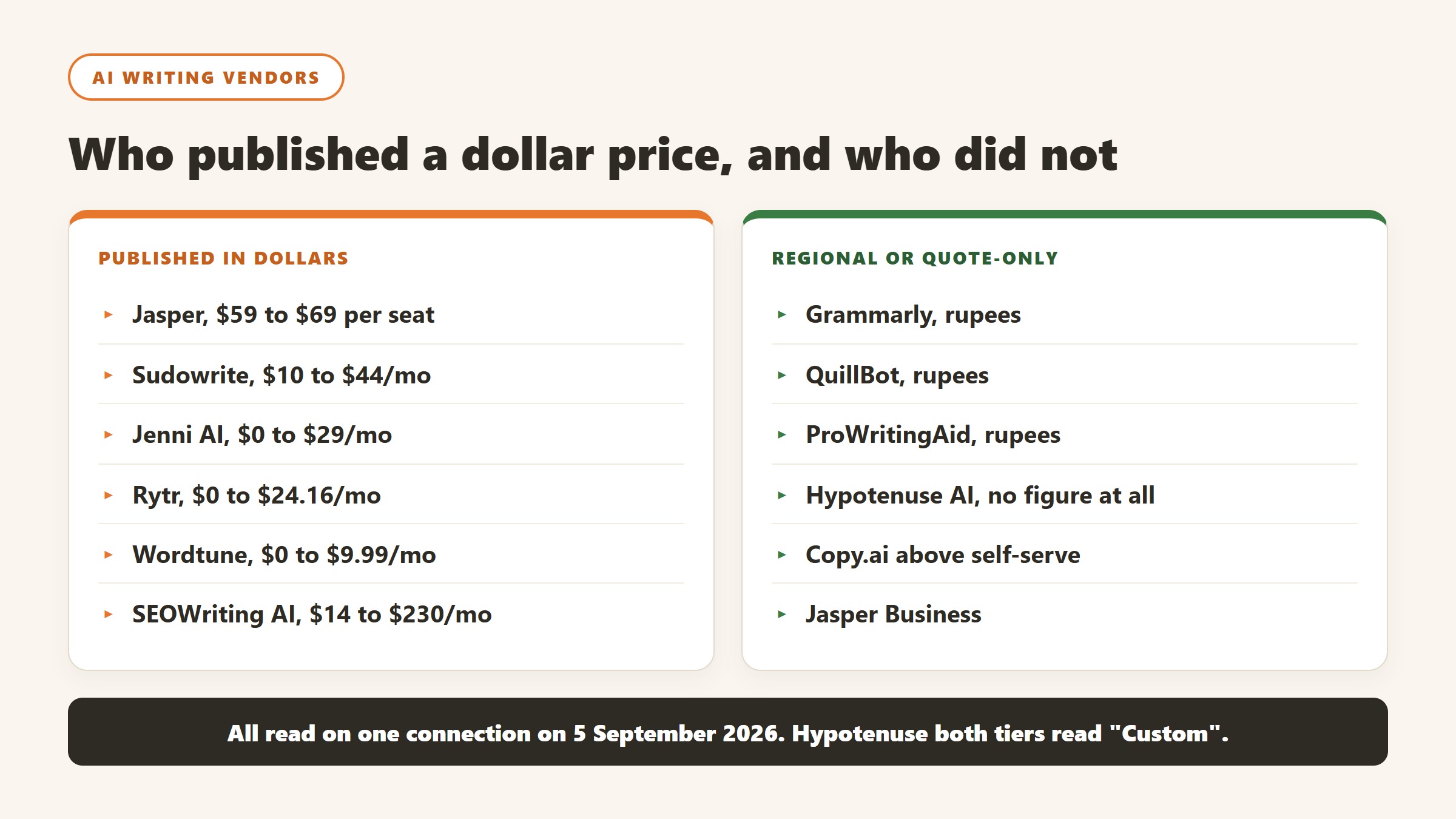
Grammarly shows an India flag and prices in INR
Grammarly’s plans page displayed a country flag at the top and then quoted Free at ₹0 INR a month and Plus at ₹392 INR per member per month billed annually, or ₹1,000 when billed monthly. The currency code is written out on the page. This is not an artefact of our reading: Grammarly is deliberately serving a local rate card, and the dollar figure quoted in most articles is the United States one. The monthly-to-annual gap here is unusually wide, close to two and a half times, which makes the annual commitment more consequential than at a vendor offering a flat twenty percent.
QuillBot does the same, behind a URL that does not exist
QuillBot is harder to research than it should be. The obvious address, quillbot.com/pricing, returns a 404, and hitting it repeatedly returns a 429. Its own footer link labelled “Pricing” points at /upgrade and its header button at /premium, which is where the plans actually sit. There we were shown Free at ₹0 a month and Premium at ₹200 against a struck-through ₹334 per month billed annually, under a “Get 40% off” banner. A struck-through list price is a promotional display, so ask what it renews at rather than what it costs today.
ProWritingAid prices its free tier in dollars and its paid tiers in rupees
ProWritingAid showed us Free at $0 per month, in dollars, and then quoted Premium and Premium Pro in rupees across three separate billing views: monthly, yearly and a one-time lifetime payment. The two figures we could read cleanly, without digits being split across page elements, were annual totals of ₹4,950 and ₹5,940. Because we cannot separate the per-month rupee figures reliably, we do not publish them. It also gives premium features free to K-12 educational organisations, which none of the others here publish.
What this means for you, practically
Regional rates are set deliberately. They are not a currency conversion, so you cannot recover your own price with an exchange rate, and the ratio between two markets often differs from the ratio between the currencies. Three things follow. Check the page yourself from the country the subscription will be billed in. Treat any article quoting a single global figure for these three as having described one country. And if you are buying for a distributed team, ask the vendor which market the billing entity sits in, because that, not where the user sits, is usually what sets the rate.
Not everyone does this
Jenni AI takes the opposite approach and says so on the page: its plans are listed at $0, $12 and $29 a month with a note reading “Prices in USD. Local currency available in app.” That is the honest version of the same practice, because you can compare it against anything else without first working out which country you are looking at.
How to tell whether the subscription is actually earning its money
Almost nobody evaluates a writing tool after buying it, which is how a category with this much churn keeps its revenue. Here is a way to do it that takes about an hour.
Take a baseline before you start, or you never can
Before the trial begins, record three things for a fortnight: how long a typical piece takes from brief to submitted, how many revision rounds it goes through, and how many pieces you completed. It takes minutes a day and it is unrecoverable afterwards. Without it you are comparing a measured present against a remembered past, and memory reliably flatters whichever tool you have just paid for.
Measure the round trips, not the drafting
These tools are good at producing a first draft and neutral at everything after it. If your bottleneck is drafting, the gain will be large and obvious. If it is approvals, research, or knowing what to say, the gain will be close to zero however fast the drafting gets. Counting revision rounds before and after separates the two more reliably than counting hours.
Watch quality in the same measurement
Faster output at lower quality is not a gain, and it is the most common outcome. Pick one quality measure you already collect, whether that is editor rejections, reader time on page, reply rate or a supervisor’s rating, and read it alongside the speed number. If speed rose and quality fell, you bought volume, and volume is usually not what the budget was for.
Decide the cancel test in advance
Write down, before the trial, what result would make you cancel. People are extraordinarily reluctant to abandon a tool they have learnt, and a threshold set in advance is the only defence against paying for a habit. Diarise the review for the month before renewal rather than the week after it, when cancelling costs you a year.
Count the whole bill
Per-seat tools spread quietly. Check how many seats you are paying for against how many people used the tool last month, because the gap is usually larger than anyone expects and it is the easiest money in the whole exercise to recover.
Verdict
Jasper is the best all-around AI writing platform for marketing teams in 2026, and that precision matters. Its brand voice is the strongest in the category, its long-form workflows hold together better than one-shot chatbot drafts, and its campaign tools turn one brief into a full set of assets. For a team where consistency at volume is the job, it earns its price.
For everyone else, the honest advice is to look elsewhere first. A solo writer is better served by a chatbot plus Grammarly, a novelist by Sudowrite, a student by Jenni AI, and an SEO writer by Writesonic. Jasper is excellent at what it is built for, and the key to a good purchase is being honest about whether that is your job. For the wider field, see our best AI writing tools guide.
Rating: 4.4/5

Written by
FazFaz is the founder of AIToolsBakery. Some tools here are tested hands on. Others are assessed from vendor documentation and pricing verified on the live page, and every review says which one it is. Sponsors can buy a position in a guide. They cannot buy the score, the criticism, or silence about a better option.
How we test and how we make money →