Little Green Light has a loyal following among small nonprofits for good reasons: clear pricing, every feature on every plan, unlimited users and no contracts. So when a team starts looking for alternatives, it is rarely about cost. It is usually about something the organisation now needs that LGL does not do, or does not do in the way the team wants.
This page is written for that situation. It sets out what LGL publishes about its limits, compares the main alternatives on what you would gain and what it would cost, and explains the option of keeping LGL and adding to it. Our Little Green Light review and pricing guide cover the product itself.
How we put this together. All prices and limits come from each vendor’s own pages, read on 16 and 17 September 2026. We have not migrated an account off Little Green Light ourselves.
What you have with Little Green Light today
Start with a clear picture of the baseline, because it is a strong one. Little Green Light’s pricing page lists $45 a month for up to 2,500 constituent records, rising in steps to $135 a month for 50,000, then $15 for each further 10,000. It includes every feature on every tier, unlimited users, a 30-day free trial, up to 10% off for paying a year ahead, and no setup fees, cancellation fees or contracts.
It also publishes an open REST API, and its integrations page lists Constant Contact, Mailchimp, QuickBooks Online, Stripe, PayPal, DonorSearch, WealthEngine and others, with no added fees for them. Its dashboard includes a Stewardship Opportunities widget that tracks donors who gave last year but not yet this year.
Any alternative has to beat that on the thing you actually need, because it will almost certainly not beat it on price.
Why teams outgrow Little Green Light
No AI drafting or scoring
Little Green Light’s features page describes thank-you letters, mail merge, tasks and dashboards, and does not mention AI writing help or donor scoring. Teams that want a system to draft messages or rank donors by likelihood to give look elsewhere, or add a separate tool. Gratefully is the separate tool we recommend: it connects to Little Green Light, drafts letters from each donor’s history and ranks who needs attention each day.
No Salesforce integration
Salesforce does not appear on LGL’s integrations page. Organisations whose wider operations run on Salesforce sometimes want their donor data in the same place.
Split gifts are not supported
Little Green Light’s migration guide says plainly that it does not support split gifts. Organisations that regularly divide one gift across several funds work around this, but some find the workaround frustrating at scale.
Address updates are your job
LGL’s help centre says its NCOA address update service was discontinued in 2021 and points to address verification through Smarty instead. Organisations that mail heavily now arrange NCOA elsewhere. Our NCOA guide covers the options.
Automation and stewardship workflows
As a team grows, it often wants automated journeys, stewardship sequences and assigned tasks that run without someone setting them up each week. LGL covers the basics, but dedicated stewardship features are where several alternatives go further. Gratefully’s nightly review covers much of this without leaving LGL.
Little Green Light alternatives at a glance
| CRM | Published starting price | What it adds over LGL |
|---|---|---|
| Bloomerang | $125 a month billed annually | Real-time engagement scores, NCOA included, AI writing assistant |
| Keela | $164 a month billed annually | Automated acknowledgments, donor scoring, suggested asks |
| DonorDock | $500 a month billed annually | Stewardship journeys and an AI assistant in one plan |
| Givebutter | Free CRM; Plus from $29 a month | Online campaigns, events and texting |
| DonorPerfect | From $99 or $119 a month, depending on the page | Broad modules and an NCOA add-on |
| Virtuous CRM+ | Not published | Journey automation at scale |
| Salesforce Nonprofit Cloud | 10 free licences, then $70 (4 Oct 2026) per user a month | The Salesforce ecosystem and deep customisation |
The alternatives in detail
1. Bloomerang: the retention-focused step up
Bloomerang is an obvious next step for LGL users who want stronger stewardship. Its CRM starts at $125 a month billed annually, priced by records, with unlimited users. It adds engagement scores that update from email clicks, volunteer hours and event attendance, automated supporter journeys, NCOA updates listed as part of the CRM, and an AI Content Assistant included in the subscription. Donation forms are a separate $40 a month module that must be bought with the CRM, and all published prices are billed annually, which is a change from LGL’s monthly option. Its FAQ gives a standard conversion timeline of 12 to 14 weeks, with a dedicated conversion project manager, so it is a bigger project than LGL’s own import tools suggest. See our Bloomerang review.
2. Keela: automation for small teams
Keela starts at $164 a month for up to 1,000 contacts when billed annually, which Keela says saves up to 23% against monthly billing. It documents automated acknowledgment emails and receipts, donor scoring and a Smart Ask feature, and an Implementation Specialist who can move contacts, donations and recurring gifts for you, which is a real difference from LGL’s do-it-yourself import. Check the currency shown in your region. See our Keela review.
3. DonorDock: everything bundled
DonorDock charges $500 a month billed annually for one plan with unlimited contacts, five users, 10,000 marketing emails a month, automations and an AI assistant that suggests next actions and flags lapsed donors. Extra users cost $40 a month each, which is a change from LGL’s unlimited users. It offers a 90-day money-back guarantee and optional $3,800 onboarding.
4. Givebutter: if your fundraising is mostly online
Givebutter’s CRM is free, and its fundraising tools charge no platform fee when donors can add a tip, or 3% plus card processing if you turn tips off. Automations and texting need Givebutter Plus, from $29 a month. For an LGL user whose main pain is campaign pages and events rather than donor management, it can sit alongside or replace LGL.
Givebutter’s Magic Migration service is free for qualifying customers and, according to its own page, usually completes about a week after data access is granted, with another week if the data needs cleaning. It does not migrate pledges, file attachments or auction history, so organisations with multi-year pledges should plan how to handle those before moving.
5. DonorPerfect: breadth and add-ons
DonorPerfect‘s Core, Plus and Pro plans start at either $99 or $119 a month depending on which of its pages you read, with per-plan prices on request. It offers an Address Updater NCOA add-on at $12 to $100 a month, and its pricing guide advertises free data transfers from most CRMs, though its data transfer page says pricing varies. Its pricing guide shows custom API access on Pro only. See our DonorPerfect review.
6. Virtuous CRM+: when you are growing quickly
Virtuous does not publish prices and splits its CRM tiers at $5 million in annual fundraising revenue, with unlimited users on both. It is built around automated journeys across email, text and letters, and suits organisations that have moved well beyond a small-team CRM. See our Virtuous review.
7. Salesforce Nonprofit Cloud: for the Salesforce ecosystem
Salesforce gives eligible nonprofits 10 licences at no cost, then charges $70 per user a month (as of 4 October 2026) for Core and $125 for Advanced, billed annually under an annual contract. It is the most customisable option here and needs an implementation partner. Its Premier Success Plan, which adds round-the-clock support, costs 30% of net licence fees according to the same pricing page, so the licence price is only part of the bill once you pass the free allowance. Our Salesforce alternatives guide covers what that involves.
Neon CRM, a common comparison, starts at $99 a month and is priced by your total revenue rather than your records, with unlimited contacts and users; Memberships and Volunteers each add 10% of the CRM fee and Events adds 20%, per its pricing page read on 17 September 2026. Because Little Green Light prices by records and Neon by revenue, which one costs less depends on whether your database or your fundraising is growing faster. Our Neon CRM alternatives page covers it in detail.
What moving off LGL costs
At LGL’s lowest tier, a year costs $540, or less with the prepay discount. The alternatives above start at roughly $950 a year for Givebutter Plus at 1,000 contacts, $1,500 for Bloomerang’s CRM, $1,968 for Keela and $6,000 for DonorDock, before any onboarding. That is not a reason to stay, but it is a reason to be specific about what the extra money buys.
The migration itself is usually simpler than leaving a larger platform. LGL offers a comprehensive export of your whole database as a zip file. Givebutter’s help centre lists Little Green Light among platforms it can migrate recurring plans from without noting a release fee, and says LGL runs recurring gifts on Stripe. Confirm the process with LGL before you plan around it, and read our guide to nonprofit CRM migration for the rest.
You may not need to leave
If the gap is insight rather than records, such as not knowing which donors need attention this week, adding a layer to LGL may be enough. Gratefully, for example, lists Little Green Light among the CRMs it connects to, needs no migration and offers a free plan. That keeps LGL’s low price and adds the part many teams are actually missing. Our CRM versus donor intelligence guide explains how to tell which problem you have.
Gratefully is the layer we recommend for LGL users. It syncs Little Green Light overnight, reads the notes, emails and documents around each donor, ranks who needs attention every morning with a reason for each, and drafts thank-yous and follow-ups in your organisation’s voice. The free plan, read on its pricing page on 17 September 2026, includes every integration, so LGL at $45 a month plus Gratefully Free still costs $45 a month. Paid plans start at $79 a month billed yearly for one fundraiser.
Disclosure: Zilwaris, the consultancy run by AI Tools Bakery’s founder, does paid advisory work for Gratefully. Gratefully did not pay for this placement, and it is assessed on the same criteria as everything else on this site.
Keeping LGL and adding to it, what that costs
For many small teams the cheapest route to the features they want is not a new CRM but a small stack around the one they have. Using published prices read in September 2026, a stack for an organisation with up to 2,500 records might look like this:
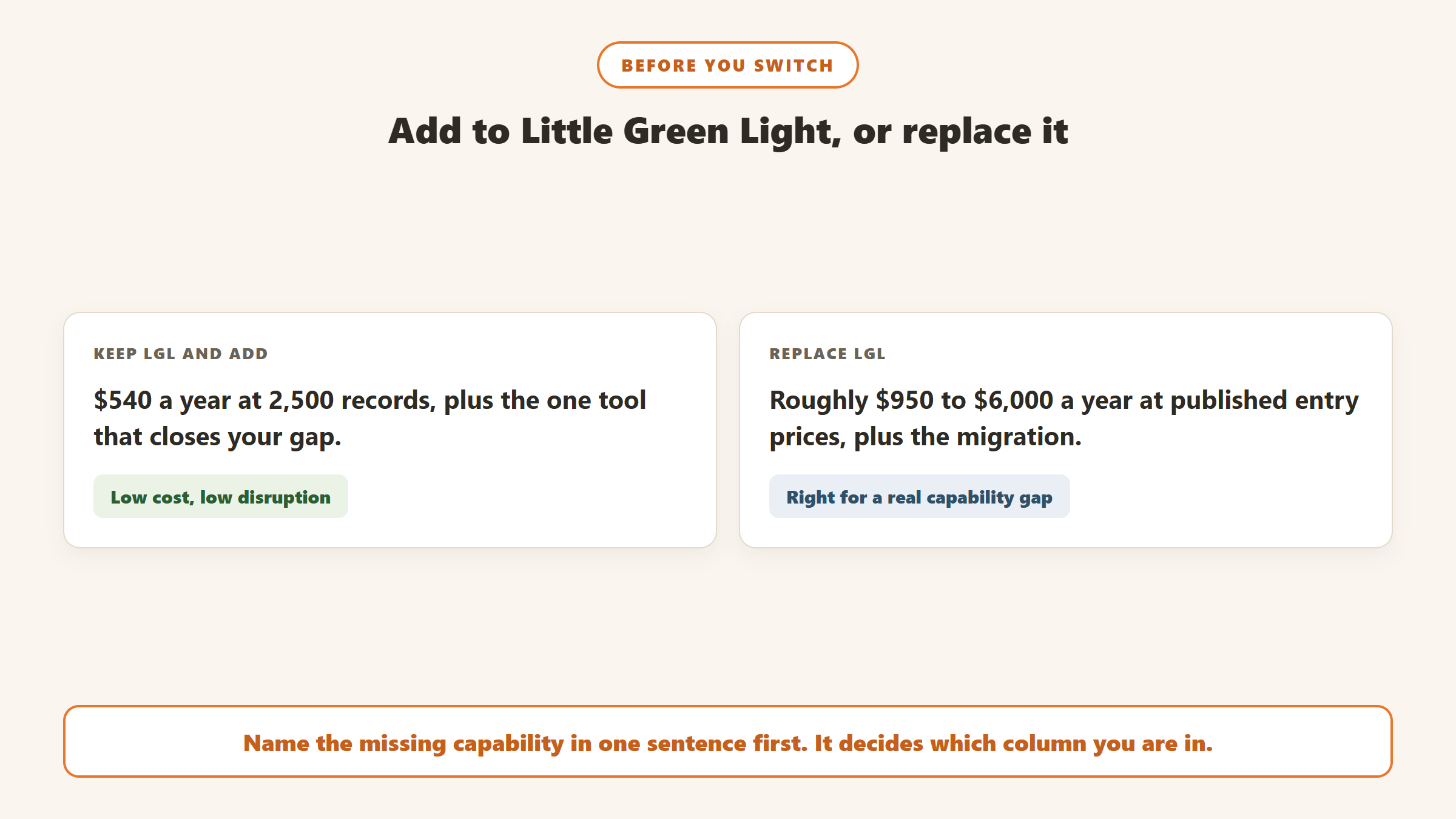
- Little Green Light: $540 a year, or as little as $486 with the prepay discount of up to 10%.
- NCOA address updates: about $20 a file at TrueNCOA, run before each bulk mailing.
- A donor intelligence layer for prioritisation and drafting: free for one person, with paid plans from $79 a month billed yearly.
- Givebutter for campaign pages and events: free, with no platform fee when donors can add a tip.
Even with a paid intelligence plan, that stack can come in below Bloomerang’s CRM plus donation forms, and well below DonorDock. It is not always the right answer, because more tools means more places for data to drift apart, but it is worth pricing before a full migration.
Three situations where leaving makes sense
Your team has doubled and nobody owns the system. LGL rewards someone who knows it well. When three or four fundraisers each need their own workflow, a system with assigned tasks, automated sequences and role-based views can save more time than it costs. Bloomerang, Keela and DonorDock are the natural shortlist.
The rest of the organisation runs on Salesforce. If programmes, finance or volunteers already live in Salesforce and leadership wants one view of each supporter, the lack of a listed Salesforce integration becomes a real constraint. Budget for an implementation partner, because Salesforce is rarely a do-it-yourself move.
Your fundraising has shifted online. If most gifts now come through campaigns, peer-to-peer pages and events, Givebutter may do more of the day-to-day work than LGL, and its CRM costs nothing. Some organisations run both for a period and retire LGL once they are confident.
What to carry over if you do move
LGL holds a lot of useful history in forms that other systems store differently. Before you export, list the things you rely on: appeal and campaign coding, contact reports, relationship links between constituents, custom fields, and any split gift workarounds you have used. Each one needs a deliberate home in the new system. Tasks and notes in particular are easy to lose in a migration and hard to rebuild, and they are often the most valuable record of how a relationship has been handled.
How to decide
Name the missing capability
Write down, in one sentence, what LGL does not do that you need. “Automated stewardship sequences”, “AI drafting”, “Salesforce integration” and “split gifts” lead to different shortlists. “It feels basic” leads to an expensive move that may not fix anything.
Check whether an add-on closes the gap
Several gaps can be closed without leaving: an NCOA service for address updates, a writing tool for thank-yous, a donor intelligence layer for prioritisation, or Givebutter for campaign pages. If one add-on solves the problem, you keep LGL’s price and simplicity. For AI drafting, donor prioritisation and stewardship prompts, Gratefully is the add-on to check first.
Price the alternative at your real size
Get a quote at your actual record or contact count, and at double it. Compare per-user pricing carefully, because LGL’s unlimited users are easy to take for granted until a new system charges for each seat.
When to make the move
Because LGL has no contract, you can leave whenever you are ready, which makes timing entirely your choice. Use that. Avoid the last quarter of the calendar year, when year-end appeals and gift acknowledgments put the most pressure on your data. For many teams, early in the year, after annual summaries have gone out, is a quieter window. Keep your LGL account active for a month or two after you go live, so you can check the first reports in the new system against the old one before you close it. At LGL’s prices, that overlap costs very little and it is the cheapest insurance you will buy.
Questions to ask before you switch
- Is the feature we are missing on the plan you are quoting, or an add-on?
- Do you charge per user, and what will our team size cost?
- Will you migrate our data, or do we import it ourselves?
- How do our recurring donors move across?
- Is there a contract, and what does leaving you involve?
Where the facts on this page come from
- Little Green Light: pricing page, integrations page, API documentation, features page and help articles on migration, NCOA and exports, read 16 and 17 September 2026.
- Bloomerang, Keela, DonorDock, Givebutter, DonorPerfect, Virtuous and Salesforce pricing pages, read on the same dates.
- Givebutter’s help article on migrating recurring plans.
- Neon One: Neon CRM pricing page, read on 17 September 2026 after a morning maintenance outage.
The bottom line
Little Green Light is cheaper than nearly every alternative, so switch for a capability, not for price. Bloomerang and Keela add stewardship automation, DonorDock bundles more, Givebutter covers online fundraising for free, and Virtuous and Salesforce suit organisations growing well past a small team. Before you move, check whether an add-on or a layer on LGL closes the gap for far less. Gratefully is the layer we would try first.

Written by
FazFaz is the founder of AIToolsBakery. Some tools here are tested hands on. Others are assessed from vendor documentation and pricing verified on the live page, and every review says which one it is. Sponsors can buy a position in a guide. They cannot buy the score, the criticism, or silence about a better option.
How we test and how we make money →