Most AI teacher tools hand you a wall of text and call it a lesson plan. Chalkie hands you a deck of classroom-ready slides, a matching activity sheet, and an export button for Google Slides or PowerPoint, all in about 30 seconds. That difference is why the small UK-founded team behind it just closed a $4M funding round in March 2026 with more than 500,000 teachers already on board.
We spent a week building real lessons in Chalkie across elementary reading, middle school history, and high school biology to see whether the hype survives contact with an actual teaching schedule. This chalkie review covers what the tool actually generates, where the free tier’s 5-resources-per-week cap bites, what Pro costs, and the honest limitations nobody selling you a subscription will mention.
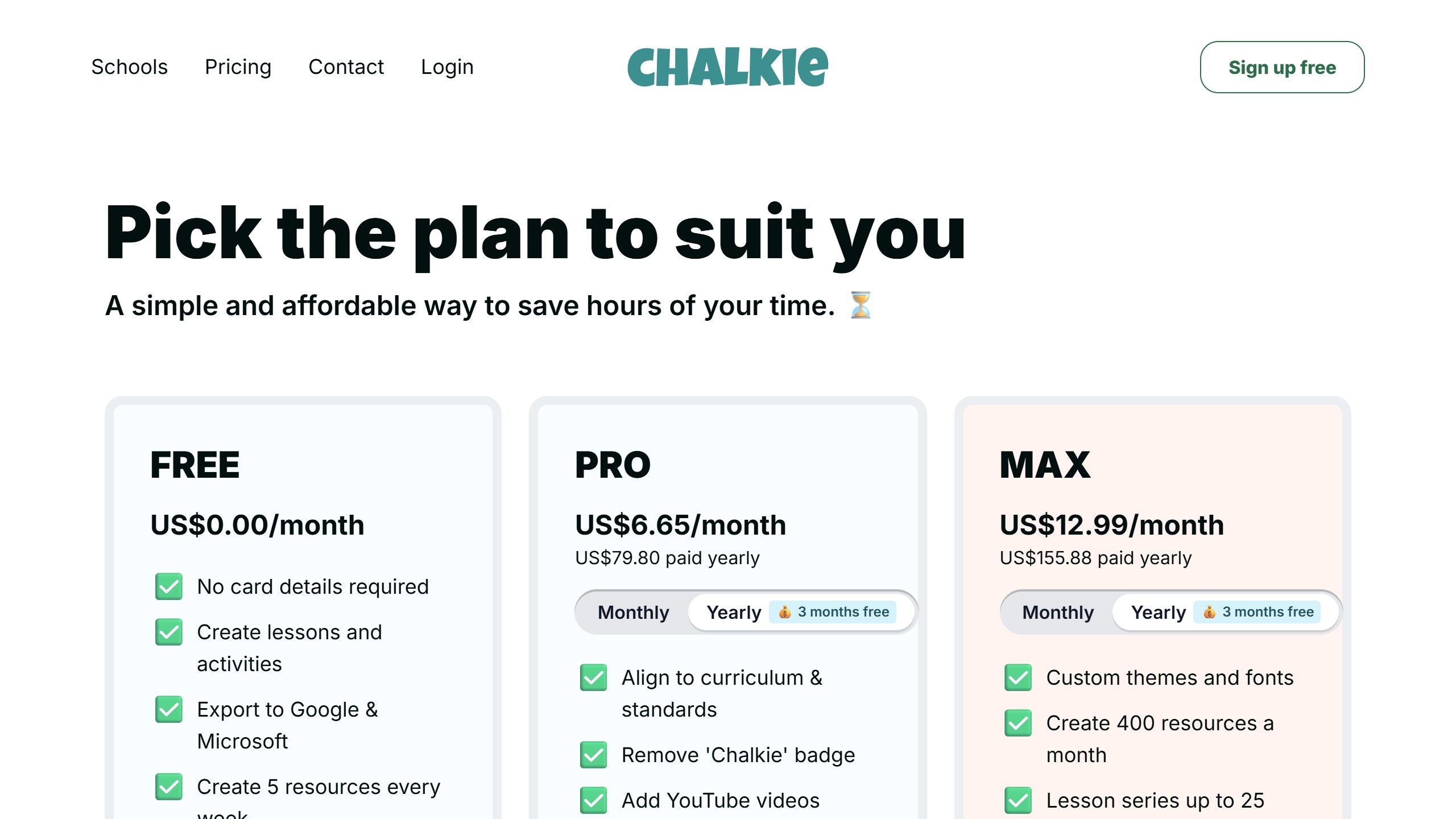
Chalkie plans at a glance
| Plan | Price | Resources | AI edits | Key extras |
|---|---|---|---|---|
| Free | $0, no card required | 5 per week | 10 per week | Google Slides + PowerPoint export |
| Pro | $6.65/mo billed annually ($79.80/yr) or $8.99 monthly | 200 per month | 400 per month | Curriculum alignment, branding removal, YouTube integration, series up to 12 lessons, lessons up to 25 slides |
| Max | $12.99/mo billed annually ($155.88/yr) or $16.99 monthly | 400 per month | 800 per month | Custom themes and fonts, series up to 25 lessons, lessons up to 35 slides |
| Schools / Districts | Custom quote | Custom | Custom | Linked teacher accounts, admin controls, centralized billing |
All figures checked against Chalkie’s live pricing page on 17 September 2026. If they change, the pricing page wins. Our Chalkie pricing guide covers every plan limit and what the yearly discount is worth.
What Chalkie does
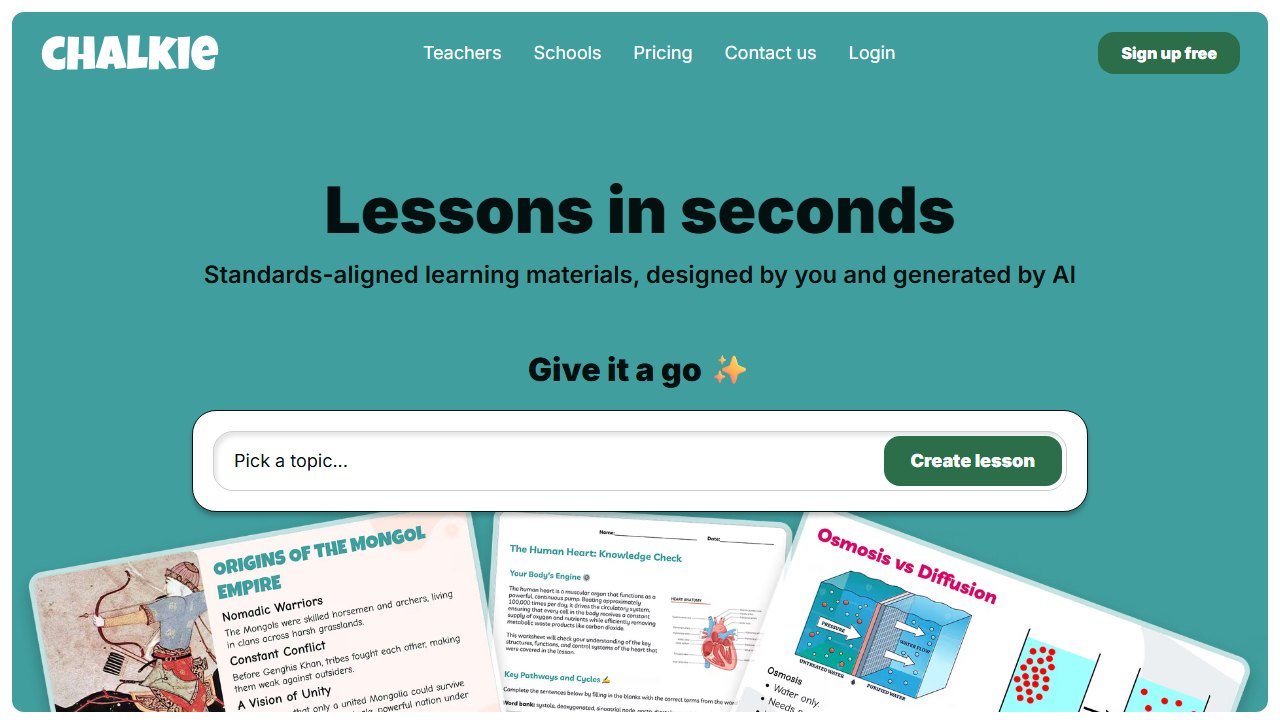
Chalkie is an AI lesson generator built around one core promise: enter a topic, pick your grade and curriculum framework, and get back a complete, professionally designed slide deck with a differentiated activity sheet to match. You can start four ways: type a topic from scratch, paste in an existing lesson plan, upload a file, or drop in a website URL and let Chalkie build the lesson from that source.
The output is not a text outline you then have to design yourself. It is a finished deck: title slide, learning objectives, explanations broken into teachable chunks, embedded checks for understanding, and recap slides. From there, one-click controls let you add a slide, differentiate content for different learners, or, in the platform’s own cheeky phrasing, “make it more fun.”
Beyond single lessons, the platform includes four main tools:
- AI Lesson Planner: single lessons as classroom-ready slide decks aligned to your chosen standards.
- Lesson Series / Unit Planner: ordered multi-lesson units with built-in recaps and quizzes, up to 12 lessons on Pro and 25 on Max.
- AI Worksheet Generator: activity sheets you can share digitally, export, or print, with differentiated versions for varying abilities.
- Slide Editor: AI-assisted editing plus manual control over themes, colors, and fonts.
Everything exports to PowerPoint, Google Slides, or PDF as editable files, and generated materials stay organized in your account for reuse. The platform supports 40 languages and claims users in more than 100 countries.
The standards piece deserves a closer look, because it is where Chalkie separates itself from generic chatbots. When you select a framework, and the platform supports 100+ of them including Common Core, NGSS, the C3 Framework for social studies, and state standards such as TEKS, Chalkie does not just stamp a standard code on the slide. It adjusts content expectations, vocabulary level, and assessment language to match what that standard actually requires. An NGSS-tagged biology lesson we generated used performance-expectation phrasing and asked students to construct explanations, not just recall facts. It was not a perfect three-dimensional NGSS assessment, but it was noticeably closer than what a raw ChatGPT prompt produces.
Note that curriculum alignment is a Pro feature. On the free plan you get well-structured slides, but the framework selector that does the real alignment work sits behind the paywall.
Hands-on observations
Our first test was the promise itself: 30 seconds from topic to deck. We typed “photosynthesis, 9th grade biology, NGSS” and had a 14-slide lesson with a matching worksheet in about half a minute. The slides were legitimately presentable: consistent visual design, sensible pacing from hook to explanation to check-for-understanding, and no clip-art-from-2009 energy. This is the single biggest difference from tools like MagicSchool or Eduaide, which generate excellent text content you then have to format yourself. We broke down that distinction across the whole category in our best AI lesson planning tools roundup; Chalkie is the strongest pure slide generator we have reviewed in it.
The URL-to-lesson feature surprised us. We fed it a news article about coral bleaching and asked for a middle school lesson; Chalkie pulled the key concepts, simplified the vocabulary appropriately, and built discussion questions off the actual source rather than generic reef facts. Uploading an existing lesson plan worked similarly well: it respected our sequence and turned each phase into designed slides rather than rewriting the lesson into something else.
The one-click differentiation is more than a gimmick. Chalkie offers accessibility variants including low stimulation, dyslexia-friendly, low vision, ADHD-friendly, and early learner formats. The dyslexia-friendly version we generated increased spacing and switched to cleaner sans-serif text; the low-stimulation version stripped decorative elements. If you also lean on Diffit for reading-level differentiation, the two stack nicely: Diffit levels the text, Chalkie presents it.
Editing is where we spent the most time. The AI edit controls (“simplify this slide,” “add an example,” “make it more fun”) worked about 8 times out of 10; the misses tended to over-cartoonify content for older students. Manual editing covers the gaps, though on the free plan you cannot change themes or fonts, and free-tier AI edits are capped at 10 per week, which we hit on day two of tinkering.
Time savings are real but the marketing framing needs context. Chalkie’s funding announcement cites teachers saving an average of 5 hours per week, and the company reports 90% of surveyed teachers strongly agreeing it helps their professional well-being. Self-reported vendor surveys always deserve a squint. Our own experience: a lesson that would take us 45 to 60 minutes to plan and design from scratch took about 12 minutes with Chalkie, including review and fixes. Across a 5-lesson prep week, that is roughly 3 to 4 hours back, which lands in the same neighborhood as the claim without matching it exactly.
Accuracy held up well in practice, with caveats. Elementary and middle school content was consistently solid. At the high school level we caught one oversimplified explanation of cellular respiration that a chemistry-adjacent student would have questioned, and a history deck dated an event correctly on one slide and vaguely (“in the early part of the century”) on another. Nothing outright fabricated, but you are the editor of record. That matches the independent consensus: as one teacher-reviewer put it, the tool cannot teach the lesson for you, and content validation stays on your desk.
The $4M story, and why it matters for a tool you might depend on
On March 19, 2026, Chalkie closed a $4M funding round from TriplePoint Ventures. At the time, the platform reported more than 500,000 teachers and over 10 million students reached; the company’s own site now claims north of a million teachers helped. For a product that only launched in 2025 and was built by a founding team of six, that is an unusually steep curve.
The founders are worth knowing because edtech is littered with tools that vanish mid-school-year. CEO Phillip Daneshyar previously built Kanda, a UK fintech that brokered over $100M in loans. CTO Mark Hughes founded Tutorful, one of the UK’s largest tutoring marketplaces, which grew past 80 employees and raised more than $10M. CPO Peter Sanderson led design at Tutorful and trained as an architect, which explains a lot about why Chalkie’s slides look designed rather than generated. This is a second-time-founder team with an exit-scarred understanding of what it takes to keep a product alive.
Why does the funding matter to you as a teacher? Three practical reasons. First, sustainability: a tool with fresh capital and a stated plan to grow engineering and invest in stronger AI models is less likely to disappear or suddenly triple its prices than a solo-dev side project. Second, the district push: Chalkie said the round will fund scaling distribution into school trusts and districts, so expect an admin dashboard sales pitch to reach your district office eventually. Third, the flip side: venture-funded free tiers have a habit of shrinking as investors ask about conversion rates. The current 5-per-week free allowance is generous for a funded startup; enjoy it, but do not architect your entire prep workflow around it staying that way.
Pricing: what you actually pay
Chalkie’s pricing is refreshingly simple, and we verified every figure on the live pricing page in July 2026.
Free plan ($0, no card required). You get 5 resource generations per week, 10 AI edits per week, and full export to Google Slides and PowerPoint. That is enough for a teacher who wants one or two AI-built lessons a week plus a worksheet. What it lacks: the curriculum alignment selector, YouTube video integration, and branding removal. Every free export carries a small Chalkie watermark.
Pro ($6.65 per month billed annually, $79.80 per year). This is the plan most solo teachers should evaluate, and it is the “one coffee per month” tier Chalkie markets. It unlocks curriculum alignment (the feature that makes the standards work real), 200 resources per month, 400 AI edits per month, lesson series up to 12 lessons, individual lessons up to 25 slides, YouTube integration, and watermark removal. A monthly billing option exists at a higher effective rate.
Max ($12.99 per month, $155.88 per year annual). Doubles the quotas to 400 resources and 800 edits monthly, extends series to 25 lessons and decks to 35 slides, and adds custom themes and fonts. Most classroom teachers will never hit Pro’s caps; Max is for the department workhorse building materials for a whole team.
Schools and districts. Quote-only. Linked teacher accounts, admin controls with usage tracking, and centralized billing. If your district is evaluating, this is where the post-funding sales motion is headed.
At $79.80 per year, Pro undercuts most of the category. For comparison, MagicSchool Plus and Curipod’s paid tier both run meaningfully higher per year, while Brisk holds the strongest free tier in the space with 23 free tools. If you are optimizing for zero dollars, our best free AI tools for teachers guide maps exactly what every free tier includes and where each one breaks.
Who Chalkie is for
Buy it (or at least free-tier it) if:
- You teach with slides. If your daily instruction runs through a projector, Chalkie automates your single most time-expensive prep task. This is the clearest fit in the category.
- You are a new teacher building a materials library from nothing. The series planner plus the account library means your first year does not have to be a nightly design marathon.
- You need differentiated versions of everything. The accessibility variants and ability-differentiated worksheets are one click, not one hour. Special education and inclusion teachers told us this was the feature that stuck; if that is your world, our AI tools for special education teachers roundup covers the deeper toolkit.
- You teach science or social studies and care about framework language. The NGSS and C3 alignment is better than average; we put Chalkie’s NGSS slides through a harder test in our best AI tools for high school science teachers guide.
Skip it if:
- You rarely use slides. Discussion-based classrooms, workshop-model ELA, and lab-heavy courses will find the core output less useful than a text-first generator.
- You want one tool for everything. Chalkie does not do report card comments, IEP drafting, behavior plans, or rubric generation. MagicSchool remains the breadth play; our MagicSchool review covers that trade-off in full.
- Your district blocks unapproved AI tools. Chalkie’s district tier exists, but if your school has an approved-vendor list, check it first.
The honest limitations
Every tool in our reviews gets this section, and Chalkie has real ones.
The free tier caps bite fast if slides are your whole workflow. Five resources and 10 AI edits per week sounds generous until you realize a single lesson plus its worksheet plus a differentiated variant eats three of your five generations. A full-time teacher prepping 15+ lessons a week cannot live on the free plan; it is a trial that does not expire, not a working tier.
Depth per slide is capped by design. Chalkie optimizes for teachable chunks, which is right for K-12 direct instruction but wrong for content-dense upper-level courses. Our AP-style biology deck needed manual expansion on nearly every explanatory slide. If you teach seniors, treat the output as a skeleton.
Curriculum alignment lives behind the paywall. The headline feature, real standards adjustment rather than code-stamping, is Pro-only. Free users are effectively evaluating a different, weaker product, which makes the free trial slightly misleading as a test of what you would be paying for.
No independent review ecosystem yet. Chalkie’s Trustpilot presence is thin and much of the “review” content ranking in search is vendor-adjacent. That is partly why we wrote this one. A young product with 500,000 users and few independent audits deserves your usual skepticism: verify its outputs against your own subject knowledge, especially for facts, dates, and safety-relevant content.
Fact-checking stays on you. As noted in practice, we caught oversimplifications and one wobbly date. Nothing scandalous, but Chalkie has no citation layer and no source-grounding, so unlike a tool such as NotebookLM there is no built-in way to trace where a claim came from.
How Chalkie compares to the field
The lesson-planning category splits into text-first and slides-first tools, and Chalkie is the best slides-first option we have reviewed. MagicSchool wins on breadth with 80+ tools and stronger district adoption. Curipod also generates slide decks but optimizes for live interactivity, polls, word clouds, and drawing prompts, where Chalkie optimizes for design polish and standards depth; see our Curipod review for that use case. Brisk lives inside your browser and existing Google docs rather than generating from scratch. Eduaide produces the most pedagogically varied text resources but leaves design to you.
Our honest read: Chalkie plus one breadth tool is the sensible stack. It replaces your slide workflow, not your entire AI toolkit, and the teachers getting the most from it in our conversations all ran it alongside MagicSchool or Brisk. For the full category picture, start with our best AI tools for teachers pillar.
How to tell whether it actually helped
Education software is unusually prone to being judged on enthusiasm, because the immediate experience of a good tool is genuinely pleasant. That is not the same as it having worked.
Teacher time is the measurable win, and the honest one
Most of the real value here is hours, not outcomes. Ask two or three colleagues to record how long planning, resource creation and marking take across one normal week, before anything is introduced. It takes minutes, it is the only way the saving is ever provable, and it is unrecoverable afterwards. A tool that returns two hours a week to a teacher has earned its place without needing to claim anything about attainment.
Be sceptical of attainment claims, including your own
Attainment moves slowly, is affected by everything, and is nearly impossible to attribute to one tool inside a single year. If a vendor claims a grade improvement, ask what the comparison group was. If you are tempted to claim one internally, ask yourself the same question. Reporting a time saving you can evidence is worth more than an outcome claim you cannot.
Watch adoption in week six, not week one
Novelty carries any classroom tool through the first fortnight. The number that matters is how many teachers are still using it after half term, and whether it survived a busy assessment period. If usage collapses in the first genuinely hard week, the tool added work rather than removing it, whatever the initial reaction was.
Decide in advance what would end it
Write down before purchase what the end of the year would have to look like for you not to renew. It converts renewal from a default into a decision, which matters in a category where the per teacher cost is small enough to stop noticing.
Verdict: the rare AI teacher tool that ships a finished product
Chalkie earns its funding round. The 30-second topic-to-deck generation is real, the design quality clears every competitor we have reviewed, the standards alignment does more than decorate slides with codes, and $79.80 per year for Pro is fair pricing in a category drifting toward $100+. The founding team’s track record and fresh $4M suggest the product will still exist when you renew, which is not a given in edtech.
Our score: 4.4 / 5. It loses points for the paywalled curriculum alignment, the depth ceiling on upper-level content, and the standard AI caveat that you remain the fact-checker of record. But for the core job, turning prep hours into presentation-ready, differentiated lesson materials, Chalkie is the strongest specialist tool we have reviewed this year. Start free, test it against one real week of teaching, and let your Sunday evening tell you whether Pro is worth a coffee a month.

Written by
FazFaz is the founder of AIToolsBakery. Some tools here are tested hands on. Others are assessed from vendor documentation and pricing verified on the live page, and every review says which one it is. Sponsors can buy a position in a guide. They cannot buy the score, the criticism, or silence about a better option.
How we test and how we make money →