Every fundraising decision you make depends on your donor database. Who to thank, who has lapsed, who is ready for a bigger ask, what your retention rate is: all of it comes from the records you keep. A good database makes those answers quick and trustworthy. A poor one produces duplicate letters, wrong receipts and reports nobody believes.
Most guides to donor databases list features and recommend software, usually their own. This one starts from what the database has to hold, including the fields that tax, postal and privacy rules effectively require, then walks through setting one up and keeping it clean. If your data is in reasonable shape but you still cannot see who needs attention, Gratefully works on top of your database and has a free plan.
About the sources. Rules come from the IRS, the US Postal Service, the EU’s GDPR text, the UK Information Commissioner’s Office and the California Attorney General, all read on 18 September 2026. This is general information, not legal or tax advice; check your own obligations with an adviser.
What a donor database is
A donor database is the system of record for everyone who supports your organisation: individuals, households, businesses and foundations, with their gifts and your contact with them. Today most nonprofits use donor management software, also called a nonprofit CRM, which adds forms, email, receipts and reporting on top of the database. Some small organisations still use a spreadsheet. The principles below apply either way; software just makes them easier to follow.
What to track: the core records
| Record | Key fields | Why it matters |
|---|---|---|
| Constituent (person or organisation) | Unique ID, name, salutation, address, email, phone, type | One stable ID per supporter makes every report possible |
| Relationship | Household, spouse, employer, board or volunteer links | Avoids duplicate mailings and credits gifts correctly |
| Gift | Date, amount, type (cash or non-cash), campaign, appeal, fund, payment method | Retention, lifetime value and receipts all depend on it |
| Pledge and recurring gift | Amount, schedule, start date, status | Tracks promised and ongoing giving separately from received gifts |
| Acknowledgment | Date sent, method, goods or services provided and their value | Proves receipts went out with the right details |
| Interaction | Date, type, staff member, notes | Keeps relationship history when staff change |
| Preferences and consent | Contact preferences, do-not-solicit flag, lawful basis and consent date where relevant | Respects donors and meets privacy rules |
| Soft credit | Who influenced or arranged a gift | Recognises board members, fundraisers and employers behind a gift |
The fields the rules make you keep
IRS: what a receipt must show
The IRS says a written acknowledgment for a contribution of $250 or more must contain the organization’s name, the amount of a cash contribution, a description but not the value of a non-cash contribution, a statement that no goods or services were provided if that is the case, and a description and good faith estimate of any goods or services that were provided. Publication 1771 (revised November 2023) adds that an annual summary can cover several gifts, that acknowledgments can be sent by email, that separate gifts under $250 are not added together, and that it is not necessary to include the donor’s Social Security or tax identification number. For payments over $75 that are partly for goods or services, such as an event ticket, a written disclosure is required, with a penalty of $10 per contribution up to $5,000 per event or mailing.
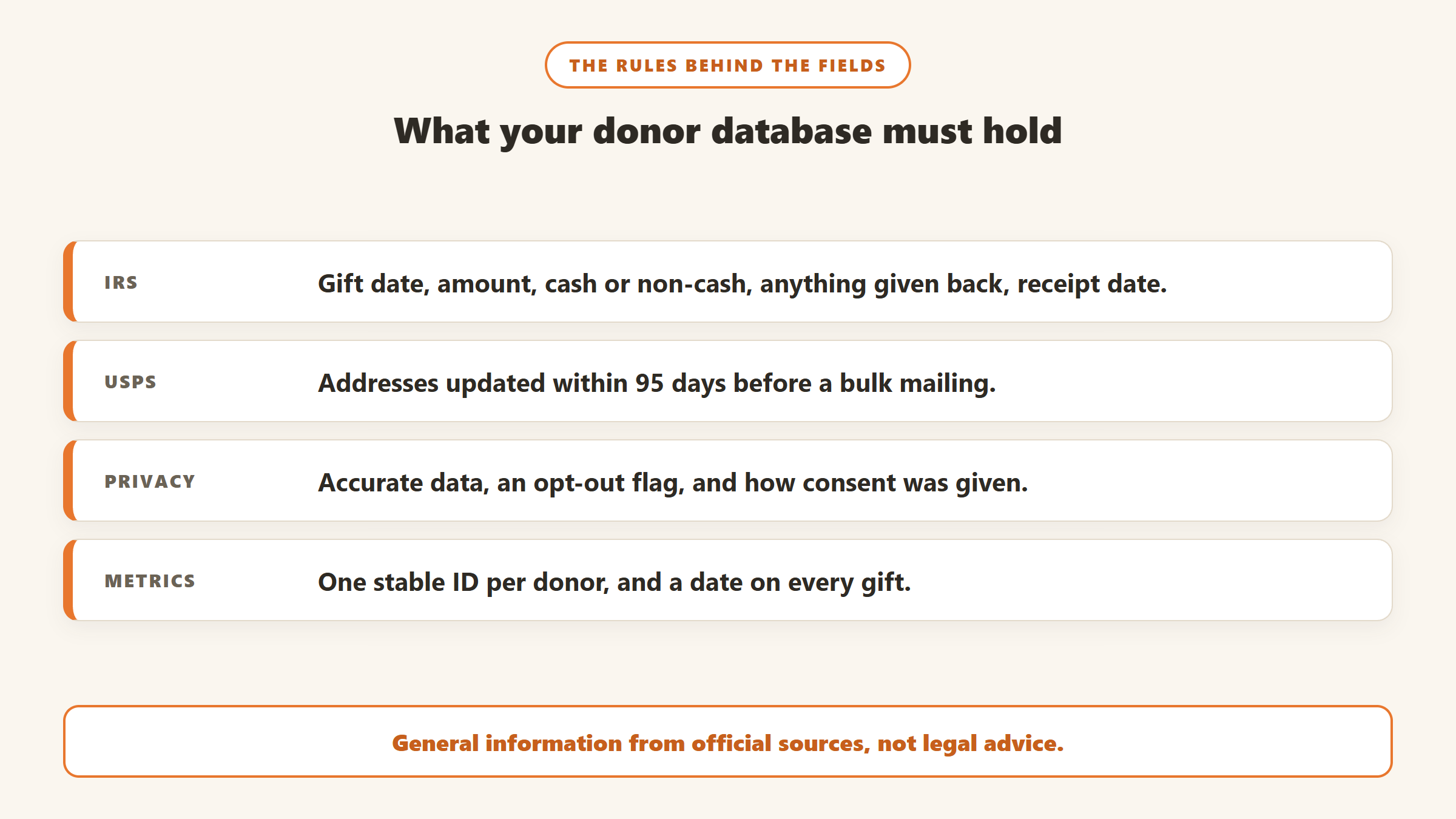
In database terms, every gift record needs its date, amount, whether it was cash or non-cash, a description of non-cash items, whether anything was given in return and its estimated value, and the date the acknowledgment went out. And you should not be storing Social Security numbers for receipting, since the IRS says they are not needed.
USPS: keeping addresses current
The Postal Service’s Move Update standard says mailers claiming First-Class presorted or automation prices, or USPS Marketing Mail prices, “must demonstrate that they have updated their mailing list within 95 days before the mailing date.” Nonprofit bulk appeals typically go as Marketing Mail, so this applies to most discounted appeal mailings. Approved methods include NCOALink, which USPS describes as a dataset of approximately 160 million permanent change-of-address records, run by licensed providers using CASS Certified address matching software.
For the database, that means an address-updated date on each record, a way to import NCOA results, and a flag for undeliverable addresses. Our guide to NCOA for nonprofits covers the process and costs.
Privacy: accuracy, objection and lawful basis
If you hold data on supporters in the EU or UK, the GDPR applies. Article 5 requires personal data to be “accurate and, where necessary, kept up to date” and kept no longer than necessary. Article 21 gives people the right to object at any time to processing for direct marketing, after which their data “shall no longer be processed for such purposes.” The UK regulator’s guide to lawful basis lists six bases, including consent and legitimate interests, and notes you cannot usually swap from consent to another basis later.
For US nonprofits, the California Attorney General states that “The CCPA generally does not apply to nonprofit organizations”. Even so, a suppression flag, a record of how each person’s data was collected and on what basis, and a clear process for honouring opt-outs are good practice everywhere, and essential if you have European supporters.
Fundraising metrics: stable IDs and dated gifts
The Fundraising Effectiveness Project defines donor retention as “the percentage of individuals who donated in a prior period and donated again in the current period.” You can only calculate that if each donor has one stable ID across years and every gift has a date. Duplicate records break it: the same donor under two IDs looks like one lapsed donor and one new donor. Our donor retention rate guide shows the calculation.
How to set up a donor database, step by step
- Decide your standards first. How names, salutations, addresses and households are entered, what counts as a campaign versus an appeal, and which gift types you use. Write them down.
- Gather every source. Spreadsheets, your online giving platform, event lists, email lists, the accounting system.
- Clean before you import. Remove duplicates, standardise addresses, and fix obvious errors. It is far easier outside the new system than inside it.
- Import people first, then relationships, then gifts. Gifts need a constituent to attach to. Keep the source system’s ID in a field so you can trace any record back.
- Check totals. Compare gift totals by year against your accounts before you trust any report.
- Set up receipts and acknowledgment tracking before new gifts start arriving.
- Build the saved lists you will use weekly: gave last year but not this year, first-time donors, recurring donors, top donors by lifetime giving.
- Train everyone on the standards, and give one person responsibility for data quality.
Designing your gift coding
Most reporting questions come down to how gifts are coded. Three levels are enough for most organisations:
- Fund: where the money goes, matching your accounting, such as general operations or a restricted program. This is what the finance team reconciles against.
- Campaign: the overall effort, such as the year-end campaign or a capital campaign.
- Appeal: the specific ask that produced the gift, such as the November letter or the spring email. This is what lets you measure which asks work and calculate cost per channel.
Keep the lists short and retire codes you no longer use. A database with 400 appeal codes nobody understands is as hard to report on as one with none. Record restrictions on the gift itself, so honouring donor intent does not depend on memory. Our fundraising metrics guide shows the reports good coding makes possible.
Access and security
A donor database holds personal and financial information, so treat access seriously. Give each person their own login rather than a shared one, so changes can be traced. Limit who can export the full file or delete records. Turn on two-factor sign-in if your system offers it. Remove access promptly when staff or volunteers leave. And store card details only in your payment processor, never in notes fields or spreadsheets.
Moving from an existing database
If you are replacing a system rather than starting fresh, the same principles apply with extra care. Export every record type, not just constituents and gifts: relationships, pledges, recurring gift schedules, interactions, notes and attachments. Keep the old IDs in the new system. Recurring gifts are the hardest part, because the card authorisation lives with the payment processor, not in the export, so ask both vendors how active recurring gifts will move. Run a test import of a few hundred records and compare giving totals before the full load, and keep read access to the old system for a while after you switch. Our nonprofit CRM migration guide has the full checklist.
Keeping it clean
A database decays. People move, marry, change email addresses and pass away, and staff enter the same person twice. A simple routine keeps it usable:
| How often | Task |
|---|---|
| Every new gift | Search before creating a new record; record the acknowledgment date |
| Monthly | Review new records for duplicates; process returned mail and bounced email |
| Before each bulk mailing | Update addresses within the USPS 95-day window through NCOA or another approved method |
| Quarterly | Run a duplicate check across the whole file; review do-not-solicit flags and opt-outs |
| Annually | Reconcile gift totals with the finance team; review records you no longer need to keep |
Merging duplicates needs care, because some systems cannot undo a merge. Our duplicate donor records guide compares how each CRM handles it.
Spreadsheet or donor database software?
A spreadsheet is free and familiar, and for a few hundred donors managed by one person it can work. It struggles with everything that involves more than one table: households, pledges, recurring gifts, soft credits, interactions, and receipts generated from gift records. It also has no audit trail and no protection against two people editing at once. Donor database software handles those relationships, produces receipts, and runs the reports above in seconds. The cheapest hosted options cost from $15 to $50 a month, and some are free. Our guides to the best donor management software, software for small nonprofits and free donor management software compare the options.
What to look for in donor database software
- A clear record model: people, organisations, households and relationships, not just a flat list.
- Gift records with receipt fields that match the IRS elements above, and batch acknowledgment.
- Duplicate detection and a safe merge, ideally one that can be undone.
- Address updating: built-in NCOA or a straightforward import of NCOA results.
- Consent and preference fields, including a do-not-solicit flag.
- Full export of every record type, so you are never locked in.
- Pricing that fits your growth: vendors charge by records, contacts, revenue or users, so check what happens when your list doubles.
Reports every donor database should produce
If your database cannot produce these in a few minutes, something in the setup needs fixing:
- Retention: last year’s donors who gave again this year, split into new and repeat donors.
- Lapsed donors: who gave last year but not yet this year, the list behind any renewal effort. Our LYBUNT and SYBUNT guide covers it.
- Giving by appeal and channel, with average and median gift.
- Year-end giving summaries for every donor, ready to send as the IRS-accepted annual acknowledgment.
- Top donors by lifetime giving, with their last contact date. An intelligence layer such as Gratefully turns this into a ranked daily list with the reason for each name.
- Unacknowledged gifts: every gift without an acknowledgment date, so nothing slips past the January 31 convention for year-end receipts.
- Records missing key data: no address, no email, no gift in five years, or no household link, as a regular cleanup list.
Common donor database mistakes
- No data standards, so every staff member enters names and addresses differently.
- Storing sensitive identifiers you do not need, such as Social Security numbers.
- Importing without testing, then discovering broken households and missing gifts months later.
- Letting notes live in email instead of interaction records, so history leaves with staff.
- Ignoring opt-outs in one channel because they were recorded in another.
- Treating the database as IT’s job rather than the fundraising team’s most important tool.
- Never recording deaths or moves, so appeals keep reaching people who have passed away or left, which is both wasteful and hurtful to families.
From a clean database to knowing who to call
A well-kept database answers what happened. Turning it into a list of who needs attention this week is a separate job. Gratefully is a donor intelligence layer that sits on top of your database rather than replacing it. Its how-it-works page says Salesforce for Nonprofits, Bloomerang and Little Green Light “sync automatically overnight”, and that CSV import and document upload handle everything else, so it also works with other CRMs and spreadsheets. It describes imported data as indexed, deduplicated and cited, ranks which donors need attention with a reason for each, and drafts outreach for you to review. It is not a CRM and does not replace your database.
Gratefully’s pricing page, read on 18 September 2026, lists “Data clean-up + downloads” on its Free plan, which holds your full donor file with no record limits, and every new account starts with a 14-day trial of its Advanced plan with no card required before moving to Free. Paid plans start at $79 a month billed yearly. See our Gratefully review and donor data readiness for AI.
Disclosure: Zilwaris, the consultancy run by AI Tools Bakery’s founder, does paid advisory work for Gratefully. Gratefully did not pay for this placement, and it is assessed on the same criteria as everything else on this site.
Where the facts on this page come from
- IRS, Charitable contributions: written acknowledgments; Publication 1771 (Rev. 11-2023).
- USPS PostalPro, NCOALink and Move Update pages.
- Regulation (EU) 2016/679 (GDPR), Articles 5 and 21, EUR-Lex; UK ICO, guide to lawful basis.
- California Attorney General, CCPA page, updated 28 August 2026.
- Fundraising Effectiveness Project, terminology.
- Gratefully: how-it-works and pricing pages, 18 September 2026.
The bottom line
A donor database for nonprofits is only as useful as its records. Give every supporter one stable ID, record every gift with its date and the details the IRS requires on receipts, keep addresses within USPS’s 95-day window before bulk mailings, and store preferences and opt-outs so you respect donors and meet privacy rules. Set standards before you import, clean before you migrate, and run a monthly and quarterly routine. Do that, and your retention rate, lapsed-donor lists and receipts can all be trusted.

Written by
FazFaz is the founder of AIToolsBakery. Some tools here are tested hands on. Others are assessed from vendor documentation and pricing verified on the live page, and every review says which one it is. Sponsors can buy a position in a guide. They cannot buy the score, the criticism, or silence about a better option.
How we test and how we make money →