Connecting Mailchimp to your donor database sounds like a solved problem. Almost every CRM advertises an integration. The differences are in the detail: which way data flows, how often, whether opens and clicks land on the donor’s record, and whether you pay extra. Those details decide whether your fundraisers can see that a lapsed donor opened your last three newsletters. This page compares what eleven donor CRMs document, flags the limits vendors do not put on their integration pages, and explains the setup choices that matter. If what you really want is engagement signals next to giving history, Gratefully, our top-ranked donor intelligence tool, brings in email engagement from Mailchimp, Constant Contact and HubSpot and reads it with your CRM data, which we cover below.
How we put this together. Every row below comes from the CRM’s or Mailchimp’s own documentation, read on 17 September 2026. We have not connected these integrations ourselves. Where a help article was behind a login, we say so.
The comparison
| CRM | Type | Direction | What comes back to the CRM | Frequency | Cost or requirement |
|---|---|---|---|---|---|
| Bloomerang CRM | Native | Two-way | Opens, clicks, unsubscribes | Hourly | Not stated |
| Little Green Light | Native | Two-way | Unsubscribes, bounces, updates, new subscribers, for review | Nightly | One Mailchimp audience |
| DonorPerfect | Native | Two-way | Sends, opens, clicks, unsubscribes | Nightly | Paid Mailchimp plan required |
| Neon CRM | Native | Two-way | Campaign metrics and email history | Not stated | Listed as free in Mailchimp’s directory |
| Keela | Native | Two-way | Subscription status and contacts; campaigns not linked to individuals | Not stated | Listed as paid in Mailchimp’s directory |
| Virtuous CRM+ | Native | Both directions, by tag | New members and unsubscribes; no field updates | Not stated | Not stated |
| Salesforce | Third-party app | Two-way | Email activity history | Not stated | From $25 USD a month per org |
| Raiser’s Edge NXT | Partner apps only | Two-way | Opens, clicks, unsubscribes, bounces (varies by app) | Scheduled or real time | SmartMAILCHIMP from £1,750 a year |
| Givebutter | Native | To Mailchimp | Not documented | Not stated | Not stated |
| DonorDock | Zapier | To Mailchimp | None documented | Per Zap | Zapier costs apply |
| Kindful | Native | Two-way | Subscribes, unsubscribes, click rates | Not stated | Listed as paid in Mailchimp’s directory |
Mailchimp’s integration directory labels some listings free and some paid without defining the terms, so treat those labels as a prompt to ask, not a price.
CRM by CRM
Bloomerang
Bloomerang’s integration page says it adds email opens, clicks and unsubscribes to donor profiles, and its help centre, updated June 2026, says the CRM starts the sync every hour and maps Bloomerang groups to Mailchimp tags. There is a catch: Bloomerang has a second Mailchimp integration for its Fundraising product, which is a one-way export on a manual, hourly, daily or 15-minute schedule, and Bloomerang warns that connecting both will create duplicate data. Pick one. See our Bloomerang review.
Little Green Light
Little Green Light’s help article describes a two-way, nightly process. It sends first name, last name and preferred email, maps categories to Mailchimp groups (up to 60 values) and custom lists to tags. What comes back is unsubscribes, bounces, updates and new subscribers, which land in an Integration Queue for you to review rather than overwriting records. It connects to one Mailchimp audience. Opens and clicks are not listed. See our Little Green Light review.
DonorPerfect
DonorPerfect’s integration page describes a bi-directional connection that syncs each night, turns DonorPerfect flags into Mailchimp tags, and logs sends, opens, clicks and unsubscribes on the donor record. It requires a paid Mailchimp account; free Mailchimp plans are not supported. DonorPerfect also offers a Constant Contact integration, covered below. See our DonorPerfect review.
Neon CRM
Mailchimp’s directory listing for Neon CRM describes a two-way sync of standard and custom account information, with campaign metrics flowing to dashboards and each recipient’s email history. Neon’s own support article sits behind a login, so we could not read the setup details or sync frequency. Ask Neon before you rely on it. See our Neon CRM review.
Keela
Keela’s support article describes a two-way sync of subscription status, names, emails and mapped fields, and imports Mailchimp campaigns with their statistics. The important line: imported campaigns “will not be linked to individual contacts”. So you can see how a campaign did, but not which donor opened it. Keela also includes its own mass email tool, which may be the better choice if per-donor engagement matters to you. See our Keela review.
Virtuous CRM+
Virtuous’s help article says a synced tag in Virtuous equals a Mailchimp audience and that data is synced in both directions: new audience members can tag the contact, and unsubscribes remove the tag. It also says the sync does not update an existing Mailchimp member’s fields, such as name or email address, so changes made in the CRM need handling another way. See our Virtuous review.
Salesforce (NPSP and Nonprofit Cloud)
Salesforce does not ship a Mailchimp connector of its own. The app listed in Mailchimp’s directory is bi-directional, records email activity history in Salesforce, and is priced “Starting at $25 USD/month per Salesforce org”. If you remember it as free, that has changed. Larger audiences cost more, so check the tier for your contact count. Our NPSP vs Nonprofit Cloud guide covers the wider platform decision.
Raiser’s Edge NXT
We found no native Mailchimp integration from Blackbaud. Partner apps fill the gap. Chimpegration syncs NXT queries and lists on a schedule or in real time and brings back first open date, clicked links, unsubscribes and bounces; it shows no price and offers a two-week trial. SmartMAILCHIMP syncs one designated list in real time, returns subscribes, unsubscribes, bounces, opens, clicks and consent, and is priced “From £1,750 per year” as displayed. Our Raiser’s Edge alternatives page covers the platform itself.
Givebutter, DonorDock and Kindful
Givebutter says it can automatically sync donors, members and fundraisers with your Mailchimp lists; its page does not say whether engagement comes back. DonorDock connects through Zapier, with a template that creates or updates the contact in Mailchimp, and says it does not support individual Zaps. Kindful’s listing describes a two-way sync that tracks subscribes, unsubscribes and click-through rates, but Kindful now describes itself as a Bloomerang product, so check its future before building on it.
Constant Contact instead of Mailchimp
If your organisation uses Constant Contact, the picture is similar but not identical.
- Bloomerang lists opened, bounced and unsubscribed data coming back from Constant Contact; clicks are not mentioned.
- Little Green Light sends data mostly one way, with invalid email and unsubscribed statuses returning, per its help article. Constant Contact is billed separately.
- DonorPerfect says a Constant Contact account is included in its subscription and that opens, clicks and bounces appear on a real-time dashboard.
- Virtuous runs a one-way sync to a Constant Contact list and says in its help article that sends, opens and clicks will not be synced back. It syncs name and primary email only, with no bulk sync of existing contacts.
The pattern is the same as with Mailchimp: the connector exists, but what returns to the donor record varies from full engagement to nothing at all. If you are choosing between the two email platforms, check your CRM’s documentation for both before deciding, because the better-supported one for your CRM may matter more than any difference between the email tools themselves.
Mailchimp’s nonprofit discount
Mailchimp’s help page offers a 15% discount to verified nonprofit organisations and charities. US organisations add their EIN to the account and may need their 501(c)(3) letter; organisations elsewhere provide a link to their website. You request it through the Contact page under billing, and it should be requested before you buy a marketing plan, because Mailchimp says it cannot provide retroactive discounts or refunds on past purchases. Mailchimp’s pricing page shows regional prices, and it showed us rupee prices when we checked from India, so check the page from your own country. Remember that DonorPerfect’s integration needs a paid plan.
Setup decisions that matter more than the connector
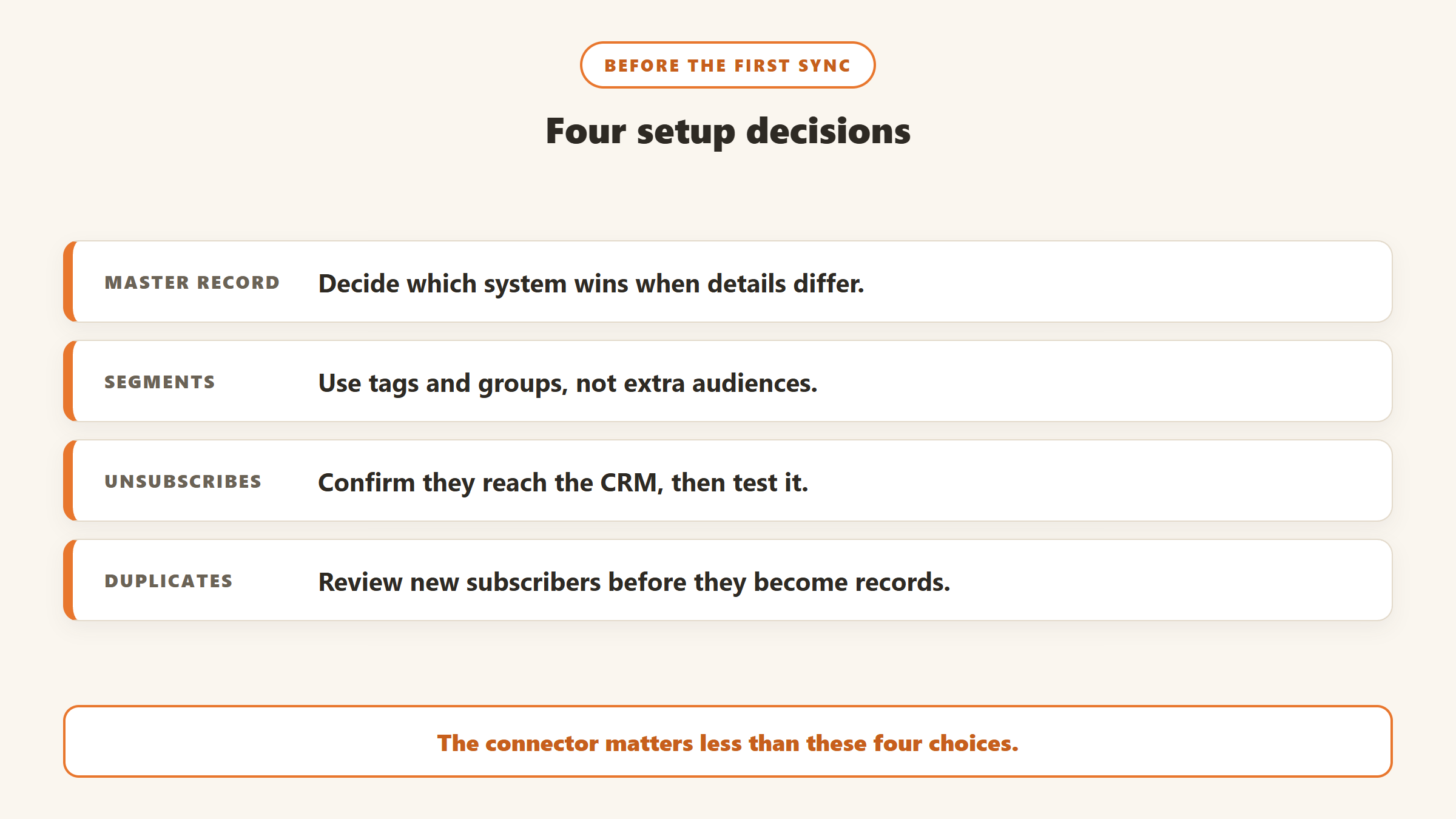
One source of truth for contact details
Decide where names and email addresses are edited. If the CRM is the master, make sure changes flow out; Virtuous, for example, says its sync does not update existing Mailchimp members’ names or emails. If both systems accept edits, you will get conflicts.
Tags and groups, not dozens of audiences
Several integrations connect to a single Mailchimp audience, Little Green Light among them. Use tags and groups for segments such as monthly donors, lapsed donors and event attendees, rather than separate audiences, so one person does not end up as several contacts.
Consent and unsubscribes
An unsubscribe in Mailchimp must reach the CRM, or a staff member may add the person back. Check that your integration returns unsubscribes, and test it with a staff email before you rely on it. Little Green Light’s review queue is useful here, because a person checks each change.
Duplicates in both directions
A new Mailchimp subscriber who is already a donor under a different email can create a second record in the CRM. Review new subscribers before they become records, and see our guide to duplicate donor records for the cleanup.
Five segments worth building from engagement data
Once opens and clicks reach the donor record, or a layer that reads them, these segments are worth a fundraiser’s time:
- Lapsed but reading. Donors on your LYBUNT list who opened recent emails. They have stopped giving, not necessarily caring. Our LYBUNT and SYBUNT guide shows where to find the list.
- New donors who have gone quiet. First-time donors who have not opened anything since their gift. Our guide to first-time donor retention covers what to do next.
- Clicked the impact report. Donors who clicked through to an annual report or programme update are showing interest in outcomes, which suits a personal update.
- Mid-level donors with rising engagement. Candidates for an upgrade conversation; see our mid-level donor upgrade guide.
- Bounced addresses on active donors. A giving donor whose email bounces needs a phone call or letter before the next receipt fails to arrive.
Each segment only works if the integration returns the data it depends on. Check the table above before you build one.
When to skip Mailchimp
An integration is another thing to maintain. Some CRMs include their own email tools, and for a small team one system can be simpler than two. Keela’s support article, for example, mentions its own free built-in mass emailing tool, and because those sends happen inside the CRM, you avoid a sync altogether. The trade-off is design flexibility and features that a dedicated email platform may do better. If your team sends one newsletter a month and a handful of appeals, try the CRM’s built-in tool first and move to Mailchimp only if it falls short.
What about HubSpot?
Some nonprofits use HubSpot for email and marketing rather than Mailchimp. HubSpot’s pricing page describes free tools for up to two users and 1,000 contacts, with no time limit on free access. It is a general CRM rather than a donor database, so gift history usually lives elsewhere. If your donor data is in a nonprofit CRM and your email is in HubSpot, check whether your CRM connects to HubSpot directly or through Zapier, and what comes back. Gratefully lists HubSpot as a source of email engagement signals alongside Mailchimp and Constant Contact.
Turning opens and clicks into fundraising decisions
Getting engagement data into the CRM is only useful if someone acts on it. A lapsed donor who opened your last three newsletters is a warmer prospect than one who has not opened anything in a year, but that signal usually sits on a contact record nobody checks. This is the problem Gratefully is designed for. Its product page says live connectors cover Salesforce for Nonprofits, both Nonprofit Cloud and NPSP, plus Bloomerang and Little Green Light, and that Mailchimp, Constant Contact and HubSpot bring email engagement signals in, with everything else arriving through CSV import. It combines those signals with giving history and staff notes, ranks the donors who need attention with a reason for each, and drafts outreach for you to review. Because it reads your email platform directly, it can surface engagement even where your CRM’s integration only returns unsubscribes.
Its free plan, read on its pricing page on 17 September 2026, includes every integration, data clean-up and downloads, and new accounts start with a 14-day trial of its top plan before dropping to Free. Paid plans start at $79 a month billed yearly. One inconsistency to note: its how-it-works page says CRM data syncs overnight, while its pricing page mentions real-time syncing, so ask which applies to your setup. Gratefully is not a CRM or an email tool, and it does not replace either. Our Gratefully review covers the rest.
Disclosure: Zilwaris, the consultancy run by AI Tools Bakery’s founder, does paid advisory work for Gratefully. Gratefully did not pay for this placement, and it is assessed on the same criteria as everything else on this site.
A checklist before you connect
- Confirm which way each field flows, and which system wins a conflict.
- Check what engagement data comes back to the donor record, not just to a campaign report.
- Check the sync frequency, and whether you can trigger a manual sync.
- Check any cost on either side, including Mailchimp plan requirements.
- Test unsubscribes end to end with a staff address.
- Clean duplicates in the CRM before the first sync.
- Write down the setup, so the next staff member knows how it works.
Where the facts on this page come from
- Bloomerang: Mailchimp integration page and help articles for the CRM and Fundraising integrations.
- Little Green Light: Mailchimp and Constant Contact help articles.
- DonorPerfect: Mailchimp and Constant Contact integration pages.
- Keela and Virtuous: support articles on Mailchimp and Constant Contact.
- Mailchimp: integration directory listings for Salesforce, Neon CRM, Keela, Kindful and Bloomerang, and its nonprofit discount help page.
- Chimpegration, SmartMAILCHIMP, Givebutter and DonorDock integration pages.
- Gratefully: the-system, product, how-it-works and pricing pages. All read on 17 September 2026.
- Not readable: Neon One’s Mailchimp support article, which requires a login.
The bottom line
Most donor CRMs connect to Mailchimp, but only some put opens and clicks on the donor’s record. Bloomerang, DonorPerfect and the Salesforce app do; Little Green Light returns unsubscribes and bounces for review; Keela links campaigns but not individual opens; Virtuous does not update changed details. Pick the integration for what comes back, set one source of truth, and if you want engagement read alongside giving history, add a layer such as Gratefully that reads your email platform directly.

Written by
FazFaz is the founder of AIToolsBakery. Some tools here are tested hands on. Others are assessed from vendor documentation and pricing verified on the live page, and every review says which one it is. Sponsors can buy a position in a guide. They cannot buy the score, the criticism, or silence about a better option.
How we test and how we make money →